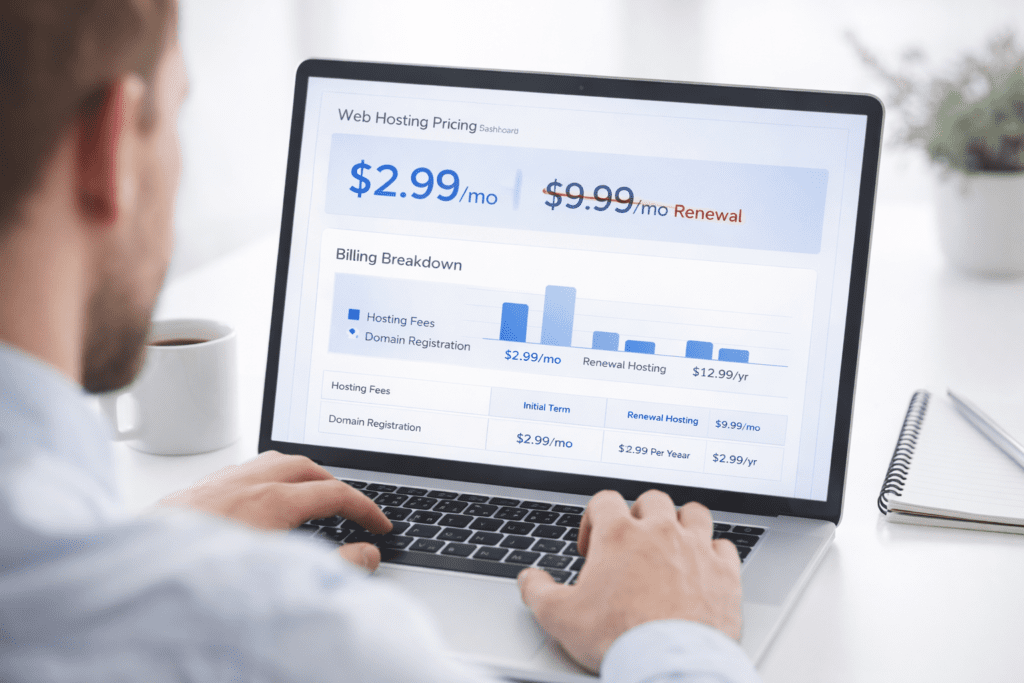
You sign up for a hosting plan that costs $2.99/month. It feels like a smart move, especially if you’re just starting a small site in the US. Everything looks simple at checkout, and honestly, it seems like a low-cost entry point with almost no risk.
But a few months later, things start to look different. Renewal pricing jumps, extra features show up on your invoice, and suddenly those hosting billing traps begin to surface. That’s usually when people realize the original price wasn’t the full story.
Here’s the thing. Hosting isn’t always as straightforward as it looks. Behind that attractive price, there are often hidden costs, contract terms, and usage limits that can increase your total spend. If you don’t understand how hosting billing works upfront, it can get expensive in the long run.
Why Hosting Billing Traps Catch Beginners Off Guard
Understanding How Hosting Billing Structures Work
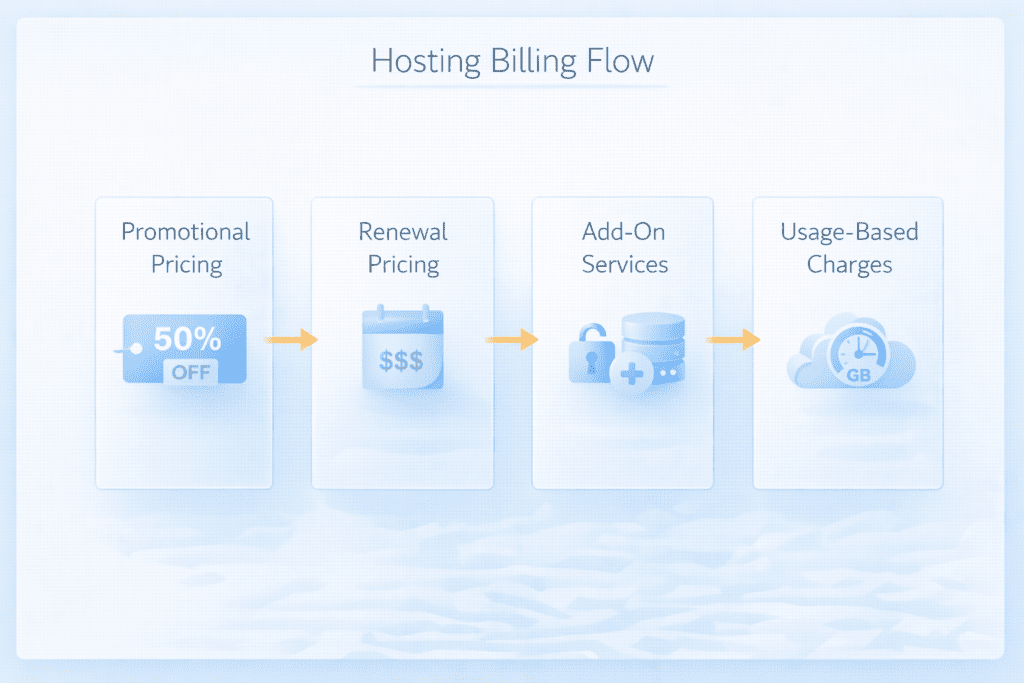
Let’s keep it simple. Most hosting companies don’t actually charge a flat price forever. Instead, they use layered billing models that change over time.
Here’s what usually happens:
• Promotional pricing: A discounted rate for the first term
• Renewal pricing: A higher rate after the initial period ends
• Add-on services: Optional features that often become necessary
• Usage-based billing: Charges based on how much you use
Now this is where people get confused about different pricing models. The price you see on the homepage is rarely the price you’ll pay long term. It’s part of a broader billing structure designed to bring you in first, then increase costs later.
From my research, most US-based beginners don’t check renewal pricing before buying. And honestly, it’s easy to miss because the details are often buried.
Why Cheap Plans Often Include Hidden Pricing Strategies
Cheap hosting often follows a very specific pricing strategy. The goal is to make the plan look affordable upfront, even if the long-term cost tells a different story.
Here’s how that plays out:
• Introductory offers: Very low starting prices to attract signups
• Bait-and-switch pricing: Prices increase after the first billing cycle
• Long-term commitments: Discounts tied to 12, 24, or 36-month plans
• Add-on stacking: Extra services added during checkout
That said, not every provider is trying to trick you. But the structure itself can still lead to common pricing and billing traps if you’re not paying attention.
Personally, I feel this is where most beginners slip. They focus on the monthly price instead of the total cost over time. And once you’re locked in, switching isn’t always easy.
Why Cheap Web Hosting Plans Can Be Misleading for Long-Term Use
The Illusion of Low-Cost Hosting Deals
At first glance, low-cost hosting looks like a great deal. And sometimes it is, especially for testing or small projects.
But there’s usually a catch.
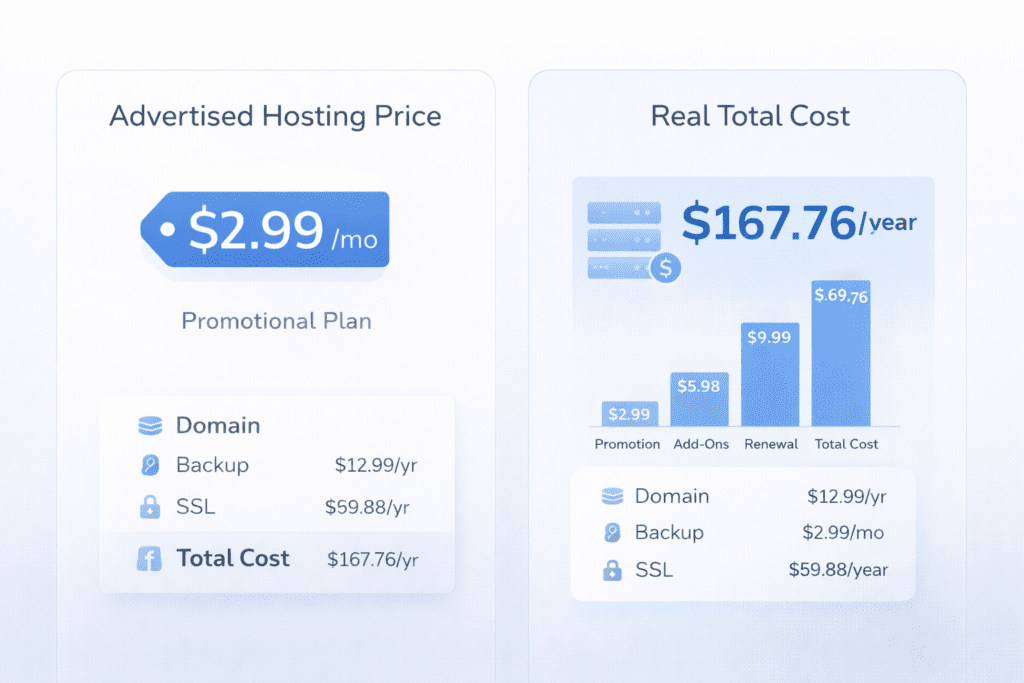
To get that $2.99/month deal, you often have to pay upfront for multiple years. So instead of paying monthly, you might be committing to a $100+ payment right away. That changes the picture quite a bit.
Also, cheap hosting often doesn’t include everything you need. Things like backups, security, or even email hosting can cost extra.
So while the advertised price looks low, the actual cost can end up being a lot more than expected.
Most cheap hosting plans run on shared hosting. That means your website shares server resources with many other sites.
Here’s where limitations show up:
• Storage limits: Restricted disk space for files
• Bandwidth limits: Caps on how much traffic your site can handle
• CPU usage: Limits on how much processing power you can use
If your site grows or gets traffic spikes, performance can drop. Pages load slower, and sometimes your site may even go offline.
Let’s be real for a second. For small US-based blogs, shared hosting works fine in the beginning. But once growth starts, these limits can become a real issue.
Scalability Issues That Force Expensive Upgrades
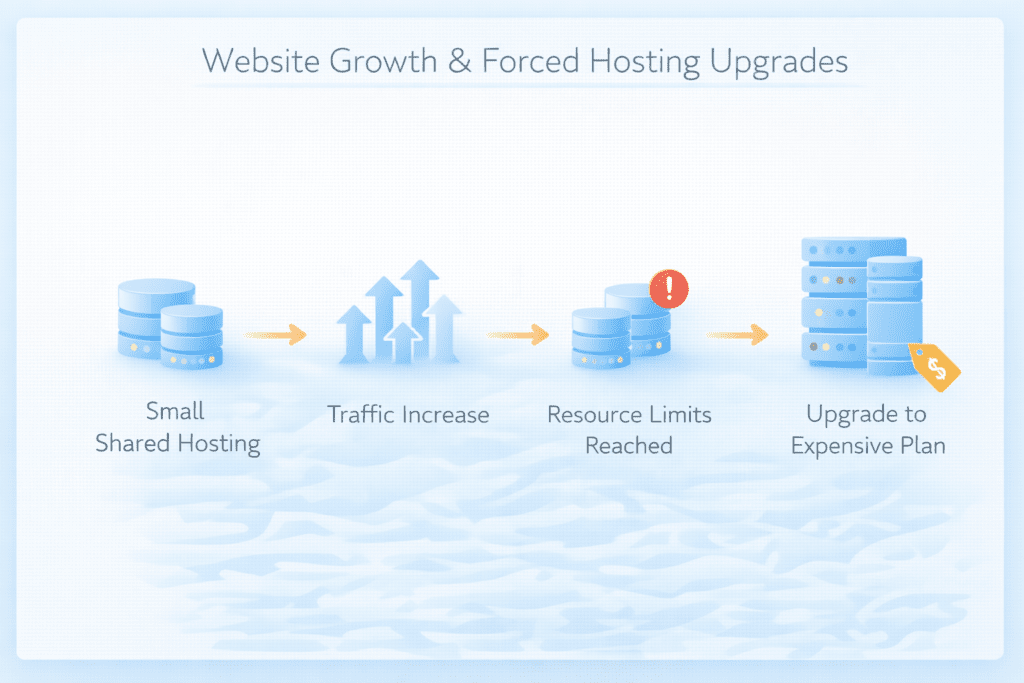
This is something most beginners overlook.
Cheap plans usually aren’t designed for growth. As your site gets more visitors, you’ll likely hit resource limits pretty quickly.
And when that happens, you’re pushed to upgrade.
Here’s what that looks like:
• Forced upgrades: Moving to higher-tier plans
• Higher monthly costs: Upgrades often cost significantly more
• Limited flexibility: Fewer options to scale gradually
Scale is frustrating when the platform doesn’t grow with you. Instead of a smooth upgrade path, you’re often jumping into a much higher pricing tier.
In some cases, switching to cloud hosting or a more scalable platform like AWS or DigitalOcean might make more sense. But by then, you’ve already invested time and money into your current provider.
Most Common Hosting Billing Traps That Increase Your Costs
Promotional Pricing That Increases After Renewal
This is probably the most common trap, and honestly, it catches people all the time.
You see a plan advertised at $2.99/month, sign up, and everything feels fine. But once your first term ends, the price jumps. Sometimes it triples.
This is classic bait-and-switch pricing. The low price gets your attention, but the renewal pricing is where hosting companies make their money.
Here’s what to check before buying:
• Renewal rate: The actual price after the first billing cycle
• Discount duration: How long the promotional price lasts
• Total cost: What you’ll pay over the full term
Most people in the US don’t look at the renewal rate. And that’s where things get expensive in the long run.
Hidden Costs Added During Checkout
Now this is where people get caught off guard.
During checkout, you’ll often see a bunch of add-ons already selected. At first, they look optional. But in reality, some of them become necessary once your site is live.
Here’s what typically shows up:
• SSL certificates: Sometimes free, sometimes paid depending on the plan
• Backup services: Automated backups often cost extra
• Security tools: Malware protection and monitoring features
• Website builder tools: Extra subscription fees for basic functionality
Hosting companies often bury hidden costs in the checkout process, making it hard to understand the true pricing unit. You might not notice them unless you manually review every option.
From what I’ve seen, beginners usually leave these checked by default. That alone can double your initial cost.
Overage Fees Triggered by Resource Usage
This one is a bit less obvious, but it can hit hard.
Some hosting providers use usage-based billing. That means you pay more when your site uses more resources.
Here’s how it works:
• Traffic spikes: Sudden increases in visitors can push you over limits
• Bandwidth usage: Higher data transfer can trigger extra charges
• Storage overuse: Exceeding allocated disk space
In some cases, you’ll get an overage fee if you exceed your limits. And these charges aren’t always small.
Let’s say your site gets featured somewhere and traffic jumps overnight. Sounds like a good problem, right? But if your hosting plan can’t handle it, you might end up paying more than expected.
This usually works fine for stable traffic, but not always. There are exceptions, especially during sudden growth.
Contract Terms That Lock You Into Long Commitments
Here’s something that doesn’t get talked about enough.
To get the cheapest price, you’re often required to commit to long contract terms. We’re talking 12, 24, or even 36 months.
Here’s what that means:
• Upfront payment: You pay for multiple years in advance
• Limited flexibility: Harder to switch providers
• Early cancellation fees: Charges if you cancel before the term ends
Personally, I think this is one of the bigger risks. You’re committing before you really know if the hosting fits your needs.
And if performance isn’t great or support is slow, you’re kind of stuck.
Free Account Limitations That Lead to Paid Upgrades
Free sounds good. No doubt about that.
But free account options usually come with serious limitations.
Here’s what you’re dealing with:
• Limited resources: Very low storage and bandwidth
• Restricted features: Missing important tools and integrations
• Forced branding: Ads placed on your website
At some point, you’ll likely need to upgrade.
And that’s where the trap comes in. The free plan gets you started, but it’s not designed to support real growth.
So while it looks like you’re saving money, you’re eventually pushed into a paid plan anyway.
Real Example of How Hosting Price Traps Increase Total Cost
Let’s walk through a simple example to make this clearer.
Imagine you choose a hosting plan from a provider like Bluehost or Hostinger.
Here’s what the pricing might look like:
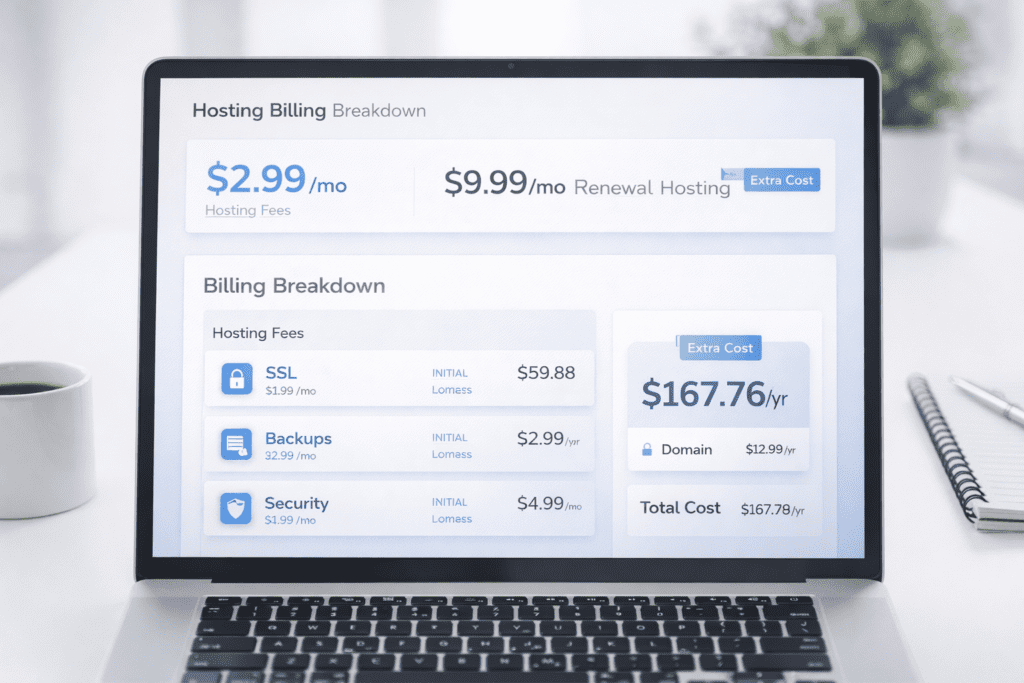
• Advertised price: $2.99/month
• Billing term: 36 months required
• Initial payment: Around $107 upfront
Now here’s where things change.
After your first term:
• Renewal price: Around $9.99/month
• Renewal cost: About $120/year
And during checkout, you might also add:
• Backup service: $2–$3/month can sometimes reflect a low data cost per gb in serverless pricing structures.
• Security add-on: $3–$5/month
• Premium support: Extra monthly fee
So what looked like a cheap plan ends up costing a lot more than the advertised price.
Here’s the thing. It’s not that the hosting is bad. It’s just that the pricing structure isn’t as simple as it seems.
Hidden Costs Most Hosting Providers Don’t Clearly Advertise
Domain Renewal Fees After the First Year
A lot of hosting plans include a “free domain” for the first year. Sounds great at first.
But after that, renewal pricing kicks in.
Here’s what usually happens:
• Free first year: Domain included with hosting signup
• Renewal fee: Around $12–$20/year depending on the provider
• Auto-renewal: Charges applied automatically unless disabled
Now this is where people get confused. The domain feels free, but it’s really just bundled into the initial deal.
From my research, many users forget to check domain renewal pricing. It’s a small cost, but it adds up over time.
Paid Backup and Security Services
Backups and security are essential. No way around that.
But most cheap hosting plans don’t include them fully.
Here’s what you’ll often see:
• Daily backups: Only available as a paid add-on
• On-demand backups: Extra fee per backup
• Malware protection: Paid security feature
• Site monitoring: Monthly subscription cost
Let’s be real for a second. Skipping backups to save money isn’t worth the risk. One issue or downtime event can cost more than the service itself.
So even if the plan looks cheap, you’ll likely end up paying for these features anyway.
Email Hosting and Migration Charges
This one surprises a lot of people.
You might assume email hosting is included, but that’s not always the case.
Here’s what can happen:
• Email accounts: Limited or not included
• Premium email: Extra monthly subscription
• Migration services: Paid when moving your site
• Manual setup: Time-consuming if you avoid the fee
If you’re running a small business in the US, email is essential. So this becomes a necessary cost rather than an optional one.
And migration? That’s another hidden charge people don’t think about until they try to switch providers.
Cheap Hosting vs Transparent Hosting Pricing Models Compared
How Cheap Hosting Pricing Works
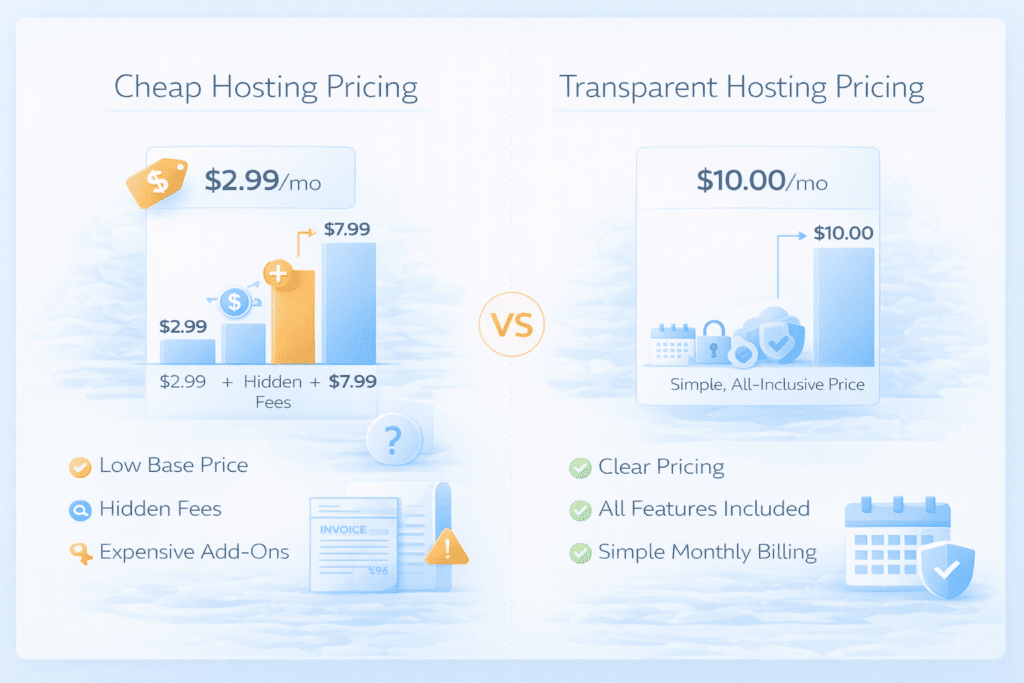
Cheap hosting pricing is designed to look simple, but there’s more happening behind the scenes.
Here’s the typical structure:
• Heavy discounts: Very low introductory pricing
• Long commitments: Multi-year contracts required
• Add-on driven: Extra services increase total cost
• Tiered upgrades: Higher pricing as your needs grow
Cheap hosting often relies on getting you in at a low price, then increasing your spending over time.
It’s not always a bad thing. But if you’re not aware of the structure, it can feel misleading.
What Transparent Pricing Looks Like
Transparent hosting providers take a different approach.
Here’s what they usually offer:
• Clear renewal pricing: No surprises after signup
• Fewer add-ons: Core features included upfront
• Flexible billing: Monthly or shorter-term plans
• Usage clarity: Easy-to-understand limits
Now, these plans might look slightly more expensive at first. But in many cases, they’re more predictable.
And honestly, that predictability matters when you’re trying to manage your budget.
How to Identify Honest Hosting Providers
So how do you tell the difference?
Here’s what to look for:
• Transparent pricing pages: Renewal rates clearly listed
• Simple checkout process: Minimal forced add-ons
• Clear resource limits: Storage and bandwidth explained
• Upgrade paths: Logical scaling options
Providers like SiteGround or even some cloud platforms tend to be more transparent in how they present pricing.
That said, no provider is perfect. You still need to read the details.
Important Hosting Billing Terms Every Buyer Should Understand
Billing Cycles and Subscription Types
Not all hosting plans bill the same way.
Here’s how billing cycles usually work:
• Monthly billing: Pay month-to-month, higher cost but flexible
• Annual billing: Lower monthly cost, paid yearly
• Multi-year billing: Cheapest rates, long-term commitment
Now this is where people make a mistake. They go for the cheapest option without thinking about flexibility.
If you’re testing a new site, shorter billing cycles might make more sense.
Renewal Pricing and Long-Term Costs
Renewal pricing is one of the biggest factors in total cost.
Here’s what to consider:
• Intro vs renewal price: Often a big difference
• Long-term cost: Total spend over multiple years
• Price increases: Future adjustments after renewal
In most cases, the renewal price is the real price.
So if you’re comparing plans, that’s the number you should focus on.
Resource Limits and Overage Charges
Every hosting plan comes with resource limits. That’s just how it works.
Here are the key ones:
• Storage limits: Maximum disk space available
• Bandwidth limits: Amount of data transferred
• Peak usage level: Resource thresholds during high traffic
If you exceed these, you might face overage fees or forced upgrades.
And honestly, this is where budgeting gets tricky. You don’t always know how much you’ll use in the beginning.
Key Price Traps to Watch When Buying Cheap Hosting
Here’s a quick breakdown of the most important traps to watch:
• Storage limits: Restricted space in lower-tier plans
• Mandatory add-ons: Features required for basic functionality
• Limited scalability: Hard to grow without upgrading
• Performance restrictions: Slower speeds under load
These are the small details that can turn a low-cost plan into something expensive over time.
Red Flags That Indicate Hosting Billing Traps Before You Buy
Some warning signs are easy to miss, especially when you’re focused on price.
Here’s what you should pay attention to regarding the top five observability pricing traps:
• Extremely low pricing: Plans that look unrealistically cheap
• Mandatory add-ons: Features pre-selected during checkout
• Hidden upgrade tiers: Limited plans that push you to upgrade
• Limited scalability: Plans that don’t grow with your site
Here’s the thing. If the price looks too good, there’s usually a reason behind it.
Watch Out for Budget-Breaking Pitfalls During Signup
This is where many hosting billing traps actually happen.
During signup, you’ll often see upsells that feel small but add up quickly.
Here’s what to watch for:
• Upselling during checkout: Extra services added automatically
• Pre-selected add-ons: Options enabled by default
• Automatic renewals: Charges applied without reminders
• Unexpected price increases: Higher charges after the first term
Most people don’t review these carefully. And honestly, that’s understandable. The process moves fast.
But slowing down here can help you avoid surprise costs later.
Safe Strategies to Avoid Budget-Breaking Hosting Pitfalls
If you want to avoid hosting billing traps, a few simple habits can make a big difference.
Here’s what usually works:
• Check renewal pricing first: Always review the real long-term cost
• Choose transparent providers: Look for clear pricing structures
• Avoid long commitments: Start with shorter billing cycles
• Monitor resource limits: Understand how much you can use
This helps you avoid getting locked into something that doesn’t fit your needs.
And more importantly, it helps you avoid surprise costs down the line.
Common Mistakes Beginners Make With Cheap Hosting
Most issues come down to a few simple mistakes.
Here’s what I’ve noticed:
• Choosing based only on price can result in a situation where you don’t pay for what you use effectively. Ignoring long-term costs can lead to falling into five common pricing and billing pitfalls.
• Skipping the fine print: Missing important billing details
• Ignoring scalability: Not planning for growth
• Overlooking add-ons: Underestimating extra costs
Let’s be real. Everyone wants to save money in the beginning. But focusing only on price can backfire.
What Most Buyers Miss About Hosting Pricing Structures
Even after doing some research, people still miss a few key details.
Here are the big ones:
• Long-term costs: Total spend over multiple years
• Resource limits: Restrictions in shared hosting plans
• Traffic-related charges: Costs during traffic spikes
• Upgrade pricing: Higher costs when scaling
These are the details that don’t always show up on the main pricing page.
And that’s exactly why they matter.
Frequently Asked Questions
What are hosting billing traps?
Hosting billing traps are pricing structures that make hosting plans look cheaper upfront but increase costs later through renewal pricing, add-ons, or usage limits.
Cheap plans use introductory pricing to attract users. Additional costs appear later through upgrades, add-ons, and renewal rates.
What overage fees should I watch for in web hosting?
You should watch for charges related to bandwidth, storage, and traffic spikes that exceed your plan limits.
How does bait-and-switch pricing work in hosting plans?
It starts with a low promotional price. After the first term, the renewal price increases significantly.
Are free hosting accounts really free?
Not entirely. Free plans often include limitations that push users to upgrade to paid plans.
What price traps should I avoid before buying web hosting?
You should avoid hidden add-ons, long-term contracts, unclear renewal pricing, and limited scalability options.
Final Thoughts on Hosting Billing Traps
So what does this mean for you?
Hosting billing traps aren’t always obvious, but they show up in common places like renewal pricing, hidden add-ons, and long contract terms. What looks like a low-cost plan at first can easily become expensive in the long run.
If you’re in the US and just starting out, take a few extra minutes to review the full pricing structure before you buy. Check renewal rates, look at what’s included, and think about how your site might grow.
It’s not about avoiding cheap hosting completely. It’s about understanding how it works so you can avoid the price surprises that catch most people off guard.