
Every time someone visits your website, data is transferred from your server to their browser. That transfer is called bandwidth in web hosting, and it happens whether you notice it or not.
Here’s the part most people don’t realize. Even a simple page with a few images can use more bandwidth than expected, especially as your website gets more visitors. And if your hosting plan doesn’t have enough bandwidth, your website performance can suffer or even go offline.
This guide keeps things practical. You’ll understand what bandwidth actually means, how it works, and how to choose the right web hosting plan based on your real needs without overpaying.
What Is Bandwidth in Web Hosting?
Bandwidth in web hosting refers to the amount of data transferred from your web server to visitors over a specific time period, usually monthly bandwidth.
In simple terms, it’s how much data your website can send to users over a period of time.
Think of bandwidth like a highway.
If your website is a store, bandwidth is the road that allows traffic to move between your website and its visitors. When more people visit, more data moves. That movement increases bandwidth usage.
Every time someone loads a web page, downloads a file, or views an image, data travels from your web host to their browser.
Here’s what counts toward bandwidth usage:
• Page loads
• Images
• Videos
• File downloads
• API requests
So when someone visits your site, the amount of data your website sends increases your bandwidth consumption.
Bandwidth measures how much data flows out from your hosting provider’s server to your audience. It doesn’t measure storage. It measures transfer.
Key Insight: Bandwidth Is About Data Transfer, Not Storage

This is where confusion happens.
Storage refers to how much disk space your website files occupy on the web server. Bandwidth in web hosting refers to how much data moves when someone accesses those files.
If storage is the size of your warehouse, bandwidth is the number of trucks delivering goods.
Both matter for website performance, but in different ways.
You can have plenty of storage and still run into insufficient bandwidth if your site receives heavy traffic. On the other hand, you could have high bandwidth but very little storage space.
Understanding bandwidth in web hosting helps you choose the right hosting plan and avoid unnecessary costs.
How Bandwidth in Web Hosting Works Step by Step
Let’s keep it simple. Here’s how bandwidth in web hosting works when someone visits your site.
First, a visitor enters your domain in their browser. That request is sent to your web host.
Next, the web server processes the request and gathers the needed website files. This may include images, scripts, or database content.
Then, those files are delivered to the visitor’s device. At that moment, bandwidth usage increases because data is being transferred.
Finally, the hosting provider records that data transfer as part of your monthly bandwidth.
Every click, refresh, or file download adds to overall bandwidth usage. If you have limited bandwidth, this matters more than most people think.
Real-Life Bandwidth Examples
Bandwidth becomes easier to understand with real numbers:
• Blog website: A 1 MB page with 1,000 daily visitors uses around 30 GB/month
• Business website: A 2 MB page with 5,000 daily visitors uses about 300 GB/month
• Ecommerce website: Product images and higher traffic increase bandwidth usage quickly
As traffic grows, even small increases in page size can significantly raise bandwidth usage over time.
Behind the Scenes What Happens During a Traffic Spike

Now imagine your website receives more visitors than usual.
When traffic rises quickly, server load and bandwidth increase together. More visitors mean more data moving from the web server to users.
If your hosting plans include a strict bandwidth limit, you could approach that limit faster than expected.
In some cases, insufficient bandwidth can lead to slow page delivery. Some hosting providers may throttle performance or temporarily suspend your website if bandwidth overages occur.
This doesn’t always happen. But it’s possible, especially on cheaper shared hosting setups.
That’s why understanding bandwidth requirements is important if you expect growth or run marketing campaigns.
Types of Bandwidth in Web Hosting Plans
Not all hosting plans handle bandwidth the same way.
Metered Bandwidth
Metered plans come with a fixed monthly bandwidth allowance.
If your website exceeds that bandwidth limit, you may face additional charges or restrictions.
This type of web hosting bandwidth plan is common in entry-level hosting plans.
Unmetered Bandwidth
Unmetered bandwidth means your hosting provider does not strictly track data transfer limits.
However, it doesn’t mean unlimited power. Server resources still apply. If you consume more bandwidth than your plan can handle, performance could still be affected.
So unmetered bandwidth or unlimited bandwidth hosting still depends on your hosting solution.
Unlimited Bandwidth Reality Explained
Unlimited bandwidth sounds attractive.
But unlimited bandwidth plans usually operate under fair usage policies. There is always a practical cap tied to server capacity.
Bandwidth allows your site to handle traffic, but no system has infinite resources.
When comparing hosting plans, it’s smarter to look at realistic bandwidth needs and choose a web hosting plan that fits your growth expectations.
Most unlimited bandwidth plans are still limited by server resources like CPU and RAM, even if bandwidth itself isn’t strictly capped.
How Much Bandwidth in Web Hosting Do You Really Need?
This is where most website owners pause.
How much bandwidth is actually enough?
The answer depends on traffic, page size, and how much data your website sends per visitor.
Small Blogs and Portfolio Sites
If your web page size is modest and you don’t host large videos, bandwidth requirements stay low.
A simple site with optimized images and basic design won’t consume much bandwidth. Most starter hosting plans handle this easily.
In many cases, website bandwidth for a personal blog is lower than people expect.
Business Websites
A business website often includes more images, forms, and downloadable materials.
Marketing campaigns can increase traffic suddenly. That increase affects bandwidth usage quickly.
If your website receives steady visitors, you’ll need enough bandwidth to handle consistent data transfer.
eCommerce Stores
Online stores require more bandwidth.
Product images, checkout activity, and customer accounts all transfer data. During promotions, bandwidth consumption rises even more.
A high-traffic website selling products must plan for higher bandwidth needs.
It’s always smart to add a safety buffer. Traffic spikes, marketing campaigns, or viral content can increase bandwidth usage faster than expected. Adding 20–50% extra capacity helps avoid performance issues.
Simple Formula to Estimate Your Bandwidth Needs
This is an estimate, not an exact number, but it helps you plan your hosting needs realistically.
A simple formula works:
• Bandwidth calculation: Page size × visitors × page views
Here’s a real example.
If your page is 3 MB, and you get 20,000 visitors per month, with each viewing 2 pages:
3 MB × 20,000 × 2 = 120 GB/month bandwidth
That’s your estimated bandwidth usage.
From my research, it’s smart to add extra capacity.
• Growth buffer: Add 20–50% more bandwidth for traffic spikes
This helps you avoid running into limits during unexpected traffic increases.
How to Check Bandwidth Usage in Your Hosting Dashboard
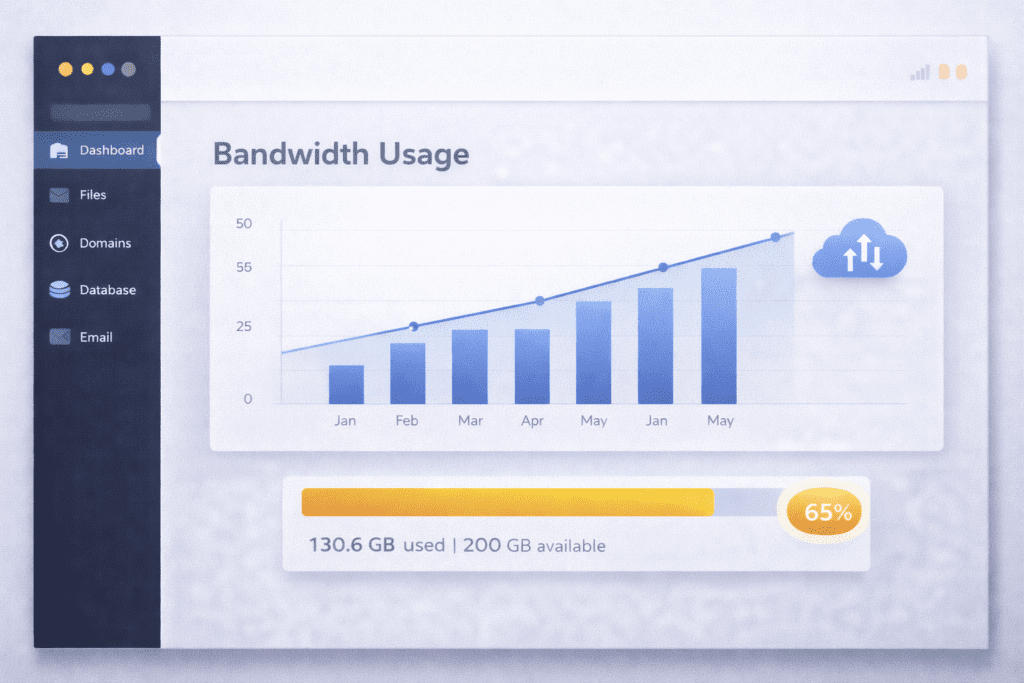
Most hosting providers give access to bandwidth statistics inside the hosting control panel.
You can monitor your bandwidth usage through:
• Monthly bandwidth reports
• Real-time traffic statistics
• Resource usage sections
• Alerts for bandwidth limit warnings
Monitoring helps prevent surprises.
When you monitor your bandwidth usage regularly, you’ll notice patterns. Maybe traffic spikes on certain days. Maybe video content consumes more bandwidth than expected.
If you ignore it, you risk hitting limited bandwidth thresholds.
A good habit is to monitor bandwidth usage at least once a month, especially if your website grows.
Why Bandwidth in Web Hosting Matters More in 2026
Websites today look different than they did a few years ago.
Higher resolution images, autoplay videos, and AI-generated visuals increase the amount of data your website transfers. That directly affects bandwidth usage.
Mobile traffic is also growing. When a website receives thousands of mobile visitors, bandwidth consumption rises quickly.
In 2026, faster loading expectations are normal. Users won’t wait. If insufficient bandwidth causes delays, website performance suffers.
So yes, bandwidth in web hosting matters more now than it used to.
What Impacts Bandwidth Usage the Most?
Not all content affects bandwidth the same way.
Large images increase bandwidth usage quickly. The size of your web page matters more than most people realize.
Page size is often the biggest factor affecting bandwidth, even more than traffic in some cases.
Autoplay videos consume more bandwidth than static content. Downloadable files also raise bandwidth consumption.
Bots and spam traffic can quietly increase bandwidth usage in the background. That traffic doesn’t help your site, but it still counts.
Using a CDN can reduce bandwidth strain on your web host, though it doesn’t eliminate data transfer completely.
Understanding what drives bandwidth usage helps you manage bandwidth more efficiently.
Hidden Bandwidth Killers Most Site Owners Ignore
Some problems are less obvious.
Poor image optimization can waste bandwidth. Uploading full-resolution images when smaller versions would work leads to unnecessary data transfer.
Malware traffic can increase bandwidth usage without you noticing. This affects website performance and security.
Hotlinking is another issue. If other websites use your images directly, your server delivers that data, increasing bandwidth consumption.
Backup downloads also consume bandwidth. Large backup files transferred frequently can push you closer to your bandwidth limit.
Keeping an eye on overall bandwidth usage helps prevent these hidden issues.
How to Reduce Bandwidth Usage Without Upgrading Your Plan
You don’t always need higher bandwidth right away. In many cases, simple optimizations can significantly reduce how much data your website transfers.
Start with image optimization. Compress images before uploading them so they use less data without affecting quality. Smaller files reduce bandwidth usage on every visit.
Lazy loading is another effective method. It delays loading images until users actually scroll to them, which helps reduce unnecessary data transfer.
Blocking hotlinking prevents other websites from using your images directly, so your server doesn’t waste bandwidth serving external traffic.
You can also improve efficiency by using optimized themes and plugins. Lightweight designs load fewer resources and reduce overall bandwidth consumption.
In most cases, these small improvements can reduce bandwidth usage more effectively than upgrading to a higher hosting plan.
Does a CDN Reduce Bandwidth in Web Hosting?

Yes, but not in the way some people expect.
A CDN stores copies of your content on multiple servers around the world. When visitors access your site, content is delivered from the closest location instead of your primary web host.
This reduces the strain on your web server and can reduce bandwidth usage coming directly from your hosting provider.
It doesn’t remove total bandwidth. It shifts part of the bandwidth consumption to the CDN network.
For high-traffic websites or media-heavy pages, this can make a noticeable difference in performance of your website.
Common Mistakes When Choosing Bandwidth in Web Hosting
Small decisions can create bigger problems later.
Choosing the cheapest hosting plans without checking the bandwidth limit is risky. Limited bandwidth may look fine at first but restrict growth.
Ignoring traffic growth is another issue. As your website grows, bandwidth requirements increase.
Confusing bandwidth with website speed leads to unrealistic expectations. Bandwidth measures transfer, not server processing power.
Overpaying for unlimited bandwidth plans when traffic is low increases hosting costs unnecessarily.
Failing to monitor bandwidth usage means you won’t see warning signs early.
Choosing the right hosting plan requires understanding both current and future bandwidth needs.
What Hosting Companies Don’t Tell You About Bandwidth
• Unlimited bandwidth still follows fair usage policies
• Server resources often limit performance before bandwidth does
• Shared hosting can slow down due to other users
• Some hosts throttle performance during high usage
Even if bandwidth looks sufficient on paper, real performance depends on multiple factors.
Bandwidth in Web Hosting vs Other Resources
Bandwidth is just one part of the puzzle.
Storage controls how much data your website holds. Bandwidth controls how much data moves.
RAM and CPU affect how quickly your web server processes requests.
High bandwidth with weak server resources can still lead to slow performance. Balance matters more than extreme numbers.
A reliable hosting solution considers bandwidth management alongside storage and processing power.
Real World Example How a Website’s Bandwidth Grows Over Time
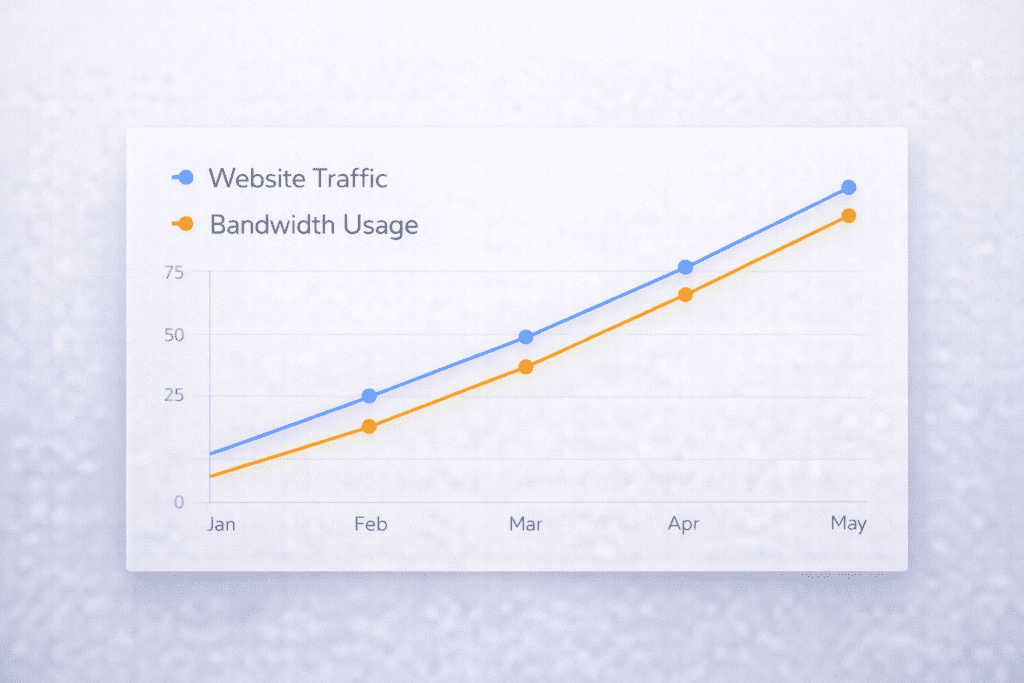
In the first year, a small blog might receive modest traffic. Bandwidth usage stays predictable.
As content grows and marketing improves, traffic increases. More visitors means more data transfer.
If one article goes viral, bandwidth consumption can spike dramatically in a short period.
When website grows steadily, the amount of bandwidth required also rises. Planning for that growth prevents sudden limits.
Watching trends inside your hosting control dashboard helps you adjust before issues appear.
When Should You Upgrade Your Bandwidth Plan?
There are clear signals.
If you consistently approach your bandwidth limit, it’s time to review your hosting plans.
If you experience throttling or temporary restrictions, insufficient bandwidth may be the cause.
Planning marketing campaigns or product launches? That often means more traffic and more bandwidth needed.
Upgrading before major launches ensures your website runs smoothly during high demand.
Sometimes increasing bandwidth within your current web hosting plan is enough. Other times, switching to VPS hosting provides better flexibility.
What Most Blogs Miss About Bandwidth in Web Hosting
Bandwidth does not directly control speed.
Server quality still matters. Poor infrastructure can slow a website even with higher bandwidth.
A CDN can reduce bandwidth strain, but it doesn’t replace solid hosting service.
Traffic quality also affects bandwidth consumption. Bots and spam consume resources without adding value.
Understanding bandwidth in web hosting as part of a bigger system gives you better long-term decisions.
Frequently Asked Questions About Bandwidth in Web Hosting
What is bandwidth in web hosting used for?
Bandwidth in web hosting is used to measure how much data your website transfers to visitors over a given time period.
How much bandwidth in web hosting do I need for a small site?
Most small sites require less bandwidth than expected. It depends on traffic, page size, and how much data your website sends per visit.
Is unlimited bandwidth in web hosting really unlimited?
Unlimited bandwidth usually operates under fair usage policies. It’s generous, but not infinite.
What happens if I exceed bandwidth in web hosting?
Depending on the hosting provider, you may experience throttling, bandwidth overages, or temporary restrictions.
Does bandwidth in web hosting affect website speed?
Indirectly. Insufficient bandwidth can lead to slow delivery during traffic spikes, but server performance also plays a major role.
How can I reduce bandwidth usage?
You can reduce bandwidth usage by compressing images, enabling caching, blocking hotlinking, and optimizing themes.
Does video content increase bandwidth in web hosting?
Yes. Video files consume much bandwidth because they transfer large amounts of data.
Can I upgrade bandwidth later?
Most hosting providers allow upgrades within your hosting plans or by moving to higher tiers like VPS hosting.
Final Thoughts Choosing the Right Amount of Bandwidth in Web Hosting
Most small websites need less bandwidth than they assume.
Monitoring traffic and optimizing media usually solves early concerns. It’s smarter to manage bandwidth than to overpay for excessive plans.
Bandwidth in web hosting is about data transfer, not storage. When you understand that difference, you choose more confidently.
Check your hosting dashboard regularly. Monitor your bandwidth usage. Adjust as your website grows.
And if you want to understand the full picture, the next step is learning how storage and server resources work together with bandwidth.
Choosing the right balance between bandwidth, storage, and performance will help your website scale without unexpected issues.