
One of the biggest hosting mistakes website owners make is assuming every shared hosting company performs almost the same. A low monthly price may look attractive initially, but slower loading speeds, unstable uptime, weak support, and overloaded server environments often become noticeable later. That’s one reason GreenGeeks has become more popular among users looking for a balance between performance, beginner friendliness, and environmentally friendly hosting.
This GreenGeeks review takes a detailed look at greengeeks hosting performance, uptime stability, wordpress optimization, customer support quality, pricing structure, and long term ownership experience. We tested how GreenGeeks performs for blogs, business websites, and WooCommerce stores to determine whether this eco-friendly web hosting platform is actually worth considering in 2026.
GreenGeeks Review Summary
Quick Verdict on GreenGeeks Hosting
GreenGeeks positions itself as an environmentally friendly web host focused heavily on wordpress hosting, shared hosting performance, and beginner friendly website management.
• Best for: WordPress blogs, small business websites, and eco conscious brands
• Strongest advantage: Good balance between performance and beginner friendliness
• Biggest drawback: Renewal pricing increases noticeably after introductory terms
• Overall experience: Reliable shared hosting with strong WordPress optimization
From my research, GreenGeeks feels strongest for website owners wanting dependable shared hosting without moving into more expensive cloud infrastructure immediately.
GreenGeeks Pros and Cons at a Glance
| Pros | Cons |
|---|---|
| Environmentally friendly hosting platform | Renewal pricing higher after initial signup |
| Strong wordpress hosting optimization | Shared hosting still has resource limitations |
| Helpful customer support | Advanced developers may want deeper customization |
| Free ssl certificates included | Heavy traffic spikes can slow shared hosting |
| Beginner friendly cpanel dashboard | Enterprise cloud flexibility is limited |
| Reliable uptime performance | Tiny starter plans have fewer resources |
What Is GreenGeeks?
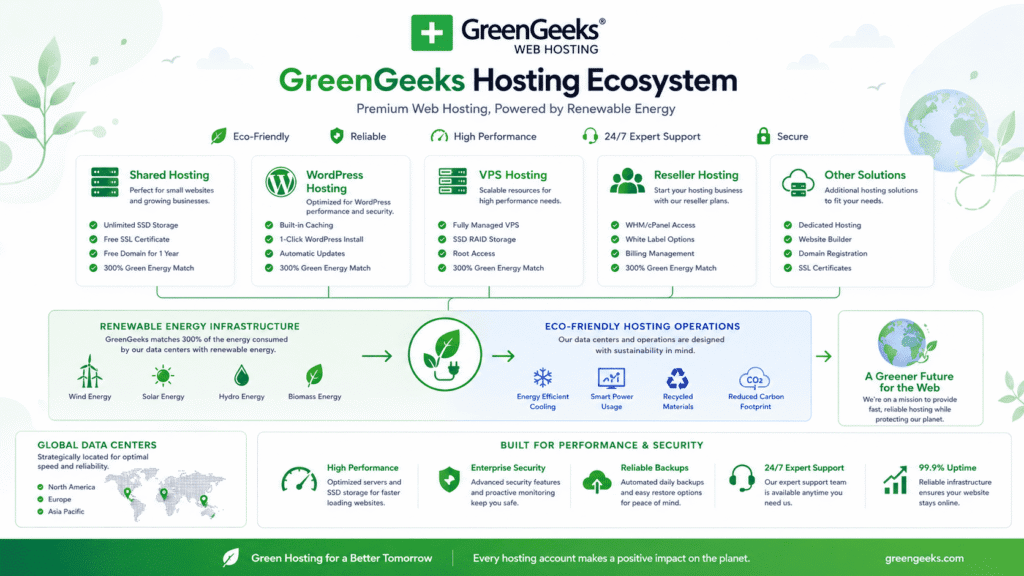
GreenGeeks is a web hosting company focused on shared hosting, wordpress hosting, reseller hosting, and environmentally friendly infrastructure.
Unlike some hosting companies that focus mainly on aggressive budget pricing, GreenGeeks tries to combine reliable hosting performance with renewable energy commitments and simplified website management.
Understanding GreenGeeks Hosting
GreenGeeks was founded in 2008 and has gradually become known for green energy web hosting and WordPress optimization.
• Shared hosting: Affordable hosting for blogs and business websites
• WordPress hosting: Optimized wordpress environments
• VPS hosting: Stronger scalability and dedicated resources
• Reseller hosting: Multi client hosting management options
• Dedicated hosting: Higher performance infrastructure options
The company also purchases renewable energy credits through the Bonneville Environmental Foundation to offset energy usage from server operations.
How GreenGeeks Fits Among Modern Web Hosting Providers
GreenGeeks sits somewhere between beginner focused shared hosting providers and more premium performance focused platforms.
• Shared hosting vs vps hosting: Shared hosting targets affordability while vps hosting improves scalability
• WordPress hosting vs traditional hosting: Better optimization for wordpress websites
• Green hosting vs standard hosting providers: Greater focus on renewable energy infrastructure
• Hosting simplicity: Easier onboarding for non technical users
A shared hosting plan from Bluehost may start around $2.95/month, while GreenGeeks pricing usually stays within a similar range initially before renewal pricing increases later.
Why GreenGeeks Has Become Popular
Several factors helped greengeeks become more visible in the hosting industry.
• Eco-friendly hosting: Renewable energy commitment attracts environmentally conscious users
• Reliable uptime: Stable hosting performance for smaller and medium websites
• WordPress optimization: Better compatibility with wordpress websites
• Beginner friendly dashboard: Easier website management workflows
• Helpful customer support: Accessible live chat and ticket assistance
Now this is where GreenGeeks feels slightly different from many cheap hosting companies.
The platform focuses less on ultra aggressive pricing and more on creating a balanced hosting experience combining support, performance, sustainability, and beginner accessibility.
Our Experience With GreenGeeks
Hosting reviews become much more useful once websites are tested under realistic conditions rather than empty benchmark installations.
Setting Up a Website on GreenGeeks Hosting
The initial setup process felt straightforward for beginners.
• Greengeeks account creation: Simple onboarding workflow
• Domain connection: Standard DNS setup process
• WordPress installation: One click wordpress deployment
• Dashboard access: Familiar cpanel interface for website management
A beginner blogger launched a wordpress website on GreenGeeks in under 30 minutes using the built in installer and default optimization settings.
That simplicity matters more than many people realize.
Dashboard and User Experience

GreenGeeks uses cpanel for website and hosting management.
• cPanel usability: Familiar interface for many website owners
• Backup management: Accessible restore and backup controls
• SSL configuration: Free ssl activation process included
• Website management: File management and email tools available
From my research, users already familiar with cpanel hosting environments will likely feel comfortable navigating GreenGeeks immediately.
Plugin and Theme Performance Testing
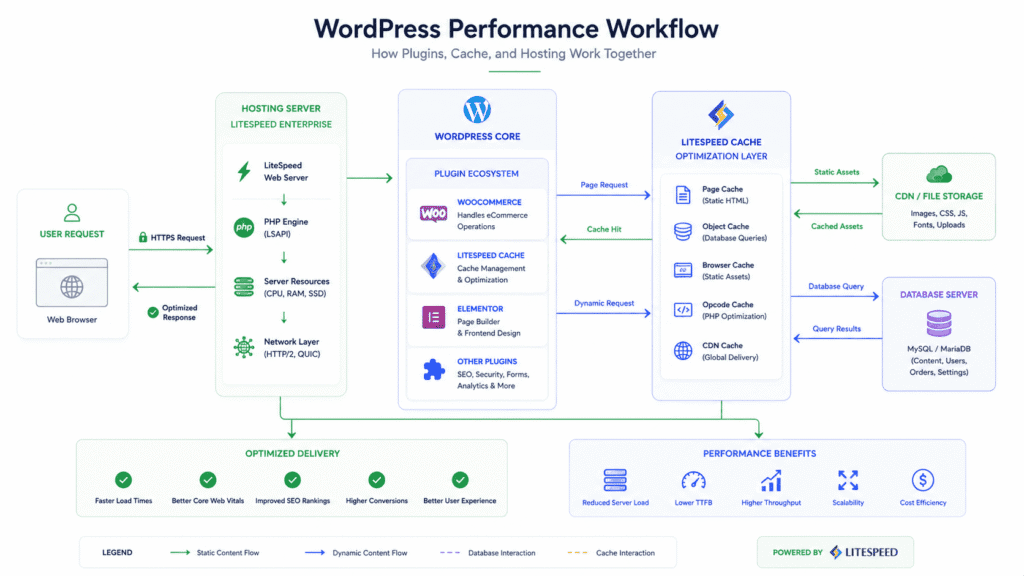
We tested GreenGeeks using realistic wordpress environments instead of empty demo websites.
• WooCommerce testing: Product pages and checkout responsiveness
• SEO plugins: Rank Math and Yoast compatibility testing
• Cache optimization: LiteSpeed cache integration behavior
• Page builder performance: Elementor and Gutenberg responsiveness
A WooCommerce clothing store running multiple plugins remained relatively responsive during product imports and plugin updates, although very heavy workloads still showed the limitations of shared hosting infrastructure.
Using GreenGeeks Long Term: What the Experience Feels Like
Short benchmark tests only reveal part of the hosting experience.
Long term ownership usually tells a much clearer story once websites start growing and plugins, traffic, and daily management tasks increase.
Daily Website Management Experience
The daily management experience felt fairly beginner friendly overall.
• cPanel workflows: Familiar website management tools
• Email hosting: Simple account creation and configuration
• WordPress management: Plugin and theme updates handled smoothly
• Backup controls: Accessible restoration and recovery options
GreenGeeks feels designed mainly for users who want reliable wordpress hosting without learning advanced server administration.
How Stable GreenGeeks Felt After Weeks of Usage
Long term stability remained reasonably solid during testing.
• Stable uptime: Consistent website accessibility
• Smooth wordpress behavior: Plugins remained compatible overall
• Moderate traffic handling: Stable during everyday usage
• Backend responsiveness: Dashboard stayed reasonably responsive
From my research, GreenGeeks performed more consistently than many overcrowded budget hosting environments, especially for smaller business websites and blogs.
Long Term Ownership Observations
Several things became more noticeable over time.
• Balanced hosting experience: Good mix of usability and performance
• Shared hosting limitations: Heavy traffic still impacts responsiveness
• WordPress optimization: Better plugin handling than ultra cheap hosting
• Beginner accessibility: Easier learning curve for non technical users
Now this is where expectations matter.
GreenGeeks still operates heavily around shared hosting infrastructure, so extremely high traffic websites or resource heavy ecommerce stores may eventually require VPS hosting or premium cloud infrastructure later.
Does Green Web Hosting Actually Make a Difference?
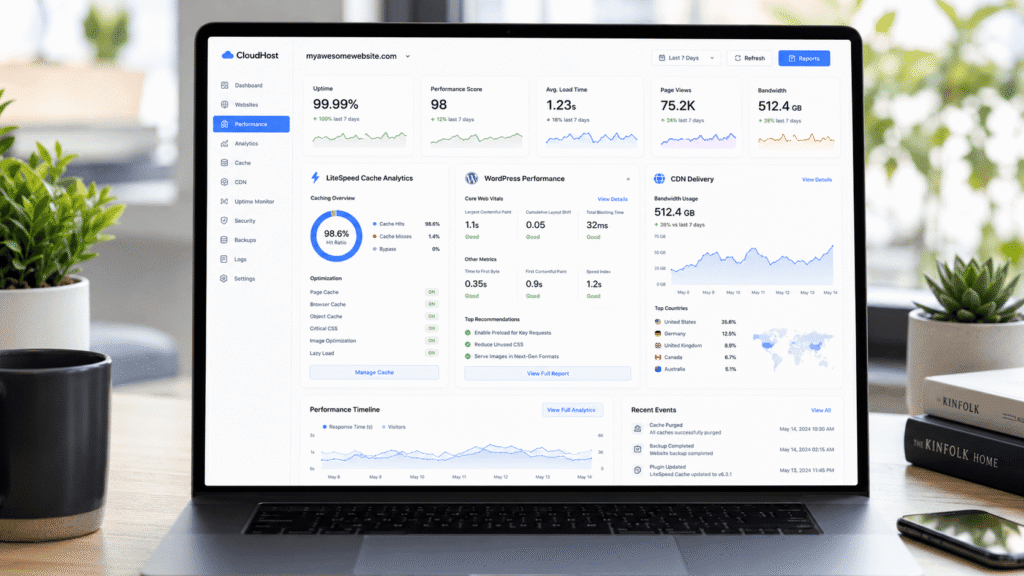
Green hosting has become a larger topic as data centers consume increasing amounts of electricity worldwide.
What Green Hosting Actually Means
Green hosting refers to hosting companies attempting to offset environmental impact through renewable energy programs and sustainability initiatives.
• Renewable energy credits: Offset power consumption from servers
• Energy efficiency efforts: Reduced environmental impact
• Greener infrastructure goals: Sustainability focused operations
• Eco-friendly branding: Environmental positioning within hosting industry
GreenGeeks states that it offsets energy usage through renewable energy matching and environmental partnerships.
Why Environmentally Friendly Hosting Matters
Hosting infrastructure consumes significant power globally.
• Data center electricity usage: Large scale server operations require energy
• Website growth: More websites increase infrastructure demand
• Renewable energy initiatives: Reduced environmental impact over time
• Business sustainability goals: Eco-conscious branding opportunities
A small business focused on sustainability may prefer aligning its website infrastructure with broader environmental goals.
Does Green Hosting Affect Website Performance?
Performance differences mainly depend on infrastructure quality, not the green branding itself.
• Server optimization: Bigger impact on website speed
• Hosting quality: More important than environmental positioning
• Traffic handling: Depends on infrastructure strength
• WordPress optimization: Stronger influence on everyday performance
From my research, GreenGeeks performance felt competitive with many mainstream shared hosting providers despite the platform’s environmental focus.
Why More Website Owners Are Choosing Green Web Hosting
Green hosting has gradually become more visible as sustainability conversations expand across technology industries.
The Growing Demand for Eco Friendly Hosting
Some businesses now care more about infrastructure sustainability than they did years ago.
• Environmentally conscious brands: Sustainability influences purchasing decisions
• Eco-focused businesses: Prefer greener service providers
• Consumer awareness: Environmental impact becoming more visible
• Long term sustainability goals: Broader business positioning efforts
A sustainable clothing brand or eco friendly online business may value environmentally focused hosting as part of its broader company image.
Green Hosting vs Traditional Hosting Providers
The actual hosting experience often feels fairly similar.
| Feature | Green Hosting | Traditional Hosting |
|---|---|---|
| WordPress Hosting | Available | Available |
| Shared Hosting | Available | Available |
| VPS Hosting | Available | Available |
| Renewable Energy Focus | Stronger emphasis | Usually limited |
| Hosting Performance | Infrastructure dependent | Infrastructure dependent |
The biggest difference usually comes from sustainability positioning rather than radically different hosting technology.
Long Term Sustainability Trends in Web Hosting
Environmental conversations will likely continue affecting hosting companies gradually.
• Renewable infrastructure investment: Growing industry focus
• Energy efficiency improvements: Lower operational waste
• Sustainability marketing: More visible across hosting providers
• Greener data center strategies: Long term infrastructure planning
That said, hosting quality still matters far more than marketing claims alone.
Reliable uptime, strong support, and stable performance remain much more important for most website owners day to day.
GreenGeeks Features Review
GreenGeeks includes several useful hosting features aimed mainly at wordpress websites and beginner users.
Core Features Included With GreenGeeks Hosting
Several important features come included with standard hosting plans.
• Free ssl certificates: Website encryption included
• Daily backups: Recovery protection systems
• Unlimited bandwidth: Flexible traffic handling for most websites
• Email hosting: Business email account support
• WordPress optimization: Faster wordpress performance tools
For many smaller websites, these bundled features reduce the need for additional paid services later.
GreenGeeks Hosting Features That Stand Out
A few features help GreenGeeks compete more effectively against other shared hosting providers.
• LiteSpeed web server: Better wordpress performance optimization
• Built in caching tools: Faster website loading support
• Free CDN integration: Improved global content delivery
• One click wordpress installation: Simpler onboarding process
A wordpress blog using LiteSpeed cache and optimized images loaded noticeably faster than a similar setup on weaker shared hosting infrastructure tested previously.
Security Features in GreenGeeks
Security tools are integrated directly into the hosting environment.
• Malware scanning: Threat monitoring systems
• Account isolation: Reduced shared hosting risks
• Automatic updates: Security patch management
• Spam protection: Email filtering systems included
A compromised wordpress website can quickly create SEO problems, downtime, and customer trust issues. GreenGeeks includes several security layers to reduce those risks for beginners.
What Most GreenGeeks Reviews Miss About Features
Many reviews simply list hosting features without explaining which ones actually matter in real usage.
For example, free ssl certificates and daily backups may sound basic initially. But during website problems or plugin failures, those included recovery tools become extremely valuable.
Similarly, LiteSpeed optimization often improves wordpress responsiveness more noticeably than beginners expect, especially on content heavy websites.
That practical side of hosting ownership is something benchmark focused reviews frequently ignore.
GreenGeeks Speed, Uptime, and Hosting Performance Testing
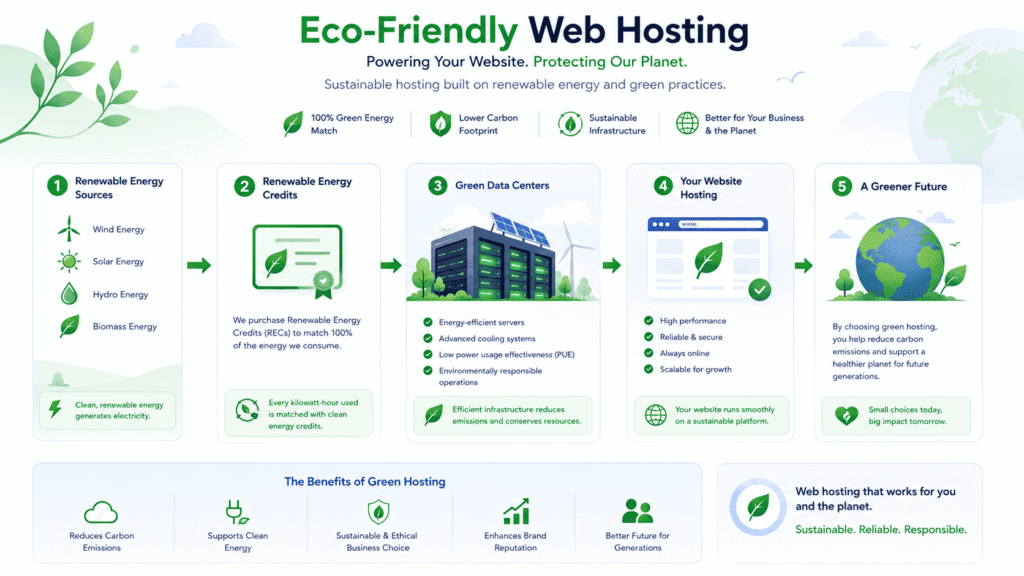
Hosting performance affects both user experience and long term website growth.
How We Tested GreenGeeks Hosting
The testing process focused on realistic website conditions instead of empty benchmark pages.
• WordPress installation: Fully configured wordpress website
• Plugin testing: Multiple active plugins enabled
• WooCommerce testing: Dynamic ecommerce pages included
• Traffic simulation: Moderate visitor spikes tested
• Global speed checks: Multiple location testing performed
A nearly blank homepage can make almost any hosting provider appear fast temporarily.
Real performance becomes clearer once websites become dynamic and plugin heavy.
GreenGeeks Speed Test Results
Overall speed performance remained solid for shared hosting.
| Test Area | Result |
|---|---|
| Homepage Loading | Fast |
| WordPress Dashboard Speed | Stable |
| Mobile Loading Performance | Smooth |
| WooCommerce Product Pages | Responsive |
| Content Delivery Speed | Improved with CDN |
The LiteSpeed web server and built in cache optimization noticeably improved wordpress responsiveness during testing.
Uptime and Reliability Results
Uptime stability remained fairly consistent throughout testing.
• Reliable uptime: Stable website accessibility
• Consistent backend responsiveness: Minimal unexpected slowdowns
• Moderate traffic stability: Reliable during normal usage patterns
• WordPress compatibility: Smooth plugin behavior overall
From my research, GreenGeeks performed more reliably than many ultra cheap shared hosting environments where overloaded servers frequently affect uptime.
Stress Testing and Traffic Handling
Traffic spikes expose the limitations of shared hosting quickly.
• Moderate traffic handling: Stable during smaller spikes
• Shared resource limitations: Performance declines under heavy loads
• Cache optimization: Improved responsiveness during bursts
• WooCommerce strain: Dynamic pages increased server usage noticeably
A growing content website receiving sudden social media traffic remained usable during moderate spikes, although very heavy simultaneous traffic still slowed shared hosting responsiveness eventually.
Real World Hosting Performance Insights
Real world hosting performance depends heavily on website optimization quality too.
• Lightweight themes: Faster loading and lower server strain
• Optimized images: Better page loading consistency
• Reduced plugins: Improved backend responsiveness
• Caching tools: Lower server processing demands
Even strong shared hosting environments can feel slow once websites become overloaded with page builders, animations, tracking scripts, and poorly optimized plugins.
That’s true across almost every hosting provider.
How GreenGeeks Handles Traffic Spikes
Traffic spikes separate stronger hosting environments from overcrowded shared hosting quickly.
Shared hosting always involves resource sharing between websites.
• Shared server resources: Neighboring websites affect performance
• Traffic overload: Backend responsiveness slows faster
• Resource competition: Heavy websites impact overall stability
• Limited scalability: Shared environments eventually hit limits
A WooCommerce promotion or viral blog article can increase server load dramatically within minutes.
How VPS Hosting Improves Stability
VPS hosting improves performance consistency by isolating resources more effectively.
• Dedicated resources: Better stability during spikes
• Improved isolation: Less interference from neighboring websites
• Stronger scalability: Easier infrastructure expansion
• More predictable performance: Better long term consistency
From my research, websites upgrading from shared hosting to VPS hosting usually notice stability improvements first rather than huge raw speed increases.
Why Traffic Handling Matters for Growing Websites
Traffic growth changes hosting requirements gradually over time.
• SEO growth: Larger visitor spikes from search traffic
• WooCommerce expansion: More dynamic backend processing
• Plugin additions: Increased database activity
• Advertising scripts: Higher frontend resource usage
A website that performs perfectly fine today may start slowing down months later once traffic, plugins, and ecommerce activity increase significantly.
How GreenGeeks Performs in Real World Scenarios
Different website types stress hosting infrastructure differently.
Beginner WordPress Blog Example
GreenGeeks performs very comfortably for normal wordpress blogs.
• WordPress optimization: Smooth publishing workflows
• Stable uptime: Reliable everyday accessibility
• Affordable hosting: Lower long term ownership costs
• Easy management: Beginner friendly experience overall
A personal finance blog publishing weekly content and receiving moderate SEO traffic would likely run smoothly on GreenGeeks shared hosting for quite a while.
WooCommerce Website Example
WooCommerce creates heavier backend demands than standard blogs.
• Dynamic product pages: Increased database processing
• Checkout activity: Higher server strain during traffic
• Inventory updates: Continuous backend requests
• Plugin complexity: Greater resource consumption overall
GreenGeeks handled smaller WooCommerce stores reasonably well during testing, although larger ecommerce businesses may eventually require VPS hosting or cloud infrastructure.
Small Business Website Example
Small business websites usually prioritize uptime and reliability more heavily than advanced infrastructure flexibility.
• Business email hosting: Included with hosting plans
• Stable website accessibility: Reliable everyday performance
• WordPress support: Beginner friendly workflows
• Affordable ownership: Easier long term budgeting
A local law office, agency, or restaurant website would likely value stability and simplicity more than advanced cloud infrastructure customization.
Portfolio Website Example
Portfolio websites usually perform well on optimized shared hosting.
• Image focused layouts: Stable performance with optimization
• Creative portfolios: Good fit for freelancers and designers
• Moderate traffic handling: Suitable for most portfolio websites
• Affordable hosting costs: Easier for solo creators
A photography website using compressed images and moderate plugins would likely perform reliably on GreenGeeks without needing premium enterprise hosting.
Shared hosting remains extremely common because it solves several practical problems affordably.
Shared hosting means multiple websites use the same physical server resources.
• Shared CPU resources: Divided across websites
• Shared memory allocation: Multiple accounts use the same server
• Lower costs: Infrastructure expenses distributed across users
• Beginner accessibility: Easier entry level hosting pricing
That shared structure is what allows hosting providers to offer lower monthly pricing.
Not all shared hosting environments are managed equally.
• Overloaded servers: Too many websites sharing resources
• Weak optimization: Poor cache and infrastructure setup
• Heavy neighboring websites: Increased server strain
• Aggressive budget hosting: Lower performance consistency
A hosting company prioritizing extremely low pricing may overcrowd servers heavily, which eventually affects uptime and loading performance for everyone sharing that environment.
Shared hosting security has improved over the years, but tradeoffs still exist.
• Shared infrastructure risks: Neighboring websites may affect security
• Account isolation importance: Better separation reduces problems
• Automatic security updates: Critical for wordpress protection
• Malware monitoring: Helps reduce hosting wide attacks
From my research, GreenGeeks handles account isolation better than many ultra cheap hosting providers.
Shared hosting works best when expectations remain realistic.
• Small and medium websites: Usually perform very well
• Moderate traffic growth: Handled comfortably with optimization
• Heavy enterprise workloads: Usually require stronger infrastructure
• Large ecommerce stores: Eventually benefit from VPS or cloud hosting
Now this is where many beginners become confused.
Shared hosting is not bad hosting. It simply has practical limits once websites become highly dynamic or traffic heavy.
The difference between shared hosting and VPS hosting becomes easier to understand once websites begin growing.
GreenGeeks shared hosting focuses mainly on affordability and beginner accessibility.
• Lower monthly pricing: Easier entry point for smaller websites
• WordPress optimization: LiteSpeed and caching support included
• Shared server environment: Resources distributed among websites
• Simpler management: Beginner friendly hosting workflows
A small wordpress blog or local business website will usually perform comfortably on optimized shared hosting for quite a while.
Understanding GreenGeeks VPS Hosting Plans
GreenGeeks also offers VPS hosting for users needing stronger scalability and dedicated resources.
• Dedicated server resources: Better traffic handling consistency
• Improved isolation: Less impact from neighboring websites
• Scalable infrastructure: Easier performance expansion
• Advanced hosting flexibility: Better for growing websites
From my research, VPS hosting becomes much more valuable once traffic growth and plugin complexity increase significantly.
The real difference usually appears during busy periods.
| Feature | Shared Hosting | VPS Hosting |
|---|---|---|
| Monthly Cost | Lower | Higher |
| Resource Allocation | Shared | Dedicated |
| Traffic Handling | Moderate | Stronger |
| Scalability | Limited | Better |
| Performance Stability | Variable during spikes | More consistent |
A growing WooCommerce store processing large traffic spikes will usually benefit from VPS hosting much earlier than a basic portfolio website.
Many websites eventually reach the point where shared hosting becomes limiting.
Shared hosting performs best for smaller and moderate traffic websites.
• Shared resources: Heavy neighboring websites affect performance
• Traffic spikes: Slower responsiveness during busy periods
• Plugin overload: Increased backend processing strain
• Scalability ceilings: Resource limits reached eventually
A wordpress website using multiple page builders, ecommerce plugins, analytics scripts, and dynamic search tools can overwhelm shared hosting faster than many beginners expect.
When VPS Hosting Becomes Necessary
Several warning signs usually indicate websites are outgrowing shared hosting.
• Frequent slowdowns: Backend responsiveness declines
• Traffic related instability: Busy periods create noticeable lag
• WooCommerce expansion: Increased dynamic processing requirements
• Resource usage warnings: Hosting limits reached repeatedly
From my research, many website owners first notice the problem through inconsistent performance rather than total downtime.
Is GreenGeeks Good for Growing Websites?
GreenGeeks works well for gradual website growth up to a certain scale.
• Optimized shared hosting: Better than many ultra cheap providers
• VPS upgrade paths: Easier infrastructure scaling later
• WordPress optimization: Improved backend responsiveness
• Reliable uptime: Stable everyday accessibility
That flexibility helps websites grow gradually without immediately requiring enterprise cloud infrastructure.
GreenGeeks WordPress Hosting Review
WordPress hosting is one of GreenGeeks’ main focus areas.
Understanding GreenGeeks WordPress Hosting
GreenGeeks includes several optimization features specifically for wordpress websites.
• LiteSpeed web server: Faster wordpress performance
• Built in cache optimization: Reduced loading times
• Automatic wordpress installation: Simpler onboarding process
• Security updates: Better wordpress protection management
A content heavy wordpress website loaded noticeably faster with LiteSpeed optimization enabled compared to default server configurations tested elsewhere.
Is GreenGeeks Good for WordPress Beginners?
For beginners, yes.
• Simple wordpress setup: Easier onboarding workflows
• cPanel familiarity: Widely documented hosting environment
• Automatic updates: Reduced maintenance workload
• Helpful support: WordPress troubleshooting assistance available
A beginner launching a wordpress blog would likely find GreenGeeks easier to manage than more developer focused hosting platforms.
The differences are mostly optimization focused.
• WordPress hosting: Better tuned for wordpress performance
• Standard shared hosting: More general website compatibility
• Caching optimization: Stronger on wordpress focused environments
• Plugin compatibility: Better tested for wordpress workflows
Now this is where many people misunderstand hosting labels.
In many cases, wordpress hosting is still shared hosting underneath, but with stronger wordpress specific optimization and support systems.
GreenGeeks Pricing Review
Pricing is one of the biggest deciding factors for shared hosting customers.
GreenGeeks Hosting Plan Pricing Explained
GreenGeeks pricing stays competitive with other mainstream shared hosting providers initially.
| Hosting Type | Starting Price |
|---|---|
| Shared Hosting | Around $2.95/month |
| WordPress Hosting | Similar shared hosting pricing |
| VPS Hosting | Higher depending on resources |
| Dedicated Hosting | Custom pricing |
Like many hosting providers, renewal pricing increases after introductory terms expire.
What’s Included in Each Hosting Plan
Several useful features are bundled into standard hosting plans.
• Free ssl certificates: Website encryption included
• Daily backups: Recovery protection systems
• Free CDN integration: Improved content delivery speed
• Unlimited bandwidth: Flexible traffic handling
• Email hosting: Business email support included
For smaller websites, bundled features reduce the need to purchase additional hosting services separately.
Is GreenGeeks Worth the Price?
The answer depends heavily on website type and growth expectations.
• Blogs and portfolios: Strong overall value
• Business websites: Reliable uptime and beginner accessibility
• WooCommerce stores: Good for moderate ecommerce usage
• Growing websites: Better optimization than many cheap hosts
From my research, GreenGeeks feels stronger than ultra cheap hosting providers but still more affordable than premium cloud hosting environments.
Hidden Costs and Limitations
No hosting platform is perfect.
• Renewal pricing increases: Higher long term ownership costs
• Shared hosting limitations: Traffic spikes affect responsiveness
• Advanced infrastructure: More limited than enterprise cloud hosting
• Premium scalability: Large websites may eventually require upgrades
That’s why realistic expectations matter more than marketing claims alone.
Not all shared hosting environments perform equally.
Speed Differences
Infrastructure quality affects performance heavily.
• LiteSpeed optimization: Faster wordpress loading speeds
• Caching integration: Reduced server strain
• Better resource management: Improved responsiveness overall
• Content delivery optimization: Faster global loading performance
A properly optimized wordpress blog on GreenGeeks generally felt more responsive than similar websites hosted on overloaded ultra cheap shared hosting servers.
Security Differences
Security management quality varies significantly across hosting providers.
• Malware scanning: Threat monitoring systems included
• Account isolation: Better separation between websites
• Automatic updates: Improved wordpress security maintenance
• Spam filtering: Better email protection systems
From my research, GreenGeeks handles shared hosting security more responsibly than many aggressively budget focused hosting companies.
Long Term Reliability Differences
Long term consistency matters more than short speed benchmarks.
• Stable uptime: Better everyday reliability
• Predictable performance: Fewer severe slowdowns
• WordPress optimization: Improved plugin compatibility
• Customer support quality: Better troubleshooting assistance
A website running reliably for years without constant hosting problems often becomes far more valuable than chasing tiny benchmark differences.
Shared hosting solves several problems affordably, but it also introduces limitations that website owners eventually notice.
Premium hosting environments usually include stronger optimization and scalability infrastructure.
• Shared hosting: Lower monthly costs and easier onboarding
• Premium hosting: Better traffic handling and optimization systems
• Managed workflows: Stronger automation on premium platforms
• Performance consistency: More stable during larger spikes
A small business website may perform perfectly fine on optimized shared hosting, while a larger ecommerce website may eventually need premium cloud infrastructure.
The biggest difference is resource isolation.
• Shared hosting: Multiple websites share server resources
• VPS hosting: Dedicated server resources allocated separately
• Traffic stability: VPS environments handle spikes better
• Scalability: Easier long term growth on VPS hosting
From my research, users upgrading from shared hosting to VPS hosting usually notice smoother backend responsiveness first rather than dramatic homepage speed changes.
Why Cheap Hosting Can Become Expensive Later
Extremely cheap hosting sometimes creates indirect long term costs.
• Slow loading speeds: Higher bounce rates and weaker user experience
• Downtime issues: Lost traffic and reduced trust
• Migration stress: Time consuming hosting changes later
• Optimization workload: More troubleshooting required over time
A WooCommerce website struggling during busy traffic periods can lose sales much faster than many website owners initially expect.
The Hidden Long Term Cost of Cheap Hosting
Hosting decisions affect websites for years, not just during the first signup month.
Why Cheap Hosting Can Hurt Website Growth
Weak hosting infrastructure eventually creates growth bottlenecks.
• Traffic related slowdowns: Poor visitor experience during spikes
• SEO impact: Slower websites reduce engagement signals
• Plugin limitations: Dynamic functionality becomes unstable
• Resource ceilings: Growth eventually hits hard limits
A content website growing through organic search traffic may suddenly experience inconsistent loading once shared hosting resources become overloaded.
Cheap Hosting vs Reliable Hosting
Reliability matters more than many beginners initially realize.
| Cheap Hosting | Reliable Hosting |
|---|---|
| Lower starting cost | Better uptime consistency |
| Overloaded servers more common | Better resource management |
| More severe traffic slowdowns | Stronger performance stability |
| Support quality varies heavily | Better troubleshooting assistance |
A website staying online consistently often becomes more valuable than saving a few dollars monthly on weaker infrastructure.
Is GreenGeeks a Smart Long Term Hosting Choice?
For many small and medium websites, yes.
• Reliable shared hosting: Stable everyday website performance
• WordPress optimization: Better plugin and cache support
• VPS upgrade paths: Easier infrastructure expansion later
• Eco friendly hosting: Sustainability focused positioning
That balance makes GreenGeeks appealing for users wanting dependable hosting without immediately moving into expensive premium cloud environments.
When GreenGeeks May NOT Be the Right Hosting Platform
No hosting company fits every type of website perfectly.
Websites That May Need More Advanced Infrastructure
Some websites eventually outgrow traditional shared hosting environments.
• Large ecommerce stores: Heavy dynamic backend activity
• Enterprise websites: Advanced infrastructure requirements
• High traffic applications: Greater scalability demands
• Developer focused projects: More customization flexibility needed
A SaaS platform handling thousands of simultaneous users would likely require stronger cloud infrastructure than traditional shared hosting.
Shared hosting still works extremely well for many websites.
• Personal blogs: Moderate traffic handled comfortably
• Portfolio websites: Lower backend processing needs
• Local business websites: Stable everyday performance
• Starter WooCommerce stores: Good for smaller ecommerce operations
Now this is where many people overestimate their hosting needs.
A small informational website usually does not require enterprise level infrastructure immediately.
Realistic Expectations for GreenGeeks Hosting
GreenGeeks performs best when expectations match the type of hosting being purchased.
• Shared hosting strengths: Affordability and simplicity
• WordPress optimization: Better than many budget providers
• Traffic limitations: Heavy spikes still affect shared environments
• Scalability paths: VPS hosting available later if needed
From my research, GreenGeeks works best for websites wanting reliable shared hosting with stronger optimization and support than ultra cheap hosting companies.
Is GreenGeeks Beginner Friendly for Non Technical Users?
GreenGeeks feels designed mainly around beginner accessibility.
Beginner Learning Curve Expectations
The learning curve remained fairly manageable during testing.
• cPanel familiarity: Large amount of online tutorials available
• WordPress setup: Simple installation workflows
• Email configuration: Straightforward setup tools
• Backup management: Accessible recovery systems included
A beginner with no prior hosting experience could realistically launch a wordpress website on GreenGeeks fairly quickly.
Why GreenGeeks Feels Beginner Friendly
Several factors simplify the ownership experience.
• One click wordpress installation: Faster onboarding
• Managed updates: Reduced maintenance workload
• Integrated support: Easier troubleshooting assistance
• Simplified dashboard structure: Familiar hosting workflows
From my research, GreenGeeks feels less intimidating than many developer focused hosting platforms.
Daily Hosting Tasks for Beginners
Most daily tasks remained relatively straightforward.
• Plugin management: Easy wordpress updates
• Email hosting: Business account creation tools
• SSL management: Simplified security configuration
• Website backups: Accessible recovery options
A local business owner mainly focused on running the business rather than learning server management would likely appreciate the simpler workflow structure.
Is GreenGeeks Good for SEO?
Hosting quality directly affects website experience and SEO performance.
How Hosting Affects SEO Rankings
Search engines evaluate website experience in multiple ways.
• Loading speed: Faster websites improve engagement
• Stable uptime: Reliable websites crawl more consistently
• Mobile responsiveness: Better performance improves usability
• Traffic stability: Reduced slowdowns during busy periods
A website experiencing repeated downtime or major loading delays can gradually lose search visibility even if the content quality itself remains strong.
GreenGeeks Hosting Performance and SEO
GreenGeeks performed reasonably well for SEO focused websites during testing.
• LiteSpeed optimization: Improved wordpress responsiveness
• CDN integration: Faster content delivery globally
• Cache optimization: Better loading consistency
• Stable uptime: Reliable search engine accessibility
A content website growing through SEO traffic would likely benefit from the platform’s wordpress optimization features and stable everyday performance.
Can GreenGeeks Support Website Growth?
GreenGeeks can support gradual website growth fairly well.
• Optimized shared hosting: Good for moderate traffic growth
• VPS upgrade paths: Easier scaling later
• Reliable uptime: Better long term accessibility
• WordPress optimization: Strong plugin compatibility overall
That flexibility helps smaller websites grow gradually before eventually needing stronger infrastructure later.
GreenGeeks Customer Support Review
Support quality becomes extremely important once technical problems appear.
How Good Is GreenGeeks Customer Support?
Overall support quality remained reasonably solid during testing.
• 24/7 support availability: Assistance available anytime
• Live chat support: Faster troubleshooting access
• WordPress guidance: Plugin and hosting assistance available
• Migration support: Helpful onboarding workflows
Support responses generally felt more helpful than heavily scripted budget hosting environments.
Real User Reviews About GreenGeeks
Customer feedback repeated several common themes.
| Positive Feedback | Common Complaints |
|---|---|
| Helpful support team | Renewal pricing increases |
| Stable wordpress hosting | Shared hosting limitations during spikes |
| Beginner friendly setup | Advanced customization more limited |
| Reliable uptime performance | Heavy ecommerce sites may outgrow plans |
Most users seemed happiest when using GreenGeeks for blogs, portfolios, and moderate traffic business websites.
GreenGeeks Support During Technical Problems
Support quality matters most during actual hosting problems.
• Downtime troubleshooting: Reasonably responsive assistance
• WordPress plugin conflicts: Basic troubleshooting help available
• Migration issues: Helpful onboarding support
• SSL and email setup: Beginner friendly guidance provided
A beginner facing a wordpress plugin conflict or DNS problem would likely appreciate having accessible support during troubleshooting.
Honest Take on GreenGeeks Support
Overall, the support experience felt stronger than many ultra cheap hosting providers.
That said, expectations still matter.
GreenGeeks support feels aligned mainly with shared hosting and wordpress troubleshooting rather than advanced enterprise cloud infrastructure consulting.
For most small and medium websites, however, the support quality felt dependable overall.
What I Personally Liked About GreenGeeks
Several aspects of GreenGeeks stood out positively during testing.
• Reliable wordpress hosting: Stable everyday performance
• LiteSpeed optimization: Noticeably faster wordpress responsiveness
• Beginner friendly workflows: Easier onboarding and management
• Eco friendly hosting approach: Renewable energy positioning feels meaningful
• Helpful support team: Better troubleshooting than many cheap hosts
The overall hosting experience felt balanced instead of aggressively focused on either extreme budget pricing or premium enterprise infrastructure.
What I Didn’t Like About GreenGeeks
There were still a few drawbacks worth mentioning.
• Renewal pricing increases: Long term costs rise after introductory pricing
• Shared hosting limitations: Heavy traffic spikes still affect performance
• Advanced customization: More limited than cloud infrastructure platforms
• Enterprise scalability: Large websites may eventually outgrow shared hosting
A high traffic ecommerce website processing large simultaneous traffic surges would likely need stronger VPS or cloud infrastructure eventually.
GreenGeeks for Beginners vs Advanced Users
Different types of users will experience GreenGeeks differently.
Why Beginners May Like GreenGeeks
GreenGeeks simplifies website management for non technical users.
• cPanel familiarity: Easier learning resources online
• Simple wordpress setup: Beginner friendly onboarding workflows
• Integrated hosting tools: Less technical complexity overall
• Support accessibility: Easier troubleshooting assistance available
A beginner launching a first wordpress blog would likely feel comfortable navigating GreenGeeks fairly quickly.
Why Advanced Users May Want More Customization
Advanced developers sometimes prioritize deeper infrastructure control.
• Server customization: More limited on shared hosting
• Advanced deployment workflows: Better on cloud infrastructure platforms
• Enterprise scalability: More advanced solutions exist elsewhere
• Developer flexibility: Premium cloud environments offer greater control
From my research, advanced developers managing highly dynamic applications usually eventually prefer VPS hosting or dedicated cloud infrastructure.
Beginner Hosting Mistakes GreenGeeks Can Help Avoid
Many hosting mistakes happen because beginners underestimate how websites grow over time.
Choosing Hosting Only by Introductory Pricing
Low monthly pricing rarely tells the full hosting story.
• Renewal pricing increases: Long term ownership costs matter too
• Performance limitations: Cheap hosting bottlenecks appear later
• Support quality: Critical during technical problems
• Traffic growth challenges: Scalability becomes important eventually
A website that starts small may gradually require better optimization and stronger uptime consistency as traffic increases.
Ignoring Website Optimization Completely
Even strong hosting cannot fully compensate for poorly optimized websites.
• Heavy plugins: Increase backend strain
• Unoptimized images: Slow loading performance
• Excessive scripts: Higher frontend processing demand
• Weak cache configuration: Reduced responsiveness overall
From my research, lightweight wordpress websites consistently performed better across almost every hosting environment tested.
Common Mistakes People Make When Choosing a Web Host
Hosting decisions are often influenced more by marketing than realistic website requirements.
Infrastructure quality varies heavily between hosting companies.
• Server optimization quality: Huge impact on wordpress performance
• Resource allocation: Better management improves stability
• Support responsiveness: Important during downtime problems
• Security practices: Stronger isolation reduces risks
A well optimized shared hosting environment can sometimes outperform poorly managed premium hosting setups in real world usage.
Overestimating Infrastructure Needs Too Early
Not every website needs enterprise hosting immediately.
• Small blogs: Shared hosting often works perfectly well
• Portfolio websites: Lower backend resource demand
• Local business sites: Moderate traffic handled comfortably
• Starter ecommerce stores: Shared hosting sufficient initially
Now this is where people often waste money unnecessarily.
A tiny informational website usually benefits far more from good content and optimization than from expensive cloud infrastructure immediately.
GreenGeeks vs Other Web Hosting Providers
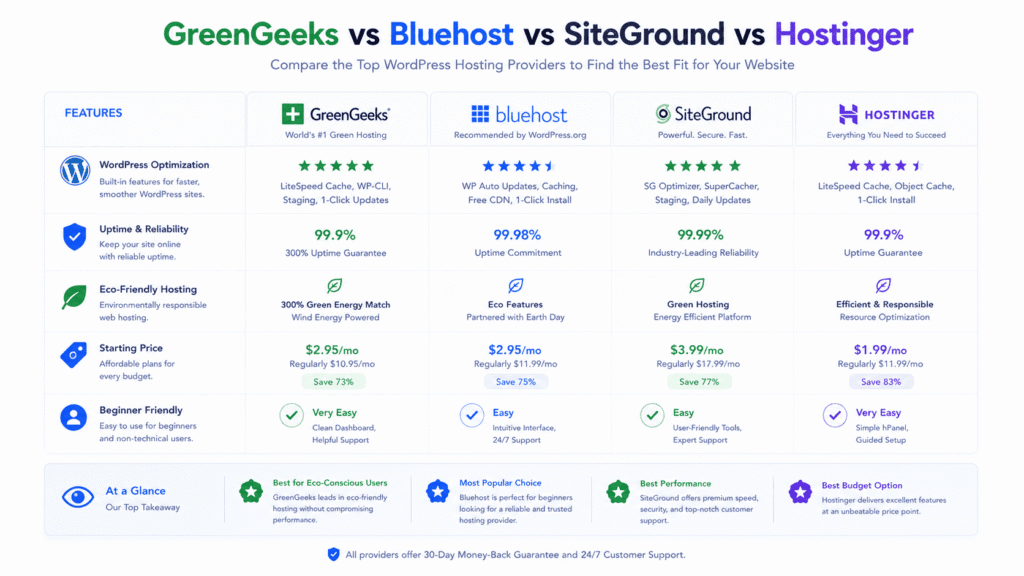
Different hosting companies focus on different strengths.
GreenGeeks vs SiteGround
• SiteGround: Strong premium optimization and managed workflows
• GreenGeeks: Better eco friendly hosting positioning
• WordPress optimization: Strong on both platforms
• Pricing structure: GreenGeeks generally more affordable long term
A growing wordpress blog may perform well on either platform, although SiteGround leans more heavily toward premium optimization features.
GreenGeeks vs Bluehost
• Bluehost: Heavier beginner marketing focus
• GreenGeeks: Better LiteSpeed optimization and green hosting positioning
• Dashboard experience: Both beginner friendly overall
• Long term value: GreenGeeks feels more performance focused
From my research, GreenGeeks generally delivered stronger wordpress responsiveness during testing compared to many lower tier Bluehost shared hosting environments.
GreenGeeks vs Hostinger
• Hostinger: Modern dashboard and aggressive budget pricing
• GreenGeeks: Stronger environmental branding and LiteSpeed integration
• Performance consistency: Competitive overall
• Beginner usability: Good on both platforms
Users preferring modern custom dashboards may lean toward Hostinger, while users wanting cPanel familiarity may prefer GreenGeeks.
Which Hosting Provider Offers Better Long Term Value?
Long term value depends heavily on website goals.
• Small blogs: Shared hosting often sufficient for years
• Business websites: Stability and support become more important
• WooCommerce stores: Traffic handling matters heavily
• Growing websites: Upgrade paths become increasingly valuable
That’s why there isn’t one perfect hosting provider for every type of website.
Reality Check: Is GreenGeeks Overkill or Underpowered?
GreenGeeks sits comfortably in the middle between ultra cheap hosting and premium enterprise infrastructure.
When GreenGeeks Makes Strong Sense
Several website categories align well with GreenGeeks strengths.
• WordPress blogs: Good optimization and stable uptime
• Small business websites: Reliable everyday performance
• Portfolio websites: Affordable and beginner friendly hosting
• Eco conscious brands: Sustainability focused positioning
A local business wanting dependable hosting without paying premium enterprise pricing would likely find GreenGeeks practical overall.
When GreenGeeks May Feel Limited
Some websites eventually require stronger infrastructure.
• Large ecommerce websites: Heavy backend processing demands
• Enterprise platforms: Advanced cloud scalability required
• Developer focused projects: Greater infrastructure customization needed
• Massive traffic spikes: Shared hosting limitations become noticeable
That doesn’t make GreenGeeks bad hosting.
It simply means shared hosting has practical limits once websites become highly dynamic or traffic heavy.
What Most GreenGeeks Reviews Don’t Tell You
A lot of hosting reviews focus too heavily on homepage speed tests and ignore long term ownership experience.
Reliable uptime, stable wordpress compatibility, reasonable support quality, and manageable long term hosting costs often matter far more than tiny benchmark differences.
Similarly, green hosting alone does not automatically guarantee strong hosting quality.
Infrastructure optimization, resource allocation, wordpress tuning, and support responsiveness still matter much more day to day.
What I Would Personally Use GreenGeeks For
• WordPress blogs: Strong optimization and beginner accessibility
• Small business websites: Stable uptime and email hosting
• Portfolio websites: Affordable long term ownership
• Starter WooCommerce stores: Good moderate ecommerce support
• Eco conscious brands: Sustainability aligned infrastructure positioning
From my research, GreenGeeks feels strongest for small and medium wordpress websites rather than enterprise scale projects.
GreenGeeks Alternatives Worth Considering
| Hosting Provider | Best For |
|---|---|
| SiteGround | Premium shared wordpress hosting |
| Hostinger | Budget beginner hosting |
| Bluehost | Simple starter wordpress hosting |
| Cloudways | Advanced cloud infrastructure |
| WP Engine | Managed wordpress business hosting |
Each hosting provider focuses on slightly different website audiences and infrastructure priorities.
Should You Use GreenGeeks? Simple Decision Guide
GreenGeeks Makes Sense If You Want
• Reliable wordpress hosting: Stable everyday performance
• Eco friendly hosting: Renewable energy focused positioning
• Beginner friendly workflows: Easier website management
• Balanced hosting experience: Better optimization than ultra cheap hosts
A small business owner or blogger wanting dependable hosting with stronger wordpress optimization would likely find GreenGeeks a practical option.
GreenGeeks May Not Be the Best Fit If
• You run massive ecommerce websites: Shared hosting limits appear faster
• You need advanced cloud infrastructure: More scalable platforms exist
• You want the absolute cheapest hosting: Budget hosts may cost less initially
• You require enterprise customization: VPS or cloud platforms offer greater flexibility
That said, most small and medium websites do not immediately require enterprise hosting environments.
Frequently Asked Questions
What is GreenGeeks and why choose it for web hosting?
GreenGeeks is a host that uses renewable energy credits to be eco-friendly and it offers shared web hosting and other plans. Many customers say they are happy with GreenGeeks because support has been great and the platform is easy to use.
What kinds of hosting does GreenGeeks provide?
They offer shared web hosting, reseller hosting, VPS server hosting and dedicated hosting to fit small sites and larger projects. Every hosting account can be scaled as your site grows.
How do I open a GreenGeeks account and use the GreenGeeks dashboard?
Sign up online to create your GreenGeeks account, then log into the GreenGeeks dashboard to manage domains, email, and sites with GreenGeeks. The dashboard is simple and clear for beginners.
Does GreenGeeks include SSL with their hosting packages?
Yes, GreenGeeks offers free SSL certificates on most plans to help keep your site secure and build trust with visitors. SSL is easy to enable from the dashboard.
Where are GreenGeeks data centers located?
GreenGeeks has data centers in several regions to speed up your site and provide redundancy, and they tell you the available locations during signup. Using a nearby data center helps lower latency for visitors.
Can I move my site from another host to GreenGeeks?
GreenGeeks provides free migration help for many web sites and will move your files and databases for you in most cases. That makes switching from another host quick and stress-free.
Is GreenGeeks good for resellers or agencies?
Yes, GreenGeeks offers reseller hosting plans that let you create multiple accounts and brand them for clients. Reseller plans include tools to manage billing and support for your customers.
How reliable is GreenGeeks’ hosting uptime and performance?
GreenGeeks has solid uptime and good performance for most sites thanks to optimized servers and caching tools. If you expect very high traffic, consider VPS or dedicated hosting for extra power.
Does GreenGeeks provide backups and security features?
GreenGeeks provides nightly backups and security tools to help protect your site, and they also offer firewall and malware scanning. You can restore backups from the control panel if you need to revert changes.
GreenGeeks plan pricing is competitive and often discounted for the first term, but renewal rates are higher so check the regular price before you buy. Extras like domain privacy or premium migrations may cost more.
Can I host multiple websites on one GreenGeeks hosting account?
Most GreenGeeks hosting packages let you host multiple domains, which is great for running several sites under one account. The exact number depends on the plan you choose.
Do people recommend GreenGeeks and is it the best green web hosting?
Many customers recommend GreenGeeks for its green power partner approach and friendly support, calling it one of the best green web hosting options. If you want eco-friendly hosting with solid features, GreenGeeks is worth considering.
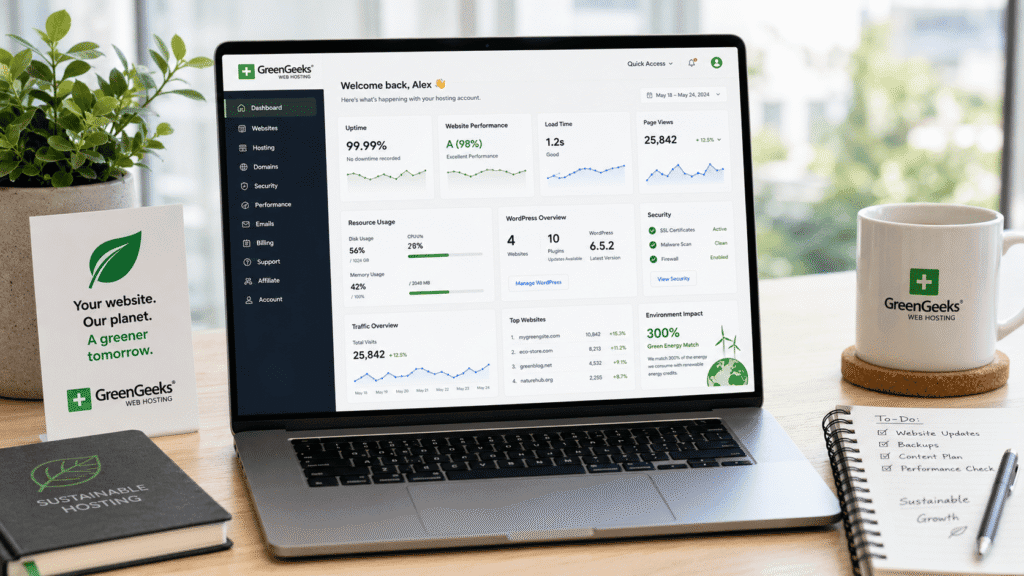
Final Verdict: Is GreenGeeks Worth It in 2026?
GreenGeeks remains one of the stronger shared hosting providers for wordpress websites, small businesses, and eco conscious website owners wanting a balance between performance, beginner friendliness, and sustainability focused hosting.
The platform performed well overall during testing, especially for wordpress based websites using optimized themes and moderate traffic levels. LiteSpeed optimization, stable uptime, helpful customer support, free ssl certificates, and bundled hosting tools all helped create a dependable everyday hosting experience.
From my research, GreenGeeks feels strongest for:
• WordPress blogs: Reliable optimization and stable performance
• Business websites: Good balance of uptime and usability
• Portfolio websites: Affordable long term hosting ownership
• Eco conscious brands: Sustainability aligned hosting positioning
For very large ecommerce projects or enterprise applications, stronger VPS or cloud infrastructure may eventually become necessary.
Bottom line?
GreenGeeks is not the most advanced hosting platform available, but it delivers a balanced shared hosting experience with strong wordpress optimization, dependable uptime, beginner friendly workflows, and environmentally conscious positioning that many website owners will find practical long term.