
One of the biggest mistakes website owners make is assuming all web servers perform the same. A site may look well optimized on the surface, but the wrong server setup can still create slow loading speed, weak scalability, and poor Core Web Vitals scores.
LiteSpeed vs Apache vs NGINX has become a much more important comparison because modern websites now handle heavier traffic, more dynamic content, and stricter performance expectations. The web server affects how quickly pages load, how efficiently wordpress hosting performs, and how well a website handles traffic spikes without slowing down.
In this LiteSpeed vs Apache vs NGINX comparison, you’ll learn how each web server works, where each one performs best, and which server makes the most sense depending on your website type, traffic level, technical experience, and hosting goals.
What Is a Web Server?
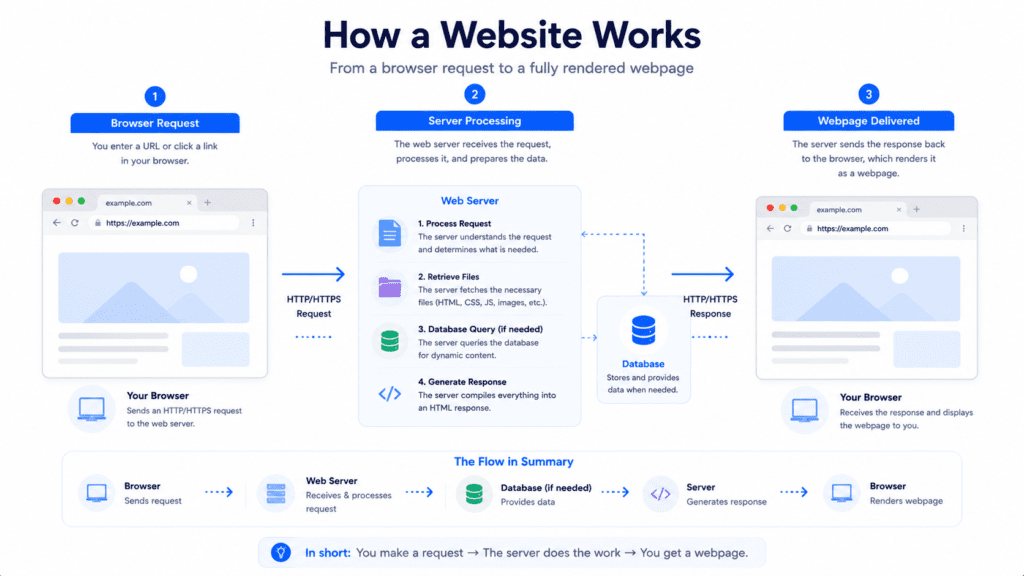
A web server is the software responsible for delivering website content to a visitor’s web browser.
When someone opens a website, the web server processes requests, loads files, communicates with the database, and sends the content back to the browser so the page can appear on screen.
What a Web Server Actually Does
The web server handles almost every request happening behind the scenes.
• Request processing: Receives requests from the user’s web browser
• File delivery: Sends html, images, css, and scripts
• Database communication: Loads dynamic wordpress content
• Traffic management: Controls how the server handles multiple visitors
A visitor opening a blog post on a wordpress website may not notice this process happening, but the server is constantly working in the background before the page fully loads.
If the web server responds slowly, visitors experience delays before images or content even appear.
Why Web Server Technology Affects Website Speed
Different web server technologies process requests differently.
That difference affects loading speed, scalability, server resources, and overall website performance.
• LiteSpeed: Optimized heavily for wordpress hosting and built in caching
• Apache: Flexible and widely compatible across hosting environments
• NGINX: Designed for handling high concurrency and traffic spikes efficiently
From my research, many website owners focus only on themes or plugins while ignoring the server itself.
But the web server software plays a major role in how fast pages load and how stable the website remains during high traffic periods.
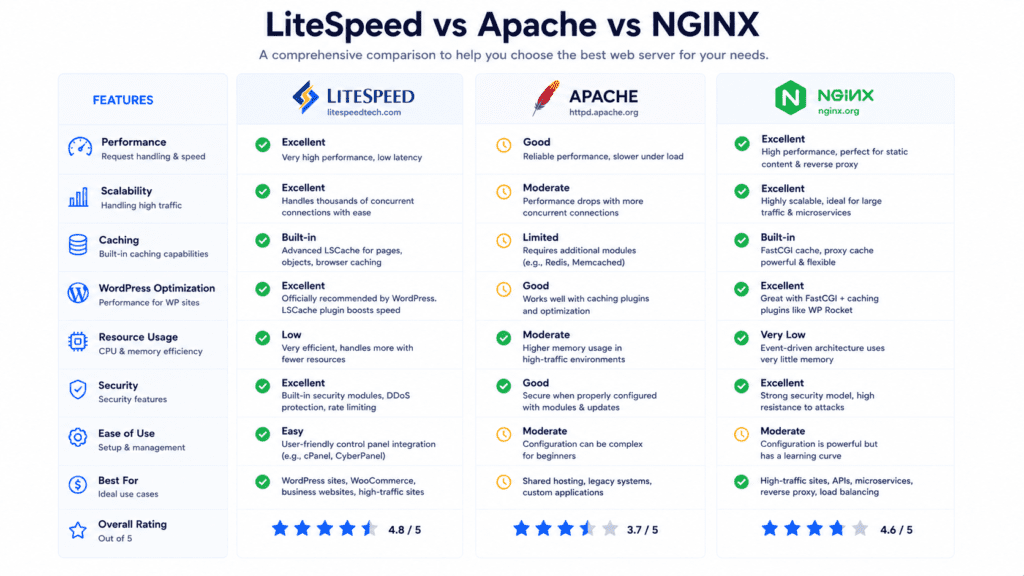
LiteSpeed vs Apache vs NGINX: Quick Comparison Table
| Feature | LiteSpeed | Apache | NGINX |
|---|---|---|---|
| Performance | Very Fast | Moderate | Very Fast |
| Resource Usage | Low | Higher | Very Low |
| WordPress Optimization | Excellent | Good | Excellent |
| Built In Caching | Yes | No | Limited |
| Ease of Use | Easy | Beginner Friendly | Moderate |
| Scalability | High | Moderate | Very High |
| Best For | WordPress Hosting | Compatibility | High Traffic Apps |
| Pricing | Paid + Free Version | Free | Free |
Why the LiteSpeed vs Apache vs NGINX Debate Matters
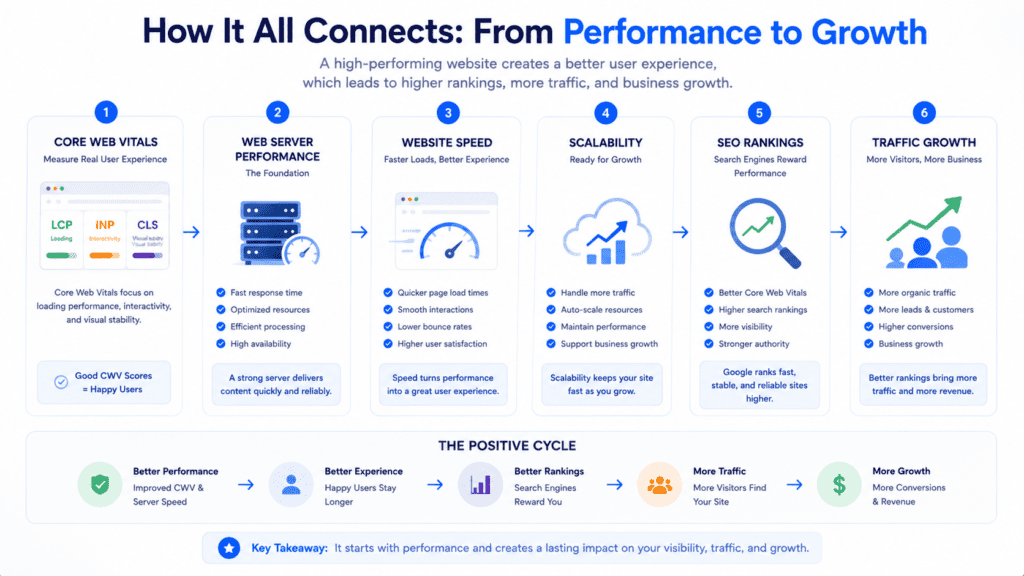
Web hosting priorities have changed a lot over time.
A few years ago, many websites could still perform reasonably well with basic apache hosting and minimal optimization. Modern websites now handle larger traffic loads, heavier wordpress plugins, dynamic content, and stricter performance expectations from Google.
Core Web Vitals and Hosting Performance
Core Web Vitals pushed hosting performance much closer to the center of SEO discussions.
• Faster loading speed: Helps improve user experience signals
• Better scalability: Reduces slowdown during traffic spikes
• Improved backend performance: Faster response from the server
• Stable page rendering: Reduces delays during high traffic periods
The web server now affects rankings more directly because performance focused SEO depends heavily on backend speed and stability.
A slow hosting environment can weaken Core Web Vitals scores even if the website design itself is optimized properly.
Scalability and Traffic Growth Challenges
Traffic growth creates problems that weaker web server setups often struggle to handle.
• Concurrency handling: Important for websites receiving many simultaneous visitors
• Resource efficiency: Impacts server stability during spikes
• Memory usage: Heavy traffic increases server load quickly
• Dynamic content delivery: WordPress and WooCommerce require more processing power
A WooCommerce store during Black Friday traffic may perform normally at first, then suddenly slow down once hundreds of active shoppers hit checkout pages simultaneously.
That’s usually where server architecture becomes more important than frontend design.
Web Server Trends Changing Hosting
Modern hosting platforms now prioritize scalability and automation much more aggressively.
Why Managed WordPress Hosting Favors LiteSpeed
Many managed wordpress hosting companies now prefer running LiteSpeed because it simplifies optimization.
• LiteSpeed cache: Built in caching improves wordpress speed
• Lower server load: Better efficiency under dynamic traffic
• Compatibility support: LiteSpeed can read Apache configurations
• Simplified optimization: Easier setup for beginners
From my research, LiteSpeed also became popular because website owners can improve performance without manually configuring complicated caching layers.
That makes it attractive for beginner friendly wordpress hosting environments.
Why Cloud Hosting Often Uses NGINX
NGINX became extremely common across cloud platforms and scalable infrastructure.
• Lightweight architecture: NGINX consumes much less memory than Apache
• Concurrency handling: Better performance during heavy traffic
• Cloud scalability: Popular across AWS and Google Cloud environments
• API performance: Efficient for dynamic web application traffic
Cloud providers running container based systems often prefer nginx web server setups because scalability matters more than traditional compatibility features.
NGINX was originally created to solve concurrency problems affecting high traffic websites.
Even with newer technologies available, Apache is still heavily used across shared hosting environments.
• Wide compatibility: Older wordpress plugins work smoothly
• cPanel integration: Supported by most beginner hosting platforms
• Flexible configuration: Easy to customize using .htaccess rules
• Established ecosystem: Huge documentation and support community
A hosting company like Bluehost or HostGator may continue using apache because compatibility and beginner friendliness remain important for mainstream hosting customers.
That said, apache web environments often require more optimization work compared to LiteSpeed or nginx based systems.
What Is Apache?
Apache became one of the most widely used web server technologies in hosting history.
Apache Web Server Overview
Apache HTTP Server is an open source web server software developed for handling website requests and delivering web content.
It powers millions of websites across shared hosting, wordpress hosting, and business environments.
• Apache HTTP Server: Open source and widely supported
• Flexible configuration: Strong support for custom rules
• Cross platform support: Apache runs on Linux and Windows server setups
• Large ecosystem: Extensive plugin and module support
Let’s start with Apache from a practical perspective.
Its biggest strength is compatibility. Most hosting platforms, plugins, and control panels are designed with apache support in mind.
Apache Features, Strengths, and Weaknesses
Apache has remained popular because it balances flexibility with broad hosting support.
• Strong compatibility: Works with most wordpress plugins and tools
• Beginner friendly: Easier for traditional hosting environments
• Modular design: Supports extensive customization
• Higher resource usage: Consumes more memory under heavy load
Apache is a reliable web server for websites focused on compatibility and traditional hosting workflows.
But compared to nginx and litespeed, apache may struggle more during high concurrency traffic unless optimized carefully.
What Is NGINX?
NGINX is one of the most popular web servers for scalability focused hosting environments.
Unlike Apache, NGINX was designed with concurrency and lightweight performance as core priorities from the beginning.
NGINX Web Server Overview
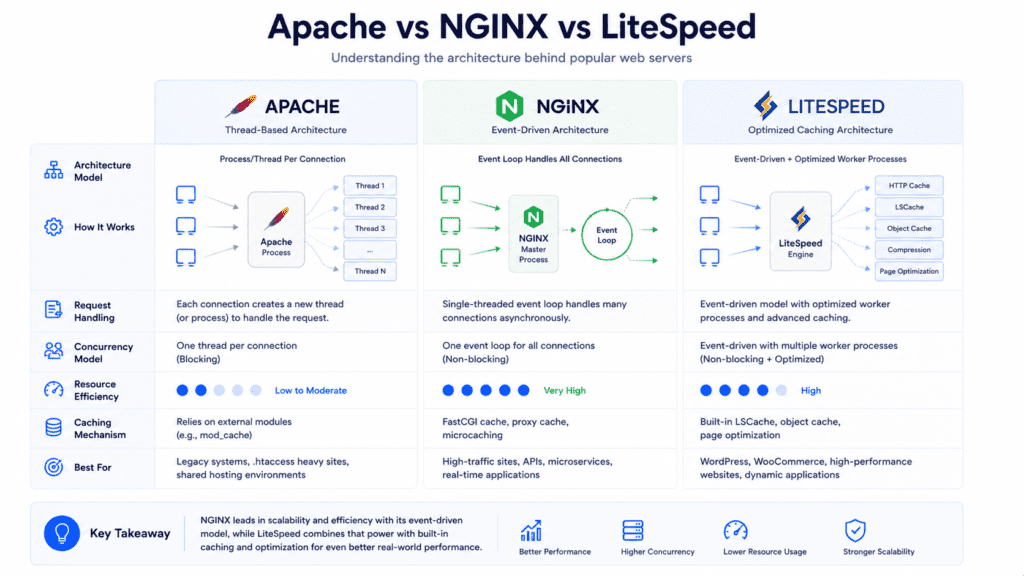
NGINX web server software uses an event driven architecture that handles requests differently than Apache.
Instead of creating separate processing threads for every visitor, NGINX manages multiple connections much more efficiently.
• NGINX web server: Lightweight and scalability focused
• Event driven design: Handles concurrent traffic efficiently
• Lower memory usage: Uses fewer server resources
• High concurrency support: Better for traffic spikes and APIs
From my research, developers often prefer nginx web environments because they remain stable under heavy traffic conditions.
Large media websites, SaaS dashboards, and API platforms commonly rely on nginx and apache hybrid systems or fully dedicated nginx setups.
NGINX Scalability and Performance Benefits
The biggest advantage of NGINX is scalability.
• Concurrency handling: Excellent under heavy simultaneous traffic
• Low resource usage: NGINX consumes much less memory than Apache
• Fast static delivery: Efficient for images and static assets
• Cloud friendly architecture: Popular across AWS and DigitalOcean platforms
A news website receiving sudden Reddit traffic may slow down heavily on traditional Apache hosting while remaining stable on optimized nginx web server infrastructure.
That’s one reason NGINX became extremely common across modern cloud hosting providers.
NGINX Drawbacks
NGINX is powerful, but it isn’t always beginner friendly.
• Manual configuration: Requires more technical knowledge
• WordPress setup complexity: Advanced optimization often needed
• Plugin compatibility: Some Apache specific rules need adjustment
• Learning curve: Harder for non technical users
Now this is where people sometimes struggle.
NGINX delivers excellent scalability, but beginners using cPanel hosting may find Apache or LiteSpeed easier to manage because those environments require less manual configuration work.
What Is LiteSpeed?
LiteSpeed is newer compared to Apache and NGINX, but it has become extremely popular in wordpress hosting.
LiteSpeed Web Server Overview
LiteSpeed web server software was designed as a high performance replacement for Apache while maintaining compatibility with Apache configurations.
That compatibility became one of its biggest advantages.
• LiteSpeed web server: Performance focused apache replacement
• Apache compatibility: LiteSpeed can read .htaccess rules
• Built in optimization: Strong caching and performance tools
• Efficient resource usage: Better handling under load
LiteSpeed is designed to work smoothly with existing Apache hosting environments while improving speed and reducing server load.
That made migration easier for many hosting companies.
LiteSpeed Enterprise and Built In Caching
LiteSpeed Enterprise includes advanced optimization features focused heavily on wordpress hosting.
• LiteSpeed Enterprise: Premium version with advanced scalability
• LiteSpeed cache plugin: Built specifically for wordpress optimization
• Built in caching: Reduces backend processing automatically
• WooCommerce support: Better handling for dynamic ecommerce traffic
Many managed wordpress hosts now choose LiteSpeed because caching works efficiently without requiring complicated web server configuration.
A WooCommerce store handling hundreds of active shoppers may perform significantly better on running LiteSpeed environments due to integrated caching improvements.
LiteSpeed Drawbacks
LiteSpeed performs very well, but there are still tradeoffs.
• Enterprise licensing: LiteSpeed Enterprise requires paid licensing
• Smaller ecosystem: Apache still has broader historical support
• Hosting availability: Not every web hosting provider offers LiteSpeed
• Advanced tuning: Some enterprise setups still require optimization work
Small websites often don’t fully utilize enterprise level LiteSpeed features.
That’s why Apache or nginx may still make sense depending on the project goals and hosting environment.
LiteSpeed vs Apache: Performance and Hosting Differences
LiteSpeed vs Apache comparisons usually focus on performance efficiency and wordpress optimization.
Performance and Resource Usage
LiteSpeed generally handles requests more efficiently than Apache.
• LiteSpeed efficiency: Lower memory consumption during traffic spikes
• Apache flexibility: Strong customization and compatibility
• Built in caching: LiteSpeed reduces backend processing automatically
• Concurrency handling: LiteSpeed outperforms Apache under heavier load
From my research, LiteSpeed caching advantages become most noticeable on dynamic wordpress websites and WooCommerce stores.
Compatibility Differences
Apache still remains valuable because of its broad compatibility ecosystem.
• Apache modules: Extensive plugin and hosting support
• LiteSpeed compatibility: Apache drop in replacement support
• Migration simplicity: Easier transition from Apache environments
• Control panel integration: Strong support across shared hosting platforms
A WooCommerce website experiencing slow checkout performance on Apache may improve dramatically after moving to LiteSpeed hosting with optimized caching enabled.
NGINX vs Apache: Which Handles Traffic Better?
NGINX vs Apache comparisons usually focus on concurrency and scalability.
Both web server technologies can run large websites, but they handle traffic very differently behind the scenes.
Architecture Differences
Apache and NGINX use different request handling models.
• Apache architecture: Thread based request handling
• NGINX architecture: Event driven request processing
• Concurrent traffic: NGINX handles simultaneous users more efficiently
• Memory efficiency: NGINX uses fewer server resources under load
Apache due to their event driven limitations may consume more memory during heavy traffic compared to nginx web server environments.
That’s why nginx is also heavily used across large scale applications and media platforms.
Heavy Traffic Performance
Traffic spikes reveal major differences between these servers.
• NGINX scalability: Better stability during sudden traffic growth
• Apache flexibility: Easier compatibility for traditional hosting
• Static content delivery: NGINX handles static assets efficiently
• High concurrency: NGINX performs better for API heavy systems
A news website receiving sudden viral traffic from Reddit or social media may remain stable on nginx and apache hybrid setups while slowing significantly on overloaded Apache hosting.
Ease of Configuration Differences
Performance isn’t the only factor.
Management complexity also matters depending on technical skill level.
• Apache configuration: Easier for beginners using cPanel
• NGINX configuration: More manual optimization required
• WordPress rules: Apache handles .htaccess more naturally
• Advanced setups: NGINX offers stronger scalability flexibility
Developers often prefer nginx or litespeed for advanced environments, but compatibility focused users may still choose Apache because setup feels simpler.
LiteSpeed vs NGINX vs Apache for WordPress Hosting

WordPress hosting changes this comparison quite a bit because dynamic content creates additional backend load.
Which Server Works Best for WordPress?
Each server handles wordpress differently.
• LiteSpeed: Strong wordpress optimization and integrated caching
• Apache: Broad plugin compatibility and traditional hosting support
• NGINX: Excellent scalability but more advanced configuration needs
• LiteSpeed cache: Simplifies optimization for beginners
A beginner blogger using LiteSpeed hosting may improve loading speed significantly without understanding advanced server optimization techniques.
That simplicity is part of why LiteSpeed became popular across managed wordpress hosting providers.
WooCommerce and Dynamic Traffic
WooCommerce stores create heavier backend demand than standard blogs.
• Dynamic checkout pages: Increase server processing load
• Product filters: Generate additional database activity
• High traffic spikes: Require stronger concurrency handling
• Caching importance: Reduces backend strain significantly
LiteSpeed Enterprise often performs extremely well for WooCommerce because built in caching reduces repeated backend processing automatically.
Core Web Vitals Performance
Modern wordpress hosting focuses heavily on Core Web Vitals performance.
• LiteSpeed optimization: Faster backend response for wordpress
• NGINX scalability: Strong performance during traffic spikes
• Apache compatibility: Easier integration with older plugins
• Caching layers: Often matter more than raw server technology alone
From my research, a well optimized Apache server can sometimes outperform poorly configured LiteSpeed hosting.
That surprises many website owners who assume server choice alone guarantees performance improvements.
How Each Web Server Handles Performance and Scalability
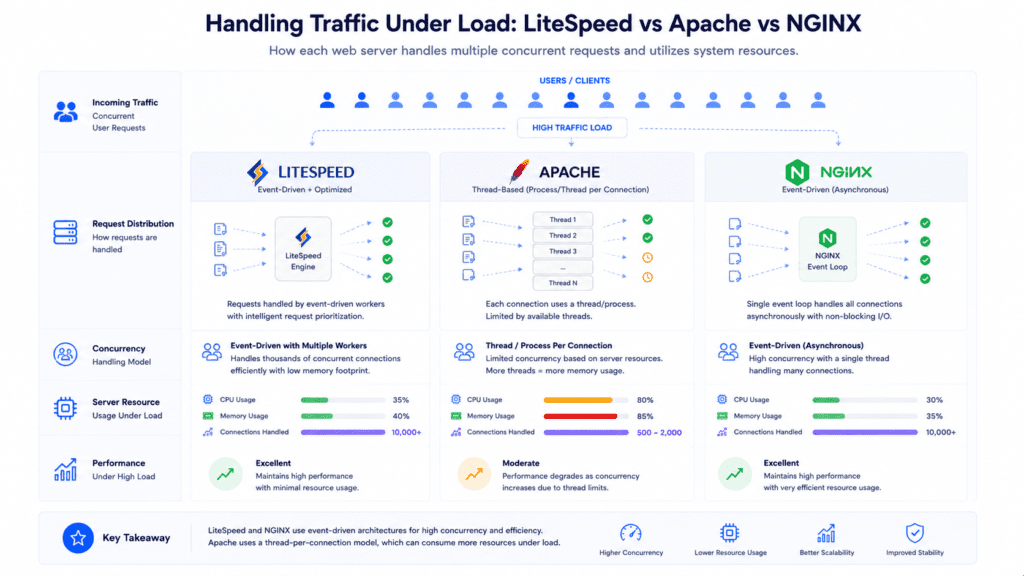
Different websites stress servers in different ways.
LiteSpeed Performance Characteristics
• Integrated caching: Reduces backend load automatically
• Efficient wordpress handling: Strong dynamic content performance
• Lower server strain: Better resource management under load
• Simplified optimization: Easier for non technical users
NGINX Scalability Characteristics
• Concurrency handling: Excellent for high traffic environments
• API optimization: Strong performance for dynamic web application traffic
• Memory efficiency: Much less memory than Apache under heavy traffic
• Cloud hosting strength: Common across scalable infrastructure setups
A SaaS platform processing thousands of API requests may perform better on NGINX compared to traditional Apache environments.
Apache Performance Characteristics
• Wide compatibility: Strong plugin and control panel support
• Flexible customization: Extensive module ecosystem
• Traditional hosting workflows: Easier migration and management
• Higher resource usage: Requires more optimization during heavy traffic
Apache is still valuable for compatibility focused hosting even though nginx and litespeed often deliver better scalability.
Which Web Server Feels Fastest in Real World Use?
Benchmarks are useful, but real world performance often depends on the type of website being hosted.
A small personal blog behaves very differently than a WooCommerce store or SaaS dashboard.
Shared hosting environments often hide the true potential of a web server.
• Apache hosting: Common across low cost shared hosting plans
• LiteSpeed hosting: Often feels faster due to integrated caching
• NGINX hosting: Less common in beginner shared hosting
• Overselling problems: Weak infrastructure can slow every server
A small wordpress blog may not notice dramatic differences between Apache and LiteSpeed during normal traffic levels.
But once traffic increases, LiteSpeed usually handles backend load more efficiently.
WooCommerce and Dynamic Website Performance
Dynamic websites reveal larger differences between these servers.
• WooCommerce traffic: Heavy backend processing during checkout
• LiteSpeed cache plugin: Helps reduce repeated database requests
• NGINX scalability: Excellent under concurrent API traffic
• Apache limitations: Higher server strain during spikes
A WooCommerce store with hundreds of active shoppers may benefit heavily from LiteSpeed Enterprise because integrated caching reduces repeated backend rendering.
High Traffic Scalability
Large websites stress concurrency handling much more aggressively.
• NGINX concurrency: Handles simultaneous visitors efficiently
• LiteSpeed scalability: Strong balance between speed and simplicity
• Apache optimization: Requires careful tuning during high traffic
• Static asset delivery: NGINX performs efficiently with large file delivery
A SaaS dashboard receiving large API traffic often performs better on nginx web infrastructure because NGINX handles concurrent requests efficiently with much less memory than Apache.
LiteSpeed Enterprise vs Open Source Alternatives
LiteSpeed has both free and paid versions, which creates some confusion for website owners.
What Is LiteSpeed Enterprise?
LiteSpeed Enterprise is the premium commercial version of LiteSpeed web server software.
It includes advanced scalability, enterprise support, and stronger wordpress optimization features.
• LiteSpeed Enterprise: Premium server software for high traffic hosting
• Advanced caching: Improved dynamic content handling
• WooCommerce optimization: Better ecommerce performance under load
• Enterprise scalability: Strong concurrency support for growing websites
Companies running LiteSpeed web server environments for ecommerce often choose the Enterprise version because traffic spikes create heavy backend demand.
OpenLiteSpeed vs LiteSpeed Enterprise
The free version and premium version behave differently in some areas.
| Feature | OpenLiteSpeed | LiteSpeed Enterprise |
|---|---|---|
| Cost | Free | Paid |
| WordPress Optimization | Good | Excellent |
| Enterprise Support | No | Yes |
| Advanced Caching | Limited | Full |
| cPanel Support | Limited | Full |
Small websites often perform perfectly well on OpenLiteSpeed.
High traffic WooCommerce businesses, however, may benefit from LiteSpeed Enterprise during major seasonal traffic spikes.
Is LiteSpeed Enterprise Worth It?
The answer depends heavily on traffic size and business requirements.
• Small blogs: Usually don’t need enterprise features
• WooCommerce stores: Benefit more from advanced caching
• Agencies: May value easier optimization workflows
• High traffic businesses: Often justify premium performance tools
From my research, LiteSpeed Enterprise feels most valuable when backend performance directly affects revenue or user experience.
Apache and NGINX Together: Can You Use Both?
Some hosting providers combine Apache and NGINX instead of choosing only one.
Why Hybrid Configurations Exist
Hybrid setups try to combine the strengths of both servers.
• NGINX frontend: Handles static content and traffic distribution
• Apache backend: Processes php and wordpress compatibility tasks
• Reverse proxy setup: NGINX forwards requests to Apache
• Performance balance: Combines scalability and compatibility
A hosting provider may use nginx and apache together by placing NGINX in front as a reverse proxy while Apache handles dynamic wordpress processing behind the scenes.
Drawbacks of Hybrid Server Setups
Hybrid environments also introduce additional complexity.
• Configuration complexity: More moving parts to manage
• Troubleshooting difficulty: Backend issues become harder to diagnose
• Compatibility layers: Additional setup requirements
• Maintenance overhead: Requires stronger technical knowledge
Now this is where beginners sometimes get overwhelmed.
Hybrid setups can perform very well, but they are usually better suited for advanced hosting environments rather than simple shared hosting websites.
Which Web Server Is Easiest to Manage?
Ease of management matters more than many website owners expect.
A powerful web server can still become frustrating if configuration and troubleshooting feel too technical.
Beginner Friendliness Comparison
Different servers target different skill levels.
• Apache: Easier for traditional hosting environments
• LiteSpeed: Beginner friendly with built in optimization
• NGINX: More technical and configuration focused
• cPanel support: Apache and LiteSpeed integrate more naturally
Beginners using shared hosting often find Apache or LiteSpeed easier because most web hosting company dashboards are already designed around those environments.
Maintenance and Troubleshooting
Maintenance becomes important as websites grow.
• Apache ecosystem: Huge documentation and support availability
• LiteSpeed simplicity: Easier caching and wordpress optimization
• NGINX flexibility: Strong scalability but steeper learning curve
• Plugin compatibility: Apache remains very compatible with older systems
A manually configured nginx web environment may deliver excellent performance, but troubleshooting redirects and wordpress rewrite rules often requires more technical knowledge compared to Apache based hosting.
How Difficult Is It to Switch Servers?
Changing web server technology is possible, but it isn’t always effortless.
Migrating From Apache to LiteSpeed
LiteSpeed was designed partly as a drop in replacement for Apache.
• Apache compatibility: LiteSpeed can read existing .htaccess rules
• Migration simplicity: Easier transition from Apache hosting
• cPanel support: Works well in traditional hosting environments
• Reduced downtime risk: Usually smoother migrations
That compatibility is one reason many hosting providers replace Apache files with LiteSpeed while keeping similar hosting workflows.
Moving From Apache to NGINX
NGINX migrations are usually more technical.
• Manual configuration: Rewrite rules often need adjustment
• WordPress setup: Additional optimization may be required
• Plugin compatibility: Some Apache specific behaviors change
• Migration complexity: Higher learning curve for beginners
Switching web servers is not always a one click process, especially when moving toward NGINX focused infrastructure.
Best Web Server Based on Website Type
Different websites benefit from different server strengths.
Best Server for WordPress Blogs
• LiteSpeed: Excellent wordpress optimization and caching
• Apache: Good compatibility for traditional hosting
• NGINX: Better suited for advanced optimization workflows
A beginner blogger may benefit most from LiteSpeed hosting because performance improvements often happen without complicated configuration changes.
Best Server for WooCommerce Stores
• LiteSpeed Enterprise: Strong ecommerce caching performance
• NGINX: Excellent concurrency handling under high traffic
• Apache: Works well but requires stronger optimization
WooCommerce creates heavier backend demand, so scalability and caching become much more important.
Best Server for SaaS and High Traffic Platforms
• NGINX: Excellent for APIs and concurrent traffic
• LiteSpeed: Strong balance between speed and simplicity
• Apache: Better for compatibility focused workflows
Developers building APIs and scalable web application systems often prefer nginx web infrastructure because concurrency handling matters heavily under load.
Best Server for Agencies and Beginners
• Apache: Easier management for compatibility focused hosting
• LiteSpeed: Easier optimization for client wordpress sites
• NGINX: Better for technical development environments
Agencies managing many wordpress websites may still prioritize Apache compatibility because plugin support and migration simplicity remain important.
Common Mistakes When Choosing a Web Server
A lot of server decisions are based on marketing instead of real hosting needs.
• Choosing only by popularity: Popular doesn’t always mean best for your workload
• Ignoring wordpress optimization: Backend performance still matters
• Overpaying too early: Enterprise hosting isn’t always necessary
• Using Apache without optimization: High traffic environments require tuning
• Choosing NGINX without experience: Configuration complexity surprises beginners
The best web server depends heavily on traffic type, technical experience, scalability needs, and website goals.
Which Hosting Providers Use LiteSpeed, Apache, or NGINX?
Different hosting providers prioritize different server technologies.
• Apache hosting: Common across Bluehost and HostGator shared hosting
• LiteSpeed hosting: Popular among managed wordpress hosting providers
• NGINX infrastructure: Common across AWS, Google Cloud, and DigitalOcean
• Hybrid setups: Some providers combine apache and nginx together
Some budget hosts advertise LiteSpeed servers but overcrowd them heavily, which reduces the real world performance advantage significantly.
That’s why hosting quality matters as much as server technology itself.
What Most Hosting Reviews Don’t Tell You
A faster server alone does not automatically create a fast website.
• Poor optimization: Plugins and themes still affect every server
• Overselling problems: Cheap hosting weakens performance regardless of technology
• Caching configuration: Often matters more than raw server choice
• Infrastructure quality: Strong hosting environments improve every platform
A well optimized Apache server can outperform badly configured LiteSpeed hosting in real world situations.
That surprises many website owners who expect server technology alone to solve performance problems.
LiteSpeed vs Apache vs NGINX: Which Should You Choose?
The best choice depends on the type of website you run and how much technical control you want.
• Choose LiteSpeed: If you want easier wordpress optimization and strong caching
• Choose Apache: If compatibility and simplicity matter most
• Choose NGINX: If scalability and concurrency are top priorities
Quick Decision Framework
• Personal blog: Apache or LiteSpeed
• Growing wordpress website: LiteSpeed
• High scale SaaS platform: NGINX
• Enterprise WooCommerce store: LiteSpeed Enterprise or optimized NGINX
From my research, LiteSpeed feels like the strongest all around option for most wordpress hosting environments because it balances performance, caching, and usability well.
NGINX remains the strongest scalability focused solution for highly technical and traffic intensive systems.
Apache is still valuable because compatibility and beginner friendliness continue to matter for a huge number of websites.
What Most Blogs Miss About Web Servers
The server matters, but it’s not the entire performance story.
• Hosting quality matters: Weak infrastructure limits every server
• Caching matters heavily: Proper optimization improves every environment
• WordPress optimization matters: Plugins and databases still affect speed
• Server choice alone isn’t enough: Full optimization requires multiple layers
Switching servers without optimizing themes, plugins, database queries, and caching rarely solves every website performance issue completely.
Frequently Asked Questions
What makes litespeed different from Apache and Nginx?
Litespeed is event-driven like Nginx and can act as a drop-in replacement for Apache, giving better performance on many sites.
Is one of the three web servers clearly the best web server?
No single server is best for every case; pick based on traffic, apps like WordPress, and your hosting setup.
Can Litespeed replace Apache without major changes?
Yes, Litespeed offers Apache drop-in replacement features so many Apache configs and .htaccess rules keep working.
How does performance compare: Litespeed vs Apache vs Nginx?
Benchmarks often show Litespeed or Nginx faster than Apache, but you should test Apache web servers with your real workload.
Should I choose Litespeed for a WordPress site?
Choose Litespeed if you want built-in caching and faster responses for apps like WordPress with minimal tuning.
Is Litespeed the newest option among the three most popular web servers?
Litespeed is newer than Apache and Nginx, but it already matches many features and adds modern optimizations.
Does Nginx or Litespeed offer better security features like a web application firewall?
Litespeed and Nginx both support WAFs and secure nginx deployments are common, but your host and config matter most.
Will switching to Litespeed affect my existing Apache files and rules?
Most Apache files and rules work, though you should test and adjust any custom modules or third-party configs.
How hard is running Apache versus running Litespeed day to day?
Running Litespeed is similar to running Apache for admins, but Litespeed can be easier for high-load setups thanks to its event-driven model.
Can a web hosting company help me choose between these servers?
Yes, a good web host can advise which server software to run based on your app, budget, and traffic needs.
When should I benchmark and test Apache web servers instead of switching?
If you rely on specific Apache modules or have unique traffic patterns, benchmark and test Apache web servers before changing.
Is replacing Apache with Litespeed worth the cost for small sites?
For small low-traffic sites, the default web server may be fine, but Litespeed can speed up growth and reduce load costs.
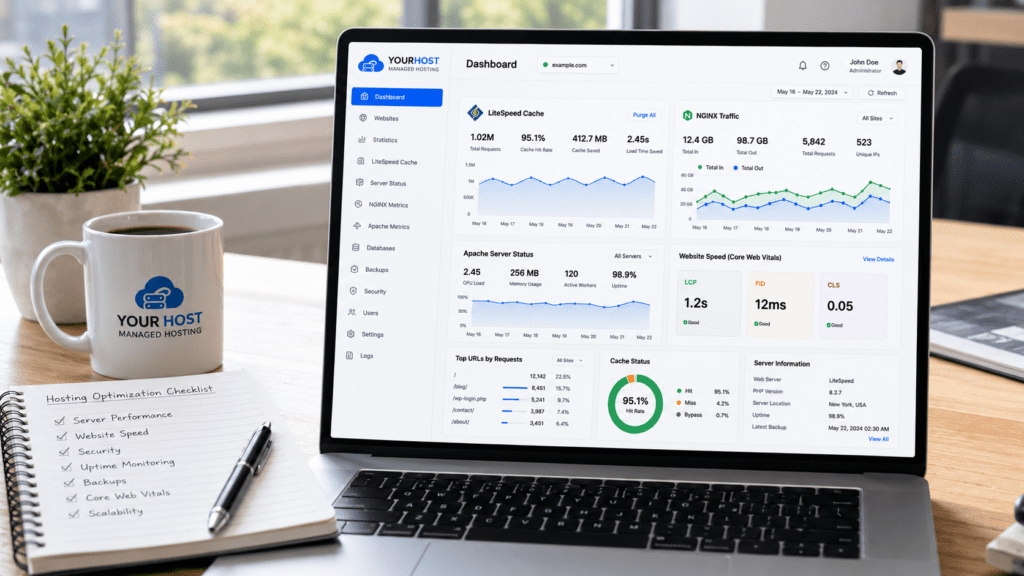
Final Verdict: LiteSpeed vs Apache vs NGINX
LiteSpeed, Apache, and NGINX each solve different hosting problems well.
LiteSpeed delivers one of the strongest all around experiences for wordpress hosting because caching, scalability, and optimization are easier to manage.
NGINX remains one of the best scalability focused servers for APIs, SaaS platforms, and high concurrency environments where traffic handling matters most.
Apache is still valuable because compatibility, flexibility, and traditional hosting support continue to matter for millions of websites.
Before switching servers, it’s worth reviewing your current hosting environment, traffic patterns, wordpress optimization, caching setup, and long term scalability goals.
The fastest server on paper will not automatically fix weak hosting infrastructure or poorly optimized websites.