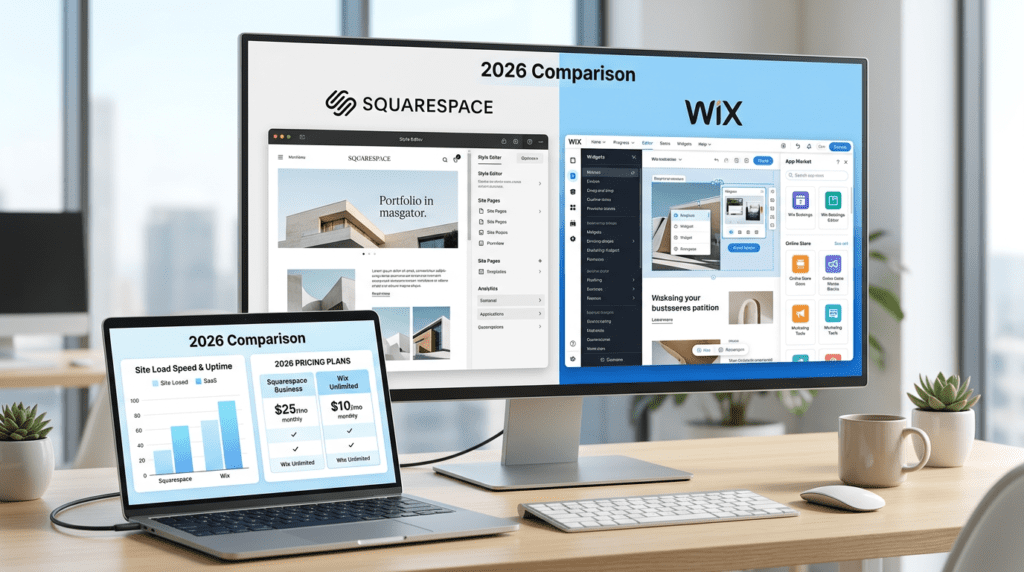
A lot of people hit the same wall when they start comparing Squarespace Vs Wix both look easy, both promise quick setup, and both can build a solid website without coding. The real question isn’t whether they work. It’s which one fits your business better in 2026, especially if you care about design, flexibility, pricing, and how the site will hold up as your needs grow.
That’s where this comparison gets practical. Squarespace and Wix are popular with small business owners, bloggers, creators, and ecommerce sellers, but they solve different problems. In this article, we’ll look at design, ease of use, pricing, advanced features, integrations, performance, customer support, and the real trade-offs that matter when you’re deciding which website builder to trust with your brand.
Quick Verdict: Squarespace vs Wix
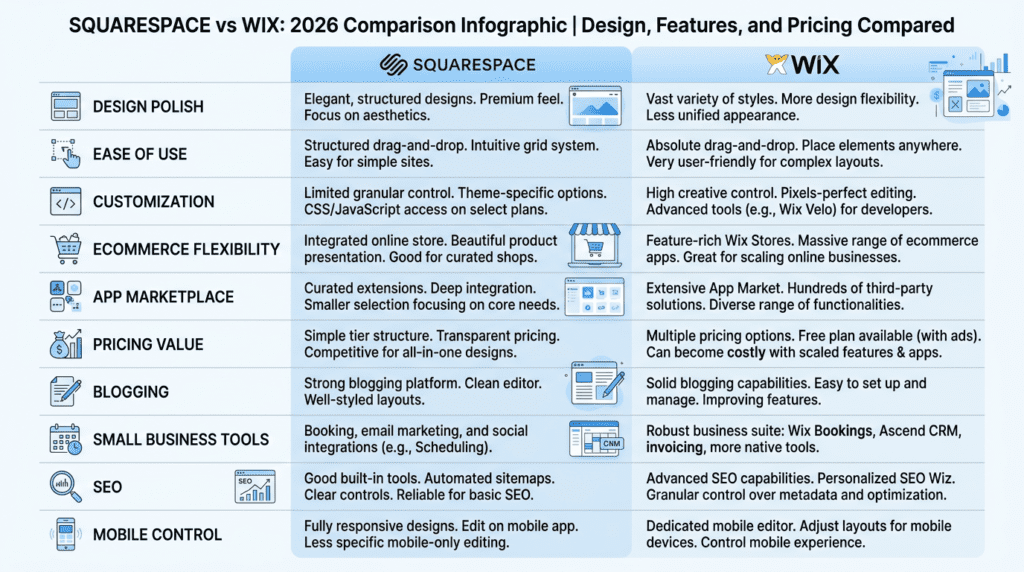
| Category | Winner | Why It Matters |
|---|---|---|
| Best overall for design | Squarespace | More polished templates and stronger visual consistency |
| Best for ease of use | Wix | More beginner-friendly drag-and-drop editing |
| Best for customization | Wix | Greater layout freedom and more apps |
| Best for clean, professional sites | Squarespace | Better structured design system |
| Best for ecommerce flexibility | Wix | More apps, payment options, and business tools |
| Best value for money | Depends | Squarespace is cleaner; Wix can offer more features but costs can rise |
| Best for bloggers/creators | Squarespace | Strong content presentation and visual branding |
| Best for local small business | Wix | More flexible booking, service, and marketing tools |
Best For
- Choose Squarespace if you want a polished, design-led website with less manual tweaking.
- Choose Wix if you want maximum flexibility, beginner-friendly editing, and a wider app marketplace.
Not Ideal For
- Squarespace is not ideal if you want total drag-and-drop freedom.
- Wix is not ideal if you want strict design consistency or fewer setup decisions.
Bottom Line
Squarespace is better for polished design and brand-focused websites. Wix is better for customization, small business tools, and users who want more control over layout and features.
Squarespace vs Wix Design: Which Builder Creates Better-Looking Websites?
Squarespace Templates Feel More Polished Out Of The Box
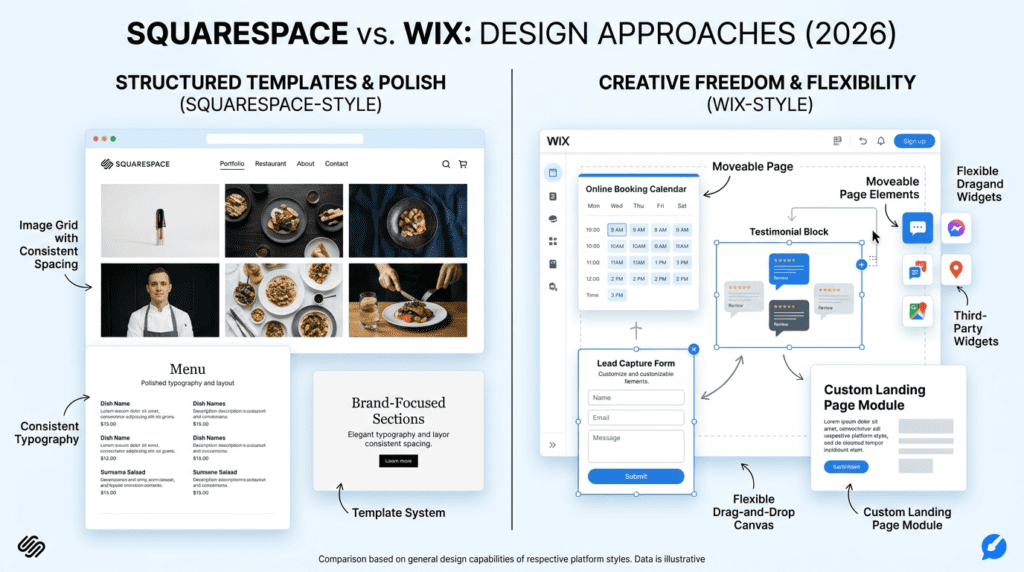
Squarespace has always leaned into design first, and that shows the moment you start browsing its website templates. The layouts usually look intentional right away, with strong typography, clean spacing, and a more consistent visual system. That matters a lot if you want a site that feels premium without spending hours adjusting every section.
For many users, this is the biggest reason to choose Squarespace. Creatives, consultants, photographers, restaurants, and personal brands often care more about how the site feels than how many knobs they can turn. With Squarespace, the default template often already looks close to finished. You’re mostly swapping in your own content instead of rebuilding the entire layout.
There’s also a hidden benefit here: beginners usually make fewer design mistakes. That’s not glamorous, but it saves time. When a website builder gives you too much freedom too early, it’s easy to end up with crowded sections, uneven spacing, or mismatched fonts. Squarespace reduces that risk.
Wix Offers More Creative Freedom With Drag-And-Drop Editing
Wix gives you more room to move things around, and that’s the main appeal. Its drag-and-drop editing is more open-ended, which means you can position elements with more freedom than you can in Squarespace. For some users, that flexibility is exactly what they need.
This works especially well if you want a specific layout that doesn’t fit a standard template. A local service business might want a strong homepage hero, a booking section, testimonials, and a lead form arranged in a very exact way. Wix makes that kind of custom page building easier without requiring design workarounds.
But more freedom also means more responsibility. The Wix editor can be a strength for experienced users and a headache for beginners who aren’t confident about design choices. If you move too many elements without a plan, the page can start to feel inconsistent fast. That’s one reason some users love Wix while others feel overwhelmed by it.
Design Trade-Off: Structure vs Freedom
This is the real squarespace vs wix design decision: do you want structure or freedom?
Squarespace protects you from messy design decisions. It gives you fewer ways to break the page, which is helpful if you care about a polished brand image and want less trial and error. The trade-off is that you’ll also have less layout freedom.
Wix does the opposite. It gives you more control, more placement options, and more room to customize. That can be great for users who know what they want. It can also slow you down if you keep adjusting small details instead of publishing the site.
Here’s the practical version:
- Choose Squarespace if you want a clean, high-end look with less effort.
- Choose Wix if you want to shape the site yourself and don’t mind making more decisions.
- Avoid Wix if design consistency is hard for you to manage.
- Avoid Squarespace if you need very specific page layouts or advanced visual freedom.
Best Design Choice By Website Type
Different site types need different levels of control, and that’s where the decision gets easier.
- Portfolio website: Squarespace
- Local service business: Wix
- Restaurant or hospitality site: Squarespace
- Highly customized landing pages: Wix
- Visual personal brand: Squarespace
For a photographer or designer, Squarespace usually feels like the better fit because the template does a lot of the heavy lifting. For a plumber, trainer, or agency that needs booking forms, service pages, and custom lead flows, Wix often gives more practical flexibility.
The best website builder isn’t the one with the most features on paper. It’s the one that helps you launch a good-looking site quickly and keep it manageable later.
Wix vs Squarespace Ease Of Use: Which Is More User-Friendly?
Wix Is Easier For Beginners Who Want Visual Control
Wix feels familiar fast because you can click directly on almost anything and move it around the page. That matters for beginners who don’t want to learn a rigid system first. If you’re building a first website for a local business, coaching brand, or simple service site, the visual editing style makes the process feel less technical.
The upside is freedom. You can adjust spacing, resize elements, and shift sections without fighting the platform. The downside is that this freedom can create decision fatigue. A lot of first-time users overestimate how much control they actually need, then spend extra time tweaking margins, fonts, and spacing instead of publishing the site.
Wix also tends to feel easier when you’re making small edits later. If you need to swap a headline, add a testimonial, or update a photo, the process is usually straightforward. That said, using Wix well still takes some restraint. The editor is simple enough to start with, but not always simple to keep tidy as the site grows.
Squarespace Has A Cleaner Editing Experience But More Structure
Squarespace is easier to manage when you want fewer moving parts. The interface is cleaner, and the section-based layout keeps users from accidentally building a messy page. For people who care more about a polished result than deep layout control, that structure is a real advantage.
The catch is that beginners sometimes feel boxed in at first. You’re working inside a system that nudges you toward certain layouts and spacing choices. That reduces trial and error, but it also means you may need to adapt your idea to the platform instead of forcing the platform to match every idea.
This matters most for users who want a professional-looking site without spending hours on design decisions. A consultant, photographer, or small agency owner may actually prefer that Squarespace keeps things orderly. But if you’re the kind of user who wants to drag elements anywhere and adjust every detail manually, you may find the structure limiting over time.
Setup Speed: Getting A Basic Website Live
For a basic site, both platforms can get you online quickly, but the workflow feels different.
With Wix, the early setup often feels faster because the editor is immediately hands-on. You can pick a template, replace demo content, and move through pages in a very direct way. That’s useful if you want a homepage, about page, services page, and contact form live fast.
Squarespace can also be quick, but the process is a little more guided. That can save time later because fewer layout mistakes happen during setup. In practice, Squarespace often feels faster for users who already know what content they need and want a clean finish. Wix can feel faster for users who like to build as they go.
A simple setup timeline usually looks like this:
- Wix: faster if you want to visually edit as you build
- Squarespace: faster if you want a structured site with minimal cleanup
- Wix: better when you expect to keep reshaping pages during setup
- Squarespace: better when you want fewer revisions after launch
Common Ease-Of-Use Mistakes
A lot of frustration with both tools comes from avoidable setup mistakes, not the platforms themselves.
- Over-customizing Wix pages until the design feels inconsistent
New users often keep adjusting fonts, spacing, and element placement because they can. After a while, the page starts to look uneven.
- Choosing a Squarespace template without checking section flexibility
A template can look great in the demo but feel cramped when you need more content blocks, more services, or a different homepage structure.
- Ignoring mobile layout previews
What looks balanced on desktop may break on mobile, especially if you add large images, long headings, or layered elements.
- Adding too many apps or third-party scripts too early
This is a common mistake with Wix, especially for users who think more apps will solve every problem. Extra tools can slow the site down and make maintenance harder.
The real lesson here is that ease of use changes over time. Beginners usually care about getting the first page online. Later, they care more about keeping the site clean, fast, and easy to update. That’s where the difference between the two platforms becomes more obvious.
—
Squarespace vs Wix Features: Core Website Tools Compared
Website Building And Page Editing Features
Both platforms give you the core tools needed to build a modern site, but they approach page building differently.
Wix offers more freedom in how you place content blocks, elements, and sections. That makes it appealing for users who want custom layouts, landing pages, or mixed content on one page. It also provides more room for experimentation, which is useful for marketers and small businesses testing different page styles.
Squarespace is more controlled. Its templates and section system create a more consistent look, which is a big deal for users who want the site to feel cohesive without micromanaging every page. The template structure also helps beginners avoid common design errors, like uneven spacing or mismatched layouts.
In practical use, this means:
- Wix works well if you need more page-by-page customization
- Squarespace works well if you want a polished system with less layout upkeep
- Wix can feel more powerful when you’re building unique pages
- Squarespace can feel more stable when you’re building a brand site that should stay visually consistent
Mobile controls matter here too. Wix gives you more hands-on mobile editing options, while Squarespace leans on cleaner responsive behavior from the start. That sounds minor, but it matters when you’re building a site that needs to look good across phones, tablets, and desktops without a lot of rework.
Blogging, Portfolio, And Content Features
For content-heavy sites, the difference is less about raw publishing ability and more about presentation.
Squarespace usually feels stronger for blogs, portfolios, and visual storytelling. Posts, galleries, and image-forward layouts tend to look refined with less effort. That’s why creators, photographers, designers, and personal brands often like it. You spend more time publishing content and less time fixing the way it looks.
Wix is more flexible if your content strategy is tied to different page types or mixed formats. It can handle blogs and portfolios well, but the overall experience depends more on how carefully you build the site. If the layout gets too busy, the content can feel scattered.
For a solo blogger, the key question is not which platform has blogging tools. It’s which one helps the blog feel organized after 30, 50, or 100 posts. Squarespace often stays cleaner longer. Wix can match that result, but usually requires more attention from the user.
Ecommerce And Booking Features
This is one area where buyers should pay close attention to business model, not just feature lists.
Wix is often a stronger fit for businesses that need more moving parts: product variants, service bookings, local business tools, and different add-ons that support sales operations. It gives users more room to tailor the setup to how they actually sell.
Squarespace can work very well for simpler online stores, digital products, and appointment-based businesses that want a clean front end. It’s often the easier choice when the store is small and visual presentation matters a lot.
Here’s the real trade-off:
- Wix gives more flexibility for varied business needs
- Squarespace keeps the store experience simpler and more design-focused
- Wix is usually better when operations are more custom
- Squarespace is often better when you want fewer setup decisions
For example, an ecommerce store with many service add-ons, booking rules, or location-based needs may outgrow Squarespace faster. A course creator selling a few digital products and coaching sessions may be perfectly fine with Squarespace for a long time.
Advanced Features For Growing Websites
Advanced needs are where the gap between these platforms becomes more practical.
Wix tends to give growing businesses more ways to extend the site through apps, customizations, and business tools. That can be useful if you’re adding memberships, client portals, automated workflows, or more complex integrations over time.
Squarespace does offer advanced capabilities too, but it stays more opinionated. That can be a plus for smaller brands that want a controlled system, yet it may feel limiting once the business starts layering on more custom workflows.
A few growth-stage considerations:
- Member areas and gated content: useful for creators and training businesses
- Automations: helpful when lead follow-up starts taking too much manual time
- Multilingual needs: important for businesses serving multiple markets
- Custom code: valuable when a site needs more technical flexibility
- Client management: relevant for agencies and service businesses
The misconception here is that advanced features only matter to large companies. In reality, they often become important much earlier than expected. A freelancer may not need automation on day one, but once leads start coming in every week, manual follow-up becomes a real workload. That’s when platform flexibility starts to matter more than design alone.
—
Squarespace vs Wix Pricing: Plans, Hidden Costs, And Value For Money
Squarespace Pricing Explained
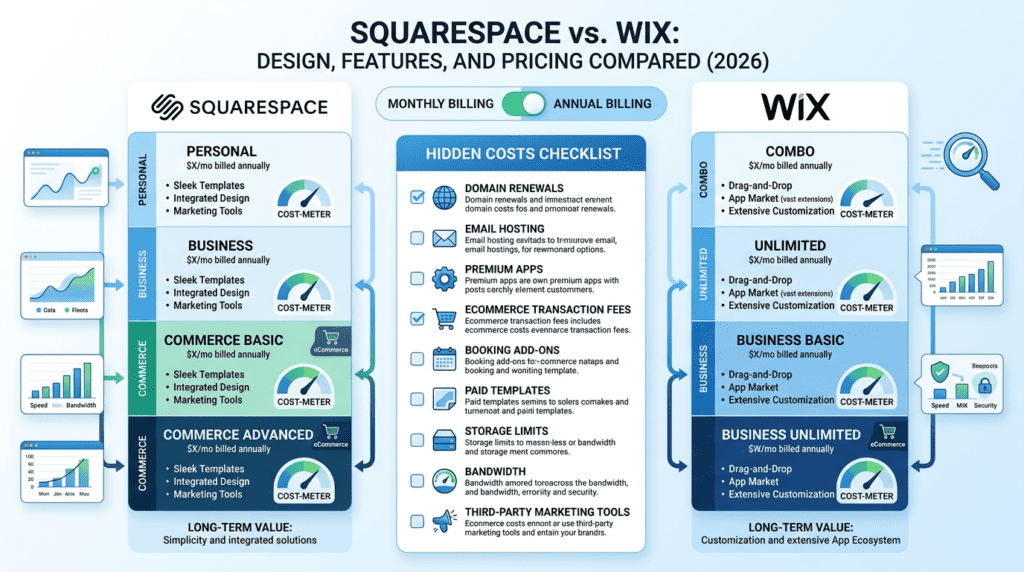
Squarespace pricing is usually easier to understand because the plan structure stays relatively clean. In general, Squarespace plans include a personal site option, business plans, and ecommerce plans. The exact names and prices can change over time, so it’s smart to check current pricing before buying.
A key point with Squarespace is that plan choice affects more than just features. It can also affect whether you pay transaction fees and what ecommerce tools you get access to. That matters if you’re planning to sell products or services from the start.
Annual billing usually lowers the monthly cost compared to paying month to month, which is true for most website builders. If you know you’ll keep the site for at least a year, annual billing often makes more sense financially. But if you’re still testing a business idea, monthly billing may be safer even if the monthly rate is higher.
Wix Pricing Explained
Wix pricing is more layered. It offers multiple tiers, and the total cost can rise depending on which business features, apps, or add-ons you need. Wix also has a broader spread between basic website use and business/ecommerce use, so the plan you need depends heavily on what you’re building.
One thing many first-time buyers miss is that the base plan may not be the full cost. If you rely on premium apps, scheduling tools, or advanced business features, the real monthly spend can go beyond the plan price. That’s not necessarily a problem, but it does change the value conversation.
Another practical issue is storage and bandwidth. As your site grows, media-heavy pages, more blog posts, and extra apps can push you into higher tiers sooner than expected. That’s especially important for agencies, stores, and content-heavy brands.
Hidden Costs Buyers Should Watch For
The sticker price is rarely the whole story. With both platforms, buyers should check for the following:
- Domain renewal costs
- Email hosting costs
- Premium apps
- Ecommerce transaction fees
- Booking or scheduling add-ons
- Paid templates or design help
- Third-party marketing tools
Some of these costs are obvious, but others show up later. For example, a site may launch fine with a basic plan, then need an email service, extra booking tools, or a premium app once traffic and lead volume increase. That’s when monthly costs can rise in a way that surprises new site owners.
Wix users are especially likely to face this if they keep adding features one by one. Squarespace users are more likely to feel the need for outside tools when they want capabilities that sit outside the core platform.
Which Platform Offers Better Value For Money?
This depends on what “value” means for your project.
If you want a simple website with a polished look and limited complexity, Squarespace often feels like the cleaner value because you spend less time managing the site. That matters if your time is more valuable than technical flexibility.
If you need a more feature-heavy small business site, Wix can deliver more tools and customization. But the value only stays strong if you actually use those tools. Paying for features you don’t need is a common mistake, especially for users who are still early in their business.
A practical way to think about it:
- Simple website: Squarespace may offer better day-to-day value
- Feature-heavy small business site: Wix may offer better functional value
- Ecommerce store: depends on complexity, product count, and add-on needs
- Creator portfolio: Squarespace often feels like the better design value
The long-term cost question is just as important as the starting price. A cheaper plan that forces upgrades later can become more expensive than a higher plan that already fits your needs.
—
Wix vs Squarespace Performance, SEO, And Reliability
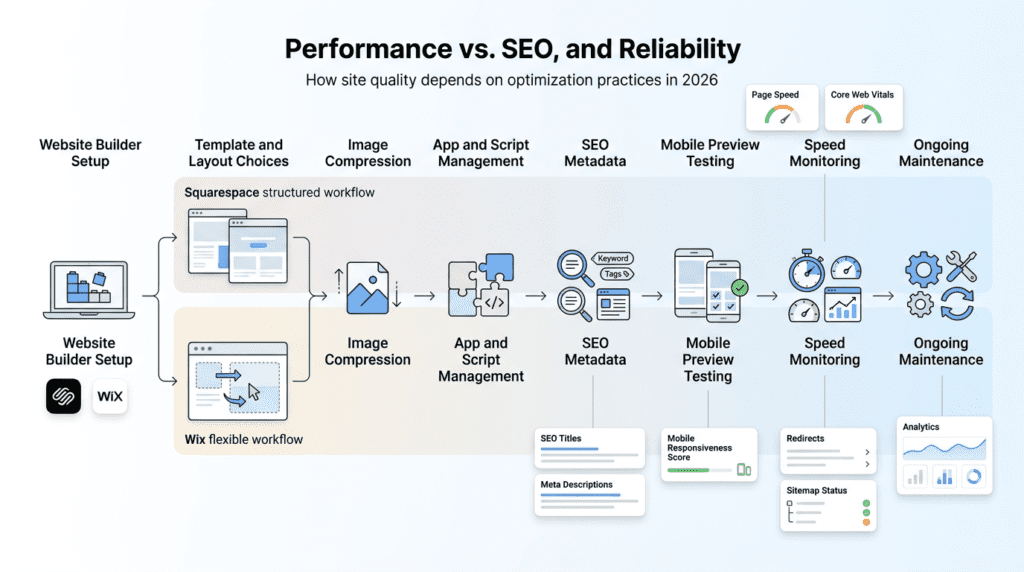
Website Speed And Performance Considerations
Performance is often shaped less by the platform itself and more by how the site is built inside it.
Both platforms can produce fast sites, but speed is affected by image size, animations, page length, app usage, and how much third-party code you add. Wix users are more likely to slow a site down by stacking on extra functionality. Squarespace users are more likely to create heavier pages through large visuals and dense sections.
That difference matters because speed affects both user experience and conversion. If your homepage takes too long to load, visitors may leave before they ever read your offer. For ecommerce stores, that can hit sales directly. For service businesses, it can lower form submissions.
What most marketing pages ignore is that site speed problems often appear after launch, not before. A site can feel fine when it has five pages and a few images. Then it gets slower as you add blog content, widgets, video embeds, or extra tracking scripts.
SEO Features Compared
Both platforms cover the basics needed for practical SEO work. You can usually manage:
- Custom titles and meta descriptions
- URL editing
- Image alt text
- Redirects
- Structured data basics
- Blogging SEO
- Sitemap and indexing controls
The bigger difference is how easily you can keep the site organized while doing that work. Squarespace tends to feel more streamlined for content presentation, which can help bloggers and brand sites stay consistent. Wix can give you more control in certain areas, but that flexibility can make SEO management feel more hands-on.
The hidden misconception is that SEO comes mainly from the builder. In reality, the site structure, content quality, internal linking, and publishing consistency matter more. A well-organized Squarespace site can outperform a messy Wix site, and a carefully built Wix site can perform just as well or better than a Squarespace site. The builder helps, but it doesn’t replace good site strategy.
Mobile Performance And Responsive Design
Mobile behavior is one of the most overlooked parts of the Wix vs Squarespace decision.
Squarespace generally handles responsive design in a more structured way. That means users are less likely to break layouts on mobile, even if they don’t do much manual adjustment. For business owners who want less maintenance, that’s a meaningful advantage.
Wix gives you more control over the mobile view, which can be helpful if a desktop layout needs special treatment. But that control comes with more responsibility. If you adjust one version of the site and forget the other, the mobile experience can drift out of sync.
This becomes especially important for users who depend on mobile traffic, such as:
- Local businesses
- Restaurants
- Service providers
- Social media creators
- Affiliate marketers running paid traffic
If most of your visitors are on phones, mobile consistency matters more than desktop design freedom.
Reliability And Maintenance
Since both are fully hosted website builders, a lot of the maintenance work is handled for you. That includes hosting, SSL, platform updates, and basic security management. For many small business owners, that’s the real appeal. You don’t have to deal with separate hosting dashboards or manual updates like you would with WordPress.
The trade-off is less control. You get convenience, but not the same level of backend flexibility you’d have on a self-hosted system. That’s fine for most users, but it matters if you expect to build a very custom stack later.
The main reliability question isn’t whether the platforms can keep a site online. It’s how easy they make it to keep the site stable as it grows. Squarespace usually wins on simplicity. Wix usually wins on flexibility. The better fit depends on whether you value fewer decisions or more control as your site becomes more complex.
Squarespace vs Wix Integrations, Apps, And Marketing Tools
Wix Has The Larger App Marketplace
Wix gives you more room to expand when your site starts doing real business work. Its app marketplace is much larger than Squarespace’s, so you can add tools for bookings, live chat, forms, reviews, events, loyalty programs, memberships, and niche ecommerce needs without rebuilding your whole site.
That matters most when your website is no longer just a brochure. A local salon may want online booking, reminders, and review tools. A small ecommerce brand may want upsells, preorder tools, or shipping helpers. An agency may want client intake forms and lead capture. Wix usually has more options for those situations.
The trade-off is that a bigger app ecosystem can also create clutter. Beginners often install too many apps too early, then wonder why the site feels slower or harder to manage. Some apps also come with separate fees, which makes the true cost higher than the base plan suggests.
For users who want flexibility now and more room to grow later, Wix is usually the stronger fit. For users who prefer a simpler stack, that extra choice can become a distraction.
Squarespace Integrations Are More Curated
Squarespace takes a tighter approach. Instead of trying to support every possible business workflow, it focuses on a smaller set of integrations that cover the most common needs well. That usually includes email marketing, scheduling, commerce, analytics, social media, and payment tools.
This curated setup is one reason many users find Squarespace easier to keep organized over time. There’s less temptation to patch together five different tools for one job. If you want a website that looks polished and doesn’t require constant plugin management, that can be a real advantage.
But the smaller ecosystem also means you hit limits sooner. If your business needs a very specific booking flow, advanced CRM handoff, or a specialized ecommerce tool, Squarespace may feel restrictive. The platform is solid for standard use cases, but less adaptable when your workflow gets unusual.
In practice, Squarespace works best when your marketing stack is fairly simple. If you know you only need the basics, the cleaner setup can be a strength. If you expect to bolt on lots of third-party tools later, Wix usually gives you more breathing room.
Marketing Tools For Small Business Owners
For small business owners, the real question isn’t “Which platform has more features?” It’s “Which platform helps me get leads and sales without making my workflow messy?”
Wix usually wins on sheer marketing flexibility. You can add pop-ups, lead forms, booking widgets, CRM-style tools, coupons, event features, and more through built-in tools and apps. That makes it attractive for businesses that rely on appointments, follow-up emails, or recurring customer contact.
Squarespace offers many of the same core ideas, but in a more controlled way. Its email marketing, scheduling, and commerce tools are often enough for creators, consultants, and service businesses that don’t need a deep automation stack. It’s easier to keep the site looking consistent because the marketing tools are designed to fit the layout system.
Here’s the practical difference:
- Choose Wix if your marketing depends on multiple tools working together.
- Choose Squarespace if you want simpler marketing with less setup overhead.
- Choose Wix if you expect to test lots of lead capture ideas.
- Choose Squarespace if you’d rather keep one or two strong conversion paths.
A common mistake is overestimating automation. Many buyers think they need a big marketing system right away, when what they really need is a good contact form, a clear offer, and reliable email follow-up. If that’s your situation, Squarespace may be enough. If you’re building a more active funnel, Wix gives you more options.
When Integrations Become A Limitation
Both platforms can feel limited once your business becomes more complex.
You may outgrow Squarespace if:
- you need a large app stack
- you rely on advanced automations
- you want deeper ecommerce workflows
- you need a very custom CRM or booking process
You may outgrow Wix if:
- you want cleaner long-term design control
- you prefer a simpler website maintenance routine
- app sprawl starts creating performance or workflow issues
- you need a more structured content system
At a certain point, the right answer may not be Squarespace or Wix at all. Shopify makes more sense for serious ecommerce. WordPress gives you more control if you’re willing to manage the complexity. Webflow can be a better fit for advanced design work. And if your business depends heavily on sales pipelines, a dedicated CRM may be more useful than website-native tools.
The key is to think ahead. If your website will stay small and focused, either platform can work. If you already know your business model is getting more layered, choose the one that gives you the cleanest path for the next 12 to 24 months, not just the first week.
Squarespace vs Wix Customer Support And Learning Curve
Support Channels Compared
Both platforms offer enough support for most non-technical users, but they don’t feel the same in practice.
Wix usually has a broader support footprint because it serves such a wide range of users and feature types. That can be helpful when you’re troubleshooting something specific, especially if the issue comes from one of its many apps or business tools. Squarespace, by contrast, tends to have a more streamlined support experience because the system is more controlled.
For beginners, the important question is not just whether support exists. It’s whether the answer is easy to find without digging through five layers of documentation.
In general:
- Wix has more moving parts, so the help center can feel more sprawling.
- Squarespace has fewer variables, so many issues are easier to isolate.
- Wix often gives you more to learn, but also more community examples online.
- Squarespace usually feels cleaner, but some users hit walls faster when they need something outside the standard setup.
If you’re the kind of user who likes to figure things out through tutorials and examples, Wix can feel very manageable. If you prefer a tighter system with fewer choices, Squarespace may be less stressful.
Which Platform Is Easier To Troubleshoot?
Squarespace is usually easier to troubleshoot because the platform is more structured. When something looks off, there are fewer places the issue could be coming from. That matters a lot for non-technical users who don’t want to debug a website like it’s a software project.
Wix can be easy to use, but it also creates more opportunities for confusion. The flexible editor is great until a page starts behaving differently on desktop and mobile, or an app conflicts with another tool. At that point, flexibility becomes a trade-off.
The difference shows up most clearly when something breaks:
- Squarespace problems are often simpler to trace.
- Wix problems can involve layout settings, app behavior, mobile edits, or third-party integrations.
- Both can be managed, but Wix may require more patience as the site grows.
This doesn’t mean Wix is worse. It just means the upside of freedom comes with more troubleshooting responsibility. Beginners often underestimate that part.
Support For Ecommerce And Business-Critical Websites
If your website makes money directly, support quality matters more than it does for a hobby site. A store with 20 products, an appointment-based business, or a service provider running paid leads can’t afford long delays when checkout, booking, or contact forms stop working.
That’s where you should think beyond features and look at operational risk.
Squarespace may be a better fit if:
- you want fewer things to maintain
- your site structure is simple
- you value predictability over customization
Wix may be a better fit if:
- your business needs more tools
- you expect to grow into bookings, forms, or ecommerce features
- you’re comfortable managing a more layered system
Neither platform replaces the need for good business processes. If your store depends on fast issue resolution, clear documentation and responsive support matter more than a fancy template. The same goes for service businesses that can lose leads from a broken form or a failed booking flow.
Learning Curve Over The First 90 Days
The first 90 days usually matter more than most buyers expect. That’s when the real experience starts showing up.
Week 1 is about setup. Most users are choosing a template, connecting a domain, editing basic pages, and getting comfortable with the editor. Wix can feel more open-ended here, which is exciting for some users and overwhelming for others. Squarespace tends to feel more guided, which helps people publish faster with fewer design mistakes.
By month 1, the focus usually shifts to content. You’re adding blog posts, service pages, product pages, forms, and maybe an email capture tool. This is where Squarespace’s structure can feel efficient, especially for users who just want to write and publish. Wix users often spend more time adjusting layouts, but they also have more room to tailor the experience.
By month 2 or 3, the real work starts:
- improving SEO basics
- checking analytics
- testing conversion points
- refining mobile layouts
- connecting extra tools
This is the point where the platform choice starts to matter more. If you like control and want to keep adjusting, Wix can stay useful longer. If you want the site to settle into a clean, manageable system, Squarespace may feel easier to live with.
For many buyers, the best platform is the one that keeps them publishing instead of endlessly tweaking. That’s a real consideration, not a small one.
Real-World Use Cases: Who Should Choose Squarespace Or Wix?
Best For Small Business Websites
For local service businesses, the right choice depends on what the website needs to do on day one.
Choose Wix if your business depends on bookings, quote requests, service pages, or flexible lead capture. It’s often the better pick for salons, fitness studios, contractors, and consultants who want to add tools as they grow. The app ecosystem and business features give you more ways to shape the site around operations.
Choose Squarespace if the business is more brand-driven and presentation matters most. Restaurants, boutiques, premium service brands, and creative professionals often benefit from the cleaner look. A polished site can build trust fast, especially when customers are comparing you with competitors.
The hidden issue is maintenance. A busy small business owner usually doesn’t want to manage a complicated website. If your team is small, a simpler system may save time even if it gives up some flexibility. That’s why Squarespace can feel better for some owners, while Wix wins for others who need more moving parts.
Best For Bloggers, Creators, And Personal Brands
For content-led brands, Squarespace often has the edge in presentation. Blog posts, portfolio pages, and visual storytelling tend to look more refined out of the box. That matters when your site is part of your brand identity, not just a publishing tool.
Wix is still a strong option if your brand needs more flexibility. Creators who want landing pages, lead magnets, course pages, or multiple content formats may appreciate the broader toolset. If your audience-building strategy includes lots of experiments, Wix gives you more room to test.
A lot of creators overfocus on the template and underfocus on the workflow. What matters long term is how easy it is to publish regularly, update offers, and collect email subscribers. Squarespace is often calmer for that. Wix is stronger if you want more custom paths and more promotional tools.
If your brand is visual and your content is relatively simple, Squarespace is usually the smoother fit. If your creator business is turning into a small media engine, Wix can be more adaptable.
Best For Ecommerce Stores
For ecommerce, the better choice depends on how complex the store is.
Squarespace works well for small product catalogs, digital products, and businesses that care about design consistency. It’s a good fit for makers, artists, and brands that want a beautiful storefront without a lot of technical setup. The checkout and store tools cover the essentials, but they’re not built for every advanced retail workflow.
Wix is usually stronger for stores that need more flexibility. It can support more app-driven features, more business tools, and more ways to customize the shopping experience. That can be valuable if you sell services alongside products, offer appointments, or want to experiment with different conversion tools.
Still, ecommerce buyers should be realistic. Neither platform is a substitute for Shopify if your store is becoming a serious sales operation. If you’re comparing Squarespace Vs Wix for a small catalog, either can work. If you’re scaling inventory, promotions, or fulfillment complexity, you may want to look elsewhere.
Here’s the practical rule:
- Choose Squarespace for small, polished product lines.
- Choose Wix for more flexible, service-linked, or app-heavy stores.
- Consider Shopify once ecommerce becomes the core of the business.
Best For Agencies And Freelancers Building Client Sites
Agencies and freelancers care about two things: how fast they can build, and how easy the client can manage the site later.
Squarespace is often the better choice when clients want a polished result with minimal upkeep. Its structure reduces the chance that a client will accidentally break the layout. That’s useful if you hand off sites to non-technical business owners who just need to update text, images, or blog posts.
Wix can be more attractive when the client needs custom workflows or when you want more control during the build. The flexible editor lets you create more tailored pages, which can be useful for lead generation sites or businesses with unusual layouts.
The challenge with Wix is handoff. Clients sometimes get lost in the freedom. If they’re not confident, they can easily make changes that hurt consistency. That means agencies may need to spend more time training users or creating clearer maintenance instructions.
In short:
- Squarespace is often better for simple client handoff.
- Wix is better for customized client projects.
- The best choice depends on how much support the client will need after launch.
Best For Beginners With No Website Experience
Beginners usually think they want the easiest editor. What they actually need is the least confusing path to a finished site.
Wix can feel easier at first because the drag-and-drop editing is so direct. You can move things around, test layouts, and see changes immediately. That builds confidence fast. But the same freedom can also lead to decision fatigue. Beginners often spend too much time adjusting spacing, fonts, and page structure instead of publishing content.
Squarespace gives beginners more guardrails. That can be a huge advantage if they don’t want to make design decisions every five minutes. The downside is that some users feel boxed in when they want to move something a little differently.
For first-time users, the better choice depends on personality:
- Choose Wix if you want hands-on control and don’t mind experimenting.
- Choose Squarespace if you want fewer decisions and a more guided process.
If someone has never built a website before, I’d usually suggest asking one question: do you want to design, or do you want to publish? If the answer is “publish,” Squarespace often gets you there faster. If the answer is “design,” Wix gives you more room.
Squarespace vs Wix Pros And Cons: The Honest Trade-Offs
Squarespace Pros And Cons
Squarespace does a lot right for users who care about presentation.
What it does well:
- Strong template design
- Clean visual consistency
- Good fit for portfolios and brand-led sites
- Less cluttered editing experience
- Easier to keep the site looking polished over time
Where it falls short:
- Less layout freedom than Wix
- Smaller app ecosystem
- Some advanced workflows feel limited
- Not ideal for highly unusual business setups
The biggest strength is that Squarespace helps users avoid messy design choices. That sounds simple, but it matters a lot for real businesses. A site that looks coherent often performs better than one with more features but weaker presentation.
The main drawback is that you can hit the edges of the system sooner than expected. If your business grows into more complex marketing or ecommerce needs, you may feel boxed in.
Wix Pros And Cons
Wix is built for flexibility, and that shows up everywhere.
What it does well:
- Flexible drag-and-drop editing
- Broad feature set
- Larger app marketplace
- Strong tools for small business websites
- More room for custom page layouts and workflows
Where it falls short:
- Design can become inconsistent
- Feature overload can confuse beginners
- App costs can add up
- More setup decisions can slow you down
- Troubleshooting can be harder as the site grows
Wix is often the stronger choice for users who want to shape the site around the business, not the other way around. That’s valuable. But flexibility has a cost. The more options you have, the easier it is to create a site that feels busy, uneven, or hard to maintain.
Many buyers love Wix at the start and then get frustrated later when the site becomes harder to manage. That’s not a flaw for everyone, but it’s a real pattern worth noting.
What Most Buyers Miss Before Choosing
Most people compare templates, price, and a few headline features. That’s not enough.
The real decision comes down to how you’ll use the site six months from now.
Think about:
- how often you’ll update pages
- whether you’ll need more tools later
- how much design control you really want
- whether you’ll manage the site yourself or hand it off
- how important consistency is versus flexibility
- whether you expect to scale into ecommerce, bookings, or marketing automation
That’s where Squarespace and Wix separate. Squarespace is often the better choice if you want a clean, stable website that stays manageable. Wix is often the better choice if you want more room to build, test, and expand.
So the better platform is not the one with the most features on paper. It’s the one that fits your actual workflow and still makes sense after the launch excitement wears off.
Decision Guide: How To Choose Between Squarespace And Wix
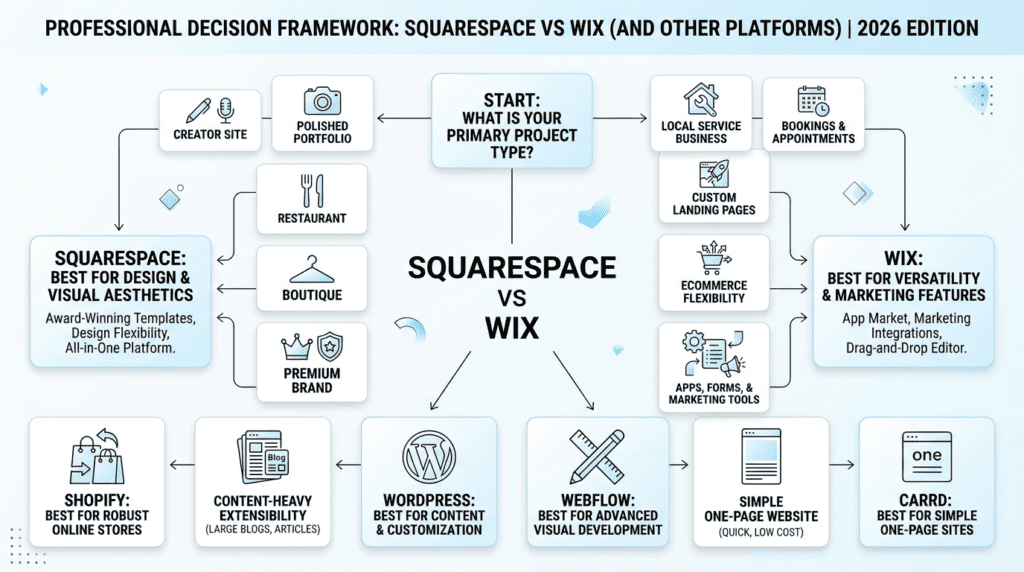
Choose Squarespace If…
Choose Squarespace if you want a polished site fast and you do not want to spend much time making layout decisions.
It is the stronger pick when:
- You want a visually polished site quickly
- You care about design consistency
- You are building a portfolio, creator site, restaurant site, or premium service brand
- You prefer fewer customization decisions
- You want a clean all-in-one website experience
In practice, Squarespace fits people who value a controlled, professional look more than endless flexibility.
Choose Wix If…
Choose Wix if you want more freedom to shape the site around your business needs.
It is the better fit when:
- You want more layout control
- You need bookings, apps, chat, forms, or niche business tools
- You are building a local small business website
- You want more flexibility without using WordPress
- You prefer drag-and-drop customization
Wix makes more sense when the website needs to do more than look good, especially if you expect to add features over time.
When Neither Squarespace Nor Wix Is The Best Choice
Neither platform is ideal for every project.
Consider other options if your needs are more specialized:
- Shopify for serious ecommerce
- WordPress for content-heavy or highly extensible sites
- Webflow for advanced design control
- Carrd for simple one-page websites
If your site has a very specific technical or scaling requirement, it is better to choose the platform built for that job instead of forcing it into a general website builder.
Long-Term Considerations Before You Commit
Before choosing, think beyond launch day.
Key questions to ask:
- Platform lock-in: How hard will it be to leave later?
- Redesign difficulty: Will you need a major rebuild to change direction?
- Content migration: How much content would you need to move manually?
- App dependency: Will your site rely on third-party tools to function well?
- Pricing changes: Can your budget handle plan upgrades over time?
- SEO growth: Will the platform support your content strategy as it expands?
- Ecommerce scalability: Will it still fit if product volume or sales complexity grows?
- Team maintenance: Can the people running the site manage it comfortably?
The best choice is usually the one your team can sustain without creating extra work later.
Final Recommendation: Is Squarespace Or Wix Better In 2026?
Overall Winner Depends On Your Priority
The simple answer is that Squarespace wins for polish and simplicity, while Wix wins for flexibility and business features.
If your top priority is a website that looks refined with minimal effort, Squarespace is the better match. If you want more control, more tools, and more room to adapt, Wix is stronger.
Best Choice For Most Design-Focused Users
Squarespace is the safer choice for users who want a clean, modern, professional-looking website without managing too many moving parts.
It is especially appealing if you want the site to feel cohesive from day one and you do not want to constantly adjust layouts, plugins, or extra settings.
Best Choice For Most Feature-Focused Users
Wix is the better choice for users who need more business tools, customization, integrations, bookings, or app-based flexibility.
If your website needs to support ongoing growth and you expect to add functionality later, Wix gives you more room to build without switching platforms immediately.
Final Buying Advice
Choose the platform based on the website you will need 12 to 24 months from now, not just the one that looks best today.
If your future site will stay simple and brand-led, go with Squarespace. If it will become more functional, interactive, or operational, choose Wix.
FAQs About Squarespace vs Wix
Is Squarespace Better Than Wix?
Squarespace is better for design consistency and polished websites, while Wix is better for customization and broader features.
Is Wix Cheaper Than Squarespace?
Not always. Entry pricing can look similar, but the total cost depends on your plan, apps, ecommerce needs, domain, email, and renewal pricing.
Which Is Easier To Use, Squarespace Or Wix?
Wix is usually easier if you want drag-and-drop control, while Squarespace is easier if you prefer structured editing.
Which Is Better For Small Business Websites?
Wix is often better for small businesses that need bookings, service tools, apps, and marketing features. Squarespace is better for brand-led businesses that prioritize presentation.
Which Is Better For Ecommerce, Squarespace Or Wix?
Wix is usually more flexible for small ecommerce stores, while Squarespace works well for visually driven stores with simpler needs. Larger stores may need Shopify.
Can You Switch From Wix To Squarespace Or Squarespace To Wix?
Yes, but not automatically. You may need to rebuild pages, migrate content manually, reconnect domains, and reconfigure SEO settings.
Which Platform Has Better SEO?
Both offer the core SEO tools you need. The better outcome depends more on content quality, site structure, speed, mobile experience, and ongoing optimization.
Does Squarespace Or Wix Perform Better On Mobile?
Squarespace tends to preserve mobile design consistency, while Wix gives more mobile editing control but requires more manual checking.
Which Website Builder Is Better For Long-Term Growth?
Wix may offer more feature flexibility for growing small businesses, while Squarespace may be better for maintaining a polished brand presence with less complexity.