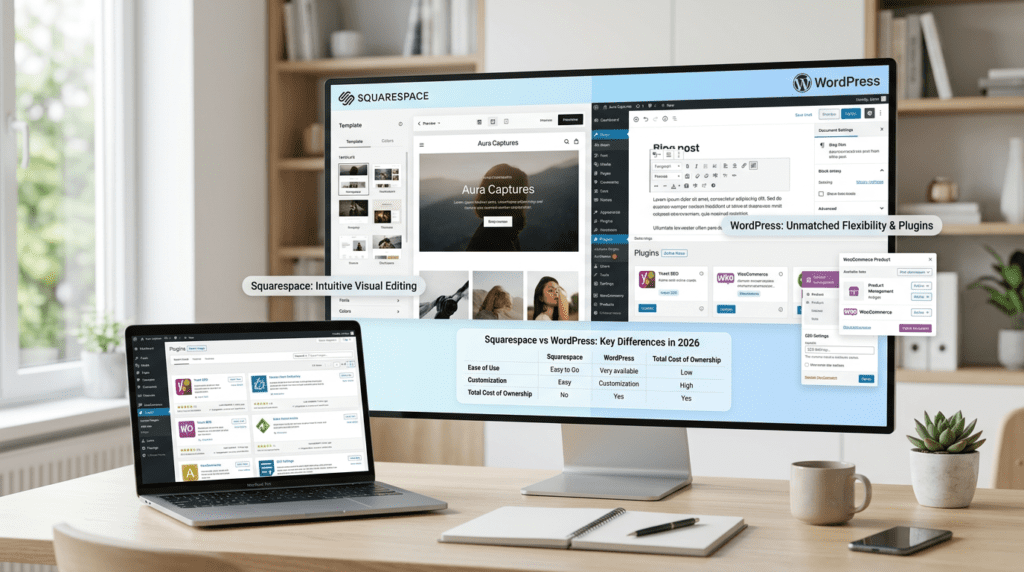
A lot of people hit the same wall when they need a new site: they want something that looks good, works reliably, and doesn’t turn into a tech headache six months later. That’s where the Squarespace Vs WordPress decision gets real. Both can power a business website, but they’re built for very different kinds of users and growth plans.
This comparison is for small business owners, creators, bloggers, ecommerce sellers, and growing brands that are trying to figure out which platform makes the most sense in 2026. The real question isn’t just which one is easier to launch. It’s which one gives you the right mix of ease of use, flexibility, pricing, features, performance, customer support, integrations, and long-term value for money.
Quick Verdict: Squarespace vs WordPress in 2026
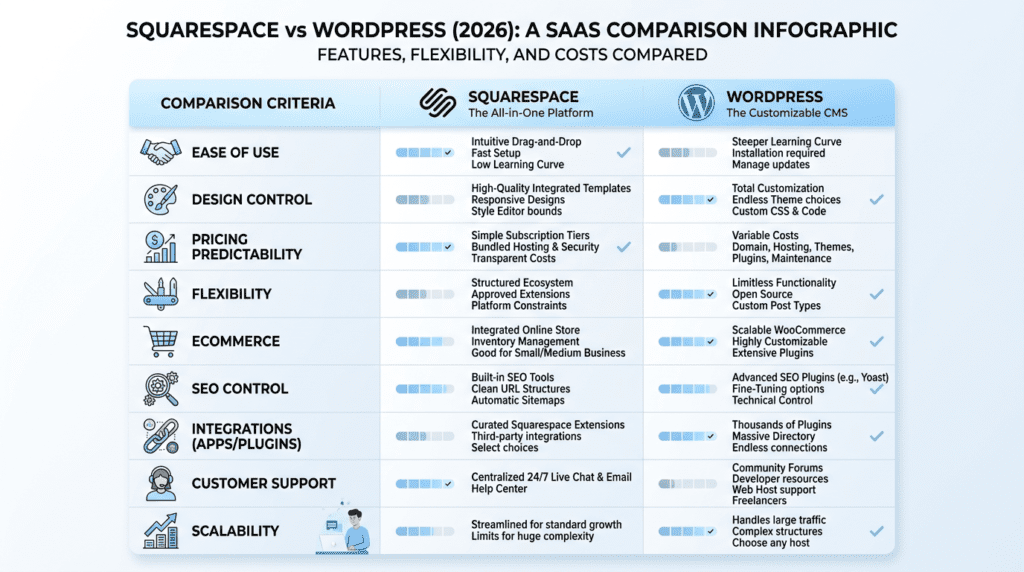
Squarespace and WordPress both make it possible to build a professional site, but they solve the problem in different ways. Squarespace is more like an all-in-one website builder. WordPress is more like a foundation you can shape into almost anything, as long as you’re willing to handle more setup and upkeep. That difference matters a lot once your site starts growing.
| Comparison Factor | Squarespace | WordPress | Better Choice |
|---|---|---|---|
| Ease of use | Very beginner-friendly | More learning curve | Squarespace |
| Design control | Polished templates | Highly customizable | WordPress |
| Pricing predictability | Simple monthly pricing | Variable costs | Squarespace |
| Flexibility | Limited but streamlined | Extremely flexible | WordPress |
| Advanced features | Built-in but capped | Plugin and developer ecosystem | WordPress |
| Ecommerce | Good for simple stores | Better for scalable stores | WordPress |
| Customer support | Direct platform support | Depends on host, theme, plugins | Squarespace |
| Integrations | Curated integrations | Huge integration library | WordPress |
| Long-term scalability | Best for simple-to-medium sites | Best for complex growth | WordPress |
Best For
Squarespace is best for users who want a user-friendly, all-in-one website builder with attractive templates and minimal setup. It works especially well for service businesses, portfolios, personal brands, and small shops that want to launch fast without managing hosting or plugin updates.
WordPress is best for users who want maximum flexibility, deeper SEO control, and more room to grow. If you’re planning a content-heavy blog, a larger online store, or a site that may need custom features later, WordPress usually gives you more room to build.
Not Ideal For
Squarespace is not ideal for highly customized websites, large content libraries, or advanced ecommerce setups. It can handle the basics well, but you can feel the limits once your workflow gets more complex.
WordPress is not ideal for users who want everything handled for them with no maintenance. You’ll need to think about hosting, updates, backups, and security, even if a managed WordPress host makes that easier.
Bottom Line
Choose Squarespace if you want a polished website quickly with fewer moving parts. Choose WordPress if you want more control, stronger growth potential, and the ability to customize almost every part of your site. For many readers, the better option comes down to how much time you want to spend managing the site after launch.
Squarespace vs WordPress Pricing: Upfront Costs, Hidden Costs, and Value for Money
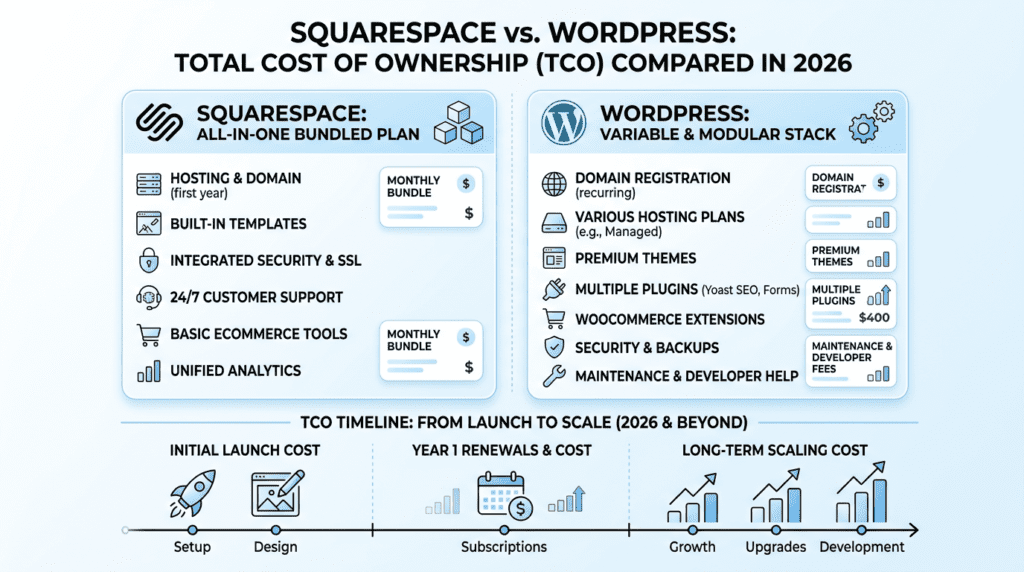
Pricing is one of the biggest reasons people compare Squarespace and WordPress in the first place. On paper, both can seem reasonable. In practice, the total cost depends on how much control you want, how much support you need, and how many extras your site will eventually require. That’s why the cheapest path at the start is not always the least expensive path over time.
Squarespace Pricing Is More Predictable
Squarespace uses a bundled pricing model, which is a big reason beginners like it. Hosting, templates, security, core site tools, and support are included in the monthly fee, so you’re not piecing together separate services just to keep the site online. That makes it easier to plan cash flow for a small business or solo operation.
For a lot of people, that predictability is the main value. If you run a local business, coaching practice, freelance brand, or simple online store, you may care less about squeezing every dollar and more about knowing the bill won’t surprise you. Squarespace also removes a lot of the maintenance decisions that can slow people down when they’re just trying to get a site live.
The trade-off is that this simplicity comes with boundaries. You’re paying for convenience, but you’re also accepting a more closed system. That’s fine if your needs stay straightforward. It becomes frustrating if you later want deeper customization or more advanced functionality without moving platforms.
WordPress Pricing Depends on Your Setup
WordPress pricing is less predictable because WordPress itself is free, but the rest of the stack is not. You’ll still need domain registration, WordPress hosting, possibly a premium theme, and sometimes paid plugins for seo, forms, backups, security, ecommerce, or design features. If you use managed WordPress hosting, your monthly cost may be easier to track, but it still depends on the plan you choose.
A basic WordPress site can start lean if you keep things simple. That’s one reason some users think WordPress is automatically cheaper. But once you add premium plugins, better hosting, or developer help, the real cost can climb faster than expected. Many WordPress users don’t notice this at first because each purchase feels small. The total adds up as the site grows.
This is where WordPress can be a better deal for some people and a worse deal for others. If you need a lot of control, the extra cost can be worth it. If you just want a clean business website and don’t want to manage moving parts, the savings may not be there in practice.
Renewal Pricing and Long-Term Cost Differences
The biggest pricing mistake is comparing first-year cost only. That’s where Squarespace vs WordPress gets misleading. A WordPress site may look cheaper at launch, especially if you start with low-cost hosting and a few free plugins. But renewal pricing, premium plugin renewals, and upgrades can change the math quickly.
With Squarespace, the pricing structure is usually easier to forecast from year to year. You’re less likely to run into a surprise when a plugin renewal or hosting jump hits. That doesn’t mean it’s always the lowest-cost choice, but it does mean the total is easier to manage.
With WordPress, long-term cost depends on how serious your site becomes. A simple brochure site may stay fairly lean. A growing blog, membership site, or ecommerce store can push you into premium tools, managed hosting, and more support. At that point, the value isn’t just about cost. It’s about whether the extra flexibility helps you earn more, save time, or avoid a platform migration later.
If you’re trying to decide based on pricing alone, think in terms of total ownership, not just the first invoice. Squarespace offers more cost predictability. WordPress gives you more control, but the long-term bill depends on how far you take it.
Squarespace vs WordPress Ease of Use: Which Platform Is More User-Friendly?
Squarespace Is Easier for Beginners
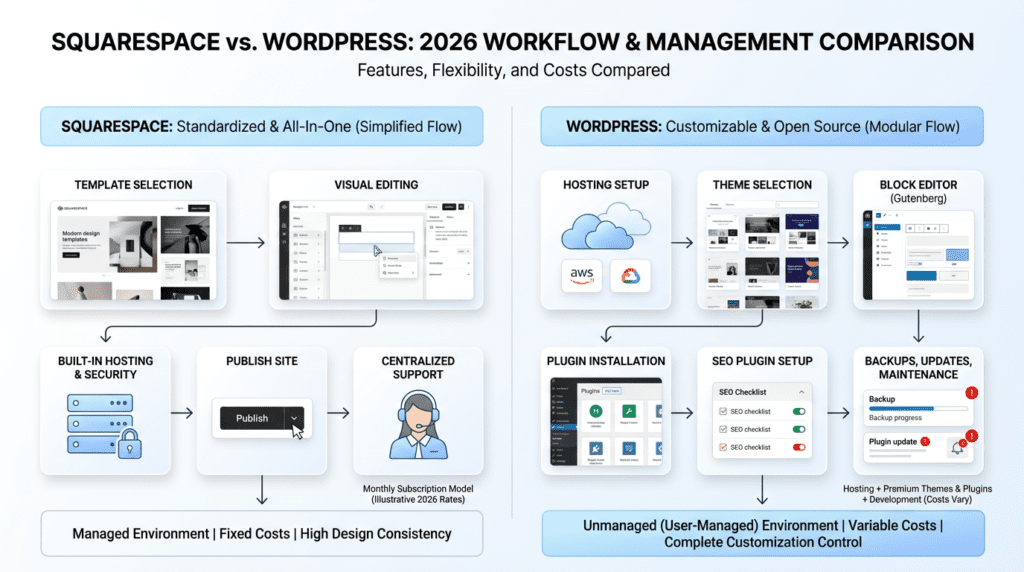
Squarespace is built for people who want to get a site live without a lot of setup. The onboarding is guided, the editor is visual, and most of the hard choices are already made for you. That matters if you’re not technical or you just don’t want to spend a weekend comparing hosting plans, themes, and plugin options.
For a local service business, this can be a real advantage. A plumber, photographer, or consultant can usually build a five-page site in a weekend: home, about, services, contact, and maybe a blog or gallery. You pick a template, swap in your copy and images, and make a few style edits. There’s less room to break things, and that’s often what beginners need most.
What people sometimes underestimate is how much mental energy this saves. With Squarespace, you’re not constantly asking, “Which plugin do I need?” or “Why did this update change my layout?” The trade-off is that you give up some customization, but for many first-time site owners, that’s a good trade.
WordPress Has a Steeper Learning Curve
WordPress is manageable, but it asks more from you up front. You need to think about hosting, theme selection, plugin installation, updates, backups, and security. Even with a managed WordPress host, there are more moving parts than with Squarespace.
The block editor is easier than it used to be, and many users adapt quickly. Still, WordPress has more decisions at every step. Beginners often get stuck not because WordPress is hard in one single way, but because there are so many small choices. That’s where the learning curve comes from.
It’s also important to separate “hard to use” from “more to manage.” WordPress can be easy once it’s set up, especially for content-heavy sites. But setup and maintenance are where many users feel the friction. If you’re the kind of person who likes control and doesn’t mind learning a system, that trade-off may be worth it.
Everyday Website Management Differences
Day-to-day, the experience feels different in a few small but important ways.
On Squarespace, common tasks usually feel more unified:
- Publish a blog post in the same environment where you edit pages
- Move images around without worrying much about file paths or plugins
- Update menus, fonts, and colors from one design area
- Fix layout issues with fewer technical surprises
On WordPress, the workflow can be more powerful, but also more fragmented:
- You may edit content in one place, manage design in another, and handle SEO in a separate plugin
- Adding a feature often means testing compatibility
- A plugin update can sometimes create a conflict or change how a page behaves
- Troubleshooting may involve your host, theme provider, or plugin developer
For a solo creator, that difference becomes noticeable over time. Squarespace often feels calmer. WordPress often feels more capable. If you publish often, run multiple pages, or rely on several tools, WordPress can become the better long-term system. But if you just want to keep a site updated without a lot of maintenance, Squarespace usually feels easier to live with.
Squarespace vs WordPress Features: Built-In Simplicity vs Advanced Features
Squarespace Features Are Streamlined and Built In
Squarespace includes a lot of the basics in one place, which is part of why it appeals to smaller teams. You get templates, blogging tools, portfolio layouts, basic ecommerce, analytics, simple SEO settings, scheduling features, member areas, and email marketing tools depending on the plan and current offering. The point is not to overwhelm you with options. It’s to give you enough to launch a professional site without assembling a stack of separate tools.
That streamlined setup is useful for people who want a clean workflow. A freelancer can run a portfolio, a contact form, and a simple blog without touching extra software. A small business can sell a few products, collect leads, and manage content from one dashboard. In practice, that saves time.
The downside is that Squarespace’s features are designed to stay within a certain lane. They work well for standard use cases, but they’re not meant to replace a deeply customized system. A lot of users don’t notice this at first because the built-in tools feel complete enough. The limits usually show up later, when a business wants more complex automation, unusual data structures, or tighter control over how content is organized.
WordPress Offers More Advanced Features Through Plugins
WordPress stands out because it can grow into almost anything with the right plugins and setup. Need stronger SEO tools? There are plugins for that. Want a full online store? You can use ecommerce plugins. Need memberships, online courses, directories, multilingual pages, custom post types, lead generation forms, or automation? WordPress has options for all of it.
That breadth is a big reason many growing businesses use WordPress. A site can start simple and become more specialized without switching platforms. A course creator might add a learning system later. An agency might create custom service pages and dynamic case studies. An ecommerce brand might layer in subscriptions, bundles, or advanced product filtering. WordPress makes those paths possible.
Of course, more features usually mean more decisions. Beginners often overestimate how easy it is to add advanced functions just because a plugin exists. In reality, one plugin may solve a problem while creating another, especially if you install several that overlap. The platform is flexible, but that flexibility comes with responsibility.
Feature Limitations That Matter Over Time
This is where the difference becomes practical rather than theoretical.
Squarespace tends to hit limits in two main areas:
- Customization beyond its built-in design system
- Integrations that need deeper automation or more complex logic
That doesn’t mean Squarespace is weak. It means it’s intentionally bounded. For many users, that’s exactly why it stays manageable. But if your workflow starts to involve multiple tools, advanced forms, custom content types, or specialized ecommerce needs, those guardrails can start feeling restrictive.
WordPress has a different kind of ceiling. It rarely runs out of features, but it can run into complexity. The more plugins you add, the more likely you are to face conflicts, slower performance, or maintenance work you didn’t plan for. For some businesses, this trade-off is fine because the flexibility is worth it. For others, it becomes frustrating once the site grows.
The biggest misconception here is that “more features” automatically means “better.” What matters is whether the features help your actual workflow. If you need a focused site with standard tools, Squarespace’s simpler feature set may be enough. If your business depends on specialized functionality, WordPress is usually the stronger fit.
Squarespace vs WordPress Design Flexibility and Customization
Squarespace Templates Look Polished Out of the Box
Squarespace has a strong reputation for good-looking templates, and that reputation is deserved. The layouts are clean, the typography is generally well balanced, and the design system helps users avoid common beginner mistakes. That matters more than people think. Many small websites fail not because the content is bad, but because the design feels inconsistent or cluttered.
This is why Squarespace works especially well for portfolios, restaurants, consultants, photographers, personal brands, and straightforward business websites. These users usually want a site that looks professional quickly, with minimal design work. Squarespace gives them a controlled environment where the site is hard to mess up.
The guardrails are part of the value. If you’ve ever seen a site built on a flexible platform that ended up with mismatched fonts, odd spacing, and random button styles, you already understand the benefit. Squarespace limits some freedom so the final result stays polished.
WordPress Gives You More Creative and Technical Control
WordPress gives you more ways to customize almost every layer of the site. You can choose from many free themes and premium themes, use page builders, edit templates, add custom code, and work with a developer for deeper changes. That makes it a much stronger option for businesses that need a specific look or a more unusual layout structure.
This is one reason agencies, publishers, ecommerce brands, and complex content sites often use WordPress. They may need custom landing pages, unique post layouts, advanced category systems, or design elements that don’t fit a standard template. WordPress allows that level of control.
But more control also means more responsibility. Beginners sometimes assume customization just means “more options.” In reality, it also means more chances to spend time tweaking instead of publishing. And if you rely on a page builder or a heavily modified theme, you can make future updates harder than they need to be.
Design Trade-Off: Speed vs Control
The choice here is pretty simple once you strip away the noise.
Squarespace helps you launch faster. The design process is streamlined, and the template system keeps you on track. That’s valuable when speed matters more than fine-grained control.
WordPress gives you more freedom. If you’re willing to manage more complexity, you can shape the site more precisely around your brand and business model.
A good way to think about it is this: if you want a website that looks good quickly, Squarespace is usually easier. If you want a website that can be shaped around very specific needs, WordPress gives you more room to work.
That difference becomes more important as the site grows. A one-person business might never need the extra flexibility. A growing ecommerce brand, content publisher, or agency site often will.
Squarespace vs WordPress Performance, SEO, and Site Ownership
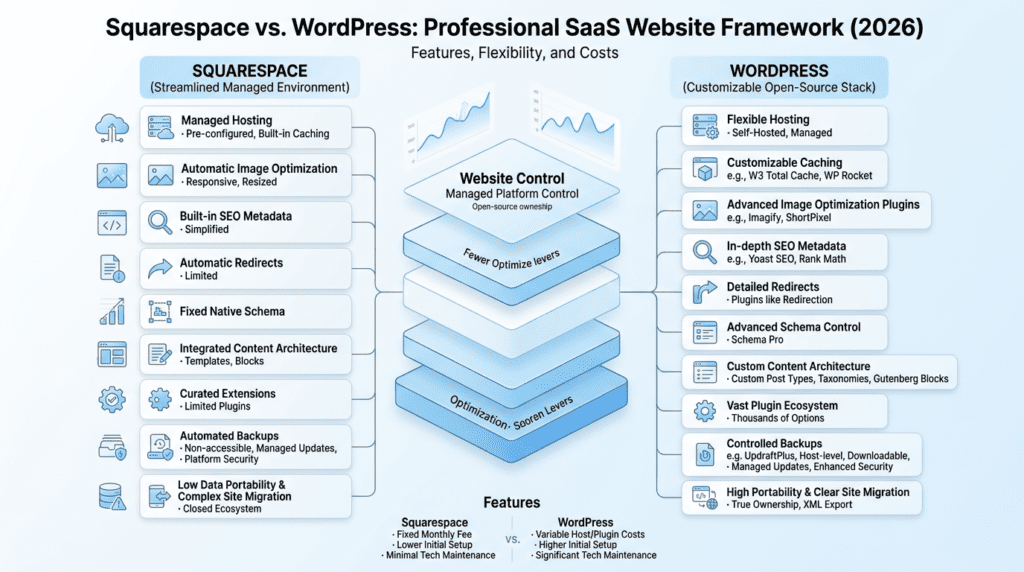
Website Performance Depends on Platform Control
Performance is one of those areas where the platform alone doesn’t tell the whole story. Squarespace runs in a managed environment, so a lot of the technical side is handled for you. You don’t have to choose a host, configure caching, or worry about server maintenance in the same way you would with WordPress.
WordPress performance depends much more on your setup. Hosting quality, theme weight, plugin load, caching, image optimization, and CDN setup all matter. A carefully built WordPress website can be very fast. A poorly built one can feel slow even if the site looks simple on the surface.
That difference matters for business owners who care about search performance, user experience, and conversions. A slow site can hurt SEO and make visitors leave before they take action. With WordPress, speed is more controllable, but also more your responsibility. With Squarespace, the experience is more standardized, but you have less room to optimize beyond the platform’s built-in structure.
SEO Control Is Stronger on WordPress
For basic seo, both platforms can work. You can edit page titles, meta descriptions, headings, image alt text, and URLs on both. That covers the basics most small sites need.
WordPress goes further. It gives you more control over technical seo, redirects, schema, internal linking workflows, content architecture, and specialized seo tools. If you want to use seo plugins like Yoast or build a more detailed content strategy, WordPress usually gives you more room to do it well.
That matters most when seo becomes a real growth channel, not just a checkbox. A blog with dozens or hundreds of posts, a local business competing in a crowded market, or a publisher with a large content library will usually benefit from WordPress’s deeper control. Squarespace can still rank, but it’s more limited when you need advanced seo tools or custom optimization workflows.
A common misconception is that platform choice alone decides rankings. It doesn’t. Content quality, site structure, and performance matter a lot more. Still, when you compare Squarespace and WordPress side by side, WordPress offers more room for technical seo work and future expansion.
Ownership and Portability Are Different
This part is easy to ignore at the start, but it becomes more important over time.
Squarespace is a hosted platform, so your website lives inside its system. That makes setup simple, but it also means you’re working within its boundaries. You can export some content, but you don’t get the same level of portability or control you would with a self-hosted WordPress site.
WordPress is open source, which gives you more ownership and flexibility. You can choose your hosting, move your site, change providers, and adjust the stack as needed. That matters if you plan to grow, hire help later, or switch hosts in the future. It also matters if you don’t want a platform deciding too much about how your site operates.
For businesses thinking long term, this is more than a technical detail. It affects how easy it is to migrate, upgrade, or hand the site off to someone else. A company that expects major growth may prefer WordPress because the site can evolve without being trapped inside one system. A smaller business that values simplicity over control may not feel that trade-off as strongly.
In short, Squarespace makes ownership easier to manage day to day. WordPress gives you more real control over the asset itself.
Squarespace vs WordPress Integrations, Ecommerce, and Marketing Tools
Squarespace Integrations Cover Common Business Needs
Squarespace covers the tools most small business websites need without turning setup into a project. You can connect email marketing services, payment processors, booking tools, social media, and analytics with far less friction than you’d usually face on WordPress.
That matters because a lot of people don’t need a giant integration stack on day one. They need a contact form, a mailing list, a calendar, maybe a simple online store, and a way to track traffic. For that kind of setup, Squarespace feels clean and manageable. You’re not hunting through dozens of plugins or worrying whether one extension will break another after an update.
This is where the platform makes sense for service businesses, coaches, local shops, and solo creators. A photographer can connect scheduling and payments. A consultant can add email signup and analytics. A small business can launch a usable squarespace website without needing a technical person on standby.
The trade-off is that Squarespace keeps things intentionally narrow. That’s great for simplicity, but it becomes frustrating once your workflows get more specific. If you want unusual automation, deeper CRM syncing, or a custom marketing stack, squarespace doesn’t give you the same room to grow as WordPress.
WordPress Has a Much Larger Integration Ecosystem
WordPress comes from a very different place. It’s open source, and that ecosystem created a huge market for plugins and third-party tools. That means you can connect almost anything if you’re willing to sort through options and manage the moving parts.
For many businesses, that flexibility is the real reason to use WordPress. You can build around WooCommerce, connect a CRM, run advanced email automation, add affiliate tools, manage memberships, launch a course platform, and tie in analytics systems that go far beyond the basics. If you need custom API connections, WordPress usually gives you a path.
Here’s the practical difference: Squarespace lets you get to “good enough” quickly. WordPress lets you build the exact system you want, but it asks more from you along the way. Beginners often overestimate how much they’ll use those advanced integrations at first. Later, as the business grows, they usually care more about the flexibility than they did on launch day.
This is especially true for agencies, publishers, and ecommerce brands. A site that starts with a simple plugin may eventually need multiple wordpress plugins working together, and that’s where WordPress can shine. But it also means more testing, more maintenance, and more chances for conflicts.
Ecommerce Comparison: Simple Store vs Scalable Store
If your main goal is to sell a few products, Squarespace is often enough. It handles product pages, checkout, inventory basics, and payments in a way that’s approachable for nontechnical users. That’s why a small business, maker, or creator can launch an online store without building a whole tech stack first.
The platform works well when the store is simple:
- A small catalog
- Basic product variants
- Straightforward shipping
- Standard tax needs
- Limited promotional complexity
For those use cases, Squarespace offers a smooth path. You don’t need to piece together hosting, themes, security, and ecommerce extensions. The system is already bundled.
WordPress with WooCommerce is the stronger choice when the store gets more serious. If you need subscriptions, advanced shipping rules, custom product logic, multiple warehouses, upsells, bundles, multilingual storefronts, or deeper integrations, WordPress offers more flexibility. That flexibility is valuable, but it also comes with overhead.
A lot of people think ecommerce is only about whether a site can “sell products.” In practice, the hard part is what happens after the first 20 or 50 products. That’s where WooCommerce tends to pull ahead. A growing store often needs better control over checkout, fulfillment, reporting, and automation. Squarespace can handle a smaller online store well, but it may feel boxed in as complexity grows.
A simple way to think about it:
| Category | Squarespace | WordPress |
|---|---|---|
| Best For | Small stores, simple product catalogs | Growing stores, complex ecommerce setups |
| Pricing | Predictable monthly plans | Variable because of hosting, plugins, and extensions |
| Ease of Use | Easier to manage | More setup and maintenance |
| Key Strength | Fast launch with fewer decisions | Deep customization and scalability |
| Biggest Limitation | Limited advanced ecommerce flexibility | More maintenance and technical responsibility |
If you want to sell a handful of products and keep life simple, Squarespace is usually the easier call. If you expect the store to grow, or you already know you’ll need more control, go with WordPress.
Squarespace vs WordPress Customer Support, Maintenance, and Scalability
Squarespace Customer Support Is Centralized
One of the most overlooked benefits of Squarespace is how centralized the support experience is. When something goes wrong, you’re dealing with one company for most of the platform, which simplifies troubleshooting a lot.
That may sound minor, but it’s a big deal for beginners. If your homepage layout breaks, your contact form stops working, or your checkout needs help, you’re not trying to figure out whether the host, theme developer, or plugin author is responsible. You have one place to start.
This is one reason many small business owners like Squarespace. They don’t want to become part-time website managers. They want a business website that stays functional without constant attention. Squarespace fits that mindset better than WordPress.
There is still a limit, though. Centralized support is helpful, but it doesn’t mean endless flexibility. If your request falls outside the standard product, you may simply hit the edge of what the platform allows. That’s the trade-off: easier help, fewer custom fixes.
WordPress Support Is More Fragmented
WordPress support works differently because the platform itself is only part of the setup. Your hosting company, theme developer, plugin providers, and even the freelancer who built the site may all play a role.
That fragmentation can be frustrating. When something breaks, beginners often don’t know where to start. A slow page might be caused by hosting, a heavy theme, too many plugins, or poor image optimization. A checkout issue might live inside WooCommerce, a payment extension, or a custom code snippet. This is one of the biggest hidden frustrations people don’t think about when they compare Squarespace and WordPress.
At the same time, the broader support ecosystem is also a strength. WordPress users have access to huge communities, documentation, agencies, freelancers, and specialized help for almost any problem. If you know what you’re doing, or you have a dependable developer, that flexibility can be a real advantage.
The downside is that support quality varies. A premium WordPress setup can be excellent, but it often depends on how well the site was built in the first place. A poorly chosen theme or messy plugin stack can make support slow and messy. That’s why WordPress is often better for businesses that are ready to manage the system, not just use it.
Scalability Depends on Your Growth Plans
Scalability is where the squarespace vs wordpress decision becomes clearer over time. The best platform isn’t always the one that’s easiest today. It’s the one that still works when your site gets bigger, busier, and more complicated.
For a simple brochure site, Squarespace scales just fine. If you need a clean homepage, a few service pages, a blog, and a contact form, it can go a long way without much effort. For a local business or creator brand, that may be all you need for years.
The picture changes when the site becomes a core business asset.
WordPress is usually the better long-term fit for:
- Content-heavy blogs
- Membership sites
- Large ecommerce stores
- Affiliate marketing sites
- Multi-author publishing
- Custom business applications
Why? Because WordPress gives you more room to adapt. You can add functionality, restructure content, change themes, and extend workflows without starting over. Squarespace can’t always keep pace with that kind of growth, especially when customization needs become more specific.
But scalability isn’t free. WordPress grows well only if it’s managed well. Once a site has many plugins, multiple editors, and business-critical workflows, maintenance becomes part of the cost of ownership. A managed wordpress host can reduce some friction, but it doesn’t remove the need for oversight.
If you expect steady growth but want a low-maintenance setup, Squarespace may still be the better option. If you expect your site to become more complex and you’re willing to invest in structure, use WordPress.
Real-World Use Cases: Who Should Choose Squarespace or WordPress?
Best for Small Business Websites
For many small business websites, the decision comes down to speed and clarity. If you need a professional site with service pages, a contact form, business hours, a location page, and maybe a simple blog, Squarespace usually gets the job done faster.
That’s especially true for businesses that don’t plan to publish a lot of content or build complicated site features. A local salon, consultant, therapist, photographer, or contractor can often use Squarespace and never feel limited in a meaningful way.
WordPress becomes more appealing when the business wants to grow through content, local seo, or conversion funnels. A business website that needs landing pages, detailed tracking, and more advanced seo tools may outgrow Squarespace sooner. If you plan to use wordpress for long-term marketing, the extra setup can pay off.
A simple rule helps here:
- Choose Squarespace if the site is mostly informational and you want less upkeep.
- Choose WordPress if the site is part of a larger lead-generation strategy.
The mistake many owners make is choosing based on launch speed alone. A squarespace site is easier to get live, but if the business is serious about search traffic and ongoing content, WordPress may be the better option over time.
Best for Bloggers and Content Publishers
Blogging is one area where WordPress still has a clear edge. It was built for publishing, and that shows in how it handles categories, tags, archives, editorial workflows, and content structure.
For bloggers, publishers, and affiliate marketers, the big difference is not just design. It’s control. WordPress gives you more ways to organize content, improve internal linking, scale site architecture, and optimize for seo. It also supports plugins for schema, redirects, related posts, table of contents, and advanced seo plugins like Yoast.
Squarespace can absolutely support blogging, and for light publishing it’s fine. But once a site starts growing into a real blogging platform, the limitations become more obvious. Content organization feels more rigid, and advanced editorial workflows are harder to build. If your site is going to hold hundreds or thousands of articles, WordPress usually makes more sense.
This is why many wordpress users in publishing think in terms of systems, not just pages. They want a site that can be edited, expanded, and optimized without fighting the platform.
If your content is a major traffic source or revenue driver, go with WordPress. If blogging is a small part of a broader business site, Squarespace may be enough.
Best for Ecommerce Sellers
Ecommerce is less about whether a platform can sell and more about how far it can grow with the store.
Squarespace works well for:
- Small product catalogs
- Handmade goods
- Digital downloads
- Simple subscriptions
- Limited shipping needs
It’s a good fit when the store is straightforward and the owner wants a clean setup. Many first-time sellers like that simplicity because it keeps the work manageable.
WordPress with WooCommerce is better for stores that need more control. If you’re dealing with a larger catalog, special tax rules, complex shipping, or repeated sales funnels, WordPress offers more room to build. It’s also better for sellers who want to connect the store to broader marketing systems, membership tools, or custom workflows.
The common mistake is assuming you should always pick the most powerful ecommerce option. That’s not true. If you sell 12 products and update the store once a month, Squarespace may be the smarter choice. If you’re operating a real ecommerce brand with growth targets, WordPress is usually the better long-term investment.
Best for Creators, Consultants, and Personal Brands
Creators and consultants often want the same thing: a site that looks polished, builds trust, and doesn’t take forever to manage. Squarespace is strong here because the template quality is high, the setup is simple, and the editing experience is easy to understand.
A coach can launch a service site. A designer can publish a portfolio. A speaker can build a landing page with a booking link. In those cases, squarespace makes it easy to move quickly.
WordPress becomes more attractive when monetization gets layered. If a creator wants memberships, courses, gated content, funnels, affiliate pages, or more complex lead capture, WordPress offers more flexibility. A platform like squarespace can support some of that, but WordPress usually does it better at scale.
The key question is whether the website is mainly a digital business card or part of a larger revenue engine. If it’s mostly a clean brand presence, Squarespace is often the simpler route. If the site is going to become a product and marketing hub, WordPress offers more upside.
Best for Agencies and Growing Companies
Agencies and growing companies usually lean toward WordPress for one simple reason: control.
WordPress offers more flexibility for client-specific needs, custom user roles, multilingual sites, integrations, and long-term expansion. A wordpress designer or agency can shape the site to match a brand and business model much more closely than a locked-down website builder usually allows.
This matters even more as a company grows. Internal workflows get more complicated. Marketing teams want landing pages, reporting, and integrations. Operations teams want forms, automations, and data flow. WordPress can handle that kind of complexity better if the site is built properly.
Squarespace can still work for smaller teams that want speed and consistency. But as soon as a business needs deeper customization or multiple systems talking to each other, WordPress usually becomes the better platform.
Squarespace vs WordPress Pros and Cons: The Honest Trade-Offs Most Buyers Miss
Squarespace Pros and Cons
Squarespace has real strengths, and they’re easy to understand once you’ve used the platform.
What it does well:
- Easy setup
- Clean templates
- Predictable pricing
- Centralized support
- Built-in basics for blogs, forms, and ecommerce
- Less maintenance
That makes it appealing to beginners and small business owners who want to focus on their business instead of their website stack.
Where it falls short is just as important:
- Less customization
- Fewer advanced features
- Smaller integration ecosystem
- Less flexibility for complex seo or site structure
- Platform lock-in
- Harder scaling for specialized needs
A lot of buyers overestimate how much customization they’ll need later. They assume a polished template will solve everything. That works at first, but as the business grows, the limits show up in small ways: awkward content structures, fewer automation options, and fewer ways to shape the site around a unique workflow.
WordPress Pros and Cons
WordPress is powerful because it gives you room to build almost anything.
What it does well:
- Deep customization
- Huge plugin ecosystem
- Strong seo control
- Better long-term scalability
- Ownership and portability
- Flexibility for advanced business models
That’s why many wordpress users stay with the platform for years. Once the site becomes important enough, the control starts to matter more than convenience.
The downside is real:
- More setup
- More maintenance
- More security responsibility
- More chances for plugin conflicts
- More variable costs
- Steeper learning curve
Beginners often underestimate how much attention WordPress takes. The dashboard is manageable, and the editor gets easier with time, but the whole system still asks more of you than Squarespace does. That’s not a flaw if you need the flexibility. It just means WordPress is a better fit for users who are ready to manage a more complex platform.
The Hidden Cost Is Usually Time or Control
When people compare Squarespace and WordPress, they often focus only on dollars. That’s part of the picture, but not the whole picture.
The real trade-off is usually time versus control.
Squarespace saves time because it reduces decisions. The platform handles hosting, updates, templates, and support in one place. That convenience is valuable, especially if the website is just one part of your business.
WordPress gives you more control, but that control comes with a cost. You make more decisions, maintain more parts, and solve more problems yourself or through help. For some businesses, that’s worth it. For others, it’s a distraction.
This is why the best website builder is not the same for everyone. The right choice depends on whether you value speed and simplicity more than flexibility and scale.
When Alternatives May Be Better
Sometimes neither Squarespace nor WordPress is the cleanest answer.
Shopify is often better if ecommerce is the whole business and you want a platform focused on selling. Wix may be worth a look if you want a website builder with a different editing style and less complexity than WordPress. Webflow can make sense for users who want more design control than Squarespace but don’t want a full WordPress setup.
That said, if your main question is squarespace vs wordpress, those alternatives should stay secondary. They’re useful in specific cases, but they don’t replace the central decision for most site owners.
Decision Guide: How to Choose Between Squarespace and WordPress

Choose Squarespace If…
Choose Squarespace if you want a website live quickly and do not want to manage the technical side.
It is the better fit when you:
- Need a polished site fast
- Prefer simple, predictable pricing
- Do not want to worry about updates, plugins, or security maintenance
- Value strong-looking templates over deep customization
- Have a smaller website with straightforward pages
- Do not need advanced integrations or complex site behavior
In short, Squarespace works best when convenience matters more than control.
Choose WordPress If…
Choose WordPress if your website needs to grow, change, or do more over time.
It is the better fit when you:
- Care about SEO control and content strategy
- Want advanced features or custom functionality
- Need more design flexibility
- Plan to publish content regularly
- Expect your ecommerce needs to become more complex
- Rely on specialized integrations, plugins, or custom workflows
- Want more ownership and long-term portability
In short, WordPress is the stronger choice when flexibility and expansion matter more than simplicity.
Choose Based on Your Next 2–3 Years, Not Just Launch Day
The best decision is not about which platform feels easier this week. It is about what your site needs to support over the next 2–3 years.
Ask yourself:
- Will I need more traffic?
- Will I publish more content?
- Will I add products or services?
- Will I need marketing automation or CRM tools?
- Will other team members need access and workflows?
- Could I outgrow my first setup quickly?
If you expect your site to stay simple, Squarespace is usually enough. If you expect growth, WordPress gives you more room without forcing a rebuild later. The main risk is choosing a platform that solves today’s problem but creates a migration problem tomorrow.
The Most Common Mistake Buyers Make
The biggest mistake is choosing only for launch convenience or only for future flexibility.
Some people pick Squarespace because it is easier today, then hit limits when their business grows. Others pick WordPress because it is powerful, then feel overwhelmed by setup and maintenance they did not plan for.
The better choice depends on what you can realistically support:
- If you want low effort and minimal upkeep, choose the simpler path
- If you can handle more setup in exchange for more control, choose the more flexible path
Do not buy for the website you wish you had. Buy for the website you will actually maintain.
Final Recommendation: Squarespace vs WordPress Winner by Situation
Overall Winner for Simplicity
Squarespace is the winner if your priority is speed, ease, and a clean result without technical overhead.
It is the better choice for users who want:
- A straightforward setup
- One platform to manage
- Predictable monthly costs
- Less maintenance
- A professional-looking site with minimal effort
If your goal is to launch a good-looking website and keep running the business, Squarespace is the more practical option.
Overall Winner for Flexibility and Growth
WordPress is the winner if your priority is long-term control, scalability, and customization.
It is the better choice for users who want:
- More design and structural freedom
- Stronger content and SEO control
- Deeper plugin and integration options
- A platform that can adapt as the business changes
- Better value when the site becomes more complex
If your website is likely to become a serious marketing, publishing, or sales asset, WordPress is the stronger long-term platform.
Final Bottom Line
Squarespace is the better website builder for simplicity and convenience. WordPress is the better platform for control, scalability, and serious long-term growth.
If you want the easiest path to a polished site, choose Squarespace. If you want the most room to grow, choose WordPress.
Squarespace vs WordPress FAQs
Is Squarespace cheaper than WordPress?
Squarespace is usually cheaper in the short term because pricing is more predictable. WordPress can cost less or more depending on hosting, themes, plugins, and maintenance.
Is WordPress better than Squarespace for SEO?
WordPress is usually better for SEO because it offers more control and flexibility. Squarespace still handles basic SEO well enough for many smaller sites.
Which is easier to set up, Squarespace or WordPress?
Squarespace is easier to set up because hosting, design, security, and core tools are bundled together.
Can I move from Squarespace to WordPress later?
Yes, migration is possible, but expect some manual work for content cleanup, design rebuilding, URL mapping, and redirects.
Which platform is better for small business websites?
Squarespace is often better for simple small business sites, while WordPress is better if content marketing and future growth are part of the plan.
Which platform is better for ecommerce?
WordPress with WooCommerce is usually better for larger or more complex stores, while Squarespace can be enough for smaller catalogs.