
The term http2 vs http3 refers to two modern versions of the http protocol that control how data moves between your browser and a server. It might sound technical at first, but this layer plays a big role in how fast a website loads and how smoothly it behaves.
Here’s the thing. Most people focus on design, plugins, or hosting, but ignore the protocol behind the scenes. From my research, upgrading from older http versions can directly affect web performance, especially when it comes to latency, connection speed, and how efficiently data transmission happens.
In this guide, we’ll break down http2 vs http3 in a simple way. You’ll see how each protocol works, where the performance differences show up, and which one actually makes sense depending on your setup.
What Is HTTP and Why It Matters for Web Performance
Understanding the HTTP Protocol
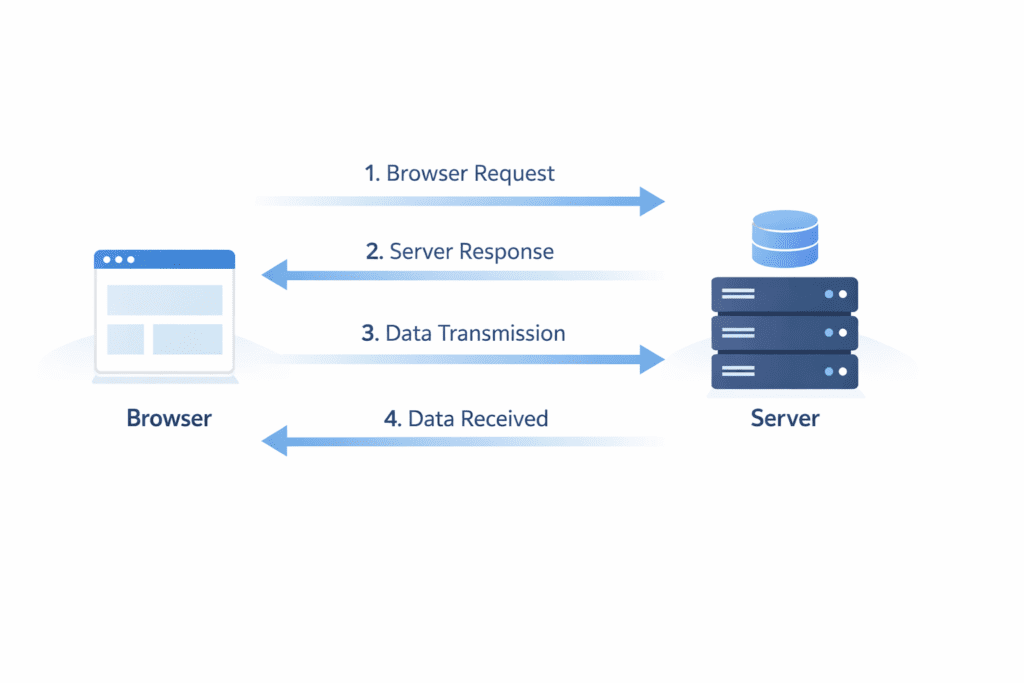
At its core, the hypertext transfer protocol is what allows your browser and server to communicate.
When you open a website, your browser sends requests and responses happen between the client and server. This includes loading images, scripts, and page content. All of this is handled through the http protocol.
• HTTP protocol: Defines how data is requested and delivered between browser and server
• Browser role: Sends requests to load web pages and resources
• Server role: Responds with data like HTML, CSS, and images
• Data transmission: Moves information back and forth across the network
Now this is where people get confused.
They assume website speed only depends on the server. But the protocol also affects how efficiently that data moves, how quickly connections are established, and how delays are handled.
Even a fast server can feel slow if the protocol handling the communication isn’t efficient.
Evolution of HTTP Versions
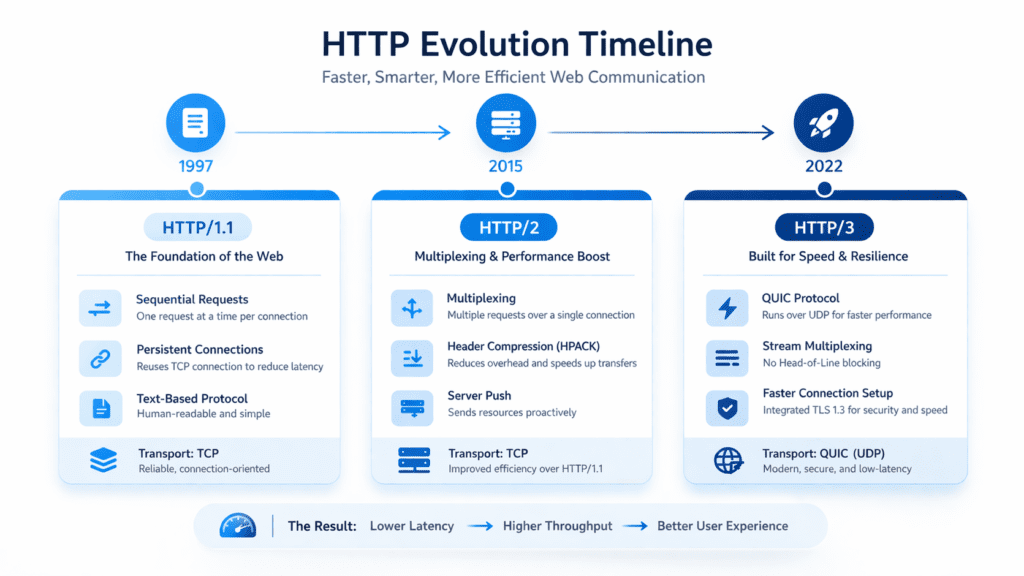
The http protocol has gone through several upgrades over time, mainly to improve performance and fix limitations.
• HTTP/1.1: Older version with sequential loading and higher latency
• HTTP/2: Introduced multiplexing and better handling of multiple requests
• HTTP/3: Uses quic instead of tcp for faster and more reliable communication
Here’s what I noticed.
Each version was created to solve real performance issues. HTTP/1.1 struggled with multiple requests. HTTP/2 improved that with multiplexing. But it still relied on tcp, which has limitations like head-of-line blocking.
That’s where HTTP/3 changes things.
Instead of using tcp connection, it uses udp with the quic protocol, which handles packet loss better and reduces delays during connection establishment.
So when comparing http2 vs http3, you’re really looking at how different transport protocols handle speed, reliability, and real-world network conditions.
What Is HTTP2 and How It Improves Web Performance
Overview of HTTP/2
HTTP/2 was introduced to fix some of the biggest performance issues in older http versions, especially HTTP/1.1.
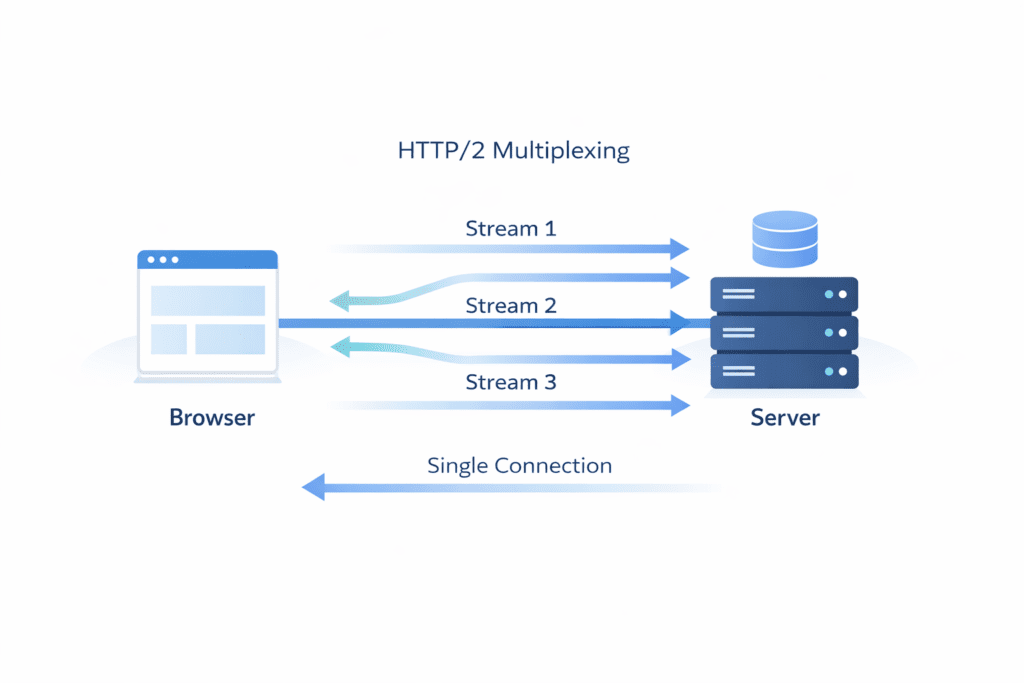
At a basic level, it’s still the same http protocol, but it changes how data moves between the browser and server. Instead of handling requests one by one, it allows multiple requests to be processed more efficiently over a single connection.
Here’s the thing.
Before HTTP/2, browsers had to open multiple tcp connection channels just to load a single page. That increased latency and slowed down page load time.
HTTP/2 improved this by keeping everything on a single connection and handling multiple requests at once. That’s where most of its performance benefits come from.
Key Features of HTTP/2
HTTP/2 introduced several improvements that directly affect web performance.
• Multiplexing: Allows multiple requests and responses to be handled over one stream
• Header compression: Reduces the size of header data sent between browser and server
• Reduced latency: Fewer round trip delays during communication
• Single connection: Eliminates the need for multiple tcp connections
Now this is where people get confused.
Multiplexing sounds like a complete solution, but it still depends on tcp. And tcp has a known limitation called head-of-line blocking.
This means if one packet gets delayed, other requests can also get delayed, even if they’re unrelated.
That’s one of the key performance issues that HTTP/2 couldn’t fully solve.
Here’s what I noticed.
HTTP/2 works really well in stable network conditions. For example, on a strong WiFi connection, the difference in load times is often noticeable compared to HTTP/1.1.
Imagine a page load where a website needs to load CSS, JavaScript, and images. With HTTP/2, all these files can load at the same time instead of waiting in sequence.
That alone improves web performance in many cases.
But there are exceptions.
On unstable networks, where packet loss happens more often, tcp can slow things down because of how it handles data integrity and retransmissions.
So while HTTP/2 was a big upgrade, it wasn’t perfect. And that’s exactly why HTTP/3 was introduced later.
What Is HTTP3 and Why It Changes How Data Is Transferred
Overview of HTTP/3
HTTP/3 is the latest version of the http protocol, and it takes a different approach compared to earlier http versions.
Instead of relying on tcp, it uses udp along with the quic protocol. This change might sound small, but it affects how fast and reliably data moves between the browser and server.
Here’s the thing.
TCP was designed for reliability, but it can introduce delays, especially during connection establishment and when packet loss happens. HTTP/3 avoids many of these issues by using quic, which was developed by the quic working group to improve speed and efficiency.
In simple terms, HTTP/3 focuses on reducing delays and handling real-world network conditions better.
Key Features of HTTP/3
HTTP/3 introduces several improvements that directly impact performance and user experience.
• Faster connection establishment: Uses quic to reduce handshake delays with 0-rtt support
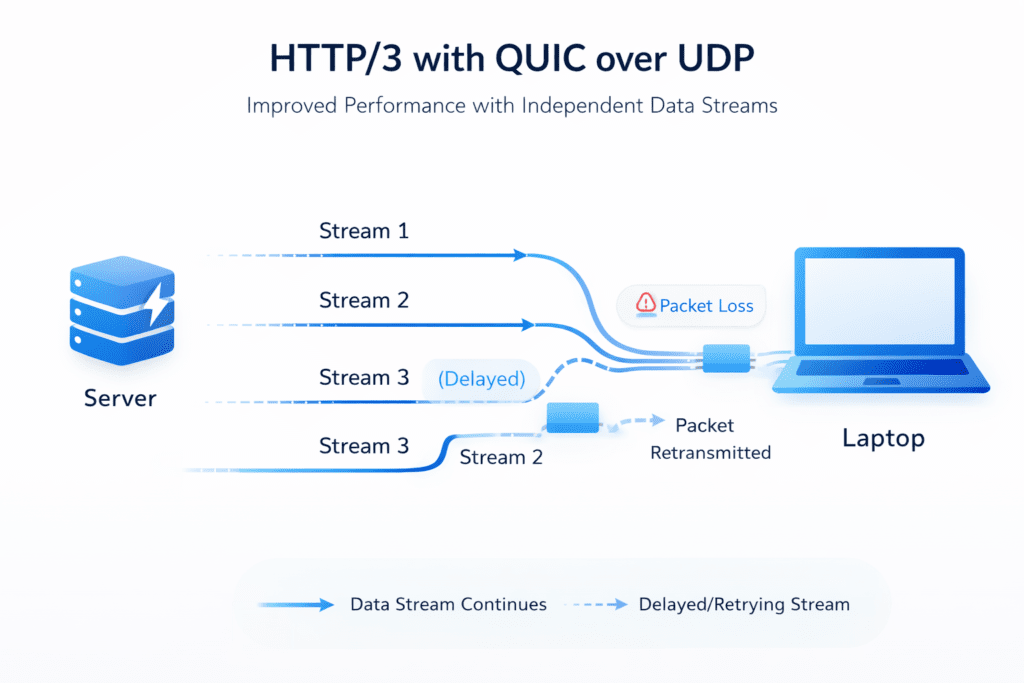
• Better packet loss handling: If one packet is lost, other streams continue without delay
• Uses udp instead of tcp: Avoids traditional tcp connection limitations
• Improved data integrity: Maintains reliability while increasing speed
Now this is where things start to make more sense.
With HTTP/2, even though multiplexing improved efficiency, head-of-line blocking could still happen at the tcp level. HTTP/3 removes that issue by handling each stream independently through quic connection logic.
Here’s what I noticed.
The biggest advantage shows up in unstable networks.
If a packet is lost, HTTP/3 doesn’t slow down everything else. It just retransmits that specific packet, while the rest of the data keeps moving.
There’s also something interesting about connection establishment.
With HTTP/2, the handshake process using tls and tcp takes multiple round trip steps before data starts flowing. HTTP/3 reduces that delay using tls 1.3 and 0-rtt, which means data can start moving almost immediately in some cases.
This might not sound like a big deal, but for mobile users switching between networks, it makes a noticeable difference.
For example, when someone moves from WiFi to mobile data, HTTP/3 can maintain the connection without forcing a full reconnect. That’s something HTTP/2 struggles with.
So when comparing http2 vs http3, HTTP/3 focuses more on real-world performance rather than just theoretical improvements.
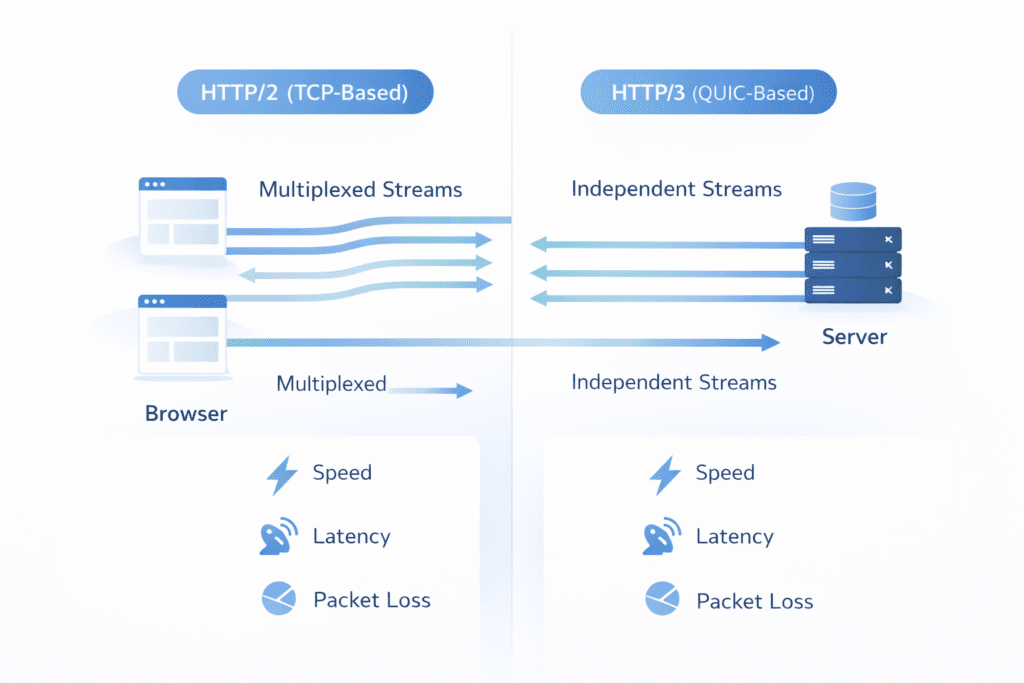
HTTP/2 vs HTTP/3: Key Differences Explained Clearly
| Feature | HTTP/2 | HTTP/3 |
|---|---|---|
| Transport protocol | Uses tcp | Uses quic over udp |
| Connection handling | Single tcp connection | Independent streams via quic |
| Packet loss impact | Can block multiple requests | Only affected stream is delayed |
| Handshake speed | Slower due to tcp + tls | Faster with tls 1.3 and 0-rtt |
| Network switching | Connection resets | Seamless connection migration |
Quick Comparison: HTTP/2 vs HTTP/3
| Use Case | HTTP/2 | HTTP/3 |
|---|---|---|
| Best for | Desktop & stable networks | Mobile & unstable networks |
| Speed | Good | Better in real-world conditions |
| Setup | Easy | Needs support (CDN/cloud) |
| Compatibility | Very high | Growing |
| Performance consistency | Moderate | High |
Here’s the thing.
At a high level, both protocols aim to improve web performance. But they solve different problems.
HTTP/2 improves how requests are handled. HTTP/3 improves how data is transported.
That difference becomes more noticeable depending on network conditions.
Real World Speed Comparison Between HTTP/2 and HTTP/3
When people compare http2 vs http3, speed is usually the first thing they care about. But the results aren’t always as straightforward as expected.
From my research, the difference depends heavily on network conditions.
• HTTP/2 load time: Around 2.2 seconds on a typical setup
• HTTP/3 load time: Around 1.6 seconds on mobile networks
• Desktop performance: Minimal difference in most cases
• Mobile performance: HTTP/3 shows noticeable improvements
Here’s what I noticed.
On a stable WiFi connection, both protocols perform similarly. The page load time difference is small, sometimes barely noticeable.
But on mobile networks, things change.
Because HTTP/3 uses quic and handles packet loss better, it maintains speed even when the connection isn’t stable. That’s where the real performance gains show up.
So if your audience includes mobile users, the difference becomes more relevant.
Performance Differences Between HTTP/2 and HTTP/3
Let’s break down what actually causes the performance differences.
Speed and Latency
HTTP/3 reduces latency by improving connection establishment.
• Faster handshake: Uses tls 1.3 and reduces round trip delays
• Reduced latency: Data starts moving sooner compared to tcp-based setups
• Improved response time: Faster interaction between browser and server
That said, the improvement isn’t always dramatic.
In stable conditions, HTTP/2 already performs well. The difference becomes noticeable mainly when delays or network issues are involved.
Data Transmission Efficiency
This is where HTTP/3 starts to stand out more clearly.
• Packet loss handling: HTTP/3 continues data flow even if a packet is lost
• Head-of-line blocking: Removed at the transport level with quic
• Stream independence: Each request runs separately
Now this is where people get confused.
With HTTP/2, multiplexing allows multiple requests over a single connection. But if one packet is delayed, others can still be affected because of tcp limitations.
HTTP/3 avoids that.
If a packet is lost, only that specific stream is impacted. Everything else keeps moving.
Here’s the thing.
This difference matters more in real-world conditions than in ideal environments.
For example, if you’re on a weak mobile network with frequent packet loss, HTTP/3 will usually maintain better performance.
But if you’re on a stable connection, the performance differences may feel small.
So when comparing http2 vs http3, it’s less about raw speed and more about consistency under different conditions.
How Network Conditions Affect HTTP/2 vs HTTP/3 Performance
Network stability plays a big role in how these protocols perform.
Stable Network Conditions
• WiFi connection: Both protocols perform similarly
• Low packet loss: TCP works efficiently
• Minimal latency issues: No major performance gap
In these situations, HTTP/2 is already efficient enough for most websites.
Unstable Network Conditions
• Mobile networks: Higher chance of packet loss
• Network changes: Switching between connections
• Latency fluctuations: More delays in data delivery
Here’s what I noticed.
HTTP/3 handles these situations better because quic is designed to adapt to network changes.
If the connection drops or changes, HTTP/3 can maintain the session without restarting the entire handshake process.
That leads to smoother performance, especially for mobile users.
HTTP/2 vs HTTP/3 in Real Hosting Environments
The protocol you use isn’t always your choice. It often depends on your hosting setup.
Here’s the thing.
Even if HTTP/3 offers better performance, your server and hosting provider must support it. Otherwise, your website will still run on HTTP/2.
• Shared hosting: Shared hosting have Mostly limited to HTTP/2 support
• VPS hosting: VPS hosting have Partial support depending on server configuration
• Cloud hosting: Cloud hosting have Full support for HTTP/3 in many cases
From my research, platforms like Cloudflare make it easier to enable HTTP/3 without changing your entire hosting server setup.
Now this is where people get confused.
They assume switching protocols is a simple toggle. But in reality, it depends on server software like nginx, TLS configuration, and whether your hosting provider supports quic.
So in a real hosting environment, your protocol choice is often limited by infrastructure.
HTTP/2 vs HTTP/3 for Web Performance and Core Web Vitals
When it comes to web performance, both protocols can improve user experience, but in different ways.
• Faster page load: Better protocol efficiency can reduce page load time
• Lower latency: Faster communication between browser and server
• Improved metrics: Helps with core web vitals like LCP
Here’s what I noticed.
HTTP/3 can improve performance even in challenging network conditions. That means more consistent loading speeds, especially for mobile users.
For example, a website using HTTP/3 may show better Largest Contentful Paint on mobile devices compared to HTTP/2, mainly because of faster connection establishment and better packet handling.
That said, protocol alone doesn’t guarantee better performance.
Other factors like server quality, CDN usage, and website optimization still matter.
How HTTP/2 Multiplexing Works in Real Scenarios
Multiplexing is one of the key features of HTTP/2.
Instead of loading files one after another, it allows multiple requests to be processed at the same time over a single connection.
• Single connection: Multiple requests handled simultaneously
• Parallel loading: Images, CSS, and scripts load together
• Reduced waiting time: No need for sequential loading
Here’s a simple way to think about it.
A page load that includes 10 images doesn’t need 10 separate connections. Everything moves through one stream.
That improves speed and reduces delays.
But there’s a limitation.
Because HTTP/2 still uses tcp, issues like head-of-line blocking can affect performance if one packet gets delayed.
How HTTP/3 Connection Establishment Works Faster
HTTP/3 changes how connections are created between the browser and server.
• Faster handshake: Uses tls 1.3 for quicker setup
• 0-rtt support: Allows data transfer during initial connection
• Reduced round trip delays: Fewer steps before data starts flowing
Here’s the thing.
In HTTP/2, the tcp connection and TLS setup require multiple steps before any real data is sent. Each step adds delay.
HTTP/3 simplifies this process using quic, which reduces connection establishment time.
This might seem like a small improvement, but it can make a noticeable difference in real-world usage, especially on mobile networks.
When HTTP/3 Does Not Make a Big Difference
HTTP/3 isn’t always a game changer. There are situations where the difference is minimal.
• Small websites: Limited resources to load
• Low traffic sites: No heavy demand on the server
• Cached content: Data already stored in the browser
Here’s what I noticed.
If your website is lightweight and loads quickly already, switching from HTTP/2 to HTTP/3 may not create a noticeable improvement.
In these cases, other factors like server optimization and CDN usage matter more.
When You Should Use HTTP/2
There are still situations where HTTP/2 makes more sense.
• Shared hosting environments: Limited support for HTTP/3
• Stable network conditions: Minimal packet loss
• Simple websites: No need for advanced performance improvements
HTTP/2 is still widely supported and works reliably in most cases.
When You Should Use HTTP/3
HTTP/3 becomes more useful in modern and performance-focused setups.
• Mobile users: Better handling of unstable networks
• Global audience: Improved performance across regions
• CDN usage: Easier implementation with platforms like Cloudflare
Here’s the thing.
If your website relies heavily on mobile traffic or experiences frequent network changes, HTTP/3 can provide more consistent performance.
Migration Considerations When Switching Protocols
Switching from HTTP/2 to HTTP/3 isn’t always automatic.
• Server support: Must support quic protocol
• Hosting provider: Needs to allow HTTP/3
• CDN integration: Often the easiest way to enable HTTP/3
From my research, enabling HTTP/3 through a CDN like Cloudflare is often the simplest approach.
But if your server doesn’t support it, switching may require configuration changes.
What Most People Miss About HTTP/2 vs HTTP/3
This is something important.
• Protocol alone isn’t enough: Other factors affect performance
• Hosting matters: Server quality impacts speed
• CDN plays a role: Improves delivery across regions
• Optimization is key: Website setup still matters
Let’s be real for a second.
Even the best protocol won’t fix a poorly optimized website.
Common Mistakes When Choosing Between HTTP/2 and HTTP/3
Here’s where things usually go wrong.
• Ignoring compatibility: Not checking server support
• Assuming HTTP/3 is always faster: It depends on conditions
• Skipping testing: Not measuring actual performance
• Overlooking hosting setup: Infrastructure matters
Most performance issues come from these mistakes rather than the protocol itself.
Simple Decision Framework for Choosing the Right Protocol
Let’s keep this simple.
• Choose HTTP/2: If you’re using shared hosting or have stable traffic
• Choose HTTP/3: If you have mobile users or use CDN and cloud hosting
That’s usually enough to make a practical decision.
Which Hosting Environments Support HTTP/3 Best
Support for HTTP/3 depends on your hosting environment.
• Shared hosting: Limited or no support
• VPS hosting: Partial support depending on configuration
• Cloud hosting: Best support for HTTP/3
Modern platforms like AWS, Google Cloud, and Cloudflare provide better compatibility with quic and HTTP/3.
Frequently Asked Questions
Choosing the right server for http2 vs http3 hosting
What is the main difference between HTTP/2 and HTTP/3?
HTTP/2 uses TCP and multiplexing, while HTTP/3 runs over QUIC, which is a quic transport protocol built on UDP to reduce latency and improve reliability.
How does QUIC’s congestion control affect loading speed?
QUIC’s congestion control reacts faster to packet loss and can improve throughput, so pages often load quicker under varying network conditions.
Does HTTP/3 enhance web performance for all sites?
HTTP/3 enhances web performance mainly for sites with many small resources or users on lossy networks, but gains vary by workload and server setup.
Will switching to HTTP/3 give optimal performance for my users?
Switching can lead to optimal performance for many users, especially mobile and global audiences, but test with your real traffic to confirm.
How does HTTP/3 handle HTTP response and error recovery?
HTTP/3 sends HTTP responses over QUIC streams which allow faster recovery from packet loss, so error recovery is usually smoother than HTTP/2.
Are there compatibility issues with HTTP/3 vs older browsers?
Most modern browsers support HTTP/3, but older browsers fall back to HTTP/2 or HTTP/1.1, so compatibility is usually graceful.
What changes are needed on the server to support HTTP/3?
Your server software or CDN must support QUIC and HTTP/3 and you may need updated TLS and UDP configuration to enable it.
How do HTTP messages differ between HTTP/2 and HTTP/3?
The structure of HTTP messages stays similar, but HTTP/3 sends them over QUIC streams which reduces head-of-line blocking and improves concurrency.
Does using HTTP/3 require new certificates or TLS changes?
No new certificate type is needed, but TLS 1.3 is required for QUIC, so check your server TLS configuration.
Can QUIC provides better mobile performance?
Yes, quic provides faster connection setup and better recovery on unstable mobile networks, often improving mobile page load times.
Should I use HTTP/3 for streaming or real-time apps?
HTTP/3 can help streaming and real-time apps by reducing latency and improving packet loss handling, but specific tests are recommended.
How do I measure benefits after switching to HTTP/3 hosting?
Use real user monitoring and synthetic tests to compare metrics like Time to First Byte, load time, and error rates before and after the migration.
Does Your Hosting Support HTTP/3?
• Most shared hosting still runs on HTTP/2
• HTTP/3 is usually available on cloud hosting or CDN setups
• Platforms like Cloudflare make HTTP/3 easy to enable
• VPS and cloud servers give more control

Final Verdict: HTTP/2 vs HTTP/3
So what does this mean for you?
HTTP/2 is still reliable, widely supported, and works well in stable environments. It handles most websites without any issues.
HTTP/3, on the other hand, focuses on improving performance in real-world conditions, especially where packet loss and network changes happen.
From my research, the biggest advantage of HTTP/3 shows up with mobile users and global traffic.
Bottom line?
If your hosting supports it and performance matters, HTTP/3 is worth using. But if you’re on a simple setup, HTTP/2 is still a solid choice.
It’s not about replacing one completely. It’s about using the right protocol for your situation.