
Picking the wrong email platform usually doesn’t hurt on day one. The real problem shows up a few months later, when your list grows, your automations get messy, and you realize the tool you chose fits a different kind of business. That’s exactly why ConvertKit vs GetResponse is such a common comparison in 2026.
Both are solid email marketing platforms, but they’re built with different priorities. ConvertKit focuses on creators, newsletters, digital product sales, and simple audience management. GetResponse goes wider, with stronger funnel tools, webinars, landing page options, ecommerce features, and deeper marketing automation. In this comparison, I’ll break down pricing, automation, subscriber management, landing page tools, integrations, support, and which platform makes more sense for different business models.
Quick Verdict: ConvertKit vs GetResponse In 2026
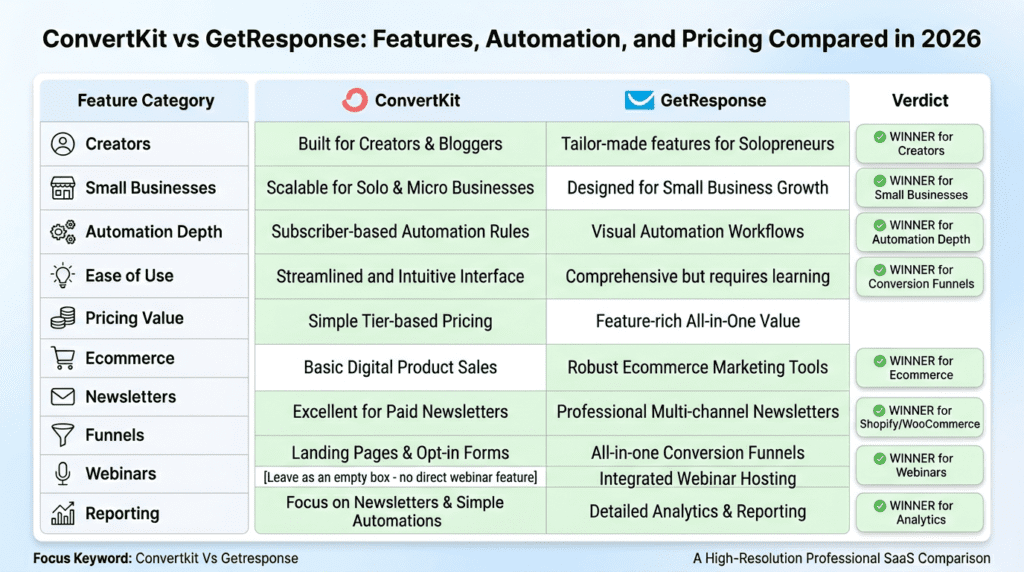
Complete Verdict Table
| Category | ActiveCampaign | Brevo |
|---|---|---|
| Best for | Advanced automation, CRM, sales workflows | Budget-friendly email marketing and transactional email |
| Starting pricing | Typically starts higher, often around the mid-$20s per month for basic plans | Usually starts lower, with a free plan and paid tiers often beginning around the low teens |
| Free plan | No permanent free plan, but usually offers a 14-day free trial | Yes, offers a free plan with limited monthly email sends |
| Automation depth | Strong advanced automation and conditional logic | Good basic-to-mid-level automation |
| CRM | Built-in CRM features are more developed | Brevo’s CRM is lighter and less central |
| Transactional email | Available, but not the main draw | One of Brevo’s major strengths |
| Ease of use | More powerful, but steeper learning curve | Easier to get started with |
| Templates | Solid email template options | Good template selection, often more approachable |
| Landing pages | Included on higher tiers | Brevo also offers landing pages on selected plans |
| Best fit | Growing teams that want depth | Smaller teams that want value |
Best For
ConvertKit is the better choice for creators, bloggers, affiliate marketers, coaches, course creators, and anyone selling a digital product to an audience-first business. If your main goal is to grow your email list, send a newsletter, build a clean email sequence, and monetize through content, ConvertKit usually feels more natural.
GetResponse is better for small businesses, ecommerce brands, agencies, and teams that want more than just an email marketing tool. It’s a stronger option for funnel building, webinar campaigns, sales workflows, landing page campaigns, and businesses that need broader marketing automation tools in one system.
Not Ideal For
ConvertKit isn’t ideal if you want advanced CRM-style pipelines, built-in webinar hosting, or very detailed automation workflow logic. It keeps things simpler on purpose, which is great for some users and limiting for others.
GetResponse is less ideal for creators who want the fastest, cleanest path to writing emails and managing subscribers without extra layers. The wider set of features can feel useful at first, but also heavier than necessary if you mainly run a newsletter.
Bottom Line
ConvertKit is better if your business runs on audience trust, newsletters, creator monetization, and digital product sales. GetResponse is better if you want an all-in-one marketing platform with stronger funnels, landing page builder tools, webinars, ecommerce workflows, and more advanced reporting.
ConvertKit vs GetResponse Positioning: Creator Marketing Platform Or All-In-One Marketing Suite?
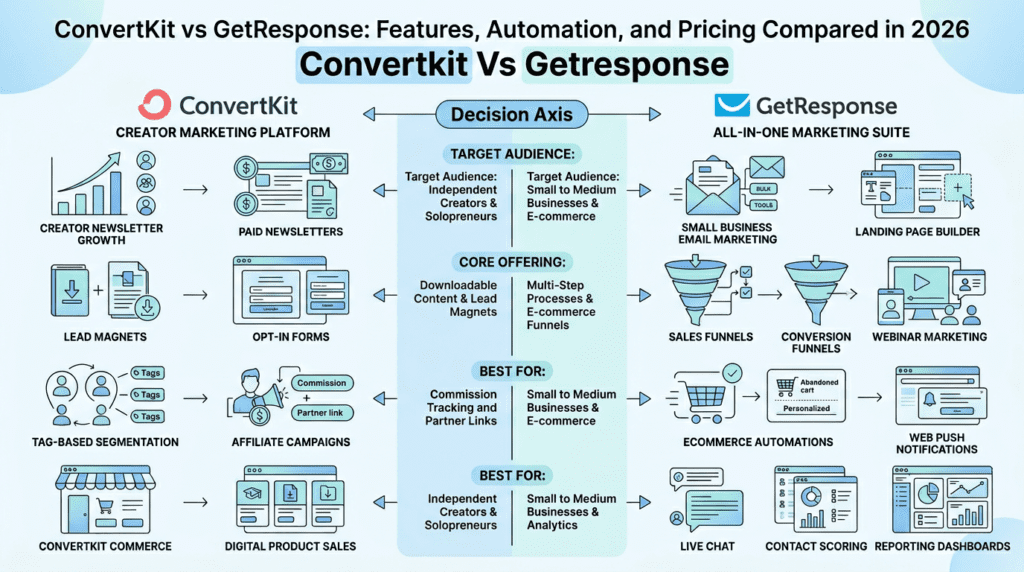
ConvertKit’s Core Strength: Creator Marketing And Newsletter Growth
ConvertKit focuses on a very specific kind of user: creators who build an audience first and sell later, or sell directly to that audience. That includes bloggers, YouTubers, podcasters, coaches, educators, newsletter operators, and solo business owners. The platform is built around subscriber relationships more than campaign complexity.
That shows up in everyday use. ConvertKit provides a cleaner workflow for writing emails, organizing tags, building opt-in forms, and sending simple automation-based sequences. Beginners usually find it easier to understand because the interface doesn’t bury core tasks under too many menus. If you’re creating a lead magnet, sending a welcome email sequence, and promoting a digital product, ConvertKit also feels more direct.
It’s especially strong for:
- Paid newsletters
- Lead magnets
- Creator monetization
- Affiliate marketing
- Digital product sales
- Audience segmentation with tags rather than rigid lists
This matters because creator businesses often don’t need a huge all-in-one stack. They need something reliable that helps them grow your business through email without creating unnecessary setup work. ConvertKit landing pages, forms, and automations are usually enough for this kind of workflow.
What beginners often like:
- Less clutter in the dashboard
- Faster newsletter setup
- Simpler automation features
- Good fit for solo operators
What becomes more valuable over time:
- Flexible tagging
- Easy email sequence management
- Strong creator-focused monetization tools
- Less friction when managing one audience across several offers
Where some users hit a wall is breadth. ConvertKit focuses on doing a narrower set of jobs well. Unlike GetResponse, it’s not trying to be a full all-in-one marketing suite with webinar campaigns, advanced funnel layers, or broad sales infrastructure.
GetResponse’s Core Strength: Small Business Email Marketing And Funnel Automation
GetResponse is built for businesses that want email marketing plus a larger set of connected marketing features. It’s not just a newsletter tool. GetResponse is an all-in-one platform aimed at companies that want landing pages, funnel building, webinar marketing, automation workflow tools, and ecommerce support in the same place.
That makes it a strong fit for:
- Small businesses
- Ecommerce brands
- Agencies managing campaigns
- SaaS teams
- Webinar marketers
- Businesses running lead generation and sales funnels
GetResponse offers more built-in functionality than ConvertKit in several areas. Its landing page builder is broader, its funnel tools are more developed, and its webinar feature stands out for businesses that rely on demos, launches, or live education. GetResponse also provides stronger campaign infrastructure for teams that want behavior-based automation, more detailed analytics, and broader customer journey mapping.
In practical terms, this is where getresponse marketing automation stands out. A business can connect a landing page, autoresponder, webinar registration flow, follow-up email builder, and sales funnel inside one system. That won’t matter to every user, but it matters a lot to businesses with multiple campaigns running at once.
A few realistic observations from long-term use patterns:
- Beginners often feel the getresponse dashboard has more going on than they need.
- As campaigns grow, those extra tools start to make more sense.
- Teams usually get more value from GetResponse than solo newsletter writers do.
- Businesses replacing several tools like webinar software, simple funnel software, and basic landing page tools may save money with GetResponse.
GetResponse is a leading option for buyers who want broader marketing features without jumping straight into enterprise software. It’s not a full CRM in the traditional sense, but it does support more CRM-style campaign logic than ConvertKit.
The Main Difference Most Buyers Should Understand
The biggest difference in ConvertKit vs GetResponse is not just features. It’s business model fit.
ConvertKit prioritizes:
- Simplicity
- Audience building
- Newsletter growth
- Creator workflows
- Direct digital product monetization
GetResponse prioritizes:
- Marketing breadth
- Funnel infrastructure
- Advanced automation
- Webinar campaigns
- Broader small business use cases
That’s why the decision is less about which platform has the biggest list of tools like landing pages, template options, or integration depth. It’s more about how you actually make money.
A blogger with a weekly newsletter, lead magnet, and course offer will often be better to use ConvertKit. A local business running promotions, webinars, forms, automations, and landing page campaigns may find GetResponse is the better fit. An ecommerce brand that needs abandoned cart flows, product-driven segmentation, and stronger sales funnel support will usually lean toward GetResponse too.
So when you compare getresponse vs convertkit, ask this first: are you running a creator business, or are you building a broader marketing system?
ConvertKit vs GetResponse Pricing: Free Plans, Subscriber-Based Pricing, And Hidden Costs
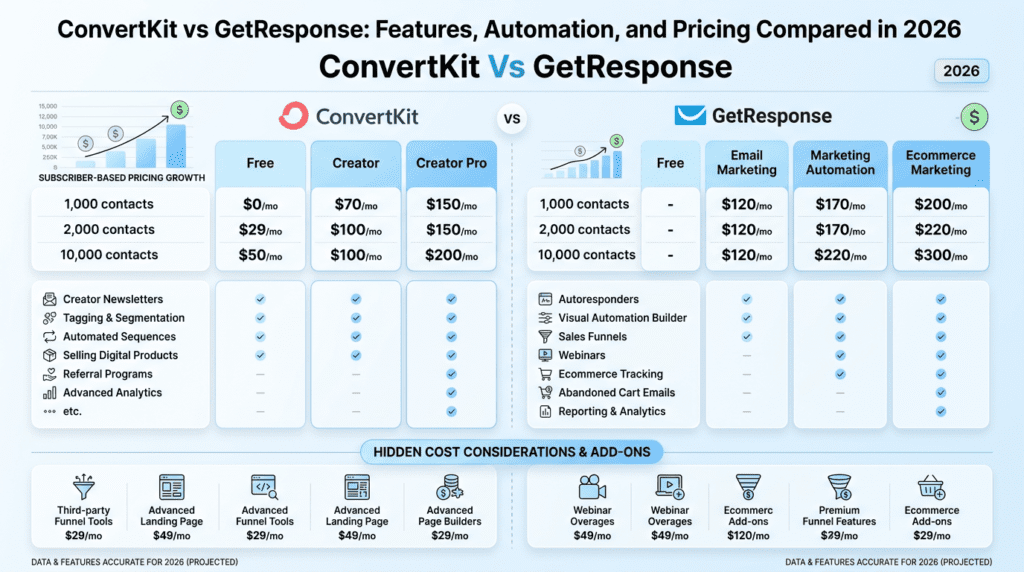
Free Plan Limitations
Free plans matter most at the beginning, but they can also create confusion because what looks generous on a pricing page often comes with important feature limits.
ConvertKit has a free plan for up to 10,000 subscribers, though features are limited compared with paid tiers. The free option is attractive for new creators who want to start a newsletter, build forms, and test audience growth before paying. That said, advanced automation, stronger monetization tools, and some premium features are reserved for paid plans.
GetResponse also has a free plan, but it’s much smaller at up to 500 contacts. That plan is useful for testing the platform, trying the email builder, and creating basic campaigns, but it becomes restrictive quickly if you’re serious about list growth.
The practical difference is simple:
| Category | ConvertKit Free Plan | GetResponse Free Plan |
|---|---|---|
| Subscriber limit | Up to 10,000 subscribers | Up to 500 contacts |
| Best use case | New creators growing a newsletter | Small tests and early-stage business setup |
| Automation access | Limited compared with paid plans | Limited on free tier |
| Landing page access | Available in basic form | Available in basic form |
| Branding | May include platform branding or feature restrictions | May include platform branding or free-tier limits |
| Support | More limited than paid plans | More limited than paid plans |
For most beginners, ConvertKit’s free plan is more practical if the goal is to grow your email list fast without paying right away. For a freelancer, blogger, or course creator, that breathing room matters. GetResponse comes with a lower free threshold, so it’s usually better treated as a trial-style entry point than a long-term free option.
One important note: free plans often look good until you need automations, deeper segmentation, or branded sales workflows. That’s the point where costs start climbing.
Pricing Tiers And Subscriber-Based Pricing
Subscriber-based pricing has a big long-term impact, especially once your list grows beyond the early stage. Both ConvertKit and GetResponse scale pricing based on contact volume, but the value changes depending on the type of business.
As of 2026, pricing may change, so always verify current numbers before buying. In general:
- ConvertKit paid plans typically start around $29/month for up to 1,000 subscribers on the Creator tier.
- GetResponse paid plans typically start around $19/month for 1,000 contacts on its Email Marketing plan, with higher tiers increasing based on features and contact count.
That means GetResponse often starts lower on entry-level paid pricing. But starter price alone doesn’t tell the full story.
Here’s what happens as businesses grow:
New creators
A creator with a small but active audience may find ConvertKit pricing easier to justify because the platform is closely matched to their workflow. If they don’t need webinars, advanced funnel tools, or ecommerce layers, paying for those extras in another platform may not make sense.
Newsletter operators
Newsletter businesses often care about list growth more than feature depth. ConvertKit was built with this kind of scaling in mind. But once a newsletter gets large, subscriber-based pricing can rise quickly, especially if list hygiene is weak.
Ecommerce stores
Ecommerce businesses usually need more automation features tied to behavior, product actions, and conversion funnel logic. In that case, GetResponse can offer better value because the platform also provides broader commerce and automation support.
Small businesses with large inactive lists
This is where many buyers make a costly mistake. They keep old subscribers, inactive leads, and outdated contacts in the account for too long. Since pricing often scales by subscriber or contact count, poor list management turns into a recurring cost problem.
In real-world use, list hygiene matters more than most people expect:
- Remove inactive contacts regularly
- Segment by engagement
- Don’t keep dead leads forever
- Watch how pricing changes as the subscriber base expands
A business with 10,000 active contacts and strong conversions may get better returns than a business with 25,000 unengaged subscribers and rising software costs.
Automation Limits And Feature Gating
This is where pricing comparisons get more serious. It’s not just about how much each tool costs. It’s about what’s locked behind higher tiers.
ConvertKit keeps its structure simpler, but important automation and monetization features are still stronger on paid plans. If you want better visual automation, more creator commerce features, and advanced subscriber workflows, you’ll likely need more than the free version.
GetResponse has broader feature gating because it has more product layers. Depending on the plan, access may vary for:
- Advanced email marketing automation
- Visual automation builder functionality
- Contact scoring
- Sales and conversion funnel tools
- Webinar attendee limits
- Advanced reporting dashboards
- Ecommerce features
- Web push notifications
This is where GetResponse has two tools in one sense: a basic email marketing service at the lower end, and a more complete business growth platform on higher plans. That can be great if you’ll use those tools. It can also become overkill if you won’t.
For example:
- A creator sending a weekly newsletter may not need contact scoring or webinar funnels.
- A SaaS founder running demo signup flows may absolutely need advanced automation.
- An ecommerce store may care more about cart recovery and product-based triggers than fancy newsletter design.
Marketing pages don’t always make this obvious. They highlight the full set of features, but not always which plan unlocks what. That’s why checking plan-level limits is critical before committing.
Value For Money: Which Platform Gives You More For The Price?
Value depends on what you would otherwise have to buy separately.
If you only need newsletter growth, forms, creator monetization, simple segmentation, and an email sequence, ConvertKit may offer better value. You’re not paying for a lot of broader infrastructure you won’t use.
If you need landing pages, webinars, funnels, more advanced marketing automation features, and ecommerce support, GetResponse wins on bundled value more often. GetResponse also provides enough built-in functionality that some small businesses can avoid paying for separate webinar software, a standalone landing page builder, or lightweight funnel tools.
Here are a few realistic scenarios.
Creator with 2,000 subscribers
A solo creator selling a digital product and sending a weekly newsletter may get more practical value from ConvertKit. The cleaner workflow, creator-focused automations, and monetization features match the business model well. Even if GetResponse comes in with more features like webinar tools or deeper funnel options, they may go unused.
Small business with 10,000 contacts
A service business, agency, or local business with a larger contact database may get more value from GetResponse, especially if it needs landing page campaigns, event registration, automated follow-ups, and better reporting. In this case, broader campaign infrastructure matters more than simplicity.
Ecommerce store needing automations and abandoned cart emails
This is where GetResponse often has the edge. Ecommerce email marketing usually depends on store behavior, segmentation, product flows, and revenue-focused automation. ConvertKit can work for some simpler creator-commerce setups, but GetResponse goes further for online stores that need more advanced automation tied to purchases and browsing behavior.
So which one gives more for the price?
- Choose ConvertKit if you want a creator-first platform and won’t use broader all-in-one marketing features.
- Choose GetResponse if you want wider built-in tools and would otherwise pay for multiple platforms.
The key differences in pricing aren’t just monthly cost. They’re tied to list growth, feature gating, and whether the extra tools actually reduce your total software stack.
Email Marketing Automation Compared: Sequences, Autoresponders, And Visual Workflows
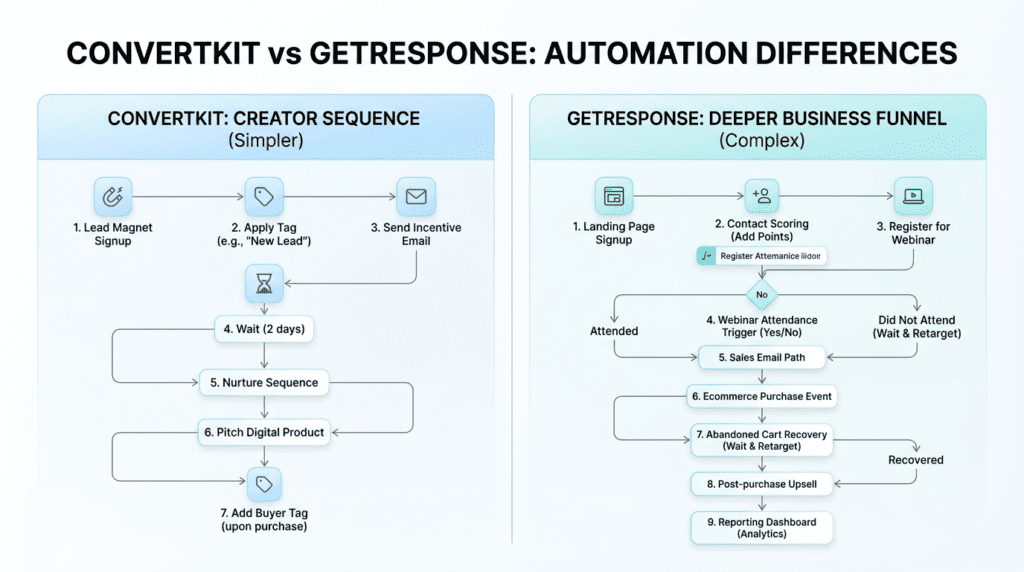
ConvertKit Email Sequences And Creator-Friendly Automation
In Convertkit Vs Getresponse, this is one of the clearest differences.
ConvertKit handles automation in a way that feels natural for creators. You build an email sequence, connect it to a form or landing page, add tags, and let subscribers move through a simple journey. For bloggers, course creators, and newsletter operators, that’s often enough.
Its core automation flow usually looks like this:
- Someone joins through a form
- They get a lead magnet
- A welcome email sequence starts
- Tags are applied based on what they signed up for
- Future broadcast emails can target those tags
That setup works well when your business runs on audience interest rather than product catalogs or sales pipelines. A creator with lead magnets for SEO, affiliate marketing, and YouTube can tag each subscriber by interest and send more relevant emails without creating separate lists.
ConvertKit also makes broadcast emails easy to work with. You can send one-time newsletter emails, promos, or launch messages, then filter by tags, segments, or past behavior. For a solo operator, that simplicity matters more than having dozens of automation conditions.
Where ConvertKit starts to feel limited is when the workflow gets more operational. If you need branching logic tied to purchase stages, post-purchase behavior, webinar attendance, or abandoned cart events across multiple products, the system can feel light. It’s good at audience nurturing. It’s less impressive when you want deep marketing automation with a lot of moving parts.
Beginners usually like this at first because there’s less to break. Over time, though, some users realize they’ve outgrown the simplicity. That’s especially true when a business moves from “send better emails” to “orchestrate a full funnel.”
GetResponse Autoresponders And Visual Automation Builder
GetResponse goes much further here.
Its autoresponders cover the basics, but the bigger advantage is the visual automation builder. That’s where GetResponse starts to separate itself from ConvertKit and other simpler email marketing tools. You can map out full automation workflow paths based on actions, delays, filters, and conditions.
That includes things like:
- Opening or not opening an email
- Clicking a link
- Visiting a page
- Buying a product
- Registering for a webinar
- Reaching a certain score or segment
- Entering a sales funnel step
For businesses with multiple offers, this matters a lot. A SaaS founder might want one workflow for trial signups, another for onboarding, and another for users who didn’t activate. An ecommerce brand may need browse reminders, abandoned cart emails, post-purchase upsells, and win-back campaigns. GetResponse is better suited for that kind of structure.
The visual automation experience is helpful because complexity becomes easier to see. Instead of guessing how a subscriber moves through the system, you can map it visually. That reduces mistakes once campaigns get larger.
There is a trade-off, though. More flexibility means more setup discipline. New users often build messy automation because they try to do too much too fast. The builder is powerful, but power doesn’t automatically mean clarity. If naming, tagging, and logic aren’t organized, the account can become hard to manage later.
Still, for advanced email marketing automation, GetResponse has more room to grow with the business. That’s the real edge.
Behavioral Triggers, Contact Scoring, And Advanced Automation Logic
This is where GetResponse vs ConvertKit becomes less subtle.
Both platforms can react to actions like form submissions and tag changes. Both let you trigger follow-ups after a signup. But once behavior-based marketing becomes important, the differences become much easier to feel in daily use.
ConvertKit supports useful triggers such as:
- Joining a form
- Getting a tag
- Completing a sequence
- Clicking certain links
- Making some purchase-related actions through connected tools
That’s enough for many creator businesses. If someone downloads a free guide, clicks a product link, or joins a waitlist, ConvertKit can move them into the right email sequence.
GetResponse supports a broader set of advanced automation features, including more detailed behavioral conditions. That usually means stronger control around:
- Link clicks
- Purchase behavior
- Cart abandonment
- Engagement levels
- Custom field updates
- Funnel progression
- Contact scoring
Contact scoring is especially useful once a business has a larger subscriber base. Not every lead is equal. A person who visits pricing pages, clicks product links, and attends a webinar is not the same as someone who grabbed a freebie 11 months ago and never opened another email. Scoring helps sales-focused teams and more advanced marketers prioritize follow-up.
Abandoned cart behavior is another major dividing line. For ecommerce brands, this isn’t some bonus feature. It can directly affect revenue. GetResponse marketing automation is simply better aligned with those campaigns.
What many buyers miss is that advanced automation is only valuable if the business can actually use it. A solo newsletter writer may never need scoring or multi-condition automation paths. But a store, agency, or small business running offers across several stages often will.
Automation Winner By Scenario
For simple automation, ConvertKit wins more often than people expect.
It’s a strong fit if you need:
- A welcome series
- A lead magnet delivery system
- A basic nurture funnel
- Interest tagging for creators
- An email sequence tied to content or product launches
GetResponse wins when automation becomes part of business infrastructure rather than just follow-up email.
It’s better for:
- Multi-step sales funnels
- Ecommerce automations
- Webinar follow-up campaigns
- Behavior-based segmentation
- Contact scoring and qualification
- More advanced segmentation across offers and actions
So in Convertkit Vs Getresponse, the automation choice comes down to operational complexity. If you want clean, creator-friendly workflows, ConvertKit keeps things easier. If you need advanced automation logic and more serious campaign control, GetResponse is the stronger platform.
Subscriber Management, Segmentation, Tagging, And Email Personalization
ConvertKit Tagging And Subscriber Management
ConvertKit focuses on a tag-first system instead of pushing users into heavy list management. That sounds small, but in practice it changes how your email list stays organized.
Instead of keeping the same person on several separate lists, you can keep one subscriber profile and add tags based on actions, interests, and signup sources. That helps reduce the classic problem of list duplication, where one contact appears in three places and gets counted or messaged in messy ways.
This works especially well for:
- Creators with multiple lead magnets
- Bloggers covering different topics
- Affiliate marketers promoting offers by niche
- Paid newsletter publishers separating free and paid readers
A blogger might tag subscribers as “SEO,” “WordPress,” or “affiliate marketing” depending on which opt-in form they used. Later, they can send a broadcast only to people interested in one category without rebuilding the whole structure.
This system is flexible, but there’s a hidden downside. Tags can get out of control if there’s no naming convention. Many users start with a clean account, then six months later have tags like “Lead-New,” “newlead,” “webinar_march,” and “Webinar March 2026.” The tool didn’t fail. The process did.
ConvertKit also feels more intuitive when the audience is content-driven. If your business revolves around topics, interest groups, and creator products, its subscriber management model is usually easier to maintain over time.
GetResponse List Management And Segmentation
GetResponse gives you more segmentation power, but it asks for more structure in return.
Its list management setup can include:
- Lists
- Segments
- Custom fields
- Engagement filters
- Behavioral conditions
- Contact scoring data
That creates more ways to target the right subscriber, especially for businesses with varied customer journeys. A small business might segment by lead source, product interest, engagement level, purchase history, and geography. An ecommerce brand can separate first-time buyers from repeat buyers, cart abandoners, and high-value customers.
This depth is useful, but it’s also where beginners make mistakes. If teams create lists and segments without a plan, reporting gets muddy and targeting becomes unreliable. GetResponse rewards users who think like operators. It’s less forgiving for people who just want to “send newsletters and figure it out later.”
The upside is control. The downside is complexity.
If ConvertKit keeps subscriber management lighter and creator-friendly, GetResponse gives more knobs to turn. That’s great when segmentation directly affects revenue. It’s less appealing if the business model is simple and the extra structure just slows things down.
Email Personalization And Audience Targeting
Personalization is one of those features people often overrate in theory and underrate in execution.
Adding a first name to a newsletter is easy. Sending the right message based on real intent is harder. That’s where segmentation and behavior matter more than surface-level personalization.
ConvertKit does well with tag-based messaging. If someone joined through a lead magnet about podcasting, you can write emails that feel specific to that interest. That kind of relevance often matters more than flashy dynamic content.
GetResponse has an advantage when personalization depends on deeper data. With custom fields, behavior filters, and purchase-based segmentation, it can support more targeted campaigns across the customer journey. That’s especially useful for ecommerce, webinar funnels, and businesses with several offers.
Better targeting can improve:
- Open rates
- Click-through rates
- Conversion rates
- Upsell performance
- Re-engagement results
For example, a course creator could send one message to people who watched a webinar but didn’t buy, and another to people who clicked the pricing link twice. A store could send different product recommendations based on past purchases. That’s not just personalization for appearance. That’s personalization tied to ROI.
Common List Management Mistakes
A lot of email marketing problems don’t come from the platform. They come from weak list discipline.
Common mistakes include:
- Creating too many lists without a clear strategy
- Keeping inactive subscribers too long
- Using tags without naming rules
- Mixing buyers and leads in the same campaigns
- Importing contacts without proper consent
- Ignoring GDPR requirements on forms and lead magnets
Inactive subscribers are a bigger issue than many businesses realize. They raise costs, weaken analytics, and can hurt deliverability over time. A list of 10,000 contacts is not automatically better than a clean list of 4,000 engaged subscribers.
Another common problem is failing to separate customer stages. Leads, first-time buyers, repeat customers, and paid newsletter members should not always receive the same message. If your segmentation doesn’t reflect those differences, the platform can’t fix the strategy for you.
Landing Pages, Opt-In Forms, Lead Magnets, And Conversion Funnels
ConvertKit Landing Pages And Opt-In Forms
ConvertKit landing pages are built for speed more than design depth.
They work well when the goal is straightforward:
- Get newsletter signups
- Deliver a lead magnet
- Build a creator waitlist
- Promote a digital product launch
That’s why many creators like them. You can launch quickly without needing a separate landing page builder, custom code, or a long setup process. A writer offering a free checklist, a podcaster building a waitlist, or a coach collecting early interest for a program can get a page live fast.
ConvertKit also connects forms and landing pages neatly with its tagging and sequence system. That reduces friction between signup and follow-up. For creators, that workflow matters more than having dozens of design controls.
But there are limits. Design customization is more constrained than what many small businesses want. If you care about highly branded pages, more detailed testing, or deeper conversion funnel tracking, ConvertKit can feel basic. It’s more of a focused lead capture tool than a full funnel system.
GetResponse Landing Pages, Sales Funnels, And Conversion Funnels
GetResponse goes much broader here, and this is one of its strongest sections.
Beyond a standard landing page builder, GetResponse offers tools for sales funnels, conversion funnels, checkout paths, lead capture pages, and webinar funnels. That makes it more useful for businesses that need to connect multiple campaign assets in one place.
For example, a typical GetResponse funnel might include:
- A lead capture landing page
- An opt-in confirmation step
- A welcome email or autoresponder
- A sales page
- A checkout page
- A follow-up sequence
- A retargeting or recovery path
That matters because many businesses don’t just need email marketing software. They need the structure around the emails too. If a local business is collecting leads for consultations, or a course creator is selling through webinar registration and replay follow-up, the funnel matters almost as much as the emails themselves.
GetResponse is an all-in-one option in a way ConvertKit usually isn’t. That doesn’t mean every business needs every funnel feature. It means fewer separate tools like standalone landing page software, checkout pages, and webinar pages may be required.
The trade-off is that broader systems take more planning. Funnel tools can save money and simplify stack sprawl, but only if the business actually uses them.
Lead Magnet Delivery And Follow-Up Sequences
Both platforms can deliver a lead magnet and trigger follow-up emails, but they feel different in practice.
ConvertKit provides a very creator-friendly setup for lead magnet delivery. A blogger offering a free checklist can connect a form, send the download automatically, apply a tag, and start a welcome email sequence without much friction. It’s fast, clean, and easy to maintain.
GetResponse can do the same, but it also supports more layered follow-up depending on the campaign.
A few practical examples:
- A blogger offering a free checklist may do perfectly well with ConvertKit’s lighter setup.
- A coach offering a webinar replay may benefit from using GetResponse if the replay leads into reminders, attendance tracking, sales follow-up, and deadline emails.
- An ecommerce store offering a 10% discount code may get more value from GetResponse if that offer ties into product browsing, cart activity, and post-purchase automation.
The more the lead magnet is part of a larger funnel, the more GetResponse tends to make sense. The more it’s part of a simple relationship-building sequence, the more ConvertKit feels efficient.
Which Platform Converts Better?
There isn’t one universal answer.
Conversion depends on:
- The strength of the offer
- Audience trust
- Page clarity
- Follow-up timing
- Funnel structure
- Email-message match
ConvertKit may convert better when the business is relationship-led. Personal brands, bloggers, writers, and creators often do well with simple landing pages, low-friction opt-ins, and plain but relevant follow-up.
GetResponse may convert better when the campaign needs more assets working together. If a business uses landing pages, webinar registration, reminder emails, checkout flows, upsells, and cart recovery, the extra infrastructure can improve results.
So the platform itself doesn’t magically raise conversions. It mainly affects how well you can execute the kind of funnel your business actually needs.
Email Builder, Templates, Broadcast Emails, And A/B Testing
ConvertKit Email Templates And Broadcast Emails
ConvertKit takes a minimalist view of email design, and for many creators, that’s a feature rather than a weakness.
Its emails tend to lean toward plain-text style formatting, lighter layouts, and simple newsletter publishing. That approach often feels more personal in the inbox. Instead of looking like a polished promotion, the message can feel closer to a direct note from the creator.
That works well for:
- Personal brands
- Bloggers
- Coaches
- Newsletter writers
- Affiliate marketers sending editorial-style emails
Broadcast emails are also straightforward to create and send. You don’t spend much time wrestling with heavy layout controls. That speeds up publishing, especially for solo users sending frequent newsletters.
One thing many businesses learn over time is that a “beautiful” email template doesn’t always perform better. In some niches, simpler emails get more replies and more trust because they look less like advertising. ConvertKit focuses on that style.
The limitation is obvious: if your brand relies on visual merchandising, product blocks, or highly designed newsletter layouts, ConvertKit may feel too restrained.
GetResponse Drag-And-Drop Editor And Template Library
GetResponse is better built for polished visual campaigns.
Its drag and drop editor gives users more control over layout, blocks, images, product sections, and promotional formatting. The template library is more useful for brands that regularly send:
- Product announcements
- Promotional campaigns
- Visual newsletters
- Ecommerce emails
- Event invites
- Designed marketing emails
This matters for stores and branded small businesses. If you need a newsletter with banners, featured products, buttons, pricing sections, and a stronger visual identity, GetResponse offers a more flexible email builder.
There’s also a practical team advantage here. Agencies or in-house marketers often need repeatable template systems so different campaigns still look consistent. GetResponse is generally stronger for that kind of workflow.
That said, more design freedom can slow things down. Some users spend too long adjusting layouts instead of improving the offer or message. Fancy design can help, but it can also become a distraction if the business doesn’t really need it.
A/B Testing And Campaign Optimization
Testing is where marketers often separate good instincts from guesswork.
Both platforms support optimization, but GetResponse usually gives more room to experiment across campaign pieces. Depending on plan level and feature access, users may want to test:
- Subject lines
- Email content
- Send times
- Landing pages
- Funnel steps
- Calls to action
ConvertKit covers the basics well enough for many newsletter-first users. If your main question is “Which subject line gets more opens?” that may be enough.
GetResponse becomes more useful when optimization expands beyond one email. If you want to compare landing page variations, funnel structure, or different email paths based on behavior, it supports a more marketer-heavy approach.
This matters most at scale. A creator with 1,500 subscribers probably doesn’t need elaborate testing. A business sending campaigns to 50,000 contacts or running paid traffic into funnels often does. Small gains in conversion rates can add up quickly there.
The hidden challenge is volume. A/B testing only works well when you have enough traffic or subscriber activity to produce meaningful patterns. Many small accounts test too early and draw conclusions from weak data.
Best Email Design Approach By Business Type
The best email design approach depends more on business model than on personal taste.
Creators usually do best with simple, personal emails. A clean message often feels more authentic and gets read more like a real note.
Ecommerce stores often need more visual structure. Product images, pricing blocks, featured collections, and promo layouts can help shoppers act faster.
Agencies usually care about template flexibility. They need reusable systems, client-friendly presentation, and easier brand consistency across campaigns.
Small businesses often land in the middle. They need decent design quality, but they also need speed. A polished template is useful only if the team can produce campaigns consistently.
In Convertkit Vs Getresponse, that makes the design decision fairly practical. ConvertKit is stronger when email is personal communication. GetResponse is stronger when email is part of a broader branded marketing system.
Deliverability, Reporting Dashboards, Audience Analytics, And ROI Tracking
Deliverability Comparison
Deliverability is one of the biggest concerns in any Convertkit Vs Getresponse decision, and for good reason. It doesn’t matter how strong your automation workflow is if your emails land in spam or promotions and never get opened.
The first thing to understand is simple: neither ConvertKit nor GetResponse can guarantee inbox placement. No serious email marketing platform can. Deliverability depends on the software, but it also depends heavily on how you use it.
The biggest factors are usually:
- Sender reputation
- Domain authentication setup
- List hygiene
- Engagement rates
- Spam complaints
- Email content quality
- Sending consistency
ConvertKit focuses heavily on creator-style email sending, which often means simpler, more personal newsletter emails. In practice, those plain-text or low-design emails can perform well because they tend to feel more like real communication and less like a promotion. That can help engagement, which indirectly helps deliverability over time.
GetResponse gives you more options for promotional campaigns, visual newsletters, funnels, and ecommerce messaging. That flexibility is useful, but it also creates more room for mistakes. New users sometimes lean too hard on image-heavy template designs, broad segmentation, or cold-ish imported lists. That usually hurts results faster than the platform itself.
A few real-world points matter more than most buyers expect:
- A clean list usually beats a bigger list.
- Good authentication setup matters from day one.
- Re-engagement and pruning inactive subscribers lower long-term risk.
- Frequent spam complaints can cause problems on any platform.
- Purchased or poorly collected contacts are a bad fit for both tools.
For beginners, ConvertKit may feel safer simply because its style encourages cleaner email habits. For businesses running more advanced campaigns, GetResponse can still perform very well, but it asks for more discipline. If your team is sending webinars, product offers, abandoned cart emails, and funnel follow-ups at scale, list quality and segmentation become non-negotiable.
So in a practical sense, ConvertKit often feels easier to keep healthy. GetResponse gives you more power, but that power needs better management.
Reporting Dashboards And Campaign Performance Metrics
This is one area where the differences between GetResponse and ConvertKit become more visible.
ConvertKit provides the core reporting most creators and newsletter operators actually use. You can track open rates, click rates, unsubscribes, basic subscriber growth, and performance by email or sequence. For many bloggers, course creators, and solo operators, that’s enough. If your main goal is to send emails, watch engagement, and improve your next launch or newsletter, ConvertKit’s dashboard is usually easy to read and not overloaded.
GetResponse offers broader reporting that tends to appeal more to data-driven marketers and small businesses with multiple moving parts. Depending on plan level and setup, users may get more visibility into:
- Open rates
- Click-through rates
- Bounce rates
- Unsubscribes
- Conversion tracking
- Funnel performance
- Revenue attribution
- Ecommerce campaign results
That matters when email is only one part of the customer journey. If someone opts into a landing page, attends a webinar, clicks a follow-up offer, and later buys, GetResponse is generally better positioned to show more of that path in one place.
Here’s the practical difference:
| Category | ConvertKit | GetResponse |
|---|---|---|
| Best for quick email reporting | Strong | Strong |
| Open and click tracking | Yes | Yes |
| Sequence performance visibility | Good | Good |
| Funnel performance tracking | Limited compared to broader funnel tools | Stronger |
| Revenue attribution | More limited depending on setup | Generally stronger |
| Ecommerce reporting | Basic compared to dedicated ecommerce workflows | Better suited for stores |
| Dashboard complexity | Simpler | More detailed |
ConvertKit’s reporting is cleaner, but some users outgrow it. This usually happens when a business wants to answer questions like:
- Which lead source produces the highest-value subscriber?
- Which funnel step is losing conversions?
- Which abandoned cart email drives the most revenue?
- Which webinar reminder sequence improves attendance?
GetResponse is usually better for those questions because it was built more like an all-in-one marketing platform. ConvertKit is more focused on the email relationship itself.
Audience Analytics For Creators And Small Businesses
Audience analytics isn’t just about seeing growth charts. It’s about understanding what kind of subscriber is joining, what they care about, and whether they’re actually moving toward a purchase.
ConvertKit gives creators a straightforward way to understand subscriber growth and engagement patterns. If you run a newsletter, promote lead magnets, or sell a digital product, this simplicity is often a strength. You can usually tell:
- Which forms bring in subscribers
- Which tags indicate interest
- Which emails get clicks
- Which segments are engaged or cold
That works especially well for creators who organize audiences by topic or intent. A blogger might tag readers based on SEO, affiliate marketing, or email marketing interest. A course creator might separate leads who downloaded a checklist from buyers who joined a workshop. In those cases, ConvertKit provides useful clarity without forcing users into a heavy analytics setup.
GetResponse goes further for businesses that care about more detailed behavior. It’s typically stronger for:
- Segment performance
- Lead source tracking
- Purchase behavior
- Sales funnel activity
- Behavior-based targeting
- Contact scoring
That becomes more valuable when your audience is larger or more commercially complex. For example, a small business generating leads from ads, organic traffic, webinar registration pages, and multiple landing page builder campaigns will often want more than open-rate trends. They’ll want to know which source brings the best leads, not just the most leads.
A common misconception is that more analytics always means better decision-making. In practice, many smaller users don’t need 20 metrics. They need 3 to 5 useful ones they’ll actually act on. That’s where ConvertKit landing pages, forms, and audience reports can still work very well for creators.
On the other hand, if you’re managing a bigger sales process, using GetResponse marketing automation to segment by behavior becomes much more useful over time. As list size grows, broad analytics often stop being enough. You need segment-level visibility, not just campaign-level visibility.
ROI Measurement And Revenue Attribution
ROI measurement is where many email marketing buyers realize their setup is weaker than they thought.
Opening an email isn’t the goal. Clicking isn’t the goal either. Revenue, booked calls, product sales, renewals, and customer value are the real outcomes that matter.
ConvertKit provides useful ROI visibility for creator-led businesses, especially when the main path is fairly direct. A creator selling a digital product might run a launch email sequence, tag buyers, and measure how many sales came from those campaign links. That’s often enough to answer the most important question: did this sequence make money?
For example:
- A course creator launches a $99 workshop.
- 2,000 subscribers receive the launch sequence.
- 120 click through.
- 18 buy.
- Revenue is $1,782 before refunds.
That’s clear and actionable. ConvertKit works well when the path from email to sale is simple and trackable.
GetResponse tends to be stronger when attribution gets more layered. Consider an ecommerce store using getresponse email campaigns and automations:
- Visitor joins through a discount landing page
- Subscriber receives welcome emails
- Product browse behavior triggers follow-up
- Cart abandonment starts another automation
- Purchase happens 3 days later
That path is harder to measure cleanly in simpler tools. GetResponse is generally better for tying email activity to broader funnel and purchase behavior, especially for ecommerce and lead generation systems.
A small business can benefit too. Imagine a service provider offering a lead magnet, then inviting subscribers to book a sales call:
- Landing page gets 500 visitors
- 160 opt in
- 40 click a nurture email
- 12 book calls
- 3 become clients worth $1,500 each
In that case, the business doesn’t just want email metrics. It wants lead magnet to sales call conversion data. GetResponse offers more infrastructure for that kind of funnel tracking.
The trade-off is complexity. Better attribution usually requires:
- Better integration setup
- Better UTM discipline
- Better funnel structure
- Better tagging or event tracking
- More careful reporting review
That’s why ConvertKit provides enough ROI insight for many creator businesses, while GetResponse is better when email sits inside a larger conversion funnel. If you only need to know whether a newsletter or launch sequence sold your digital product, ConvertKit may be enough. If you need to connect email marketing automation to ecommerce revenue, webinars, and multi-step sales journeys, GetResponse usually has the edge.
Ecommerce, Webinars, CRM Features, Transactional Emails, And Integrations
Ecommerce Email Marketing: Shopify And WooCommerce Integration
For ecommerce, GetResponse is generally the stronger choice.
That’s not because ConvertKit can’t support online selling. It can. But ConvertKit focuses more on creator commerce, simple digital product flows, and subscriber-first relationships. GetResponse goes further into store-driven marketing, which matters once a business depends on product catalogs, cart behavior, and post-purchase automation.
In a Convertkit Vs Getresponse comparison for ecommerce, the biggest differences usually show up in these areas:
- Shopify integration depth
- WooCommerce integration depth
- Product-based segmentation
- Abandoned cart emails
- Post-purchase follow-up
- Revenue tracking
- Product recommendations
GetResponse is better suited for stores that want structured ecommerce email marketing. If someone browses a product, adds to cart, leaves, then returns through an email, GetResponse is built more naturally around that kind of behavior. It also makes more sense for stores that need multiple workflows running at once, such as:
- Welcome discount series
- Cart recovery
- Cross-sell offers
- Post-purchase review requests
- Repeat purchase campaigns
ConvertKit also provides ways to sell and nurture buyers, but it tends to fit smaller creator-commerce setups better. Think of a creator selling one course, a few templates, a membership, or a digital product bundle. In that case, simple tagging and email sequence logic may be more valuable than a more complex ecommerce system.
Here’s the clean way to think about it:
| Category | ConvertKit | GetResponse |
|---|---|---|
| Best for creator-commerce | Strong | Good |
| Best for Shopify stores | Limited compared to ecommerce-focused workflows | Stronger |
| Best for WooCommerce stores | Limited compared to advanced store automation | Stronger |
| Abandoned cart emails | More limited depending on setup | Better suited |
| Product recommendations | Less central | More relevant |
| Purchase-based segmentation | Basic to moderate | Stronger |
| Revenue reporting for stores | More limited | Better |
A lot of smaller stores overestimate how much they need advanced automation on day one. But once order volume rises, simpler systems get frustrating. The missing piece is usually not the email builder. It’s behavior-based ecommerce logic.
If your store depends on repeat purchases, cart recovery, and segmented product campaigns, GetResponse is usually the better to use platform.
Webinar Marketing And Funnel-Based Selling
This is one of the clearest gaps between the two platforms.
GetResponse has a real advantage for webinar marketing because getresponse offers webinar-related tools inside the broader platform. That matters for businesses selling through education, demos, workshops, or live events. Instead of stitching together several tools like a landing page builder, reminder system, and follow-up automation, GetResponse can keep more of that process under one roof.
That often includes workflows around:
- Webinar registration pages
- Confirmation emails
- Reminder emails
- Attendance follow-up
- Replay campaigns
- Sales funnels after webinars
For coaches, consultants, B2B businesses, and course sellers, this can remove a lot of setup friction. Webinar funnels are often where separate software stacks start to feel messy. You collect registrations in one tool, send reminders in another, host elsewhere, then try to sync attendance data back into your email marketing software. GetResponse reduces that problem.
ConvertKit users can absolutely run webinar campaigns, but they’ll usually need third-party webinar tools. That’s not always a bad thing. Some creators already prefer dedicated webinar platforms and only need ConvertKit to handle registration tags, reminder sequences, and replay follow-up. For a simple creator launch, that setup can be fine.
But if webinar selling is central to your business, GetResponse goes further. A webinar isn’t just an event. It’s part of a funnel. Registration page, reminder timing, live attendance, no-show follow-up, replay deadline, sales close sequence — all of that works better when the system is built with funnels in mind.
This is one place where getresponse wins very clearly for the right user.
CRM Features And Sales Pipeline Needs
Neither of these tools replaces a full sales CRM for every business, but GetResponse is more suitable when email marketing overlaps with pipeline management.
ConvertKit focuses on subscribers, tags, forms, sequences, and creator relationships. That’s great when the business model is mostly content, audience trust, and direct offers. It’s less ideal when you need to manage lead stages, qualification steps, or sales follow-up in a more structured way.
GetResponse is equipped with more CRM-style and behavioral tools that can help teams manage leads more actively. Depending on the plan and workflow, that may include:
- Lead stages
- Contact scoring
- Sales follow-up triggers
- Segmentation based on activity
- Behavior-driven movement through funnels
That matters for service businesses and B2B-style marketing. If someone downloads a lead magnet, visits a pricing page, clicks a consultation email, and books a demo, GetResponse can fit that logic better than ConvertKit.
Where buyers get confused is assuming they need a CRM just because they have leads. Many creators don’t. A newsletter-driven digital product business can scale quite far with tags and automations alone. But if your sales process includes multiple touchpoints, sales calls, qualification, and follow-up steps, ConvertKit starts to feel lightweight.
So the real dividing line is this:
- If contacts are mostly subscribers, readers, buyers, and audience segments, ConvertKit works.
- If contacts move through sales intent stages, GetResponse makes more sense.
API Integrations, Zapier Integration, And Third-Party Tools
Both platforms support integrations, but they tend to serve slightly different ecosystems.
ConvertKit provides strong compatibility with creator-focused tools like:
- Course platforms
- Membership platforms
- Checkout tools
- Creator monetization tools
- Affiliate marketing tools
That’s why convertkit focuses on audience businesses. If you’re a blogger, educator, or creator selling digital products, its integration priorities usually make sense. A lot of users connect ConvertKit to checkout software, landing page tools, or community platforms and keep things fairly lean.
GetResponse also provides integrations across ecommerce, marketing, analytics, and broader business systems. Since getresponse is an all-in-one platform, some businesses may rely less on outside tools in the first place. But when integration needs grow, businesses often look for:
- API integrations
- Zapier integration
- Ecommerce apps
- Analytics tools
- CRM-related connections
- Webinar and funnel tools
- Sales and checkout platforms
GetResponse API access can matter more for teams with custom workflows or more advanced reporting needs. Agencies and technical marketers often care more about this than solo creators do.
One practical point that gets ignored on marketing pages: integration quality matters more than integration count. A platform may list many tools like third-party apps, but if syncing is slow, limited, or one-directional, the real value drops fast.
So if your business runs on a creator stack, ConvertKit often feels more natural. If you need a wider marketing platform with more business-style workflow options, GetResponse usually fits better.
Transactional Emails And Operational Messaging
Transactional emails sit in a different category from standard newsletter or promotional campaigns. These are the operational messages people expect after taking a specific action.
Examples include:
- Purchase confirmations
- Receipts
- Account notifications
- Password resets
- Access emails
- Shipping updates
Many buyers assume their email marketing tool should handle everything. In practice, that depends on the platform and the business setup.
For some users, especially creators selling a digital product through a simple checkout flow, the checkout or product platform may already handle key transactional emails. In those cases, ConvertKit or GetResponse mainly handles marketing emails, onboarding, and follow-up.
For more complex stores or SaaS-style systems, you may still need a dedicated transactional email provider depending on your stack. That’s especially true when messages must be triggered instantly and reliably from an app or ecommerce backend.
This is important because operational messaging has different demands than newsletter sending:
- Higher reliability expectations
- Immediate delivery needs
- System-level triggers
- Different compliance considerations
- Different template priorities
So while both ConvertKit and GetResponse can support parts of the customer communication journey, businesses should not assume either one fully replaces dedicated transactional infrastructure in every scenario.
Ease Of Use, Onboarding, Migration Tools, Support, Compliance, And Scalability
Ease Of Use For Beginners
Ease of use is one of the most important differences in Convertkit Vs Getresponse.
ConvertKit is usually easier for beginners. Its interface is cleaner, the core workflow is simpler, and it doesn’t push users into a giant all-in-one system before they’re ready. If your main goals are to grow your email list, send a newsletter, create a landing page, and set up a basic email sequence, ConvertKit feels approachable fast.
That’s especially helpful for:
- Bloggers
- Solo creators
- Coaches
- Freelancers
- Course creators
- Non-technical users
Beginners often struggle less with ConvertKit because the platform encourages a straightforward mental model: collect subscribers, tag them, send emails, build simple automations. What gets easier over time is confidence. Many users can launch something useful quickly without feeling buried in settings.
GetResponse has a broader set of features like funnels, webinars, landing pages, more advanced automation features, and deeper reporting. That can be a major advantage later, but it also means the learning curve is steeper at the start. New users may open the getresponse dashboard and realize there are more paths, menus, and campaign types than they expected.
That doesn’t mean GetResponse is badly designed. It means getresponse goes wider. If you’re willing to learn a fuller marketing system, it can be worth it. But if you only need a clean email marketing tool right now, it may feel heavier than necessary.
The easiest way to frame the differences between getresponse and convertkit is this:
- ConvertKit is simpler to learn.
- GetResponse is broader to master.
For a lot of beginners, one is best only if it matches what they actually need this quarter, not what they imagine they might need two years from now.
Onboarding Experience And Migration Tools
Onboarding matters most when you’re not starting from zero.
If you already have subscribers, forms, a lead magnet, automations, or old campaign data, switching email marketing software can be more work than people expect. The list import itself is usually the easy part. The hard part is rebuilding the logic behind the system.
Both ConvertKit and GetResponse support subscriber imports, but migration complexity rises fast when you have:
- Tags and segments
- Multiple lead magnets
- Existing automations
- Landing pages
- Ecommerce customer data
- Funnel logic
- Webinar workflows
ConvertKit often makes migration easier for creator-focused setups. If your current system is mostly forms, sequences, and simple segmentation, moving into ConvertKit is usually manageable. Rebuilding nurture emails and creator funnels tends to be less painful because the platform structure stays relatively simple.
GetResponse may take longer to migrate into if your setup is broad, but it can be the better long-term move if you want to consolidate more marketing features in one place. The challenge is that migrating landing page builder assets, funnel logic, automations, and store-related triggers requires more planning.
Common migration pain points include:
- Importing subscribers without losing consent data
- Mapping tags to segments correctly
- Recreating forms and pop-ups
- Rebuilding automations in a new visual automation system
- Replacing old landing page URLs
- Testing every post-signup path
A lot of businesses underestimate testing. After migration, you need to verify that every form, integration, and automation still works. One broken tag rule or bad integration can quietly damage campaigns for weeks.
Customer Support And Help Resources
Support matters more after the sale than before it.
Most users don’t contact support when things are going well. They reach out when imports fail, automations break, forms stop syncing, or a campaign deadline is close. That’s why customer support quality should be part of any getresponse vs convertkit buying decision.
Support options and priority levels can vary by plan, and pricing may change, so it’s smart to check the latest details directly before signing up. In general, buyers should look for:
- Live chat
- Email support
- Knowledge base
- Tutorials
- Community resources
- Priority support availability
ConvertKit tends to serve a user base that values education and simplicity, so its help resources are often especially useful for creators learning email marketing for the first time. If your issues are around forms, sequences, tags, or a lead magnet funnel, that kind of support structure can be enough.
GetResponse usually appeals more to businesses using more features, so support becomes more important as campaign complexity grows. If you’re using webinars, ecommerce automations, sales funnels, and reporting dashboards, chat and email support quality matters a lot more because more things can break or need clarification.
One industry reality worth mentioning: support speed matters, but documentation quality often matters more long term. A clear tutorial library saves more time than waiting in live chat for common questions. Advanced users often prefer strong docs, while beginners want fast human guidance.
GDPR Compliance And Data Ownership Concerns
GDPR compliance matters even for many US-based users because audiences are often international. If you collect leads from Europe, run paid ads globally, or attract subscribers through content, compliance can’t be treated as an afterthought.
With ConvertKit and GetResponse, users should pay attention to a few basics:
- Consent records
- Unsubscribe management
- Form compliance
- Data processing agreements
- Subscriber export options
- Data deletion workflows
The platform helps, but the business is still responsible for how contacts are collected and used. A bad form setup or unclear lead magnet opt-in process can create risk regardless of the software.
Creators sometimes miss this because their setup feels casual. A free checklist, newsletter opt-in, or webinar registration still involves personal data. Small businesses can create bigger issues when old spreadsheets, event contacts, or imported lists are added without clear consent.
Data ownership matters too. You should be able to export your subscriber data, understand how it’s structured, and move it if needed. That becomes more important as your audience becomes a real business asset.
A practical rule: if your system would be hard to explain to a regulator or impossible to untangle after a migration, it’s probably too messy.
Scalability As Your List And Marketing Needs Grow
Scalability is where the long-term differences really show up.
ConvertKit scales well for creators growing an audience. If your business model is based on publishing, lead magnets, newsletter growth, digital product launches, and relationship-driven selling, ConvertKit can support a surprisingly large operation without becoming overwhelming. That’s one reason convertkit also remains popular with newsletter-first businesses.
What becomes more valuable over time in ConvertKit is not complexity. It’s clarity. As your subscriber count rises, clean tagging, simple automations, and fast campaign execution can matter more than having every possible marketing feature.
GetResponse scales better for businesses adding more layers:
- Funnels
- Webinars
- Ecommerce automation
- Revenue tracking
- Team workflows
- Advanced segmentation
- Broader reporting
- More sophisticated marketing automation tools
This is where getresponse is the better fit for businesses that don’t just want to send emails. They want all-in-one marketing infrastructure. As usage grows, those extra tools can reduce the need for separate software.
The trade-off is that scale increases management complexity too. More features mean more maintenance, more reporting review, and more things to configure correctly. For some users, that’s exactly the right trade. For others, it creates friction they never needed.
A creator with 50,000 subscribers may still prefer ConvertKit because the business is audience-led. A local business with 8,000 contacts might outgrow ConvertKit faster if it needs webinar funnels, sales follow-up, and deeper reporting.
Real-World Use Cases: Which Platform Fits Different Users Best?
Creator Selling Digital Products
For creators selling a digital product, ConvertKit is usually the stronger fit.
That’s especially true if the business depends on:
- Lead magnets
- Launch emails
- Paid newsletters
- Simple nurture sequences
- Audience segmentation by interest
- Creator monetization
ConvertKit provides a workflow that matches how many creators actually sell. Someone joins through a free guide, gets tagged by topic, enters a welcome sequence, then later receives a launch series for a course, template pack, or membership. That path is simple, effective, and easier to manage in ConvertKit than in a more complex system.
A lot of creator businesses do not need advanced CRM logic. They need consistency, speed, and clear subscriber organization. Convertkit also tends to support the more personal email style that works well when trust drives conversion rates.
GetResponse may be better if the creator’s business is more operationally complex. Examples include:
- Webinar funnels
- Multi-step launches
- Product-specific behavior tracking
- Broader funnel testing
- Sales pages tied closely to automation logic
So if the creator’s model is audience-first, ConvertKit wins here more often. If the creator is acting more like a small digital business with event-based selling and a heavier conversion funnel, GetResponse becomes more compelling.
Blogger Or Newsletter Publisher
For a blogger or newsletter publisher, ConvertKit is often the better fit.
That’s because convertkit focuses on audience building and simple ongoing communication. Bloggers usually want to:
- Publish a newsletter consistently
- Segment readers by interests
- Deliver lead magnets
- Run affiliate marketing campaigns
- Keep automation light and manageable
This is where ConvertKit’s structure works well. You can tag people based on what they signed up for, what content they clicked, or what topic they care about most. A blogger writing about SEO, WordPress, and email marketing can keep those readers organized without building a complicated system.
GetResponse is better if the blog is operating more like a full marketing business. For example, if the site depends on deeper funnel tracking, more advanced landing page testing, webinar promotions, or highly designed campaigns, GetResponse offers more room to build that out.
Still, many newsletter publishers overestimate their need for complexity. If your revenue comes from sponsorships, affiliate links, community building, or paid subscriptions, simple often performs better than elaborate.
Ecommerce Store Owner
For ecommerce, GetResponse is generally stronger.
This is one of the less ambiguous parts of compare getresponse vs convertkit because store needs are usually more behavior-driven than creator-led. Ecommerce businesses often need:
- Shopify integration
- WooCommerce integration
- Abandoned cart workflows
- Product-based segmentation
- Revenue reporting
- Post-purchase follow-up
- More advanced automation
GetResponse has two tools that matter a lot here: stronger ecommerce automation logic and broader funnel support. That makes it easier to build campaigns around store behavior rather than just subscriber tags.
A store owner using GetResponse can typically think in terms of customer actions:
- Viewed product
- Added to cart
- Purchased
- Didn’t repurchase
- Clicked a category email
- Engaged with a promotion
That kind of structure is harder to manage elegantly in simpler creator systems.
ConvertKit may still work for smaller creator-commerce brands, especially if the store is relatively simple and the business is built around personality, content, and a small catalog. But once product variety, order flow, and lifecycle marketing increase, GetResponse is the better long-term option.
Small Business Owner Or Service Provider
For small businesses, the right choice depends on how the business actually sells.
GetResponse fits small businesses needing:
- Lead generation funnels
- CRM features
- Landing pages
- Email automation
- Sales follow-up
- Broader campaign reporting
A local service business, agency, consultant, or B2B company often needs more than a newsletter. They may run lead magnets, qualification sequences, booking reminders, and sales nurture campaigns. In that case, GetResponse comes with a wider set of features that can support the full process better.
ConvertKit fits service providers who sell mainly through education and trust. If a coach, consultant, or freelancer writes strong content, builds a newsletter, and converts readers through relationship-based selling, ConvertKit can be a very good fit. It removes noise and helps keep the system easy to manage.
The hidden question is whether the business needs subscriber management or lead management. If the answer is subscriber management, ConvertKit may be enough. If the answer includes pipeline-like follow-up, GetResponse usually makes more sense.
Agency Or Advanced Marketer
For agencies and advanced marketers, GetResponse is usually the stronger platform.
That’s because advanced users often care less about simplicity and more about control. They want:
- More complex campaigns
- Better reporting dashboards
- A/B testing flexibility
- Funnel workflows
- Behavioral triggers
- Broader segmentation
- Stronger all-in-one marketing coverage
GetResponse marketing automation is generally better suited for that environment. Agencies handling client funnels, promotional sequences, lead scoring, or webinar campaigns will usually get more from the platform’s wider set of marketing features.
ConvertKit is still useful in agency environments when the client model is creator-style. If you manage newsletters for personal brands, authors, course creators, or content-first businesses, ConvertKit provides a cleaner system and simpler maintenance.
So for agencies, it depends on client type. For advanced marketers building layered campaigns across channels, getresponse is the better choice more often. For simpler creator-style email systems, ConvertKit can still be the one you like better operationally.}}## Honest Trade-Offs Most Buyers Miss
More Features Do Not Always Mean Better Results
GetResponse gives you more built-in capability, but more capability does not automatically produce better marketing. If your actual workflow is writing newsletters, tagging subscribers, sending launch sequences, and selling a few creator products, a larger toolset can become background noise rather than an advantage.
ConvertKit’s narrower focus is often what makes it effective. With fewer moving parts, it is easier to publish consistently, keep automations understandable, and make decisions quickly. That matters because execution speed often beats theoretical flexibility.
The real trade-off is feature depth versus workflow clarity. GetResponse can support broader marketing systems. ConvertKit can help many users get to a working system faster and maintain it with less friction.
Simplicity Can Become A Limitation Later
ConvertKit’s simplicity is a strength until your business outgrows it. That usually happens when email stops being a standalone channel and starts becoming part of a wider sales and customer journey system.
At that point, you may want more than straightforward email sequences and subscriber tagging. You may need advanced CRM-style tracking, webinar marketing, more layered sales funnels, deeper ecommerce automation, or richer reporting dashboards tied to revenue and funnel performance.
If those needs are already visible on your roadmap, choosing the simpler platform may save time now but create constraints later. That does not make ConvertKit the wrong choice. It just means you should be honest about whether your business is likely to stay audience-first or become infrastructure-heavy.
All-In-One Platforms Can Create Setup Complexity
GetResponse can absolutely reduce tool sprawl, especially if you want email, landing pages, funnels, webinars, and reporting in one place. But consolidation comes with a setup burden.
When more systems live inside one platform, there are more opportunities to misconfigure them. Automations can become hard to follow. List organization can get messy. Reporting can become unreliable if tracking is not set up correctly. Campaign performance can suffer when the underlying structure is too complicated for the team actually using it.
In other words, all-in-one value depends on implementation quality. If you are willing to invest in setup and ongoing management, GetResponse can be powerful. If not, a simpler platform may produce better real-world outcomes.
Switching Costs Increase Over Time
The longer you stay on a platform, the more expensive it becomes to leave. That is why this decision should be made with a longer horizon than just this month’s campaign needs.
A future migration may require rebuilding sequences, recreating tags, redefining segments, redesigning landing pages, replacing forms, reconstructing automations, and reconnecting integrations. If ecommerce data, funnel logic, or webinar workflows are involved, the work increases even more.
This does not mean you must choose the most advanced option immediately. It means you should choose with awareness. If your current setup is likely to stay simple, switching risk is lower. If you expect your system to grow into something more operationally complex, platform fit becomes much more important early on.
ConvertKit vs GetResponse Decision Guide: How To Choose The Right Platform

Choose ConvertKit If Your Business Is Audience-First
Choose ConvertKit if your business grows primarily through trust, content, and subscriber relationships. It is the better fit when your core assets are a newsletter audience, a personal brand, creator products, affiliate content, paid subscriptions, or educational email sequences.
In that model, the email list itself is the center of the business. You are not trying to run a full marketing stack inside one platform. You are trying to publish, segment intelligently, nurture consistently, and sell through communication. ConvertKit aligns well with that style of business.
Choose GetResponse If Your Business Needs More Marketing Infrastructure
Choose GetResponse if email is only one part of a broader marketing engine. It is the stronger option when you need deeper email automation, landing pages, sales funnels, webinar marketing, ecommerce email marketing, CRM-style functionality, and more advanced reporting.
This is especially true when your campaigns need tighter coordination across acquisition, nurturing, conversion, and post-purchase follow-up. If your business depends on systems rather than just content, GetResponse usually gives you more room to build those systems in one environment.
Choose Based On Your Next 12 Months, Not Just Today
The best choice is rarely about your current needs alone. It is about what you are likely to build next.
If you only need a newsletter today but already know you will be building funnels, webinars, or more advanced automation in the next year, it may make sense to choose for that future state now. On the other hand, if your real goal is to stay lean, publish regularly, and avoid unnecessary complexity, paying for broader functionality too early can slow you down.
Use these factors to decide:
- Budget: not just plan cost, but tool stack cost and setup time
- Technical comfort: how confident you are managing automations and tracking
- List size: both current subscriber count and expected growth
- Revenue model: creator sales, services, ecommerce, memberships, or mixed
- Automation needs: basic nurture versus multi-step behavioral systems
- Ecommerce plans: simple product sales versus store-based retention workflows
- Reporting requirements: top-level campaign stats versus revenue and funnel visibility
Quick Selection Checklist
Pick ConvertKit if you want simplicity, creator-focused workflows, clean tagging, straightforward newsletters, and support for digital product sales.
Pick GetResponse if you want deeper automation, funnels, webinars, stronger ecommerce workflows, broader analytics, and more complete marketing functionality.
Final Recommendation: Is ConvertKit Or GetResponse Better In 2026?
Overall Winner By User Type
Best overall for creators: ConvertKit
Best overall for small businesses: GetResponse
Best for ecommerce: GetResponse
Best for newsletters and paid content: ConvertKit
Best for advanced automation: GetResponse
Best for ease of use: ConvertKit
Final Verdict
ConvertKit is the better choice for creators, bloggers, newsletter publishers, coaches, and digital product sellers who want an audience-first platform that stays focused on email, subscriber relationships, and content-led selling.
GetResponse is the better choice for small businesses, ecommerce brands, marketers, and agencies that need a more complete marketing system with stronger automation depth and broader infrastructure around email.
Practical Buying Advice
Start with ConvertKit if your main goal is to build trust, grow an audience, and sell through content without adding unnecessary operational complexity.
Start with GetResponse if your main goal is to build automated campaigns, conversion funnels, webinars, and revenue-oriented marketing systems that extend beyond basic email publishing.
If you are undecided, choose based on how you make money. A platform that matches your revenue model will usually serve you better than one that simply has the longest feature list.
FAQs About ConvertKit vs GetResponse
Is ConvertKit Better Than GetResponse For Beginners?
Yes, for most beginners, ConvertKit is easier to start with. Its interface, setup flow, and creator-oriented structure usually make it faster to learn for newsletter and content-based email marketing.
Is GetResponse Better Than ConvertKit For Automation?
Yes, GetResponse is generally better for automation depth. It offers more advanced workflow options, stronger behavioral triggers, and broader funnel-based automation capabilities.
Which Is Cheaper, ConvertKit Or GetResponse?
It depends on your list size and the features you need. A lower starting price does not always mean lower total cost if you need advanced functionality, higher sending limits, or extra tools outside the platform.
Which Platform Is Better For Ecommerce Email Marketing?
GetResponse is usually better for ecommerce email marketing. It is stronger for store integrations, abandoned cart workflows, product-driven campaigns, and ecommerce-focused reporting.
Can I Use ConvertKit Or GetResponse For Affiliate Marketing?
Yes, both can be used for affiliate marketing if you follow their policies. ConvertKit is often a more natural fit for content-led affiliate promotion built around newsletters, recommendations, and educational sequences.
Which Platform Has Better Landing Pages And Funnels?
GetResponse has better funnel breadth overall. ConvertKit works well for simpler opt-in pages and forms, while GetResponse is better suited to broader conversion funnel building.
Which Has Better Deliverability?
Neither platform can guarantee better deliverability in every case. Deliverability depends more on sender practices, authentication, list quality, engagement, and campaign behavior than on the platform name alone.
Can I Migrate From ConvertKit To GetResponse Or From GetResponse To ConvertKit?
Yes, you can migrate between them, but some rebuilding is usually required. Subscriber data can typically be exported and imported, while tags, segments, forms, landing pages, automations, and integrations often need manual recreation.
Which Platform Is Better For Paid Newsletters?
ConvertKit is usually better for paid newsletters. Its creator-first setup is a stronger match for subscription content and newsletter-led monetization.
Which Platform Scales Better For A Growing Business?
It depends on the type of growth. ConvertKit scales well for creator and newsletter businesses, while GetResponse scales better for companies adding advanced automation, funnels, ecommerce workflows, webinars, and deeper reporting.