
A lot of teams don’t compare email marketing platforms until they’re already feeling the pain. The list is growing, the newsletter is sending, and then someone asks for a funnel, a CRM, better segmentation, or a webinar flow that doesn’t require five separate tools. That’s where the Activecampaign Vs Getresponse decision starts to matter.
In 2026, this isn’t just about sending emails. It’s about how much of your marketing stack can live in one platform, how much setup you can realistically handle, and whether the automation actually saves time or just creates more work. For buyers who need email marketing that scales without turning into a mess, the difference is real.
Why this comparison matters in 2026
The market has shifted. Both ActiveCampaign and GetResponse are more than basic email marketing tools now. They’re closer to full marketing platforms, with CRM features, landing page builders, automation workflows, and in GetResponse’s case, webinars and sales funnel tools too.
That matters because most buyers aren’t just comparing templates anymore. They’re comparing operational fit. If you’re a coach, SaaS founder, agency, or ecommerce team, your email marketing platform has to connect lead capture, follow-up, tagging, and conversion. If it can’t, you end up stitching together another stack of integrations and paying for the privilege.
What most buyers want from an email marketing platform
Most people want the same core things, even if they don’t say it that way. They want a platform that can send emails reliably, organize subscribers without a headache, and support segmentation that doesn’t break once the list gets bigger. They also want automation that’s useful, not decorative.
The practical wishlist usually looks like this:
- A clean email campaign editor
- Reliable deliverability
- Easy segmentation
- A landing page or funnel builder
- Enough automation to follow up without manual work
- A CRM if sales handoff matters
- Pricing that still makes sense once the list grows
The problem is that few platforms do all of that well at the same time.
Common frustrations people run into with ActiveCampaign and GetResponse
ActiveCampaign can feel powerful, but not always simple. New users often spend more time learning the automation builder than they expect. It’s the kind of platform where the logic is strong, but the setup can feel heavier than it first looks. That becomes a problem for small businesses that want results quickly.
GetResponse usually feels easier at the start, especially if you want landing pages, webinars, and a faster path to a working funnel. But some teams hit limits once they want deeper logic, more advanced CRM behavior, or cleaner scaling across multiple customer journeys. That’s the point where the convenience starts to thin out.
Honest take on the trade-offs before you choose
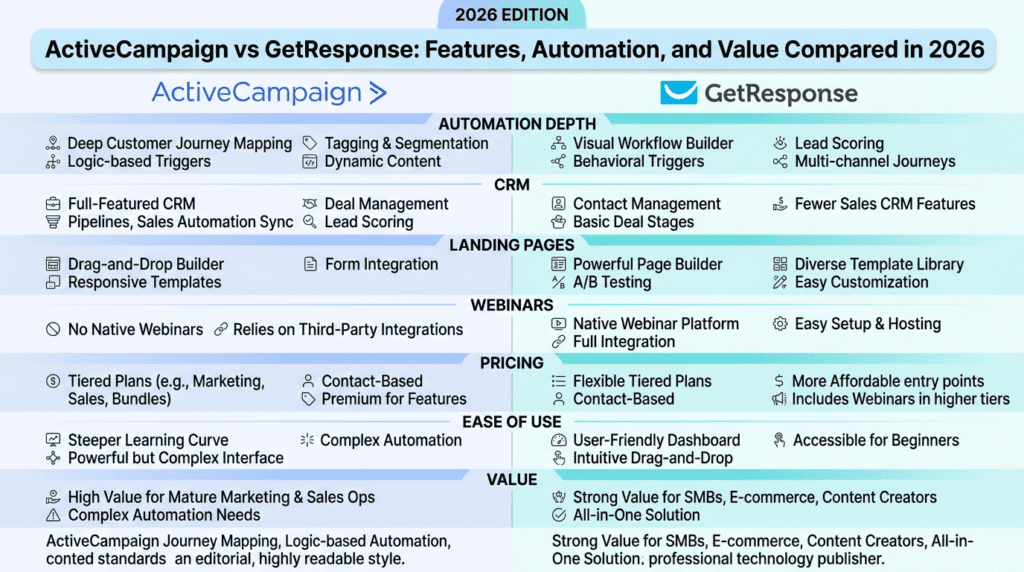
This isn’t a simple “best platform wins” situation. ActiveCampaign usually wins on automation depth, CRM usefulness, and advanced segmentation. GetResponse usually wins on ease of use, bundled features, and value for buyers who want more built-in marketing tools without assembling extra software.
So the real question is not which platform is better in theory. It’s which one fits your workflow, your team size, and how much complexity you can actually manage.
Quick Verdict: Activecampaign Vs Getresponse at a Glance
| Category | ActiveCampaign | GetResponse |
|---|---|---|
| Best For | Teams that need advanced automation, CRM workflows, and deeper segmentation | Marketers who want email marketing, landing pages, webinars, and funnels in one place |
| Not Ideal For | Beginners who want a fast setup with minimal learning curve | Users who need very advanced automation logic and CRM depth |
| Starting Price | Typically starts higher than GetResponse, with pricing tied to contacts and plan tier | Usually more affordable at entry level, and GetResponse offers a free plan |
| Free Plan | No traditional free plan | Yes, GetResponse offers a free plan |
| Ease of Use | More powerful, but takes longer to learn | Easier to get moving, especially for solo marketers and small teams |
| Key Strength | Advanced marketing automation and CRM | Built-in landing pages, webinars, and funnel tools |
| Biggest Limitation | Can feel complex and expensive as you scale | Less depth for complex automation and CRM workflows |
| Overall Recommendation | Best for growth-focused automation-heavy teams | Best for value seekers who want an all-in-one marketing platform |
ActiveCampaign is the stronger choice if your email marketing depends on sophisticated workflow logic, sales handoff, or detailed segmentation. It’s also the better fit when your team can tolerate a steeper setup in exchange for better control.
GetResponse is the better pick for buyers who want practical all-in-one marketing features without stacking multiple tools. If you care about landing pages, webinars, and campaign speed more than deep CRM complexity, it usually makes more sense.
Best for
ActiveCampaign is best for agencies, SaaS companies, consultants, and established small businesses that need advanced marketing automation and tighter CRM control. It’s especially useful when lead scoring, personalization, and multi-step workflow branching matter.
GetResponse is best for creators, ecommerce brands, coaches, and smaller teams that want email marketing, landing page, and webinar tools under one roof. It’s also appealing if you want to move quickly and keep the workflow simpler.
Not ideal for
ActiveCampaign is not ideal if you’re new to email marketing and want the easiest possible setup. It can also be more than you need if your campaigns are basic newsletters and a few follow-ups.
GetResponse is not ideal if your business depends on highly customized automation workflows, complex sales logic, or deeper CRM behavior. It can do a lot, but there’s a ceiling once your funnel gets serious.
Bottom line
If you value power and control, ActiveCampaign is usually the stronger platform. If you value speed, bundled features, and a lower barrier to entry, GetResponse often delivers better value.
Complete Comparison Table: ActiveCampaign Vs GetResponse
| Area | ActiveCampaign | GetResponse |
|---|---|---|
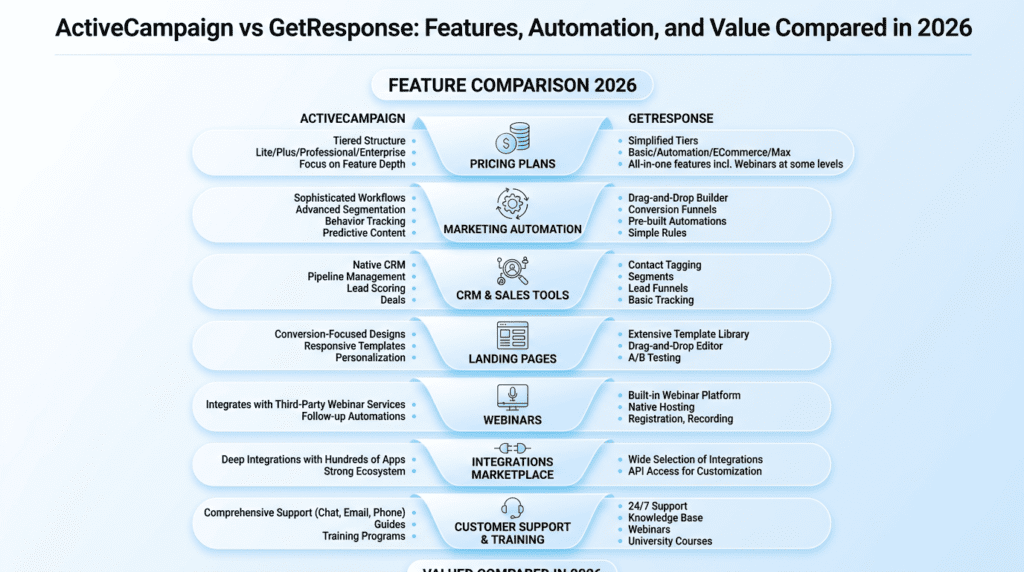
| Pricing | Higher entry cost, especially as contacts increase | Typically more affordable, with a free plan available |
| Automation | Strong advanced automation with deep branching logic | Solid automation, but less advanced than ActiveCampaign |
| CRM | Built-in CRM is a core strength | CRM features are lighter and less central |
| Landing Pages | Includes landing page tools, but not the main reason people choose it | Strong landing page builder with more all-in-one appeal |
| Webinars | No native webinar focus | Built-in webinar tools are a major plus |
| Funnels | Can support sales workflows well, but not as funnel-centric | Offers conversion funnel and sales funnel tools directly |
| Templates | Good email template options | Broad template selection across email, pages, and funnels |
| Free Plan | No | Yes |
| Best Value | For advanced automation users | For buyers who want more bundled tools |
The pricing difference matters more than people expect. ActiveCampaign can become expensive once your email list grows, especially if you need higher-tier automation and CRM features. GetResponse is often easier on the budget at the entry level, and the free plan lowers the barrier for testing.
Ease of use, deliverability, integrations, and support
| Area | ActiveCampaign | GetResponse |
|---|---|---|
| Ease of Use | More complex, especially for beginners | Easier to navigate for most new users |
| Deliverability | Strong reputation for email deliverability | Generally reliable, with solid sending performance |
| Integrations | Large integration ecosystem | Good integrations, though not as deep in some categories |
| Support | Helpful, but experience can depend on plan level | Strong support options and easier onboarding for many users |
| Dashboard | Dense, built for power users | Cleaner for fast campaign management |
This is where the user experience starts to separate. ActiveCampaign feels built for people who expect to live inside the platform and build detailed workflows. GetResponse feels more approachable if you want to launch campaigns without a long learning curve.
Deliverability is good on both sides, which is important because email marketing falls apart fast if messages don’t land. Neither platform removes the usual list hygiene work, though. If your email list is messy or inactive, no platform can fully save the campaign.
Best use case by platform
| Platform | Best Use Case |
|---|---|
| ActiveCampaign | Advanced email marketing automation, lead scoring, CRM-based follow-up, and segmented lifecycle campaigns |
| GetResponse | All-in-one email marketing, landing pages, webinars, and conversion funnel creation for smaller teams |
Activecampaign Vs Getresponse: Features Compared
Email marketing and campaign creation
Both platforms handle email marketing well enough for daily use, but they feel different in practice. ActiveCampaign is more geared toward building campaigns that connect to user behavior and CRM data. GetResponse is often easier for sending a straightforward newsletter or campaign quickly.
If your team sends a weekly newsletter, a product update, and a few evergreen follow-ups, GetResponse is usually enough. If your email marketing depends on where a subscriber clicked, what they bought, or which stage they’re in, ActiveCampaign has the edge. That extra control can improve targeting, but it also makes the system feel more crowded.
Marketing automation and advanced automation depth
This is the biggest difference between the two platforms. ActiveCampaign is known for advanced marketing automation, and that reputation is earned. Its workflow builder can handle more conditions, deeper branching, and more complex paths through the customer journey.
GetResponse offers automation too, and for many users it’s perfectly adequate. You can trigger follow-ups, build nurture sequences, and create a useful funnel without a lot of friction. But once you want layered logic, multiple behavioral branches, and tighter CRM-linked actions, ActiveCampaign usually handles the job better.
That said, not every business needs advanced automation. A lot of teams think they do because it sounds efficient. In reality, they need five core workflows, not fifty. That’s where GetResponse often makes more sense: enough automation to be useful, without turning the dashboard into a project.
Segmentation and audience targeting
Segmentation is one of the clearest points of separation. ActiveCampaign offers more powerful segmentation, especially when combined with tagging, lead scoring, and activity-based conditions. That makes it easier to build campaigns around behavior instead of just list groups.
GetResponse also supports segmentation, and it’s more than enough for many email marketing campaigns. You can divide subscribers by interest, source, engagement, or funnel stage. The limitation shows up when your audience becomes more layered and you want the platform to react in more nuanced ways.
For example, a SaaS company might want one sequence for trial users who opened three emails but never activated, and a separate path for users who visited pricing twice. ActiveCampaign handles that kind of segmentation more naturally. GetResponse can work for simpler lists, but the logic gets less elegant as complexity grows.
CRM capabilities in ActiveCampaign and GetResponse
ActiveCampaign’s built-in CRM is a major advantage if your email marketing supports a sales process. You can track deals, assign leads, and connect automation directly to sales stages. That matters for service businesses, SaaS teams, and agencies where email marketing and sales follow-up overlap.
GetResponse includes lighter CRM-related functionality, but it’s not the same level of depth. It’s more of a support feature than a centerpiece. If you mainly want to organize subscribers and move them through a funnel, that can be enough. If your team needs a real sales pipeline inside the platform, ActiveCampaign is the clearer choice.
Landing page and conversion funnel tools
GetResponse is more convincing here. It offers landing page tools, funnel features, and a more complete conversion funnel workflow out of the box. That makes it easier to launch lead-gen campaigns, webinar registrations, and sales funnels without buying extra software.
ActiveCampaign includes landing page support too, but it’s not usually the reason people choose the platform. The stronger point is what happens after the lead arrives. The automation and CRM follow-up are better, which can improve conversions over time, but the front-end funnel builder itself is less of a headline feature.
If you’re a marketer who wants a simple page-to-email-to-sale path, GetResponse is often the cleaner setup. If you already have landing pages elsewhere and need better backend automation, ActiveCampaign fits better.
Webinars, templates, and other built-in marketing features
GetResponse stands out because it includes webinars, templates, and several built-in marketing features that reduce tool sprawl. That’s a real advantage for small businesses trying to keep monthly software costs under control. You can build a landing page, promote a webinar, and follow up with attendees inside one platform.
ActiveCampaign also has useful templates and supporting tools, but it doesn’t lean as hard into the all-in-one marketing promise. Its strength is precision. GetResponse’s strength is convenience. That difference matters when your team is short on time and wants fewer moving parts.
Activecampaign Vs Getresponse: Automation and Segmentation Differences
Visual workflow builder and automation logic
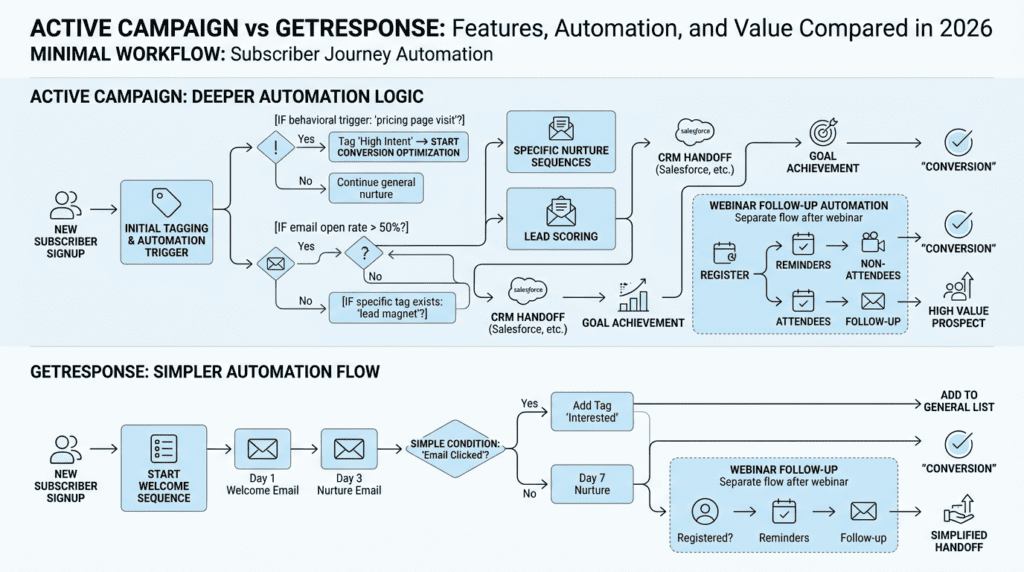
ActiveCampaign’s visual automation builder is one of its biggest selling points. You can map out workflows with branches, conditions, tags, and actions that react to behavior in a pretty detailed way. For teams that need structure, this is where the platform feels premium.
GetResponse also has a visual automation builder, and it’s good enough for many common workflows. You can create welcome sequences, nurture paths, and re-engagement campaigns without much trouble. The difference is less about whether it works and more about how far it can go before the logic feels cramped.
A basic workflow might be fine on either platform. Once you start layering time delays, page visits, purchase behavior, webinar attendance, and score-based triggers, ActiveCampaign begins to feel more natural.
Trigger-based campaigns and behavioral follow-up
Trigger-based automation is where email marketing starts saving real labor. Both platforms let you respond to actions like signups, clicks, purchases, or inactive periods. That’s useful if you want subscribers to get the right email campaign without manual sorting.
ActiveCampaign tends to handle behavioral follow-up with more precision. It can trigger more nuanced responses and connect them to CRM actions. GetResponse covers the common use cases well, especially for nurture sequences and lead magnets, but the workflow depth is lighter.
A local agency might use either platform to send a follow-up after a consultation form submission. But if that same agency wants different paths based on service interest, page activity, and deal stage, ActiveCampaign is the better fit.
Dynamic segmentation and personalization options
This is where the platform choice starts affecting campaign quality. ActiveCampaign supports more dynamic segmentation and stronger personalization because it can pull from more behavioral data. That lets you tailor messages around user actions instead of relying only on static list groups.
GetResponse supports personalization too, and for many email marketing campaigns that’s enough. You can make messages feel relevant without overcomplicating the setup. But once you want the system to adapt constantly based on subscriber behavior, ActiveCampaign provides more room to work.
The upside is obvious. The trade-off is that more personalization requires more setup and more maintenance. That’s where teams sometimes overbuild. They spend hours creating conditions that only improve a small slice of the email list.
Where advanced automation becomes a real advantage
Advanced automation matters when your lead volume is high enough that manual follow-up becomes unreliable. It also matters when your funnel has multiple decision points, like webinar attendance, demo requests, product trials, or ecommerce behavior. In those cases, the platform isn’t just sending emails. It’s helping run the customer journey.
ActiveCampaign is usually the better marketing automation platform for that kind of complexity. It gives experienced teams more control and fewer workarounds. GetResponse still works well for many businesses, especially if the workflow is simpler and the team wants to move fast.
Reality check: what most users actually need versus what sounds impressive
A lot of buyers say they need advanced automation, but what they really need is consistency. They need one welcome workflow, one post-purchase sequence, one lead nurture path, and maybe a webinar follow-up. That’s it.
For that use case, GetResponse is often more than enough, and sometimes more practical. ActiveCampaign becomes the better answer when the business has enough traffic, enough subscribers, and enough internal complexity to justify the learning curve. If your team isn’t there yet, paying for advanced automation can feel like buying a race car for a grocery run.
Activecampaign Vs Getresponse: Ease of Use and Learning Curve
Setup experience for beginners
GetResponse is usually the easier platform to get moving on day one. The dashboard is cleaner, and the setup flow makes it pretty clear what to do next: import a list, pick a template, build a basic campaign, and publish. If you’re switching from a spreadsheet or a simple newsletter tool, that matters more than people admit. A lot of email marketing platforms look fine in demos, then waste an afternoon once you actually need to connect forms, tags, and an email list without breaking something.
ActiveCampaign asks for a little more patience. It’s not hard in a technical sense, but it assumes you already understand how segmentation, automations, and CRM logic should work together. That can feel like a lot for first-time users. The upside is that the structure pays off later. The downside is that beginners often spend more time just deciding how they want the platform to behave before they ever send an email campaign.
Everyday campaign management
For day-to-day email marketing, GetResponse feels lighter. Once you’ve built a few campaigns, the flow stays pretty straightforward: choose a template, edit copy, set your audience, schedule, and send. The platform doesn’t constantly push you into complex workflows unless you want them. That’s useful for solo marketers, creators, and small businesses that mostly send newsletters, launches, or simple promotional campaigns.
ActiveCampaign is more operationally powerful, but it can also feel busier. There’s more happening in the dashboard, and that’s not always a good thing when you just want to send a clean email. The platform shines when your email marketing depends on segmentation, lead stages, and follow-up logic. If you only need to send a few well-timed newsletters each month, some of ActiveCampaign’s depth will feel like overhead instead of value.
How easy it is to build automations and funnels
This is where the two platforms start to separate more clearly. GetResponse gives you enough marketing automation to build practical funnels without making the process feel technical. You can create sequences, connect forms, move subscribers between steps, and build a conversion funnel that makes sense for lead capture or a simple sales process. For many users, that’s enough. They want to automate the obvious stuff, not design a giant system.
ActiveCampaign goes deeper. Its automation builder is one of the main reasons people choose it, especially if they want advanced marketing automation with conditional logic, branching paths, tag-based actions, and CRM handoffs. That power is real, but it also creates a learning curve. A first funnel can take longer than expected because the platform gives you more ways to do the same thing. That flexibility is great once you’re scaling. It’s less fun when you’re still figuring out the basics.
A simple rule helps here:
- Choose GetResponse if: you want to launch automations quickly and keep the workflow manageable.
- Choose ActiveCampaign if: you’re ready to invest time upfront for more control later.
- Avoid both as a shortcut: if your process is still vague and you don’t know what should happen after someone subscribes.
Template quality and editing workflow
GetResponse usually feels stronger on first impression because the template library is broad and practical. The email template and landing page builder are designed for speed, so you can move from idea to published campaign without spending too much time in the editor. That matters when you send weekly newsletters or run time-sensitive promotions. The trade-off is that some templates still need cleanup if you want a more polished brand look.
ActiveCampaign’s template experience is solid, but it’s not the main reason people buy the platform. It provides the pieces you need for email marketing, but the editing flow feels more functional than flashy. If your team cares about brand control and repeatable sending, that’s fine. If you want lots of visual help early on, GetResponse generally feels friendlier. Neither platform is painful here, but GetResponse tends to get the nod for ease of use.
What gets harder as your list and workflows grow
The weird thing about email marketing software is that the simple part often stays simple. The pain shows up later. Once your subscriber count grows, your segmentation gets messier, and your workflow starts touching sales, forms, and integrations, small setup choices turn into daily annoyances. Tags overlap. Automations trigger twice. A landing page pulls the wrong audience. That’s where platform design starts to matter.
ActiveCampaign handles that kind of complexity better, but only if your team is disciplined. It gives you more room to build smarter systems, yet it also gives you more room to create chaos. GetResponse stays easier to manage, but very large or highly layered funnels can start to feel cramped. If you’re running a straightforward funnel with a few paths, GetResponse is usually enough. If you expect multiple lead sources, several stages of personalization, and ongoing CRM work, ActiveCampaign’s structure becomes more valuable.
Activecampaign Vs Getresponse: Landing Page, Funnel, and Webinar Tools
Landing page builder comparison
GetResponse is stronger when you want one platform to handle both email marketing and landing pages without bolting on extra tools. Its landing page builder is built for lead generation, so it’s easy to create opt-in pages, thank-you pages, and simple sales pages tied to a campaign. For marketers running paid traffic or quick launches, that integration saves time. You’re not stitching together five tools just to collect a subscriber.
ActiveCampaign also offers landing page support, but it’s more of a supporting feature than a core strength. The platform can help you capture leads and connect them to automation, but most users won’t pick ActiveCampaign because of its landing page builder alone. If your main goal is fast page creation with a decent range of templates, GetResponse usually has the edge. If you care more about what happens after the form submit, ActiveCampaign becomes more compelling.
Conversion funnel features inside GetResponse
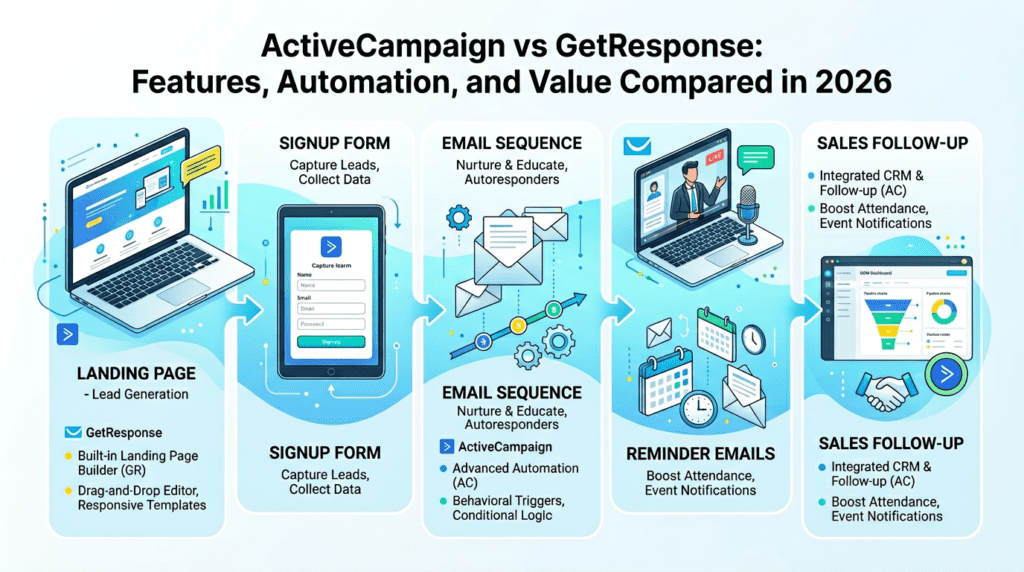
This is one of GetResponse’s clearest advantages. It gives you built-in conversion funnel tools that help map the whole process: landing page, signup form, email follow-up, and sales page. That makes it easier for a smaller team to launch a funnel without needing a separate funnel builder. For product launches, webinars, and lead magnets, that convenience is hard to ignore.
The trade-off is that the funnel logic is practical rather than endlessly customizable. That’s fine for most buyers. In fact, it’s often better, because too much complexity slows down execution. A coach, course creator, or ecommerce brand can use GetResponse to move a subscriber from opt-in to follow-up to offer with very little friction. If you want a clean system more than a custom one, it does a solid job.
Funnel-building flexibility in ActiveCampaign
ActiveCampaign doesn’t position itself as a classic funnel builder first, but it can absolutely power a sales funnel through automations, tags, CRM stages, and integrations. The difference is that you’re building the logic yourself instead of following a more guided funnel path. That gives you more freedom, especially if your funnel depends on behavior across multiple touchpoints.
That flexibility is also where people run into friction. ActiveCampaign can support complex funnel logic, but it expects you to understand the sequence: who enters, what tags fire, which deal stage changes, and when a message goes out. That’s powerful for agencies and B2B teams, but it can be overkill for a simple lead gen campaign. If your funnel is mostly “collect email, send sequence, book call,” GetResponse is usually faster. If your funnel needs multiple rules and CRM movement, ActiveCampaign is stronger.
Webinar functionality and when it matters
GetResponse includes webinar tools, which is still a meaningful differentiator for many marketers. If your workflow depends on live training, product demos, or recurring lead generation events, keeping webinars inside the same marketing platform cuts down on integration headaches. You can promote the webinar, collect registrations, send reminders, and follow up afterward without juggling separate systems.
ActiveCampaign doesn’t center webinars the same way, so if webinars are core to your acquisition strategy, you may need a separate tool and an extra integration. That’s not a dealbreaker, but it adds moving parts. For a business that runs one webinar a month, that might be fine. For a business that uses webinar campaigns as a primary funnel, GetResponse is usually the cleaner fit.
Which platform is better for lead generation campaigns
For lead generation, GetResponse is often the more practical choice. It has the landing page builder, conversion funnel tools, and webinar support all working in the same platform. That makes it easier to capture subscribers and push them into a follow-up sequence without a lot of technical setup. If you care about speed and simplicity, that’s a real advantage.
ActiveCampaign is better when lead generation is only the first step. If you want each subscriber to enter a deeper CRM process, move through a longer nurture flow, and get personalized follow-up based on behavior, ActiveCampaign becomes more useful. So the real answer is simple: GetResponse is better for running the lead gen system. ActiveCampaign is better for managing what happens after the lead arrives.
Activecampaign Vs Getresponse: Deliverability and Campaign Performance
Inbox placement expectations
Deliverability is one of those areas where buyers want a clean answer and rarely get one. In practice, both platforms can perform well, but inbox placement depends far more on list quality, sending habits, and authentication than on the platform alone. If your list is healthy and your email campaign makes sense, both tools can deliver strong results. If your list is sloppy, neither platform is going to rescue you.
That said, ActiveCampaign has a strong reputation with experienced senders who care about targeting and behavior-based email marketing. GetResponse also performs well for standard newsletter sending, especially when users keep their sends consistent and avoid bad list practices. The bigger difference usually comes from how each platform helps you manage the list, clean it, and segment it before you hit send.
List hygiene and deliverability controls
ActiveCampaign is especially good when you want tighter segmentation and better control over who gets what. That matters because deliverability improves when subscribers get relevant content instead of random blasts. The platform makes it easier to create workflows that move people based on opens, clicks, purchases, and site activity. That kind of filtering keeps your campaigns cleaner.
GetResponse also gives you solid list management tools, but its strength is more in simplicity than deep behavior modeling. For many users, that’s enough. If you send to 5,000 to 25,000 subscribers and keep your segmentation basic, GetResponse can be perfectly effective. The real risk with any email marketing platform is not the software itself, but letting your list get stale and then wondering why engagement drops.
Performance differences across common email campaign types
For newsletters, both platforms are more than capable. GetResponse tends to feel smoother for straightforward broadcast campaigns, product announcements, and lead nurture sequences that don’t need a lot of branching. ActiveCampaign usually performs better when the campaign needs to react to behavior, such as a click-triggered follow-up or a purchase-based sequence.
For launch campaigns and sales funnels, GetResponse benefits from its built-in funnel structure, especially if you want a quick path from landing page to follow-up. ActiveCampaign can do the same job, but it usually requires more setup. If your campaign strategy is repetitive and process-driven, ActiveCampaign’s automation depth can improve consistency. If your team is sending 2 to 4 campaigns a month and wants speed, GetResponse is easier to manage.
Testing methodology and real-world usage considerations
The honest way to evaluate deliverability is to test your own list. A platform’s reputation helps, but your audience, content, and sending patterns matter more. Start with a small segment, watch open rates, click-throughs, and spam complaints, then scale from there. That’s especially important if you’re migrating from another email marketing platform, because even a healthy list can behave differently after a move.
Real-world usage also introduces boring problems that matter. People forget to authenticate domains. They import old subscribers without cleaning them. They send too many promotional campaigns in a row. None of that is glamorous, but it affects outcomes more than platform feature lists do. If you’re moving into a new system, plan on at least 1 to 2 weeks of monitoring before you trust the numbers.
What to watch if deliverability is a top priority
If deliverability is a top priority, pay attention to three things: list hygiene, domain authentication, and segmentation discipline. ActiveCampaign gives you more control over behavior-based segmentation, which can help reduce irrelevant sends. GetResponse gives you a simpler operating model, which reduces setup mistakes.
The platform matters, but the workflow matters more. If your team sends to the wrong segment or overuses a newsletter list, inbox placement suffers no matter which tool you choose. For high-stakes email marketing, the best platform is the one your team can actually manage without making avoidable errors.
Activecampaign Vs Getresponse: Integrations and Platform Ecosystem
Native integrations and third-party connections
Both platforms integrate with the tools most businesses already use, but ActiveCampaign generally has the stronger reputation for broad ecosystem depth. It works well with CRMs, ecommerce apps, form builders, webinar tools, and a wide range of automation connectors. If your stack is already layered, that matters. You don’t want your email marketing platform to become the thing that limits your process.
GetResponse also has a healthy integration library, and for many small teams it’s enough. If you’re connecting a store, a form tool, and a payment system, you’ll probably be fine. The issue shows up when you need a more unusual integration or a tighter workflow between systems. That’s where ActiveCampaign often feels more flexible, especially for businesses that rely on multiple apps to manage sales and customer follow-up.
How each platform handles app integration
ActiveCampaign tends to work like a central hub. Its CRM and automation structure make it easier to pass data between apps and act on it. That’s useful when you want a subscriber’s behavior in one system to affect an email sequence, deal stage, or sales task in another. The result is less manual cleanup and more coordinated marketing automation.
GetResponse is more self-contained. It still integrates well, but it feels more like a complete marketing platform than a control center for a scattered stack. For teams that want fewer moving parts, that’s a plus. For teams that want to connect 10 tools and automate everything, ActiveCampaign usually has the edge. The choice comes down to whether you want simplicity or orchestration.
E-commerce, CRM, and webinar ecosystem fit
ActiveCampaign is often the better fit for ecommerce and CRM-heavy teams because it can connect purchase behavior, lead scoring, and sales follow-up in one workflow. That makes it useful for stores with repeat buyers, high-ticket offers, or a sales team that needs context before reaching out. It also fits service businesses that depend on deal pipelines and personalized follow-up.
GetResponse fits well for ecommerce brands and creators who care more about campaigns, funnels, and webinars than full sales operations. It gives you enough built-in marketing tools to run lead capture and nurture without stretching into a heavier CRM process. If your business lives inside webinars, launches, and direct-response email marketing, GetResponse feels more natural. If sales and customer lifecycle tracking matter more, ActiveCampaign is stronger.
Integrate with your existing stack without creating friction
This is where a lot of buyers underestimate the work. An integration isn’t just a checkbox. It has to move the right data, at the right time, without breaking when a tag changes or a form updates. If your current stack includes Shopify, WordPress, Stripe, Zoom, and a CRM, your setup time can easily double if the platform doesn’t map cleanly to those systems.
ActiveCampaign usually gives more room to build complicated connections, but that also means more room for mistakes. GetResponse is easier to keep tidy when the stack is smaller. For a solo marketer or small business with 3 to 5 core tools, GetResponse is often less frustrating. For a growing team with multiple systems and handoffs, ActiveCampaign reduces the chance that your workflow becomes a mess later.
Which platform scales better with a growing tool stack
ActiveCampaign scales better when the stack gets bigger and the workflow gets more layered. It’s built for businesses that need deeper segmentation, CRM actions, and logic across several apps. That doesn’t mean it’s always the better choice, but it does mean it holds up better when your process evolves from “send emails” to “manage a lifecycle.”
GetResponse scales well for marketing execution, especially if you stay inside its ecosystem for landing pages, funnels, and webinars. But once your business starts depending on more external systems, ActiveCampaign usually becomes the more durable choice. If you expect your stack to stay simple, GetResponse is fine. If you expect it to keep growing, ActiveCampaign is less likely to box you in.
Activecampaign Vs Getresponse: Pricing, Free Plan, and Value for Money
ActiveCampaign pricing structure and where it gets expensive
ActiveCampaign’s pricing is usually where buyers pause. It starts at a reasonable entry point on lower tiers, but the cost climbs as your subscriber count grows and as you unlock more advanced CRM and automation features. That’s normal for a serious marketing automation platform, but it can surprise people who expected a simple email tool. The price tends to make more sense once you’re using the platform for segmentation, lead scoring, and sales handoffs.
The hidden issue is that the features you actually want often live on higher plans. If you need advanced automation, CRM depth, or more users, you can move out of the cheap tier faster than expected. So the “real” cost is often higher than the first monthly quote suggests. For teams with a defined funnel and a clear revenue process, that’s still worth it. For casual newsletter senders, it can feel like paying for more machine than you need.
GetResponse free plan and starter value
GetResponse is easier to approach if you want to test the platform before committing. It offers a free plan, which gives new users a low-risk way to try email marketing basics, build a simple landing page, and see whether the workflow fits their team. That matters for creators and small businesses that don’t want to lock in before they’ve built confidence.
Its paid starter tiers are also generally friendlier for buyers who care about value early on. GetResponse is more affordable for people who want a decent range of features without moving straight into heavy automation costs. If your goal is to send newsletters, build a funnel, and run occasional webinars, the platform offers a strong entry point before you outgrow it.
Plan comparison by features and list size
This is where the two platforms diverge in a practical way. GetResponse gives you more bundled value at the lower end, especially if you use landing pages, funnels, and webinars. ActiveCampaign makes more sense when your subscriber list and workflow complexity justify the extra spend. A list of 1,000 contacts might fit neatly into GetResponse’s starter logic, while a larger business with segmented buyer journeys may get more usable value from ActiveCampaign even if it costs more.
The best comparison is not just price, but cost per useful feature. If you’re using only 30% of ActiveCampaign’s depth, it’s expensive. If you’re using 80% of it, the price becomes easier to justify. GetResponse is often the better value for early-stage and mid-stage email marketing. ActiveCampaign becomes the stronger value when automation and CRM work are directly tied to revenue.
Hidden costs and upgrade pressure
The first hidden cost is user growth. As your team expands, more tools, seats, or higher-tier features can push the bill up. The second is workflow pressure. A platform that seems cheap at first may force you to upgrade once you need stronger automation, CRM actions, or more advanced segmentation. That’s especially true when your business starts treating email as part of a larger sales system.
Another hidden cost is time. A cheaper platform that’s harder to configure can still be expensive if it slows your launches or creates cleanup work. GetResponse saves time for simpler campaigns. ActiveCampaign saves time when the workflow is complex enough to justify the setup. That’s the trade-off most people miss when they compare only monthly prices.
Which platform offers better long-term value
GetResponse usually offers better long-term value for users who want a broad email marketing platform with landing pages, funnels, and webinars in one place. It’s a strong choice when you care about speed, usability, and getting a lot done without adding more software.
ActiveCampaign offers better long-term value for businesses that are serious about automation, segmentation, and CRM-driven follow-up. If your campaigns feed directly into sales, support, or lifecycle marketing, the higher cost can pay for itself. The best choice depends on how much operational control you need. If you want simplicity and bundled tools, GetResponse is the safer buy. If you want deeper logic and are willing to pay for it, ActiveCampaign is the stronger investment.
What Most Blogs Miss About Activecampaign Vs Getresponse
A lot of comparisons treat Activecampaign Vs Getresponse like a clean spec sheet battle. That’s not how email marketing works in real life. The bigger issue is not whether a platform has 10 or 20 features. It’s whether your team can actually use them without creating extra work, broken workflows, or a dashboard nobody wants to open twice a week.
The difference between feature depth and actual usability
ActiveCampaign usually wins on depth. GetResponse often feels easier to start with. That sounds simple until you’re the person building the campaign every week. A deeper platform can still be a pain if the automation builder takes too long to learn, the segmentation rules feel too technical, or your team keeps avoiding the CRM because it’s “for later.” On the other side, a simpler platform can leave you hitting limits once your email list grows past a few thousand subscribers and your funnel gets more complicated.
The real question is not “Which platform has more marketing automation?” It’s “Which platform lets your team launch, test, and adjust campaigns without friction?” For a solo creator sending newsletters and a few promo emails each month, ease of use may matter more than advanced branching. For a SaaS brand or agency running multiple campaigns, the extra control can pay off if someone on the team is actually willing to manage it.
When more automation is not the same as better results
It’s easy to assume more automation means more revenue. In practice, it often means more setup. A workflow with 12 branches looks impressive, but if it’s based on weak segmentation or bad offers, it won’t save the campaign. That’s where a lot of buyers get stuck. They compare automation features, not operational effort.
A small business may only need a welcome series, one re-engagement flow, and a simple lead nurture sequence. That’s maybe 3 to 5 core automation workflows, not 30. Once people realize that, GetResponse can look plenty capable. ActiveCampaign becomes more attractive when you truly need advanced automation, conditional logic, and more detailed personalization across sales and marketing. But if you’re not going to use those layers, you’re paying for complexity you may never touch.
Why small teams and growing businesses make different choices
Small teams usually care about speed. They want to build a landing page, send a newsletter, and maybe test a funnel without a long setup cycle. That’s where GetResponse often makes more sense. It gives smaller operators a path to email marketing and marketing automation without forcing them into a heavy operational model on day one.
Growing businesses care more about repeatable systems. Once you’re managing several lead sources, a sales pipeline, or multiple subscriber segments, ActiveCampaign starts to feel more useful. Its CRM and automation depth matter when your email marketing platform has to coordinate with sales follow-up, deal stages, and behavioral targeting. The trade-off is that setup takes longer, and the team has to stay disciplined.
Hidden trade-offs around CRM, webinars, and funnels
This is where the comparison gets messy. ActiveCampaign’s CRM is a real advantage if your sales process matters. GetResponse’s webinars and funnel tools are useful if your business leans hard into lead generation, launches, or course-style marketing. But neither platform is a perfect all-in-one marketing platform for every team. One may be stronger in one area while feeling awkward in another.
For example, a coach selling a digital course may care more about webinars, landing pages, and conversion funnels than a full CRM. A B2B agency might care more about pipeline tracking and handoff between marketing and sales. The platform that looks “better” on paper can be the wrong fit once you factor in how your business actually sells.
Common buyer mistakes when comparing the two platforms
The biggest mistake is comparing the wrong layer of the stack. People obsess over templates, storage, or whether there’s a free plan, then ignore deliverability, workflow maintenance, and how many hours it takes to build a usable funnel. Another mistake is choosing based on current needs only. If your list is 500 subscribers today but could be 10,000 in a year, the better platform is the one that won’t box you in.
A second mistake is assuming your team will “figure it out later.” That rarely happens. If the automation builder feels clunky now, it usually stays clunky. If the CRM feels optional now, it probably gets ignored later. Compare the platform to the work you’ll actually do three months from now, not the version of your business you wish you had today.
Which Is Better For Your Use Case?
The better choice depends on how you actually run email marketing. If you want the shortest path from signup to sending, GetResponse usually has the easier start. If you want deeper automation and a more serious CRM layer, ActiveCampaign is often the stronger long-term platform. The tricky part is that both can serve similar buyers, but not with the same level of comfort.
Best for beginners and small businesses
GetResponse is usually the safer pick for beginners and small businesses. The setup feels more guided, and the platform gives you a lot in one place: email marketing, landing pages, and basic funnel tools. That matters when you don’t have time to stitch together three separate tools and learn them all at once.
It also helps that GetResponse offers a free plan, which lowers the pressure for early-stage users. A local business, solo consultant, or new creator can often get a simple newsletter and lead capture system running without a big upfront commitment. The trade-off is that you’ll eventually feel the limits if your segmentation gets more advanced or your workflow needs more branching.
Best for advanced automation and segmentation
ActiveCampaign is the stronger choice when automation is the main reason you’re buying. It handles complex segmentation, behavioral triggers, and layered workflow logic better than GetResponse. If you need to react differently to webinar attendees, demo requests, trial users, and repeat buyers, ActiveCampaign gives you more room to do that cleanly.
That said, this only matters if you’re ready to maintain it. Advanced automation is not free. It takes planning, testing, and cleanup. If your team isn’t disciplined, the extra power can turn into a mess of overlapping email campaign rules. For serious email marketing teams, though, that trade-off is often worth it.
Best for funnels, webinars, and course-style marketing
GetResponse has a clearer edge for marketers who care about funnels and webinars. Its built-in funnel structure makes it easier to map a lead magnet, opt-in page, email sequence, and offer page without stacking too many outside tools. For course creators, coaches, and product launches, that simplicity can save hours.
The webinar piece matters too. If you regularly use webinars as a conversion channel, having that feature built into the same platform is convenient. You don’t have to connect a separate webinar tool, and that reduces technical friction. ActiveCampaign can support this kind of marketing through integrations, but it doesn’t feel as naturally bundled for that workflow.
Best for teams that want CRM and sales workflow support
ActiveCampaign is the better fit when email marketing has to connect closely with sales. Its CRM gives you a way to track leads, deal stages, and follow-up inside the same platform. That’s useful for B2B teams, service businesses, and agencies that need a tighter handoff between marketing and sales.
If your process depends on lead scoring, task assignment, and personalized follow-up based on behavior, the platform feels more complete. GetResponse can still work for lead gen, but it’s less convincing when the sales workflow becomes the center of the operation. Once your team starts asking who owns which lead and when to trigger the next step, ActiveCampaign usually has the better structure.
When another option may fit better
Sometimes the honest answer is neither. If you want the easiest possible newsletter tool, a lighter platform may be better. If you need enterprise-style reporting, multi-team governance, or a very specific ecommerce stack, another platform could fit more naturally. Not every business needs this level of feature density.
If your goal is simple email marketing with low overhead, don’t force yourself into advanced software just because it looks powerful. If your goal is to run complex automation workflows across sales and marketing, don’t settle for a platform that only does the basics well. The right choice is the one that matches your actual workflow, not the one with the longest feature list.
Activecampaign Vs Getresponse: Final Buying Advice
By this point, the decision should be clearer. ActiveCampaign is the stronger platform for teams that need depth, especially in automation, segmentation, and CRM-driven follow-up. GetResponse is the more approachable platform for buyers who want a cleaner start, a better bundled feature set, and less operational overhead.
Who should choose ActiveCampaign
Choose ActiveCampaign if your email marketing is tied to revenue operations, not just newsletters. It makes sense for agencies, B2B teams, SaaS brands, and businesses that need serious segmentation and automation. If your workflow depends on behavior-based triggers, custom pipelines, and detailed personalization, this is the platform that gives you the most control.
It’s also a stronger choice if you expect your system to get more complex over time. A team that starts with simple campaigns can grow into advanced automation without changing tools later. Just be ready for a learning curve, and don’t underestimate the time it takes to keep everything organized.
Who should choose GetResponse
Choose GetResponse if you want a more accessible all-in-one marketing platform with landing pages, funnels, webinars, and email marketing in one place. It’s a good fit for creators, small businesses, and marketers who care about getting campaigns live quickly. The platform offers enough automation for many real-world use cases without making everything feel overengineered.
It also works well if your budget is tighter and you want a free plan or a lower-cost entry point. GetResponse is often the better value when your needs are practical rather than complex. You may outgrow it, but that doesn’t make it a bad starting point.
How to decide based on budget, workflow, and growth plans
Start with your workflow, not the pricing page. If you need a strong CRM and advanced automation now, ActiveCampaign can justify the higher cost. If your business is still building an audience and you mainly need campaigns, landing pages, and a few reliable funnels, GetResponse usually gives you more value per dollar.
Think about list growth too. A 1,000-subscriber setup is easy to manage almost anywhere. A 10,000-subscriber list with multiple segments, sales stages, and recurring campaigns is a different story. The platform that feels “good enough” today may become the one that slows you down later. That’s the real long-term test.
Final verdict on the better email marketing platform in 2026

ActiveCampaign wins on power, especially for advanced automation and CRM use cases. GetResponse wins on simplicity, bundled marketing tools, and entry-level value. If your business runs on complex workflows, ActiveCampaign is the better email marketing platform. If you want a practical, more affordable setup that can handle email marketing, landing pages, and funnels without much friction, GetResponse is the smarter buy.
Frequently Asked Questions About Activecampaign Vs Getresponse
Is Activecampaign Vs Getresponse better for beginners?
GetResponse is better for beginners in most cases. It has a gentler setup, and the platform feels less overwhelming when you’re learning email marketing for the first time.
ActiveCampaign is still usable, but it makes more sense once you already know what kind of workflow you want. If you’re brand new, the extra depth can slow you down.
Does GetResponse have enough automation for serious email marketing?
Yes, for many businesses, it does. GetResponse offers enough automation for welcome sequences, lead nurture flows, webinar follow-up, and basic segmentation.
Where it starts to feel limited is with more complex branching, detailed behavioral logic, and CRM-heavy workflows. If your team needs that level of control, ActiveCampaign is stronger.
Which platform has better deliverability for long-term email campaigns?
Both platforms are solid, and deliverability usually depends more on list quality and sending habits than the software itself. Clean lists, good subject lines, and consistent sending matter a lot more than minor platform differences.
That said, you still need to monitor inbox placement, unsubscribes, and bounce rates. A good platform won’t save a bad list.
Is the GetResponse free plan worth it?
Yes, if you want to test the platform or run a very small email list. The free plan is useful for early-stage creators and small businesses that want to start without paying upfront.
Just remember that free plans usually come with limits on contacts, branding, or advanced features. It’s a starting point, not a forever setup.
Does ActiveCampaign justify its higher price?
It does if you’ll use the CRM, segmentation, and advanced automation. If those features are central to your workflow, the higher cost can make sense.
If you only need newsletters and a few basic automations, the price can feel hard to justify. In that case, GetResponse is usually the better value.
Which platform is better for landing pages and conversion funnels?
GetResponse is better for landing pages and conversion funnels. Its built-in funnel approach makes it easier to connect pages, forms, and follow-up in one flow.
ActiveCampaign can support funnel-style marketing too, but it relies more on integrations and external setup. That gives you flexibility, but it’s less turnkey.
Can I integrate ActiveCampaign or GetResponse with my current tools?
Yes, both platforms integrate with common tools like WordPress, ecommerce apps, CRMs, and webinar software. ActiveCampaign tends to shine when you want deep workflow automation across a larger stack.
GetResponse also integrates well, especially for smaller marketing setups. The main question is not whether they connect, but how much extra setup you want to manage.