A lot of website decisions look simple at first, then get annoying once the real work starts. You pick a builder, publish a few pages, and only later realize the editor feels limiting, the design is hard to customize, or the tools you need cost more than expected. That’s why the GoDaddy Vs Wix decision matters more than it seems.
Both platforms let you create a website without coding, but they’re built for different kinds of users. Wix leans into flexibility, design control, and room to grow. GoDaddy focuses on speed, simplicity, and getting a business site live fast. In this comparison, I’ll break down pricing, templates, ecommerce, SEO, ease of use, integrations, support, scalability, and where each builder makes more sense in real-world use.
Quick Verdict: GoDaddy vs Wix in 2026
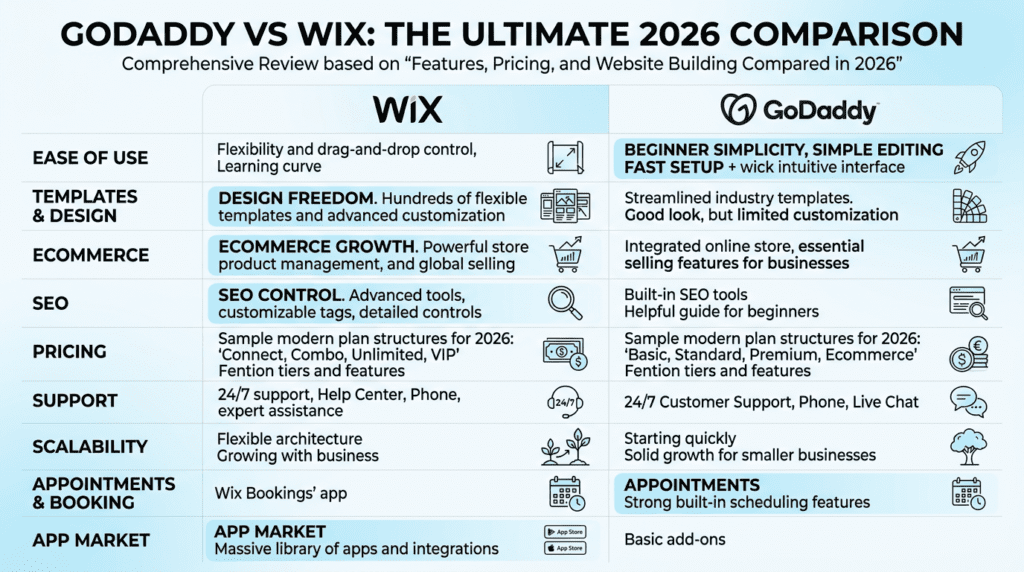
Complete Verdict Table
| Category | Wix | GoDaddy | Edge |
|---|---|---|---|
| Ease of use | Flexible drag-and-drop builder with more controls | Faster setup with simpler editing | GoDaddy for speed, Wix for control |
| Templates and design | Larger template library and stronger customization | Cleaner but more limited templates | Wix |
| Ecommerce | Better for growing stores and product-heavy sites | Good for simple selling and appointments | Wix |
| SEO | Stronger SEO controls and app ecosystem | Basic SEO tools for simple sites | Wix |
| Pricing | More plan variety but costs can rise with apps | Simpler pricing, often cheaper initially | Depends on needs |
| Best overall | More powerful website builder | Easier beginner option | Wix for most long-term users |
Best For
- Wix: Creators, small businesses, bloggers, ecommerce brands, and users who want design freedom.
- GoDaddy: Beginners, service businesses, appointment-based businesses, and users who want a simple website online quickly.
Not Ideal For
- Wix: Users who want the absolute fastest setup with minimal decisions.
- GoDaddy: Users who need advanced customization, complex ecommerce, or deep SEO flexibility.
Bottom Line
For most users comparing Wix vs GoDaddy, Wix is the better long-term website builder because it gives more control, stronger templates, better ecommerce options, and deeper SEO features. GoDaddy wins when speed, simplicity, and basic business website setup matter more than customization.
Wix vs GoDaddy Website Builder Experience: Setup, Editor, and Ease of Use
How Wix Website Builder Works for Beginners
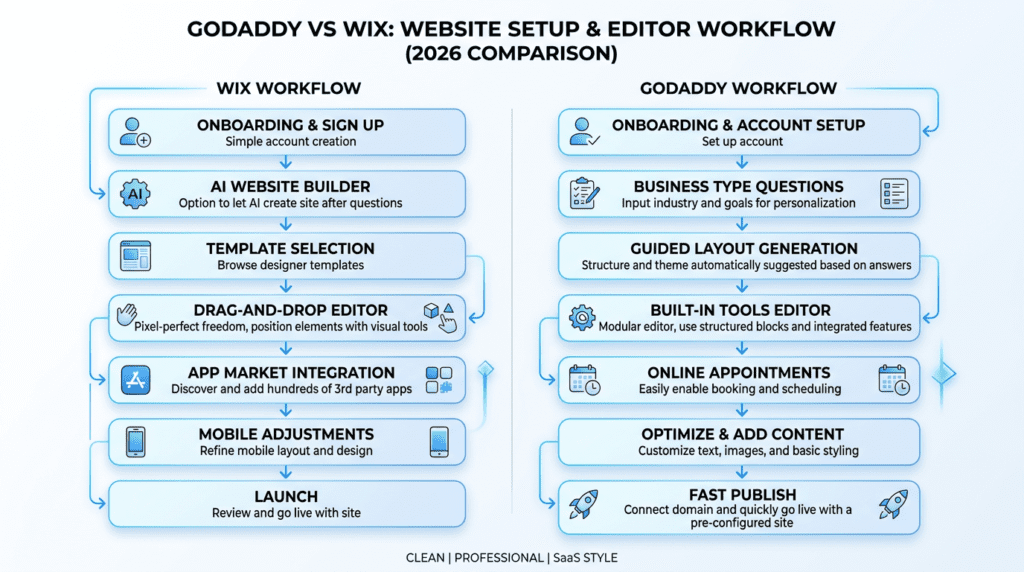
The Wix website builder gives beginners a lot of help up front, but it also gives them a lot of choices. That’s both the strength and the friction.
When you start, Wix typically asks questions about your business, goals, and the kind of site you want to create a website for. From there, you can choose between AI-assisted setup and more traditional template-based editing. Wix also offers a free plan, which is useful if you want to explore the editor before paying, though serious business use usually means upgrading.
For new users, Wix feels powerful right away because you can:
- pick from a large template library
- use sections to build pages faster
- drag elements where you want them
- expand features through the app market
- add blog, booking, store, or email marketing tools later
That flexibility is a big reason Wix is better for users who expect their site to evolve over time. A blogger may start with a basic home page and later add forms, lead magnets, and integrations. A local business might begin with service pages, then add bookings and email marketing. Wix handles that progression better than more rigid builders.
The trade-off is simple: beginners often freeze when they have too much freedom. They spend time adjusting spacing, fonts, mobile views, and page structure instead of just publishing. Marketing pages usually frame this as creative freedom. In real use, it can also mean slower setup, more second-guessing, and more cleanup if your first design choices weren’t great.
How the GoDaddy Website Builder Works
GoDaddy’s website builder takes almost the opposite approach. Instead of trying to give you deep visual control, it tries to remove as many decisions as possible.
You choose a business type, answer a few questions, and the builder assembles a starter site using prebuilt sections. The editing experience is more structured, which means you’re usually working inside preset layouts rather than freely moving elements around the page. That makes setup feel lighter, especially for people who don’t care much about website design and just want something professional enough to launch.
This is where godaddy focuses on speed. If you run a local service business, side hustle, or solo consultancy, that approach can be genuinely useful. You’re not trying to win design awards. You need a homepage, services, contact form, maybe bookings, maybe basic selling, and you need it live this week.
A GoDaddy website can usually be created faster because:
- page structures are more guided
- layouts are more standardized
- editing options are simpler
- built-in business features are easier to activate
- fewer design decisions slow you down
The downside shows up later. Once the site is live, some users start noticing where GoDaddy lacks flexibility. You may want a more customized landing page, more control over spacing, stronger blog design, or a more distinctive brand look. That’s where the structured system can start to feel narrow.
Drag-and-Drop Flexibility vs Structured Simplicity
This is one of the biggest differences between Wix and GoDaddy, and it matters more than most feature lists suggest.
Wix uses a more flexible drag-and-drop editing style. You can move items around more freely, customize sections more deeply, and shape the page closer to your own vision. That’s great if branding matters, if you want a more custom layout, or if you expect to test and improve pages over time.
GoDaddy is more controlled. You edit within a system that’s meant to keep things clean and fast. That’s often better for users who don’t want to break layouts or spend an hour changing a hero section.
Here’s the practical split:
- Choose Wix if you care about layout control, stronger branding, and long-term customization.
- Choose GoDaddy if you care about launching fast and making fewer editing decisions.
- Choose Wix or GoDaddy based on how involved you want to be after launch, not just on day one.
A freelancer building a portfolio or a course creator building lead pages will usually prefer Wix. A plumber, salon owner, or solo consultant may appreciate GoDaddy’s tighter structure because it keeps the process moving.
The important point is that “easy” means different things. For some users, easy means more freedom because they can customize exactly what they need. For others, easy means fewer choices because the builder does more of the work.
Setup Speed: Which Builder Gets You Online Faster?
If setup speed is the priority, GoDaddy usually has the edge.
Its onboarding is designed to get a basic site published quickly. You pick a category, answer a few prompts, and the platform assembles a starting point that often feels usable right away. For a small business that only needs core pages, this can save real time.
Wix also has guided setup and AI website builder features, but the process often leads to more choices. Even when the AI creates a starting structure, users tend to spend longer refining page layouts, replacing sections, and adjusting branding. That’s not necessarily bad. It just means the “fastest” path depends on how polished you want the final result to be.
A realistic comparison looks like this:
| Category | Wix | GoDaddy |
|---|---|---|
| Initial onboarding | Guided, with more branching options | Very streamlined and direct |
| AI assistance | Strong AI-based setup options | Simple AI-assisted setup |
| Time to publish a basic site | Fast, but often extended by customization | Usually faster for basic business sites |
| Control after setup | Higher | Lower |
| Best fit for speed and simplicity | Good, but not the fastest | Stronger choice |
If your goal is to build your site in one sitting and publish the same day, GoDaddy has the clearer advantage. If your goal is to build your website with more personality and flexibility, Wix often takes longer but gives you more room to optimize later.
Learning Curve and Day-to-Day Editing
The first hour with a builder matters, but the next six months matter more.
Wix takes longer to learn, but that learning usually pays off if you keep updating your site. Once you understand the editor, adding pages, changing sections, updating blog posts, and refining design choices becomes more natural. The platform asks more of you, but it also gives more back over time.
GoDaddy is easier to understand early on. Day-to-day edits are usually simple, especially for text changes, photos, business hours, or service updates. For owners who only touch the site once or twice a month, that simplicity can be a real advantage.
Still, there’s an important long-term trade-off:
- Wix gets easier as you grow into it.
- GoDaddy feels easiest at first, but its limits become more noticeable as needs expand.
That’s especially true for users adding new workflows later. A business that starts with a basic brochure site may later want lead capture tools, more advanced integration options, blog growth, or more refined landing pages. Wix handles that transition better. GoDaddy works best when the original scope stays fairly simple.
For beginners, the common frustrations usually look like this:
With Wix:
- too many design options
- more time spent adjusting layouts
- more temptation to over-customize
- steeper learning curve at the start
With GoDaddy:
- fewer layout choices
- less freedom to customize
- more frustration when trying to make pages feel unique
- limitations become clearer as the site grows
So in pure day-to-day use, the better option depends on your mindset. If you want a builder that stays out of your way, GoDaddy is easier. If you want a builder that gives you more control once you learn it, Wix is the stronger long-term choice.
GoDaddy vs Wix Design: Templates, Customization, and Brand Control
Wix Templates and Design Flexibility
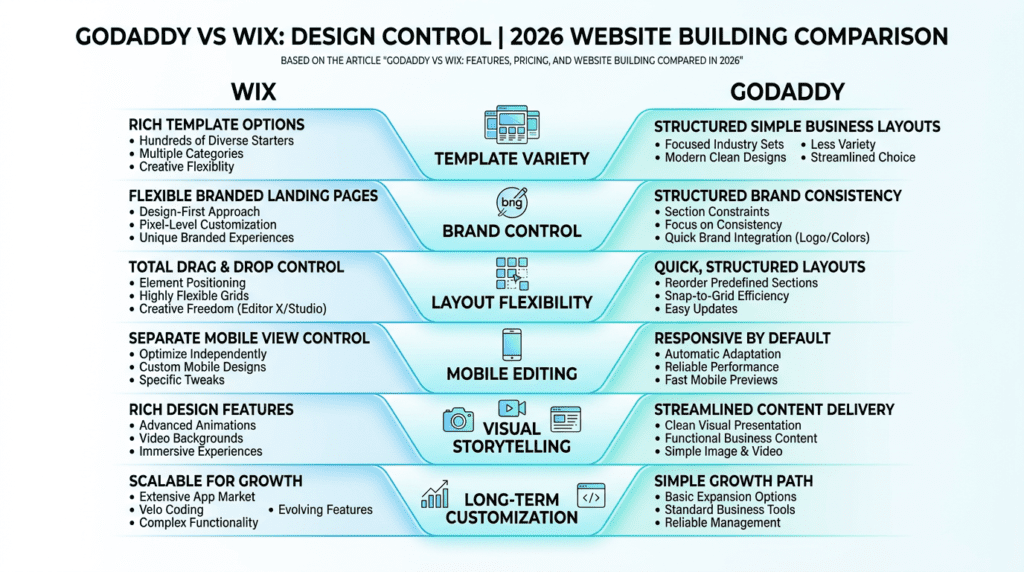
Wix gives users far more room to shape a site around a real brand instead of fitting a brand into a preset layout. Its template library covers a wide range of industries and styles, including restaurants, consultants, photographers, online stores, coaches, agencies, events, and creators. That matters because a bakery, a law firm, and a course creator usually shouldn’t all look like they came from the same starting point.
The bigger advantage isn’t just the number of templates. It’s how much you can actually do with them once you start editing. Wix offers:
- More layout variety across pages
- Better control over sections and content blocks
- More font and spacing freedom
- More visual elements like strips, galleries, buttons, and overlays
- Animations and effects for modern website design
- More ways to create distinct landing pages
For beginners, this can feel exciting and overwhelming at the same time. A lot of people assume more control automatically means a better result. In practice, it depends on whether you want to customize or just publish quickly. With Wix, you can create a polished site that feels much more tailored. But you’ll also spend more time adjusting things like alignment, spacing, image balance, and page flow.
Wix also supports mobile editing in a more hands-on way than many simple builders. That becomes useful when a desktop layout looks great but needs cleanup on phones. If your brand relies on presentation, that extra control usually matters more than people expect.
Another thing worth noting: Wix offers enough design depth that many users never outgrow it for normal small business use. A freelancer can start with a simple template, then later add more custom pages, stronger calls to action, and a better visual funnel without rebuilding on another platform too soon.
GoDaddy Templates and Simpler Site Layouts
GoDaddy takes a much more structured approach. Its templates are cleaner, simpler, and easier to work with if your goal is to get a business site live without spending hours designing. You choose a style direction, add your content, and work inside a guided layout system.
That works well for:
- Local service businesses
- Solo professionals
- Appointment-based businesses
- Very small brochure sites
- Users who care more about clarity than creative control
GoDaddy’s template system keeps users from making too many messy design decisions. In some cases, that’s actually a benefit. A plumber, accountant, or mobile dog groomer often doesn’t need advanced visual storytelling. They need a site with services, contact details, hours, a booking option, and maybe some reviews.
The trade-off shows up when a business wants something more recognizable. GoDaddy layouts can start to feel similar across industries. Once you want a custom homepage flow, more distinct brand personality, or page designs that don’t look pre-arranged, the platform starts feeling tight.
This is one of the biggest differences between Wix and GoDaddy. Wix invites creative editing. GoDaddy protects simplicity, but that same simplicity can make sites feel generic over time.
Customization Limits That Matter Over Time
This is where the Godaddy Vs Wix decision becomes more important than it first appears. Early on, both platforms can produce a usable site. Six months later, the limits become easier to feel.
The main long-term design issues usually involve:
| Category | Wix | GoDaddy |
|---|---|---|
| Fonts | More font choices and placement flexibility | More limited font styling control |
| Colors | Strong brand palette control | Simpler global color handling |
| Spacing | More control over margins, padding, and alignment | More preset spacing behavior |
| Page structure | Flexible landing page and content layouts | More section-based, predictable layouts |
| Unique branding | Easier to create a custom look | Harder to stand out visually |
| Post-launch edits | More freedom, but more chances to over-edit | Faster edits, but fewer layout options |
A common misconception is that simple builders stay simple forever. What actually happens is that a business changes. Maybe you add testimonials, a lead magnet, a pricing comparison page, a new service line, or a seasonal promotion. That’s when rigid structure starts to create friction.
Wix’s customization gives you room to evolve. GoDaddy’s builder is easier to manage when your site stays relatively stable.
Another point many marketing pages ignore: design consistency gets harder as a site grows. In Wix, you can build more custom experiences, but you also need some restraint. In GoDaddy, consistency is easier because the system limits what you can do. So if you’re the type to constantly tweak, Wix can become messy unless you set clear design rules.
Mobile Design and Responsive Editing
Both platforms help users create a website that works on mobile, but they approach it differently.
GoDaddy is more hands-off. It aims to keep layouts responsive by default, which is helpful for beginners who don’t want to think about breakpoints or mobile arrangement. In many cases, the mobile version will be usable with very little effort. That’s good for speed and simplicity.
Wix gives more control, which is both a strength and a responsibility. You can preview and refine how the site appears on mobile, which is useful when desktop designs don’t translate cleanly. This matters on:
- Image-heavy pages
- Long sales pages
- Service pages with stacked sections
- Restaurant menus
- Portfolio layouts
- Pages with overlapping visual elements
If you build a website in Wix with lots of visual customization, you should expect to spend some time checking mobile layout. That’s normal. The benefit is that you can fix things instead of accepting whatever the system gives you.
For practical business use, GoDaddy is often “good enough” on mobile out of the box. Wix gives more precise control for users who care about how a brand feels on phones, not just whether the page technically loads.
Which Platform Is Better for Brand-Heavy Websites?
For brand-first businesses, Wix is usually the stronger fit.
That includes businesses where trust, style, and visual presentation directly affect conversions, such as:
- Restaurants
- Personal brands
- Portfolios
- Consultants
- Coaches
- Agencies
- Interior designers
- Salons
- Event businesses
- Creators selling services or products
These businesses often need more than a homepage and contact form. They need a site that reflects tone, quality, personality, and positioning. Wix gives that room. It also makes it easier to build pages that support different goals, like lead capture, service detail, featured offers, or visual storytelling.
GoDaddy works better when the brand itself is not the main differentiator. A local repair company may care more about speed and simplicity than deep customization. But for businesses where presentation helps justify pricing or shape trust, the extra control in Wix tends to have a real business impact.
This is one of the clearest differences between wix and godaddy. If your website is part of your brand experience, Wix is better. If your site is mainly a digital business card, GoDaddy may be enough.
GoDaddy vs Wix Features Compared: Business Tools, Marketing, Automation, and Integrations
Core Website Features Included With Each Builder
Both platforms cover the basics most small businesses expect from a website builder. You can create pages, add contact forms, publish images, include maps, and set up standard business sections without coding.
Still, they don’t package those features in the same way.
Wix tends to feel broader and more modular. You can start with the basics, then expand into blogging, bookings, ecommerce, members areas, chat, events, and app-based features as your needs change. That flexibility is useful, but it also means setup can involve more choices.
GoDaddy focuses on essential business features that are ready faster. It’s especially geared toward service businesses that want a homepage, service list, contact path, and maybe scheduling or inquiry tools with less setup friction.
In practical terms:
- Wix is better for users who expect the site to grow into a bigger system
- GoDaddy is better for users who want core business tools pre-packaged and easy to manage
A beginner often underestimates this difference. They may only need five pages now, but a year later they want blog content, better forms, lead flows, or segmented landing pages. That’s where feature depth starts to matter more than first-day convenience.
Marketing Tools: Email, Social, Forms, and Lead Capture
This is one area where the gap isn’t just about how many tools exist, but how they fit into real business use.
GoDaddy offers built-in marketing tools designed to help small businesses move quickly. Depending on plan and availability, that can include email marketing, customer contact management, social posting support, and lead capture basics. For a local business owner who wants one dashboard instead of stitching together multiple platforms, that’s attractive.
Wix also supports marketing tools, but it often leans more on extensions, settings, and broader workflow options. That usually gives advanced users more room, especially when they want forms connected to different funnels, popups tied to offers, or separate landing pages for different campaigns.
The practical split looks like this:
- GoDaddy focuses on convenience
- Wix focuses on flexibility
For example, a local dentist may want:
- A contact form
- A booking request
- A simple email follow-up
- A social posting workflow
GoDaddy handles that kind of small-business marketing stack well enough if the goal is operational simplicity.
A consultant, coach, or affiliate publisher may care more about:
- Multiple lead magnets
- Different form placements
- More customized page paths
- Better segmentation through integrations
- More control over campaign pages
That’s where Wix usually feels more capable.
One frustration that comes up over time is form depth. Many users think all forms are basically the same. They aren’t. Once lead flow becomes important, people start caring about where submissions go, what happens next, how contacts are tagged, and whether follow-up can be customized. Basic lead capture is easy on both platforms. Smarter lead handling tends to favor Wix.
Wix App Market vs GoDaddy Built-In Tools
This is one of the most important structural differences in Godaddy Vs Wix.
Wix offers more expansion through its app market. That means users can add functions beyond the core builder, including apps for marketing, forms, reviews, bookings, chat, popups, ecommerce enhancements, analytics, and other integrations. Not every app is excellent, and some may cost extra, but the overall platform gives users more ways to extend functionality.
GoDaddy relies more heavily on built-in tools. That makes the experience simpler because you don’t have to evaluate as many add-ons. It also means you’re more dependent on what GoDaddy has chosen to support natively.
There are clear trade-offs here.
Why Wix’s app market matters long term
- More room to adapt the site as needs change
- Better odds of finding a specific integration
- More paths for niche workflows
- Stronger flexibility for growing businesses
Why GoDaddy’s built-in model appeals to some users
- Fewer moving parts
- Less setup complexity
- Lower chance of piling on too many tools
- Easier for non-technical owners to manage
What most users overestimate is the value of “having lots of apps” by itself. Apps only help if they solve a real workflow problem. What many users underestimate is how fast simple websites stop being simple. Once you want reviews in a certain format, event tools, advanced forms, or a more specialized integration, Wix usually gives you more options.
That doesn’t automatically make it better for every buyer. If you know you want a clean site with built-in business tools and don’t want to manage an app ecosystem, GoDaddy’s simpler stack can feel more stable.
Automation and Workflow Features
Automation becomes more useful once a business gets regular leads, bookings, or sales. Early on, owners often don’t think much about this. Then they start repeating the same tasks every week and realize the website should be doing more of the work.
Useful automation examples include:
- Confirmation emails after form submissions
- Booking reminders
- Abandoned cart recovery for ecommerce
- Follow-up emails after a purchase or inquiry
- Customer notifications tied to appointments
- Triggered responses to common actions
Wix generally gives more workflow flexibility, especially as you connect forms, store activity, bookings, or customer actions into broader site behavior. It’s the kind of thing that matters more at 50 leads per month than at 5.
GoDaddy handles the core business side more simply. For service businesses, reminders and follow-up basics may be enough. If the website exists mainly to bring in appointments or straightforward inquiries, a heavy automation system may be unnecessary.
The hidden trade-off is this: limited automation doesn’t hurt much at the beginning, but it creates manual admin work later. If you’re constantly exporting contacts, manually messaging leads, or using outside tools to fill gaps, the “simple” platform may stop saving time.
Reporting and Analytics for Business Owners
Most small business owners don’t need enterprise-level analytics, but they do need enough visibility to know what’s working.
The useful questions are simple:
- Are people finding the site?
- Which pages get attention?
- Are forms converting?
- Are products selling?
- Are appointments increasing?
- Is traffic turning into leads or customers?
Both wix and godaddy provide dashboards and performance reporting, but the experience differs. GoDaddy tends to keep reporting simpler and more approachable. That can be helpful for business owners who don’t want to sort through too much data.
Wix usually offers more room for deeper tracking and a more expandable setup, especially when connected to additional apps or marketing tools. For businesses running campaigns, testing landing pages, or trying to optimize conversion paths, that flexibility matters.
A common beginner mistake is focusing on traffic alone. In reality, small business owners usually benefit more from understanding:
- top pages
- lead sources
- booking behavior
- store performance
- drop-off points
The better platform depends on how actively you plan to optimize. If you want basic business insight, GoDaddy is often enough. If you want more control over analysis as the site grows, Wix gives more room to optimize.
Wix vs GoDaddy Ecommerce: Selling Products, Services, Bookings, and Digital Goods
Ecommerce Setup and Store Management
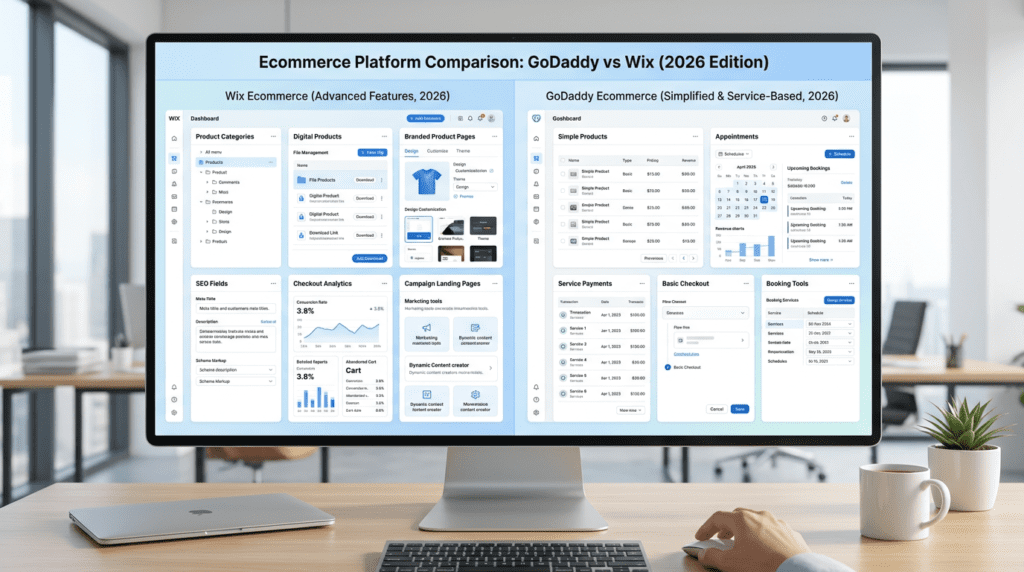
For basic selling, both platforms let you create an online store, add products, and start taking payments. The difference is how comfortable the system feels once the catalog grows or store tasks become more frequent.
GoDaddy works best when store management stays simple. If you have a small set of products, limited categories, and straightforward fulfillment, setup is relatively fast. That makes sense for local businesses adding merchandise, service providers selling a few add-ons, or side businesses testing online sales.
Wix has a steeper setup process, but it gives more control over the store structure. That becomes useful when you need to:
- Organize products into clearer categories
- Build stronger product pages
- Manage more visual merchandising
- Handle a larger inventory
- Expand selling options later
This is where many users feel the difference between a simple store and a real ecommerce workflow. A five-product store can work almost anywhere. A growing catalog with variants, seasonal items, promotions, and more structured browsing needs a stronger builder behind it.
If you only plan to sell a handful of items, GoDaddy may feel easier. If you expect to expand, Wix usually makes more sense before the store gets messy.
Product Sales, Digital Products, and Service-Based Selling
Not all ecommerce is product-heavy ecommerce. Some users sell physical items. Others sell digital downloads, appointments, memberships, classes, or service packages. That distinction matters a lot here.
Wix handles a wider range of selling models more comfortably. It’s often a better option for businesses mixing:
- Physical products
- Digital products
- Service bookings
- Event registrations
- Membership-style access
- Lead-gen pages tied to paid offers
That flexibility is valuable for modern small businesses because many don’t fit neatly into one sales type. A fitness coach might sell a consultation, a digital guide, and a recurring class. A photographer might sell prints, booking packages, and downloadable presets. Wix is usually better suited to that kind of blended model.
GoDaddy does well for simpler service-based selling. It’s especially practical for appointments, basic payments, and businesses that need online booking more than a fully built ecommerce engine.
What users often miss is that “selling online” can mean very different things. If your site is basically a booking and payment hub, GoDaddy can work well. If your revenue model may branch into multiple offer types, Wix gives more room.
Payments, Checkout, Taxes, and Shipping
Checkout is one of those areas that looks similar on the surface but becomes more important once real orders start coming in.
Important ecommerce considerations include:
- Which payment gateways are supported
- How easy checkout is for customers
- Whether checkout can be customized
- Tax setup flexibility
- Shipping options and rules
- How much friction exists during purchase
Wix generally provides more control around store experience and selling workflows. That includes how products are presented and how the customer moves through the buying process. For stores that care about brand presentation and conversion flow, this can have a meaningful impact.
GoDaddy keeps the process more straightforward, which helps users who don’t want to configure too many store settings. That’s fine for lighter selling needs, but less ideal if you need more nuanced shipping logic or a more refined checkout experience.
Taxes and shipping are common pain points for beginners. People often assume the platform will “just handle it.” In reality, setup still needs care, especially when selling physical products across regions. Wix usually offers more room for finer control, while GoDaddy is easier if your shipping and tax setup is simple.
Ecommerce SEO and Product Page Control
For stores that want organic traffic from product pages and category pages, SEO control matters more than many beginners expect.
Wix generally gives stronger control over ecommerce SEO elements like:
- Product page titles
- Meta descriptions
- URLs
- Image alt text
- Category structure
- Content around products
- On-page presentation
That matters because ecommerce growth often depends on more than paid traffic or direct visits. If customers can discover products through search, the platform needs to support that structure well.
GoDaddy can cover basic product visibility needs, but it’s not usually the stronger choice for stores trying to grow through deeper organic search strategy. Once you care about optimizing product pages at scale, the limitations become more noticeable.
Another issue is product page uniqueness. Many simple store owners upload a product image, one short description, and a price. Later, they realize they need stronger copy, better category logic, FAQs, trust elements, and supporting content. Wix is better suited to that level of page control.
When Wix Offers More for Ecommerce Growth
Wix offers more headroom when ecommerce becomes a meaningful part of the business rather than a side feature.
That matters most for businesses with:
- Growing catalogs
- Strong visual branding
- Multiple product types
- More detailed product pages
- Organic search goals
- Promotions and campaign landing pages
- Long-term store expansion plans
A store selling 8 handmade products and a store aiming for 300 SKUs are not making the same platform decision. Wix supports that growth path more naturally.
It’s also the better option for brands where product presentation affects conversion. Apparel, beauty, specialty food, home goods, digital products, and creator-led commerce often benefit from better design control and a richer storefront experience.
One of the biggest long-term advantages is not just “more features,” but fewer early platform regrets. Businesses often start with basic selling and later want stronger structure, more content, and better merchandising. Wix usually handles that evolution better.
When GoDaddy Is Enough for Simple Selling
GoDaddy is enough when online selling supports the business rather than defining it.
That often includes:
- Local service businesses taking deposits or payments
- Businesses selling a small product range
- Appointment-based businesses
- Restaurants or food sellers with limited online items
- Side projects testing demand
- Solo businesses that want minimal admin work
In these cases, speed and simplicity may matter more than advanced ecommerce depth. If the store is small, the checkout path is simple, and product discovery mostly happens outside search, GoDaddy can do the job without introducing unnecessary complexity.
The key is being honest about future plans. If “simple selling” is likely to stay simple, GoDaddy is a practical choice. If simple selling is just phase one, moving earlier to a more capable builder often saves time later.
GoDaddy vs Wix SEO, Site Performance, and Growth Potential
SEO Controls in Wix vs GoDaddy
For basic SEO, both platforms let users handle the essentials. You can work with page titles, meta descriptions, URLs, and image alt text. That’s enough for a simple brochure site or a local business that mainly needs to appear for branded and nearby searches.
The difference shows up when SEO becomes more intentional.
Wix usually gives more control over important settings such as:
- Custom URLs
- Redirects
- Indexing controls
- Structured data options in some contexts
- Broader page-level optimization
- SEO setup guidance for beginners
GoDaddy covers the basics, but advanced users often run into limits sooner. If your strategy is just “make sure the homepage and service pages are indexed,” that may not matter much. If you want to build out content hubs, optimize larger site sections, or make more deliberate technical adjustments, Wix tends to be more capable.
One common misconception is that SEO depends mostly on the builder itself. In reality, rankings still depend heavily on content quality, internal linking, page usefulness, local relevance, and competition. But platform flexibility does matter once you try to optimize beyond the basics.
For example, a local cleaning company with five pages may do fine on either platform. A business planning 100 location pages, service variations, blog content, and lead-focused landing pages will usually feel more comfortable in Wix.
Blogging and Content Marketing Features
This is one of the clearest long-term growth areas where wix is better for many users.
Blogging isn’t equally important for every business. A barber shop or one-page consultant site may barely use it. But for businesses that want content marketing, educational pages, affiliate content, search traffic, or thought-leadership publishing, the blog system matters a lot.
Wix is generally the stronger choice for:
- Frequent blog publishing
- Better content presentation
- Richer article formatting
- Category-based organization
- Content-led SEO growth
- More flexible internal linking opportunities
GoDaddy can support lighter blogging, but it’s usually not the platform people choose when content becomes a major acquisition channel. The workflow tends to be more basic, which is fine for occasional updates, announcements, or a few foundational posts.
The practical question is whether the blog is decorative or strategic.
If you’re a SaaS founder building comparison pages, a consultant publishing educational content, or a local business trying to rank for service questions, content infrastructure matters. Over time, the ability to format better posts, organize topics clearly, and expand content depth has real SEO value.
A lot of buyers ignore this because they don’t plan to blog on day one. Then six months later, they realize paid leads are inconsistent and they need organic traffic. That’s when a stronger content system becomes a real advantage.
Site Speed and Performance Considerations
Site speed is rarely determined by the builder alone. It’s shaped by design choices, image sizes, scripts, apps, page length, and how much visual weight a site carries.
That’s important in any fair compare wix vs godaddy discussion, because users often expect one simple speed winner.
In real use:
- GoDaddy often feels lighter because its layouts are more constrained
- Wix can perform well, but heavy customization can create slower pages
- Image-heavy sites need more attention regardless of platform
- Extra apps and visual effects can increase load demands
- Mobile experience matters more than desktop vanity tests for many small businesses
GoDaddy’s simpler system can help avoid self-inflicted performance problems. Since users have fewer ways to overbuild pages, they’re less likely to create bloated layouts. That’s an underrated benefit for beginners.
Wix gives more freedom, but freedom creates responsibility. If you use oversized images, stack too many sections, overload animations, or install apps without reviewing impact, speed can suffer. The upside is that a well-built Wix site can still deliver a strong user experience.
For most businesses, the practical performance advice is simple:
- compress images
- keep layouts clean
- avoid unnecessary effects
- review mobile pages carefully
- don’t install tools you won’t use
So yes, godaddy focuses on speed and simplicity in a way that helps some users. But a lean Wix site can still perform very well if it’s built with discipline.
Local SEO for Small Businesses
For local businesses, SEO is often less about advanced technical control and more about clear service relevance, location signals, and conversion-focused pages.
Both platforms can support local SEO basics, including:
- Contact information
- Maps
- Service pages
- Business hours
- Inquiry forms
- Mobile-friendly layouts
The difference is how far you can take the strategy.
GoDaddy is usually enough for small local businesses that need:
- one main location
- a few service pages
- a contact page
- quick visibility for branded searches
Wix gives more room for businesses that want to expand local search coverage through:
- more detailed service pages
- separate location pages
- stronger page customization
- richer supporting content
- better internal linking between local pages
This matters for businesses like law firms, med spas, home services, agencies, and consultants operating across multiple areas. Once you need more than a basic local presence, the flexibility starts to matter more.
Reviews, business profiles, and off-site signals still play a major role, of course. But if your local SEO strategy includes building out targeted landing pages and supporting content, Wix is usually the better option.
Scaling Organic Traffic Over Time
This is where the long-term gap becomes most visible.
GoDaddy can absolutely work for a small business site that mainly needs:
- a few core pages
- branded visibility
- local search presence
- basic lead capture
For those use cases, organic growth may not require much more.
Wix gives more room when a site is expected to grow through search over time. That includes businesses planning to add:
- blog content
- SEO landing pages
- topic clusters
- category structures
- more internal links
- larger site architecture
- more conversion-specific content
The hidden cost of choosing a simpler builder is not just feature limits. It’s opportunity cost. If your business could benefit from compounding organic traffic, a platform with tighter content and SEO constraints can hold back growth later.
That doesn’t mean every small business needs Wix. Some don’t. If your website is mainly a trust asset for direct referrals, GoDaddy may be enough. But if search traffic is likely to become a serious channel, Wix offers more long-term growth potential without needing to jump to wordpress too early.
GoDaddy vs Wix Pricing: Plans, Renewal Costs, Ecommerce Fees, and Value for Money
Wix Pricing Structure Explained
Wix has more plan variety than GoDaddy, which is helpful if you want to match features more closely to your needs. It also means pricing can feel a little harder to decode at first.
Wix usually separates its plans into two broad groups:
- plans for standard websites
- plans for business and ecommerce use
Pricing can change, especially during promotions, but Wix’s paid plans often start around the lower end for basic sites and move up significantly for business features, more storage, and advanced selling tools. In many cases, Wix plans fall somewhere in the rough range of $17 to $159 per month before discounts, depending on whether you need a simple site or a larger business setup. Since Wix updates plan names and pricing from time to time, it’s smart to confirm current details before buying.
What matters more than the headline price is when you’ll outgrow the lower tier.
A lot of users start with a basic Wix plan thinking they only need a brochure site, then realize they want one or more of these later:
- online payments
- booking tools
- more storage for images or video
- advanced ecommerce features
- additional contributors
- premium apps
- stronger marketing tools
That’s the common Wix upgrade path. The builder itself is powerful, but the platform makes the most sense when you choose the right tier early instead of trying to force a lower plan to do a bigger job.
For example:
- A freelancer with 5 pages and a contact form can often stay on a lower plan longer.
- A course creator selling downloads or sessions will usually need a business plan much sooner.
- A store with dozens of products will almost always need a higher ecommerce tier for smoother operations.
Wix also offers a free plan, but it comes with Wix branding and doesn’t support a fully professional business setup. For testing the editor, that’s fine. For real business use, it’s mostly a preview environment.
One thing beginners often miss: Wix offers a lot of room to grow, but that flexibility is tied to plan decisions. The platform is rarely the lowest-cost option once your site starts using apps, selling tools, and premium features.
GoDaddy Pricing Structure Explained
GoDaddy keeps pricing simpler. That’s one reason beginners often find it less intimidating.
Its website builder plans are generally structured around a few core levels, usually covering:
- basic website use
- sites with more marketing features
- commerce needs for selling online
- service businesses that need appointments or bookings
Pricing changes often because GoDaddy runs introductory offers aggressively. In many cases, plans start around $10 to $21 per month depending on promotions, billing term, and feature bundle. Intro pricing is often lower than renewal pricing, so the first checkout number may not reflect what you’ll actually pay later.
GoDaddy offers tends to bundle more built-in business tools into the platform earlier than some buyers expect, especially for:
- appointment scheduling
- email and marketing basics
- customer communication tools
- simple online selling
That’s part of GoDaddy’s appeal. Instead of pushing you toward a large app market, it tries to give you a ready-to-use business stack inside the same dashboard.
Still, there’s an important limitation: once your needs move beyond simple site management, those bundled tools can feel narrow. You may have the feature technically included, but not with the depth you want.
A local service company might be happy with that setup for years. A growing brand usually won’t.
GoDaddy’s ecommerce access is typically reserved for its higher-tier commerce plans. So if you want to accept online payments, sell products, or run a fuller online store, you should expect to skip the lower plans and go straight to the commerce level.
This is where buyers sometimes get misled by “starts at” pricing. If your actual goal is to sell, the entry plan often isn’t relevant.
Hidden Costs Most Buyers Should Check
This is where the real Godaddy Vs Wix decision gets more practical.
Neither platform is just about monthly plan pricing. The true cost of running a website usually includes several moving parts.
Here are the most common extra costs buyers should check before committing:
- Domain renewal: The first year may be included or discounted, but renewal often costs more.
- Professional email: If you want branded email like you@yourbusiness.com, that may cost extra.
- Premium apps or integrations: Wix especially can become more costly if you rely on third-party tools from its app market.
- Payment processing: Selling online means transaction-related fees from payment providers.
- Booking or scheduling upgrades: Some service businesses need more advanced appointment features than the base plan includes.
- Marketing tools: Email marketing limits, automation tools, or campaign upgrades may add cost.
- Storage and media needs: Image-heavy and video-heavy sites may require a higher plan earlier than expected.
Wix users are more likely to run into app-related spending over time. That’s not always bad. In fact, those apps are often what make Wix more scalable. But if you build your workflow around several add-ons, your monthly stack can grow quietly.
GoDaddy users are more likely to face limits in tool depth rather than too many add-on options. The cost issue there is slightly different: instead of buying more extras inside GoDaddy, you may eventually need outside tools or a different platform if your needs outgrow what’s built in.
For ecommerce, also check these practical cost areas:
| Category | Wix | GoDaddy |
|---|---|---|
| Domain costs | May be included for 1 year on annual plans; renewal extra | Often discounted upfront; renewal extra |
| Custom email | Usually separate | Often tied to broader GoDaddy business services |
| Premium apps | More likely as site complexity grows | Less app-driven, fewer add-on choices |
| Payment processing | Third-party processor fees apply | Third-party processor fees apply |
| Booking tools | May require the right business plan or app setup | Often built into business-focused plans |
| Marketing extras | Can increase with automation or email needs | Some included, but advanced needs may still add cost |
A common misconception is that the lower monthly plan always means lower total cost. In practice, the opposite can happen if the cheaper platform forces a migration later.
Renewal Pricing and Long-Term Ownership Costs
First-year pricing is where a lot of website builder comparisons get fuzzy.
Both Wix and GoDaddy use promotions, annual billing discounts, and introductory rates. That’s normal in this category. The problem is that many buyers choose based on month one instead of year three.
Long-term cost is shaped by four things:
1. plan renewals
2. added tools over time
3. feature gaps that push upgrades
4. the cost of switching later
GoDaddy focuses on speed and simplicity, so its upfront pricing often looks attractive. In some cases, it’s cheaper than Wix at the start. For a basic local business site, that may remain true for quite a while.
Wix, on the other hand, can start at a higher monthly cost once you move into business features. Then the total grows if you add premium apps, advanced forms, automation, or design-focused upgrades.
But long-term ownership isn’t just about subscription totals.
If Wix lets you stay on the same platform for 3 to 5 years as your site grows, that higher monthly cost may still be the better value. If GoDaddy gets you online quickly but you need to rebuild on another platform a year later, the lower starting price was less meaningful than it looked.
This is especially important for:
- businesses planning to invest in SEO
- stores expecting larger catalogs
- brands that care about deeper website design
- creators who’ll need more content flexibility
- service companies that may add lead funnels later
A practical way to think about it:
- Short-term cost winner: often GoDaddy
- Longer-term flexibility value: often Wix
That won’t be true for every user, but it’s the pattern many buyers discover after the first renewal cycle.
Which Builder Gives Better Value for Money?
Value depends heavily on what kind of site you’re actually building.
If you only compare list pricing, you’ll miss the bigger point. The better value is the platform that gives you enough room without forcing either an early upgrade or an early rebuild.
For different user types, the picture looks like this:
| Category | Wix | GoDaddy |
|---|---|---|
| Beginner | Better if you want room to customize and grow | Better if you want the fastest path to launch |
| Local business | Strong if brand presentation matters | Strong value for simple service websites |
| Ecommerce seller | Better long-term value for expanding stores | Better only for very simple selling |
| Creator or blogger | Better value due to stronger design and content flexibility | Limited value if content becomes central |
| Growing company | Better if you expect more integrations and complexity | Better only if needs stay simple |
Wix gives better value when:
- your site is part of your brand
- you want stronger website design control
- you may need ecommerce growth
- SEO flexibility matters
- you expect to customize workflows later
GoDaddy gives better value when:
- you need a simple site live quickly
- you run a local service business
- appointments are more important than deep design control
- you don’t want to manage lots of choices
- your site will likely stay small
The less obvious part of the Godaddy comparison is this: value is not the same as lower price.
A one-page consultant site and a multi-service business have very different needs. Wix is better for users who want a better option over time. GoDaddy is often the better value only when simplicity itself is the main goal.
GoDaddy vs Wix Support, Security, Ownership, and Scalability
Customer Support Experience
Support quality matters more after launch than during setup.
When everything is working, both Wix and GoDaddy feel manageable. When something breaks, billing changes, a domain won’t connect, or a form stops working, that’s when platform differences become more obvious.
GoDaddy has long positioned itself as a business services company, so phone support is one of its stronger points in many cases. That matters for users who don’t want to troubleshoot through articles and forums. A lot of local business owners still prefer to call someone, especially when the issue affects appointments, email, or domain settings.
Wix support is usually more platform-centered. It has a large help center, tutorials, guided resources, and contact options that vary by issue and region. For users comfortable working through documentation or support flows, Wix is often fine. For users who want immediate human help every time, the experience may feel less direct than GoDaddy.
The practical difference looks like this:
- GoDaddy: often better for users who want direct business support
- Wix: often better for users willing to learn the platform and use self-service resources
That said, support quality also depends on the type of question.
Basic setup questions are usually easy on either platform. More advanced issues like app conflicts, layout behavior, redirects, or ecommerce workflow problems can take longer in Wix simply because the platform is more flexible and has more moving parts.
With GoDaddy, fewer moving parts can mean fewer support headaches. It can also mean fewer ways to solve edge-case problems.
Website Security and Maintenance
Both platforms handle a lot of the technical maintenance for you. That’s one of the biggest reasons people use a hosted website builder instead of self-managed WordPress.
In practical terms, users on both Wix and GoDaddy usually get:
- hosting included
- SSL support
- platform-level updates
- managed infrastructure
- basic security handled behind the scenes
That’s good news for beginners. You don’t have to manage server patches, plugin conflicts, or manual maintenance in the same way you would on a self-hosted setup.
But there’s a trade-off: convenience comes with less control.
You usually don’t control security at a deep server level on either platform. You’re trusting the company to manage updates, uptime, and underlying protection. For many small businesses, that’s completely reasonable. For advanced users, it can feel limiting.
A few practical realities buyers should understand:
- You won’t have the same technical access you’d get on an open platform.
- Backup behavior may exist, but how much direct control you have can vary.
- Malware protection is largely platform-managed, not user-managed.
- Security customization is more limited than on self-hosted systems.
That works well for typical business sites. It works less well for users who want deep infrastructure control, custom server logic, or advanced security workflows.
Domain, Email, and Business Service Integration
This is one area where godaddy and wix feel very different.
GoDaddy’s strength goes beyond the builder. It’s also a major domain registrar and business services provider. If you want one account for domain name registration, DNS, business email, and a quick site, GoDaddy’s ecosystem can feel convenient.
That convenience is real, especially for users who already have a GoDaddy domain or use GoDaddy for email and related business services. Keeping everything under one roof reduces setup friction.
Typical GoDaddy advantages here include:
- strong domain management familiarity
- easy connection between domain and site
- business email options
- broader small-business service bundling
Wix takes a different approach. Its strength is the website ecosystem itself. You can absolutely connect a domain from GoDaddy to Wix, and many users do exactly that. But Wix is more focused on helping you build your site inside its own environment rather than acting as a broad business utilities hub.
That means:
- GoDaddy is stronger if your starting point is domain and business service management.
- Wix is stronger if your starting point is website design and growth.
If you already have a domain from GoDaddy, that doesn’t mean you should stay there for the builder. It just means the setup path may feel smoother if you do. Many businesses complete domain to Wix connections without much trouble, but it is one extra step.
Ownership and Portability Concerns
This is one of the most overlooked parts of any site builder comparison.
With both Wix and GoDaddy, you’re building inside a closed platform. That means portability is limited compared with open systems like WordPress.
You own your brand, your text, your images, and your domain if it’s registered in your name. But the actual site structure, theme system, and editing environment are tied to the platform.
That creates lock-in.
The lock-in doesn’t always matter early on. In fact, beginners often benefit from it because the system is simpler. The problem shows up later, when a business wants to move.
Common portability issues include:
- limited full-site export options
- rebuild work if moving to another builder
- layout recreation on a new platform
- app or feature replacement
- SEO migration planning for URLs and redirects
Wix’s environment is more advanced, but that also means migration can be more painful because there may be more custom design decisions, app dependencies, and structured content to rebuild.
GoDaddy’s simpler sites may be easier to recreate elsewhere, but that’s partly because there’s less complexity in the first place.
This is why buyers should think beyond launch day. If the site may become a major business asset, platform lock-in deserves more attention than most marketing pages give it.
Scalability for Growing Websites
This is where the differences between wix and godaddy become much clearer over time.
At small scale, both can work. At larger scale, they start to separate.
Wix handles growth better in most real-world scenarios because it gives more flexibility for:
- more pages
- more content sections
- more app-based functionality
- larger product catalogs
- more advanced design needs
- broader marketing workflows
As traffic grows, content expands, and operations become more layered, Wix usually remains the stronger website builder for your needs if growth is part of the plan.
GoDaddy can handle moderate business growth, especially for service sites, but it tends to feel narrower once you need:
- deeper integrations
- more customizable page structures
- more advanced content organization
- stronger ecommerce expansion
- richer conversion-focused workflows
A service business with 10 to 20 pages may do perfectly well on GoDaddy for a long time. A content-heavy brand, online store, or multi-offer company usually hits limits sooner.
The hidden frustration is that GoDaddy good enough at the start can delay better decisions. Businesses launch quickly, then discover 12 to 18 months later that they’ve outgrown the structure.
Wix also has limits, of course. As projects become highly custom, very large, or deeply integrated, some businesses start looking at Shopify, WordPress, or more advanced platforms. But between these two, wix gives more room before that conversation becomes urgent.
Real-World Scenarios: Which Builder Fits Your Website Project?
Beginner Building a First Website
For a true beginner, GoDaddy often feels easier in the first hour.
The dashboard is simpler. The setup asks fewer questions. The editing model is more guided. If your goal is just to create a website without getting stuck in design choices, that structure helps.
This is why GoDaddy works well for people who say things like:
- “I just need something live this week.”
- “I don’t care much about layout details.”
- “I want a simple site with contact info, services, and maybe booking.”
Wix is still beginner-friendly, but in a different way. It’s easier once you accept that you’ll need to make more decisions. You choose more design elements. You customize more sections. You think more about structure. That can be exciting or exhausting depending on the person.
So the real split is simple:
- choose GoDaddy if you want the least friction now
- choose Wix if you’re willing to learn a little more for better long-term control
A beginner who expects the site to grow will often be happier starting with Wix, even if the first setup takes longer.
Small Business Owner Needing a Professional Website Fast
This is one of the closest comparisons in the whole article.
For restaurants, salons, contractors, consultants, and local service businesses, both platforms can work. The better fit depends on what “professional” means for that business.
If professional means:
- clean design
- fast launch
- contact info
- service pages
- booking or appointments
- simple updates
then GoDaddy is often enough.
If professional means:
- stronger brand presentation
- more polished website design
- more control over page layouts
- more room for content and SEO growth
- a more customizable user experience
then Wix is better.
A local plumbing company may not need much more than GoDaddy. A boutique law firm, interior designer, or high-end med spa usually benefits more from Wix because appearance and brand detail influence trust.
This is where buyers should be honest with themselves. Many business owners say they only need a simple site, but what they actually want is a site that looks distinct. That usually pushes them toward Wix.
Creator, Blogger, or Portfolio Website
Wix is better here by a comfortable margin.
Creators tend to care about visual identity, page presentation, content layout, and audience experience. Bloggers care about content structure, publishing flexibility, and room to optimize over time. Portfolio users care about galleries, styling, and how the site reflects their work.
That combination aligns much better with Wix.
Wix website builder strengths in this scenario include:
- stronger visual customization
- more polished presentation for portfolios
- better content flexibility
- more room for blog growth
- stronger app market support
- more customizable branding
GoDaddy can work for a simple personal site, but it often feels too rigid for creators once they move beyond the basics. The layout options are narrower, and the site can start to feel similar to many other business-first templates.
If your website is part of your identity or your work itself, wix is better much more often than GoDaddy.
Ecommerce Store Owner Selling Multiple Products
For a store owner, the decision is usually not very close unless the catalog is tiny.
Wix offers more for product presentation, category organization, product page control, content-driven selling, and long-term store growth. If you’re selling multiple products, especially across several categories, Wix is usually the better option.
This matters even more if you care about:
- branded product pages
- store layout control
- product-focused SEO
- visual merchandising
- content plus commerce on the same site
- future catalog expansion
GoDaddy is fine for simple selling. It works best when the store is really an add-on to the business rather than the main event.
Examples where GoDaddy may still be enough:
- a bakery selling gift cards and a few items
- a local salon selling a handful of retail products
- a coach selling one or two digital offers
- a service provider taking online payments for packaged services
But once selling becomes central, godaddy lacks the same long-term depth. That’s where the wix vs godaddy choice becomes more obvious.
Agency or Freelancer Building Client Websites
Agencies and freelancers need to think differently from solo site owners.
The question isn’t just “Can I build this site?” It’s also:
- Can I hand it off cleanly?
- Will the client be able to edit it?
- Will they outgrow it too fast?
- How much support will they need later?
For client work, Wix usually gives more flexibility and a better finished result for design-conscious projects. It’s especially useful when clients want custom-looking websites without moving into full custom development.
Wix Studio may also enter the conversation for freelancers or teams handling more advanced layout workflows, though that depends on project type and team comfort.
GoDaddy has a place here too, but it’s narrower. It makes sense when the client wants:
- a basic brochure site
- fast turnaround
- easy updates
- limited future complexity
- low editorial involvement
The downside is long-term client growth. A site that feels fine at handoff may feel restrictive six months later if the client wants more landing pages, better content structure, or stronger marketing workflows.
For one-off, low-complexity projects, GoDaddy can work. For higher-quality client websites, Wix usually wins.
Growing Company That May Need More Advanced Tools Later
This is the scenario where buyers should think two steps ahead.
If a business is likely to add more products, more content, more campaigns, more pages, or more integrations, the platform choice matters a lot more. What feels easy today can become a bottleneck surprisingly fast.
Wix is generally the safer pick for growth within the website builder category. It gives more room before you need to consider a major rebuild.
GoDaddy is better only if growth is expected to stay operationally simple.
Still, there’s a point where even Wix may stop being the best website builder for a growing company. If you need deeper commerce operations, Shopify may be the better fit. If you need maximum control, complex plugins, or broad platform ownership, WordPress may be stronger. If you want a polished middle ground with less complexity, Squarespace may also be worth a look.
In other words:
- Choose GoDaddy if growth will remain simple and service-focused.
- Choose Wix if growth likely includes content, design, products, or integrations.
- Consider alternatives if you already know your business will need more advanced systems later.
Honest Take: Hidden Trade-Offs Most Buyers Miss
Wix Gives More Control, But More Control Means More Decisions
This is one of Wix’s biggest strengths and one of its biggest friction points.
People often see customization as automatically better. In practice, more control means more decisions about:
- layout
- spacing
- sections
- design consistency
- navigation structure
- app selection
- mobile presentation
For users who enjoy shaping a site, that’s a major advantage. For users who just want to build your website quickly and move on, it can slow everything down.
The hidden issue is not that Wix is hard. It’s that Wix makes you care.
You start noticing little things. One page looks slightly off. A section needs better spacing. A button color doesn’t match the rest of the site. That level of control is valuable, but it also creates more work.
Beginners often underestimate how much time they’ll spend refining instead of publishing.
GoDaddy Wins on Speed, But Simplicity Can Become a Limitation
GoDaddy focuses on speed and simplicity, and that’s not just marketing language. It really does reduce friction better than many popular website builders.
The trade-off shows up later.
What feels efficient on day one can feel restrictive once you want:
- better page variety
- stronger branding
- more specific layout control
- deeper SEO settings
- richer store presentation
- more advanced integrations
That doesn’t make GoDaddy bad. It just means its ideal use case is narrower.
A lot of buyers choose it because fast setup feels like smart efficiency. Sometimes it is. Other times, it’s just delayed complexity. If your business grows, the platform’s structure may start deciding too much for you.
That’s the real catch: speed and simplicity are only wins if your site stays simple enough for those limits to remain acceptable.
Website Builder Convenience Comes With Platform Lock-In
Both platforms make website building easier by controlling the environment tightly. That convenience is real. So is the lock-in.
If you build a website on Wix or GoDaddy, you’re not building an open system you can pack up and move anywhere with one click. You’re building inside that company’s ecosystem.
That affects:
- site migration
- redesign flexibility
- long-term ownership strategy
- switching costs
- rebuilding workload
For many small businesses, this won’t matter for years. For others, it becomes a painful surprise.
A common pattern looks like this:
1. launch quickly on a builder
2. grow content, products, or lead flows
3. hit structural limits
4. realize migration means partial or full rebuilding
That’s not unique to wix and godaddy. It’s a common trade-off in the site builder space. But buyers should go in with open eyes.
The Cheapest Plan Is Rarely the Best Long-Term Choice
The lowest monthly number is often the least useful pricing number.
A basic plan can look attractive, especially to first-time buyers. But if that plan doesn’t support the features you’ll need within a few months, it’s not really saving money.
This matters most when buyers ignore future needs like:
- ecommerce
- booking growth
- content expansion
- better analytics
- custom branding
- marketing automation
- SEO improvements
A better buying mindset is to ask:
- What will this site need in 12 months?
- Will I need to upgrade soon?
- Will this platform still fit if traffic grows?
- Am I choosing based on first-year promo pricing only?
That approach usually leads to better decisions than chasing the cheapest entry tier.
In the comparison of wix, the smarter long-term buyer usually looks at total fit, not just monthly cost.}}## Decision Guide: When To Choose Wix vs When GoDaddy Wins
Choose Wix If You Want Design Freedom and Long-Term Flexibility
Choose Wix if you care about how your site looks, how it grows, and how much control you have later.
Its biggest advantage is flexibility. You get more template variety, deeper layout customization, stronger app options, and more room to shape the site around your brand instead of fitting your brand into a very narrow system. That matters if you want a website that feels distinctive rather than simply functional.
Wix also makes more sense when your site may evolve. If you start with a basic brochure site but later want a blog, lead capture tools, member areas, advanced forms, ecommerce features, or stronger SEO control, Wix usually gives you a smoother path forward. You are less likely to hit the “this builder can’t really do that” wall as quickly.
It is also the better pick for users who want:
- more visual control over pages
- stronger template and section customization
- access to more apps and integrations
- better ecommerce expansion options
- more SEO settings and content flexibility
- a site that can support future marketing efforts
If your website is part of your brand strategy rather than just an online listing, Wix is usually the safer long-term choice.
Choose GoDaddy If You Want the Fastest Simple Business Website
Choose GoDaddy if your main goal is to get a business website online quickly with as little friction as possible.
This is where GoDaddy is strongest. Its setup flow is simpler, the editing experience is more guided, and it is easier for non-technical users who do not want to make many design decisions. If speed matters more than customization, GoDaddy can feel refreshingly straightforward.
It also makes sense if you already use GoDaddy for domains or related business services. Keeping your domain, basic website, and sometimes scheduling tools under one provider can reduce setup complexity.
GoDaddy is a good fit when you want:
- a simple business site up fast
- fewer design choices
- a clean, functional online presence
- built-in appointment or service-oriented tools
- easier domain management in one place
- less ongoing site tweaking
If you do not need a highly customized site and mostly want customers to find you, contact you, and book with you, GoDaddy can absolutely be enough.
Choose Wix for Ecommerce, Blogging, or SEO Growth
Choose Wix when traffic growth, content strategy, or catalog growth matter.
For ecommerce, Wix is the stronger choice because it handles larger product catalogs, more branded storefronts, and more marketing-driven store development better than GoDaddy. If you expect to add products, create category pages, improve product presentation, or connect more tools over time, Wix gives you more room.
For blogging, Wix is also more capable. It is better suited to businesses or creators who want to publish content regularly, organize posts more effectively, and turn content into a growth channel.
For SEO, Wix offers more depth. If you want tighter control over metadata, page structure, URLs, content scaling, and optimization across a larger site, Wix is the better platform. As noted earlier, this matters more over time than it does on day one.
Choose Wix here if your plan includes:
- publishing articles consistently
- ranking service or location pages
- growing organic traffic
- building a branded online store
- adding integrations to support marketing
- expanding beyond a basic online presence
If your site is supposed to help generate ongoing traffic and revenue, Wix is the stronger foundation.
Choose GoDaddy for Local Services, Appointments, and Simple Sites
Choose GoDaddy if your website mostly supports an existing local business rather than acting as a full digital growth engine.
It works well for service businesses that need the essentials: business info, service descriptions, contact details, operating hours, a booking option, and perhaps a few trust-building sections like reviews or FAQs. For many local companies, that is enough.
GoDaddy is especially practical for:
- salons
- barbers
- consultants
- coaches
- repair services
- contractors
- solo professionals
- small local companies needing a one-page or low-page-count site
If appointments matter more than design polish, or if you mainly need customers to call, submit a form, or book a time slot, GoDaddy’s simplicity can be an advantage rather than a weakness.
It is not the best fit for businesses planning aggressive SEO content expansion or a highly branded online experience, but for straightforward local presence, it can do the job well.
Consider Another Website Builder If You Need Something More Specialized
Consider a different platform if your needs are more specialized than either of these builders handles well.
Choose Shopify if ecommerce is the core of your business and you want a platform built primarily for serious online selling.
Choose WordPress if you want maximum ownership, deeper SEO control, and the flexibility to build beyond the limits of closed website builders.
Choose Squarespace if you want a polished, design-forward site with a simpler editing experience than Wix, especially for portfolios, service brands, or visually driven businesses.
Wix is the best all-around option here, and GoDaddy is the best simple option, but neither is automatically the best specialized option.
Final Recommendation: Which Website Builder Is Better in 2026?

Overall Winner: Wix for Most Users
Wix is the better overall website builder for most users in 2026.
It wins because it gives you more control over design, more flexibility as your site grows, better app and integration support, stronger ecommerce capability, and better SEO potential. For users who want a site that can do more than just exist online, Wix is usually the smarter investment.
This is especially true if your website is tied to branding, content, lead generation, product sales, or long-term growth. Even if it takes slightly more effort at the start, it usually gives you fewer reasons to outgrow the platform later.
If you are choosing one platform on overall capability rather than just speed of setup, Wix is the winner.
Where GoDaddy Is Still the Better Choice
GoDaddy is still the better choice when simplicity is the priority.
If you want to launch fast, keep things basic, avoid too many design decisions, and run a straightforward business website with minimal setup stress, GoDaddy can be the better fit. It is especially appealing for local service businesses, solo operators, and appointment-based companies that do not need a highly customized web presence.
In other words, GoDaddy is not the better all-purpose builder, but it is often the better low-complexity builder.
Final Buying Advice Before You Choose
Choose based on what you will need over the next 12 to 24 months, not just what feels easiest today.
If you expect to care about SEO, blogging, ecommerce growth, design control, or integrations, choose Wix now and avoid rebuilding later.
If you only need a clean, simple site for a local business and want to be online quickly with minimal effort, GoDaddy is a reasonable choice.
Before you commit, check five things:
- how important customization is to you
- whether you plan to sell more than a few products or services
- whether SEO and content marketing will matter
- whether you will need extra integrations later
- what the real renewal and add-on costs look like over time
For most people, Wix is the better long-term decision. For the fastest simple launch, GoDaddy still has a clear place.
FAQs About GoDaddy vs Wix
Is Wix better than GoDaddy?
Yes, for most users Wix is better than GoDaddy. It offers stronger customization, better ecommerce tools, and more SEO flexibility.
Is GoDaddy cheaper than Wix?
Sometimes upfront, yes, but not always long term. The real cost depends on renewals, ecommerce needs, add-ons, and whether GoDaddy’s lower-complexity feature set is actually enough for your business.
Which is easier to use, Wix or GoDaddy?
GoDaddy is easier to use at first. Wix is still beginner-friendly, but it gives you more options, which makes setup slightly more involved.
Which is better for SEO, Wix or GoDaddy?
Wix is better for SEO. It gives you stronger control over metadata, URLs, content structure, and long-term content growth.
Which is better for ecommerce, Wix or GoDaddy?
Wix is better for ecommerce in most cases. GoDaddy works for simple selling, but Wix is the stronger platform for larger catalogs, branding, and store growth.
Can I connect a GoDaddy domain to a Wix website?
Yes, you can connect a GoDaddy domain to Wix. You can keep the domain registered at GoDaddy and point it to your Wix site through DNS settings.
Can I move my website from GoDaddy to Wix or from Wix to GoDaddy?
Yes, but usually not with a full one-click transfer. In most cases, you can move the domain, but much of the site content and design may need to be rebuilt because of platform limitations.
Which website builder is better for small businesses?
It depends on the business type. Wix is better for brand-focused businesses, ecommerce, creators, and companies that want growth flexibility, while GoDaddy is better for simple local service sites and appointment-driven businesses.