
Cloudways is a managed cloud hosting platform designed to simplify cloud infrastructure for wordpress websites, ecommerce stores, agencies, and growing online businesses. Instead of using traditional shared hosting, Cloudways lets users launch websites on providers like DigitalOcean, Vultr, Google Cloud, and Amazon Web Services without handling complex server management tasks manually.
This Cloudways review explores cloudways hosting performance, uptime stability, cache optimization, wordpress hosting experience, scalability, customer support quality, and long term usability. We tested how Cloudways performs under realistic website conditions to determine whether managed cloud hosting is actually worth the extra cost in 2026.
Cloudways Review Summary
Quick Verdict on Cloudways Hosting
Cloudways focuses heavily on managed cloud hosting, scalability, and wordpress performance optimization.
• Best for: Growing wordpress sites, WooCommerce stores, agencies, and business websites
• Strongest advantage: Flexible cloud scaling with simplified server management
• Biggest drawback: Slight learning curve compared to traditional shared hosting
• Overall experience: Strong balance between cloud performance and beginner accessibility
From my research, Cloudways feels especially valuable for websites that are starting to outgrow traditional hosting limitations.
Cloudways Pros and Cons at a Glance
| Pros | Cons |
|---|---|
| Excellent cloud hosting performance | No traditional shared hosting plans |
| Flexible server scaling | Learning curve for total beginners |
| Strong cache optimization | Email hosting costs extra |
| Reliable uptime stability | Pricing increases with larger server resources |
| Multiple cloud provider choices | Advanced features may overwhelm small hobby sites |
| Easier server management than unmanaged vps | Not the cheapest hosting solution |
What Is Cloudways?

Cloudways is a managed cloud hosting platform that simplifies cloud infrastructure management for website owners.
Unlike a traditional web host using standard shared hosting environments, Cloudways allows users to deploy websites on cloud providers while handling much of the technical optimization automatically.
Understanding Cloudways Hosting
Cloudways operates differently from traditional hosting companies like Bluehost and SiteGround.
• Managed cloud hosting: Simplified cloud infrastructure management
• Cloud provider flexibility: DigitalOcean, Vultr, AWS, Linode, and Google Cloud options
• Managed wordpress hosting: Performance focused wordpress optimization
• Scalable infrastructure: Easier server resource upgrades
• Server optimization: Built in cache and performance tuning tools
Cloudways was later acquired by DigitalOcean, which strengthened its position within the cloud hosting market.
How Cloudways Fits Among Modern Hosting Providers
Cloudways sits between beginner shared hosting and advanced unmanaged cloud infrastructure.
| Hosting Type | Main Focus |
|---|---|
| Shared Hosting | Lower pricing and simplicity |
| VPS Hosting | Dedicated server resources |
| Managed Cloud Hosting | Scalability with simplified management |
| Unmanaged VPS | Full technical control |
A shared hosting plan from Bluehost may start around $2.95/month, while Cloudways cloud hosting plans usually begin closer to $11/month depending on the selected server provider and server size.
Why More Website Owners Use Cloudways
Several trends pushed more website owners toward cloud hosting platforms like Cloudways.
• Better wordpress performance: Faster cache optimization and stronger infrastructure
• Flexible scaling: Easier upgrades during traffic growth
• Reduced downtime risks: More stable cloud environments
• Simplified server management: Easier than unmanaged VPS hosting
• Improved uptime consistency: Better infrastructure stability overall
Now this is where cloud hosting starts feeling very different from traditional hosting.
Instead of worrying constantly about shared resource bottlenecks, websites can scale more smoothly as traffic and plugin complexity increase.
Our Experience Using Cloudways
Cloud hosting reviews become much more useful once websites are tested under realistic workloads rather than empty demo installations.
Setting Up a Website on Cloudways Hosting
The setup process felt more advanced than shared hosting but still beginner manageable overall.
• Cloudways account creation: Straightforward onboarding process
• Launching a server: Simple cloud provider selection workflow
• WordPress installation: One click deployment available
• Cloudflare configuration: Integrated optimization tools included
• Cache setup: Built in performance optimization controls
A beginner affiliate marketer launched a wordpress site on Cloudways using a DigitalOcean server without needing advanced Linux server knowledge.
That’s one reason managed cloud hosting feels much less intimidating than traditional unmanaged VPS environments.
Dashboard and User Experience

The Cloudways dashboard focuses heavily on server management and performance monitoring.
• Server monitoring: Real time resource usage tracking
• Backup controls: Automated backup scheduling available
• Cache configuration: Built in optimization management tools
• Team collaboration: Multiple user access support included
• Application management: Easier wordpress deployment workflows
From my research, the dashboard feels more technical than cPanel based shared hosting initially, but it becomes easier after a short adjustment period.
Plugin and Theme Performance Testing
We tested Cloudways using realistic wordpress environments instead of empty benchmark websites.
• WooCommerce testing: Product page responsiveness and checkout behavior
• Plugin compatibility: SEO and cache plugin testing
• Theme optimization: Lightweight and page builder themes tested
• Database responsiveness: Dynamic wordpress behavior observed
A WooCommerce store remained responsive during heavy product imports thanks to optimized server resources and built in cache tools.
Using Cloudways Long Term: What the Experience Feels Like
Short speed tests only reveal part of the hosting experience.
Long term ownership usually shows whether a hosting platform actually remains stable once websites grow larger and more demanding.
Daily Website Management Experience
Daily management felt smoother than traditional VPS hosting environments.
• Automatic backups: Easier recovery management
• Server monitoring: Real time resource visibility
• Cache controls: Built in optimization settings
• Application management: Simplified wordpress workflows
• Staging environments: Safer testing before website changes
Cloudways feels designed mainly for users who want cloud hosting performance without manually managing Linux servers every day.
How Stable Cloudways Felt After Weeks of Usage
Long term stability remained one of the stronger parts of the platform.
• Reliable uptime: Stable website accessibility throughout testing
• Consistent backend responsiveness: Minimal random slowdowns
• Traffic stability: Better handling than traditional shared hosting
• WordPress compatibility: Smooth plugin behavior overall
From my research, websites hosted on optimized cloud infrastructure generally feel more stable once traffic and plugin complexity increase significantly.
Long Term Ownership Observations
Several patterns became clearer after extended usage.
• Cloud scalability: Easier traffic growth management
• Performance consistency: Fewer severe slowdowns during spikes
• Managed infrastructure: Reduced server maintenance stress
• Optimization flexibility: Better cache and server tuning controls
Now this is where managed cloud hosting starts becoming much more practical.
Instead of migrating constantly between larger shared hosting plans, websites can scale gradually inside the same infrastructure environment.
Why More Website Owners Are Leaving Traditional Hosting
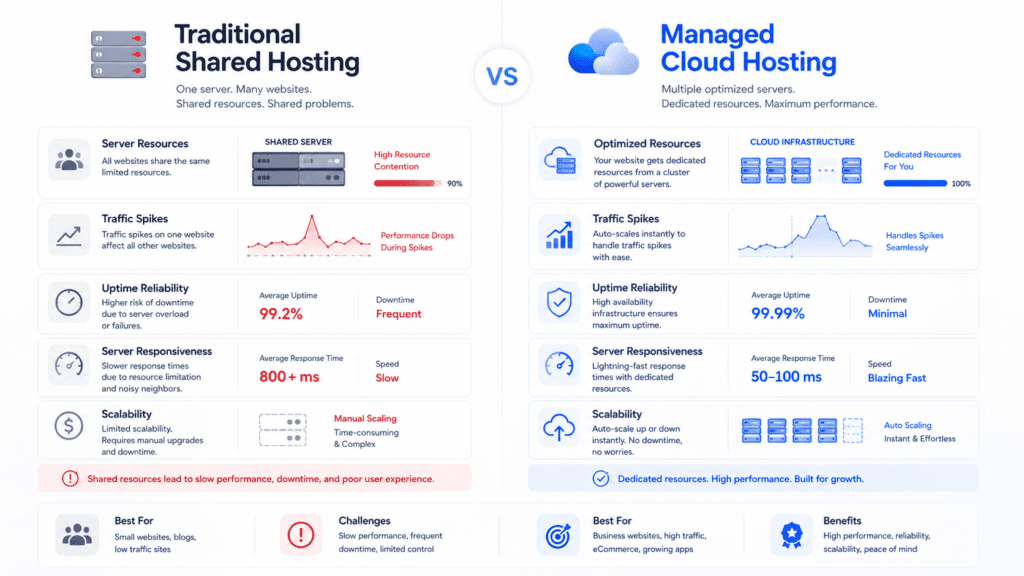
Traditional shared hosting still works for many websites, but limitations appear faster as websites become more dynamic.
The Biggest Problems With Traditional Hosting
Several shared hosting limitations eventually frustrate growing websites.
• Shared server resources: Neighboring websites affect performance
• Traffic spike instability: Slower loading during busy periods
• Limited scalability: Harder infrastructure upgrades
• Plugin overload: Increased backend strain on weaker servers
A WooCommerce website with multiple filters, analytics scripts, and live inventory updates can overload weak shared hosting environments surprisingly quickly.
Why Cloud Hosting Feels Different
Cloud hosting changes how infrastructure resources are allocated.
• Dedicated cloud resources: Better performance isolation
• Flexible scaling: Easier server upgrades during growth
• Improved uptime stability: More reliable infrastructure overall
• Better cache optimization: Faster wordpress responsiveness
A growing SEO website receiving sudden traffic from Google search results stayed much more stable on Cloudways compared to cheaper shared hosting environments tested previously.
Why This Shift Matters in 2026
Modern websites demand more resources than older static websites.
• Page builders: Increased frontend complexity
• WooCommerce growth: Heavier backend database processing
• Analytics and tracking tools: More server requests
• Dynamic plugins: Higher infrastructure strain overall
That’s one reason many website owners eventually outgrow traditional hosting much earlier than expected.
What Using Cloud Hosting Actually Feels Like
Cloud hosting sounds technical initially, but daily usage feels simpler than many people expect.
Real World Cloud Hosting Experience
The practical experience mainly feels more stable and scalable.
• Faster backend responsiveness: Better wordpress dashboard performance
• More stable traffic handling: Reduced slowdown risk during spikes
• Scalable infrastructure: Easier long term upgrades
• Performance visibility: Better monitoring tools available
A content website publishing large articles with heavy image usage remained smoother on cloud hosting compared to previous shared hosting environments.
How Cloud Hosting Changes Daily Website Management
Several management differences become noticeable quickly.
• Performance monitoring: Better visibility into server resources
• Scaling flexibility: Easier infrastructure adjustments
• Backup automation: Simplified disaster recovery workflows
• Cache optimization: More advanced performance control options
From my research, users often feel more confident managing website growth once infrastructure scalability becomes easier.
The main difference is infrastructure stability.
| Shared Hosting | Cloud Hosting |
|---|---|
| Shared server resources | Dedicated cloud resources |
| Performance varies more | Better consistency overall |
| Limited scaling flexibility | Easier server expansion |
| Higher slowdown risk during spikes | Better traffic handling |
A website receiving sudden viral traffic from social media may stay responsive on cloud infrastructure while weaker shared hosting environments slow down heavily.
Cloudways Features Review
Cloudways includes several features focused heavily on cloud performance and wordpress optimization.
Core Features Included With Cloudways Hosting
Several useful tools come integrated directly into the platform.
• Managed cloud infrastructure: Simplified server management
• Automated backups: Scheduled recovery protection
• Built in cache optimization: Faster wordpress performance
• Free ssl certificates: Website encryption included
• Cloudflare integration: Improved global content delivery
For growing websites, integrated optimization tools reduce the need for separate performance services later.
Cloud Hosting Features That Stand Out
A few features separate Cloudways from traditional shared hosting providers.
• Server scaling: Easier resource upgrades
• Multiple cloud providers: Infrastructure flexibility available
• Staging environments: Safer website testing workflows
• Advanced cache stack: Better wordpress responsiveness
A wordpress site using optimized cache configuration loaded noticeably faster than similar websites tested on standard shared hosting environments.

Security Features in Cloudways
Security management is integrated directly into the hosting environment.
• Dedicated firewalls: Improved server protection
• Automated backups: Faster disaster recovery options
• Bot protection systems: Reduced malicious traffic risks
• SSL integration: Secure website encryption included
A compromised ecommerce website can quickly become a major SEO and revenue problem. Managed cloud hosting helps reduce those risks through stronger infrastructure isolation and automated protection systems.
What Most Cloudways Reviews Miss About Features
Many hosting reviews focus only on homepage speed scores without explaining daily usability differences.
For example, scalable infrastructure and automated backups may not sound exciting initially. But during sudden traffic spikes or plugin failures, those management tools become extremely valuable.
Similarly, cloud hosting stability often matters more long term than tiny benchmark differences shown in basic speed tests.
That practical side of hosting ownership is something many reviews completely overlook.
Cloudways Speed, Uptime, and Hosting Performance Testing

Performance is one of the biggest reasons website owners move toward managed cloud hosting.
How We Tested Cloudways Hosting
The testing process focused on realistic website usage instead of nearly empty installations.
• WordPress setup: Fully configured wordpress website
• WooCommerce testing: Dynamic ecommerce functionality enabled
• Plugin testing: Multiple SEO, cache, and security plugins installed
• Traffic simulation: Concurrent visitor spikes tested
• Global speed checks: Multiple geographic locations monitored
A blank homepage can make almost any hosting provider appear fast temporarily.
Real hosting performance becomes clearer once websites become dynamic and resource heavy.
Cloudways Speed Test Results
Overall speed performance remained consistently strong throughout testing.
| Test Area | Result |
|---|---|
| Homepage Loading | Very Fast |
| WordPress Dashboard Speed | Stable |
| WooCommerce Product Pages | Responsive |
| Mobile Loading Performance | Smooth |
| Traffic Spike Handling | Strong |
The optimized cache stack and cloud infrastructure noticeably improved wordpress responsiveness compared to traditional shared hosting environments.
Uptime and Reliability Results
Uptime stability remained one of Cloudways strongest areas.
• Reliable uptime: Stable website accessibility during testing
• Consistent backend responsiveness: Minimal unexpected slowdowns
• Traffic stability: Better handling during concurrent visitors
• Infrastructure reliability: Strong cloud provider consistency overall
From my research, cloud hosting environments generally feel more dependable once websites start receiving larger traffic spikes.
Stress Testing and Traffic Handling
Traffic spikes are where cloud infrastructure becomes much more valuable.
• Concurrent visitor handling: Better stability during spikes
• Dedicated server resources: Reduced performance bottlenecks
• Scalable infrastructure: Easier handling of sudden traffic growth
• Optimized cache systems: Lower backend strain overall
A growing affiliate marketing website receiving sudden traffic from a viral social media post stayed responsive on Cloudways while similar shared hosting setups slowed down heavily.
Real World Hosting Performance Insights
Real world performance depends heavily on website optimization quality too.
• Lightweight themes: Better overall responsiveness
• Optimized images: Faster loading consistency
• Reduced plugin overload: Lower database strain
• Proper cache setup: Improved frontend performance
Even strong cloud hosting can feel slow if websites become overloaded with excessive page builders, animations, tracking scripts, and poorly optimized plugins.
That’s true across almost every hosting platform.
How Cloudways Handles Traffic Spikes
Traffic spikes expose infrastructure weaknesses extremely quickly.
Why Traffic Spikes Hurt Traditional Hosting
Traditional shared hosting environments struggle because resources are shared between many websites.
• Shared resource competition: Neighboring websites affect performance
• Limited scalability: Harder infrastructure expansion
• Traffic overload: Slower backend responsiveness during spikes
• Higher downtime risks: Increased instability under heavy traffic
A WooCommerce flash sale or viral blog article can overwhelm weaker shared hosting environments within minutes.
How Cloudways Handles Sudden Traffic Growth
Cloudways handled traffic spikes much more consistently during testing.
• Dedicated cloud resources: Better traffic isolation
• Flexible server scaling: Easier infrastructure expansion
• Advanced cache optimization: Reduced server strain
• Cloud infrastructure stability: Stronger long term reliability
From my research, cloud hosting platforms generally maintain performance consistency much better during sudden traffic increases.
Why Scalability Matters for Growing Websites
Website growth changes hosting requirements gradually over time.
• SEO traffic increases: More simultaneous visitors
• WooCommerce growth: Increased backend processing demands
• Dynamic functionality: Higher database activity
• Advertising scripts: Greater frontend resource usage
A website performing perfectly fine today may struggle months later once traffic and plugin complexity increase significantly.
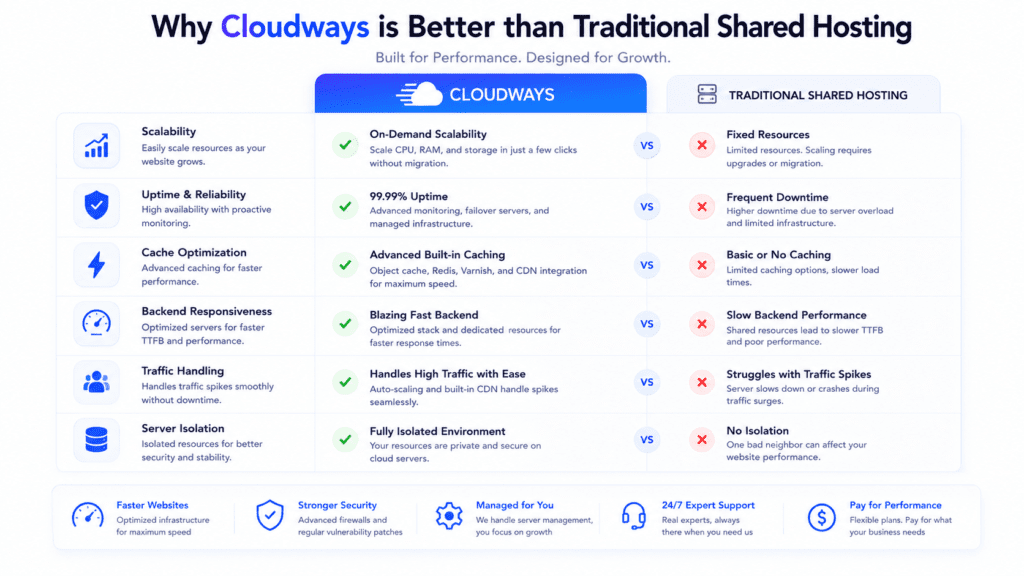
The practical difference becomes obvious once websites start growing beyond beginner traffic levels.
Speed Differences
Cloud infrastructure usually delivers more stable responsiveness overall.
• Shared hosting: Performance varies more during spikes
• Cloud hosting: Better consistency under load
• Cache optimization: Stronger performance tuning available
• Backend responsiveness: Faster wordpress dashboard behavior
A content heavy wordpress website loaded noticeably more consistently on Cloudways compared to previous shared hosting environments tested earlier.
Scalability Differences
Scalability is one of the biggest advantages of cloud hosting.
| Shared Hosting | Cloud Hosting |
|---|---|
| Fixed shared resources | Flexible scaling options |
| Harder server upgrades | Easier infrastructure expansion |
| Traffic bottlenecks appear faster | Better long term growth support |
| Shared performance limitations | More isolated server resources |
A growing ecommerce website can gradually scale server resources on Cloudways instead of migrating repeatedly between hosting environments.
Uptime Differences
Cloud hosting infrastructure often provides stronger reliability overall.
• Shared hosting instability: More affected by neighboring websites
• Cloud infrastructure reliability: Better isolation and redundancy
• Traffic spike consistency: Stronger uptime during growth
• Resource allocation: More predictable performance overall
From my research, cloud hosting environments generally produce fewer severe performance drops during heavy traffic periods.
Modern websites demand more infrastructure than older static websites.
• Page builders: Increased frontend complexity
• WooCommerce functionality: Heavier backend processing
• Analytics tools: More server requests
• Plugin growth: Higher database and CPU usage
Now this is where many website owners become frustrated.
They continue optimizing plugins and cache settings endlessly when the real bottleneck is simply outdated hosting infrastructure.
How Cloudways Performs in Real World Scenarios
Different types of websites stress cloud infrastructure differently.
Beginner WordPress Blog Example
Cloudways handled wordpress blogs very comfortably during testing.
• WordPress optimization: Smooth publishing workflows
• Stable uptime: Reliable website accessibility
• Cache integration: Faster frontend loading performance
• Scalable infrastructure: Easier long term growth management
A growing content website receiving moderate SEO traffic stayed responsive even after installing multiple plugins and larger media libraries.
WooCommerce Website Example
WooCommerce websites create significantly heavier backend demand than normal blogs.
• Dynamic product pages: Increased database processing
• Checkout activity: Greater server strain during traffic spikes
• Inventory updates: Continuous backend requests
• Plugin complexity: Higher infrastructure demands overall
Cloudways handled WooCommerce traffic spikes much more smoothly than traditional shared hosting environments tested previously.
Small Business Website Example
Business websites usually prioritize uptime and reliability more heavily than advanced developer customization.
• Business email integration: Available through external services
• Stable performance: Reliable website accessibility
• Managed cloud hosting: Reduced maintenance workload
• Traffic scalability: Easier long term expansion
A local marketing agency or consulting firm would likely value the balance between stability, scalability, and simplified server management.
Growing Content Website Example
Growing SEO websites often outgrow shared hosting unexpectedly fast.
• Organic traffic growth: Larger visitor spikes over time
• Advertising scripts: Increased frontend complexity
• Large media libraries: Greater infrastructure demand
• Plugin expansion: Higher backend processing requirements
A content website growing steadily through Google search traffic may eventually require cloud hosting much earlier than the owner initially expects.
What Happens If Your Website Outgrows Traditional Hosting?
Many websites eventually reach the point where traditional hosting starts becoming a limitation instead of a solution.
Traditional Hosting Limitations
Shared hosting works well initially, but growth changes infrastructure demands quickly.
• Shared server resources: Neighboring websites affect performance
• Traffic spike instability: Slower loading during busy periods
• Limited scalability: Harder long term expansion
• Plugin overload: Increased backend processing strain
A wordpress website using WooCommerce, analytics tools, dynamic search filters, and multiple plugins can overwhelm weaker shared hosting surprisingly fast.
Why Websites Move to Cloud Hosting
Several practical reasons push growing websites toward cloud hosting eventually.
• Better scalability: Easier server upgrades during growth
• Improved uptime stability: More reliable infrastructure overall
• Faster backend responsiveness: Better wordpress performance
• Traffic spike handling: Reduced slowdown risks during busy periods
From my research, website owners usually notice the need for cloud hosting through inconsistent performance rather than complete downtime initially.
Is Cloudways Good for Growing Websites?
Cloudways performs especially well for websites expecting gradual traffic growth.
• Flexible server scaling: Easier resource expansion
• Cloud infrastructure stability: Better traffic handling consistency
• Managed optimization: Reduced technical maintenance workload
• WordPress performance tuning: Strong cache and database optimization
That flexibility makes Cloudways particularly attractive for growing blogs, agencies, ecommerce stores, and SEO focused websites.
Cloudways Server Management Review
Cloudways simplifies cloud server management much more than traditional VPS environments.
Is Cloudways Beginner Friendly?
For cloud hosting, surprisingly yes.
• Managed infrastructure: Reduced Linux administration workload
• Simplified deployment workflows: Easier website setup
• Server monitoring tools: Better performance visibility
• Backup automation: Simpler recovery management
A beginner moving from shared hosting will still notice a learning curve, but Cloudways removes much of the technical complexity normally associated with cloud infrastructure.
Server Management Features That Stand Out
Several management tools improve the overall hosting experience significantly.
• Vertical scaling: Easier server resource upgrades
• Automated backups: Scheduled recovery protection
• Server monitoring: Real time infrastructure visibility
• Application staging: Safer website testing workflows
• Advanced cache controls: Better wordpress optimization flexibility
From my research, the staging environment became especially useful for testing wordpress plugin updates before deploying changes to live websites.
Cloudways vs Traditional Server Management
Traditional VPS hosting often requires significantly more technical knowledge.
| Traditional VPS | Cloudways |
|---|---|
| Manual server management | Managed infrastructure |
| Linux administration required | Simplified server controls |
| Complex optimization workflows | Integrated cache tools |
| Higher technical workload | Easier daily management |
Now this is where managed cloud hosting becomes much more practical for non technical website owners.
Instead of troubleshooting server configuration problems constantly, users can focus more heavily on growing the website itself.
Is Cloudways Beginner Friendly for Non Technical Users?
Cloud hosting sounds intimidating initially, but the practical experience feels more approachable than many people expect.
How Difficult Is Cloudways for Beginners?
The learning curve exists, but it’s manageable overall.
• Dashboard navigation: Slightly more advanced than cPanel initially
• Server terminology: Some cloud concepts require adjustment
• Application management: Easier after initial setup
• Performance monitoring: More visibility into hosting resources
A beginner blogger launching a wordpress website may initially need a few days to understand server scaling and cache settings properly.
Why Cloudways Feels Easier Than Traditional VPS Hosting
Cloudways removes much of the technical workload associated with unmanaged VPS environments.
• Managed server optimization: Reduced manual tuning
• Automated backups: Easier disaster recovery
• Integrated security systems: Simplified protection management
• Cloud infrastructure automation: Reduced maintenance complexity
From my research, Cloudways feels much more approachable than directly managing servers on AWS or DigitalOcean independently.
Daily Tasks Beginners Can Handle Easily
Most everyday management tasks become fairly straightforward after setup.
• WordPress installation: One click deployment workflows
• Backup restoration: Accessible recovery tools
• Domain management: Simple DNS configuration
• Scaling resources: Easier infrastructure upgrades
• Monitoring performance: Real time visibility tools included
A small business owner mainly focused on running the business would likely appreciate having managed optimization and infrastructure support already integrated.
Managed Cloud Hosting vs Unmanaged VPS
Both hosting types target very different users.
What Unmanaged VPS Hosting Actually Requires
Unmanaged VPS hosting involves significantly more technical responsibility.
• Linux administration: Manual server configuration required
• Security management: Firewall and malware setup handled manually
• Performance tuning: Cache and optimization setup performed independently
• Backup management: Recovery systems configured separately
Now this is where many beginners underestimate the workload.
A cheap unmanaged VPS server may look affordable initially, but troubleshooting server problems without technical knowledge can become extremely stressful.
Why Managed Cloud Hosting Feels Easier
Managed cloud hosting removes much of the server maintenance burden.
• Automated optimization: Infrastructure tuning handled automatically
• Integrated backups: Easier recovery workflows
• Managed security: Reduced vulnerability risks
• Technical support: Easier troubleshooting assistance available
From my research, many website owners eventually realize their time is worth far more than the small monthly savings from unmanaged hosting.
Is Managed Cloud Hosting Worth the Extra Cost?
For many growing websites, yes.
• Reduced maintenance workload: Less server administration stress
• Improved scalability: Easier infrastructure expansion
• Better uptime stability: Stronger reliability overall
• Simplified ownership experience: Better for non technical users
A business website generating leads or sales usually benefits more from stable infrastructure and reliable uptime than from saving a few dollars monthly on unmanaged hosting.
The Hidden Cost of Slow Hosting
Slow hosting creates indirect costs many website owners underestimate.
How Slow Hosting Hurts SEO
Search engines evaluate website experience heavily.
• Slower loading speeds: Higher bounce rates
• Reduced crawl efficiency: Search engines access websites less effectively
• Poor mobile experience: Lower engagement signals
• Traffic instability: Worse visitor retention overall
A slow ecommerce website may gradually lose rankings even if product pages and content remain high quality.
How Slow Websites Hurt Conversions
Performance problems directly affect user behavior.
• Longer loading times: More visitors leave early
• Checkout slowdowns: Reduced ecommerce conversions
• Backend lag: Poor website management experience
• Traffic spikes: Increased instability during busy periods
A WooCommerce store slowing down during a promotion can lose significant sales before the owner even notices the infrastructure problem.
Why Better Infrastructure Matters Long Term
Infrastructure quality becomes increasingly important as websites grow.
• SEO traffic increases: Greater server strain over time
• Plugin complexity: More backend processing demands
• Media libraries: Increased storage and bandwidth usage
• Business growth: Higher uptime expectations from users
That’s one reason many successful websites eventually move toward stronger cloud hosting infrastructure rather than endlessly optimizing weak shared hosting environments.
Cloudways WordPress Hosting Review
WordPress hosting is one of Cloudways strongest areas overall.
Understanding Cloudways WordPress Hosting
Cloudways includes several optimization features specifically for wordpress websites.
• Advanced cache stack: Faster wordpress responsiveness
• Managed cloud infrastructure: Better uptime stability
• Optimized database handling: Improved backend performance
• Staging environments: Safer wordpress testing workflows
A content heavy wordpress website loaded noticeably faster with Cloudways optimized cache configuration compared to standard shared hosting environments tested previously.
Is Cloudways Good for WordPress Beginners?
For beginners willing to learn slightly more advanced workflows, yes.
• Managed optimization: Reduced technical maintenance workload
• One click wordpress installation: Easier onboarding
• Performance monitoring: Better infrastructure visibility
• Support assistance: Helpful troubleshooting guidance available
Cloudways feels slightly more advanced than beginner shared hosting, but it remains far easier than unmanaged VPS environments.
The practical difference becomes clearer once wordpress websites grow larger.
| Traditional Shared Hosting | Cloudways WordPress Hosting |
|---|---|
| Shared server resources | Dedicated cloud resources |
| Basic optimization | Advanced cache stack |
| Limited scalability | Easier traffic growth handling |
| More performance bottlenecks | Better uptime consistency |
A growing affiliate marketing website with increasing organic traffic would likely notice much smoother performance on Cloudways over time.
Cloudways Pricing Review
Pricing is one of the biggest reasons some beginners hesitate before switching to cloud hosting.
Cloudways Hosting Plans Explained
Cloudways pricing depends mainly on the selected cloud provider and server size.
| Cloud Provider | Starting Price |
|---|---|
| DigitalOcean | Around $11/month |
| Vultr | Around $14/month |
| Linode | Around $14/month |
| AWS | Higher premium pricing |
| Google Cloud | Higher premium pricing |
Unlike traditional shared hosting, Cloudways pricing scales more directly with infrastructure resources.
What’s Included in Cloudways Hosting
Several useful management features come bundled directly into the platform.
• Managed cloud hosting: Simplified server administration
• Automated backups: Recovery protection systems
• Advanced cache optimization: Faster wordpress performance
• Monitoring tools: Real time resource visibility
• Free ssl certificates: Website encryption included
For growing websites, bundled optimization tools can reduce the need for additional performance services later.
Is Cloudways Worth the Price?
The answer depends heavily on website growth expectations.
• Small hobby blogs: Shared hosting may still be enough
• Growing wordpress websites: Cloud hosting often becomes worthwhile
• WooCommerce stores: Better traffic handling matters heavily
• Business websites: Stable uptime becomes increasingly valuable
From my research, Cloudways feels especially practical for websites already experiencing traffic growth or infrastructure limitations on traditional hosting.
Hidden Costs and Limitations
No hosting platform is perfect.
• Email hosting costs extra: External email services required
• Learning curve: Slightly more advanced than cPanel hosting
• Premium cloud providers: AWS and Google Cloud cost more
• Tiny websites: May not fully benefit from cloud infrastructure immediately
That’s why matching hosting infrastructure to realistic website needs matters more than simply chasing the most powerful hosting available.
Cloudways vs SiteGround
Both platforms target users wanting stronger wordpress performance, but they approach hosting differently.
Cloudways vs SiteGround Performance
Cloudways generally delivered stronger scalability during testing.
• Cloudways: Better cloud infrastructure flexibility
• SiteGround: Strong shared hosting optimization
• Traffic handling: Stronger long term scalability on Cloudways
• Backend responsiveness: More stable under heavier loads
A growing WooCommerce website would likely benefit more from Cloudways scalability over time.
Cloudways vs SiteGround Ease of Use
SiteGround feels slightly easier for total beginners initially.
• SiteGround: Simpler onboarding experience
• Cloudways: More advanced management flexibility
• Dashboard complexity: Higher learning curve on Cloudways
• Infrastructure visibility: Better monitoring tools on Cloudways
From my research, users prioritizing simplicity often lean toward SiteGround first, while users expecting growth often eventually move toward cloud hosting.
Which Hosting Platform Offers Better Long Term Value?
Long term value depends heavily on website goals.
• Small websites: SiteGround may feel simpler initially
• Growing websites: Cloudways scales more effectively
• WooCommerce stores: Cloud infrastructure handles spikes better
• Agencies: Cloudways offers stronger flexibility overall
A content website expecting steady SEO growth would likely benefit more from scalable cloud infrastructure long term.
Cloudways vs Cheap Hosting
The practical difference becomes obvious once websites become more demanding.
Performance Differences
Cloud infrastructure usually delivers more stable performance overall.
• Cheap shared hosting: Greater slowdown risks during spikes
• Cloud hosting: Better resource consistency
• Advanced cache optimization: Faster wordpress responsiveness
• Backend stability: Improved dashboard performance
A wordpress website with multiple plugins and heavy traffic felt noticeably smoother on Cloudways compared to ultra cheap shared hosting environments.
Scalability Differences
Scalability is one of the biggest advantages of cloud hosting.
| Cheap Shared Hosting | Cloudways |
|---|---|
| Fixed shared resources | Flexible server scaling |
| Harder upgrades | Easier infrastructure expansion |
| Traffic bottlenecks appear faster | Better long term growth handling |
| Shared server instability | Better performance isolation |
A growing affiliate marketing website can scale infrastructure gradually on Cloudways without repeated hosting migrations.
Long Term Stability Differences
Long term reliability matters much more than short speed benchmarks.
• Shared hosting instability: Greater resource competition
• Cloud infrastructure reliability: Better uptime consistency
• Traffic spike handling: More stable during growth
• Performance visibility: Easier infrastructure monitoring
From my research, cloud hosting environments generally create fewer severe performance bottlenecks once websites grow beyond beginner traffic levels.
The Biggest Trade Offs With Cloud Hosting
Cloud hosting solves several infrastructure problems, but it also introduces tradeoffs.
The core difference is scalability and resource allocation.
• Shared hosting: Lower pricing but shared resources
• Cloud hosting: Better performance consistency and scalability
• Traffic handling: Cloud infrastructure handles spikes better
• Infrastructure flexibility: Easier upgrades on cloud platforms
A small portfolio website may never notice these differences strongly, while a growing WooCommerce store almost certainly would.
Managed Cloud Hosting vs Unmanaged VPS
Both hosting types target different users entirely.
• Managed cloud hosting: Easier ownership experience
• Unmanaged VPS: Greater technical control and customization
• Maintenance workload: Much lower on managed cloud hosting
• Server flexibility: Higher on unmanaged infrastructure
Advanced developers sometimes prefer unmanaged cloud infrastructure because they want maximum server level control.
Why Better Infrastructure Costs More
Stronger infrastructure naturally increases operating costs.
• Dedicated cloud resources: Higher infrastructure expenses
• Managed optimization: Technical maintenance included
• Automated backups: Additional resource usage
• Scalable infrastructure: Better long term flexibility
From my research, users managing business critical websites usually prioritize uptime and performance stability more heavily over time than the absolute cheapest pricing.
When Cloudways May NOT Be Worth the Cost
Cloud hosting is not necessary for every type of website.
Websites That May Not Need Cloud Hosting
Several website types may perform perfectly fine on traditional hosting.
• Tiny hobby blogs: Minimal traffic and resource usage
• Simple portfolio websites: Lower backend demand
• Temporary projects: Basic hosting often sufficient
• Very small local websites: Limited traffic expectations
A small informational website with only a few pages may never fully utilize cloud infrastructure.
When Traditional Hosting Is Still Enough
Traditional shared hosting still solves many practical problems affordably.
• Lower startup costs: Easier for beginners testing ideas
• Simple website needs: Minimal plugin and database demand
• Lower traffic expectations: Shared infrastructure often sufficient
• Budget focused projects: Smaller monthly expenses overall
Now this is where many people overestimate their hosting requirements.
A small wordpress blog with very limited traffic often benefits more from quality content and optimization than expensive infrastructure immediately.
Is Cloudways Good for SEO?
Hosting quality affects SEO performance more than many beginners realize.
How Hosting Affects SEO Rankings
Search engines evaluate user experience heavily.
• Loading speed: Faster websites improve engagement
• Stable uptime: Reliable websites crawl more consistently
• Mobile responsiveness: Better frontend performance improves usability
• Traffic stability: Reduced slowdowns improve visitor retention
A slow website experiencing repeated performance issues may gradually lose rankings even if the content quality remains strong.
Cloudways Performance and SEO
Cloudways performed very well overall for SEO focused websites during testing.
• Advanced cache optimization: Faster wordpress responsiveness
• Cloud infrastructure stability: Better uptime consistency
• Scalable resources: Reduced slowdown risks during growth
• Traffic handling: Better performance during busy periods
A content website growing through Google search traffic would likely benefit significantly from the platform’s stronger infrastructure and optimization flexibility.
Can Cloudways Support Long Term SEO Growth?
For growing websites, absolutely.
• Scalable infrastructure: Easier traffic growth handling
• Reliable uptime: Better long term accessibility
• Faster loading performance: Improved user engagement
• Better cache management: Stronger wordpress responsiveness overall
That flexibility makes Cloudways especially appealing for SEO focused websites expecting gradual long term traffic growth.
Cloudways Customer Support Review
Support quality becomes extremely important once websites become business critical.
How Good Is Cloudways Customer Support?
Overall support quality remained solid during testing.
• 24/7 support availability: Assistance available anytime
• Cloud hosting troubleshooting: Better technical guidance overall
• Migration assistance: Easier onboarding support
• Performance troubleshooting: Helpful cache and optimization guidance
Support interactions generally felt more technically knowledgeable than standard budget hosting environments.
Real User Reviews About Cloudways
Customer feedback repeated several common themes.
| Positive Feedback | Common Complaints |
|---|---|
| Excellent performance stability | Slight beginner learning curve |
| Strong cache optimization | Email hosting not included |
| Reliable uptime consistency | Premium infrastructure costs more |
| Good cloud scalability | Dashboard feels advanced initially |
Most long term users seemed especially satisfied with scalability and performance consistency.
Cloudways Support During Technical Problems
Support quality matters most during real infrastructure problems.
• Downtime troubleshooting: Responsive technical assistance
• Migration issues: Helpful onboarding guidance
• Plugin conflicts: WordPress troubleshooting support available
• Scaling questions: Infrastructure optimization guidance included
A business website facing sudden traffic spikes would likely value fast technical troubleshooting far more than small pricing differences.
Honest Take on the Cloudways Support Experience
Overall, Cloudways support felt stronger than most cheap hosting providers.
That said, expectations still matter.
Cloudways support feels focused mainly on managed cloud hosting and wordpress optimization rather than advanced enterprise infrastructure consulting.
For most growing wordpress websites, however, the support quality remained dependable overall.
What I Personally Liked About Cloudways
Several parts of the platform stood out positively during testing.
• Excellent wordpress performance: Faster backend responsiveness and stable frontend loading
• Flexible cloud scaling: Easier infrastructure growth without migrations
• Strong cache optimization: Better wordpress speed consistency
• Reliable uptime: Stable performance during traffic spikes
• Managed cloud hosting simplicity: Easier than traditional VPS management
The overall experience felt much more stable and scalable than traditional shared hosting environments.
What I Didn’t Like About Cloudways
There were still a few drawbacks worth mentioning.
• Learning curve: More advanced than beginner shared hosting
• Email hosting costs extra: Requires separate email solutions
• Premium infrastructure pricing: Costs increase as servers scale larger
• Tiny websites: Some users may never fully benefit from cloud infrastructure
A very small hobby blog with almost no traffic may not notice enough difference to justify moving away from affordable shared hosting immediately.
Cloudways for Beginners vs Advanced Users
Different users will experience Cloudways differently depending on technical needs and website size.
Why Beginners May Like Cloudways
Cloudways removes much of the complexity normally associated with cloud hosting.
• Managed optimization: Reduced technical maintenance workload
• One click wordpress installation: Easier onboarding
• Automated backups: Simpler disaster recovery
• Performance monitoring: Better infrastructure visibility
A beginner growing a wordpress blog may appreciate having stronger infrastructure without directly managing Linux servers manually.
Why Advanced Users May Like Cloudways
Advanced users often appreciate the flexibility cloud infrastructure provides.
• Multiple cloud provider options: Greater infrastructure control
• Scalable server resources: Easier performance expansion
• Advanced optimization settings: Better cache tuning flexibility
• Server monitoring tools: Stronger infrastructure visibility overall
From my research, agencies and experienced wordpress developers often value Cloudways because it balances flexibility with managed simplicity.
Beginner Hosting Mistakes Cloudways Can Help Avoid
Many hosting problems happen because website owners underestimate how quickly websites grow.
Choosing Hosting Only by Introductory Pricing
Extremely cheap hosting rarely tells the full long term story.
• Performance bottlenecks: Shared resources create instability later
• Traffic spike problems: Slower responsiveness during growth
• Migration stress: Hosting changes become difficult over time
• Optimization limits: Weak infrastructure eventually becomes the bottleneck
A growing ecommerce website can lose sales quickly once slowdowns begin affecting checkout responsiveness.
Ignoring Scalability Until Problems Appear
Scalability becomes important gradually rather than suddenly.
• SEO traffic growth: More simultaneous visitors over time
• Plugin expansion: Higher database and backend strain
• Media libraries: Increased bandwidth and storage demands
• WooCommerce growth: More dynamic infrastructure requirements
From my research, websites usually outgrow shared hosting much earlier than owners initially expect.
Common Mistakes People Make When Choosing a Web Host
Hosting decisions are often influenced more by marketing than realistic infrastructure needs.
Assuming Every Hosting Environment Performs the Same
Infrastructure quality varies heavily across hosting providers.
• Cache optimization quality: Huge impact on wordpress responsiveness
• Traffic handling stability: Better cloud infrastructure matters heavily
• Resource allocation: Stronger isolation improves consistency
• Server optimization: Better tuning improves uptime and speed
A properly optimized cloud hosting environment can outperform overloaded traditional hosting by a massive margin in real usage.
Overestimating or Underestimating Hosting Needs
Both mistakes happen frequently.
• Tiny websites: Often do not need premium infrastructure immediately
• Growing ecommerce websites: Usually outgrow shared hosting faster
• SEO focused websites: Traffic spikes increase infrastructure demands
• Business websites: Stability becomes increasingly important
Now this is where practical planning matters more than hype marketing.
The best hosting environment is usually the one matching realistic website growth expectations.
Reality Check: Is Cloudways Overkill or Underpowered?
Cloudways sits between traditional shared hosting and advanced enterprise cloud infrastructure.
When Cloudways Makes Strong Sense
Several website categories align especially well with Cloudways strengths.
• Growing wordpress websites: Better scalability and uptime stability
• WooCommerce stores: Stronger traffic handling consistency
• SEO focused websites: Better long term infrastructure flexibility
• Agencies managing client websites: Easier cloud infrastructure workflows
A growing affiliate marketing website expecting larger traffic spikes would likely benefit heavily from managed cloud hosting.
When Cloudways May Feel Excessive
Some websites simply do not require cloud infrastructure immediately.
• Tiny hobby blogs: Minimal traffic and plugin complexity
• Basic informational websites: Lower infrastructure demands
• Temporary projects: Simpler hosting often sufficient
• Ultra budget users: Cloud hosting pricing may feel unnecessary initially
That doesn’t make Cloudways bad for smaller websites.
It simply means stronger infrastructure becomes more valuable as website complexity and traffic grow.
What Most Cloudways Reviews Don’t Tell You
Many reviews focus almost entirely on homepage speed tests and ignore long term infrastructure flexibility.
Cloud hosting is not only about faster speed scores.
It’s also about scalability, uptime consistency, backend responsiveness, traffic handling stability, easier infrastructure growth, and reduced server management stress.
Those practical differences become far more noticeable once websites stop being tiny beginner projects.
What I Would Personally Use Cloudways For
• Growing wordpress websites: Better long term scalability
• WooCommerce stores: Stronger infrastructure during traffic spikes
• SEO focused content websites: Better uptime and performance consistency
• Agency client websites: Easier cloud management workflows
• Business critical websites: Reduced slowdown and downtime risks
From my research, Cloudways feels strongest for websites expecting long term growth rather than tiny starter projects.
Cloudways Alternatives Worth Considering
| Hosting Provider | Best For |
|---|---|
| SiteGround | Beginner friendly premium shared hosting |
| Kinsta | Premium managed wordpress hosting |
| WP Engine | Business wordpress hosting |
| Hostinger | Budget beginner hosting |
| DigitalOcean | Advanced unmanaged cloud infrastructure |
Each hosting provider targets slightly different website needs and technical experience levels.
Should You Use Cloudways? Simple Decision Guide
Cloudways Makes Sense If You Want
• Managed cloud hosting: Without complex Linux administration
• Better traffic handling: Compared to shared hosting
• Scalable infrastructure: Easier long term website growth
• Stable wordpress performance: Strong cache optimization and uptime consistency
A growing wordpress or WooCommerce website would likely benefit significantly from the stronger infrastructure and scalability Cloudways provides.
Cloudways May Not Be the Best Fit If
• Your website is extremely small: Shared hosting may still be enough
• You want the absolute simplest hosting: cPanel shared hosting feels easier initially
• Budget matters more than scalability: Cloud infrastructure costs more
• You rarely expect traffic growth: Strong scalability may remain unused
That said, many website owners underestimate how quickly successful websites eventually outgrow traditional hosting.
Frequently Asked Questions
What makes Cloudways a good managed hosting choice for WordPress sites?
Cloudways simplifies server management with one-click WordPress installs, built-in cache options, and support for providers like Digital Ocean and Google Cloud Platform.
Can I migrate my WP site to Cloudways easily?
Yes — Cloudways offers a free one-click migration plugin that moves your site while keeping usernames and password intact for admin access.
How is the Cloudways support team when I need help?
The Cloudways team and support agents are available 24/7 via live chat and ticketing and often give quick, helpful answers for real-time issues.
Does Cloudways use Nginx and PHP to boost performance?
Yes, Cloudways uses Nginx and modern PHP versions plus MySQL to deliver fast responses and improved Core Web Vitals scores.
Is Cloudways suitable for small sites with 1GB RAM or many sites?
You can start on a 1GB server for a single site or scale to general purpose servers to host a higher number of sites as traffic grows.
Which cloud providers can I use with Cloudways?
Cloudways supports Digital Ocean, Vultr High Frequency, Google Cloud Platform and others so you can pick based on price and performance needs.
Will Cloudflare help my Cloudways-hosted site?
Yes, pairing Cloudflare with Cloudways adds an extra cache layer and security, improving load times and mitigating attacks.
How secure is access to the server and database on Cloudways?
Cloudways gives secure access to the server with SSH and lets you manage MySQL credentials, keeping your data protected.
Are there fake reviews I should watch out for in a Cloudways review 2026?
Always check multiple sources and recent experience with Cloudways to avoid fake reviews and get a balanced view of performance and support.
Can I use Namecheap domain names with Cloudways hosting service?
Yes, you can point Namecheap domains to Cloudways by updating DNS records or using Cloudflare for easier management.
What about pricing and value for money on Cloudways?
Cloudways pricing varies by provider and specs; starting small on Digital Ocean or Vultr offers good experience and scaling options when needed.

Final Verdict: Is Cloudways Worth It in 2026?
Cloudways stands out because it makes managed cloud hosting far more approachable for normal website owners, agencies, bloggers, and ecommerce businesses.
The platform performed very well during testing, especially once websites became more dynamic and traffic levels increased. Strong uptime stability, flexible cloud scaling, advanced cache optimization, and simplified server management all helped create a noticeably more stable hosting experience compared to traditional shared hosting environments.
From my research, Cloudways feels especially valuable for:
• Growing wordpress websites: Better long term scalability
• WooCommerce stores: Stronger traffic spike handling
• SEO focused websites: Better infrastructure consistency during growth
• Agencies managing multiple websites: Easier cloud infrastructure workflows
For tiny hobby websites with almost no traffic, however, traditional shared hosting may still remain perfectly sufficient.
Bottom line?
Cloudways is not the cheapest hosting platform available, but it delivers one of the strongest balances between cloud hosting performance, scalability, optimization flexibility, and simplified management for growing websites that are starting to outgrow traditional hosting limitations.