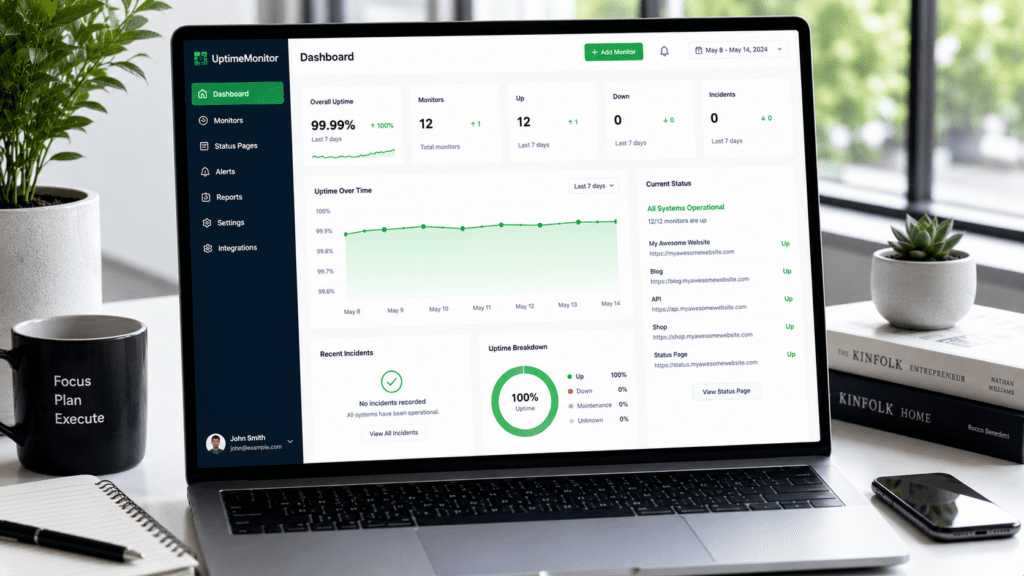
Website uptime refers to the amount of time a website remains operational and accessible to users without interruption. If visitors can open your website normally, your uptime is stable. If the website becomes unavailable, even briefly, that period counts as downtime.
Website uptime matters much more than some website owners realize. Frequent downtime can hurt SEO rankings, reduce customer trust, increase bounce rates, and lower conversions or revenue. In modern web hosting environments, maintaining high website uptime is essential because users expect websites and online services to stay available around the clock.
In this guide, you’ll learn practical ways to improve website uptime, minimize downtime issues, monitor website availability, and build a more reliable online presence using better hosting, monitoring tools, backups, and proactive maintenance strategies.
What Is Website Uptime?
Understanding Website Uptime in Simple Terms
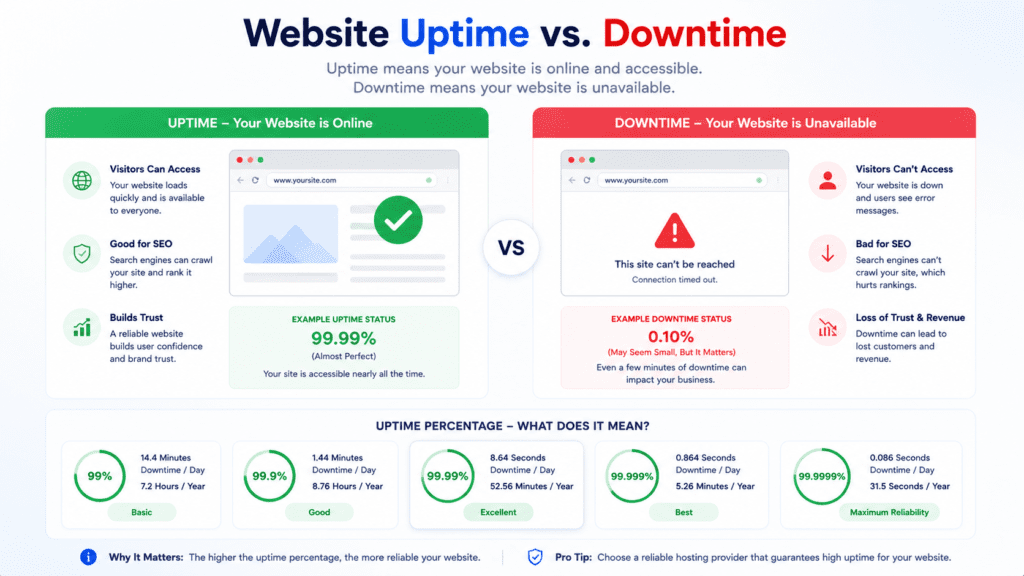
Website uptime means the amount of time a website is available and functioning properly for visitors.
If users can access pages normally, the website is considered online. If visitors cannot load the website, the site is experiencing downtime.
• Uptime: Time a website remains available to visitors
• Downtime: Period when the website becomes unavailable
• Website availability: Ability for users to access the website normally
• Operational and accessible: Website is working correctly for visitors
From my research, many website owners focus heavily on website speed while overlooking uptime stability.
But even a fast website creates problems if visitors cannot access it consistently.
What Uptime Percentage Actually Means
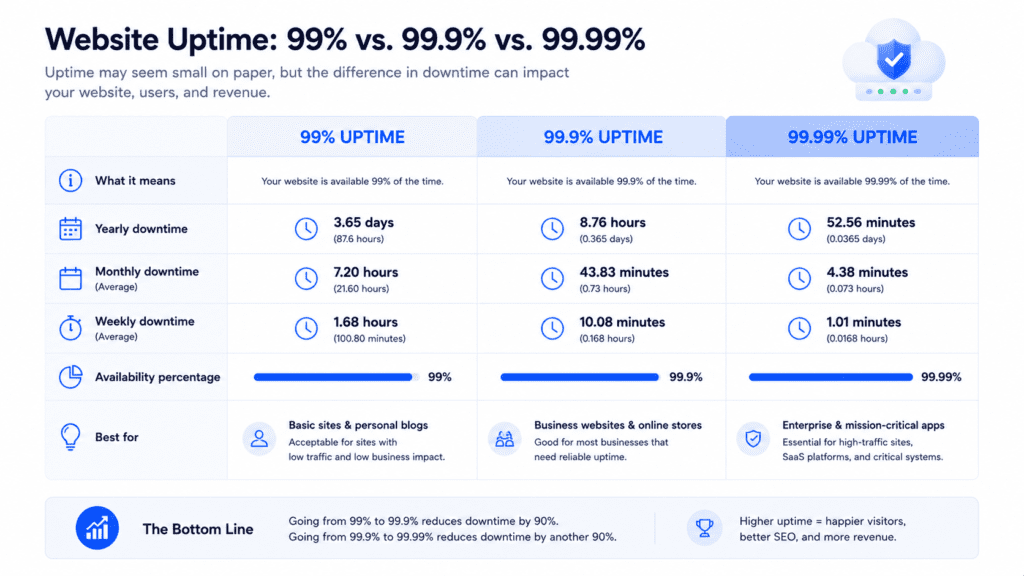
Uptime percentage measures how often a website stays online over a specific period.
Hosting providers often advertise uptime guarantees like 99.9% or 99.99%, but those numbers still allow some downtime.
| Uptime Percentage | Approximate Yearly Downtime |
|---|---|
| 99% | About 3.6 days |
| 99.9% | About 8.7 hours |
| 99.99% | About 52 minutes |
Now this is where people get confused.
A 99% uptime percentage may sound excellent at first, but it can still result in several days of website downtime across a year.
That level of downtime may seriously affect ecommerce stores, SaaS platforms, and business websites.
Why Website Availability Matters for SEO and Businesses
Website availability affects much more than technical performance.
• SEO impact: Search engine crawlers struggle to access unstable websites
• User experience: Visitors lose trust when websites frequently go offline
• Conversions: Downtime interrupts purchases and lead generation
• Online presence: Reliability affects customer confidence
A customer visiting an online store during a major sale may leave permanently if the website becomes unavailable for even a few minutes during checkout.
That’s why maintaining high website uptime is essential for both businesses and bloggers.
Why Website Uptime Matters More Than Ever
Websites are expected to stay online constantly now.
Visitors don’t usually care whether the issue comes from the server, plugins, DNS problems, or hosting provider failures. If the site is unavailable, they simply move on.
How Downtime Hurts SEO Rankings
Search engines value stable website performance.
• Crawling issues: Search engines may fail to index unavailable pages
• Reduced trust signals: Frequent downtime affects reliability
• Lower rankings: Unstable websites may lose visibility
• Poor performance and user experience: Downtime frustrates visitors quickly
A SaaS platform experiencing repeated outages may lose subscribers even if the product itself works well most of the time.
Why Users Expect Websites to Stay Online 24/7
Modern users expect websites to be accessible anytime.
• Always connected behavior: Visitors browse from multiple devices constantly
• Instant expectations: Users rarely wait for unavailable websites
• Global audiences: Different time zones create nonstop traffic
• Competition: Alternatives are usually one click away
That said, maintaining high website uptime is not only about technology. It’s also about protecting reputation and customer trust.
How Uptime Affects Revenue and Customer Trust
Website reliability directly affects how visitors view a business.
A website that frequently goes offline can quickly damage confidence, even if the products or services themselves are excellent.
• Lost conversions: Visitors cannot complete purchases during downtime
• Customer frustration: Repeated outages reduce trust
• Revenue impact: Downtime interrupts sales and subscriptions
• Brand reputation: Reliability affects long term credibility
An ecommerce website going offline during a holiday sale may lose hundreds of orders in only a short period.
That’s why uptime translates directly into business stability for many online platforms.
Website Uptime vs Downtime Explained
People often hear uptime and downtime together, but the difference is very simple.
Difference Between Uptime and Downtime
Uptime refers to the period when the website is operational and accessible to users.
Downtime refers to the period when visitors cannot access the website normally.
• Uptime: Website is available and functioning properly
• Downtime: Website becomes unavailable or broken
• Website uptime metrics: Measure stability over time
• Site uptime: Tracks long term availability performance
Even short downtime incidents can affect user experience and search engine visibility if they happen repeatedly.
Understanding 99%, 99.9%, and 99.99% Uptime
Small percentage differences create large differences in actual downtime.
| Uptime Level | Approximate Monthly Downtime |
|---|---|
| 99% | Around 7 hours |
| 99.9% | Around 43 minutes |
| 99.99% | Around 4 minutes |
A website owner seeing “99% uptime” in a hosting advertisement may assume the website will almost never go offline.
In reality, that still allows noticeable downtime across a month or year.
How Much Downtime Is Acceptable for a Website?
The acceptable level of downtime depends heavily on the type of website.
Personal Blogs and Small Websites
Small websites usually tolerate occasional downtime more easily.
• Lower traffic pressure: Fewer users affected simultaneously
• Limited revenue dependence: Downtime may not create direct financial loss
• Basic monitoring needs: Simpler uptime monitoring service requirements
A personal blog experiencing a brief outage overnight may not notice serious impact immediately.
Ecommerce and Business Websites
Business websites face much greater risks from downtime.
• Lost transactions: Customers cannot complete purchases
• Trust damage: Users may hesitate to return later
• SEO concerns: Frequent instability affects rankings
• Customer support pressure: More complaints during outages
An online store losing access during Black Friday traffic can lose significant revenue very quickly.
SaaS Platforms and Online Services
SaaS businesses often require extremely high uptime percentages.
• Subscription expectations: Users expect constant access
• Operational dependency: Customers rely on the service daily
• Retention risk: Downtime increases cancellations
• Business disruption: Outages affect customer workflows directly
A project management SaaS platform becoming unavailable during working hours may frustrate entire teams relying on the service.
That’s why high website uptime is essential for subscription based online services.
Understanding Website Uptime Metrics
Monitoring uptime properly requires more than checking whether the homepage loads.
Key Metrics Website Owners Should Monitor
Several key metrics help measure website stability and availability.
• Uptime percentage: Measures long term website availability
• Response time: Tracks how quickly the server responds
• Error rates: Detects failures and broken requests
• Recovery time: Measures how quickly issues get resolved
• Server latency: Indicates backend response delays
• Downtime incidents: Tracks outage frequency over time
From my research, focusing on key metrics helps identify hidden stability problems before they become serious outages.
Response Time vs Uptime Percentage
A website can technically stay online while still delivering poor performance.
• Response time: Measures loading responsiveness
• Uptime percentage: Measures availability only
• Website performance: Includes speed and stability together
• User experience: Slow websites still frustrate visitors
A website may remain accessible to users while pages load extremely slowly because of server overload or poor optimization.
That’s why uptime and website performance should always be monitored together.
Error Rate and Recovery Monitoring
Error monitoring helps identify instability early.
• Error tracking: Detects failed requests and server issues
• Alert systems: Notify owners when outages happen
• Recovery monitoring: Measures how fast systems recover
• Monitoring tools: Help detect hidden downtime issues
A website owner receiving an alert within minutes after a crash can usually restore the website much faster than someone relying only on manual monitoring.
What Causes Website Downtime?
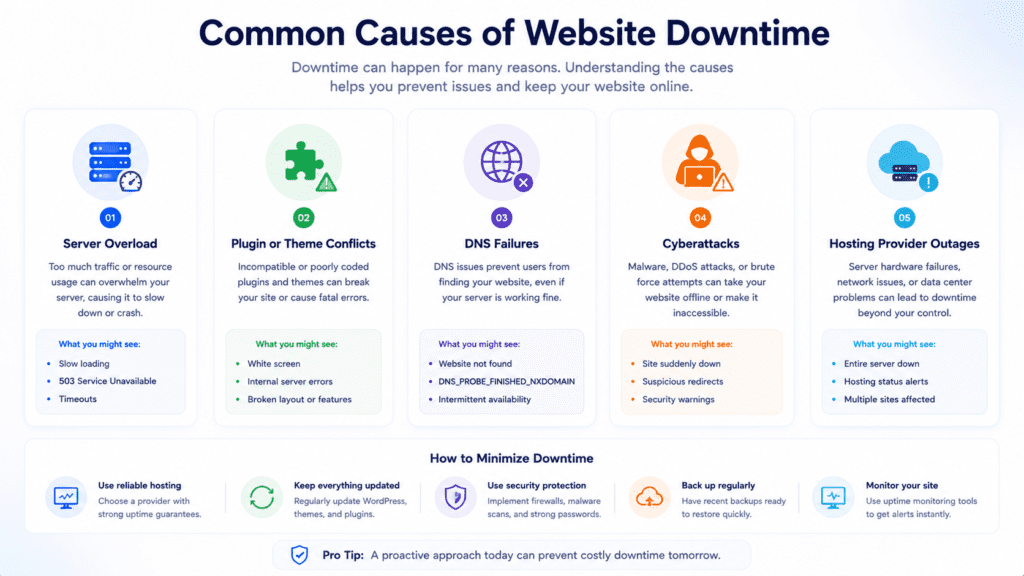
Downtime problems usually come from a combination of technical issues rather than one single failure.
Some outages last only a few minutes. Others can keep a website unavailable for hours if the root problem is not fixed quickly.
Hosting Provider Failures
The hosting provider plays one of the biggest roles in uptime reliability.
• Overloaded servers: Too many websites share limited resources
• Hardware failures: Physical server issues cause outages
• Weak infrastructure: Poor redundancy increases downtime risks
• Network outages: Connectivity failures interrupt website availability
A low cost shared hosting plan from a crowded hosting environment may struggle during traffic spikes much more than optimized cloud hosting services.
Server Overload and Traffic Spikes
Sudden traffic increases can overwhelm weak server setups.
• Traffic surges: More visitors increase server strain
• Resource exhaustion: CPU and memory usage spike quickly
• Slow response times: Website performance becomes unstable
• Server crashes: Website becomes inaccessible under heavy load
A WooCommerce store running a holiday promotion may crash completely if the hosting plan cannot handle the incoming traffic.
That’s why scalability matters for maintaining website uptime.
Plugin Conflicts and Software Problems
Software issues are another common source of website downtime.
• Broken plugin updates: Compatibility issues break functionality
• Theme conflicts: Poor coding creates instability
• Outdated software: Older versions increase security and stability risks
• Database problems: Corrupted data interrupts website operations
A wordpress plugin update can accidentally trigger fatal errors that make the entire website inaccessible until the issue is reversed.
DNS and Security Related Downtime
Not every outage starts on the server itself.
• DNS failures: Visitors cannot connect to the website properly
• Expired domains: Website becomes unreachable
• SSL certificate issues: Browsers block website access
• Cyberattacks: DDoS attacks overload the server intentionally
Now this is where website owners sometimes get confused.
A website owner may see the homepage loading normally from one location while visitors in another region experience full downtime because of DNS propagation or regional routing problems.
What Actually Happens When a Website Goes Down?
A website outage can happen in several different ways behind the scenes.
Server Side Failures Explained
Server side issues are among the most common causes of downtime.
• Server crashes: Hosting infrastructure stops responding
• Database failures: Dynamic pages stop loading properly
• Memory exhaustion: Applications run out of resources
• Backend overload: Requests exceed server capacity
A website may appear online initially while visitors receive database connection errors on product pages or checkout sections.
DNS and Hosting Related Outages
Sometimes the website files still exist normally, but users cannot reach them.
• DNS outages: Domain routing stops functioning correctly
• Hosting outages: Data center issues interrupt service
• Configuration problems: Incorrect settings break connectivity
• Routing failures: Traffic cannot reach the server reliably
From my research, DNS related downtime often confuses beginners because the website may work on one device while failing completely on another.
Traffic Overload Scenarios
Traffic overload creates a different type of outage.
• High traffic spikes: Too many requests hit the server simultaneously
• Slowdowns before failure: Website performance drops first
• Timeout errors: Requests fail because the server responds too slowly
• Complete downtime: Server eventually becomes inaccessible
A viral social media post can sometimes overwhelm small hosting environments within minutes if proper scaling systems are not already in place.
How to Identify Website Uptime Problems Early
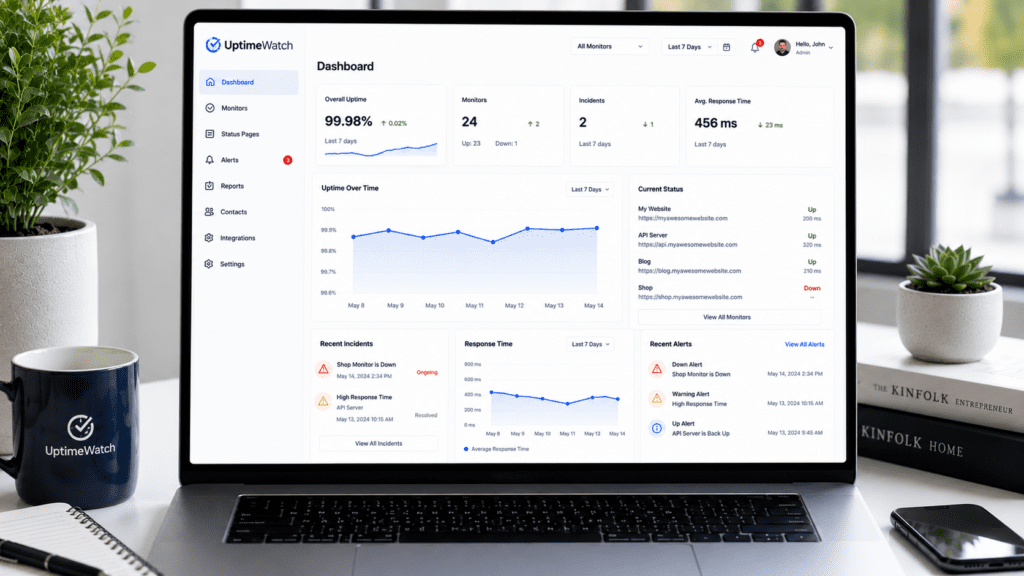
The earlier you detect instability, the easier it becomes to prevent major downtime.
Signs Your Website Uptime Is Unstable
Small warning signs often appear before large outages happen.
• Random loading failures: Pages occasionally stop working
• Intermittent slowdowns: Website performance becomes inconsistent
• Frequent timeout errors: Visitors experience failed requests
• Unexpected traffic drops: Search traffic suddenly declines
A blogger may discover the website was offline overnight only after seeing a major traffic decline the next morning.
Why Regular Monitoring Matters
Regular monitoring helps detect problems before users complain.
• Instant alert notifications: Owners receive warnings quickly
• Comprehensive monitoring: Tracks uptime from multiple locations
• Historical uptime reports: Identify recurring stability patterns
• Performance analysis: Reveals hidden infrastructure problems
Many downtime incidents go unnoticed for hours without proper website uptime monitoring systems.
How Monitoring Tools Detect Problems
Modern monitoring tools constantly check website availability automatically.
• Automated uptime checks: Website tested continuously
• Monitoring services: Detect outages in real time
• Alert systems: Notify through email or mobile alerts
• Global monitoring: Detect regional downtime issues
Services like UptimeRobot and Pingdom help monitor website availability continuously without relying on manual checking.
How to Improve Website Uptime
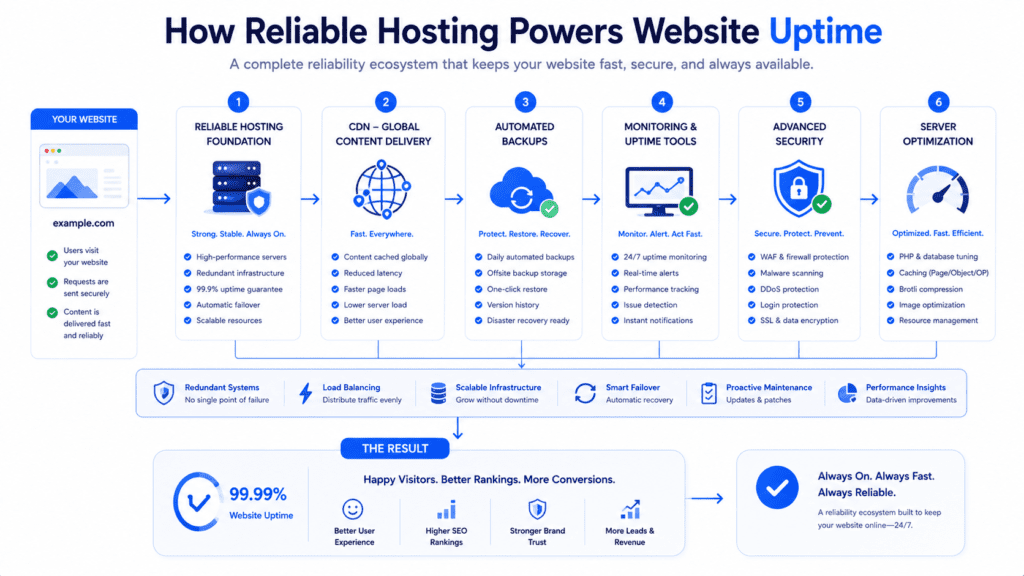
Improving uptime usually requires a combination of stronger infrastructure, proactive monitoring, and better maintenance habits.
No single fix prevents every outage, but several improvements can reduce downtime risks significantly.
Choose a Reliable Hosting Provider
Your hosting provider has one of the biggest impacts on website uptime.
• Reliable infrastructure: Better hardware and network stability
• Redundant systems: Backup systems reduce outage risks
• Support quality: Faster response during emergencies
• Strong uptime guarantee: Better reliability expectations
A quality web hosting provider may cost more than budget hosting, but the improved stability often prevents larger business losses later.
Upgrade Weak Hosting Infrastructure
Outdated or overloaded hosting environments create instability.
• Cloud hosting: Better scalability during traffic spikes
• Dedicated resources: Improved server reliability
• Scalable systems: Handle traffic growth more efficiently
• Modern infrastructure: Better long term stability
A growing ecommerce website moving from overcrowded shared hosting to cloud hosting services often sees immediate improvements in uptime stability.
Use CDN and Content Delivery Systems
A content delivery network helps distribute traffic more efficiently.
• Content delivery network: Reduces strain on the origin server
• Global delivery points: Faster access for visitors worldwide
• Traffic distribution: Prevents overload during spikes
• Improved website availability: Reduces risk of regional outages
Cloudflare is commonly used because it improves both content delivery and uptime resilience during traffic surges.
Monitor Website Uptime Continuously
Monitoring helps detect issues before they become larger outages.
• Website uptime monitoring: Tracks availability continuously
• Real time alert systems: Notify owners immediately
• Monitoring tools like: UptimeRobot and Pingdom detect failures quickly
• Historical reports: Help identify recurring problems
From my research, website owners who monitor uptime consistently usually recover from incidents much faster because they notice problems early.
Strengthen Server Security
Security issues can create serious downtime problems.
• Firewall protection: Blocks malicious traffic
• DDoS protection: Reduces attack related outages
• Software updates: Prevent security vulnerabilities
• Access controls: Reduce human error risks
A hacked wordpress website may become unavailable entirely if malware overloads the server or corrupts core files.
Best Practices for Maintaining High Website Uptime
Maintaining high website uptime requires ongoing attention rather than one time setup changes.
Use Proactive Monitoring
Waiting until visitors complain usually means the outage has already lasted too long.
• Regular monitoring: Detects issues early
• Instant alerts: Faster recovery response
• Performance metrics: Identify hidden instability patterns
• Monitoring uptime: Continuous automated checks
A website owner noticing rising CPU usage early may prevent a full crash by upgrading resources before traffic overload occurs.
Keep Software and Plugins Updated
Outdated software creates both stability and security risks.
• Plugin updates: Fix compatibility and security problems
• CMS updates: Improve overall stability
• Theme maintenance: Prevent broken functionality
• Security patches: Reduce vulnerability related downtime
That said, updates should still be tested carefully because rushed changes sometimes create outages themselves.
Perform Regular Backups
Backups are essential for fast recovery.
• Automated backups: Protect website data continuously
• Rollback options: Restore previous stable versions
• Backup testing: Verify recovery systems actually work
• Disaster recovery: Faster restoration after failures
A business with reliable backup systems can often restore operations within minutes instead of losing hours rebuilding the website manually.
Monitor Server Resource Usage
Resource monitoring helps detect overload before failure happens.
• CPU monitoring: Detect unusual spikes
• Memory tracking: Prevent resource exhaustion
• Disk usage monitoring: Avoid storage related outages
• Performance metrics: Reveal long term scaling issues
Small server problems often grow gradually before causing full downtime.
That’s why monitoring resource usage matters even for relatively small websites.
How to Prepare for Website Downtime Before It Happens
Even well optimized websites occasionally experience outages.
Preparation often determines how quickly recovery happens.
Create Backup and Recovery Systems
Strong recovery planning reduces long term downtime impact.
• Backup systems: Protect critical website data
• Recovery procedures: Restore services faster
• Rollback versions: Reverse broken updates quickly
• Emergency documentation: Simplify troubleshooting steps
A company restoring a failed website quickly usually succeeds because recovery systems were already tested before the outage happened.
Use Multiple Monitoring Alerts
One notification method is not always enough.
• Email alerts: Basic downtime notifications
• SMS alerts: Faster emergency response
• Team notifications: Important for larger organizations
• Escalation systems: Ensure critical outages receive attention
Some agencies use multiple monitoring services together so outages are detected even if one monitoring platform experiences delays itself.
Assign Responsibilities for Larger Teams
Larger businesses need organized response systems.
• Defined responsibilities: Faster troubleshooting coordination
• Support workflows: Clear recovery procedures
• Communication plans: Inform customers during outages
• Status page updates: Maintain transparency during incidents
A clear recovery process often reduces downtime much more effectively than reactive troubleshooting during a crisis.
Website Uptime Monitoring Explained
Website uptime monitoring helps track whether a website is operational and accessible to users continuously.
Without monitoring systems, outages can remain unnoticed for hours, especially during low traffic periods.
What Is Website Uptime Monitoring?
Website uptime monitoring checks website availability automatically at regular intervals.
• Website uptime monitoring: Automated availability tracking
• Monitoring services: Continuously test website access
• Uptime checks: Verify the website is operational
• Website monitoring service: Detects outages and performance issues
The goal is simple.
If the website goes offline, the monitoring system sends an alert immediately.
How Real Time Alerts Work
Modern uptime monitoring tools notify website owners quickly when problems appear.
• Real time alerts: Immediate outage notifications
• Email notifications: Basic monitoring alerts
• SMS alerts: Faster emergency response
• Team alerts: Shared notifications for agencies or businesses
A business owner receiving an alert within minutes after a website outage can often fix the issue before most visitors even notice the downtime.
Automated Monitoring vs Manual Monitoring
Manual monitoring is unreliable for most websites.
• Manual monitoring: Requires checking the website manually
• Automated monitoring: Continuous uptime checks 24/7
• Synthetic monitoring: Simulated user tests from multiple locations
• Real user monitoring: Tracks actual visitor experiences
From my research, automated uptime monitoring service platforms are much more effective because outages rarely happen at convenient times.
Best Tools for Website Uptime Monitoring
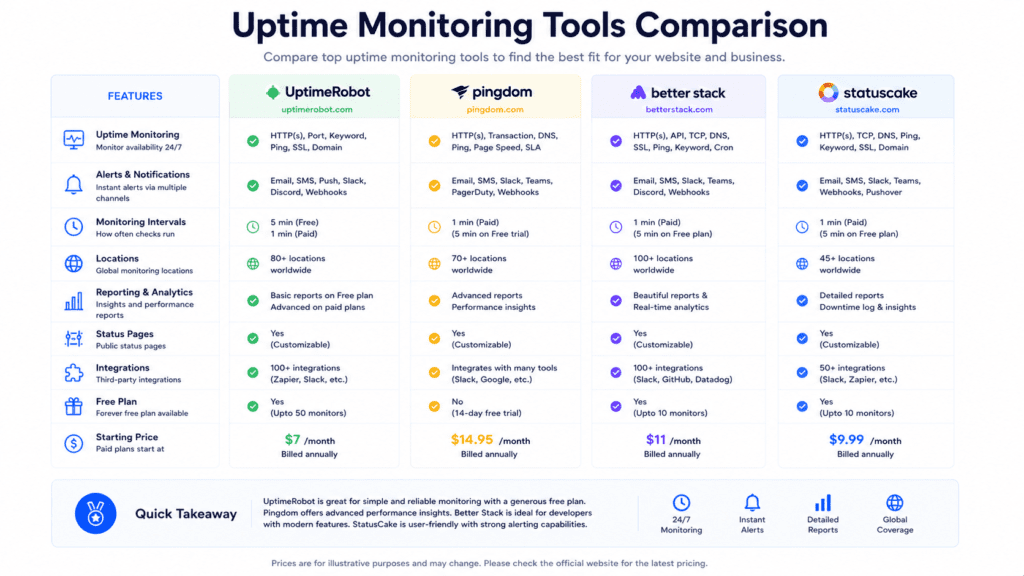
Different monitoring tools focus on different features and business needs.
Features That Matter Most
The best monitoring tools focus on fast detection and reliable reporting.
• Instant alerts: Faster outage awareness
• Historical uptime reports: Long term reliability tracking
• Global monitoring locations: Detect regional outages
• Detailed performance analysis: Tracks website performance trends
Some tools for monitoring also include SSL certificate monitoring and response time tracking alongside uptime reporting.
Popular Monitoring Tools
Several monitoring platforms are commonly used across websites and online services.
| Tool | Best For | Free Plan |
|---|---|---|
| UptimeRobot | Beginners and bloggers | Yes |
| Pingdom | Performance analysis | Limited |
| Better Stack Uptime | Teams and agencies | Yes |
| StatusCake | Global uptime monitoring | Yes |
A global ecommerce website may use monitoring tools like Pingdom with worldwide monitoring locations to detect outages affecting only certain regions.
Free vs Paid Monitoring Tools
Free monitoring tools work well for many small websites, but advanced businesses often need additional features.
• Free tools: Basic uptime alerts and reports
• Paid tools: Faster alert systems and deeper analytics
• Agency features: Team collaboration and reporting
• Advanced monitoring: More detailed performance metrics
A small blog may only need simple email alerts, while a SaaS platform often requires comprehensive monitoring solutions with multiple escalation systems.
How to Choose the Right Website Uptime Monitoring Tool
The best monitoring solution depends heavily on website size and business requirements.
Best Monitoring Tools for Beginners
Small websites usually need simple monitoring systems.
• Simple setup: Easy configuration for beginners
• Email alerts: Basic outage notifications
• Free plans: Enough for personal websites
• Basic reports: Simple uptime percentage tracking
UptimeRobot is popular among beginners because setup takes only a few minutes.
Best Monitoring Tools for Agencies and Businesses
Larger organizations usually require more advanced monitoring systems.
• Team notifications: Shared alerts for support teams
• Detailed reporting: Long term performance analysis
• Multiple integrations: Slack and incident management tools
• Comprehensive monitoring: Broader infrastructure visibility
Agencies managing multiple client websites often prioritize centralized dashboards and reporting tools.
Features That Actually Matter
Some monitoring features are much more important than others.
• Fast alert response: Immediate outage detection
• Reliable monitoring uptime: Consistent availability checks
• Global testing locations: Detect regional downtime issues
• Historical reports: Long term stability analysis
Fancy dashboards matter less if the alert system itself is unreliable during real outages.
Choosing the Right Hosting Provider for Better Uptime
Hosting quality directly affects website uptime stability.
Different hosting environments deliver different levels of reliability.
• Shared hosting: More vulnerable to overloaded servers
• Cloud hosting: Better redundancy and scalability
• Dedicated infrastructure: Improved stability under heavy traffic
• Cloud hosting services: Better failover systems
Two wordpress websites with nearly identical setups may experience very different uptime results because of differences in hosting infrastructure quality.
What to Look for in a Hosting Provider
Not all uptime guarantees reflect real world reliability.
• Uptime guarantee: Hosting SLA commitments
• Infrastructure quality: Redundant systems and networking
• Support responsiveness: Faster issue resolution
• Scalability options: Better traffic handling during growth
A hosting provider advertising 99.99% uptime may still experience unstable real world performance if the servers are overcrowded.
Why Cheap Hosting Often Increases Downtime Risks
Budget hosting plans sometimes prioritize volume over stability.
• Oversold servers: Too many websites share limited resources
• Limited support: Slower outage resolution
• Weak redundancy: Fewer backup systems
• Higher instability: Greater downtime risks during spikes
That’s why choosing hosting based only on price can create long term reliability problems.
Uptime Monitoring vs Website Performance Monitoring
These two concepts are closely related, but they are not the same thing.
A website can technically stay online while still delivering a terrible experience to visitors because pages load too slowly.
Uptime Monitoring vs Website Speed Monitoring
Uptime monitoring checks whether the website is available.
Performance monitoring checks how well the website performs while it’s online.
• Uptime monitoring: Tracks whether the website is accessible
• Website performance monitoring: Measures speed and responsiveness
• Response time tracking: Detects slow server behavior
• Performance and user experience: Both affect visitor satisfaction
A website may remain online continuously while pages take 10 seconds to load because of server overload or poor optimization.
That situation still hurts user experience even though uptime percentage remains technically high.
Why Both Metrics Matter Together
Monitoring only uptime creates blind spots.
• Slow websites: Still increase bounce rates
• Core Web Vitals: Measure real loading behavior
• Site performance: Affects SEO and conversions
• Detailed performance metrics: Reveal hidden infrastructure problems
From my research, stable uptime combined with poor performance often frustrates visitors almost as much as actual downtime.
That’s why many businesses combine website uptime monitoring with Core Web Vitals and performance analysis systems.
Beginner vs Advanced Website Uptime Strategies
Different websites require different uptime strategies.
A personal blog does not need the same infrastructure as a SaaS platform serving thousands of users daily.
Beginner Uptime Practices for Small Websites
Small websites usually benefit most from simple reliability improvements.
• Basic uptime monitoring: Detect outages quickly
• Automated backups: Protect website data
• Reliable hosting provider: Reduce common downtime risks
• Plugin management: Avoid unnecessary software conflicts
A personal wordpress blog may only need monitoring uptime alerts and backup systems to maintain reasonable stability.
Intermediate Improvements for Growing Websites
As traffic increases, uptime strategies become more important.
• Cloud hosting: Better scalability and redundancy
• CDN usage: Improve website availability globally
• Resource monitoring: Detect overload early
• Security hardening: Reduce attack related outages
Growing ecommerce websites often move beyond shared hosting once traffic spikes begin affecting stability.
Advanced Uptime Infrastructure for Large Businesses
Large platforms require more advanced infrastructure systems.
• Load balancing: Distribute traffic across multiple servers
• Failover systems: Backup infrastructure during outages
• Redundant environments: Prevent single points of failure
• Comprehensive monitoring: Detect issues across entire systems
Streaming platforms and SaaS businesses usually rely on multiple server regions and automated scaling systems to maintain high website uptime during major traffic events.
How High Traffic Websites Maintain High Website Uptime
Large online platforms use layered infrastructure to reduce downtime risks.
Load Balancing and Multiple Server Systems
Traffic distribution plays a major role in uptime reliability.
• Load balancing: Spreads traffic across servers
• Redundant systems: Backup infrastructure prevents outages
• Multiple server environments: Reduce dependency on one machine
• Automated scaling: Handle traffic spikes dynamically
A streaming service handling major live events may distribute traffic worldwide so no single server becomes overwhelmed.
CDN Failover and Backup Infrastructure
Modern content delivery systems improve resilience significantly.
• Content delivery: Reduces strain on origin servers
• Failover systems: Redirect traffic during outages
• Global availability: Better uptime across regions
• Cloudflare integration: Common for large scale websites
Cloudflare and AWS are commonly used together because they improve both scalability and uptime reliability.
Common Mistakes That Hurt Website Uptime
Most downtime problems begin with smaller issues that gradually grow worse.
Ignoring Monitoring and Maintenance
Without regular monitoring, problems often remain hidden.
• No monitoring tools: Outages go unnoticed longer
• Skipped updates: Increased compatibility and security risks
• Poor maintenance: Stability declines over time
• No backup testing: Recovery becomes slower during emergencies
Many downtime incidents could be reduced simply through regular monitoring and maintenance routines.
Choosing Hosting Only by Price
Cheap hosting sometimes creates expensive reliability problems later.
• Weak infrastructure: More frequent outages
• Limited scalability: Traffic spikes create instability
• Overloaded servers: Shared resources affect uptime
• Slow support: Longer recovery times during outages
A low cost hosting plan may work initially, but instability often appears as traffic grows.
Overloading Websites With Plugins and Scripts
Heavy websites create additional server strain.
• Too many plugins: Increased backend processing
• Excessive scripts: Slower response times
• Database overload: More instability under traffic
• Poor optimization: Increased crash risks
A wordpress website overloaded with plugins may remain functional during low traffic but become unstable during busy periods.
Common Website Uptime Myths
Several common misconceptions create unrealistic expectations about uptime.
Myth: 100% Uptime Is Realistic
Even major technology companies experience outages occasionally.
• Hardware failures: Physical systems can still fail
• Network issues: Connectivity problems happen
• Software bugs: Updates sometimes create outages
• Human error: Mistakes still occur during maintenance
The goal is usually maximum uptime and fast recovery, not perfection.
Myth: Expensive Hosting Guarantees Uptime
Higher pricing does not automatically guarantee reliability.
• Infrastructure quality matters: Not pricing alone
• Configuration quality: Poor setups still create outages
• Monitoring matters: Problems require fast detection
• Optimization matters: Heavy websites still strain servers
Some premium hosting environments still experience instability if websites are poorly optimized.
Myth: Small Websites Don’t Need Monitoring
Small websites are still vulnerable to downtime.
• Plugin conflicts: Can break any website
• DNS problems: Affect websites of every size
• Expired domains: Cause unexpected outages
• Security issues: Small sites are still targeted
Even a personal blog benefits from basic website monitoring systems.
What Most Website Owners Miss About Uptime
Website uptime is not only about hosting.
• Performance optimization: Helps reduce server strain
• Recovery speed: Fast restoration matters heavily
• Monitoring alone: Cannot prevent every outage
• Infrastructure planning: Long term stability requires preparation
A website with strong recovery systems may perform better overall than one chasing unrealistic uptime claims without proper backups or monitoring.
Quick Checklist to Improve Website Uptime
• Choose a reliable hosting provider: Better infrastructure improves stability
• Enable uptime monitoring tools: Detect outages quickly
• Set up instant alert systems: Faster response during downtime
• Keep wordpress updated: Reduce compatibility issues
• Monitor server resources: Detect overload early
• Use CDN services: Improve content delivery and resilience
• Create automated backups: Protect recovery capabilities
• Test website availability regularly: Verify monitoring accuracy
• Strengthen website security: Reduce attack related downtime
• Review uptime reports monthly: Identify recurring problems
Frequently Asked Questions
What is website uptime and why does it matter?
Website uptime is the time your site remains accessible to visitors, and it impacts user experience and trust, so keeping it high is key to an optimal website.
How can I minimize downtime for my site?
Use reliable web hosting, set up redundancy, and monitor key metrics like response time to reduce outages and ensure your site remains accessible.
How do I choose a web hosting provider that supports optimal performance?
Look for hosts with strong SLAs, fast servers, and good reviews on uptime to help your site reach an ideal uptime and boost performance.
What tools for monitoring should I use to monitor my website’s uptime?
Use a website uptime monitoring service or tools for monitoring like Pingdom or UptimeRobot to track uptime percentage and downtime alerts.
How often should I monitor my website for downtime?
Check your site’s status every 1–5 minutes with automated monitoring so you can react fast if the site goes down.
What are common causes of downtime I should watch for?
Causes include server failures, bad updates, DNS issues, and traffic spikes that exceed capacity and affect your website’s performance.
How does downtime affect SEO and traffic?
Frequent downtime hurts rankings and user trust, so monitoring your website’s uptime helps protect search visibility and visitor numbers.
Can a content delivery network (CDN) help improve site uptime?
Yes, a CDN spreads traffic across servers worldwide, reduces load on your host, and helps ensure uptime during traffic surges.
What simple steps can I take today to start improving uptime?
Set up monitoring, enable backups, update software, and review your web hosting plan to start improving your site’s uptime quickly.
How do I measure if my uptime improvements are working?
Track metrics like uptime percentage and response time from your monitoring tools to see if the site’s performance is improving.
When should I call my web hosting provider about downtime?
If automated monitoring shows repeated or long outages, contact your web hosting provider immediately to diagnose and resolve the problem.

Final Verdict: Improve Website Uptime to Reduce Downtime Problems
Website uptime affects much more than technical reliability.
Frequent downtime can reduce trust, hurt SEO visibility, interrupt revenue, and damage overall user experience. That’s why maintaining high website uptime is essential for blogs, ecommerce stores, SaaS platforms, and business websites alike.
From my research, the most effective way to minimize downtime usually involves several improvements working together. Reliable hosting, proactive uptime monitoring, automated backups, strong security practices, and regular maintenance all help improve long term stability.
The important thing is to treat uptime as an ongoing process rather than a one time setup.
Even well optimized websites occasionally face outages. What matters most is how quickly problems are detected and resolved before they affect too many visitors.
Bottom line?
If website availability matters to your business or online presence, investing in better monitoring, hosting quality, and recovery systems is usually worth it long term.