
A visitor taps your website link from Google search, waits a few seconds, and then leaves before the page even appears. The images haven’t loaded yet. The content isn’t visible. Your server is simply taking too long to respond. That single delay is often enough to hurt user experience, increase bounce rate, and weaken search engine performance.
Server response time has become a much bigger deal for website owners, especially after Google started focusing heavily on Core Web Vitals and backend speed signals like TTFB. A slow server response time doesn’t just affect load time anymore. It can influence rankings, conversions, mobile usability, and how trustworthy your website feels to visitors.
In this guide, you’ll learn how to reduce server response time, what causes slow ttfb, how to audit backend performance, and the most practical ways to optimize your server, cache setup, wordpress configuration, and hosting environment for faster website performance.
What Is Server Response Time and Why It Matters
Understanding Server Response Time
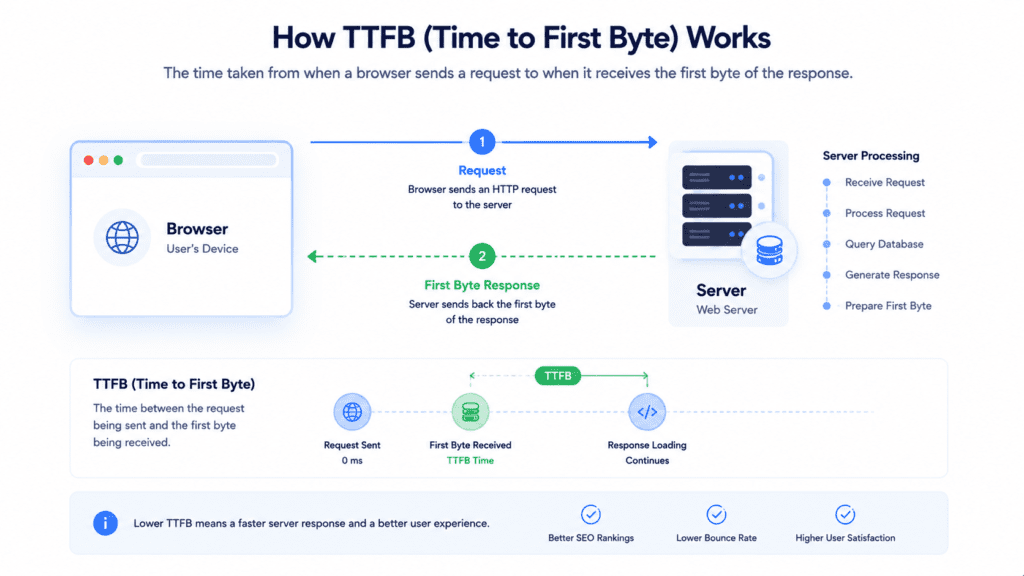
Server response time refers to the amount of time your server needs before it starts sending data back to the browser after receiving an http request.
Think of it like this.
When someone visits your website, the browser sends a request to the server asking for the page. Before anything appears on screen, the server must process files, run scripts, query the database, and prepare the response.
• Server response time: Delay between the browser request and server reply
• Browser request: Visitor opens a page or enters a url
• Server processing: Backend prepares the requested data
• First byte: Initial data sent back to the browser
A fast website isn’t only about compressed images or lightweight html. Backend speed matters just as much because the browser cannot begin loading the page until the server responds.
What Is TTFB (Time to First Byte)
TTFB stands for time to first byte.
It measures how long it takes for the browser to receive the first byte of data from the server after sending the request.
• TTFB: Measures backend response speed
• Fast TTFB: Usually below 200 milliseconds
• Slow TTFB: Often above 800 milliseconds
• Latency: Delay between request and response
From my research, ttfb is one of the clearest indicators of server health because it shows how quickly your hosting provider and backend infrastructure react to user requests.
If ttfb is high, the entire page load process starts late.
How Slow Response Time Affects SEO and Visitors
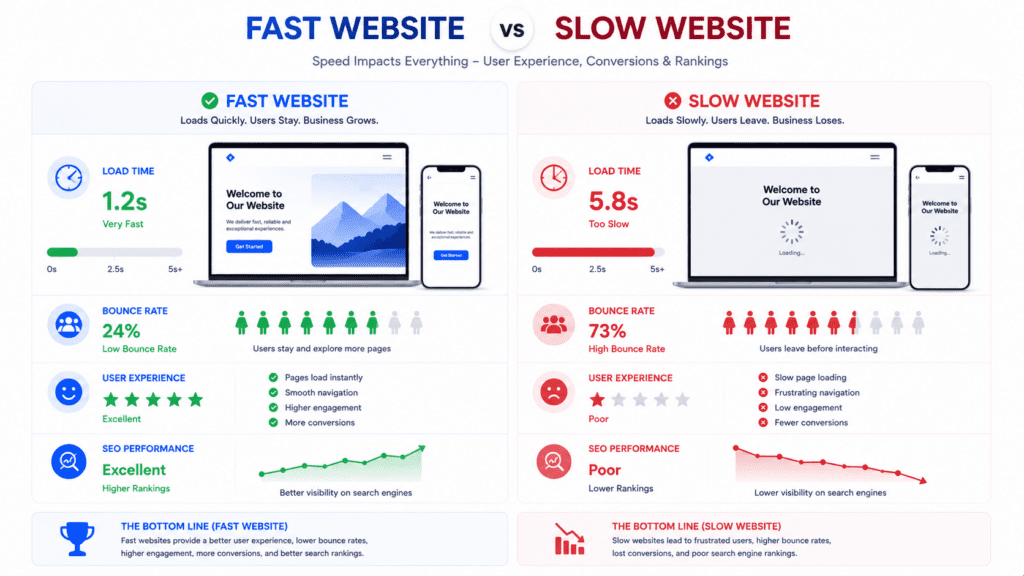
A slow server response creates problems long before the full page appears.
• Higher bounce rate: Visitors leave before content loads
• Poor user experience: Mobile visitors notice delays quickly
• Longer load time: Backend delays affect the full page load
• Search engine impact: Slow performance can affect rankings
What surprises many site owners is that users often leave before they even see the design of the website.
A server that takes over 3 seconds to respond already creates friction, even if the rest of the page eventually loads fast afterward.
Why You Should Reduce Server Response Time
Google pays much closer attention to backend performance than it used to.
A few years ago, many websites could still rank reasonably well even with slow server response. That’s no longer true in most cases, especially for competitive search results.
Google Core Web Vitals and Backend Performance
Core Web Vitals focus heavily on real user experience, and backend delays directly affect those metrics.
• TTFB impact: Delayed first byte slows page rendering
• Page load delays: Browser waits before content appears
• Mobile performance: Slow server response affects mobile visitors more
• Search engine signals: Faster websites usually perform better in search results
Google doesn’t only measure frontend visuals anymore. It also measures the time it takes for the server to respond after a visitor opens a page.
That backend delay affects how quickly the browser can start rendering content.
How Slow Loading Speed Hurts Rankings and Conversions
Slow loading speed affects both SEO and user behavior.
• Higher bounce rate: Users leave before the page fully loads
• Lower engagement: Visitors spend less time on slow websites
• Reduced conversions: Delays hurt sales and lead generation
• Poor website performance: Backend bottlenecks affect the full experience
From my research, mobile users are usually less patient than desktop users. Even small delays can increase bounce rate significantly.
A wordpress blog running on outdated shared hosting may feel usable to the site owner, but visitors often experience noticeable lag before the page even starts loading.
Once server response time improves, engagement metrics often improve as well because users can access content faster.
Real Life Example of Slow Server Response Time
A slow server response problem usually starts quietly.
At first, the website feels slightly delayed. Then plugins increase, traffic grows, and backend processing becomes heavier.
That’s when the problems become obvious.
• Shared hosting limitation: Limited server resources slow backend processing
• Slow ttfb: Browser waits too long before receiving the first byte
• Plugin overload: Extra plugins force the server to process more requests
• Poor cache setup: Every visitor triggers full server processing
A wordpress site running on cheap shared hosting can easily develop slow server response time issues once traffic increases.
For example, a blog using multiple plugins, tracking scripts, and dynamic widgets may force the server to process every request individually. Without proper cache systems, the load grows quickly.
Now this is where people get frustrated.
They optimize images, compress css and javascript, and reduce page size, but the website still feels slow because the real problem is happening on the backend.
Switching to a stronger hosting provider and enabling page cache often creates bigger improvements than frontend optimization alone.
What Causes Slow Server Response Time?
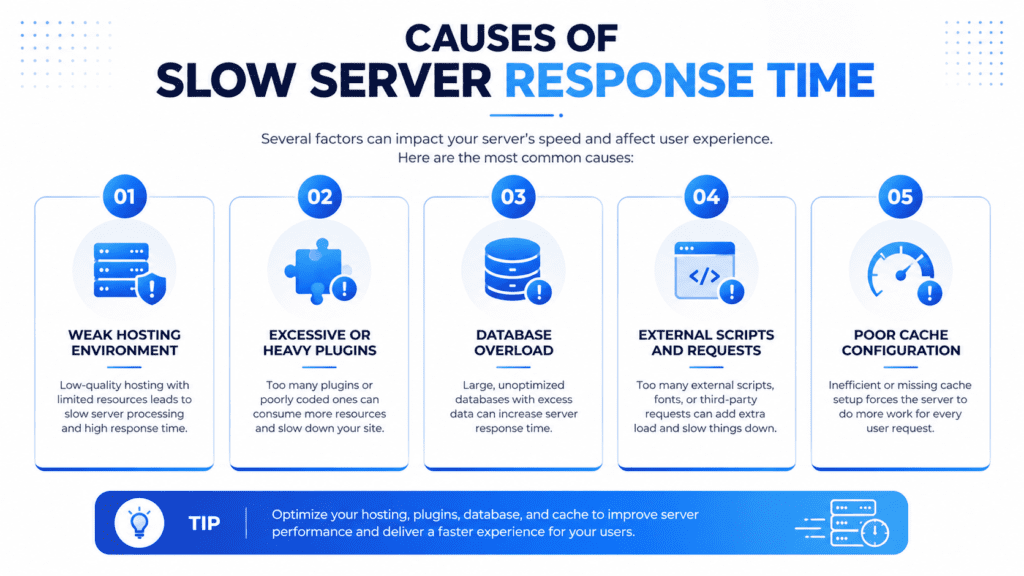
Server response problems usually come from multiple issues working together.
Hosting Infrastructure Problems
• Weak server hardware: Limited processing power slows requests
• Overloaded shared hosting: Too many websites share the same server
• Poor hosting provider: Inconsistent server performance increases latency
• Slow dns lookup: Delays happen before the page even begins loading
WordPress Themes and Plugin Overload
• Heavy plugins: Extra processing increases server load
• Complex themes: Large dynamic layouts slow backend rendering
• Database strain: Plugins create excessive database queries
• Background tasks: Hidden plugin activity consumes resources
A WooCommerce store with dozens of plugins can overload the server before product pages even appear.
Database and Script Issues
• Slow queries: Database takes too long to process requests
• External scripts: Ads and tracking tools increase processing time
• Too many http request calls: Browser waits for multiple services
• Outdated php version: Older server software slows execution speed
A blog filled with popup scripts, analytics tools, and ad networks may slow down dramatically even when the design itself looks lightweight.
How to Audit Your Server Response Time
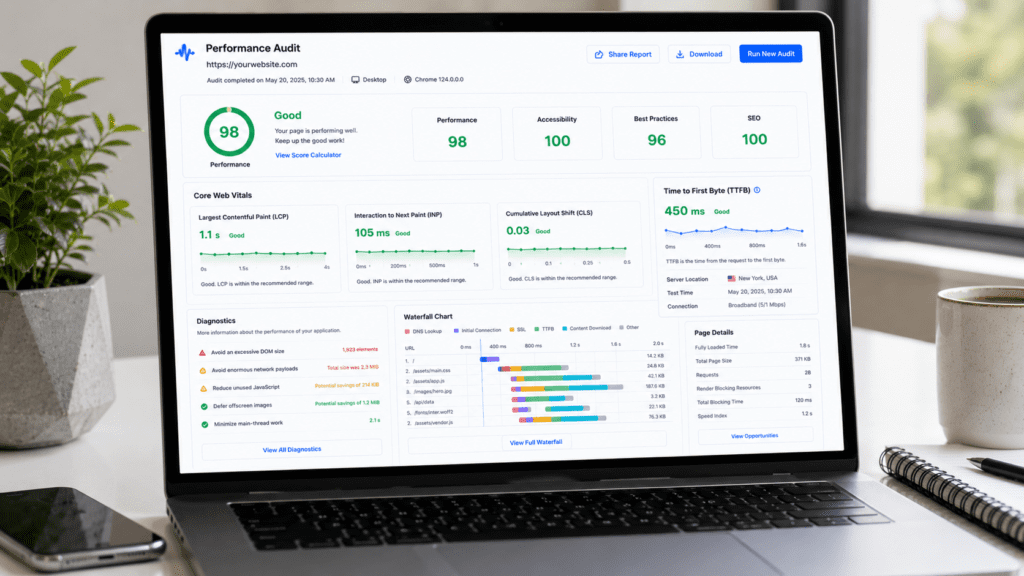
Before trying to optimize anything, you first need to measure what’s actually happening on the backend.
A lot of website owners assume they have a frontend problem when the real issue is the server itself.
Using PageSpeed Insights to Check TTFB
Google PageSpeed Insights is one of the easiest tools for beginners.
• Pagespeed Insights: Measures real performance data
• TTFB reporting: Shows backend response delays
• Core Web Vitals: Identifies user experience problems
• Performance suggestions: Highlights optimization opportunities
When you enter a url into the tool, it analyzes how long the server takes to respond before the browser starts loading the page.
If the ttfb is high, Google usually flags it as a backend performance issue.
Using GTmetrix and Lighthouse
Other tools can help you audit server response problems more deeply.
• GTmetrix: Breaks down page load timing
• Lighthouse: Identifies backend bottlenecks
• Waterfall reports: Show where delays happen
• Speed test analysis: Reveals script and cache issues
From my research, two websites can look almost identical on the frontend while having completely different server response time results because of hosting quality.
That’s why auditing matters before making changes.
What Is Considered a Good Server Response Time?
There’s no perfect number, but there are realistic performance ranges.
• Excellent TTFB: Below 200 milliseconds
• Acceptable response: Around 200 to 500 milliseconds
• Slow server response: Above 800 milliseconds
• Critical delay: Above 1 second
A fast web server usually responds quickly enough that users barely notice the backend delay.
Once response time becomes too high, however, visitors start feeling friction before the page even appears.
How to Identify What’s Slowing Down Your Server
Not every slow website has the same root problem.
Some websites suffer from hosting limitations, while others are slowed by plugins, database overload, or excessive scripts.
Hosting Problem vs WordPress Problem
One of the first things to identify is whether the issue comes from the hosting provider or the wordpress setup itself.
• Slow everywhere: Often points to server infrastructure problems
• Slow only on wordpress pages: Usually plugin or theme related
• Random performance drops: May indicate overloaded shared hosting
• Traffic related slowdowns: Often caused by limited server resources
A cheap hosting environment may struggle to handle user requests consistently, especially when multiple websites share the same server.
Backend Issue vs Frontend Issue
This part confuses a lot of beginners.
Frontend optimization improves how fast content renders after loading begins. Backend optimization improves how fast the server responds before the page starts loading.
• Frontend issue: Large images, javascript, or css delays rendering
• Backend issue: Server processing delays the initial response
• Database issue: Queries take too long to complete
• Cache issue: Server rebuilds pages repeatedly instead of serving cached content
A website can have perfectly optimized images and still feel slow because the backend takes too long to respond.
Quick Diagnostic Framework
A simple framework helps identify the likely bottleneck quickly.
• Slow across entire site: Hosting or server problem
• Slow only on certain pages: Plugin or database issue
• Slow during traffic spikes: Server resource limitation
• Slow after adding scripts: External tools causing delays
Now this is where troubleshooting becomes easier.
Once you know whether the bottleneck is frontend, backend, database, or hosting related, you can focus optimization efforts in the right direction instead of changing random settings.
Proven Ways to Reduce Server Response Time
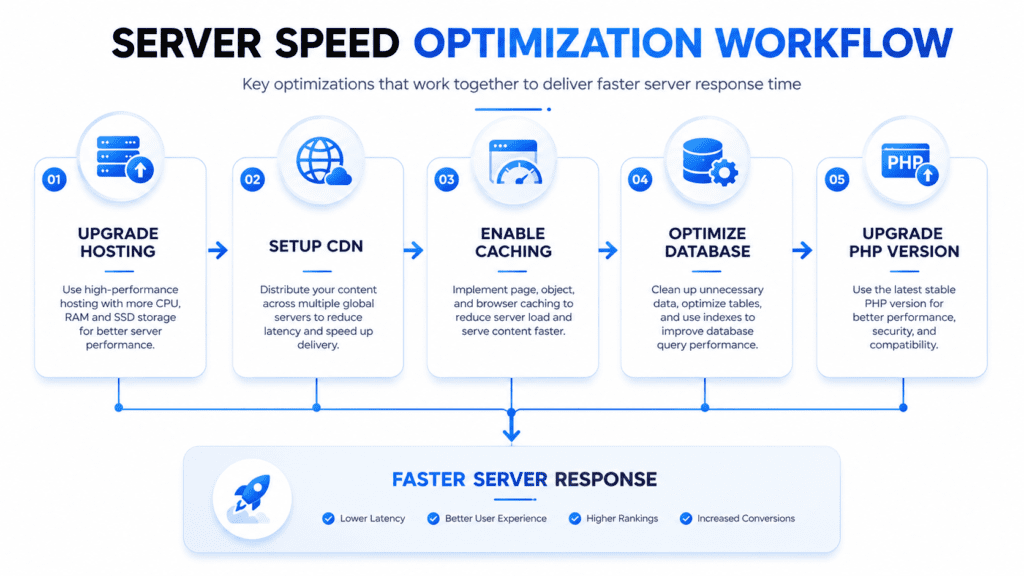
There’s no single fix for slow server response time. In most cases, performance improves when several optimizations work together.
Some changes create small gains. Others can dramatically reduce ttfb almost immediately.
Upgrade to a Better Hosting Provider
Your hosting provider has a massive impact on backend speed.
• Shared hosting: Cheapest option but limited server resources
• VPS hosting: Better isolation and stronger performance
• Cloud hosting: More scalable during traffic growth
• Dedicated hosting service: Full server control for high traffic websites
A growing SaaS blog may outgrow shared hosting long before the owner realizes it. Traffic increases slowly, plugin usage expands, and eventually the server struggles to respond quickly.
That’s why moving to stronger hosting often creates the biggest improvement in server response time.
Use a CDN and Proper Cache Setup
A cdn and caching system reduce how much work the server must perform repeatedly.
• CDN: Delivers content from locations closer to visitors
• Page cache: Stores prebuilt pages instead of regenerating them
• Browser cache: Prevents repeat downloads for returning users
• Content delivery network: Reduces latency and server load
Using a cdn becomes especially important for websites serving visitors across different regions.
Without one, the browser may need to request every asset directly from a distant server, which increases load time.
Optimize Your Database and Plugins
Database overload is one of the most overlooked causes of slow server response.
• Database cleanup: Removes unnecessary data and overhead
• Reduce plugins: Fewer plugins mean less backend processing
• Optimize queries: Faster database requests improve ttfb
• Caching plugin: Helps reduce repeated server processing
From my research, wordpress websites often become slower over time because plugins accumulate quietly in the background.
Some plugins constantly run database queries even when visitors never use those features.
Compress Files and Upgrade PHP
Small backend optimizations also help reduce server response.
• Compress files: Reduce transfer size using GZIP or Brotli
• Update php: Newer versions process requests faster
• Minify html: Smaller files reduce transfer delays
• Reduce javascript usage: Fewer scripts improve processing efficiency
A recipe blog filled with animations, popup tools, and multiple page builders may still feel slow despite optimized images because backend rendering becomes too heavy.
Sometimes simplifying the website creates larger gains than adding more optimization tools.
Beginner vs Advanced Ways to Reduce Server Response Time
Different websites need different optimization levels.
Beginner Fixes With the Biggest Impact
These changes usually create the fastest improvements for smaller websites.
• Better hosting: Stronger server infrastructure improves response speed
• Enable caching: Reduces repeated backend processing
• Setup CDN: Improves global delivery speed
• Remove heavy plugins: Reduces unnecessary server load
Most beginners see major improvements from these changes alone.
Intermediate Optimizations for Growing Websites
As websites grow, deeper optimization becomes necessary.
• Database optimization: Improves query speed
• PHP upgrades: Faster execution performance
• Script cleanup: Reduces unnecessary processing
• Cloud hosting migration: Improves scalability during growth
A website experiencing growing traffic often reaches a point where basic optimization is no longer enough.
Advanced Server Improvements
Large websites usually require server level optimization strategies.
• Redis object cache: Reduces database load
• Load balancing: Distributes traffic across servers
• Edge caching: Delivers content closer to users
• HTTP/3 optimization: Improves modern browser communication speed
These techniques are common on high traffic websites where even small delays affect revenue and user experience.
How to Reduce Initial Server Response Time on WordPress
WordPress websites are one of the most common places where slow server response problems appear.
The platform is flexible, but flexibility often comes with extra processing load.
Why WordPress Sites Often Become Slow
A wordpress site can gradually become heavier over time.
• Too many plugins: Extra backend processing increases ttfb
• Heavy themes: Complex layouts slow rendering
• Database growth: More content increases query load
• Dynamic features: Filters and search tools stress the server
A WooCommerce store with live filters, dynamic pricing, and poorly optimized plugins can create major backend strain during peak traffic.
That’s why wordpress optimization matters just as much as hosting quality.
Best Ways to Optimize WordPress Performance
Several optimizations consistently help reduce initial server response time.
• Caching plugin: Stores static versions of pages
• Database cleanup: Removes unnecessary overhead
• Update php: Improves execution speed
• Lightweight themes: Reduce backend rendering load
From my research, many wordpress websites become slow because owners continue adding plugins without auditing how much processing those tools require.
Even a fast server can struggle if the backend workload becomes excessive.
Hosting Settings That Improve WordPress Performance
The hosting environment also plays a huge role in wordpress speed.
• Managed wordpress hosting: Optimized specifically for wordpress performance
• Modern php versions: Faster script execution
• Object cache systems: Reduce repeated database requests
• Dedicated server resources: Better stability during traffic spikes
Sometimes wordpress optimization alone cannot fully fix a slow server response issue if the hosting infrastructure itself remains weak.
Best Hosting Choices to Improve Server Response Time
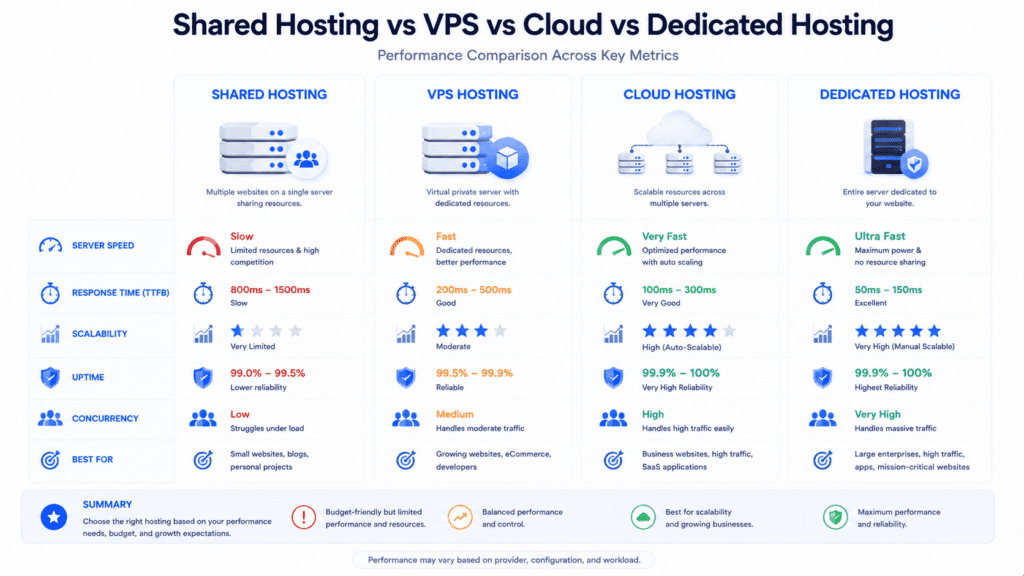
Hosting quality is often the foundation of backend performance.
A weak hosting setup creates limits that frontend optimization cannot fully overcome.
Shared hosting works for small websites, but it has clear limitations.
• Shared resources: Multiple websites use the same server
• Inconsistent performance: Traffic from other sites affects speed
• Limited scalability: Harder to handle traffic growth
• Higher latency: Server responds slower under heavy load
This is why cheap hosting plans sometimes feel fast at first but become unstable as traffic increases.
VPS Hosting vs Cloud Hosting
Both options improve performance compared to shared hosting, but they work differently.
• VPS hosting: Dedicated virtual resources on one server
• Cloud hosting: Resources distributed across multiple systems
• Scalability advantage: Cloud hosting handles traffic spikes better
• Performance stability: VPS environments offer predictable resources
A website expecting rapid growth often benefits more from cloud hosting because it can scale more easily during sudden traffic increases.
Dedicated Hosting Service Benefits
A dedicated hosting service gives full access to server resources.
• Dedicated server: No shared resource competition
• Better server performance: Faster processing under load
• More control: Greater optimization flexibility
• High traffic handling: Suitable for demanding websites
A website serving mostly US visitors may still load slowly if the server location is far away from the target audience.
That’s why server location matters alongside hosting quality.
Advanced Ways to Reduce Server Response Time
Once basic optimizations are complete, advanced techniques can improve performance even further.
Server Side and Edge Caching
• Edge cache: Delivers content closer to visitors
• Server side cache: Reduces backend processing repeatedly
• Object cache: Stores database query results
• Faster page load: Reduces repeated rendering work
Database and API Optimization
• Reduce database latency: Faster query execution
• Optimize APIs: Reduce unnecessary external requests
• Limit background tasks: Prevent hidden processing delays
• Reduce http request overhead: Improve backend efficiency
HTTP/2 and HTTP/3 Improvements
Modern protocols can also help improve website performance.
• HTTP/2: Better handling of simultaneous requests
• HTTP/3: Reduced latency and faster communication
• Faster browser communication: Improves responsiveness
• Improved loading speed: Better transfer efficiency
An international ecommerce website can often improve load time dramatically by combining CDN edge locations with modern server protocols.
Common Mistakes That Increase Server Response Time
A lot of website owners accidentally create backend performance problems without realizing it.
The frustrating part is that some of these issues build up slowly over time.
Ignoring Hosting Quality
Cheap hosting can become a major limitation once traffic grows.
• Weak infrastructure: Slower server processing under load
• Overloaded environments: Shared hosting struggles during traffic spikes
• Limited resources: Server cannot handle growing demand
• Poor scalability: Backend delays increase over time
Sometimes optimization alone cannot fully fix a slow server response problem because the hosting infrastructure itself becomes the bottleneck.
Overloading WordPress With Plugins and Scripts
Too many tools running together can dramatically slow backend performance.
• Heavy plugins: Increase processing load on the server
• Tracking scripts: Extra external requests delay rendering
• Popup systems: Additional javascript increases backend work
• Ad networks: Slow the browser and server together
A website may compress images perfectly and still load slowly because the backend spends too much time processing plugin activity.
Skipping Maintenance and Audits
Websites need regular optimization.
• Database bloat: Old data slows queries
• Outdated php: Older versions reduce performance
• Missing audits: Hidden issues remain undetected
• Poor cache setup: Repeated rendering wastes server resources
From my research, websites that receive regular audits tend to maintain stable server response time much more consistently.
Server Response Time vs Page Speed Explained
People often mix these two concepts together, but they are different.
Server Response Time
This measures how long the server takes before sending the first byte of data.
• Backend focused: Measures server processing delay
• TTFB metric: Indicates backend speed
• Server dependent: Influenced by hosting and database performance
Page Speed
Page speed measures how quickly the full page appears and becomes usable.
• Frontend focused: Affected by images, scripts, and rendering
• Visual loading: How quickly users see content
• Browser performance: Influenced by css and javascript execution
A website can have optimized images and lightweight html but still feel slow because the server delays the initial response.
That’s why frontend optimization alone isn’t enough.
Realistic Expectations for TTFB Improvements
Not every website improves overnight.
Some server bottlenecks are simple to fix, while others require deeper infrastructure changes.
What Is a Realistic TTFB Target?
• Excellent response: Under 200 milliseconds
• Good performance: Around 200 to 500 milliseconds
• Slow backend: Above 800 milliseconds
• Critical delays: Over 1 second
Small blogs often improve quickly after enabling cache and moving away from outdated hosting.
Larger dynamic websites usually require multiple layers of optimization.
When Hosting Changes Deliver the Biggest Gains
There are situations where changing hosting creates the largest improvement immediately.
• Weak hosting environment: Server struggles under normal traffic
• High traffic websites: Shared hosting cannot scale effectively
• Backend heavy websites: Ecommerce and dynamic pages require stronger resources
• Poor infrastructure: Hardware limitations affect every request
Moving to a stronger hosting provider often reduces slow server response faster than frontend optimization alone.
What Most Blogs Miss About Server Response Time
A lot of optimization guides focus too heavily on frontend tweaks.
But backend performance matters just as much.
• Hosting quality matters: Faster hosting improves backend speed
• WordPress optimization matters: Plugins and themes affect processing time
• Core Web Vitals require balance: Both frontend and backend improvements matter
• Long term monitoring matters: Performance changes over time
Endless plugin optimization cannot fully compensate for weak hosting infrastructure.
Sometimes the smartest move is simply upgrading the server itself.
Quick Checklist to Reduce Server Response Time
• Audit TTFB: Use Pagespeed Insights and Lighthouse
• Upgrade hosting: Move if backend performance remains weak
• Enable cache: Reduce repeated processing requests
• Use CDN: Improve global delivery speed
• Optimize plugins: Remove unnecessary wordpress tools
• Clean database: Reduce query overhead
• Update php: Improve execution speed
• Reduce scripts: Limit external tracking tools
• Monitor Core Web Vitals: Track backend and frontend performance together
Frequently Asked Questions
What is server response time and why does it affect server response time for my web page?
Server response time is how long the server takes to start sending data, and it affects your web page by changing the time to load and the speed of your page.
How can I reduce your ttfb to reduce load times?
Use faster hosting, enable caching, and optimize database queries to reduce your TTFB and cut the time it takes a page to load.
Do content delivery networks help reduce the number of requests and improve speed?
Yes, CDNs serve static files from nearby locations, which can significantly improve load times and lessen the server’s response time.
What are simple best practices to speed up a web page and not slow down your site’s performance?
Compress images, minify CSS/JS, and use lazy loading to keep the site’s performance fast without extra complexity.
How does database optimization respond to user requests faster?
Indexing tables and using efficient queries lets the server respond to user requests quicker and reduces the time to load dynamic pages.
Can upgrading my server increase your server response time or just cost more?
Upgrading to better CPU, RAM, or SSDs usually increases your server response time in a positive way and makes the site faster.
How do backend code improvements reduce load times and ways to improve performance?
Refactoring slow loops, caching results, and reducing blocking operations are ways to improve backend speed and lower server’s work.
What role does SSL/TLS and network latency play in the speed of your page?
SSL adds a handshake but modern setups and HTTP/2 reduce overhead, while lower latency networks make the page load faster.
How can monitoring tools help me find what slows down your site’s performance?
Tools show slow endpoints and TTFB metrics so you can target fixes that will significantly improve response times.
Is it better to reduce the number of third-party scripts to get a fast server response?
Yes, cutting or deferring third-party scripts reduces extra requests and helps the server deliver the page more quickly.
What does ttfb measures the time for and how do I test it?
TTFB measures the time from request to first byte; test it with browser dev tools or online speed checks to spot delays.

Final Verdict: Reduce Server Response Time to Improve Website Performance
Server response time plays a much bigger role in website performance than most people realize.
A slow backend delays everything that happens afterward, including page load, Core Web Vitals, search engine visibility, and user experience.
From my research, the biggest improvements usually come from combining multiple optimizations together. Better hosting, stronger cache systems, database cleanup, CDN usage, and wordpress optimization all contribute to faster backend performance.
The important thing is not to guess blindly.
Start with a proper audit using tools like Pagespeed Insights or Lighthouse. Identify whether the problem comes from hosting, plugins, scripts, or server configuration before making major changes.
Bottom line?
If your website feels slow before content even appears, backend optimization is probably where you need to focus first.
That’s why improving server response time has become one of the most important parts of website optimization.