

You type a domain into your browser. Within seconds, the website loads.
Behind that simple action, What Is DNS becomes incredibly important.
Every domain depends on the domain name system to connect domain names to an IP address. Without DNS, your browser wouldn’t know where your website lives.
Some website owners think their hosting provider handles everything automatically. Others confuse DNS with web hosting itself. In reality, DNS work happens before your site even starts loading.
In this guide, we’ll break down What Is DNS, how DNS resolution works, the types of DNS servers involved, common DNS issues, security risks, and how to manage DNS settings correctly.
What Is DNS? Understanding the Domain Name System
So, What Is DNS?
DNS stands for domain name system. It translates human-readable domain names into machine-readable IP addresses.
Computers don’t understand domain names like example.com. They understand numbers like an IP address.
DNS translates domain names into IP addresses so your browser can connect to the correct dns server and retrieve website data.
Without DNS, you would need to remember the IP address of every website you visit. That’s not practical.
The domain name system makes the internet usable by converting domain names into IP addresses instantly.
Key Insight: DNS Is the Internet’s Phonebook

Here’s a simple way to think about it.
Think of DNS as a digital phonebook.
You search for a domain, and DNS finds the matching IP address. Just like a phonebook connects a name to a phone number, DNS connects domain names to IP addresses.
This process must happen fast. DNS resolution takes place in milliseconds.
If a dns server responds slowly, website performance suffers. That’s why dns performance and proper cache handling matter.
Without DNS, websites simply wouldn’t load.
How Does DNS Work? Step by Step Breakdown of DNS Work

Let’s walk through what actually happens when someone types a domain into a browser.
First, your device needs to find the correct IP address linked to that domain. That process is called DNS resolution.
This typical DNS lookup may seem instant, but several systems are involved in a dns lookup chain.
Here’s the simplified version of how DNS work happens behind the scenes.
Step One: DNS Resolver Starts the Request
The journey begins with a dns resolver.
A dns resolver is usually provided by your internet service provider. It’s sometimes called a recursive dns server or dns recursor.
When you enter a domain, the dns client on your device sends a request. The dns resolver queries a dns server to find the correct IP address.
Recursive dns resolvers handle the initial request and begin searching for the answer.
They don’t usually store the actual dns records permanently. Instead, they locate the authoritative source.
Step Two: DNS Lookup Process
The dns lookup process moves through multiple layers.
If the recursive dns server doesn’t already have the answer in its dns cache, it begins contacting other systems.
First, it may query a root name server. The root server directs the request to the correct top-level domain server, often called a TLD server.
For example, if your domain ends in .com, the TLD server helps guide the lookup toward the correct authoritative name server.
This entire DNS lookup chain happens quickly, even though multiple servers are involved in a dns lookup.
There are also two main types of lookup directions.
A forward dns lookup converts a domain name into an IP address.
A reverse DNS lookup works the other way around. It converts an IP address back into a domain.
Once the request reaches the authoritative dns server, the final answer is provided.
An authoritative dns server stores the actual dns records for a domain.
This authoritative server contains the dns record that maps the domain to its IP address.
When the authoritative dns responds, it sends the correct IP address back to the recursive dns server.
That response becomes the official DNS response for that request.
Step Four: DNS Cache Speeds Everything Up
After the IP address is found, the recursive dns server stores the result in its cache.
This dns cache helps avoid repeating the full dns lookup process every time someone visits the same domain.
Caching reduces load on authoritative servers and improves DNS performance.
Your device may also store results in a local dns cache for faster access next time.
Without cache systems, every DNS query would require contacting multiple dns servers. That would slow everything down.
Caching makes DNS resolution efficient and keeps websites loading quickly.
Types of DNS Explained
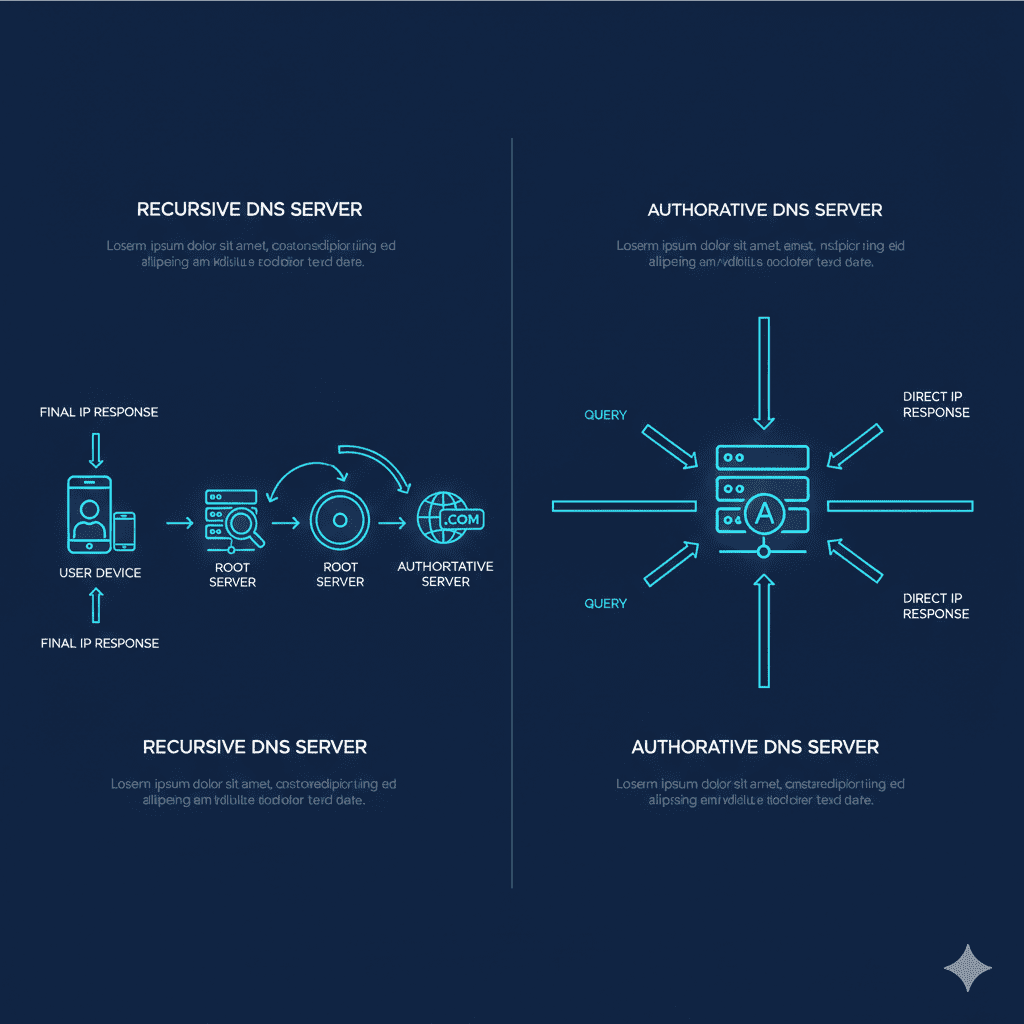
To really understand What Is DNS, you need to understand the types of DNS involved.
The domain name system isn’t handled by a single dns server. Instead, different types of dns servers work together inside a broader dns infrastructure.
Each layer has a specific responsibility in handling dns queries and returning the correct IP address.
Recursive DNS
Recursive DNS is the starting point for most dns queries.
When your device makes a request, the dns resolver forwards that request to a recursive dns server. This recursive dns server searches for the answer on your behalf.
It may contact a root name server, then a TLD server, and eventually an authoritative dns server.
Recursive DNS handles the heavy lifting of the dns lookup process. It doesn’t permanently store dns resource records, but it does cache results to improve speed.
Authoritative DNS holds the final answer.
An authoritative dns server stores the dns record that maps a domain to its IP address.
Unlike recursive systems, authoritative servers store the actual dns records. They provide definitive answers to dns queries.
If the recursive dns resolver queries a dns server and reaches the authoritative server, that response is considered final.
Without authoritative dns, domain names would not reliably point to the correct IP address.
Common DNS Infrastructure Explained
The dns infrastructure works as a coordinated system.
Recursive dns resolvers begin the search. Root servers guide the request to the correct top-level domain. Authoritative name servers return the correct IP address.
Every dns query passes through multiple layers, but it happens in milliseconds.
Without dns infrastructure, domain names into IP addresses conversion would not work.
The domain name system depends on cooperation between different types of dns servers.
Types of DNS Queries
There are different types of DNS queries, and each affects how the response behaves.
The three main types of dns queries are recursive, iterative, and non-recursive.
Recursive Query
In a recursive query, the dns resolver expects a complete answer.
The recursive dns server continues the search until it finds the final IP address or confirms that the domain doesn’t exist.
Recursive queries are the most common type in everyday browsing.
Iterative Query
In an iterative query, the dns server returns the best answer it has.
If it doesn’t know the final IP address, it provides a referral to another dns server.
The dns resolver then continues the lookup process step by step.
Non-Recursive Query
A non-recursive query happens when the answer is already available in cache.
If the dns cache contains the IP address, the dns server responds immediately without contacting other servers.
Understanding types of dns queries helps explain why DNS resolution sometimes feels instant and other times slightly delayed.
DNS Record Types and What They Do

A dns record controls how a domain routes traffic.
Each dns record contains instructions that tell the dns server where to send requests.
Without correct dns record types, a domain may not connect to the proper IP address.
Major DNS Record Types
Different dns record types serve different purposes.
A Record
The A record maps a domain to an IPv4 address.
This is the most common dns record used for website routing.
AAAA Record
The AAAA record maps a domain name to an IPv6 IP address.
It performs a similar function but supports newer address formats.
CNAME
A CNAME record points one domain to another domain.
It doesn’t store an IP address directly but redirects traffic to another domain name.
MX
An MX record directs email traffic.
It tells the dns server where to route email for a specific domain.
TXT
A TXT record stores verification data.
It’s often used for domain validation and email security configurations.
NS
An NS record identifies the authoritative name server responsible for the domain.
This record is essential for directing dns queries to the correct authoritative server.
Understanding dns record types helps with troubleshooting dns issues and configuring dns configurations properly.
DNS Server Explained What Is a DNS Server?
A dns server processes dns queries and returns responses.
There are different types of dns servers involved in a dns lookup, including recursive dns servers and authoritative dns servers.
A recursive dns server searches for the correct IP address on behalf of the user.
An authoritative dns server stores the dns records and returns the final answer.
Together, these systems convert domain names to IP addresses and allow browsers to load websites.
Without a dns server, domain names would not resolve, and websites would not load.
DNS vs Web Hosting: What’s the Difference?
This is where confusion usually happens.
DNS does not store website files. A dns server only translates a domain into an IP address.
Web hosting stores your website files on a web server. That’s where your content lives.
Think of DNS as the address book and web hosting as the house.
The domain name system points visitors to the correct IP address. Then the hosting server delivers the actual website.
Understanding this difference helps avoid misconfigured dns record settings and downtime.
How DNS Affects Website Speed and Performance
DNS resolution happens before your website loads.
If the dns server responds slowly, the browser waits before connecting to the IP address. That delay increases initial loading time.
DNS performance depends on caching, infrastructure, and server placement.
When dns cache stores recent results, repeat visits happen faster. Cache reduces the number of dns queries required.
A CDN can also work alongside DNS. It improves routing efficiency but does not replace the domain name system.
Even though DNS does not control hosting speed directly, poor dns resolution can affect website performance.
DNS Security: Why It Matters in 2026

DNS security is more important than ever.
Attackers may attempt dns spoofing or dns cache poisoning. These attacks try to redirect a domain to a malicious IP address.
Cache poisoning happens when incorrect dns data is stored in cache.
DNSSEC helps protect against these risks by validating dns responses.
As websites handle more sensitive data, dns security protects users from fraud and phishing.
In 2026, secure dns configurations are no longer optional.
Private DNS and Public DNS Explained
There are two common models: public DNS and private DNS.
Public DNS services are available for general internet users. Some people use options like google public dns to improve dns performance.
Private DNS is typically used within organizations.
Private networks implement dns internally for internal domain names.
The choice depends on infrastructure needs, not hype.
For most website owners, stability and reliability matter more than chasing the “best dns” label.
DNS Issues and Troubleshooting Basics
DNS issues are common during domain changes or hosting migrations.
Propagation delays can make updates appear inconsistent. One dns server may update faster than another.
Misconfigured dns record settings can break email or website routing.
Caching problems may cause outdated IP address information to load.
If a domain suddenly stops working, start by checking dns configurations and verifying the authoritative dns server settings.
Most dns failures are configuration related, not hardware failures.
How Long Does DNS Propagation Take?

DNS propagation is the time it takes for updated dns records to spread globally.
When you change a dns record, not every dns server updates instantly.
The resolution of the dns may take anywhere from a few minutes to up to forty eight hours.
Propagation depends on TTL values and caching behavior.
During that period, some users may see the new IP address while others still see the old one.
Understanding propagation avoids unnecessary panic during updates.
How to Change DNS Settings in Your Hosting Dashboard
Most hosting dashboards include DNS management tools.
Inside your domain settings, you can edit A, CNAME, MX, and NS records.
When updating a domain name into an IP configuration, double check the IP address.
Small errors can disconnect your website or email services.
After updating dns configurations, allow time for propagation.
Patience matters when managing DNS changes.
Reverse DNS Lookup Explained
A reverse DNS lookup works in the opposite direction of a standard dns lookup.
Instead of converting a domain into an IP address, it converts an IP address back into a domain name.
Reverse DNS lookup is often used in email verification.
Mail servers use it to confirm that the sending IP address matches the expected domain.
It helps prevent spam and improve email deliverability.
DNS Monitoring and Performance Tracking
DNS monitoring helps detect problems before visitors notice them.
When a dns server fails or responds slowly, it can cause downtime even if your hosting is fine.
DNS monitoring tools check resolution time and uptime.
They alert you if dns queries start failing or if dns performance drops.
Monitoring protects your domain from silent dns failures.
If a single dns server becomes unreachable, traffic may stop resolving correctly.
Regular monitoring keeps your website accessible.
Best DNS: Does It Matter Which DNS Provider You Use?
People often search for the best DNS.
In reality, the best dns depends on reliability, global infrastructure, and security practices.
Some dns providers specialize in performance. Others focus on enterprise-level dns security.
For beginners, stability matters more than chasing milliseconds.
If your dns server responds consistently and handles dns traffic without errors, that’s usually enough.
Switching dns providers should be based on measurable needs, not marketing claims.
What Most Blogs Miss About What Is DNS
DNS does not control hosting speed alone.
A fast dns server cannot fix a slow web server.
Caching behavior impacts performance more than people realize.
DNS changes are not instant. Propagation delays are normal.
Infrastructure quality matters. A single dns server is rarely used alone. Most setups rely on multiple dns nameservers for redundancy.
Understanding What Is DNS helps prevent downtime during migrations and record updates.
DNS FAQs
What Is DNS and why is it important?
What Is DNS refers to the domain name system that converts domain names into IP addresses so browsers can load websites.
How does DNS work behind the scenes?
DNS work involves a dns resolver contacting multiple dns servers, including recursive and authoritative systems, to locate the correct IP address.
What is a DNS server?
A dns server processes dns queries and returns dns responses that contain the requested IP address.
What is the difference between recursive DNS and authoritative DNS?
Recursive DNS searches for answers on behalf of users. Authoritative DNS stores the actual dns records and provides the final response.
What is DNS cache and how long does it last?
DNS cache stores recent dns responses temporarily. The duration depends on TTL values set in the dns record.
What are common DNS issues?
Common dns issues include propagation delays, misconfigured records, cache poisoning, and outdated IP address mappings.
What are the main DNS record types?
Common dns record types include A, AAAA, CNAME, MX, TXT, and NS records.
What is reverse DNS lookup used for?
Reverse DNS lookup is used mainly for email verification and security validation.
How long does DNS resolution take?
DNS resolution typically takes milliseconds, but it depends on cache status and network conditions.
How can I improve DNS security?
You can improve dns security by enabling DNSSEC, using trusted dns providers, and monitoring dns configurations regularly.
Final Thoughts: What Is DNS and Why Every Website Owner Should Understand It
So, What Is DNS?
It’s the system that connects a domain to an IP address so visitors can reach your website.
Without the domain name system, domain names would not translate into machine-readable IP addresses.
Understanding DNS helps you troubleshoot issues, manage records safely, and avoid downtime during updates.
Even if you never configure complex settings, reviewing your DNS dashboard occasionally builds confidence.
When you understand how domain names connect to IP addresses, you gain control over one of the most critical layers of your website.