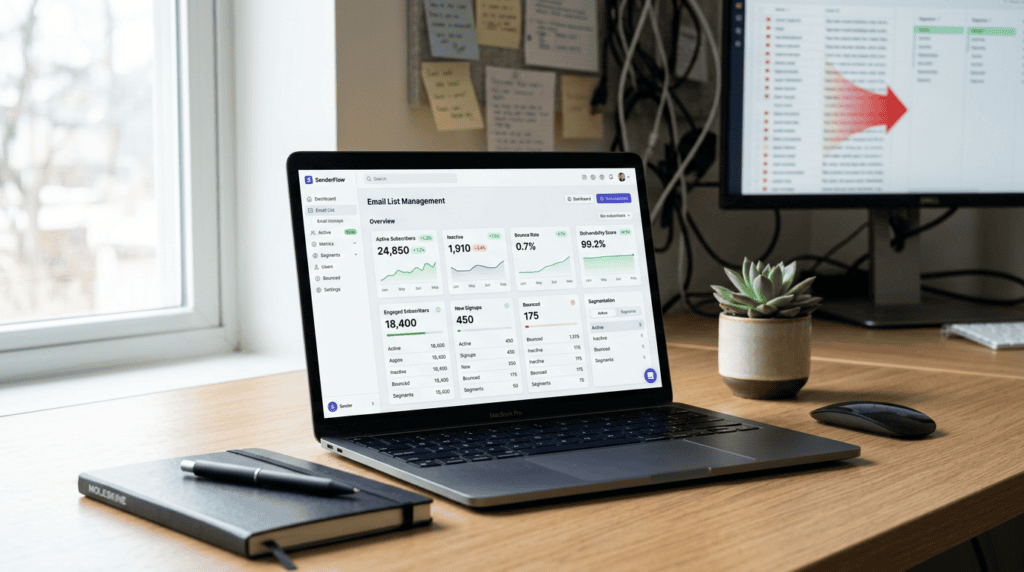
Your email list is costing you money. Many online businesses obsess over growing their subscriber count, yet they often overlook a critical workflow bottleneck: maintaining a healthy, engaged list. This isn’t just about vanity metrics; a neglected email database can silently erode your marketing ROI, damage your sender reputation, and even inflate your monthly expenses. Learning how to clean your email list isn’t a one-time fix; it’s an ongoing practice that directly impacts your bottom line and the effectiveness of every email campaign you send. This guide will walk you through the practical steps to scrub your list, ensuring your messages reach real people who actually want to hear from you.
Why Cleaning Your Email List Is Non-Negotiable in 2026
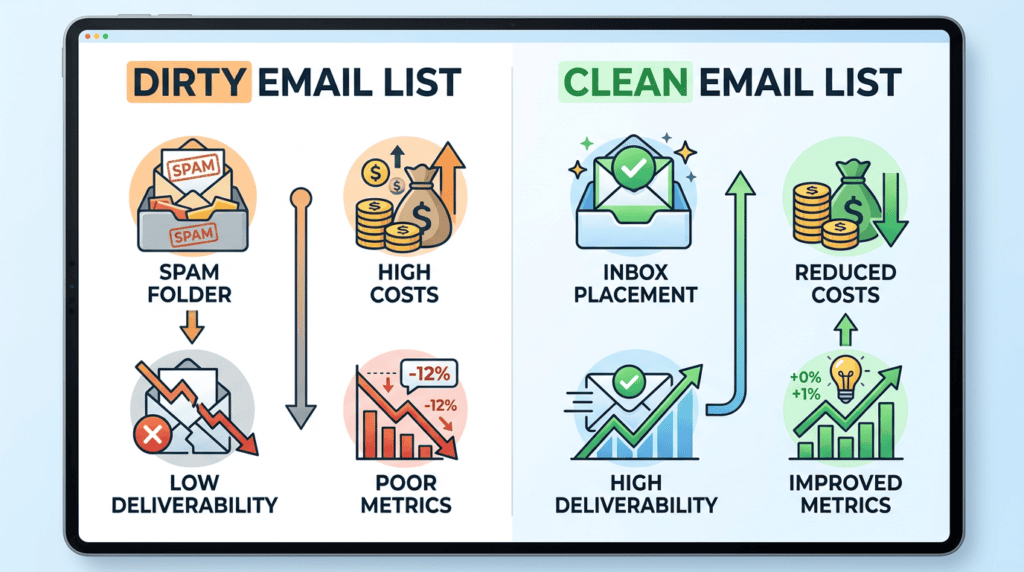
Ignoring your email list’s health is a costly mistake. In today’s competitive digital landscape, internet service providers (ISPs) and email service providers (ESPs) are increasingly sophisticated in filtering out unwanted mail. A dirty list doesn’t just mean a few emails go unread; it actively works against your entire email marketing strategy.
> Prioritizing email list hygiene is not optional; it’s a fundamental requirement for any serious digital marketer aiming for sustainable growth.
The Direct Impact on Email Deliverability: How inactive subscribers and spam traps hurt your sender reputation and cause your emails to land in spam folders.
Your sender reputation is like a credit score for your email address. Every email you send contributes to this score, and ISPs use it to decide whether to place your messages in the inbox, the spam folder, or reject them entirely. Sending emails to inactive subscribers or, worse, spam traps, severely damages this reputation. Spam traps are old, unused email addresses repurposed by ISPs to catch spammers. Hitting one signals to the ISP that you’re not maintaining a clean list, leading to lower deliverability across the board. High bounce rates, especially hard bounces (permanent delivery failures), also signal a problem. Even soft bounces, temporary delivery issues, can add up and affect your standing.
When I first started managing email campaigns, I learned this the hard way: a client’s deliverability plummeted from 98% to under 70% in just a few months because they hadn’t touched their list in years, filling it with invalid email addresses and dormant accounts. We had to implement a strict scrubbing process to recover their sender reputation.
Improving Your Key Email Marketing Metrics: How a clean list leads to higher open rates, click-through rates, and overall engagement.
When you remove unengaged and inactive subscribers, your email marketing metrics naturally improve. Your open rates and click-through rates (CTRs) will look healthier because you’re only sending to people who are genuinely interested in your content. This isn’t just about vanity; higher engagement signals to ISPs that your emails are valuable, further boosting your inbox placement. A clean list provides a more accurate picture of how your campaigns are performing, allowing you to make better decisions about content, offers, and frequency. You’ll see a clearer correlation between your email efforts and actual conversions, leading to a much stronger ROI.
Reducing Your Email Service Provider (ESP) Costs: How removing inactive subscribers can lower your monthly bill, especially as your list grows.
Most email service providers (ESPs) charge based on the number of subscribers in your database or the volume of emails you send. If your list is bloated with thousands of unengaged or invalid email addresses, you’re literally paying to send messages that will never be opened, or worse, won’t even be delivered. This is a direct drain on your marketing budget. Regularly cleaning your list by removing these inactive subscribers can significantly reduce your monthly ESP costs, freeing up funds for other marketing initiatives or allowing you to invest in more advanced features. It’s a simple, tangible way to cut unnecessary expenses.
Gaining More Accurate Data and Insights: How a clean list provides a clearer picture of what content resonates with your active audience.
A cluttered email list distorts your analytics. When you have a high percentage of unengaged subscribers, your data on open rates, click-throughs, and conversion rates becomes unreliable. It’s hard to tell what’s working when a large portion of your audience isn’t even seeing your emails. By cleaning your list, you gain a much clearer understanding of your active audience’s preferences and behaviors. This allows for more effective segmentation, personalized campaigns, and data-driven decisions that actually move the needle. You’ll know which subject lines truly grab attention and what offers genuinely convert, leading to more impactful email marketing campaigns.
Before You Begin: Essential Pre-Cleaning Checklist
Before you start scrubbing your email list, a little preparation goes a long way. Taking these preliminary steps ensures you clean your list effectively without accidentally losing valuable subscribers or causing more problems than you solve. This pre-cleaning checklist sets the stage for a smooth and successful hygiene process.
- Define Your “Inactive Subscriber” Criteria: Not every subscriber who hasn’t opened your last email is “inactive.” Your definition should align with your email marketing campaigns’ frequency and your business model. For a daily newsletter, 30-60 days without engagement might signal inactivity. For a monthly update, 90-180 days could be more appropriate. E-commerce businesses might consider a subscriber inactive after 180 days if they haven’t clicked or purchased, while a content site might extend that to 365 days. Setting a clear timeframe is crucial for consistent list hygiene.
- Backup Your Entire Email List: This step is non-negotiable. Before you make any changes, download a complete copy of your current email list from your email service provider (ESP). This backup acts as a safety net. If anything goes wrong during the cleaning process, you can always revert to your original database. It’s a simple measure that provides immense peace of mind.
- Identify Your Most Engaged Segments: Before you even think about removing subscribers, pinpoint your most valuable audience members. These are the people who consistently open your emails, click your links, make purchases, or visit your website frequently. Use your ESP’s segmentation tools to create groups based on high engagement. I once nearly purged a segment of high-value customers because their email activity was low, but they were consistently buying through other channels. Now, I always cross-reference engagement metrics with purchase history before any list cleaning. Protecting these segments ensures you don’t accidentally target them for removal, even if their email behavior has temporarily dipped.
- Choose Your List Cleaning Tools: You have a few options for how to clean your email list. For very small lists, some manual checks might be feasible, but it’s rarely efficient. Most ESPs offer built-in features for basic bounce handling and segmentation, which are a good starting point. However, for deeper cleaning, especially for larger lists or those with known deliverability issues, dedicated third-party email verification services are often necessary. These specialized tools go beyond what an ESP can do, identifying more complex problems like spam traps.
> Choosing the right cleaning method isn’t about finding the cheapest option, but the one that aligns with your list size, budget, and the specific deliverability challenges you’re facing.
The Step-by-Step Process for Cleaning Your Email List
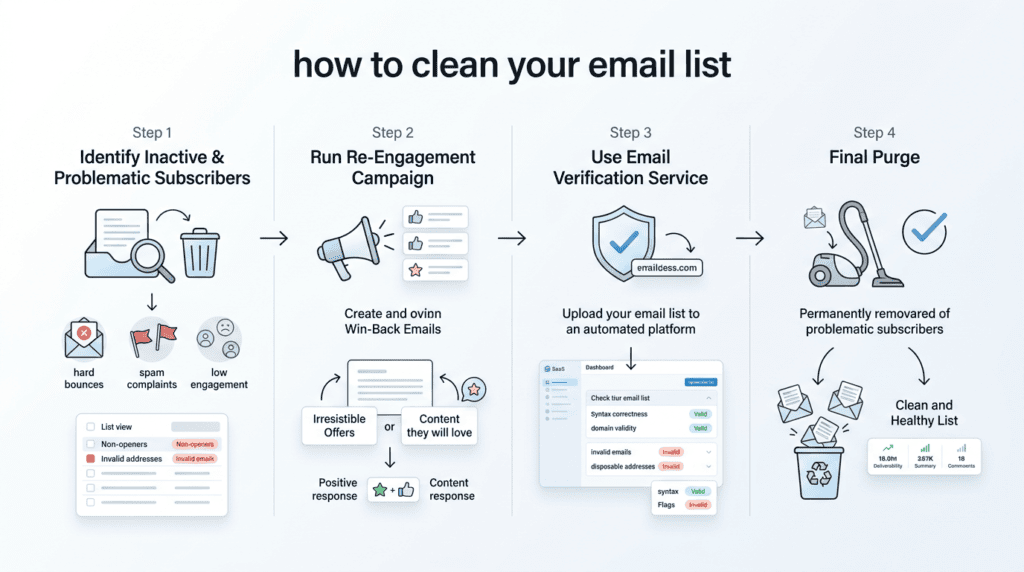
Once your pre-cleaning checklist is complete, you’re ready to dive into the practical steps of cleaning your subscriber list. This methodical approach ensures thoroughness and minimizes risks, leading to a healthier email list and improved marketing ROI.
Step 1: Identify Inactive and Problematic Subscribers
The first phase of email list hygiene involves pinpointing who needs attention. This isn’t just about inactive email subscribers; it’s also about identifying addresses that are actively harmful to your sender reputation.
- Using Your ESP’s Segmentation Tools: Your email service provider is your first line of defense. Most ESPs allow you to segment your audience based on engagement metrics. Create segments for subscribers who haven’t opened or clicked any of your email marketing campaigns within the “inactive subscriber” timeframe you defined earlier. This gives you a clear picture of your unengaged email subscribers. You can also look for those with consistently low engagement rates over a longer period.
- Spotting Obvious Invalid Emails: While verification services handle most of this, you can often catch some invalid email addresses with a quick scan. Look for common syntax errors (e.g., missing “@” symbols, multiple “@” symbols), obvious typos in domain names (like `gmaill.com` instead of `gmail.com` or `yaho.com` instead of `yahoo.com`), and disposable email addresses (e.g., `mailinator.com`, `tempmail.com`). These types of addresses are almost always hard bounces or spam traps and should be flagged for immediate removal.
- Understanding Hard Bounces vs. Soft Bounces: This distinction is critical for maintaining list health. A hard bounce means the email address is permanently undeliverable – it might be invalid, non-existent, or blocked. These must be removed from your email list immediately, as repeatedly sending to them severely damages your sender reputation. A soft bounce, on the other hand, is a temporary delivery issue, such as a full inbox, a server being down, or the message being too large. Your ESP will usually try to resend soft bounces a few times. If an address consistently soft bounces, it should eventually be treated as inactive or problematic.
> Never underestimate the long-term damage that a single spam trap or a high hard bounce rate can inflict on your sender reputation; proactive removal is always the best defense.
Step 2: Run a Re-Engagement (Win-Back) Campaign
Before you remove inactive subscribers, give them one last chance to re-engage. A well-executed re-engagement email campaign can reactivate a portion of your unengaged audience.
- Crafting a Compelling “Last Chance” Email: The goal here is to grab attention and prompt action. Your subject line is key. Consider options like: “Do you still want to hear from us?”, “Is this goodbye?”, “We miss you! Don’t go!”, or “Your subscription is about to expire.” In the email body, remind them of the value you provide and clearly state that if they don’t respond, they’ll be removed from your list.
- Offering a Clear Incentive to Stay: To encourage re-engagement, offer a compelling reason to stick around. This could be a special discount code, access to exclusive content, a free resource, or early access to a new product. Crucially, include a very clear, single-click call to action, such as a button that says “Yes, keep me on the list!” or “Update my preferences.” This simple action confirms their continued interest and permission.
- Analyzing the Results of Your Campaign: After sending your win-back email, monitor who opens and clicks the re-engagement link. These are the subscribers who have confirmed their interest and should remain on your active list. Tag them as “re-engaged” or “active” within your ESP. Those who do not open, click, or respond to your re-engagement email campaign are strong candidates for removal in the final purge.
Step 3: Use a Third-Party Email Verification Service
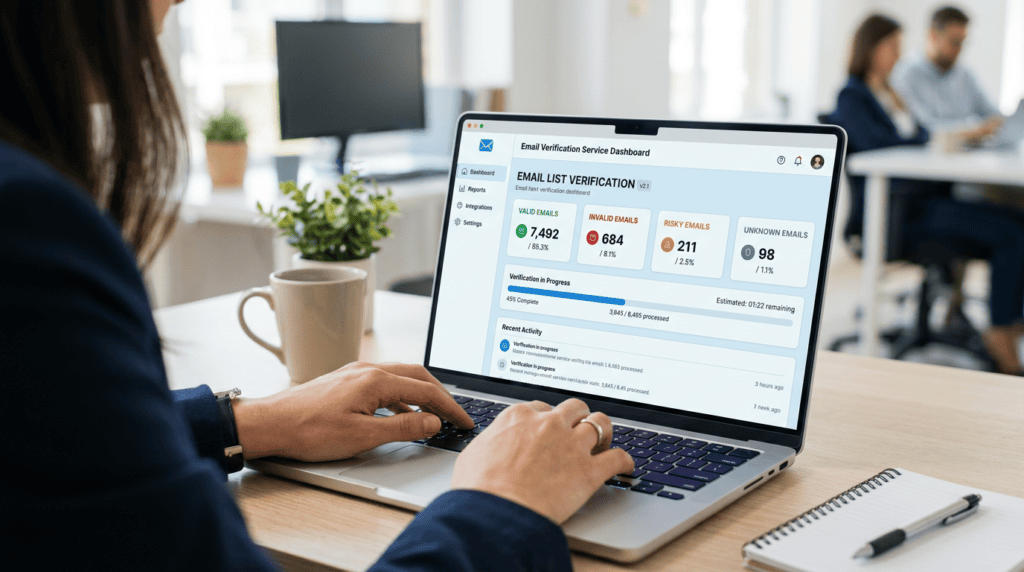
For a truly deep clean, especially if your email list is large or hasn’t been cleaned in a while, a dedicated email verification tool is invaluable.
- When a Verification Service is Necessary: You should seriously consider using a verification service if you have a large email list (tens of thousands or more), if your email deliverability rates are consistently low, or if your list hasn’t undergone a thorough cleaning in over a year. It’s also highly recommended if you’ve acquired your list through various sources or suspect it contains many invalid email addresses. This step is crucial for maintaining a healthy email list and protecting your sender reputation score.
- How These Services Work: Email verification services use sophisticated algorithms to check the validity and risk level of each email address on your list. They perform checks like:
- Syntax validation: Ensuring the email format is correct.
- Domain validation: Confirming the domain exists and is configured to receive emails.
- Mailbox existence check: Pinging the mail server to see if the specific mailbox exists.
- Spam trap detection: Identifying addresses known to be used by ISPs to catch spammers.
- Disposable email detection: Flagging temporary email addresses.
- Role-based email detection: Identifying addresses like `info@`, `sales@`, or `support@`, which often have lower engagement.
These services provide a comprehensive scrub of your email database.
- Interpreting the Verification Results: After the service processes your list, it will categorize each email address. Common categories include:
- Valid: These are good, deliverable email addresses. Keep them.
- Invalid: These are hard bounces and should be removed immediately.
- Risky: This category includes addresses like role-based emails, disposable emails, or catch-all domains. They might be deliverable but often have low engagement or pose a higher risk. You’ll need to decide whether to keep, segment, or remove these based on your risk tolerance.
- Unknown: These are addresses the service couldn’t definitively verify, often due to temporary server issues. You might re-verify them later or treat them as risky.
When I first started using verification services, I was tempted to keep all ‘risky’ emails, hoping they’d convert. But I quickly learned that even a small percentage of these can drag down your sender reputation, making it harder to reach your truly engaged audience.
- Popular Email Verification Tools: Several reputable services offer email verification. Examples include ZeroBounce, NeverBounce, and Hunter. These tools scan your list and provide detailed reports to help you make informed decisions about which subscribers to keep.
Step 4: The Final Purge: Removing Unresponsive Subscribers
This is the final, decisive step in cleaning your email list. It requires a firm hand, but the benefits for your email deliverability and overall email marketing ROI are significant.
- Who to Remove Without Hesitation: Based on the previous steps, certain subscribers should be removed from your email list immediately. This includes all email addresses that resulted in a hard bounce, as well as any identified as “invalid” by your third-party email verification service. These addresses are actively harming your sender reputation and offer no value. Also, remove any known spam traps identified during verification.
- Making the Final Call on Inactive Subscribers: Now, address the segment of inactive email subscribers who did not respond to your re-engagement email campaign. While it might feel counterintuitive to remove subscribers, keeping unengaged email subscribers on your list inflates your list size, skews your metrics (like open rates and click-through rates), and can lead to higher ESP costs. Removing them allows you to focus your efforts and resources on your truly engaged audience.
- The Difference Between Deleting and Suppressing: When removing contacts, you typically have two options in your ESP: deleting or suppressing.
- Deleting completely removes the contact record from your database.
- Suppressing moves the contact to a “suppression list.” This means they won’t receive future emails from your account, but their record remains, often with a note about why they were suppressed (e.g., “unsubscribed,” “hard bounced,” “inactive”).
Suppressing contacts is often the better long-term strategy. It prevents you from accidentally re-adding them to your active list in the future and can help with compliance, as it maintains a record of their status. This suppression list management is a key part of ongoing email list maintenance.
Honest Take: The Fear of Deleting Subscribers (And Why You Should Get Over It)

It’s a common feeling among marketers: the dread of hitting that “delete” button on your email list. We spend so much time and effort building our subscriber base, and the idea of intentionally shrinking it feels counterintuitive. We often view a large list size as a badge of honor, a vanity metric that suggests success. However, this perspective can be a significant trap. A massive list filled with unengaged or invalid email addresses isn’t an asset; it’s a liability that actively harms your email marketing campaigns.
The truth is, a smaller, highly engaged email list is far more valuable than a sprawling, inactive one. Think about it: if half your subscribers never open your emails, they’re not contributing to your open rates, click-through rates, or conversions. Instead, they’re dragging down your overall engagement metrics and potentially signaling to internet service providers (ISPs) that your content isn’t relevant, which can damage your sender reputation. I once held onto thousands of subscribers who hadn’t opened an email in over a year, convinced that “more is better.” It wasn’t until I finally purged them that I saw my deliverability rates jump and my actual engaged audience become much clearer.
Cleaning your email list is an act of strengthening your asset, not shrinking it. It’s about focusing on the business-critical metric of a profitable, responsive audience rather than the superficial metric of sheer volume.
> Don’t let the fear of a smaller number prevent you from cultivating a healthier, more profitable email list. Quality always trumps quantity when it comes to subscriber engagement and email marketing ROI.
How to Keep Your Email List Clean Moving Forward
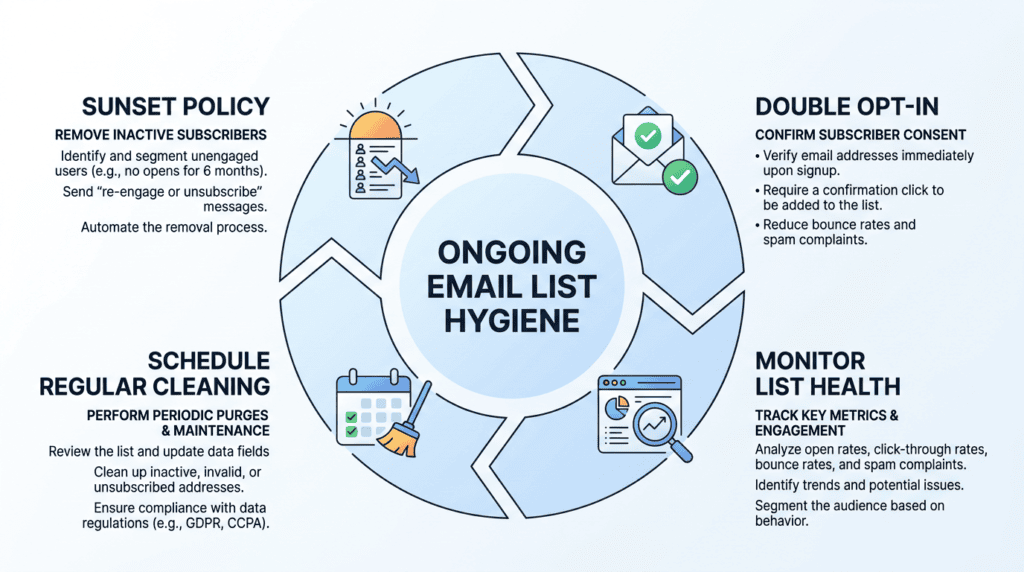
Maintaining a healthy email list isn’t a one-time event; it’s an ongoing process. Once you’ve completed a thorough cleaning process step-by-step, you’ll want to put systems in place to prevent your list from accumulating dead weight again. Proactive email list hygiene is key to sustained deliverability and strong engagement.
- Implement a Sunset Policy: This involves automatically tagging and attempting to re-engage subscribers who become inactive over a defined period (e.g., 90 or 180 days). If they don’t respond to a re-engagement email campaign, they are automatically removed or suppressed. This creates a continuous hygiene cycle, preventing a large build-up of unengaged email subscribers. Many email service providers (ESPs) offer automation features to set up these workflows.
- Use Double Opt-In for New Subscribers: This is arguably the single best way to prevent invalid email addresses, typos, fake sign-ups, and bots from joining your list in the first place. With a double opt-in process, new subscribers receive an email asking them to confirm their subscription. Only after clicking the confirmation link are they added to your active list. This ensures every new subscriber genuinely wants to receive your emails, significantly improving your initial list quality and reducing future cleaning efforts.
- Regularly Monitor List Health Metrics: Keep a close eye on your ESP dashboard for key email marketing metrics. Watch for rising bounce rates, declining open rates, or an increase in spam complaint rate. These are early warning signs that your list health might be deteriorating. Catching these issues early allows you to address them before they severely impact your sender reputation score and email deliverability rates. I make it a point to check my core email marketing metrics weekly; it helps me spot trends and react quickly.
- Schedule Your Next List Cleaning: Even with proactive measures, some level of list decay is inevitable. People change email addresses, abandon old accounts, or simply lose interest. To maintain list hygiene, schedule a full list cleaning at regular intervals. For most businesses, a quarterly or bi-annual cleaning schedule is appropriate. This proactive approach ensures you’re consistently removing inactive email subscribers and invalid email addresses, keeping your clean email database optimized for performance.
Final Recommendation: Make List Hygiene a Core Marketing Habit
Cleaning your email list isn’t a one-time task; it’s an essential, ongoing part of a healthy email marketing strategy. By following this guide, you’ve taken the most important step. Now, integrate these practices into your regular workflow. A clean list ensures your message reaches the people who want to hear it, maximizing your ROI and building a stronger, more profitable relationship with your audience.
Who benefits most from consistent email list hygiene?
Frankly, everyone with an email list. If you’re running email marketing campaigns, maintaining a clean email database is non-negotiable for improving open rates, reducing bounce rates, and protecting your sender reputation.
Who might find it challenging but still needs to prioritize it?
Those with very large, older lists that haven’t been cleaned in years. The initial scrub might feel daunting, but the long-term benefits for email deliverability rates and overall campaign performance are immense.
Who should avoid delaying this process?
Anyone experiencing low engagement rates, high spam complaint rates, or frequent email deliverability issues. Delaying means you’re actively harming your email sender reputation, wasting money on unengaged email subscribers, and missing out on potential conversion.
> Prioritize list hygiene as a continuous process to safeguard your sender reputation and maximize your email marketing ROI.
From my own experience running multiple niche sites, neglecting this is a surefire way to kill your email marketing efforts and see your inbox placement plummet. It’s a foundational element of success.
Frequently Asked Questions (FAQs)
How often should I clean my email list?
You should clean your email list at least quarterly, but ideally monthly for very active lists, to maintain optimal email list hygiene. This regular scrubbing helps remove inactive email subscribers and invalid email addresses before they negatively impact your deliverability.
Will cleaning my list hurt my sender reputation?
No, cleaning your email list will significantly improve your sender reputation by removing hard bounce addresses, spam traps, and unengaged subscribers. This signals to internet service providers (ISPs) that you’re a responsible sender, leading to better inbox placement for your legitimate audience.
Can I clean my email list for free?
Yes, you can perform basic email list cleaning for free using your email service provider’s (ESP) segmentation tools to identify inactive subscribers and hard bounces. However, for deeper validation against spam traps and disposable email addresses, a dedicated email verification tool is often necessary.
What’s a safe percentage of my list to remove during a cleaning?
There isn’t a universally “safe” percentage, as it depends on your list’s current health and how long it’s been since your last cleaning process. Focus on removing truly unengaged or invalid email addresses rather than aiming for a specific percentage; a smaller, healthy email list is always more valuable.
What is the difference between an email verification service and my ESP’s built-in cleaning tools?
An email verification service offers a deeper, more specialized analysis of email addresses, identifying spam traps, disposable emails, and risky addresses that your ESP’s basic tools might miss. Your ESP primarily handles bounces and basic engagement metrics, while verification services proactively validate addresses before you even send.
Should I remove subscribers who open but never click?
Subscribers who consistently open but never click are generally considered less engaged than those who click, but they aren’t necessarily “inactive” in the same way. Consider segmenting them for a targeted re-engagement email campaign with different content or offers before deciding to remove them, as they still show some interest.