
Choosing the wrong email platform costs more than money. Many small businesses fixate on monthly fees, missing the true cost of lost growth from inadequate tools. You’re here because you need an email marketing platform that fits your budget and helps your business thrive, not just send emails.
This guide moves beyond simple feature lists. We’ll give you real-world insights, helping you choose a tool that actually grows your audience and revenue, not just your expenses. We’ll cover the top platforms, explain who each is best for, and provide a clear framework for making the right choice to support your marketing strategy.
Quick Picks: The Best Email Marketing Platforms at a Glance
Picking the right email service provider from the start can save you headaches and money down the road. I’ve personally seen businesses waste months trying to force a generalist platform into a creator-specific workflow, losing potential sales in the process. These quick picks highlight platforms that excel in specific areas, making your decision easier based on your primary business needs.
> Don’t just look at the monthly price; consider the platform’s ability to scale with your active subscribers and support your core business model.
Best Overall
- Mailchimp: The most balanced platform for ease of use, powerful features, and scalability, making it the top choice for most small businesses starting and growing their email list.
Best for Creators & Automation
- ConvertKit: Unmatched for its creator-centric features, visual automation builder, and segmentation tools, ideal for bloggers, course creators, and coaches.
Best Budget-Friendly Option
- MailerLite: Delivers an impressive suite of modern features, including automations and landing pages, at one of the most competitive price points on the market.
Comparing the Top Email Marketing Platforms for Small Businesses
Choosing the right email marketing platform can feel like a big decision for any small business. It’s not just about sending emails; it’s about building relationships, driving sales, and scaling your operations. To help simplify this, we’ve put together a comprehensive comparison of the top platforms. This table highlights key differences at a glance, allowing you to quickly identify tools that align with your specific needs, whether you prioritize budget, advanced automation, or ease of use.
Complete Comparison Table
| Comparison Factor | Mailchimp | ConvertKit | MailerLite | Brevo (Sendinblue) | ActiveCampaign | Constant Contact | Moosend | GetResponse | Flodesk | Beehiiv | AWeber |
|---|---|---|---|---|---|---|---|---|---|---|---|
| Starting Price (Paid) | From $13/month | From $9/month | From $10/month | From $9/month | From $29/month | From $12/month | From $9/month | From $19/month | $38/month | From $42/month | From $14.99/month |
| Free Plan Limits | 500 contacts, 1,000 sends/month | 1,000 subscribers, limited features | 1,000 subscribers, 12,000 sends/month | Unlimited contacts, 9,000 sends/month | 14-day free trial | 14-day free trial | 30-day free trial | 30-day free trial | 30-day free trial | 2,500 subscribers, basic features | 500 subscribers, 3,000 sends/month |
| Key Feature | All-in-one marketing suite | Creator-focused automation | Budget-friendly features | Transactional email & CRM | Advanced automation & CRM | Event marketing & support | E-commerce automation | Webinars & funnels | Visually stunning emails | Newsletter monetization | Reliable autoresponders |
| Best For: | Growing small businesses | Bloggers, course creators | Startups, freelancers | Sales & marketing teams | Data-driven businesses | Service-based businesses | Budget e-commerce | All-in-one marketers | Design-focused brands | Newsletter publishers | Simplicity & support |
| Ease of Use (1-5) | 4 | 4 | 5 | 3 | 2 | 4 | 4 | 3 | 5 | 4 | 4 |
| Automation Power (1-5) | 3 | 5 | 3 | 4 | 5 | 2 | 4 | 4 | 2 | 3 | 3 |
> When evaluating platforms, don’t just look at the “starting price.” Always consider the cost at your projected subscriber count and the features you absolutely need to avoid unexpected budget increases later on.
The 11 Best Email Marketing Platforms in Detail
1. Mailchimp: The All-in-One Platform for Growth
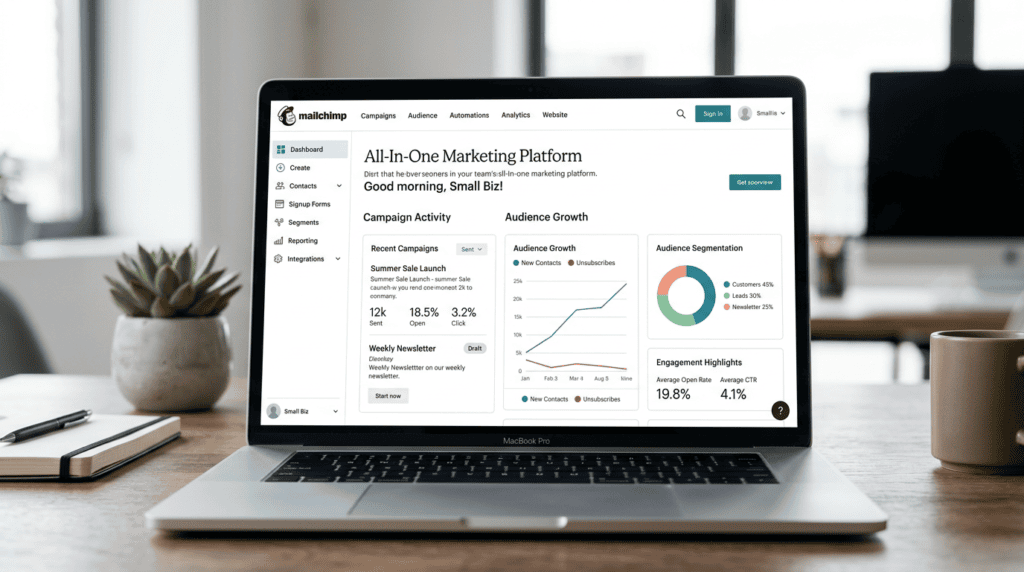
- Who It’s For: Mailchimp is a solid choice for small businesses looking for a robust, user-friendly platform that can handle everything from basic newsletters to more complex e-commerce campaigns. It’s particularly good for those just starting out who want room to grow without switching tools. If you’re planning to integrate your email efforts deeply with an online store or need a wide array of marketing tools beyond just email, Mailchimp offers a comprehensive solution.
- Key Features That Matter: Mailchimp’s strength lies in its broad feature set. The Creative Assistant helps design on-brand emails quickly, even if you’re not a graphic designer. Its Customer Journey Builder allows for visual automation setup, guiding subscribers through personalized experiences based on their actions. The robust reporting gives clear insights into campaign performance, from open rates to sales conversions. Plus, its extensive integrations with popular e-commerce platforms and other business tools make it a central hub for many small businesses.
- Pricing & Long-Term Value: Mailchimp offers a free plan for up to 500 contacts and 1,000 sends per month, which is excellent for testing the waters. Paid plans start around $13/month for 500 contacts, with costs increasing as your subscriber list grows. While it provides immense value early on, especially with its comprehensive features, the pricing can become a significant consideration for larger lists. For example, a list of 10,000 contacts might cost around $100–$150/month, depending on the plan. We’ve seen businesses start on the free plan, scale to thousands of subscribers, and find the cost-benefit still makes sense due to the platform’s reliability and feature depth, especially if they’re actively generating revenue from their email marketing.
- Limitations to Consider: The primary limitation is its cost scalability. As your subscriber count climbs, Mailchimp can become more expensive than some competitors. Additionally, while it has automation, the most advanced automation features are typically reserved for higher-tier plans, which might mean an upgrade sooner than expected if your needs evolve quickly.
2. ConvertKit: The Ultimate Tool for Creators
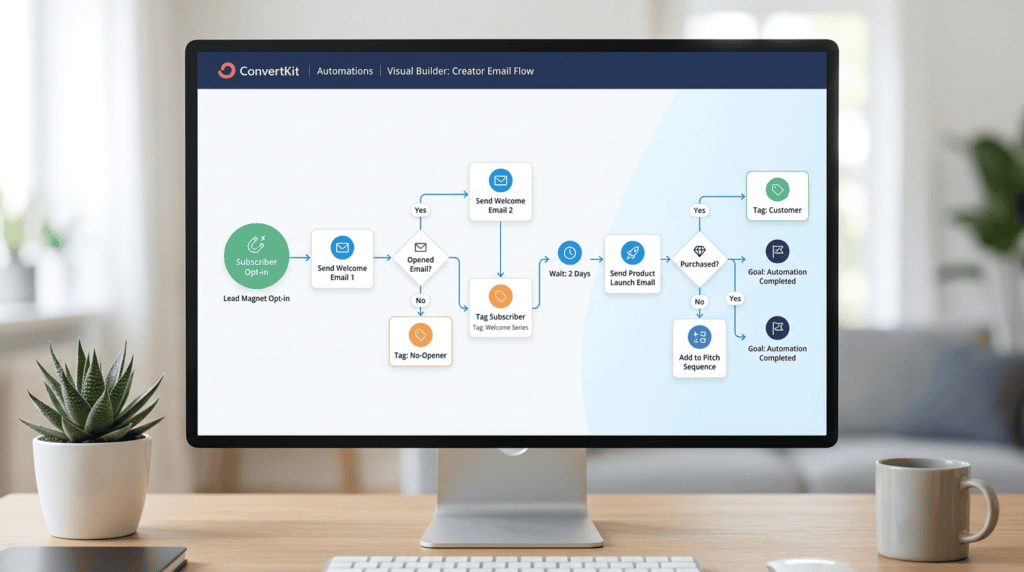
- Who It’s For: ConvertKit shines brightest for creators: think bloggers, podcasters, online course instructors, coaches, and YouTubers. If your business model revolves around selling digital products, building a community, and nurturing an audience through valuable content, ConvertKit is designed specifically for you. It simplifies the process of segmenting your audience based on their interests and purchases, allowing for highly targeted communication.
- Key Features That Matter: The Visual Automation Builder is a standout, making it easy to map out complex subscriber journeys without coding. Its flexible tagging system allows for incredibly granular segmentation, so you can send specific content or offers only to the people who will find it most relevant. ConvertKit also includes built-in landing pages and sales funnels, which are crucial for lead generation and product launches. It integrates seamlessly with creator-focused tools like Teachable, Podia, and Stripe.
- Pricing & Long-Term Value: ConvertKit’s pricing is subscriber-centric, starting with a free plan for up to 1,000 subscribers (with limited features). Paid plans begin around $9/month for 300 subscribers, scaling up. While this might seem higher per subscriber than some general-purpose platforms, the value for creators is in its specialized features. For someone running multiple funnels and selling various digital products, the ability to precisely segment and automate can lead to significantly higher conversion rates, making the investment worthwhile. I’ve personally used ConvertKit to manage multiple email sequences for different product launches, and the ability to quickly duplicate and adapt funnels saved me countless hours.
- Limitations to Consider: The email editor is functional but less design-focused compared to platforms like Mailchimp or Flodesk. If beautiful, image-heavy email layouts are your top priority, you might find it a bit basic. It can also be overkill for simple newsletters that don’t require advanced segmentation or product sales.
3. MailerLite: The Best Value for Modern Features
- Who It’s For: MailerLite is an excellent fit for startups, freelancers, and small businesses that need a powerful email marketing solution without breaking the bank. It’s perfect for those who want modern features like automation, landing pages, and even a website builder, but are operating on a tight budget. If you’re looking for a tool that’s easy to learn and use, but still offers plenty of room to grow, MailerLite delivers.
- Key Features That Matter: MailerLite boasts an intuitive drag-and-drop editor for emails, landing pages, and even websites, making design accessible to everyone. Its workflow automation is surprisingly robust for its price point, allowing you to set up welcome series, abandoned cart reminders, and more. The inclusion of a built-in website and blog builder means you can manage your online presence and email marketing from a single platform. Plus, the ability to sell digital products directly through their platform adds significant value.
- Pricing & Long-Term Value: MailerLite offers a very generous free plan for up to 1,000 subscribers and 12,000 emails per month, including many core features. Paid plans start around $10/month for 1,000 subscribers, making it one of the most affordable options for the features it provides. This affordability, combined with its modern toolkit, positions it as a top budget pick for long-term value. It allows small businesses to access features often found in more expensive platforms, enabling them to compete effectively.
- Limitations to Consider: While its reporting is good, it’s less detailed than what you’d find in premium competitors like ActiveCampaign. Also, new accounts sometimes face a strict approval process, which can cause a slight delay in getting started.
4. Brevo (Sendinblue): The Sales & Marketing Powerhouse
- Who It’s For: Brevo, formerly Sendinblue, is ideal for businesses that need an integrated sales and marketing platform beyond just email. If you’re looking for a solution that combines email, SMS, chat, and a CRM into one package, and you want to manage these channels without a prohibitive price tag, Brevo is a strong contender. It’s particularly useful for businesses with large contact lists but perhaps less frequent sending needs.
- Key Features That Matter: A key differentiator for Brevo is its unlimited contacts on all plans, meaning you only pay for the number of emails you send, not the size of your list. It includes a built-in CRM to manage customer relationships, an SMTP relay for transactional email API (essential for e-commerce order confirmations), and robust multi-channel marketing capabilities, including SMS and even WhatsApp campaigns. This makes it a versatile tool for comprehensive customer engagement.
- Pricing & Long-Term Value: Brevo’s pricing model is unique, based on the number of emails sent per month rather than subscriber count. The free plan allows for unlimited contacts and up to 9,000 emails per month (300/day). Paid plans start around $9/month for 20,000 emails. This model can be incredibly cost-effective for businesses with large lists that don’t send daily emails to everyone. It offers excellent long-term value by consolidating multiple marketing functions into a single, affordable platform.
- Limitations to Consider: The user interface can sometimes feel less intuitive or polished compared to more modern, email-focused platforms like MailerLite or Mailchimp. Some of the more advanced features, especially in automation and CRM, are typically gated behind higher-tier plans, requiring an upgrade to fully leverage its power.
5. ActiveCampaign: For Advanced Automation & CRM
- Who It’s For: ActiveCampaign is built for data-driven small businesses that demand sophisticated automation, lead scoring, and deep CRM integration. If your business has complex sales funnels, requires highly personalized customer journeys, or needs to track and nurture leads through various stages, ActiveCampaign provides the tools to do it. It’s a powerful platform for those ready to invest in advanced marketing strategies.
- Key Features That Matter: ActiveCampaign boasts an industry-leading automation builder that allows for incredibly intricate workflows based on subscriber behavior, site visits, and more. Its site tracking capabilities provide deep insights into how contacts interact with your website, feeding into its lead scoring system to identify your hottest prospects. The integrated sales CRM means your sales and marketing teams can work seamlessly, ensuring no lead falls through the cracks.
- Pricing & Long-Term Value: ActiveCampaign is positioned as a premium tool, and its pricing reflects that. Plans start around $29/month for 500 contacts, with costs increasing significantly with more contacts and advanced features. While it has a steeper learning curve and higher price point, the investment often yields a clear ROI for businesses that fully utilize its capabilities. The ability to automate complex customer journeys and personalize communications at scale can dramatically improve conversion rates and customer lifetime value.
- Limitations to Consider: Its steeper learning curve means it’s not a platform you can master overnight; it requires dedication to set up effectively. For businesses with simple email marketing needs, ActiveCampaign can be too complex and expensive, offering features they might never use.
6. Constant Contact: The Veteran for Service-Based Businesses
- Who It’s For: Constant Contact is a long-standing player in the email marketing space, particularly well-suited for traditional small businesses, non-profits, and event organizers. If you value high-quality customer support, straightforward tools, and specialized features for event marketing or surveys, this platform is designed with your needs in mind. It’s a reliable choice for those who appreciate a more guided experience.
- Key Features That Matter: Constant Contact excels with its event marketing tools, allowing you to promote and manage registrations directly within the platform. It also offers social media posting capabilities and robust survey and poll features to gather feedback from your audience. A significant draw is its award-winning phone and chat support, which can be invaluable for users who prefer direct assistance.
- Pricing & Long-Term Value: Constant Contact’s pricing starts around $12/month for 500 contacts, with costs increasing based on your list size. While its base price is competitive, it’s the value of its specialized tools and exceptional support that truly defines its long-term worth for specific business types. For a non-profit running multiple fundraising events or a local business hosting workshops, the integrated event management can save significant time and effort.
- Limitations to Consider: The interface can feel somewhat dated compared to newer, more modern platforms. Its automation capabilities are also less advanced than what you’d find in ConvertKit or ActiveCampaign, focusing more on basic autoresponders rather than complex, behavior-triggered workflows.
7. Moosend: The Affordable E-commerce Specialist
- Who It’s For: Moosend is an excellent choice for e-commerce businesses operating on a budget that still need powerful automation, segmentation, and personalization features. If you’re selling products online and want to implement strategies like abandoned cart recovery, product recommendations, and advanced customer segmentation without the premium price tag of a tool like Klaviyo, Moosend offers a compelling solution.
- Key Features That Matter: Moosend provides a suite of pre-built automation templates, including essential e-commerce workflows like abandoned cart sequences and post-purchase follow-ups. Its AI-powered subject line generator can help improve open rates, and its advanced personalization options allow you to tailor content based on customer behavior and purchase history. These features are crucial for driving sales and customer loyalty in an e-commerce environment.
- Pricing & Long-Term Value: Moosend is known for its competitive pricing. While the free plan is no longer available, paid plans start around $9/month for 500 subscribers, making it very affordable for the features it offers. This makes it a strong contender for businesses looking to maximize their e-commerce marketing ROI without overspending. For a small online shop, the ability to automate sales-driving emails at this price point offers significant long-term value.
- Limitations to Consider: The free plan is no longer available, which means new users will need to commit to a paid plan or a free trial. Additionally, its landing page builder is less robust and offers fewer design options compared to some competitors.
8. GetResponse: Beyond Email with Webinars & Funnels
- Who It’s For: GetResponse is designed for marketers and businesses that want an all-in-one platform to manage not just email, but also conversion funnels and webinars. If you’re looking to consolidate multiple marketing tools into a single subscription and need features like lead magnets, sales pages, and live online events, GetResponse offers a comprehensive ecosystem.
- Key Features That Matter: A standout feature is its Conversion Funnel builder, which helps you create complete marketing funnels, from lead capture to sales. It also includes built-in webinar hosting, allowing you to run and promote online events directly from the platform. The AI email generator assists in crafting compelling copy, and its autoresponder capabilities ensure timely follow-ups.
- Pricing & Long-Term Value: GetResponse offers a 30-day free trial, with paid plans starting around $19/month for 1,000 contacts. The value of GetResponse lies in its all-in-one approach. By combining email, landing pages, webinars, and sales funnels, it can potentially replace several other marketing tools, offering cost savings and streamlining workflows. This consolidation can provide significant long-term value for businesses that utilize these diverse features.
- Limitations to Consider: While the “all-in-one” approach is a strength, it can also make the platform feel less focused in any single area. Some users might find the interface a bit cluttered due to the sheer number of features. Historically, deliverability rates have faced scrutiny in the past, though the company continually works to improve this aspect.
9. Flodesk: For Visually-Driven Brands
- Who It’s For: Flodesk is the perfect email marketing solution for photographers, designers, coaches, and lifestyle brands where aesthetics and visual appeal are paramount. If your brand identity relies heavily on beautiful imagery and elegant design, and you want your emails and landing pages to reflect that high-end feel, Flodesk is built for you.
- Key Features That Matter: Flodesk truly excels with its stunning email templates and an intuitive visual editor that makes creating gorgeous emails effortless. It focuses on helping brands maintain a consistent, beautiful aesthetic across all their communications. Its “Workflows” feature allows for simple automations, ensuring you can set up welcome sequences or nurture campaigns that look as good as they perform.
- Pricing & Long-Term Value: Flodesk has a unique flat-rate pricing model of $38/month, which includes unlimited subscribers and unlimited sends. This is incredibly appealing for fast-growing lists, as your cost doesn’t increase as your audience expands. For brands that prioritize design and anticipate significant list growth, this flat fee offers exceptional long-term value and predictability.
- Limitations to Consider: While beautiful, Flodesk lacks advanced analytics, segmentation, and integration capabilities compared to more feature-rich platforms. If you need deep insights into subscriber behavior, complex automation rules, or extensive third-party integrations, you might find Flodesk’s offerings a bit basic.
10. Beehiiv: The Modern Platform for Newsletters
- Who It’s For: Beehiiv is a relatively newer player that has quickly become a favorite among writers, journalists, and creators whose primary focus is building and monetizing a premium newsletter. If your business model is centered around delivering high-quality content directly to subscribers and generating revenue through paid subscriptions or sponsorships, Beehiiv is purpose-built for your needs.
- Key Features That Matter: Beehiiv stands out with its built-in monetization tools, making it easy to offer paid subscriptions and manage subscriber tiers. It includes a robust referral program to help grow your audience organically and offers advanced segmentation specifically for newsletters, allowing you to tailor content to different reader groups. Its focus on excellent deliverability ensures your newsletters consistently land in inboxes.
- Pricing & Long-Term Value: Beehiiv offers a free plan for up to 2,500 subscribers with basic features. Paid plans start around $42/month for up to 10,000 subscribers, with higher tiers offering more advanced features and support. The value here is in its specialized toolkit for newsletter growth and monetization. For a creator whose income depends on their newsletter, Beehiiv’s tailored features can offer a better ROI than a general-purpose email service provider.
- Limitations to Consider: Beehiiv is not designed for complex e-commerce or B2B sales funnels. Its automation capabilities are also focused primarily on the newsletter experience, so if you need broad marketing automation across multiple channels, you might find it limited.
11. AWeber: The Reliable Autoresponder Pioneer
- Who It’s For: AWeber is a long-standing, dependable choice for small businesses and entrepreneurs who prioritize simplicity, excellent deliverability, and reliable customer support for setting up foundational autoresponders. If you need a straightforward tool to send newsletters, automate welcome series, and ensure your emails reach their destination, AWeber offers a solid, no-frills experience.
- Key Features That Matter: AWeber is known for its consistently high deliverability rates, which is crucial for ensuring your messages get seen. It provides 24/7 customer support via phone, email, and chat, offering peace of mind. The platform makes simple autoresponder setup easy, allowing you to create automated email sequences quickly. Its Canva integration also helps in designing visually appealing emails without leaving the platform.
- Pricing & Long-Term Value: AWeber offers a free plan for up to 500 subscribers and 3,000 sends per month. Paid plans start around $14.99/month for 500 subscribers, with costs increasing based on list size. It’s positioned as a dependable, no-frills option that has stood the test of time. For businesses that value reliability and strong support over cutting-edge features, AWeber provides consistent long-term value.
- Limitations to Consider: The interface and automation features can feel less modern and powerful compared to newer platforms like ConvertKit or ActiveCampaign. While functional, it might not offer the same level of visual sophistication or advanced segmentation options as some of its competitors.
Honest Take: What Most “Best Of” Lists Won’t Tell You
When you’re sifting through countless “best email marketing platforms” lists, it’s easy to get caught up in feature comparisons and shiny promises. But as someone who’s helped many small businesses set up their email marketing, I’ve noticed a few critical truths often get overlooked. These aren’t always in the marketing materials, but they significantly impact your long-term success and budget.
- The “Unlimited Contacts” Trap: Some platforms, like Brevo, proudly advertise “unlimited contacts” on their plans. This sounds amazing, especially if you’re building a large email list. However, the catch is often in the sending limits. These platforms typically charge based on the *number of emails you send* per month, not just the number of subscribers you have. If you have 10,000 contacts and send four newsletters a month, you’re sending 40,000 emails. This can quickly become more expensive than a platform that charges per subscriber but offers unlimited sends. Always check the sending limits and associated costs. I’ve seen businesses get burned by this, thinking “unlimited contacts” meant unlimited sending for cheap, only to face unexpected monthly bills.
- Deliverability is Not a Guarantee: No matter how good an email service provider (ESP) claims its deliverability rates are, getting your emails into the inbox isn’t solely up to them. While a reputable platform provides the technical infrastructure, your sending reputation, the quality of your email list, and the content of your emails play a massive role. If your open rates are low, click-through rates are poor, or your bounce rate is high, you’re signaling to spam filters that your emails might not be valuable.
> Critical Warning: Don’t assume your emails will always land in the inbox just because you’re using a top-tier platform. Focus on list hygiene, engaging content, and consistent sending practices to maintain a good sender reputation.
- Free Plans Have Hidden Costs: A free email marketing plan can be a fantastic starting point for a new business, but it’s rarely a long-term solution. These plans often come with strict limitations on features, subscriber counts, or branding (e.g., the platform’s logo in your emails). The real “hidden cost” isn’t monetary at first, but rather the time and effort lost when you inevitably outgrow these limitations and have to migrate your entire email list, templates, and automation workflows to a new, paid platform. This migration can be a significant headache and disrupt your marketing efforts.
- Complexity vs. Simplicity: More features aren’t always better. While advanced automation features and deep analytics are powerful, they can also introduce unnecessary complexity. For a small business owner who just needs to send a weekly newsletter and a simple welcome series, a highly sophisticated tool like ActiveCampaign might be overkill. You could end up paying for features you never use, and the steeper learning curve could slow you down. Sometimes, a user-friendly interface with a solid drag-and-drop editor and basic automation is all you need to grow your audience effectively.
How to Choose the Right Email Marketing Platform for Your Business
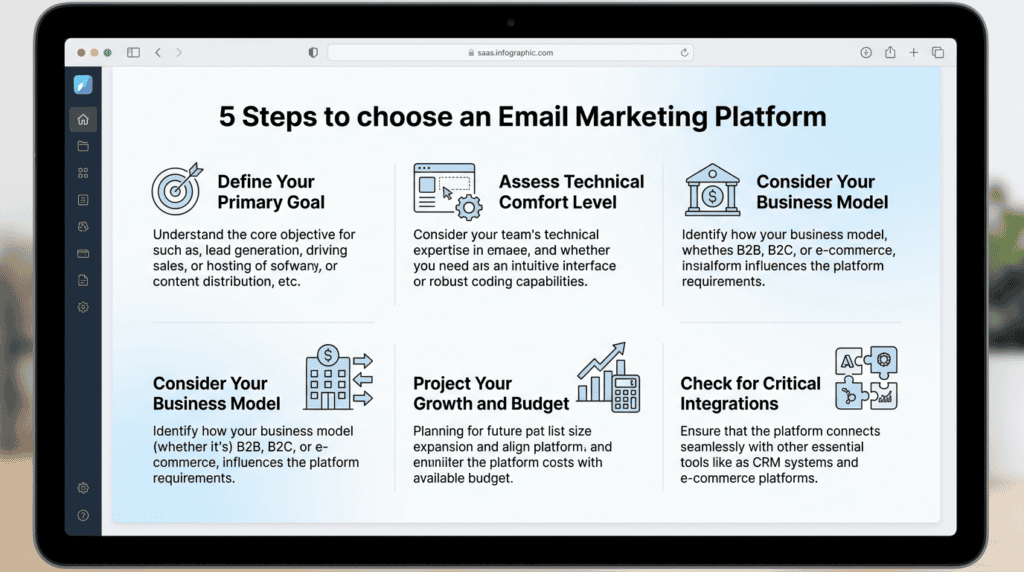
Selecting the best email marketing platform isn’t about finding the one with the most features; it’s about finding the right fit for *your* specific business needs and goals. Here’s a practical, step-by-step approach to make an informed decision:
- Step 1: Define Your Primary Goal: Before you even look at features, clarify what you want email marketing to achieve. Are you primarily selling digital products (like a course creator)? Nurturing leads for a service-based business? Publishing a paid newsletter? Or driving sales for an e-commerce store? Your primary goal will dictate the essential features you need, such as advanced segmentation, sales funnel builders, or specific monetization tools.
- Step 2: Assess Your Technical Comfort Level: Be honest with yourself about your technical skills and how much time you’re willing to invest in learning new software. Do you prefer a simple, intuitive drag-and-drop builder like MailerLite, or are you comfortable diving into a more complex, but powerful, automation engine like ActiveCampaign? Choosing a platform that matches your comfort level will save you frustration and ensure you actually use its capabilities. I always advise clients to be realistic about their tech skills; there’s no shame in starting simple and scaling up later.
- Step 3: Consider Your Business Model: Different business models have unique email marketing requirements. An e-commerce store will prioritize features like abandoned cart recovery, product recommendations, and seamless integration with platforms like Shopify. A blogger might need robust audience segmentation and tools to sell digital products. A local service business might focus on appointment reminders and lead generation forms. Ensure the platform supports the specific marketing strategy crucial to your business.
- Step 4: Project Your Growth and Budget: Look beyond the initial pricing. Choose a platform that fits your current budget but also offers scalable pricing plans that won’t become prohibitively expensive as your email list grows to 5,000, 10,000, or even 50,000 subscribers. Understand the cost implications of adding more contacts or increasing your sending frequency. A platform that seems cheap now might become a significant monthly subscription cost later.
- Step 5: Check for Critical Integrations: Your email marketing platform rarely operates in a vacuum. It needs to connect with other tools you use. Does it integrate seamlessly with your website platform (e.g., WordPress, Shopify)? Your CRM? Your online course platform (e.g., Teachable, Thinkific)? Or any other third-party integrations essential to your workflow?
> Tactical Takeaway: Always verify that your chosen email service provider offers direct or indirect integrations (via tools like Zapier) with your existing tech stack *before* committing to a plan. This prevents workflow bottlenecks down the line.
Final Recommendation: Making Your Decision

After diving deep into the best email marketing platforms available, it’s time to make a clear choice for your business. Remember, the goal isn’t just to pick *a* platform, but the *right* platform that aligns with your specific needs and growth trajectory.
- For Most Small Businesses Starting Out: If you’re just beginning or need a reliable, user-friendly platform that scales with you, start with Mailchimp or MailerLite. Mailchimp remains a safe, feature-rich bet for general small business email marketing, offering a strong foundation for growth. MailerLite, on the other hand, consistently offers some of the best features for its price point, making it an excellent value for budget-conscious businesses.
- For Creators and Bloggers: If your primary focus is building an audience, selling digital products, and nurturing a community, then ConvertKit is your clear winner. Its powerful segmentation, visual automation builder, and creator-centric tools are purpose-built for your business model and will save you countless hours.
- For Businesses Needing Advanced Automation: When you have a clear, data-driven strategy for complex sales funnels, lead scoring, and highly personalized customer journeys, the investment in ActiveCampaign will undoubtedly pay off. Its industry-leading automation capabilities allow for sophisticated marketing automation workflows that can significantly impact your bottom line.
Choosing the wrong email marketing software or delaying this decision can lead to missed opportunities for lead generation, slower audience growth, and ultimately, a direct impact on your revenue. The cost of inaction isn often higher than the cost of a well-chosen platform.
> The best platform is the one you will actually use consistently. Don’t pay for advanced features you don’t need. Start simple, master the fundamentals, and grow from there.
Having personally tested and used many of these email marketing platforms over the years for various niche sites, I’ve seen firsthand how a well-matched tool can accelerate a business. Don’t overthink it; pick one that fits your current stage and commit to mastering it.
Frequently Asked Questions (FAQ)
How much should a small business spend on email marketing?
A small business should typically allocate 5-15% of its overall marketing budget to email marketing, depending on its growth goals and current revenue. Many platforms offer free plans or affordable paid plans to start, making it accessible for any budget, with costs scaling as your subscriber list and feature needs grow.
Can I switch email marketing platforms later?
Yes, you can absolutely switch email marketing platforms later, though it requires some effort. The process usually involves exporting your subscriber list, importing it into the new platform, and then recreating your email campaigns, automation workflows, and signup forms.
What’s the difference between an ESP and a CRM?
An ESP (Email Service Provider) primarily focuses on sending and managing email campaigns, while a CRM (Customer Relationship Management) system manages all aspects of customer interactions, including sales, support, and marketing. Some modern email marketing platforms, like Brevo or ActiveCampaign, now integrate CRM functionalities, blurring the lines between the two.
Do I need a dedicated IP address?
Most small businesses do not need a dedicated IP address for their email marketing efforts. Dedicated IPs are typically reserved for high-volume senders (hundreds of thousands of emails per month) who want more control over their sender reputation and deliverability rates, which is usually managed effectively by the ESP’s shared IP pools.
How do I avoid the spam folder?
To avoid the spam folder, focus on maintaining a clean email list, using proper email authentication (like SPF and DKIM), sending relevant and engaging content, and avoiding spam trigger words in your subject lines and body. Consistently high open rates and low bounce rates also signal to email providers that your emails are valuable, improving your overall email deliverability.
Is Mailchimp still the best option in 2026?
Mailchimp remains a top contender and an excellent “best overall” option for many small businesses in 2026 due to its user-friendly interface, robust features, and scalability. While it can become more expensive as your subscriber count grows compared to some alternatives, its comprehensive marketing platform capabilities make it a strong choice for those looking for an all-in-one solution.