
The Activecampaign Vs Convertkit debate matters more in 2026 because email is no longer just about sending newsletters. Most businesses now need some mix of automation, segmentation, sales follow-up, and clean reporting. The problem is that both tools can look similar at first glance, then feel very different once you start building real workflows.
That’s where buyers get stuck. One platform looks easier, the other looks more powerful, and both can be the wrong fit if you choose based on surface-level features instead of how you’ll actually use them every week. If you’re running email marketing for content, offers, courses, or client leads, the wrong choice can slow you down fast.
Why this Activecampaign Vs Convertkit comparison matters in 2026
In 2026, email marketing is less about sending a nice-looking campaign and more about building systems that keep working when your list grows. A tool that handles 500 subscribers smoothly can feel very different once you’re managing 10,000 or 50,000 subscribers, multiple segments, and several automation paths.
ActiveCampaign and ConvertKit both stay popular because they solve different problems. ActiveCampaign leans toward deeper automation, CRM-style workflows, and more control. ConvertKit stays attractive for creators who want simpler publishing, faster setup, and a cleaner day-to-day experience. The hard part is that both can technically send campaigns, build forms, and run automation. The real difference shows up in how much friction you’re willing to accept.
What most buyers get wrong about ActiveCampaign and ConvertKit
The biggest mistake is assuming the “best email marketing” platform is the one with the longest feature list. That usually leads people toward ActiveCampaign when they really want speed and simplicity, or toward ConvertKit when they actually need stronger segmentation and sales handling.
Another common miss is ignoring the person who will operate the tool. A solo creator sending one email sequence each week has very different needs from a SaaS team managing lead scoring, lifecycle stages, and multi-step follow-up. A platform can be excellent and still be a poor fit if it takes too much effort to keep it organized. That’s why the Activecampaign Vs Convertkit choice should be based on workflow, not just pricing or brand reputation.
This is where the real trade-offs appear. With ActiveCampaign, the frustration is often the learning curve. The system is powerful, but power comes with more settings, more branching logic, and more opportunities to build a messy workflow if you’re not disciplined. Teams sometimes end up with automations they don’t fully understand six months later.
ConvertKit has the opposite problem. It feels calmer on day one, but some users eventually run into limits around segmentation depth, CRM-style organization, or more complex automation logic. That’s fine if you’re a newsletter creator. It’s less fine if your list needs detailed targeting, custom fields, and multiple buyer journeys. In other words, the first frustration is often setup speed. The second is scaling.
Honest take: who usually outgrows each platform first
Most businesses outgrow ConvertKit first when they start needing more advanced automation, better lead handling, or tighter internal sales processes. That tends to happen with agencies, SaaS brands, consultancies, and ecommerce teams that want email tied to customer behavior, not just content delivery.
ActiveCampaign usually holds up longer for that kind of use, but some smaller creators outgrow it emotionally before they outgrow it technically. The interface and workflow depth can feel heavier than they want. If you mainly want to build an email list, send a simple email sequence, and move fast, ConvertKit can stay more comfortable longer. If you expect your email marketing automation to become part of a bigger sales system, ActiveCampaign usually ages better.
Quick Verdict on Activecampaign Vs Convertkit
| Category | ActiveCampaign | ConvertKit |
|---|---|---|
| Best For | Teams, SaaS, agencies, ecommerce, complex follow-up | Creators, bloggers, coaches, solo brands |
| Not Ideal For | Users who want the simplest possible setup | Users who need deep segmentation and CRM-style workflows |
| Starting Price | Starts around $29/month for the Lite plan, depending on subscriber count | Free plan available; paid plans typically start around $25/month |
| Free Plan | No true free plan, but a short trial is usually available | Yes, free plan available for creators with basic needs |
| Ease of Use | Moderate to advanced | Easier for beginners |
| Automation Strength | Very strong, especially for complex branching | Good for straightforward creator workflows |
| Segmentation | More detailed and flexible | Solid, but less advanced |
| CRM | Built-in CRM-style tools and deal tracking | No full CRM focus |
| Landing Pages | Available | Available |
| Biggest Limitation | More setup complexity and a steeper learning curve | Less depth for advanced business automation |
| Overall Recommendation | Better when automation drives revenue | Better when simplicity and publishing speed matter |
Best For: ActiveCampaign is usually the stronger choice if your email marketing needs are tied to sales pipelines, advanced segmentation, or behavior-based follow-up. ConvertKit fits better if you want a simpler email marketing tool that helps you publish quickly and keep your workflow light.
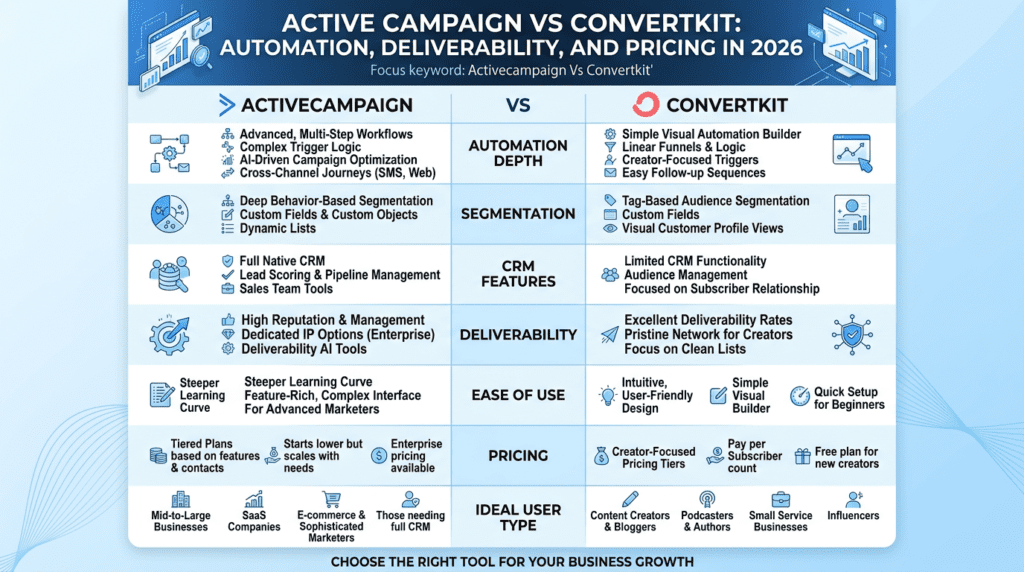
Not Ideal For: ActiveCampaign is not a great match if you want something you can fully learn in an afternoon. ConvertKit is not the best fit if you expect deep CRM control, lead scoring, or layered marketing automation across many audience types.
Bottom Line: If your business is growing into more complex automation, ActiveCampaign usually gives you more room to scale. If your main goal is to build an email list, send campaigns, and keep the process easy, ConvertKit is often the cleaner choice.
ActiveCampaign vs ConvertKit: Automation, Segmentation, and Marketing Automation Compared
ActiveCampaign automation depth and advanced marketing automation
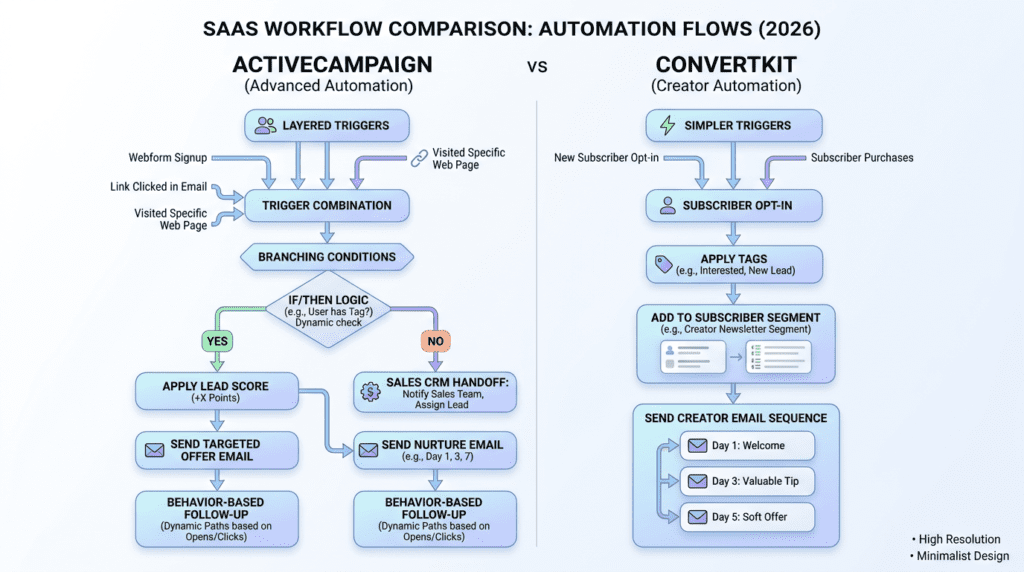
ActiveCampaign is the stronger automation tool if you need more than basic welcome emails and one-off campaigns. It supports layered triggers, branching conditions, lead scoring, site actions, custom fields, and CRM-linked workflows that can reflect what a subscriber actually does over time. That matters once your email marketing starts touching sales, onboarding, renewals, or abandoned cart follow-up.
The downside is that this level of control can create real operational drag. A well-built automation is useful. A poorly built one becomes a maintenance job. Teams often underestimate the time it takes to keep logic clean, test edge cases, and make sure one automation isn’t fighting another. ActiveCampaign offers a lot, but you do have to manage it like a system, not a newsletter app. For businesses that need advanced automation, that’s usually worth it. For smaller teams, it can feel like more machine than they need.
ConvertKit automation for creators and simpler workflows
ConvertKit keeps automation easier to understand, which is part of why creators like it. You can build an email sequence, add a trigger, tag a subscriber, and move people through a few clear paths without feeling buried in settings. That simplicity matters when you’re juggling content, launches, and audience growth at the same time.
It’s especially practical for a creator who wants to send a free lead magnet, follow with a short sequence, and then route buyers into a different email sequence. You don’t need a heavy setup to do that. ConvertKit’s automation feels less intimidating, and that tends to reduce mistakes early on. The trade-off is that once your business becomes more segmented or sales-driven, the system can start to feel a little flat compared with ActiveCampaign.
Segmentation differences that affect targeting and follow-up
Segmentation is one of the biggest differences between convertkit vs activecampaign. ActiveCampaign gives you more ways to slice your subscriber list by behavior, tags, custom fields, site visits, purchase history, and scoring. That makes follow-up more precise. If someone clicks a sales email but doesn’t buy, you can route them differently from a subscriber who only reads newsletters.
ConvertKit uses tags and segments well enough for many creators, but it’s not as deep when your list gets complicated. That’s fine if you’re mostly separating buyers from non-buyers or webinar registrants from casual readers. It becomes more limiting when you want layered audience logic across multiple products, offers, or stages of the customer journey.
Which platform handles email automation better for growing businesses
If growth means more products, more lead sources, and more sales paths, ActiveCampaign usually handles email automation better. It’s built for businesses that need marketing automation and CRM-style follow-up to work together. That includes SaaS teams, agencies, coaches with a sales process, and ecommerce brands that want behavior-based messaging.
ConvertKit handles email automation well for simpler business models. It’s effective for creators who want to build an audience, sell digital products, and keep the workflow easy to maintain. The honest divide is simple: ActiveCampaign wins on depth, ConvertKit wins on speed. If your automation needs are expected to get more complex in the next 12 months, ActiveCampaign is usually the safer long-term bet.
ActiveCampaign vs ConvertKit: Ease of Use and Setup Experience

ConvertKit ease of use for beginners and solo creators
ConvertKit is easier to live with on a daily basis. The interface feels lighter, and most core tasks are straightforward: create a form, build a landing page, send a campaign, then connect an automation. That matters when you’re a solo creator or small team and don’t have time to learn a complicated system.
The simplicity isn’t just about looks. It reduces decision fatigue. You’re less likely to spend an hour choosing between five near-identical settings. For many users, that means faster launch time and fewer broken workflows. The trade-off is that the cleaner experience can hide limits until you try to do something more advanced, such as detailed audience branching or nuanced reporting.
ActiveCampaign learning curve for teams and advanced workflows
ActiveCampaign asks for more up front. The interface is more involved, and setup usually takes longer because you’re making more decisions along the way. That’s not a flaw if your business needs structure. It is a problem if you want quick wins with minimal training.
Teams often feel the learning curve most when building their first automation or trying to connect the CRM, tags, and segmentation rules into one workflow. Once set up, the platform can be very strong. But the early phase is real work. If you’ve ever had a marketing tool that looked simple until you needed to scale it, ActiveCampaign will feel familiar. It rewards patience and planning more than casual use.
Landing page tools and basic setup differences
Both platforms offer landing page tools, but neither is trying to replace a dedicated website builder. ConvertKit’s landing page builder is usually the faster path if you want to launch a lead magnet or simple signup page without extra steps. The templates are clean, and the setup stays focused on conversion rather than design control.
ActiveCampaign also offers landing page capabilities, but they tend to matter more as part of a broader system than as a standalone page builder. If your main priority is to build an email list quickly, ConvertKit is usually less cumbersome. If the landing page is just one piece of a larger automation and sales process, ActiveCampaign can fit better, even if it takes more configuration.
Where new users typically slow down with each platform
With ConvertKit, users usually slow down when they want more control than the default workflow comfortably gives them. That can happen with segmentation, advanced automation branching, or more complex email and automation reporting. It’s not that the platform is hard. It’s that it starts to feel limited when the business outgrows a creator-first setup.
With ActiveCampaign, the slowdown usually happens before the first real campaign goes out. New users may get stuck deciding how to organize tags, contacts, lists, and automation triggers. Some of that is setup discipline, but some of it is simply the cost of flexibility. If your team doesn’t have a clear email strategy, ActiveCampaign can expose that fast. ConvertKit tends to hide the mess longer, which is one reason it feels easier at the beginning.
ActiveCampaign vs ConvertKit: Pricing, Free Plan, and Value for Money
ActiveCampaign pricing structure and what you pay for as you scale
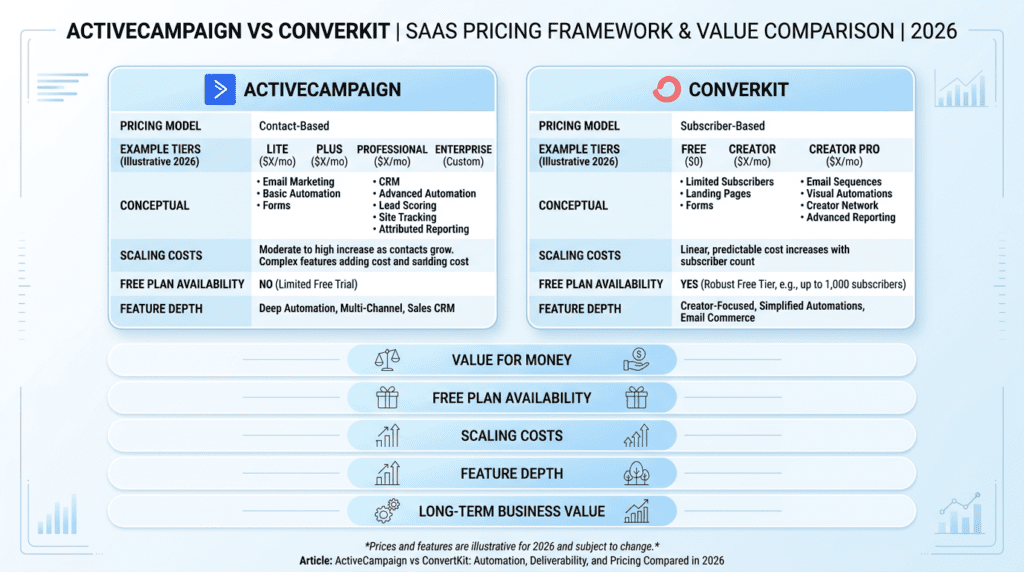
ActiveCampaign’s pricing usually starts in the low double digits, but the number that matters is how fast it climbs. The entry plan looks manageable when your list is small. Once you need more contacts, more seats, or stronger automation, the monthly bill rises fast. That’s the trade-off with ActiveCampaign: you’re paying for depth, not just sending email campaigns.
The bigger issue is that the value doesn’t show up evenly across every business stage. A solo operator may not use the full stack of automation, lead scoring, crm, and reporting features right away. But a team running segmented follow-ups, sales handoffs, and multi-step email sequence logic can get real leverage from it. In other words, ActiveCampaign offers more room to grow, but you’ll feel the cost as soon as your email list expands.
ConvertKit free plan and paid plan value
ConvertKit is easier to justify early because it gives creators a cleaner starting point. It offers a free plan, which is a real advantage if you’re still building an audience and only need basic email marketing, forms, and simple automation. Paid plans typically start lower than many full-service competitors, and that keeps the platform attractive for bloggers, course creators, and solo businesses that don’t need complex workflows.
The paid value is mostly about keeping things simple without losing the essentials. You can build an email list, send unlimited email on higher tiers, and set up automation without wrestling with a heavy interface. The catch is that ConvertKit’s lower-friction experience comes with fewer advanced controls than ActiveCampaign. If you outgrow basic email marketing automation, you may start noticing the ceiling sooner than expected.
Hidden pricing trade-offs in Kit vs ActiveCampaign
The headline price rarely tells the full story. With ActiveCampaign, you may need a higher plan to unlock the automation tool, CRM features, or reporting depth that actually make the platform worthwhile. That means the real cost isn’t just the starting monthly fee; it’s the plan level required to match your workflow. Teams often discover this after setup, when a feature they assumed was standard sits behind a higher tier.
ConvertKit has its own trade-off. It looks simpler and cheaper at the start, but the price of that simplicity is fewer operational layers. If you need detailed segmentation, lead scoring, or sales follow-up built into the same marketing platform, you may end up paying later through workarounds, extra tools, or lost efficiency. A creator might be fine with that. A service business with multiple offers and handoffs often won’t be.
Which platform offers better long-term value for different business stages
For early-stage creators, ConvertKit usually wins on value because the free plan and lower-cost entry make it easier to stay lean. If you’re building an audience from zero and want a clean email marketing tool, it gives you enough structure without overbuying. That matters when revenue is still uneven.
For scaling businesses, ActiveCampaign tends to deliver better long-term value if you’ll actually use the extra automation and crm functionality. A 2-person agency, SaaS company, or online store with segmented journeys can justify the higher pricing because it replaces patchwork systems. The practical answer is simple: choose the platform that matches the next 12 months of operations, not just this month’s budget.
ActiveCampaign vs ConvertKit: Deliverability, Reporting Features, and Performance
Deliverability expectations for ActiveCampaign and ConvertKit
Both platforms generally perform well on deliverability, which is what you want from a serious email service provider. Neither one is famous for spammy behavior or unstable sending. In day-to-day use, most problems come from poor list hygiene, weak subject lines, or sending to cold subscribers too aggressively, not from the platform itself.
ConvertKit often feels slightly more creator-friendly in this area because its workflows are simple and its sending patterns tend to stay straightforward. ActiveCampaign can also perform very well, but its larger feature set means users sometimes create overly complex automation paths that make it harder to diagnose issues. If an open rate dips or a click rate falls, the platform is rarely the whole story. The real question is whether your list, segmentation, and content are healthy.
Reporting features that matter for tracking email performance
Reporting is where ActiveCampaign starts to separate itself. It gives you more visibility into email campaign behavior, automation performance, and contact movement across the system. If you need to know which trigger generated the most conversions, where subscribers are dropping off, or which sequence is producing the strongest click pattern, that depth helps.
ConvertKit keeps reporting simpler. That’s fine if your main goal is to understand opens, clicks, and basic subscriber behavior without getting buried in data. For many creators, that’s enough. But once you’re running multiple offers or testing different email template styles, simpler reporting can feel limiting. You can see the results, but not always the deeper path that caused them.
ActiveCampaign and Kit: what performance metrics each platform emphasizes
ActiveCampaign focuses more on operational performance. It’s built to show how contacts move through automation, how segments respond, and where your crm or follow-up system is working. That’s useful for businesses where email marketing is tied to revenue flow, not just content delivery. You can track more than an open rate and make smarter adjustments.
ConvertKit emphasizes creator performance. Its metrics are more about audience growth, subscriber engagement, and keeping your email sequence readable and manageable. That’s not a weakness if your business is built around content, launches, or lead magnets. It just means the platform is optimized for a lighter kind of measurement. If you need email and automation reporting that supports deeper sales analysis, ActiveCampaign has the edge.
When better reporting matters more than simpler workflows
Better reporting becomes important when mistakes are expensive. If you’re sending to 10,000 subscribers and a broken automation costs you a launch week, you need to see exactly where the problem started. If your team is splitting traffic across several landing page offers or running nurture paths for different products, a stronger reporting layer saves time and money.
If you only send a newsletter and a basic welcome series, simpler workflows may be more valuable than detailed dashboards. That’s the cleaner fit for many creators. But once your business depends on tracking behavior across offers, channels, and sales stages, ActiveCampaign beats ConvertKit on visibility.
ActiveCampaign vs ConvertKit: CRM, Sales Follow-Up, and Audience Management
ActiveCampaign CRM strengths for lead tracking and sales pipelines
This is where ActiveCampaign pulls ahead hard. Its crm is built for businesses that need to track leads, manage follow-up, and move contacts through a real pipeline. You can tag behavior, assign stages, create lead scoring rules, and set automation around sales outcomes. That makes it far more than an email marketing platform.
For a service business, that matters fast. A lead fills out a form, gets added to a segment, receives a tailored sequence, and then moves into a sales pipeline once they click a key email or book a call. ActiveCampaign also integrates that movement into the broader automation flow, which helps teams keep outreach consistent. It’s not just about sending messages. It’s about managing the next step.
ConvertKit and ActiveCampaign differences in contact management
ConvertKit keeps contact management clean and creator-focused. You can use tags, custom fields, and subscriber groups to organize people without overcomplicating the system. That works well when you’re separating buyers from webinar attendees or segmenting by interest before a launch.
ActiveCampaign goes further because it treats contact data as part of the sales process, not just the email list. You can build deeper logic around behavior, source, deal stage, and engagement history. That extra structure helps when your email subscribers are also sales leads. The downside is obvious: more power means more setup, more decisions, and more chances to misconfigure a trigger.
When CRM functionality becomes a deciding factor
CRM becomes the deciding factor once your follow-up has financial consequences. If missing a lead means losing a $2,000 project or a monthly SaaS subscription, basic tagging won’t cut it. You need pipeline visibility, task assignment, and automation that supports handoffs. That’s where ActiveCampaign’s stronger stack starts to make sense.
If your business is mainly content-driven, CRM may be unnecessary overhead. A creator selling digital products or courses often just needs clear audience segments and a few well-timed messages. In that case, ConvertKit keeps things lighter. The key is to know whether you’re managing an audience or managing opportunities.
Best fit for creators, service businesses, and growing teams
Creators usually do better with ConvertKit because it keeps the workflow simple and the editing process light. You can build an email list, send a launch sequence, and stay organized without turning the system into a project. That’s valuable when your real work is content, not administration.
Service businesses and growing teams usually prefer ActiveCampaign because the crm and automation features support sales follow-up. Agencies, consultants, and SaaS teams often need layered contacts, internal visibility, and more advanced marketing automation. If your process involves lead qualification, handoff, or repeated follow-up, ActiveCampaign is the better fit. If your process is mostly publish, nurture, and sell, ConvertKit is usually enough.
ActiveCampaign vs ConvertKit: Landing Page, Forms, and List-Building Tools
ConvertKit landing page and form tools for creators
ConvertKit keeps its landing page and form tools simple, which is exactly why many creators like it. You can set up a basic landing page, offer a lead magnet, and start collecting subscribers without touching a separate builder. The templates are straightforward, and the setup process is fast enough that most users can get live in under an hour.
That simplicity helps when you’re trying to build an email list without slowing down your content schedule. A blogger can launch a free guide opt-in. A coach can publish a webinar registration page. The trade-off is that the design options are limited, so if your brand needs advanced email design control or a polished sales funnel look, ConvertKit may feel sparse.
ActiveCampaign landing page options and lead capture flexibility
ActiveCampaign also offers landing page and form tools, but its strength is flexibility, not beauty. You can create lead capture paths that connect directly into automation, segmentation, and follow-up logic. That makes it useful when a landing page is only the first step in a larger system.
The downside is that the setup can feel more operational than creative. If you want a fast, simple free email capture page, the process may feel heavier than it should. But if your lead capture needs to trigger multiple actions based on source, interest, or behavior, ActiveCampaign gives you more control. It’s the better option for teams that care about what happens after the click, not just the form submission.
Which platform is better for simple audience growth
For simple audience growth, ConvertKit is the easier pick. It’s built to help creators collect email subscribers with less friction. The interface is lighter, the forms are easy to deploy, and the workflow usually stays manageable even if you’re new to email marketing software.
ActiveCampaign is better when audience growth is tied to a larger marketing machine. If every form submission needs to enter a different email sequence, sales pipeline, or segment, its structure starts to pay off. But for plain list growth, many users don’t need that level of complexity. They need speed, not layers.
Where the built-in tools start to feel limiting
The limits show up when your business starts asking for more than basic capture. If you want advanced automation tied to forms, stronger customization, or a more detailed handoff into crm workflows, ConvertKit can feel too narrow. That’s especially true when multiple offers or teams are involved.
ActiveCampaign’s built-in tools can also feel limiting, just in a different way. They’re powerful enough for many use cases, but some users still prefer external landing page builders for better design control. So the question isn’t which platform has built-in tools. It’s whether those tools are enough for your actual workflow.
ActiveCampaign vs ConvertKit: Key Trade-Offs You Need to Know
When people compare Activecampaign Vs Convertkit, they usually focus on feature checklists. That’s the wrong lens. The real question is what kind of email marketing pressure you expect six months from now, not just what feels easy this week.
One platform is built to stay simple while you build an audience. The other is built to handle more moving parts, more segmentation, and more automation decisions without falling apart. That difference sounds small on paper. In practice, it changes how fast you can grow, how much time you spend inside the app, and how annoyed you get when your workflows start to branch.
Kit vs ActiveCampaign for simplicity versus power
ConvertKit, now often called Kit, keeps the experience cleaner. That matters if you want to publish, tag subscribers, send an email sequence, and move on. You don’t need a lot of setup to get a working system. For a solo creator or a small newsletter business, that simplicity can be a real advantage because it reduces setup mistakes and keeps the workflow from turning into a half-finished operations project.
ActiveCampaign gives you more control, but that control comes with more decisions. You’re working with deeper segmentation, more advanced automation logic, and a fuller CRM layer. That’s useful when your list starts to behave like different audiences instead of one audience. It’s also where some teams start to feel the tool getting heavier. If you only need a simple welcome series and a few broadcasts, ActiveCampaign can feel like more machine than you asked for.
Automation flexibility versus ease of use
This is the biggest trade-off in the ActiveCampaign and ConvertKit debate. ConvertKit automation is easier to understand quickly. You can build a solid email sequence, set a trigger, and keep things moving without a lot of friction. For many creators, that’s enough. They care more about sending consistently than building a large branching system.
ActiveCampaign is stronger when the logic gets messy. If you want behavior-based follow-up, different paths for different subscribers, lead scoring, sales handoff steps, or multi-step marketing automation that changes based on clicks and tags, it holds up better. That’s useful, but it’s not always fast. Teams often underestimate the time it takes to plan the workflow before they even click into the builder. A good automation tool only looks simple once the structure is already thought through.
Pricing versus feature depth
Pricing is where the comparison gets more practical. ConvertKit tends to make sense for smaller lists and creator-led businesses because you can start with simpler needs and avoid paying for features you may not use yet. It also has a free plan, which helps if you’re building an email list from scratch and want room to test the workflow before committing.
ActiveCampaign usually asks for more money, but it’s not just charging for the logo. You’re paying for stronger automation, better segmentation, CRM functionality, and more serious workflow depth. That’s fair if those features are part of your day-to-day. If they’re not, the monthly bill can feel high pretty fast. The hidden cost is not only price; it’s operational overhead. A team that doesn’t need the complexity will spend time managing a system that’s more capable than necessary.
What changes as your email marketing needs grow
Growth changes the value equation. At 500 subscribers, a simple platform can feel perfect. At 5,000 or 50,000 subscribers, small gaps become annoying. You start wanting better contact rules, cleaner audience splits, more advanced email automation, and clearer reporting features so you can see what’s actually working.
That’s where ActiveCampaign often pulls ahead. It scales better for businesses that run multiple offers, multiple customer types, or multiple follow-up paths. ConvertKit can still work well at scale, but it’s strongest when your content engine is the main business engine. If your email list is mostly there to support launches, paid products, or creator-style newsletters, Kit stays comfortable. If your subscribers need more lifecycle logic and more personalized follow-up, ActiveCampaign becomes harder to ignore.
Who Should Choose ActiveCampaign vs ConvertKit
ConvertKit is usually the cleaner fit for creators who want to build an audience without turning their workflow into a sales ops system. Bloggers, newsletter writers, course creators, and solo coaches often just need a reliable email service provider with simple automation, basic segmentation, and landing page tools that don’t take all afternoon to set up. That’s where Kit feels natural.
If your business is built around content, launches, and direct communication, ConvertKit keeps the moving parts manageable. You can send a welcome sequence, tag subscribers based on interests, and segment by behavior without getting buried in settings. The platform is especially attractive if you want to start lean, keep your email marketing simple, and avoid paying for a pile of features you won’t touch for months.
Best fit for ecommerce, agencies, and service businesses
ActiveCampaign is usually the stronger choice for businesses that need more than audience broadcasting. Ecommerce brands, agencies, consultants, and service businesses often need automation tied to purchases, lead forms, sales stages, and follow-up timing. ActiveCampaign handles that kind of operational detail better because it connects email marketing automation to a broader customer journey.
A service business might use lead scoring, custom fields, and CRM pipelines to separate casual inquiries from serious prospects. An ecommerce brand may want behavior-based automation that reacts to clicks, cart actions, or product interest. ActiveCampaign gives you more room to build those systems. It’s not just an email marketing tool; it can act like the nervous system around your sales process. That said, if your team is small and your process is still evolving, the setup can take longer than expected.
When ConvertKit makes more sense than ActiveCampaign
Choose ConvertKit if you care more about speed and clarity than deep system design. It’s a better fit when your email marketing revolves around a few core automation paths, a newsletter, and a straightforward subscriber journey. You’ll likely appreciate the lower friction if you don’t want to spend time configuring a CRM or mapping out complex rules for every subscriber action.
ConvertKit also makes sense when your list is still early-stage. If you’re trying to build an email list, sell a digital product, and keep your workflow simple, its lighter structure helps. You don’t need a giant marketing platform to get momentum. Sometimes a clean email campaign system is enough, and adding more power too early just creates friction.
When ActiveCampaign is the smarter long-term choice
ActiveCampaign is the smarter long-term choice when your business is already acting like a system. If you’re running separate funnels, managing sales follow-up, tracking lead quality, or coordinating marketing strategies across multiple offers, the extra depth starts to pay off. The platform is built for businesses that expect complexity, not just volume.
It’s also the better pick if your team wants one place for email automation, segmentation, lead scoring, and basic CRM work. That combination helps once you’re no longer guessing which subscriber should get which message. If you know you’ll need advanced automation in the next 6 to 12 months, starting with ActiveCampaign may save you the pain of migrating later. Just be honest about whether you’ll actually use the power you’re paying for.
ActiveCampaign vs ConvertKit: Final Recommendation

Best overall platform for most commercial use cases
For most commercial use cases, ActiveCampaign is the stronger overall platform. It offers more depth in automation, better segmentation, and more room to support growth without forcing you into a second tool too early. If your business depends on lifecycle follow-up, lead qualification, or multi-step sales journeys, it usually delivers better long-term value even if the monthly pricing is higher.
That said, “best overall” doesn’t mean best for everyone. A creator with a newsletter and one or two offers may get more practical value from ConvertKit because the workflow stays lighter. The right choice depends less on feature count and more on how complicated your email marketing actually is.
The safer choice for beginners
ConvertKit is the safer choice for beginners. It reduces the chance of getting stuck in setup, and that matters more than people admit. New users often don’t fail because the platform is weak; they fail because they overbuild. Kit helps prevent that by keeping the core experience simple and focused.
If you want a free plan to test the waters, create simple forms, and send a few broadcasts without wrestling with too many options, ConvertKit is easier to live with. It’s not as deep as ActiveCampaign, but for many first-time users, that’s exactly the point.
The better choice for advanced automation needs
ActiveCampaign is the better choice for advanced automation needs. Once your email marketing depends on behavior tracking, branching logic, lead scoring, and sales follow-up, the platform starts to justify itself. It’s built for businesses that need more than a newsletter engine.
The trade-off is that you’ll spend more time learning the system and maintaining it. That’s normal. More power usually means more setup, more testing, and more room for mistakes. If your team can handle that, ActiveCampaign beats lighter tools by a wide margin.
Final verdict on Activecampaign Vs Convertkit
The final verdict on Activecampaign Vs Convertkit is simple: choose ConvertKit if you want an easier, creator-friendly system, and choose ActiveCampaign if you need stronger automation, CRM support, and deeper control as you scale. If you’re still mostly building an audience, Kit is usually enough. If your email program is tied to revenue ops, ActiveCampaign is the better long-term bet.
Frequently Asked Questions About Activecampaign Vs Convertkit
Is Activecampaign Vs Convertkit better for email automation?
ActiveCampaign is better for complex email automation. It handles deeper branching, more segmentation, and more behavior-based triggers than ConvertKit.
ConvertKit is still strong for simpler email automation like welcome sequences, basic tagging, and launch follow-up. If you only need a few clear workflows, Kit is often easier to manage.
Does ConvertKit have a free plan worth using?
Yes, ConvertKit has a free plan that’s worth using for early audience building. It gives new users a low-risk way to test forms, send email, and start collecting subscribers.
It’s best for creators who want to build momentum before paying for a larger plan. If you need advanced automation or CRM features right away, you’ll outgrow it faster.
Is ActiveCampaign harder to use than ConvertKit?
Yes, ActiveCampaign is harder to use than ConvertKit. The platform has a steeper learning curve because it offers more automation depth, more segmentation options, and more advanced contact management.
That extra complexity is the price of flexibility. For teams that need it, the setup effort is worth it. For beginners, it can feel heavier than necessary.
Which platform has better deliverability and reporting features?
Both platforms are generally strong on deliverability, but ActiveCampaign tends to offer deeper reporting features. It gives you more ways to analyze engagement, segment performance, and track campaign behavior over time.
ConvertKit keeps reporting simpler, which some creators prefer. If you want straightforward performance tracking, it’s enough. If you need more email and automation reporting detail, ActiveCampaign has the edge.
Can you switch from ConvertKit to ActiveCampaign later?
Yes, you can switch from ConvertKit to ActiveCampaign later. Most businesses can move subscribers, tags, and email sequences with some planning.
The catch is that migration gets more annoying once your workflows are large. If you expect to need advanced automation soon, starting with ActiveCampaign can save time later.