
Is your email marketing hitting a wall? A high email bounce rate isn’t just a nuisance; it’s a critical threat to your sender reputation and overall email deliverability. When too many of your messages fail to reach the inbox, internet service providers (ISPs) start seeing you as a less trustworthy sender, which can lead to your legitimate emails landing in spam folders or being blocked entirely. This guide provides a step-by-step process for diagnosing and fixing the root causes of a high email bounce rate, helping you protect your sender reputation and ensure your campaigns actually reach your subscribers.
Many marketers focus heavily on growing their email list, but often overlook the crucial step of maintaining its health. The truth is, a high email bounce rate isn’t always about invalid email addresses; it’s often a symptom of deeper issues with your list hygiene, acquisition methods, or even your sending practices. Understanding the difference between a hard bounce (permanent delivery failure) and a soft bounce (temporary issue) is the first step, but the real challenge lies in identifying and addressing the underlying problems that cause these bounces in the first place.
We will cover immediate actions you can take to protect your sender reputation and long-term strategies to maintain a healthy, deliverable email list.
Part 2: Diagnosing the Root Cause of Your Bounce Issues
Once the immediate crisis is contained, you need to understand *why* it happened to prevent it from recurring.
How Did Bad Emails Get on Your List? Investigating List Hygiene
After you’ve removed hard bounces and paused problematic campaigns, the next step is to figure out how those bad email addresses got onto your list in the first place. This investigation is crucial for long-term email list hygiene and maintaining a healthy sender reputation. Often, the problem isn’t just one thing, but a combination of factors.
- Purchased or Rented Lists: This is almost always the number one cause of high bounce rates and deliverability issues. When you buy an email list, you’re acquiring addresses without consent, many of which are likely old, invalid, or spam traps. Mailbox providers quickly flag these lists, leading to blacklisting and severe damage to your email sender reputation. Never buy or rent email lists.
- Outdated or “Stale” Email Lists: Even legitimate lists can go bad over time. People change jobs, abandon old email accounts, or simply stop checking certain inboxes. If you haven’t engaged a segment of your list in a long time – say, six months to a year – it’s highly probable that a significant portion of those email addresses are no longer active. Sending to these stale addresses will inevitably increase your bounce rate.
- Typos and Fake Emails from Signup Forms: Not all bad email addresses are malicious; some are just mistakes. A user might accidentally type “gamil.com” instead of “gmail.com” or “yaho.com” instead of “yahoo.com.” Others might intentionally enter fake email addresses to access gated content without subscribing. This is where the impact of single vs. double opt-in becomes clear. A single opt-in process lets anyone subscribe immediately, typos and all. A double opt-in requires subscribers to confirm their email address by clicking a link in an email, effectively filtering out invalid addresses and those who entered fake information.
- Issues with a Recent List Import: Sometimes, the problem isn’t the source of the emails but how they were handled. If you recently imported a large list of subscribers, check for formatting errors or data corruption during the import process. Incorrect column mapping, encoding issues, or even hidden characters can render valid email addresses unusable, leading to unexpected bounces. I once had a client who imported a CSV file where the email column was accidentally shifted, causing thousands of phone numbers to be treated as email addresses. The resulting bounce rate was catastrophic until we caught the error.
> Tactical Takeaway: Implement a double opt-in process for all new subscribers immediately. This single step is one of the most effective ways to prevent invalid or fake email addresses from ever reaching your active list.
Are You Authenticating Your Domain Correctly? (SPF, DKIM, DMARC)
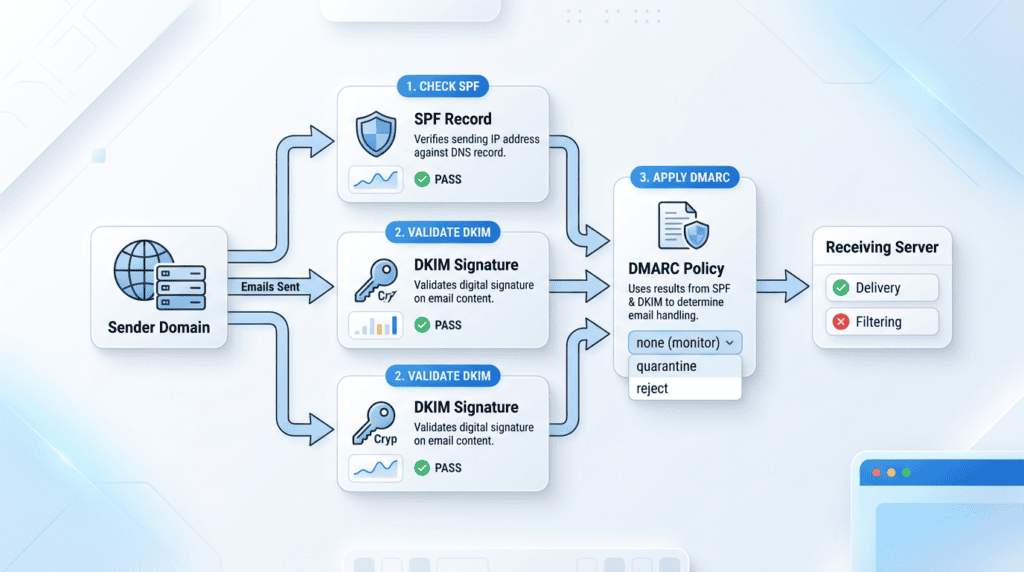
Email authentication protocols are like digital passports for your emails. They tell receiving servers that your emails are legitimate and truly coming from your domain, not from a spammer trying to impersonate you. Without proper authentication, even perfectly clean email lists can suffer from poor deliverability, with messages landing in spam folders or being rejected outright.
What is Email Authentication?
In simple terms, it’s a set of technical standards that verify your identity as an email sender. These standards help prevent phishing, spoofing, and other forms of email fraud. When your domain is authenticated, it builds trust with internet service providers (ISPs) and email service providers (ESPs), which directly impacts your inbox placement rate.
- SPF (Sender Policy Framework): This record, added to your domain’s DNS, specifies which mail servers are authorized to send email on behalf of your domain. Think of it as a bouncer at a club, checking a list of approved guests. If an email comes from a server not on your SPF list, it’s immediately suspicious.
- DKIM (DomainKeys Identified Mail): DKIM adds a digital signature to your outgoing emails. This signature acts like a tamper-evident seal. Receiving servers can check this signature to ensure the email hasn’t been altered in transit and that it genuinely originated from your domain. It protects against email tampering and ensures message integrity.
- DMARC (Domain-based Message Authentication, Reporting & Conformance): DMARC builds on SPF and DKIM. It tells receiving servers what to do if an email fails SPF or DKIM checks (e.g., quarantine it, reject it, or deliver it to the inbox but report the failure). It also provides reporting back to you, giving insights into who might be trying to send emails using your domain without authorization. Implementing DMARC is a critical step for advanced email security and deliverability.
- How to Check Your Authentication Status: You don’t need to be a tech wizard to check if your domain is properly authenticated. Free online tools like MXToolbox (mxtoolbox.com) allow you to enter your domain name and quickly see if your SPF, DKIM, and DMARC records are set up correctly. If any are missing or misconfigured, your email service provider (ESP) should have guides on how to add or fix them.
Is Your Sending Reputation Under Review?
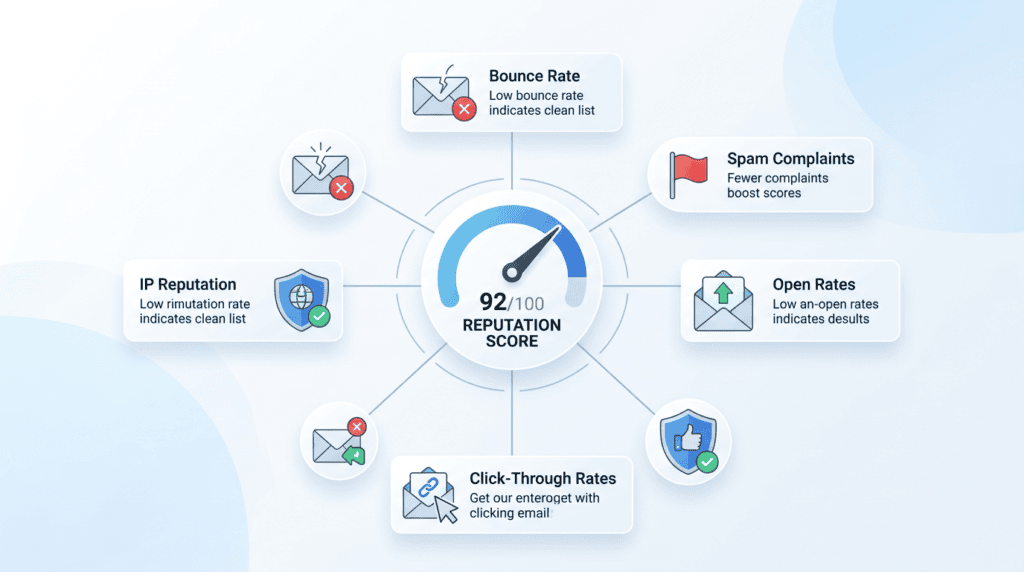
Your sender reputation is a score that mailbox providers assign to your sending IP address and domain. It’s like a credit score, but for email. A good reputation means your emails are more likely to reach the inbox; a poor one means they’ll end up in spam or be blocked entirely. A high email bounce rate is a major red flag that can quickly tank your sender score.
- Understanding Sender Score and IP Reputation: Mailbox providers like Gmail, Outlook, and Yahoo track everything you do as a sender. They look at your bounce rate, spam complaint rate, open rates, click rates, and how often your emails are marked as spam. All these factors contribute to your sender score and the reputation of your IP address (especially if you’re on a shared IP address). A dedicated IP address gives you more control, but also more responsibility for maintaining its reputation.
- Checking Your Sender Score: Tools like Sender Score by Validity (senderscore.org) provide a numerical score (0-100) for your IP address, giving you an idea of how mailbox providers view your sending practices. While not every provider uses this exact score, it’s a good indicator. Other tools might offer similar insights into your domain reputation. Regularly monitoring these metrics is key to preventing email deliverability issues.
- The Link Between High Bounce Rates and the Spam Folder: When your bounce rate climbs, it signals to ISPs that you’re sending to low-quality or unverified email addresses. This behavior is often associated with spammers. As a result, ISPs start to filter your emails more aggressively. Even if an email doesn’t hard bounce, it might be diverted to the spam folder, leading to low open rates and further damaging your sender reputation. It’s a vicious cycle where one problem directly feeds into another, making it harder to reach the inbox.
Part 3: Long-Term Strategies to Prevent High Bounce Rates
Implement these processes to maintain a healthy list and consistently low bounce rates.
Strategy 1: Implement Double Opt-In for All New Subscribers
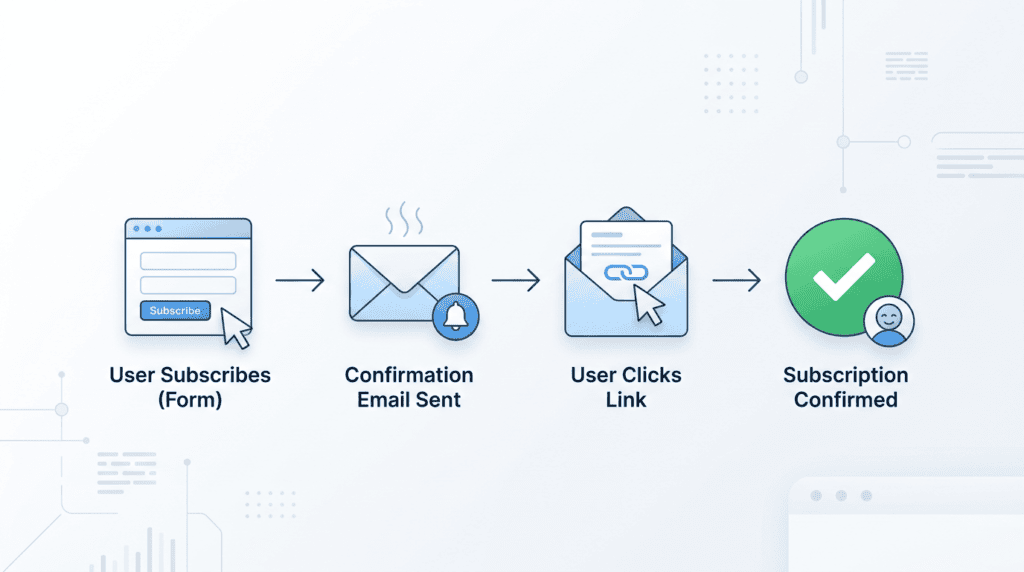
Double opt-in is a two-step process where a new subscriber not only fills out your signup form but also clicks a confirmation link in an email sent to their address. This extra step ensures that the email address provided is real, valid, and that the person signing up genuinely wants to receive your communications. It’s a powerful way to prevent fake or mistyped email addresses from ever making it onto your active list.
The primary benefit of using a double opt-in process is a significantly cleaner and more engaged subscriber list. You’re guaranteeing that every new contact has actively confirmed their interest, which drastically reduces the chances of hard bounces from invalid addresses. While it might slightly reduce your initial signup numbers, the quality of your list and your email deliverability will improve dramatically. Most email service providers (ESPs) offer a straightforward way to enable double opt-in within their settings, often found under form or list settings. I’ve seen firsthand how switching to double opt-in can instantly cut down on spam complaints and improve overall inbox placement.
Strategy 2: Use a Real-Time Email Verification Service

Even with double opt-in, some invalid addresses can slip through, especially if you’re importing old lists or running specific campaigns. A real-time email verification service works by checking the validity of an email address at the exact moment it’s entered, typically on your signup form or during a list import. These services use APIs (Application Programming Interfaces) to connect to your website or ESP, instantly flagging or rejecting addresses that are known to be invalid, temporary, or spam traps.
Tools like ZeroBounce or NeverBounce are popular choices in this space. They can identify invalid email domains, disposable addresses, and even catch common typos before the data ever hits your database. The return on investment (ROI) for these services is clear: you prevent bad emails from ever joining your list, saving you money on sending to non-existent addresses and protecting your sender reputation. Many services offer pay-as-you-go pricing, often starting around $0.008 per verification, making it an affordable preventative measure.
Strategy 3: Adopt a Regular List Cleaning Schedule
“List cleaning” means periodically reviewing and removing unengaged or invalid contacts from your email list. This isn’t a one-time fix but an ongoing process vital for maintaining a healthy email list hygiene. How often you should clean your list depends on your sending frequency and list growth, but a good rule of thumb is quarterly for active lists, or at least twice a year for less frequent senders.
Before outright removing contacts, consider running a re-engagement campaign. This involves sending a series of emails to inactive subscribers, offering them a chance to confirm their interest or update their preferences. If they don’t respond, it’s time to implement a “sunset policy,” which means removing them from your active sending list. This might feel counterintuitive, but purging inactive email addresses improves your overall engagement metrics and reduces the likelihood of future bounces.
> Critical Warning: Regularly removing unengaged subscribers, even if they never bounced, is crucial. These contacts often become future hard bounces or spam complaints, silently eroding your sender reputation.
Strategy 4: Monitor Your Email Engagement Metrics
While bounce rates are a direct indicator of list health, monitoring your email engagement metrics provides a broader picture of your audience’s interest and helps predict future issues. Look beyond just open rates; pay close attention to click-through rates (CTR) and conversion data. These metrics tell you if your content is resonating and if your subscribers are taking action.
Proactively identify unengaged segments by creating filters for users who haven’t opened or clicked an email in a specific timeframe, say 60 or 90 days. There’s a strong correlation between inactivity and list decay: low engagement predicts future bounces. Subscribers who haven’t opened an email in months are more likely to have abandoned that email address, leading to a hard bounce down the line, or they might mark your emails as spam, damaging your sender reputation. By segmenting email lists and focusing on engaged subscribers, you can prevent email deliverability issues before they escalate.
Honest Take: The Hidden Cost of Ignoring a High Bounce Rate
Ignoring a high email bounce rate is like letting a small leak in your roof go unfixed – it will eventually cause significant damage. The immediate consequence is a snowball effect: the more emails that bounce, the worse your sender reputation becomes. This leads to lower deliverability, meaning your legitimate emails are more likely to land in the spam folder or not be delivered at all, even to active subscribers.
The risks escalate quickly. A consistently high bounce rate can lead to your sending IP address or domain being blacklisted by major Internet Service Providers (ISPs) like Gmail, Outlook, or Yahoo. Once blacklisted, it becomes incredibly difficult to reach anyone’s inbox. Furthermore, your email service provider (ESP) monitors your bounce rates closely. Most ESPs have strict acceptable bounce rate policies (often around 2-5%), and if you consistently exceed these limits, they will suspend or even terminate your account to protect their own sending reputation. I’ve personally seen businesses lose their entire email marketing capabilities overnight because they didn’t take bounce rates seriously.
The financial impact is substantial: wasted marketing spend on campaigns that never reach their audience, lost revenue from missed sales opportunities, and the costly, time-consuming process of trying to rehabilitate a damaged sender reputation.
Final Recommendation: Your 3-Step Bounce Rate Reduction Plan
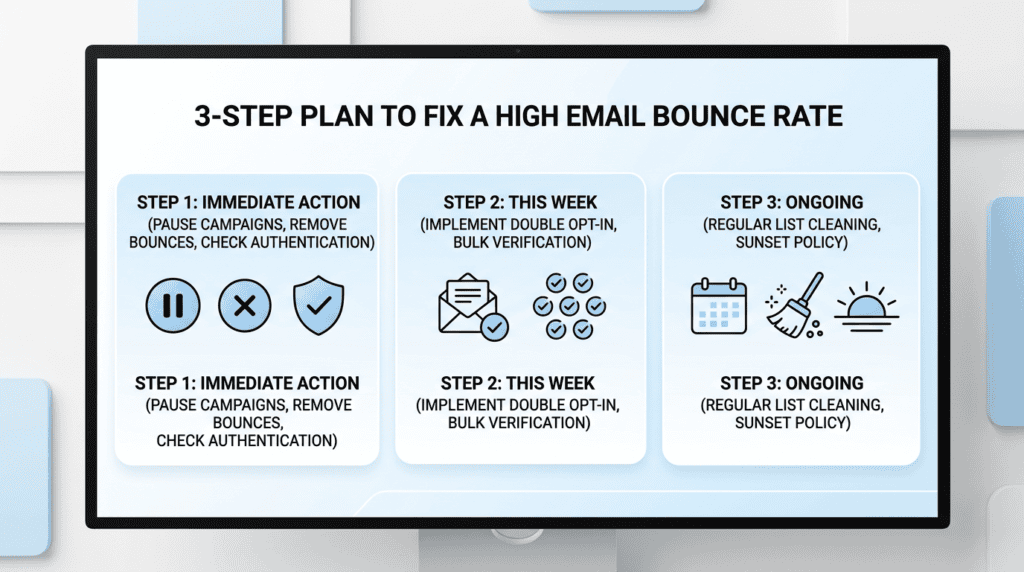
To effectively fix high email bounce rate issues and maintain a healthy email marketing program, you need a clear, actionable plan. Here’s a strategic three-step approach that moves from immediate crisis management to long-term prevention.
- Step 1 (Today): Pause all campaigns, export your bounced list, and remove all hard bounces immediately. Check your domain authentication (SPF, DKIM). This immediate action prevents further damage to your sender reputation and stops your email service provider (ESP) from potentially suspending your account. Ensuring your SPF and DKIM records are correctly set up is a foundational step for email deliverability.
- Step 2 (This Week): Implement double opt-in for all new signups. Run your entire existing list through a bulk email verification service. Double opt-in ensures every new subscriber has a valid email address and genuine consent, drastically reducing future hard bounces. A thorough email list cleaning of your current subscribers using a verification tool will identify and remove invalid email addresses, improving your overall list hygiene.
- Step 3 (Ongoing): Establish a quarterly list cleaning schedule and create a sunset policy for subscribers who are unengaged for more than 6-12 months. Consistent list cleaning and a clear sunset policy are crucial for preventing list decay and maintaining high subscriber engagement levels. This proactive approach helps you avoid future email deliverability issues and keeps your bounce rate low.
Ignoring a high email bounce rate isn’t just about lost emails; it’s a direct threat to your entire email marketing channel. The cost of inaction includes a damaged sender reputation, increased chances of landing in the spam folder, potential blacklisting of your IP address or domain, and even the suspension of your ESP account. This translates to wasted marketing spend and lost revenue from campaigns that never reach their intended audience. Prioritizing email list hygiene is non-negotiable for sustainable growth.
> Your email list is an asset; treat it like one by consistently cleaning and validating it to ensure maximum deliverability and ROI.
I’ve seen too many businesses struggle because they let their email list quality slide. Taking these steps isn’t just about fixing a problem; it’s about building a robust, profitable email marketing foundation.
Frequently Asked Questions (FAQs)
What is considered a high email bounce rate?
A bounce rate above 2% is generally considered high and requires investigation. Anything over 5% is critical and can lead to account suspension by your ESP, as it signals poor email list hygiene. A healthy, clean email list should typically maintain an acceptable bounce rate well below 0.5%.
Can a single campaign cause a high bounce rate?
Yes, absolutely. If you email an old, unengaged list segment or a newly imported list with bad data, that single email marketing campaign can cause a massive spike in your bounce rate and severely damage your overall sender reputation. This is why careful segmentation and list validation are so important.
Will fixing my bounce rate improve my open rates?
Yes, indirectly. A lower bounce rate improves your sender reputation, which tells mailbox providers like Gmail and Outlook that you are a trustworthy sender. This increases the likelihood that your emails will land in the primary inbox instead of the spam or promotions folder, leading to higher visibility and better open rates and overall inbox placement.
Is it safe to use a third-party list cleaning service?
Yes, using a reputable list cleaning service (like ZeroBounce, NeverBounce, or BriteVerify) is a standard and safe industry practice. These services don’t send emails; they use technology to check the validity of each address against mail server records, helping you clean email list data without risk.
How do I fix bounces from a specific domain like Gmail.com or Outlook.com?
If you see a high number of bounces from a single major provider, it’s a strong signal that your sending domain or IP has been flagged or partially blocked by them. The solution is to immediately stop sending to that segment, fix all other hygiene issues (remove hard bounces, ensure proper email authentication protocols like SPF and DKIM), and then consider a slow “warm-up” process to rebuild your sender reputation with that specific provider.