
Email list growth feels stuck? For most online businesses and creators, building a robust email list remains a top priority. It’s your direct line to an engaged audience, a powerful asset for sales, traffic, and long-term business stability. But simply asking visitors to “sign up for my newsletter” often falls flat, leaving valuable traffic on the table.
This is where content upgrades shine. Unlike generic opt-ins, these highly specific bonus resources are offered directly within a relevant blog post, transforming casual readers into loyal subscribers at an impressive rate. They tap into a reader’s immediate interest, providing extra value exactly when they need it most. Many marketers overlook the sheer power of this targeted approach, settling for lower conversion rates with general lead magnets.
We’ll show you how to create and implement highly effective content upgrades that significantly increase your email subscribers. You’ll get practical steps, real-world examples, and learn how to avoid common pitfalls that can hinder your list growth.
What Are Content Upgrades and Why Do They Work So Well?
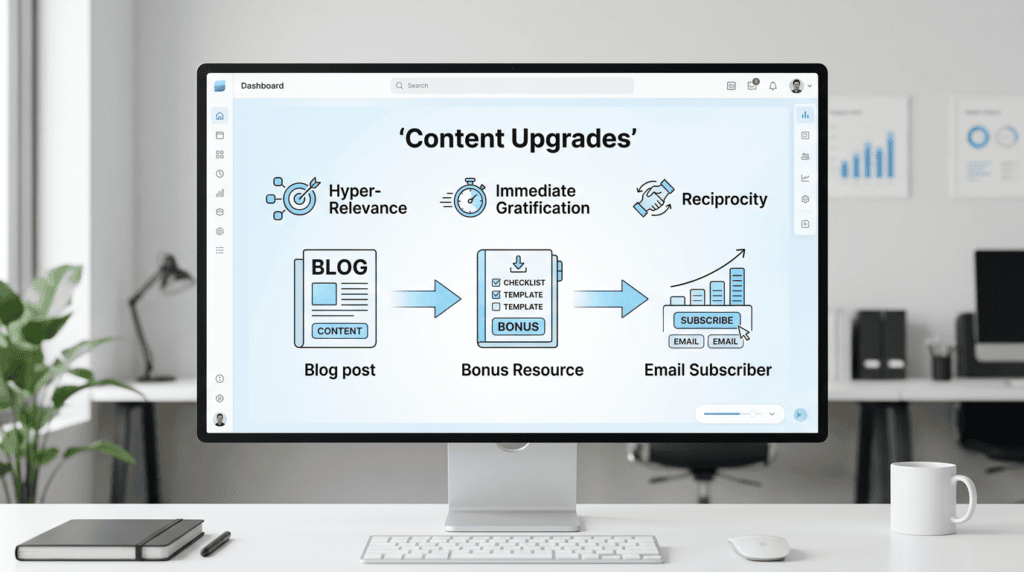
Defining the “Content Upgrade”
A content upgrade is a bonus piece of content that directly enhances or expands upon the specific blog post a reader is currently engaging with. Instead of a general “subscribe to my newsletter” prompt, it’s an offer like “Download the printable checklist from this article” or “Get the editable template mentioned in this guide.” This makes the offer hyper-relevant. When a reader is deep into a topic, offering them a direct, valuable extension of that content is incredibly persuasive. It’s a powerful lead magnet because it provides immediate, tangible value tied to their current interest, making the decision to opt-in much easier.
> The most effective content upgrades aren’t just freebies; they’re direct extensions of the specific content a reader is consuming, making the value proposition undeniable.
The Psychology Behind Their High Conversion Rates
The success of content upgrades stems from several psychological triggers. First, there’s reciprocity: you’re offering something valuable and specific in exchange for an email address. Second, it leverages immediate gratification. The reader doesn’t have to wait for a future newsletter; they get a relevant resource right now. Third, and perhaps most importantly, is hyper-relevance. If someone is reading your blog post about “10 SEO Tips for Beginners,” they’re highly likely to want a “Beginner SEO Checklist PDF” or a “Keyword Research Template.” This deep alignment between the content consumed and the bonus offered drastically boosts the conversion rate. I’ve personally seen blog posts where a generic newsletter signup barely pulled 1% of readers, but adding a specific checklist for that post rocketed opt-ins to over 15%, turning casual traffic into engaged subscribers. This direct connection makes it a far more compelling offer than a general site-wide lead magnet.
How Content Upgrades Differ From Generic Lead Magnets
While both content upgrades and generic lead magnets aim to capture leads and grow your email list, their approach and effectiveness differ significantly. A generic lead magnet (like an ebook on “Digital Marketing Fundamentals” or a general “Ultimate Guide”) is typically offered site-wide or on a dedicated landing page, appealing to a broader audience. It serves as an entry point for visitors who might be interested in your overall niche.
A content upgrade, however, is surgically precise. It’s embedded within a specific blog post and directly relates to that post’s topic. For example, if your blog post is about “How to Set Up Google Analytics 4,” the content upgrade might be a “GA4 Setup Checklist PDF” or a “Dashboard Template.” This specificity means the reader is already primed and interested in that exact topic, leading to much higher opt-in rates. Generic lead magnets cast a wider net; content upgrades use a laser focus to convert highly engaged readers into subscribers.
10 High-Converting Content Upgrade Ideas (With Examples)
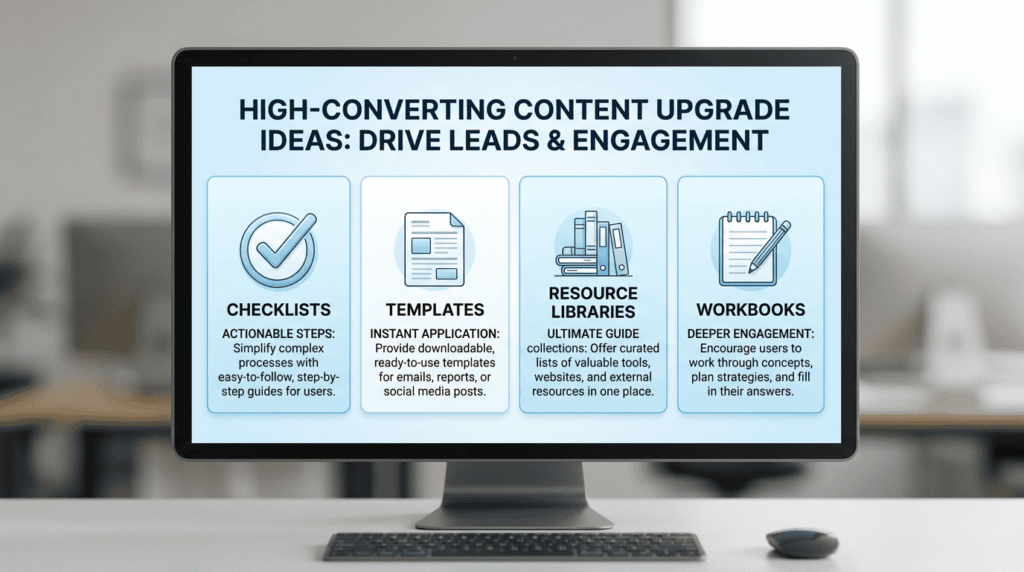
To truly boost your conversion rate and grow your email list, your content upgrades need to offer immediate, tangible value. They aren’t just generic lead magnets; they’re specific, relevant resources that enhance the blog post a reader is already enjoying. Here are some highly effective content upgrade ideas, complete with examples, that can turn casual visitors into loyal subscribers.
Checklists & To-Do Lists
These are incredibly popular because they simplify complex processes into actionable steps. Readers get a clear path forward, saving them time and effort.
- *Example:* For a blog post titled “How to Launch Your First Affiliate Marketing Campaign,” offer a “Pre-Launch Affiliate Campaign Checklist” as a free PDF download.
Cheatsheets & Quick Reference Guides
Cheatsheets condense essential information, formulas, or commands into an easy-to-digest format. They’re perfect for readers who need quick access to key data without rereading an entire article.
- *Example:* If your post is “Mastering Google Analytics for Bloggers,” provide a “Google Analytics Dashboard Cheatsheet” with common reports and metrics.
Resource Libraries & Toolkits
A curated collection of tools, links, or templates can be a powerful content upgrade. It positions you as an authority and provides ongoing value, encouraging repeat engagement.
- *Example:* For an article on “Best AI Writing Tools for Content Creators,” offer a “Curated AI Content Toolkit” with links to recommended software, tutorials, and bonus prompts.
Printable Worksheets & Workbooks
These upgrades encourage active participation, helping readers apply what they’ve learned directly. They’re especially effective for “how-to” or strategy-focused content.
- *Example:* A blog post about “Developing Your Niche Site Content Strategy” could offer a “Niche Site Content Planning Workbook” with sections for keyword research, topic clusters, and editorial calendars.
Templates (e.g., Google Docs, Canva, Spreadsheets)
Templates save your audience significant time by providing a ready-made structure. Whether it’s for planning, design, or analysis, a good template is a high-value resource.
- *Example:* If you write about “Creating High-Converting Landing Pages,” offer a “Landing Page Copy Template (Google Doc)” or a “Canva Landing Page Design Template.”
Video or Audio Recordings
Some people prefer to consume content visually or audibly. Offering a video tutorial or an audio version of your blog post provides an alternative learning format and adds a personal touch.
- *Example:* For a detailed guide on “Setting Up Your WordPress SEO Plugins,” provide a “Step-by-Step Video Walkthrough” demonstrating the installation and configuration process.
Case Studies & In-Depth Data
These upgrades offer social proof and deeper insights into successful strategies. They appeal to readers looking for evidence-based approaches and real-world results.
- *Example:* A post on “Increasing Blog Traffic with Pinterest” could include a “Pinterest Traffic Case Study: How We Grew by 200% in 3 Months” as a downloadable PDF.
Email Courses & Drip Sequences
This type of content upgrade is particularly powerful because it extends the engagement beyond a single download. Instead of a one-off resource, you deliver a series of valuable lessons directly to their inbox over several days or weeks. This allows you to build a stronger relationship with new subscribers, nurture them with consistent value, and subtly introduce them to your other offerings. It’s an excellent way to demonstrate your expertise and keep your brand top-of-mind. When I started building out my own email marketing strategy, I found that a short, five-day email course on “Affiliate Marketing Basics” converted significantly better than a single PDF download for my beginner-focused articles. The ongoing interaction made a huge difference in subscriber engagement.
- *Example:* For a blog post titled “Getting Started with Email Marketing,” offer a “5-Day Email Marketing Kickstart Course” that covers list building, segmentation, and basic automation.
Code Snippets & Swipe Files
For a more technical audience or those looking for ready-to-use examples, code snippets or swipe files are invaluable. They provide practical, copy-and-paste solutions.
- *Example:* If your article is “Customizing Your WordPress Theme with CSS,” offer a “WordPress CSS Snippet Library” with common styling adjustments.
Gated Bonus Content (e.g., an extra chapter, an extended interview)
This creates an exclusive feel, offering readers a deeper dive or additional perspective that isn’t available publicly. It leverages curiosity and the desire for more comprehensive information.
- *Example:* For a long-form guide on “The Ultimate Guide to Niche Site Research,” offer an “Exclusive Bonus Chapter: Advanced Keyword Research Tactics” as a PDF download.
How to Create and Implement Your First Content Upgrade (Step-by-Step)
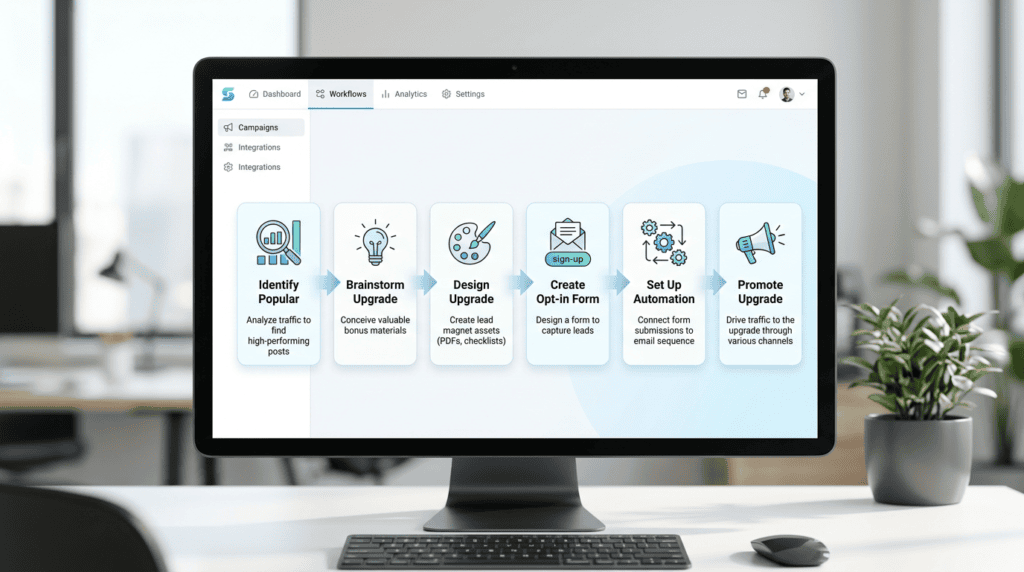
Creating and implementing content upgrades doesn’t have to be complicated. By following a structured process, you can efficiently develop high-converting lead magnets that significantly increase your email subscribers.
Step 1: Identify Your Most Popular Content
Start by looking at your existing blog posts. Use your website analytics (like Google Analytics) to find articles that already receive a good amount of traffic and engagement. These posts have proven appeal and a built-in audience, making them ideal candidates for adding a content upgrade. Focus on posts that address a specific problem or teach a particular skill.
Step 2: Brainstorm a Relevant Upgrade for That Post
Once you’ve identified a popular post, think about what additional value you could offer that directly relates to its topic. The upgrade should be a natural extension, helping the reader take the next step or apply the information more effectively. Ask yourself: What’s the logical next piece of information or tool a reader would need after finishing this article?
Step 3: Design Your Content Upgrade (Tools & Tips)
The design phase is where your content upgrade takes shape. You don’t need to be a graphic designer to create professional-looking resources. Many user-friendly tools are available. For documents like checklists, cheatsheets, or workbooks, Google Docs or Microsoft Word work fine, which you can then save as a PDF. For more visual appeal, Canva is an excellent choice for creating visually appealing PDFs, templates, and even simple graphics for your opt-in forms. It offers a vast library of templates that you can customize with your branding. If you’re creating spreadsheets, Google Sheets or Excel are your go-to. The key is to ensure your upgrade is clean, easy to read, and branded consistently with your website. I often use a simple Canva template for my checklists, ensuring my logo and brand colors are present. It takes less than 30 minutes to customize and makes the download feel much more professional than a plain text document.
Step 4: Create a Dedicated Landing Page or Pop-Up Form
You need a way for visitors to opt-in and receive your content upgrade. This can be a dedicated landing page, an inline form within your blog post, or a pop-up. Your email marketing software or a WordPress plugin can help you build these forms. Make sure the call to action is clear and compelling, explaining exactly what the subscriber will get.
Step 5: Set Up Your Email Delivery Automation
After someone opts in, they expect to receive their upgrade immediately. This requires automation. Connect your opt-in form to your email service provider (ESP) – like ConvertKit, MailerLite, or ActiveCampaign. Set up an automated email that triggers upon subscription, delivering the link to download your content upgrade. This ensures a smooth, instant experience for your new subscribers.
Step 6: Promote the Upgrade Within Your Blog Post
Don’t just hide your content upgrade at the bottom of the post. Integrate it naturally throughout the article. Use clear calls to action (CTAs) in relevant sections, perhaps a text link, a button, or an embedded opt-in box. The more visible and relevant your promotion, the higher your opt-in rate will be.
Where to Place Your Content Upgrade for Maximum Visibility
Strategic placement of your content upgrade is just as important as its quality. You want to make it easy for interested readers to find and access your valuable resource without disrupting their reading experience too much. Different placements serve different purposes and can yield varying conversion rates.
The Two-Step Opt-In (Clickable Link/Button)
This method involves a simple text link or button within your content. When clicked, it opens a small pop-up or a new page with the opt-in form. This “two-step” process often leads to higher conversion rates because the user has already taken an initial action (clicking) before being asked for their email. It leverages micro-commitments and reduces friction.
> Tactical Takeaway: Always use a clear, benefit-driven anchor text for your two-step opt-in link, like “Download the Free Checklist Here!”
The In-Content Opt-In Box
An in-content opt-in box is a static form embedded directly within your blog post, usually after a relevant section or at the end of the article. It’s less intrusive than a pop-up and allows readers to subscribe without leaving the page. These work well for readers who are already highly engaged with your content and ready to take the next step.
The Slide-In or Exit-Intent Pop-Up
These dynamic forms appear based on user behavior. A slide-in pop-up typically appears from the side or bottom of the screen after a user has scrolled a certain percentage of the page or spent a specific amount of time reading. An exit-intent pop-up, on the other hand, detects when a user is about to leave your site (by moving their mouse cursor towards the browser’s close button or tab) and presents the opt-in form as a last-ditch effort to capture their email. Both can be highly effective for converting visitors who might otherwise leave without subscribing. When I implemented an exit-intent pop-up offering a relevant content upgrade on my top-performing articles, I saw an immediate 15% increase in daily email sign-ups from that traffic segment. It’s a powerful way to convert “on-the-fence” visitors.
The “Content Locker” Method (Use With Caution)
A content locker hides a portion of your content (or the entire article) until the reader opts in. While this can lead to very high opt-in rates, it can also be frustrating for users and potentially impact your SEO if search engines can’t access the content. Use this method sparingly and only for truly exceptional, high-value content that readers are desperate to access. Ensure the unlocked content delivers on its promise to avoid disappointing new subscribers.
Essential Tools for Managing Content Upgrades

Successfully implementing a content upgrade strategy requires the right toolkit. These platforms and plugins streamline the process, from capturing leads to delivering your valuable bonus material. Choosing the right tools can significantly impact your opt-in form conversion rates and overall subscriber growth.
Email Marketing Platforms with Tagging/Segmentation
Your email marketing platform is the backbone of your content upgrade system. It’s not just for sending newsletters; it handles the automation that makes content upgrades work. When a reader opts in for a free PDF download or a checklist, your email service provider (ESP) needs to instantly deliver that digital download. Look for platforms that offer robust tagging and segmentation features. This allows you to tag subscribers based on which specific blog post or content upgrade they signed up for. This way, you can send highly relevant follow-up emails, nurturing those leads with targeted marketing messages. Platforms like ConvertKit, ActiveCampaign, and MailerLite are popular choices because they excel at these automation and segmentation capabilities, which are crucial for a sophisticated email marketing strategy.
Landing Page and Form Builders
To capture those valuable leads, you need effective opt-in forms and sometimes dedicated landing pages. While many email marketing platforms include basic form builders, specialized tools offer more design flexibility and advanced features. These builders allow you to create inline opt-in forms that blend seamlessly into your blog post content, or eye-catching popups (including exit-intent popup forms) that appear when visitors are about to leave your site. They also help you design high-converting landing pages for your content-specific opt-ins, ensuring a smooth user experience. Tools like Leadpages, Unbounce, or even page builders like Elementor Pro for WordPress, give you the power to design and test various form layouts and calls-to-action to boost your conversion rate.
> Tactical Takeaway: Don’t underestimate the power of a well-designed opt-in form; it’s the gateway to growing your email list.
WordPress Opt-in Plugins
If your website runs on WordPress, dedicated opt-in plugins can simplify the integration of your content upgrade strategy. These plugins often combine the functionality of form builders with advanced display rules, allowing you to place your content upgrades exactly where they’ll be most effective. They can create various types of forms, including two-step opt-ins, slide-ins, and content lockers, without needing to touch any code. Many also integrate directly with popular email marketing platforms, making the setup process much smoother. I’ve personally used Thrive Leads for years on several niche sites, and its ability to A/B test different forms and placements has been instrumental in significantly increasing my blog conversions and subscriber numbers. Other strong contenders include OptinMonster and ConvertBox, which offer similar powerful features for boosting email signups.
Common Mistakes That Kill Content Upgrade Conversion Rates
Even with the best intentions, it’s easy to make missteps that hinder your content upgrade’s effectiveness. Avoiding these common pitfalls is key to maximizing your subscriber growth and ensuring your efforts pay off.
Offering a Low-Value or Irrelevant Upgrade
The biggest mistake you can make is offering something that doesn’t genuinely add value or isn’t directly relevant to the content your reader is currently consuming. A generic “sign up for my newsletter” won’t cut it. Your content upgrade needs to be a specific, actionable bonus that enhances the blog post. If your post is about “how to create content,” a relevant resource list downloads or a printable checklist template for content creation would be high-value. A random ebook on social media marketing, however, would likely fall flat. Always ensure your upgrade directly solves a problem or provides an immediate benefit related to the article.
Creating Too Much Friction in the Opt-In Process
People are busy and have short attention spans. If your opt-in form asks for too much information (like their phone number, company name, and favorite color), or if the steps to download are confusing, you’ll see a drop in your conversion rate. Keep your opt-in form simple. Usually, just an email address is enough. If you need a first name for personalization, that’s generally acceptable. The fewer fields, the better. The process should be quick and intuitive, allowing readers to get their valuable bonus material with minimal effort.
Using a Generic Call-to-Action (CTA)
“Download Now” or “Sign Up” are bland and uninspiring. Your call-to-action (CTA) needs to be specific and highlight the benefit of the content upgrade. Instead of “Download the PDF,” try “Get Your Free SEO Checklist” or “Unlock the Exclusive Bonus Content.” This tells the reader exactly what they’re getting and why it’s worth their email address. A strong, benefit-driven CTA can significantly increase your opt-in rate optimization.
> Critical Warning: A vague CTA is a missed opportunity to communicate the value of your content upgrade and will depress your opt-in rates.
Failing to Deliver the Upgrade Instantly
Once someone opts in, they expect immediate gratification. If there’s a delay in delivering the content upgrade, it creates a poor user experience and can lead to frustration. Your email marketing platform should be set up to automatically send the download link or the free PDF download within seconds of the opt-in. This instant delivery reinforces trust and ensures the reader gets what they signed up for without waiting. I once had a glitch where my automation failed, and I had to manually send out hundreds of cheat sheet downloads; it was a nightmare and taught me the importance of testing delivery automation thoroughly.
Not Promoting the Upgrade Effectively
Even the best content upgrade won’t perform if no one knows it exists. Don’t just bury a small link at the bottom of your blog post. Use multiple placements for your content-specific opt-ins: inline opt-in forms within the content, a prominent call-to-action box, a slide-in, or an exit-intent popup. Mention the upgrade in your introduction and conclusion. Consider adding a P.S. to your existing newsletter or promoting it on social media. The more visible and accessible your content upgrade is, the more opportunities you create for converting blog traffic into subscribers.
Measuring the Success of Your Content Upgrades

Creating content upgrades is an investment of time and effort. To ensure that investment pays off and to continuously improve your email list building tips, you need to track their performance. Measurement isn’t just about vanity metrics; it’s about understanding what works and why.
Key Metrics to Track (Conversion Rate, List Growth)
The primary metric you’ll want to focus on is the conversion rate of your content upgrade. This is the percentage of visitors who see your opt-in offer and then subscribe. A high conversion rate indicates that your upgrade is relevant and valuable to your audience. You also need to track your overall email list growth directly attributed to content upgrades. Many email marketing platforms allow you to see which forms or lead magnets are generating the most leads. Keep an eye on the number of new subscribers you gain each month from these specific offers. Beyond these, consider tracking the engagement with your follow-up emails to see if these new subscribers are active and interested in your content.
Using A/B Testing to Optimize Your Offers
A/B testing is your secret weapon for improving content upgrade performance. Instead of guessing what works, you can test different elements of your offer to see which version performs better. You might A/B test:
- Headlines and CTAs: Does “Get the Checklist” convert better than “Download Your Free Guide”?
- Opt-in Form Design: Does a simple form with just an email field outperform one with a name field?
- Placement: Does an inline form convert better than a slide-in?
- Upgrade Type: For a specific blog post, does a printable checklist template convert better than a quick start guide?
I’ve seen my own opt-in rates jump by 20-30% just by tweaking a headline or changing the color of a button after running a few A/B tests. Small changes can lead to significant increases in subscriber growth strategies.
How to Analyze Performance and Iterate on Your Strategy
Regularly review the data from your content upgrades. Look for patterns: which types of upgrades perform best? Which blog posts are generating the most leads? Are there any specific content upgrade examples that consistently underperform? Don’t be afraid to iterate. If an upgrade isn’t converting well, don’t just abandon it. Try to understand why. Maybe the offer isn’t clear, the CTA is weak, or the placement isn’t optimal. Use your findings to refine your content upgrade strategy. This continuous process of analysis and iteration is how you build an email list effectively and ensure your efforts are always moving you towards your growth goals.
Final Thoughts: Making Content Upgrades a Core Part of Your Strategy
By now, it should be clear that `content upgrades` aren’t just a fleeting tactic; they’re a fundamental `email marketing strategy` for anyone serious about `growing your email list`. The core value lies in offering a targeted, post-specific `lead magnet` that directly enhances the `blog post` a reader is already consuming. This isn’t about tricking people into `subscribing`; it’s about providing genuine, immediate `value` that makes the `opt-in` a no-brainer.
The goal is always to provide a `valuable bonus material` or `resource` that solves an immediate problem or offers a quick win related to the content. When you consistently deliver this kind of `relevant` and `specific` bonus, your `conversion rate` will naturally `increase`. Don’t try to upgrade every single piece of `content` at once. Instead, pick your top 3-5 `blog posts` with the most `traffic` and create `highly effective content upgrades` for those first. This focused approach will give you the best return on your effort and help you `boost your conversion rate` efficiently. I’ve personally seen this strategy turn lukewarm blog traffic into a thriving community of `subscribers` time and time again.
Frequently Asked Questions (FAQs)
How many content upgrades should I have on my blog?
You should aim for quality over quantity, focusing your `content upgrade strategy` on your most popular and impactful `blog posts`. Start with 3-5 `specific blog posts` that already receive good `traffic` and have a high potential for `conversion rate` improvement, then expand from there.
Can I offer the same content upgrade on multiple posts?
Generally, no, `content upgrades` work best when they are highly `specific` and `relevant` to the `blog post` they accompany. Offering the same `lead magnet` across many posts dilutes its perceived `value` and can lead to lower `opt-in` rates, as it won’t feel as tailored to the reader’s immediate interest.
Do content upgrades still work in 2026?
Absolutely, `content upgrades` remain one of the most effective ways to `grow your email list` and `increase your email subscribers` because they are built on the timeless principle of providing immediate, relevant `value`. As long as you focus on creating `highly effective content upgrades` that genuinely help your `audience`, this `marketing strategy` will continue to perform.
What’s the ideal length or format for a content upgrade?
The ideal length or `format` for a `content upgrade` isn’t fixed; it depends entirely on the `specific` `content` and what provides the most immediate `value` to your `readers`. It could be a one-page `checklist`, a multi-page `pdf` `resource` guide, a simple `template`, or even a short audio `bonus`. The key is utility and relevance, not length.
How do I deliver the content upgrade file after someone signs up?
After someone signs up, the `content upgrade` file is typically delivered automatically via your `email marketing` service provider. You’ll set up an automation rule that sends an email containing a secure `download` link to the `pdf`, `template`, or other `resource` immediately after the `opt-in form` is submitted.