
Running a business online means constantly looking for ways to connect with your audience, build trust, and drive sales without breaking the bank. Many entrepreneurs quickly realize that relying solely on social media or paid ads can be a risky game, as algorithms change and costs fluctuate. This often leads them to a more stable, direct communication channel: email marketing. But for those just starting out, understanding how does email marketing work can feel like trying to solve a complex puzzle, from gathering contacts to sending messages that actually get opened and clicked.
The truth is, email marketing isn’t just about sending out a bunch of emails; it’s a strategic process designed to nurture relationships and guide customers through their journey with your brand. It’s a powerful tool that, when used correctly, can deliver impressive returns on investment. This guide will break down exactly how email marketing works, from building your first email list to sending campaigns that get results. We’ll move beyond the basics to show you the step-by-step process, the key components involved, and how you can use it to grow your business, blog, or brand.
How Email Marketing Works: The Core 5-Step Process
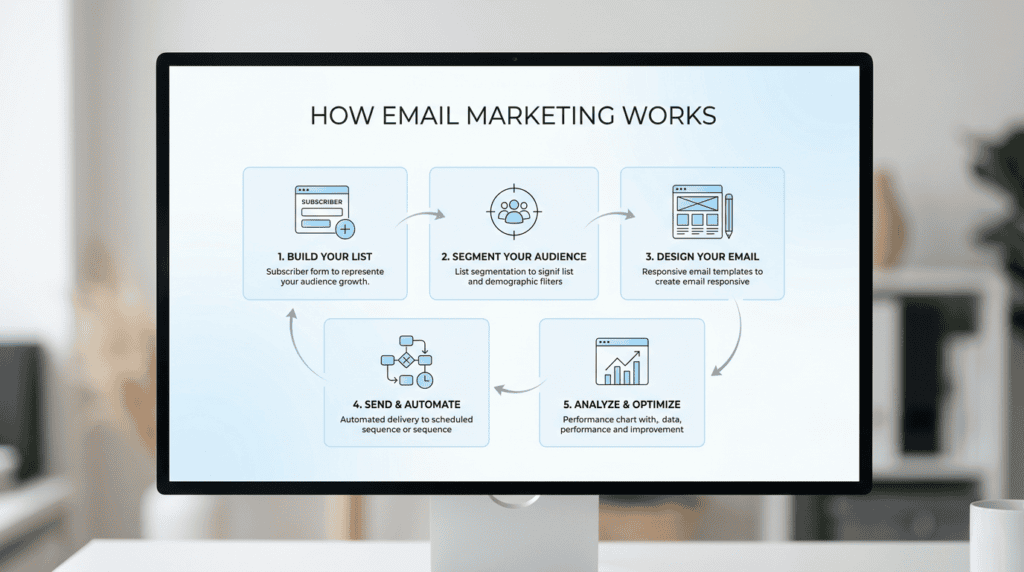
Email marketing, at its heart, is a systematic approach to communicating with your audience directly. Think of it as a conversation you control, rather than one dictated by external platforms. To truly grasp how email marketing works, it helps to see it as a continuous cycle of five main steps, each building on the last to create a powerful communication channel for your business.
Step 1: Build Your List (Permission-Based Acquisition)
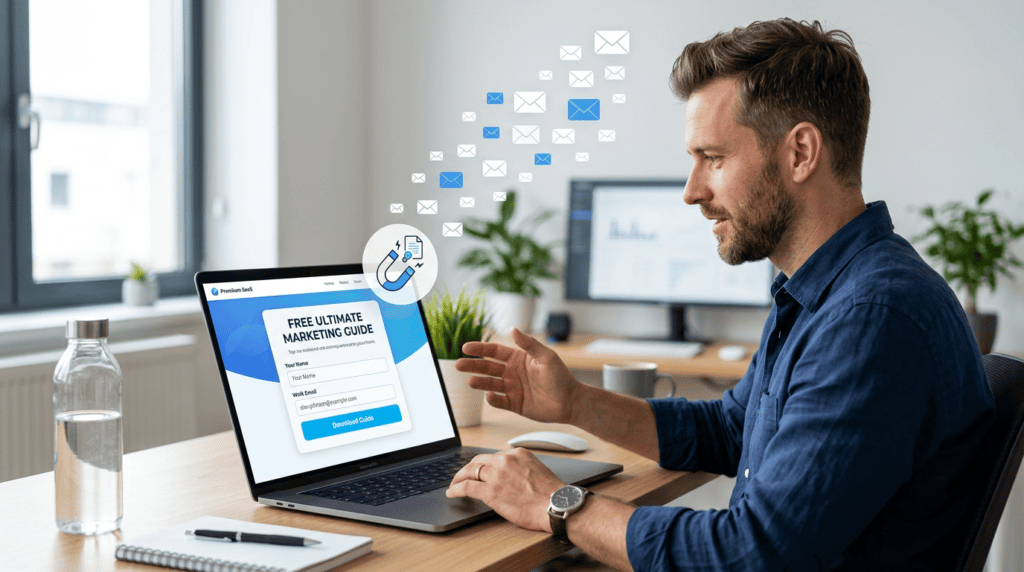
This is arguably the most critical first step in any successful email marketing strategy: gathering email addresses from people who genuinely want to hear from you. This isn’t about buying lists or scraping emails; it’s about permission-based marketing. You’re inviting people to opt-in, meaning they actively agree to receive your messages. Beginners often struggle with this, thinking they need thousands of subscribers overnight. In reality, a smaller list of engaged subscribers is far more valuable than a huge list of uninterested contacts.
To build your list, you’ll typically use opt-in forms on your website, blog, or landing pages. These forms often offer something valuable in exchange for an email address – a “lead magnet” like a free guide, an exclusive discount, a webinar registration, or access to premium content. The goal here is to attract your target audience, not just anyone. As your usage grows, you’ll find that the quality of your lead magnet directly impacts the quality of your subscribers. A good email service provider (ESP) will offer easy-to-use tools for creating these forms and managing new sign-ups, often integrating directly with your website or e-commerce platform.
Step 2: Segment Your Audience (Targeted Communication)
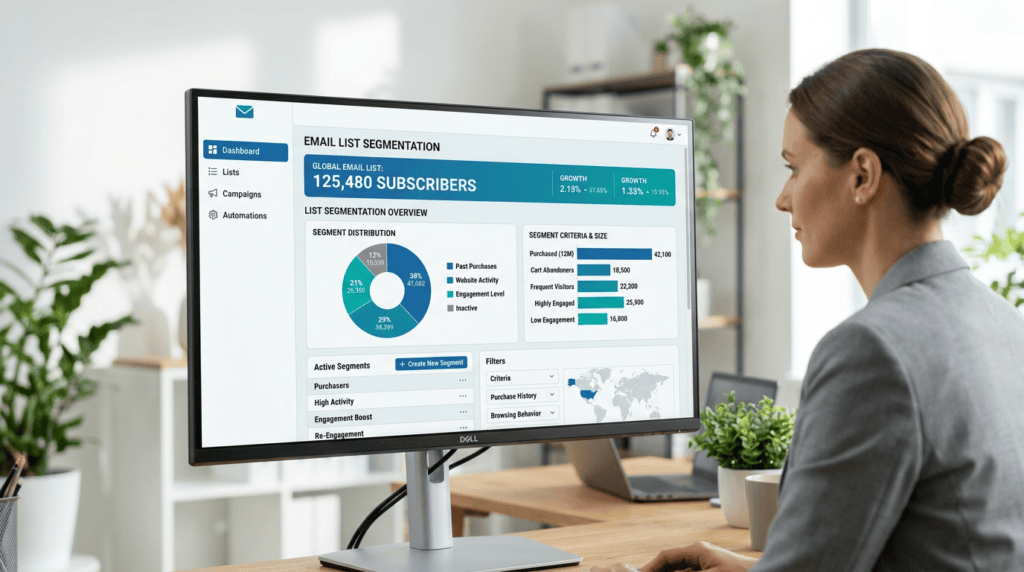
Once you start building your email list, the next crucial step is to segment your audience. This means dividing your subscribers into smaller groups based on shared characteristics, interests, or behaviors. Why does this matter? Because a one-size-fits-all email rarely resonates with everyone. Sending highly relevant content to specific segments dramatically increases engagement. For example, an e-commerce store might segment customers by past purchases (e.g., “bought shoes,” “bought accessories”), by how long they’ve been a subscriber, or by their geographic location. A blogger might segment by topics of interest (e.g., “WordPress tips,” “affiliate marketing strategies”).
This step is where many businesses move beyond basic broadcasting and start to see real results. Instead of sending a generic newsletter to everyone, you can craft messages tailored to the specific needs and preferences of each segment. This personalization makes your emails feel more valuable and less like spam, leading to better open rates and click-through rates.
Step 3: Design Your Email (Crafting the Message)
With your audience segmented, it’s time to craft the actual email message. This involves several key components, each playing a vital role in getting your email opened, read, and acted upon. It starts with the subject line, which is your first impression in a crowded inbox. A compelling subject line sparks curiosity or offers clear value, encouraging the recipient to open. Next is the preheader text, a short snippet that appears after the subject line in many inboxes, offering a bit more context.
Inside the email, the content itself needs to be clear, concise, and valuable. This could be a blog post update, a promotional offer, a product announcement, or a helpful tip. The design of your email template also matters; it should be clean, easy to read, mobile-responsive, and reflect your brand’s aesthetic. Finally, every effective email needs a clear call-to-action (CTA) – a button or link that tells the reader exactly what you want them to do next, whether it’s “Shop Now,” “Read More,” or “Download Your Guide.” Many beginners overestimate the importance of fancy graphics and underestimate the power of clear, benefit-driven copywriting.
Step 4: Send & Automate (Delivery and Scheduling)

This step covers the technical side of getting your emails from your email service provider (ESP) into your subscribers’ inboxes. You can send broadcast emails, which are one-off messages sent to a specific segment or your entire list at a scheduled time (like a weekly newsletter or a flash sale announcement). However, a significant part of how email marketing works effectively today involves automation.
Email automation allows you to set up predefined workflows that trigger emails based on specific events or subscriber behaviors. For instance, a “welcome email sequence” automatically sends a series of emails to new subscribers after they opt-in. An “abandoned cart email” automatically goes out to someone who added items to their cart but didn’t complete the purchase. These automated sequences save time, ensure timely communication, and can significantly boost conversions without constant manual effort. Your ESP handles the heavy lifting of sending, ensuring deliverability, and managing bounces.
Step 5: Analyze & Optimize (Measuring Success)
The final, but ongoing, step is to analyze the performance of your email campaigns and use those insights to optimize future efforts. Your email service provider will provide detailed analytics on key metrics such as:
- Open Rate: The percentage of recipients who opened your email.
- Click-Through Rate (CTR): The percentage of recipients who clicked a link inside your email.
- Conversion Rate: The percentage of recipients who completed a desired action (e.g., made a purchase, signed up for a webinar).
- Unsubscribe Rate: The percentage of recipients who opted out of your list.
- Bounce Rate: The percentage of emails that couldn’t be delivered.
By regularly reviewing these metrics, you can identify what’s working and what isn’t. Maybe a certain subject line style performs better, or emails sent on Tuesdays get higher engagement. You can use A/B testing (sending two slightly different versions of an email to a small portion of your list to see which performs better) to continuously refine your strategy. This data-driven approach is what allows you to continuously improve your email marketing strategy, ensuring you’re always delivering value and getting the best possible return on your efforts.
Step 1: Building Your Email List with Permission
This is the foundation of all email marketing. This section explains *how* to ethically and effectively grow an audience.
Why Permission is Non-Negotiable (CAN-SPAM & GDPR)
Understanding how does email marketing work effectively begins with permission. Sending emails without explicit consent isn’t just bad practice; it’s illegal in many regions and can severely damage your business’s reputation and deliverability. Laws like the CAN-SPAM Act in the US and GDPR in Europe mandate that you obtain clear permission before adding someone to your email list. Ignoring these rules can lead to hefty fines, your emails being blocked by internet service providers, and your domain being blacklisted, making it impossible to reach anyone’s inbox.
For businesses, this means higher engagement rates because subscribers actually *want* to hear from you. For subscribers, it means receiving relevant content they signed up for, rather than unwanted spam. While the legal jargon can seem daunting for beginners, setting up a double opt-in process (where subscribers confirm their email address after signing up) is a straightforward way to ensure compliance and build a high-quality list. The hidden frustration here is the temptation to buy email lists, which almost always results in poor engagement, high bounce rates, and legal trouble. Long-term, permission-based marketing builds trust and a loyal audience, which is far more valuable than a large, disengaged list.
Effective List-Building Methods
Once you understand the importance of permission, the next step in how does email marketing work is actively growing your list.
Lead Magnets
Lead magnets are valuable resources offered for free in exchange for an email address. This method works because it provides immediate value to your potential subscriber, solving a specific problem or fulfilling a need. For a SaaS founder, this might be a “SaaS Marketing Checklist.” A blogger could offer an “Ultimate Blog Post Template,” while an agency might provide a “Client Onboarding Kit.” The key is that the lead magnet directly relates to your business and the content you’ll send via email. Beginners often struggle with creating a high-quality lead magnet that truly resonates, but over time, you’ll learn what types of resources your target audience values most.
Opt-in Forms & Pop-ups
These are the direct gateways on your website for capturing email addresses. Opt-in forms can be embedded in your sidebar, footer, or at the end of blog posts. Pop-ups, which appear dynamically, can be triggered by time spent on a page, scroll depth, or exit intent. While pop-ups can be highly effective for conversion, they also carry the trade-off of potentially annoying some users. It’s crucial to balance effectiveness with user experience. Too many intrusive pop-ups can hurt your site’s SEO and overall visitor satisfaction. Many users overestimate the power of a generic “subscribe to our newsletter” form; instead, focus on clear, benefit-driven language and test different designs and placements to see what converts best for your audience.
Landing Pages
A landing page is a standalone web page designed for a single purpose: to convert visitors into leads, often by collecting their email address. Unlike a regular website page, landing pages typically have minimal navigation to reduce distractions and keep the visitor focused on the offer. They are particularly effective for specific campaigns, product launches, or webinar registrations, where you want to drive traffic from ads or social media to a highly focused conversion point. For businesses running paid ad campaigns, a well-designed landing page is critical for maximizing ad spend ROI. Beginners might find designing an effective landing page challenging, but many email service providers (ESPs) and website builders offer user-friendly landing page builders.
Social Media & Webinars
Leveraging your existing audience on other platforms is a smart way to build your email list. On social media, you can promote your lead magnet or opt-in forms through dedicated posts, stories, or by including a direct link in your bio. Webinars are excellent for lead generation; attendees register with their email address, and you can follow up with them via email after the event. The workflow here often involves integrating your social media tools or webinar platform with your email service provider to automatically add new sign-ups to your list. A common misconception is that social media followers will automatically become email subscribers; you need a clear, compelling call to action to bridge that gap.
Step 2: Segmenting Your List for Maximum Relevance
This section moves from collecting emails to organizing them, which is crucial for sending effective campaigns.
What is Email Segmentation?
Email segmentation is the process of dividing your main email list into smaller, more targeted groups based on shared characteristics, interests, or behaviors. This is a critical step in how does email marketing work because it allows you to send highly relevant messages to specific portions of your audience, rather than a generic broadcast to everyone. The primary benefit is improved engagement: when subscribers receive content that truly matters to them, they’re more likely to open, click, and convert. This also boosts your email deliverability, as ESPs see higher engagement as a sign of valuable content, reducing the likelihood of your emails landing in the spam folder.
Businesses with diverse product lines or varied audience interests benefit most from segmentation. For a very small business with a highly niche audience, initial segmentation might be minimal, but as the business grows, it becomes indispensable. A key scaling limitation is that manual segmentation becomes impractical with large lists; this is where email marketing automation tools become essential.
Common Segmentation Strategies
Effective segmentation relies on collecting and utilizing data about your subscribers.
Demographics
Segmenting by demographics involves grouping subscribers based on characteristics like location, age, gender, or job title. For example, a local business might send location-specific promotions to subscribers in a particular city. A B2B SaaS company could tailor content based on a subscriber’s job title or industry. The trade-off here is that collecting this demographic data can sometimes add friction to the sign-up process, potentially deterring some individuals. However, for specific campaigns, the relevance gained can far outweigh this initial hurdle.
Behavioral Data
This is often the most powerful segmentation strategy because it’s based on actual actions and interests. Behavioral segmentation groups subscribers based on their interactions with your website, emails, or products. Examples include:
- Purchase History: Sending product recommendations to customers who bought a specific item.
- Website Activity: Targeting visitors who viewed a certain product page but didn’t buy.
- Email Engagement: Sending re-engagement campaigns to inactive subscribers or exclusive content to highly engaged ones.
- Course Progress: Sending reminders or next steps to students in an online course.
Utilizing behavioral data requires integrating your email service provider with your website analytics, e-commerce platform, or CRM. While this might seem complex initially, it becomes incredibly valuable long-term for creating highly personalized customer journeys and boosting conversion rates.
Sign-up Source
Segmenting by sign-up source means grouping subscribers based on *how* they joined your list. For instance, if someone signed up through a “WordPress SEO Guide” lead magnet, they clearly have an interest in WordPress SEO. You can then send them a welcome sequence and ongoing content specifically tailored to that interest. This strategy helps you understand the initial intent of your subscribers and allows you to deliver relevant content from the very first interaction. For beginners, setting up tags or groups based on different opt-in forms is a straightforward way to implement this.
The Power of Personalization
Personalization goes hand-in-hand with segmentation and is a cornerstone of how does email marketing work effectively. It’s about making each email feel like a direct conversation rather than a mass broadcast. While using a subscriber’s first name (a basic merge tag) is a common starting point, true personalization goes much deeper. It involves dynamic content blocks that change based on a subscriber’s interests, past purchases, or location. For example, an e-commerce store might show different product recommendations based on a customer’s browsing history.
Many marketing pages often simplify personalization, making it seem like just adding a name. In reality, achieving advanced personalization at scale requires robust data collection and sophisticated automation within your email service provider. The effort, however, pays off significantly. Personalized emails consistently show higher open rates, click-through rates, and ultimately, higher conversions because they deliver highly relevant content directly to the individual. This builds stronger rapport and trust with your audience over the long term.
Step 3: Crafting Emails That People Actually Open and Read
This section covers the creative and strategic process of building the email itself.
Anatomy of a High-Performing Email
Understanding the components of an email is crucial for knowing how does email marketing work to capture attention and drive action.
The Subject Line
The subject line is arguably the single most important factor determining whether your email gets opened. It’s the gatekeeper to the inbox. A compelling subject line creates curiosity, offers a clear benefit, or conveys urgency. Personalization (like including the recipient’s name) and judicious use of emojis can also boost open rates. However, users often overestimate the power of a clever pun; clarity and relevance usually win. The trade-off is that while clickbait might increase opens, it can damage trust if the email content doesn’t deliver on the promise. Consistently A/B testing different subject lines is the most valuable long-term strategy for improvement.
The “From” Name
The “From” name is what recipients see as the sender of the email. It’s vital for establishing recognition and trust. Using a recognizable name, such as “Your Name from Your Company” or simply “Your Company Name,” helps recipients quickly identify who the email is from. Avoid generic “noreply” addresses, as they feel impersonal and can signal to recipients that you don’t want a conversation. For brands with strong recognition, a consistent “From” name reinforces their identity and encourages opens.
The Email Body
The email body is where you deliver the value promised by your subject line. A high-performing email body is structured for readability, especially on mobile devices. This means using short paragraphs, bullet points, clear headings, and ample white space. Focus on benefits for the reader, not just features of your product or service. While images and videos can enhance engagement, ensure they are relevant and don’t make the email too heavy, which can affect load times and deliverability. Beginners often struggle with writing compelling copy and structuring it for scanability. A hidden frustration is over-designing emails with complex layouts that break or render poorly across different email clients. Over time, developing a consistent brand voice and content style becomes easier.
The Call-to-Action (CTA)
The Call-to-Action (CTA) is the specific instruction you give your reader, guiding them to the next step. It’s the point where your email marketing efforts translate into tangible results. Most high-performing emails have a single, clear CTA, often presented as a prominent button. Use action-oriented language like “Shop Now,” “Download Your Guide,” or “Read More.” A common misconception is that a CTA is just a link; it’s a strategic prompt designed to drive a specific behavior. Many marketing pages overlook the importance of testing CTA button color, text, and placement to maximize click-through rates.
Plain Text vs. HTML Emails: When to Use Each
The choice between plain text and HTML emails depends on your goal and audience, and it’s an important consideration for how does email marketing work in practice.
Plain Text Emails are simple, unformatted messages without images, fancy fonts, or complex layouts.
- When to use: They are excellent for personal messages, transactional emails (like order confirmations), or when deliverability is paramount, as they are less likely to trigger spam filters. They often feel more authentic and direct, mimicking a one-on-one conversation.
- Who benefits most: Salespeople, coaches, or anyone aiming for a direct, authentic feel.
- Trade-offs: Less visual appeal and limited tracking capabilities compared to HTML.
HTML Emails allow for rich formatting, images, videos, custom fonts, and complex layouts, making them visually appealing and brand-consistent.
- When to use: Ideal for newsletters, promotional campaigns, and e-commerce, where branding and visual presentation are key.
- Who benefits most: E-commerce stores, content publishers, and businesses with strong visual brands.
- Trade-offs: Can be heavier in file size, more prone to rendering issues across the myriad of email clients (Gmail, Outlook, Apple Mail, etc.), and have a higher chance of landing in the spam folder if poorly coded or overly image-heavy.
- Workflow implications: Requires good email template design skills or reliable, mobile-responsive templates from your email service provider. Poorly designed HTML emails can hurt deliverability and brand perception in the long term.
Step 4: Sending and Automating Your Campaigns
Once you’ve built your list, segmented your audience, and crafted compelling emails, the next step in understanding how does email marketing work is getting those messages into inboxes. This involves both one-off sends and sophisticated automated sequences, all managed through a dedicated email service provider.
One-Time Campaigns vs. Automated Sequences
Understanding the difference between these two approaches is key to a flexible and effective email marketing strategy.
- Campaigns (Newsletters, Promotions): These are the manual, one-off emails you send to your entire list or a specific segment. Think of them as broadcasts. You might send a weekly newsletter with new blog posts, a flash sale announcement, or a holiday greeting. They’re great for timely information and direct promotions, but they require you to actively create and schedule each send. For many small businesses, these are the bread and butter of their initial email efforts.
- Automations (Drip Campaigns): This is where email marketing truly shines and becomes a powerful, hands-off tool. Automated sequences, often called drip campaigns or workflows, are pre-written series of emails that are triggered by a specific action a subscriber takes. For example, signing up for your newsletter, making a purchase, or abandoning a shopping cart. Once set up, these sequences run continuously in the background, nurturing leads or customers without constant manual intervention. This is a crucial part of how does email marketing work efficiently at scale.
Essential Email Automations for Beginners
For those just starting out, setting up a few core automations can yield significant results with minimal ongoing effort. These are often the first steps businesses take to leverage the power of automated email marketing.
- Welcome Series: This is arguably the most important automation you can set up. When someone new subscribes to your list, a welcome series is a sequence of 2-5 emails sent over a few days or weeks. Its purpose is to introduce your brand, deliver the lead magnet they signed up for, set expectations for future emails, and build a relationship. A well-crafted welcome series can significantly increase engagement rates, establish trust, and even drive initial sales. Beginners often struggle with making these too salesy; focus on providing value first.
- Abandoned Cart Reminders (for Ecommerce): If you run an online store, this automation is a must-have. When a customer adds items to their shopping cart but leaves your site without completing the purchase, an abandoned cart reminder automatically sends an email (or a series of emails) to prompt them to return. These emails often include the items they left behind and might offer a small incentive like free shipping. This automation directly impacts your revenue, recovering sales that would otherwise be lost. It’s a prime example of how does email marketing work to directly boost your bottom line.
The Role of an Email Service Provider (ESP)
You can’t just send mass emails from your regular Gmail or Outlook account. That’s where an Email Service Provider (ESP) comes in. An ESP is a software platform that provides the tools and infrastructure needed to manage your email list, design emails, send campaigns, and set up automations. Think of tools like Mailchimp, ConvertKit, ActiveCampaign, or HubSpot.
An ESP is absolutely necessary for several reasons:
- List Management: It handles subscriber sign-ups, unsubscribes, and keeps your list organized.
- Deliverability: ESPs have sophisticated systems and relationships with internet service providers (ISPs) to ensure your emails actually land in the inbox, not the spam folder. This is a complex aspect of how does email marketing work that most beginners overlook.
- Design & Templates: They offer drag-and-drop editors and pre-built templates, making it easy to create professional-looking emails without coding knowledge.
- Automation: This is where you build and manage all your welcome series, abandoned cart reminders, and other triggered sequences.
- Analytics: ESPs track crucial metrics like open rates, click-through rates, and conversions, giving you insights into campaign performance.
For beginners, choosing an ESP can feel overwhelming. Many start with free plans from providers like Mailchimp, which are great for learning the ropes. As your list grows and your needs become more complex (e.g., advanced segmentation, more sophisticated automations, CRM integrations), you’ll likely need to upgrade to a paid plan or switch to a more robust platform. What often becomes frustrating over time is dealing with pricing tiers that jump significantly as your subscriber count grows, or finding that a seemingly simple feature you need is locked behind a much more expensive plan.
Step 5: Measuring Success with Key Email Marketing Metrics
Sending emails is only half the battle; understanding their impact is the other. This step explains how to measure the effectiveness of your efforts and continuously improve, demonstrating how does email marketing work as a data-driven strategy. Without tracking, you’re just guessing.
Key Performance Indicators (KPIs) to Track
These metrics are your report card for every email campaign. They tell you what’s working, what’s not, and where to focus your optimization efforts.
- Open Rate: This is the percentage of recipients who opened your email. It’s a primary indicator of how compelling your subject line and “from” name are. A low open rate might mean your subject lines aren’t grabbing attention, or your sender reputation is suffering. What most marketing pages ignore is that a high open rate doesn’t necessarily mean success if people don’t click through.
- Click-Through Rate (CTR): This metric shows the percentage of recipients who clicked on at least one link within your email. CTR tells you how engaging your email content is and how effective your call-to-action (CTA) is. A good CTR means your message resonated and prompted action. If your open rate is high but CTR is low, your email content or CTA might need work.
- Conversion Rate: This is the ultimate goal for many campaigns. It measures the percentage of recipients who completed a desired action after clicking a link in your email – whether that’s making a purchase, signing up for a webinar, or downloading a resource. This metric directly ties your email efforts to business outcomes and revenue. It’s the clearest indicator of your email marketing ROI.
- Unsubscribe Rate: This is the percentage of people who opted out of your email list after receiving a particular email. While some unsubscribes are normal and even healthy (it means your list is self-cleaning), a consistently high unsubscribe rate can signal that your content isn’t relevant, you’re sending too frequently, or your audience expectations aren’t being met.
What is A/B Testing?
A/B testing, also known as split testing, is a method of comparing two versions of an email (A and B) to see which one performs better. For example, you might send one subject line to 10% of your audience and a different subject line to another 10%. Your ESP then automatically sends the winning version to the remaining 80%.
This process is invaluable because it takes the guesswork out of optimization. Instead of relying on intuition, you use data to make informed decisions. You can A/B test almost any element of your email: subject lines, “from” names, email body copy, images, calls-to-action, and even send times. Beginners often try to test too many variables at once, which makes it hard to pinpoint what actually caused the change. Focus on one element at a time for clear results.
Understanding Email Deliverability
Deliverability refers to the ability of your emails to successfully reach your subscribers’ inboxes, rather than being routed to spam folders or blocked entirely. This is a critical, yet often misunderstood, aspect of how does email marketing work. You can have the best content and subject lines, but if your emails aren’t delivered, they’re useless.
Several factors influence deliverability:
- Sender Reputation: This is like a credit score for your email address. ISPs (like Gmail, Outlook) track your sending history, including how many emails are opened, clicked, marked as spam, or bounce. A good reputation means your emails are more likely to land in the primary inbox.
- Email Content: Spam filters look for certain keywords, excessive use of all caps, too many images, or broken links.
- List Hygiene: Sending to an old, unengaged list with many invalid addresses can hurt your sender reputation. Regularly cleaning your list of inactive subscribers is crucial.
- Authentication: Setting up technical records like SPF, DKIM, and DMARC helps ISPs verify that your emails are legitimate and not spoofed. Your ESP usually guides you through this.
What most marketing pages ignore is the ongoing battle against spam filters. Even legitimate businesses can face deliverability issues. It’s a constant effort to maintain a good sender reputation, which means consistently sending valuable content to an engaged audience and regularly cleaning your list.
What Most Beginners Get Wrong About Email Marketing
Navigating the world of email marketing can be tricky, and many beginners fall into common traps. Understanding these pitfalls can save you time, money, and frustration, helping you grasp how does email marketing work effectively from the start.
Mistake 1: Buying Email Lists
This is perhaps the biggest and most damaging mistake a beginner can make. While it might seem like a quick way to grow your audience, buying email lists is a terrible idea. First, it’s often illegal or against the terms of service for most ESPs (which can lead to your account being shut down). More importantly, these lists are usually filled with unengaged contacts who never opted in to hear from you.
The practical implications are severe: you’ll get extremely low open and click rates, high bounce rates (invalid emails), and a surge in spam complaints. This will quickly tank your sender reputation, causing even your legitimate emails to land in spam folders. You’ll waste money on an ESP plan for contacts who will never convert, and you’ll alienate potential customers. Always build your list organically, with permission.
Mistake 2: Sending Without a Clear Goal
Every email you send should have a specific purpose. Is it to inform, educate, entertain, or sell? Many beginners just send emails because they feel they “should,” without defining what they want the recipient to do or feel after reading it. This leads to vague content, confusing calls-to-action, and ultimately, wasted effort.
Before you even start writing, ask yourself: “What is the single most important action I want my subscriber to take after opening this email?” Having a clear goal for each message ensures your content is focused, your CTA is prominent, and you can accurately measure its success. This clarity is fundamental to understanding how does email marketing work as a strategic tool.
Mistake 3: Ignoring Mobile Design
In today’s world, a significant majority of emails are opened on mobile devices. Yet, many beginners still design emails primarily for desktop viewing. If your email isn’t responsive – meaning it doesn’t automatically adjust its layout and formatting for smaller screens – you’re providing a poor user experience. Text might be too small, images might be distorted, and buttons might be hard to tap.
This leads to quick deletions, low engagement, and unsubscribes. Most modern ESPs offer responsive templates and preview options, so there’s no excuse for not optimizing for mobile. Always test your emails on a phone before sending. What gets easier over time is simply relying on the responsive templates provided by your ESP, but the initial struggle is remembering to check.
Mistake 4: Never Cleaning Your List
It might seem counterintuitive to remove subscribers, but regularly cleaning your email list is crucial for long-term success. An “unclean” list is full of inactive subscribers – people who haven’t opened or clicked your emails in months (or even years). These inactive contacts hurt your deliverability, inflate your ESP costs (as most charge by subscriber count), and skew your engagement metrics.
By removing unengaged subscribers, you improve your open and click rates, which signals to ISPs that your emails are valuable, boosting your sender reputation. It also means you’re paying your ESP only for active, interested contacts. What most marketing pages ignore is that while it feels good to have a large list, a smaller, highly engaged list is far more valuable than a massive, dormant one. This practice is a cornerstone of how does email marketing work efficiently and cost-effectively.
Final Thoughts: Why Email Marketing Still Works in 2026

Despite the constant evolution of digital marketing, email remains an indispensable tool for businesses and creators alike. Its enduring effectiveness stems from fundamental principles that transcend fleeting trends.
The Power of an Owned Audience
In an era dominated by ever-changing social media algorithms and platform policies, your email list stands as your most stable and valuable digital asset. Unlike followers on social media, which are rented audiences subject to the whims of external platforms, your email subscribers represent a direct, owned channel of communication. This direct line ensures that your messages reach your audience without intermediaries, providing unparalleled control and reliability for your marketing efforts.
Building Relationships, Not Just Sending Promotions
The most successful email marketing strategies prioritize building genuine connections over relentless sales pitches. As discussed in earlier sections, understanding your audience and providing consistent value through relevant content, helpful insights, and personalized communication transforms subscribers into loyal customers and advocates. When you focus on nurturing these relationships, promotions become a natural extension of the value you provide, rather than an interruption.
Your Next Step
The journey into effective email marketing begins with action. If you haven’t already, your next step should be to select an Email Service Provider (ESP) that aligns with your needs, such as Mailchimp, ConvertKit, or ActiveCampaign, which were mentioned previously. Once chosen, focus on creating your first lead magnet to begin building your owned audience. Start small, learn from your results, and consistently refine your approach.
Frequently Asked Questions (FAQs)
How much does email marketing cost?
The cost of email marketing varies widely, often starting with free tiers for basic features and smaller lists, then scaling up based on the number of subscribers, sending volume, and advanced features like sophisticated automation.
Can I do email marketing for free?
Yes, many popular Email Service Providers (ESPs) offer free plans that are suitable for beginners or small lists, typically including essential features like list management, basic automation, and sending a limited number of emails per month.
A campaign is a broad term for any single email send with a specific goal (e.g., a promotional offer, an announcement, a welcome email), while a newsletter is a specific *type* of campaign, typically a regularly scheduled email containing updates, curated content, or news.
How often should I email my list?
The ideal frequency depends on your audience and the value you provide, but consistency is key; aim for a schedule that allows you to deliver valuable content without overwhelming your subscribers, often ranging from weekly to bi-weekly.
What is the best email marketing software for a beginner?
For beginners, user-friendly ESPs like Mailchimp or ConvertKit are often recommended due to their intuitive interfaces, robust free plans (where applicable), and comprehensive resources for getting started.
Email marketing and social media marketing serve different, often complementary, purposes; email offers a direct, owned communication channel with higher engagement rates and control, while social media excels at broad reach, discovery, and community building.