If you’re trying to pick an email marketing platform in 2026, the wrong choice can waste months. You’ll either end up with a tool that feels too simple when you need real automation, or one that’s powerful but clunky for everyday email sending. That’s the tension behind Constant Contact Vs Convertkit.
This comparison looks at the parts that actually affect daily work: ease of use, automation depth, templates, integrations, pricing, and how each platform holds up as your subscriber list grows.
Why Email Marketing Platform Choice Matters for Small Businesses and Creators
Email marketing still drives a lot of direct revenue because you own the list. Social reach changes. Ad costs move. Algorithms shift. But your email list is still there. The problem is that different businesses need very different workflows. A local business may just want polished newsletters and quick follow-ups. A content creator might need lead magnets, sequences, and smarter segmentation. One platform can’t always do both well.
What People Usually Get Wrong About Constant Contact Vs Convertkit
A common mistake is treating these tools like they’re interchangeable. They’re not. Constant Contact is often better for straightforward email marketing and simple team workflows. ConvertKit tends to fit creators and online businesses that care more about automation and audience building.
People also over-focus on the starting price and ignore the real operational cost. A cheaper plan can become expensive if you outgrow it fast, while a more capable platform can save time every week.
Honest Take: Where Each Platform Tends to Fit Best
Constant Contact usually fits small businesses that want a user-friendly email marketing tool with decent templates and basic automation. ConvertKit is stronger for content creators, coaches, and digital product sellers who want more control over subscriber journeys, tagging, and sequences.
Neither is perfect. Constant Contact can feel limited once your workflow gets more complex. ConvertKit can feel lean if you want broader marketing tools beyond email. That’s the trade-off.
Quick Verdict: Constant Contact Vs ConvertKit in 2026
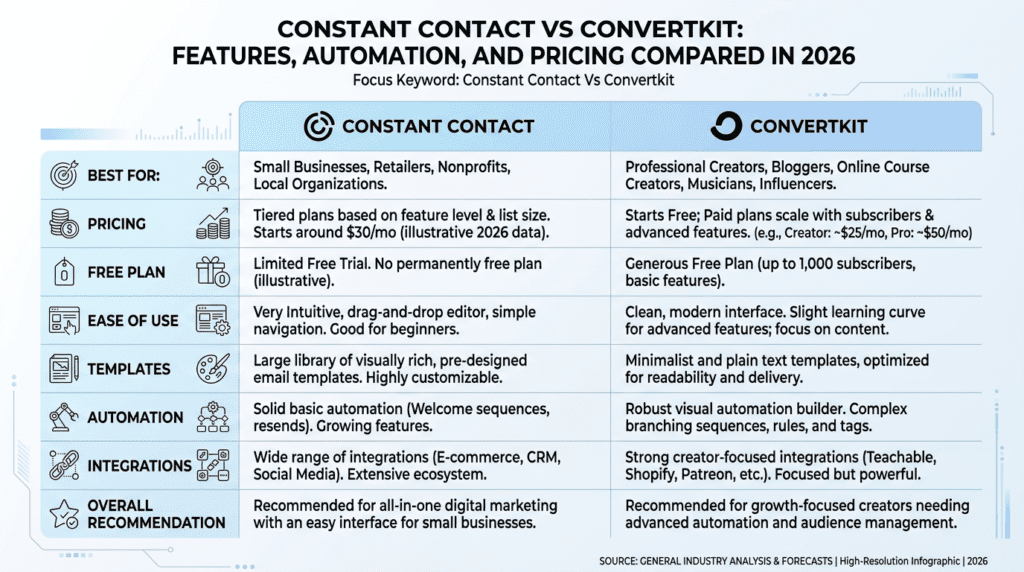
Complete Quick Verdict Table
| Category | Constant Contact | ConvertKit |
|---|---|---|
| Best For | Small businesses, local service brands, event marketers, teams that want simple email campaigns | Creators, bloggers, course sellers, coaches, and solo operators who want deeper automation |
| Not Ideal For | Users who need advanced automation or highly flexible segmentation | Teams that want lots of built-in design options and broad all-in-one marketing features |
| Starting Price | Typically starts around $12/mo, with pricing rising as your subscriber count grows | Free plan available; paid plans typically start around $29/mo |
| Free Plan | No permanent free plan, but a free trial is usually available | Yes, a free plan is available for smaller lists |
| Ease of Use | Very easy for basic email marketing | Fairly intuitive, but more workflow-oriented |
| Email Templates | Strong library of polished templates | Simpler template selection, with less emphasis on heavy design |
| Automation | Basic to moderate automation | Stronger automation and tagging-based workflows |
| Landing Page | Available | Available |
| SMS | Available on some plans | Available through built-in or add-on style features depending on plan and region |
| Integrations | Good mainstream integration coverage | Strong creator-friendly integration ecosystem |
| Biggest Limitation | Limited depth for advanced workflows | Less flexible for design-heavy teams and broader marketing needs |
| Overall Recommendation | Better for businesses that want simple, reliable email marketing | Better for creators and businesses that want stronger email marketing automation |
Best For: Constant Contact is the safer pick if you want a simple workflow, polished email templates, and less setup friction. ConvertKit is the stronger choice if you care about audience segmentation, email sequences, and automation that can scale with a content business.
Not Ideal For: Constant Contact isn’t the best fit if you already know you need complex triggers or more advanced marketing automation. ConvertKit isn’t ideal if your team wants a more traditional drag-and-drop email builder and a broader all-in-one marketing setup.
Bottom Line: If your business runs on straightforward email marketing, Constant Contact is easier to live with. If your business depends on content, funnels, and subscriber behavior, ConvertKit usually wins.
Constant Contact Vs ConvertKit: Core Differences at a Glance
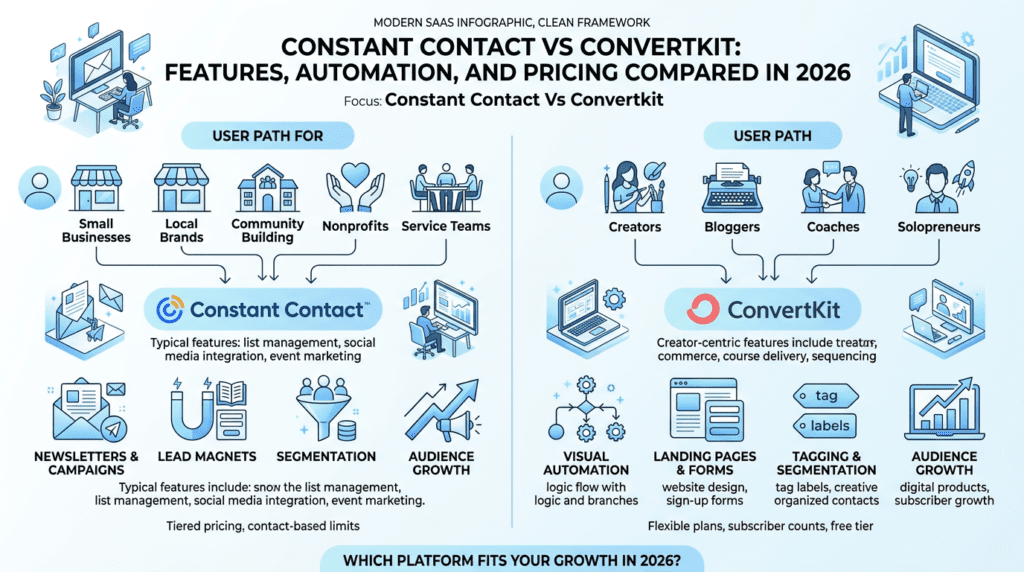
Constant Contact and ConvertKit: Audience Fit and Primary Use Cases
Constant Contact focuses on small businesses that want practical email marketing without a steep learning curve. Think local shops, nonprofits, agencies, restaurants, and service businesses that need to send announcements, promotions, and event updates.
ConvertKit leans toward creators and digital-first businesses. If you sell a lead magnet, run a newsletter, launch courses, or build funnels around content, ConvertKit feels more aligned with that workflow. It’s also a better fit if your subscriber list changes based on behavior, tag, or purchase intent.
Constant Contact vs ConvertKit: Simplicity, Flexibility, and Learning Curve
Constant Contact is usually easier to pick up on day one. Its editor and campaign flow are designed for quick wins. You can build a newsletter, choose a template, and send without much setup.
ConvertKit is still user-friendly, but it asks for a little more strategic thinking. The platform works best when you map out tags, triggers, and sequences first. That makes it more flexible, but also a little less forgiving if you just want to blast out a one-off campaign.
Constant Contact Offers vs ConvertKit Advanced Features
Constant Contact offers the basics most small businesses expect: email campaigns, contact management, templates, list segmentation, landing pages, and some automation. That’s enough for many teams.
ConvertKit goes further with subscriber tagging, visual automation, creator-focused funnels, and stronger sequence control. It’s not trying to be everything for everyone. It’s trying to help you move subscribers through a smarter customer journey.
Where Each Email Marketing Platform Feels Strongest
Constant Contact feels strongest when speed matters more than complexity. You can get a campaign out fast, and the experience is predictable.
ConvertKit feels strongest when subscriber behavior matters. If one lead magnet should trigger a different sequence than another, or if buyers should move into a separate workflow, ConvertKit handles that more naturally.
Constant Contact Vs ConvertKit: Features Compared
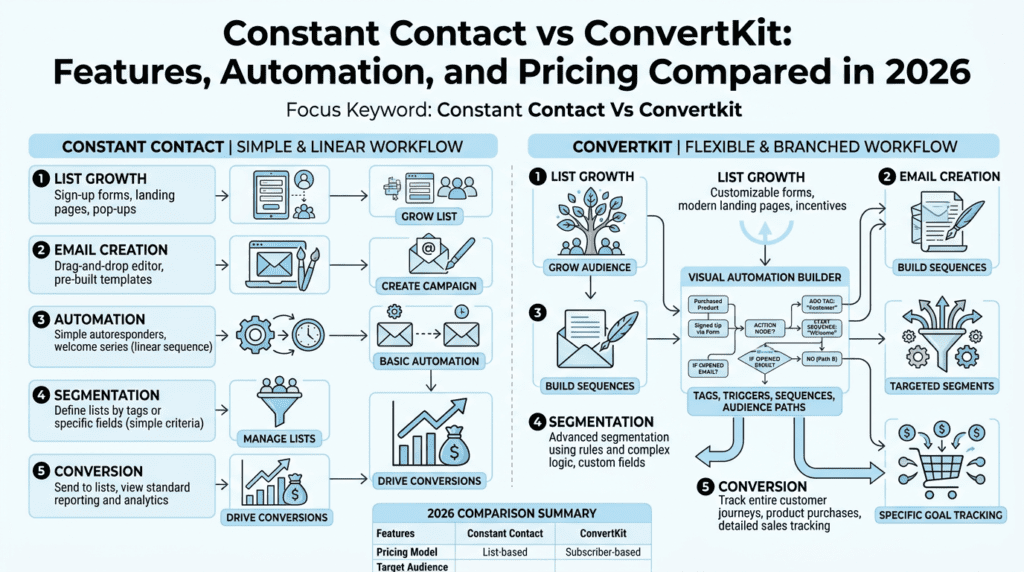
Email Marketing Features That Matter Most for Daily Use
For everyday email marketing, both tools cover the core needs: sending newsletters, managing a subscriber list, and tracking basic engagement. The difference is in presentation and control.
Constant Contact has a more traditional drag-and-drop email builder, which helps teams produce branded emails quickly. It also tends to offer more email templates out of the box, which matters if you don’t want to design from scratch every time. ConvertKit keeps the experience simpler and cleaner, but it doesn’t push design as hard. That’s good for creators who care more about the message than the layout.
A small business owner sending weekly updates may prefer Constant Contact’s editor. A content creator who wants plain, readable emails with a strong CTA might prefer ConvertKit’s approach.
Automation Workflow Differences Between Constant Contact and ConvertKit
This is where the gap widens. Constant Contact includes automation, but it’s more limited. You can build welcome workflows, basic triggers, and follow-up sequences, but it starts to feel tight once you want branching logic or behavior-based segmentation.
ConvertKit is built around automation. You can use tags, conditions, and subscriber actions to create cleaner workflows. That makes it better for funnels, lead magnets, and content upgrades. If someone downloads one resource, you can place them into one email sequence. If they buy, you can move them somewhere else.
That difference matters because automation isn’t just a feature. It’s the thing that decides how much manual cleanup your team does every week. A creator with 5,000 subscribers may be fine with simple automations at first. By 20,000 subscribers, rough workflows become a real time cost.
Integration Options and Workflow Flexibility
Both platforms offer useful integration coverage, but they serve different ecosystems. Constant Contact integrates well with common business tools, including ecommerce, event tools, and contact management systems. If you’re using platforms like Shopify and WooCommerce, the connection is usually good enough for basic email marketing.
ConvertKit tends to fit creator stacks better. It works well with tools for course delivery, membership access, forms, and digital products. That makes it easier to connect your opt-in forms, sales pages, and subscriber workflows without stitching together too many manual steps.
If your business depends on broad operational integration across sales and marketing, Constant Contact can work. If you want your email marketing and automation to mirror your content funnel, ConvertKit usually feels more natural.
SMS, Landing Pages, and All-in-One Marketing Capabilities
Both platforms go beyond email marketing to a degree, but neither is a true all-in-one replacement for a full CRM or advanced marketing suite like ActiveCampaign.
Constant Contact offers landing pages, basic forms, and SMS on selected plans. That can be helpful for small businesses that want to keep things simple. The catch is that each extra tool feels bolted on rather than deeply connected.
ConvertKit also offers landing pages and SMS options, but the value is different. It’s more about helping creators build a funnel around one audience path. If you want a newsletter opt-in, a lead magnet, a short sequence, and a product pitch, ConvertKit tends to fit better.
Which Platform Handles Growing Marketing Needs Better
ConvertKit usually handles growth better if that growth comes from content, segmentation, and launches. Its automation structure gives you more room to expand without rebuilding everything later.
Constant Contact can still scale, but mostly within a more traditional small-business model. If your needs stay centered on newsletters, promotions, and contact list management, it can hold up fine. Once you want deeper marketing automation, you may start comparing platforms like GetResponse, MailerLite, or ActiveCampaign.
Constant Contact Vs ConvertKit: Pricing and Value
Constant Contact Pricing vs ConvertKit Pricing in 2026
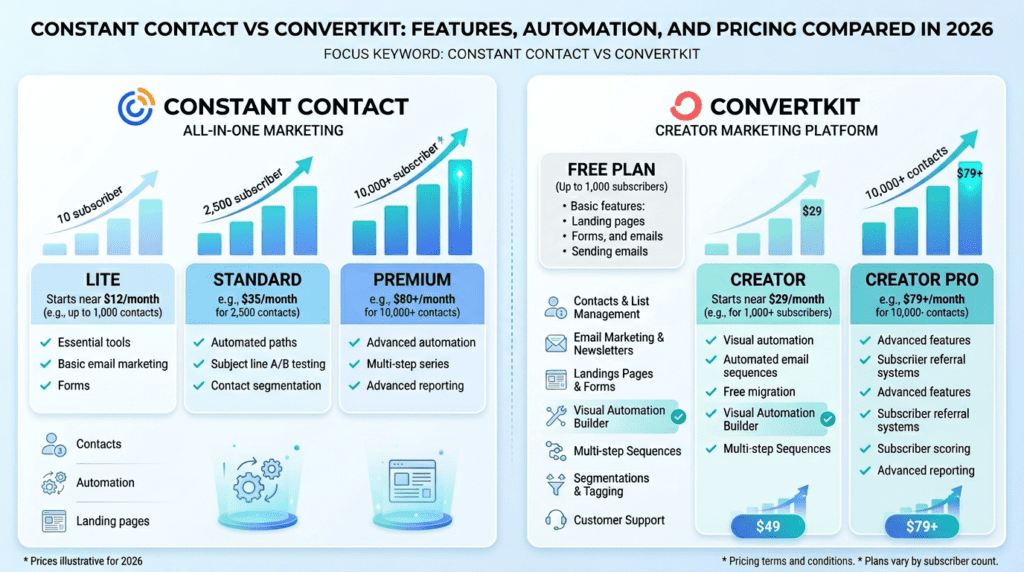
Pricing changes often, so the safest way to compare is by structure. Constant Contact typically starts around $12 per month for entry-level plans, and the cost rises as your subscriber count grows. ConvertKit has a free plan for smaller lists, and its paid plans typically start around $29 per month.
That difference is easy to overread. ConvertKit can look more expensive at first, but its free plan changes the entry math. Constant Contact may seem cheaper upfront on a paid tier, but the final bill depends heavily on list size and plan tier. Once you get beyond a few thousand subscribers, both platforms can move into a higher monthly range quickly.
Plan Structure, Contacts, and Feature Access
Plan structure matters more than the headline number. Constant Contact often gates more useful features behind higher tiers, especially when you want deeper automation or extra marketing tools. The entry plan is fine for sending, but you may need to upgrade sooner than expected.
ConvertKit’s free plan is useful if you’re starting with email marketing and want to test your workflow before paying. That said, free plans usually come with trade-offs in features and subscriber limits, so they’re best for early-stage creators, not full operating teams.
The real issue is feature access. If your workflow depends on automations, landing pages, or tagging, you can’t just look at monthly cost. You need to look at where the platform places those tools and how quickly you’ll hit a paywall.
Hidden Costs and Upgrade Pressure
This is where the two platforms can surprise people.
With Constant Contact, upgrade pressure usually appears when you want more robust automation or more advanced marketing capabilities. You may also run into practical costs tied to list size. A list of 1,000 subscribers is one thing. A list of 10,000 subscribers is a different monthly bill entirely.
With ConvertKit, the hidden cost is often time, not money. The interface is simpler than many enterprise platforms, but if you need richer design control or broader team collaboration, you may end up adding other tools around it. That can increase your overall stack cost.
A lot of businesses don’t notice this until they’ve been using the platform for 6 to 12 months. By then, the switch becomes more annoying than the original setup.
Value for Money for Small Businesses vs Content Creators
For small businesses, Constant Contact often delivers better immediate value. You get a straightforward email marketing platform with enough templates and support to keep things moving. If you just want to send promotions, reminders, and updates, that’s a fair trade.
For content creators, ConvertKit usually gives better long-term value. The automation, tagging, and sequence structure map better to a creator business model. A newsletter writer or online educator can use it to build a funnel without needing a larger marketing stack.
Which Platform Feels More Affordable Over Time
Constant Contact can feel more affordable if your use case stays simple and your list remains moderate. But if you need advanced features later, the upgrade path can eat into that advantage.
ConvertKit can feel more expensive early on, especially after you move past the free plan. Still, it may become the better value if it replaces extra tools and cuts down manual work. For many creators, that’s the real calculation: not monthly price alone, but how much workflow friction the platform removes.
If you’re starting with email marketing and want the lowest-friction decision, Constant Contact is easier to justify. If you expect your audience business to grow into funnels, sequences, and segmentation, ConvertKit often proves more efficient over time.
Constant Contact Vs ConvertKit: Ease of Use and Setup Experience
If you’re comparing Constant Contact Vs ConvertKit, ease of use is usually where the decision starts to get real. Both platforms are approachable, but they don’t feel the same once you start building a campaign, importing contacts, and trying to keep a weekly email habit going. That’s where the friction shows up.
The tricky part is that “easy” means different things depending on your business. A local business may want a simple drag-and-drop email builder and straightforward list management. A content creator may care more about fast setup for landing pages, tags, and email sequences. Those needs point in different directions.
Which Platform Feels More Intuitive for Beginners
Constant Contact usually feels more familiar on day one. The layout is straightforward, the navigation is clear, and the drag-and-drop email builder is designed for people who want to send email campaigns without spending hours learning the system. If you’re a small business owner, nonprofit manager, or someone just starting with email marketing, that matters. You can get a newsletter out quickly, and the platform does a decent job of guiding you through basic steps.
ConvertKit is also user-friendly, but in a different way. It’s simpler in some places and less polished in others. The interface is cleaner, yet it assumes you’re comfortable with tags, sequences, and a more creator-focused workflow. If you’ve never used email marketing software before, that can feel a little abstract at first. The logic is good, but it isn’t always the most obvious.
The short version: Constant Contact tends to be easier for beginners who want a traditional email marketing experience. ConvertKit feels easier once you already think in terms of funnels, lead magnets, and audience segmentation.
Constant Contact vs ConvertKit Onboarding and Daily Workflow
Onboarding is where the difference becomes obvious. Constant Contact walks you through setup with less effort. You can usually import a contact list, pick a template, and start editing an email without much second-guessing. For businesses that need to send updates, promotions, or event announcements, that speed matters more than clever automation.
ConvertKit’s onboarding is more streamlined if you’re building around a creator business. It pushes you toward forms, landing pages, and subscriber tags early in the process. That’s useful if you already know what a customer journey should look like. It’s less useful if you just want to send one newsletter a week and move on.
Daily workflow follows the same pattern. Constant Contact is built for routine email sending with simple contact management. ConvertKit is built around subscriber behavior and marketing automation, so the day-to-day experience feels more strategic. That’s a plus if you’re building a funnel. It’s a mild annoyance if you just want less software in the way.
Template Building, List Management, and Campaign Creation
This is where Constant Contact usually wins on comfort. Its template library is broad, and the editor is designed for quick changes without much training. You can create a clean-looking email, add blocks, and adjust branding without fighting the builder. For teams that send seasonal promotions, weekly newsletter updates, or event reminders, that matters.
ConvertKit takes a lighter approach. Its email templates are more minimal, which some creators actually prefer because they’re faster to edit and often look more personal. But if you rely on highly designed emails, product graphics, or branded layouts, you may find yourself wanting more customization. The trade-off is real: less design complexity often means less friction, but also less visual control.
List management is another split. Constant Contact keeps things simple with traditional list structures and contact management tools. ConvertKit leans into tagging and segmentation, which gives you more flexibility when your audience grows. A creator with 3,000 subscribers and multiple lead magnets will probably appreciate that. A local shop with one main customer list may not need it.
Where Simplicity Helps and Where It Becomes Limiting
Simplicity is valuable until it gets in the way of growth. Constant Contact’s strength is that it reduces setup friction, but that same simplicity can feel restrictive when you want deeper segmentation, more advanced automation, or a more flexible funnel. You can absolutely run effective email marketing campaigns there, but the workflow starts to feel basic once your strategy gets more layered.
ConvertKit has the opposite problem. Its structure supports more advanced marketing logic, but that can create a learning curve for users who expected a plain newsletter tool. Tags, triggers, sequences, and visual automation are helpful, yet they also make the platform feel heavier than it first appears. That’s not a defect so much as a design choice.
If you want the least complicated way to send polished emails, Constant Contact is usually the easier starting point. If you want a platform that grows into more ambitious email marketing and automation, ConvertKit becomes more attractive once you’re past the beginner stage.
Constant Contact Vs ConvertKit: Automation and Workflow Depth
Automation is where the difference between these platforms gets harder to ignore. At a glance, both can send follow-ups and segment people based on behavior. In practice, one is built to keep things manageable, while the other is built to model a more complete customer journey. That affects everything from setup time to how much you can automate without duct tape.
For many buyers, this is the real turning point in the decision. If you only need a welcome series and a few follow-ups, you don’t need a huge system. If you want branching paths, lead magnet nurturing, and behavior-based email sequences, you probably do.
Constant Contact Automation Capabilities
Constant Contact offers solid basic automation, especially for users who want practical email marketing automation without a steep learning curve. You can trigger messages based on signups, list changes, and simple actions. That works well for welcome emails, post-purchase follow-ups, event reminders, and re-engagement messages. For a lot of small businesses, that’s enough.
The limitation is depth. Constant Contact’s automation tools are useful, but they’re not built for highly branching workflows or elaborate rule stacks. If your workflow needs several conditions, multiple decision points, or repeated behavioral triggers, you’ll start noticing the edges quickly. The platform can handle common use cases, but it doesn’t always feel like a full automation engine.
That’s not a bad thing if your business is straightforward. A local restaurant, dentist, or service business usually doesn’t need 14 logic branches. They need reliable automation that doesn’t break, and Constant Contact is better aligned with that kind of use.
ConvertKit Automation Strengths for Creators and Funnels
ConvertKit is stronger when your email strategy depends on tagging, funnel logic, and content-driven segmentation. It was built with creators in mind, so the automation framework naturally supports lead magnets, email sequences, and subscriber behavior across a more complex audience journey. If someone downloads a guide, clicks a link, or joins from a specific landing page, you can shape the follow-up flow around that.
That matters because creator businesses rarely stay linear. One subscriber may come from a podcast mention, another from a webinar, and another from a blog post. ConvertKit makes it easier to treat those paths differently without creating chaos in your account. Its automation feels more like a flexible system than a fixed sequence builder.
The trade-off is that the power can become a management burden. Once you start building multiple funnels, it’s easy to lose track of tags, triggers, and overlapping sequences. ConvertKit is strong here, but only if you stay disciplined with your workflow.
Visual Workflow Differences and Rule-Based Logic
Visual automation is one of the clearest differences in the Constant Contact vs ConvertKit debate. ConvertKit’s visual automation builder is easier to use for mapping out subscriber journeys. You can see how a lead enters, what happens next, and where the flow branches. That makes it easier to build around a funnel without guessing how everything connects.
Constant Contact’s workflow logic is more limited and less visual in practice. You can still build useful automations, but the experience is simpler and more linear. That’s fine if you’re sending a limited set of campaigns. It’s less helpful when you need multiple triggers working together, such as a lead magnet download, a purchase event, and a follow-up sequence based on link clicks.
Rule-based logic also favors ConvertKit. It handles segmentation and conditional workflows in a way that better supports growing lists. That doesn’t automatically make it the better email marketing platform for everyone, but it does make it more adaptable once your business starts layering offers and audience paths.
Real-World Automation Limitations Most Buyers Notice Later
This is where people usually get frustrated. They choose a platform based on what they need today, then realize six months later that their workflow has outgrown the system. With Constant Contact, the friction usually shows up when users want more than simple automation. They hit limits around branching logic, segmentation depth, and overall workflow sophistication.
With ConvertKit, the surprise is usually different. The automation is capable, but it can become harder to keep clean as the subscriber count grows. A creator with 10,000 subscribers and several lead magnets may need tighter naming rules and better internal organization than they expected. Otherwise, the account starts to feel messy.
The common theme is that automation tools don’t just save time. They also create structure. If the structure is too simple, you outgrow it. If it’s too flexible, you have to manage it carefully. That’s the trade-off buyers often miss when comparing features on a pricing page.
Which Platform Is Better for Advanced Automations
ConvertKit is the better choice for advanced automations, especially if your business depends on funnels, subscriber tagging, and behavior-based nurturing. It gives you more room to build a real marketing system instead of a few isolated automations. That’s useful for creators, educators, and anyone selling through content.
Constant Contact is still the better choice if you want lightweight automation that’s easy to understand and maintain. It won’t overwhelm a team, and it’s often enough for straightforward sales and marketing needs. If you’re not trying to build a layered funnel, that simplicity can be a feature.
If advanced automation is central to your business model, ConvertKit has the clearer edge. If you just need dependable basics, Constant Contact is easier to live with.
Constant Contact Vs ConvertKit: Integrations and Ecosystem
Integrations matter more than most buyers expect. A platform can look good in isolation, but if it doesn’t connect cleanly to your checkout tool, CRM, landing page builder, or ecommerce stack, the workflow gets clumsy fast. That’s where the real operational cost shows up.
Constant Contact and ConvertKit both connect with useful tools, but they serve different ecosystems. One leans toward practical small-business connections. The other leans toward creator workflows and content monetization. That difference affects how much manual work you’ll need to do later.
Constant Contact Integration Options
Constant Contact covers the essentials well enough for many small businesses. It integrates with common website builders, ecommerce tools, event platforms, and CRM-style apps that support basic contact syncing and campaign workflows. If your business needs straightforward email marketing tied to forms, sales, or appointments, the ecosystem is usually sufficient.
The downside is that the integration list can feel less creator-friendly and less automation-heavy than some users expect. If you want to connect multiple tools into a complex workflow, you may find yourself relying on workarounds or outside automation services. That’s not unusual, but it adds maintenance.
For teams using one or two core systems, Constant Contact’s integrations are usually fine. For users trying to stitch together a more advanced stack, the gaps become more visible.
ConvertKit Integration Options
ConvertKit has a stronger reputation for integrations that support creators, digital products, and audience growth. It connects well with landing page tools, membership platforms, course platforms, ecommerce systems, and popular creator-focused services. If your business is built around content, launches, or lead magnets, that ecosystem fits naturally.
It also plays well with tools like Shopify and other product-selling platforms when the goal is to move subscribers from interest to purchase. That matters because creator businesses often depend on a mix of content, offers, and audience tagging rather than a single sales channel.
The practical benefit is less friction. You spend less time forcing the platform into your workflow and more time using it as part of the workflow. That’s the kind of difference that doesn’t sound dramatic in a feature list but becomes obvious during weekly operations.
Native Integrations vs Third-Party Workarounds
Native integrations are always better than patchwork solutions, and both platforms have areas where that’s true. When a tool connects directly, setup is faster, syncing is cleaner, and failure points are lower. Third-party workarounds, including automation services, can fill the gaps, but they often create a hidden tax: more places for something to break.
ConvertKit usually has the edge when you need a creator stack with less friction. Constant Contact can still work well, but some users end up leaning on external connectors sooner. That’s manageable for a small business, but it can get annoying when you’re trying to keep a stable workflow with limited time.
The real issue isn’t whether integrations exist. It’s whether they support the way you actually run your business. A single missing connection can add 30 minutes of manual cleanup every week, and that adds up fast.
Which Platform Fits Better Into a Broader Marketing Stack
ConvertKit usually fits better if your marketing stack includes lead magnets, content funnels, courses, memberships, and tagging-based segmentation. It feels built for a business that monetizes attention over time. If you’re trying to connect email marketing, landing pages, and sales funnels in one place, it tends to fit more naturally.
Constant Contact fits better when the stack is simpler. Think local business websites, event registration, basic ecommerce, and one main contact list. It works best when email marketing supports the business rather than driving the entire sales process.
If your stack is already layered, ConvertKit is easier to slot in. If your stack is basic and stable, Constant Contact is usually enough.
Constant Contact Vs ConvertKit: Performance, Deliverability, and Reliability
Performance is one of the least glamorous parts of email marketing, but it’s where business results actually show up. A polished template means nothing if emails land late, tracking is fuzzy, or list growth becomes harder to measure. Deliverability and reporting are the parts people notice only after something feels off.
Both platforms are generally reliable, but they’re optimized for different usage patterns. That affects expectations around inbox placement, campaign tracking, and how confidently you can scale.
Email Deliverability Expectations for Each Platform
Deliverability depends on many factors, not just the provider. List quality, sender reputation, content, and audience engagement all matter. Still, the platform does influence how cleanly you can manage sending practices and maintain consistency.
Constant Contact is often a dependable choice for standard business email campaigns. It’s designed for regular sending, and many small businesses use it for newsletters and promotions without major issues. ConvertKit also has strong deliverability expectations, especially for creator-style email marketing where audience engagement is typically more behavior-driven.
Neither tool magically fixes bad list hygiene. If you import old contacts, send to stale subscribers, or ignore spam complaints, deliverability problems can still happen. The key difference is how much infrastructure each platform gives you to manage things correctly over time.
Campaign Performance Criteria That Matter in Real Use
Open rates and click rates are useful, but they’re not the whole story. In real use, you want to know whether campaigns are reaching the right segment, whether automation is triggering correctly, and whether your workflow is actually converting subscribers into customers.
Constant Contact tends to make campaign execution simple, which helps teams stay consistent. That can improve performance indirectly because fewer campaigns get delayed or overcomplicated. ConvertKit can perform very well when the audience is segmented well and the funnel is built around relevant content. A creator sending a targeted sequence to 2,000 subscribers may see better results than a generic blast to 20,000 contacts.
That’s the hidden truth here: performance often follows workflow quality. The better the targeting, the better the result.
Reporting, Tracking, and List Growth Insights
Constant Contact offers practical analytics for campaign basics. You can track opens, clicks, and list activity without much hassle. That’s enough for many businesses that just need to know whether emails are getting read and whether contacts are growing. The reporting is usable, if not especially deep.
ConvertKit leans harder into subscriber-level behavior, which is valuable if you care about funnel performance. It’s easier to see how people move through sequences, how tags change, and which content path drives engagement. That’s especially useful for creators who rely on content upgrades, webinars, and lead magnets.
Neither platform is a full analytics suite. If you need detailed attribution across ads, product sales, and multi-step journeys, you’ll probably need outside reporting tools anyway. But ConvertKit’s tracking tends to be more useful when list growth is tied to content marketing.
What to Expect as Your Audience Grows
Growth changes the workload. A list of 500 contacts is easy to manage almost anywhere. A list of 25,000 subscribers is another story. At that point, segmentation, sending discipline, and workflow clarity matter much more than the basic editor.
Constant Contact can continue working well as a list grows, but many users start wanting more advanced automation and tagging. ConvertKit usually scales more naturally for content-driven businesses, though it also demands more organization as the account gets bigger. With more subscribers, the margin for messy tagging and overlapping sequences gets smaller.
If you expect your audience to stay relatively simple, Constant Contact is fine. If you expect the list to become a business asset with multiple funnels and offers, ConvertKit is the safer long-term fit.
Constant Contact Vs ConvertKit: Best Fit by User Type
This is where the decision gets practical. The better platform is not the one with the longest feature list. It’s the one that matches how you’ll actually use email marketing next week, next quarter, and once the list doubles.
The simplest way to think about it: Constant Contact is usually better for businesses that need reliable communication. ConvertKit is usually better for businesses that need subscriber-driven growth.
Constant Contact for Small Businesses and Local Brands
Constant Contact is a strong fit for small businesses, local brands, nonprofits, and service providers that need straightforward email marketing. If you send newsletters, promotions, event updates, appointment reminders, or seasonal offers, the platform is easy to maintain. The builder is approachable, the templates are convenient, and the workflow doesn’t demand much training.
It’s also a decent fit if more than one person will touch the account. Teams with limited email marketing experience often prefer something that doesn’t require constant troubleshooting. If your priority is getting campaigns out on time, Constant Contact makes that easier.
The limitation is that it can feel too basic once your marketing becomes more segmented or automation-heavy. If you know you’ll need deeper funnels later, keep that in mind now.
ConvertKit for Content Creators, Bloggers, and Solopreneurs
ConvertKit fits content creators, bloggers, coaches, educators, and solopreneurs who grow through audience trust and lead magnets. If your business depends on subscriber tags, email sequences, landing pages, and funnel-based nurture, it gives you more room to build. It’s especially useful when different subscribers need different follow-up paths.
A creator with a growing email list and multiple offers can get a lot out of that structure. You can separate podcast listeners, webinar attendees, and ebook downloads without turning the account into a mess. That flexibility is the real value.
The catch is that it expects more from you. ConvertKit works best when you’re comfortable organizing your audience and thinking in systems. If you want dead-simple email sending, it may feel like more platform than you need.
Which Platform Works Better for Agencies and Advanced Marketers
Agencies and advanced marketers usually lean toward ConvertKit when creator-style funnels are involved. The tagging, sequencing, and workflow flexibility make it easier to build a smarter system around lead generation and customer journeys. For an agency managing several content brands or online businesses, that matters.
Constant Contact can still work for agencies serving traditional small business clients, especially when the work is mainly newsletter management and basic campaign scheduling. But it’s less appealing when the brief includes complex automation, segmentation, and more ambitious marketing capabilities.
So the decision is really about complexity. If the workflow is simple and repeatable, Constant Contact is fine. If the workflow has to grow with the business, ConvertKit is usually better.
Who Should Skip Each Platform
Skip Constant Contact if you know you’ll need advanced automation, highly flexible tagging, or a more creator-focused funnel. It’s not built to be the most expandable email marketing platform.
Skip ConvertKit if you mainly want simple email sending, polished template-heavy campaigns, and a traditional small-business workflow without much setup overhead. It can do the job, but it may feel like more than you need.
Constant Contact Vs ConvertKit: What Most Comparison Posts Miss
The usual Constant Contact Vs Convertkit comparison stops at templates, automation, and pricing. That’s not wrong, but it misses the part that actually changes the buying decision: how each platform behaves once you start using it every week. A tool can look simple in a demo and still feel awkward when you’re building your third email sequence, cleaning up your subscriber list, or trying to connect a funnel to your store.
What matters is the trade-off. Constant Contact keeps things straightforward for small teams that want a dependable email marketing platform without much setup. ConvertKit leans harder into creator workflows, tagging, and automation. If you only look at feature counts, you can end up with the wrong fit and spend months working around it.
The Real Trade-Off Between Simplicity and Advanced Features
This is the core decision most buyers gloss over. Constant Contact is easier to explain to a beginner because the workflow stays close to basic email marketing: build a template, manage your contact list, send campaigns, and use lighter automation when needed. That’s useful if you’re running a local business, a small shop, or a service brand that mostly needs newsletters and promotions.
ConvertKit asks a little more from you up front, but it gives more room to grow. Its structure makes more sense if you think in terms of segments, triggers, tags, and email sequences instead of just one big email list. That’s why content creators and solopreneurs often stick with it. The downside is obvious: some people find the builder less polished for quick, marketing-heavy sends, and the learning curve shows up when you’re not used to creator-style workflow logic.
The real question is not “Which one has more features?” It’s “Which one matches the way you work?” If you want to send a weekly newsletter and maybe a few automated follow-ups, Constant Contact usually feels smoother. If you want to build funnels, nurture leads from a lead magnet, and route people into different paths based on behavior, ConvertKit is often the better fit.
Why “All-in-One” Means Different Things on Each Platform
“All-in-one” sounds nice, but these platforms use that idea in different ways. Constant Contact usually means an email marketing tool with extra marketing tools around it: landing pages, contact management, SMS marketing in some plans or add-ons, social posting, and basic automation. It’s built for business owners who want fewer moving parts.
ConvertKit’s version of all-in-one is more creator-focused. You get email marketing, landing pages, forms, automation, and checkout-style workflows tied to digital products or audience growth. That’s helpful if your business lives around content, audience building, or product launches. It’s not trying to replace a full CRM or a heavy sales system the way some platforms like ActiveCampaign or GetResponse might.
That difference matters because people often compare them as if they’re identical. They’re not. Constant Contact is better when “all-in-one” means easier operations. ConvertKit is better when “all-in-one” means building an audience engine that supports funnels, subscriptions, and repeat launches.
Scaling Concerns That Change the Decision
A platform that feels fine at 500 subscribers can start to feel cramped at 5,000 or 20,000. That’s where the decision changes. Constant Contact can absolutely support growth, but buyers sometimes hit limits in workflow depth, customization, or segment complexity before they hit technical limits. The system isn’t built to feel like a full marketing automation suite.
ConvertKit scales differently. It often handles audience growth better for creators because the tagging and automation model stays organized as the list gets bigger. But it can also expose friction if your business starts needing more traditional sales and marketing coordination, deeper CRM-style organization, or richer team workflows. In that case, tools like ActiveCampaign may become more attractive.
So the scaling question isn’t only about subscriber count. It’s about operational complexity. A small business with 8,000 contacts may still prefer Constant Contact if the work is simple. A creator with 2,000 subscribers may already need ConvertKit because the customer journey is more layered.
Common Misconceptions About Constant Contact Alternatives
A lot of people search for Constant Contact alternatives because they assume the issue is pricing alone. Sometimes it is. But more often, the real issue is fit. Users don’t leave because the platform is unusable. They leave because they want better automation, stronger customization, or a workflow that feels more natural for how they sell.
That’s why comparisons with Mailchimp, MailerLite, and GetResponse can be useful. MailerLite often appeals to budget-conscious users who want a cleaner interface. GetResponse brings stronger funnel and webinar-style marketing features. Mailchimp still comes up because of brand recognition, though it’s not always the best value once plans start climbing.
If you’re looking for an affordable Constant Contact alternative, don’t just compare starting prices. Compare how the platform handles subscriber growth, email templates, automation depth, and everyday tasks like list cleanup and segmentation. That’s where the hidden friction usually shows up.
Constant Contact Vs ConvertKit: Competitor Context and Alternatives
Looking at Constant Contact vs ConvertKit in a vacuum can be misleading. Most buyers are really comparing a short list of tools they’ve already heard of, like Mailchimp, MailerLite, GetResponse, or ActiveCampaign. That context matters because it shows what each platform is competing against in the real world, not just on a feature page.
Constant Contact vs Mailchimp
Constant Contact and Mailchimp often attract the same small business audience, but they don’t age the same way in use. Mailchimp usually gives users a more familiar brand and a broader ecosystem, while Constant Contact tends to feel more direct for small business email marketing. If you want a simple newsletter and promotion workflow, Constant Contact can be easier to live with.
Mailchimp can be stronger if you want more breadth, but its pricing and plan structure have frustrated a lot of users over time. That’s why people who compare mailchimp vs constant contact often end up choosing based on simplicity, not just features. If you’re mostly sending campaigns and managing a basic contact list, Constant Contact is often the less distracting choice. If you want more flexibility and don’t mind a more layered interface, Mailchimp may still be worth a look.
ConvertKit vs MailerLite
MailerLite is one of the most common tools like ConvertKit for creators who want a lighter setup and a friendlier price point. It often wins on simplicity and cost control, especially for smaller newsletters and lead magnet workflows. If you’re early-stage and mostly need email marketing, forms, and a landing page or two, MailerLite can feel easier to justify.
ConvertKit usually pulls ahead when tagging, automation, and creator-specific workflows matter more. It’s better at building audience segments that behave differently over time. The trade-off is that MailerLite can feel more affordable, while ConvertKit can feel more purposeful for serious audience monetization. For a blogger or course creator, the choice often comes down to whether you want the simplest path or the most creator-focused one.
Constant Contact vs GetResponse
GetResponse is a stronger comparison when you need more than basic email marketing. It brings deeper funnel features, webinar tools, and more advanced marketing automation than Constant Contact. That makes it attractive for users who want email, landing pages, and conversion paths in one place.
Constant Contact still wins for ease and faster adoption. GetResponse can be the better choice if your marketing plan includes more complex lead capture or sales workflows, but that power comes with more setup time. If a business owner wants to keep things simple, Constant Contact usually feels lighter. If the goal is to build a more structured funnel, GetResponse is often the more scalable option.
When ActiveCampaign Becomes the Better Choice
ActiveCampaign becomes the better choice when automation is no longer a nice-to-have. If you need branching workflows, deeper segmentation, CRM-style logic, and more personalized customer journey control, it can outclass both Constant Contact and ConvertKit. That’s why advanced marketers often move there once the business gets more complex.
But there’s a cost to that power. ActiveCampaign is harder to learn, and the setup can feel heavy for solo users or small teams. If you’re not ready to manage more technical marketing systems, you can end up paying for capabilities you don’t use. In that case, ConvertKit is often the smarter middle ground, and Constant Contact is still the cleaner choice for simple campaigns.
Affordable Constant Contact Alternative Options to Consider
If your main goal is price control, the market gives you a few solid options. MailerLite is often the first stop because it usually offers a friendlier entry point for smaller subscriber lists. Some users also look at GetResponse promotions or starter plans when they want more features without jumping straight into premium software.
A good affordable Constant Contact alternative should do three things well:
- Keep pricing predictable as your subscriber count grows
- Offer enough automation for your real workflow
- Avoid charging extra for basic features you’ll use every week
That last point matters. A cheap starting plan can become expensive if you quickly outgrow it or need add-ons for landing pages, SMS, or advanced reporting.
Buying Guide: How to Choose Between Constant Contact and ConvertKit
The easiest way to choose is to forget the brand names for a minute and look at your actual workflow. If your business sends newsletters, local promotions, event updates, or straightforward sales emails, Constant Contact usually fits better. If your business depends on audience growth, tagging, lead magnets, funnels, and email sequences, ConvertKit usually makes more sense.
Choose Constant Contact If You Need Simple Marketing for Small Businesses
Pick Constant Contact if you want a clean start and don’t want to spend days learning a new system. It works well for small businesses, local services, nonprofits, shops, and teams that need dependable email marketing without much technical overhead. The builder is friendly, the templates are easy to use, and day-to-day campaign creation doesn’t get in your way.
It’s especially practical if you’re sending promotions to a stable contact list and don’t need complex branching logic. A restaurant, salon, real estate office, or local retailer can get a lot of value here without overbuilding the stack. If the main job is to send, segment a little, and stay organized, Constant Contact is often enough.
Choose ConvertKit If Automation and Creator Workflows Matter More
Choose ConvertKit if your business revolves around content, audience growth, and monetizing subscribers over time. It’s a strong fit for creators, bloggers, coaches, course sellers, and solopreneurs who need tagging, automation, and more flexible customer journey design. The platform is built to support a more layered email marketing and automation workflow.
This becomes important when a simple newsletter isn’t enough. If you want to send a lead magnet follow-up, split subscribers by interest, or move people through different funnels, ConvertKit usually feels more natural. It’s not the most decorative builder, but it’s often more useful for businesses that grow through content and repeat launches.
When Pricing Should Decide the Choice
Pricing should decide the choice only after you’ve looked at plan limits and workflow fit. A lower starting price can be misleading if the platform charges more once you need extra contacts, advanced automation, or landing page features. That’s where email marketing pricing becomes less about the monthly sticker and more about the operational cost.
For many users, Constant Contact pricing feels easier to forecast for small business email marketing. ConvertKit can be more appealing if you’re building around a creator business and want to avoid paying for bloated features you won’t use. If your list is small, both can be manageable. Once you cross into several thousand subscribers, the math changes and the “cheapest” tool is often the one that wastes the least time.
When to Consider Another Email Marketing Platform Instead
Sometimes neither one is the right answer. If you need deep CRM features, complex marketing automation, or a more sales-driven workflow, ActiveCampaign may be the better fit. If you want a simpler and often more budget-friendly setup, MailerLite is worth a serious look. And if you need stronger funnel-building or webinar-style campaigns, GetResponse can be a better match.
That’s the point where it helps to step back. If your needs are basic, don’t pay for heavy software. If your needs are advanced, don’t try to force a lighter platform to behave like a full automation engine. A good email marketing platform should match the business model, not just the budget.
Final Verdict: Constant Contact Vs ConvertKit

The short version is simple: Constant Contact is usually better for small businesses that want straightforward email marketing, while ConvertKit is usually better for creators who need more flexible automation and audience workflows. Neither platform is perfect, and both make trade-offs that matter more after the first few months of use.
Final Recommendation
If your priority is ease, choose Constant Contact. If your priority is automation depth, choose ConvertKit. That’s the cleanest way to think about it in 2026.
For small businesses that mostly send newsletters, promotions, and occasional campaigns, Constant Contact is the safer pick. For creators building funnels, lead magnet sequences, and segmented subscriber journeys, ConvertKit is usually the stronger long-term tool. If you’re still undecided, ask which workflow you’ll use every week. That answer usually tells you enough.
Best For
Constant Contact: Small businesses, local brands, nonprofits, and teams that want simple email marketing with minimal setup.
ConvertKit: Content creators, bloggers, coaches, and solopreneurs who want stronger automation and more flexible subscriber logic.
Not Ideal For
Constant Contact: Users who need advanced automation, complex branching workflows, or creator-style funnel building.
ConvertKit: Businesses that want the easiest possible beginner experience or a more polished all-purpose marketing dashboard.
Bottom Line
If you need a practical, low-friction email marketing platform, Constant Contact is the easier recommendation. If your business depends on audience segmentation, automation, and creator workflows, ConvertKit is often the better fit. The right choice comes down to how you sell, how much you automate, and how quickly you expect your workflow to grow.
Frequently Asked Questions About Constant Contact Vs ConvertKit
Is Constant Contact Better Than ConvertKit for Small Businesses?
Yes, often it is. Constant Contact is usually better for small businesses that want simple email marketing, newsletter sending, and basic automation without a steep learning curve.
ConvertKit can still work for small businesses, but it makes more sense when the business acts more like a creator brand or depends on segmented follow-up. If you mainly want to send promotional emails and keep your workflow simple, Constant Contact is usually the easier choice.
Is ConvertKit Better Than Constant Contact for Content Creators?
Yes, usually. ConvertKit is better for content creators because it handles tagging, subscriber segmentation, and automation in a way that fits audience-driven businesses.
That matters if you rely on lead magnets, email sequences, or multiple funnels. Constant Contact can still work for creators, but it often feels more limited once the audience strategy gets more sophisticated.
Which Platform Has Better Automation: Constant Contact or ConvertKit?
ConvertKit has better automation. Its workflows are built for more flexible triggers, tagging logic, and creator-style journeys.
Constant Contact offers useful automation, but it’s lighter and more limited. If you only need a few basic follow-ups, that may be enough. If you want deeper behavior-based automation, ConvertKit is the stronger option.
How Does Constant Contact vs ConvertKit Pricing Compare in 2026?
Pricing depends on subscriber count and plan level, but Constant Contact and ConvertKit both typically scale upward as your list grows. Constant Contact often feels more straightforward for small business budgeting, while ConvertKit can feel more efficient for creators who use automation heavily.
The real difference is value, not just starting price. A cheaper plan isn’t helpful if you outgrow it fast or need features locked behind upgrades.
Can You Switch From Constant Contact to ConvertKit Easily?
Yes, but it still takes work. You can usually export contacts and move them over, but you’ll need to rebuild templates, forms, and automation workflows.
That’s the part people underestimate. The move is usually manageable for a small list, but once you have several segments, email sequences, and landing pages, migration becomes a real project rather than a simple export.
How Do Mailchimp vs Constant Contact and Mailchimp vs ConvertKit Compare?
Mailchimp vs Constant Contact is usually a simplicity-versus-breadth decision, with Constant Contact often feeling easier for small businesses. Mailchimp vs ConvertKit is more about audience style, since ConvertKit usually serves creators better while Mailchimp offers broader general-purpose appeal.
If you want the most beginner-friendly path for basic campaigns, Constant Contact is often the simpler pick. If you want creator-focused automation, ConvertKit tends to fit better.