
Email marketing still pays the bills for a lot of online businesses, but the tool you choose can quietly shape how fast you grow. AWeber Vs Convertkit is a real decision in 2026 because both platforms solve the same basic problem in very different ways. One leans toward straightforward list management and classic email sending. The other leans toward creators, tagging, and simpler automation flows that can scale without turning your account into a mess.
That difference matters once you’re sending beyond a few newsletters a month. The wrong platform can leave you stuck with clunky email templates, awkward automation, or a pricing jump that shows up right when your list starts working.
What most email marketing buyers get wrong
A lot of buyers compare features like they’re shopping for software that will stay the same forever. They focus on whether a platform has templates, a free plan, or a drag-and-drop editor. That’s the wrong lens. What matters is how the platform handles growth, segmentation, and day-to-day workflow once your email list gets larger and your campaigns get more specific.
People also underestimate how different creator tools feel in real use. A platform can look simple in a demo and still become frustrating when you need to tag buyers, separate subscribers by interest, or send different email sequences after a signup form. That’s where the comparison gets more useful.
Hidden frustrations creators and small businesses run into
The pain usually shows up after signup. A course creator might realize they need subscriber on multiple lists logic that gets messy fast. A small ecommerce brand may find that email broadcasts are easy, but follow-up automation feels too limited. Someone switching from Mailchimp or another email marketing platform often discovers that the setup is only half the job; the real issue is list management and segmentation once the account has been running for 6 to 12 months.
There’s also the simple annoyance of scale. A tool that feels clean at 500 subscribers can get awkward at 5,000 or 15,000 if the structure is wrong. That’s where choices made early start costing time.
How to read this comparison if you care about email marketing ROI
Don’t read this like a feature checklist. Read it like a business decision. If your goal is simple email campaigns, basic broadcasts, and predictable sending, one platform may be enough. If you care about automation, tags, and workflows that support sales funnels, one platform will usually age better.
The best email marketing choice is rarely the one with the most features. It’s the one that lets you send the right email to the right subscriber without adding extra admin work every week.
Quick Verdict: Aweber vs Convertkit at a Glance
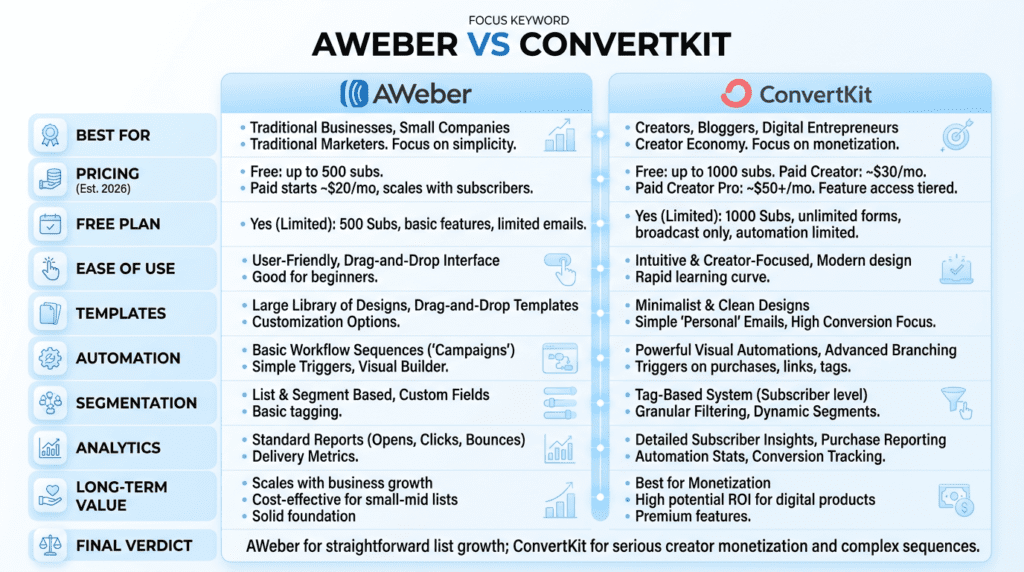
Complete Comparison Chart
| Category | AWeber | ConvertKit |
|---|---|---|
| Best for | Small businesses, newsletters, and users who want familiar list-based email marketing | Creators, bloggers, coaches, and anyone who wants tag-based automation |
| Not ideal for | Teams that want modern workflow depth and cleaner segmentation | Users who need polished template-heavy design without extra setup |
| Starting price | Typically starts around $15/month, depending on subscriber count | Typically starts around $25/month, depending on subscriber count |
| Free plan | Yes | Yes |
| Ease of use | Easy to start, especially for basic email blasts | Easy once you understand tags and flows, but less intuitive at first |
| Email templates | Stronger classic email templates | More limited design choices, more function than flair |
| Automation | Good for simple autoresponders and basic sequences | Better for visual automations and flexible creator funnels |
| Segmentation | Solid, but more list-centric | Stronger tag-based segmentation |
| Landing pages | Available | Available |
| Analytics | Enough for open rates, clicks, and basic performance tracking | Better for tracking behavior across automations and subscriber paths |
| Best long-term value | Better if you want straightforward email sending at a manageable level | Better if you expect your automation and segmentation needs to grow |
| Biggest limitation | Can feel dated and less flexible for advanced workflows | Template design and list-style simplicity can feel limited |
| Overall recommendation | Good for simple email marketing and list-based sending | Better for most creators who want to grow with automation |
Best For
AWeber is best for users who want simple email marketing, decent templates, and an easier path into broadcasts without much setup friction. It works well for local businesses, small newsletters, and people who mostly send one-off email campaigns.
ConvertKit is best for creators and small businesses that care about automation, tagging, and subscriber behavior. If your workflow depends on one subscriber moving through a funnel based on actions, ConvertKit usually fits better.
Not Ideal For
AWeber is not ideal if you want a modern automation workflow or you expect to build layered segmentation over time. It can do the job, but the structure starts to feel heavy.
ConvertKit is not ideal if you want highly polished newsletter design with lots of prebuilt email templates. You can make it work, but it’s not the platform’s strongest area.
Bottom Line
If your goal is simple sending, AWeber still makes sense. If your goal is smarter automation, cleaner segmentation, and a better long-term workflow for a creator business, ConvertKit is usually the stronger choice. For most growing users, the comparison of ConvertKit vs AWeber ends with ConvertKit ahead on flexibility, while AWeber stays competitive on basic ease of use.
AWeber vs ConvertKit: Core Feature Differences
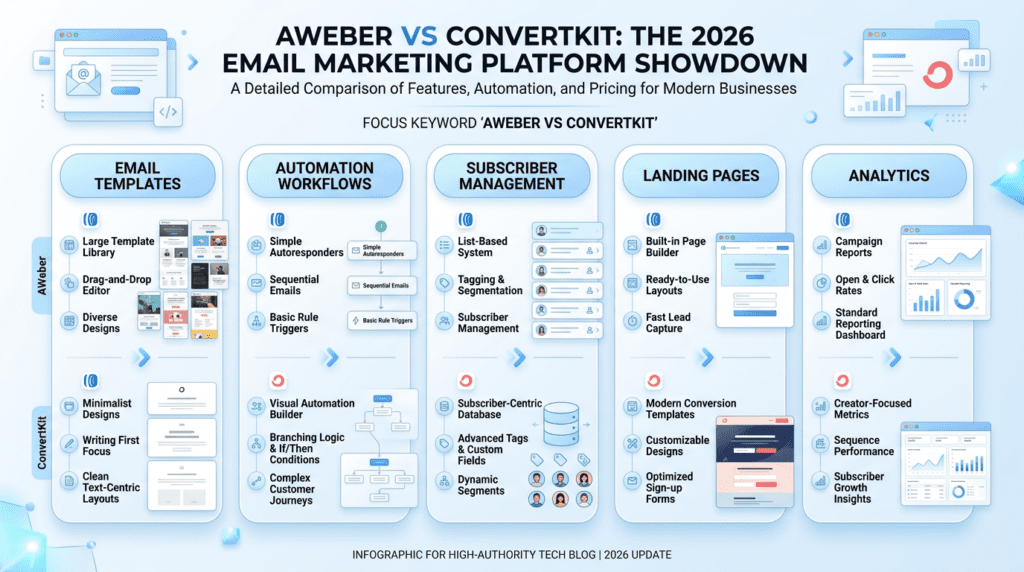
AWeber has traditionally been the stronger option for users who want more built-in email templates and a familiar drag-and-drop layout. That matters if you care about getting an email out fast without hiring a designer. The trade-off is that the design can feel a little old-school, especially if you want something clean, modern, and minimal.
ConvertKit takes the opposite approach. Its templates are simpler, and that frustrates people who expect a library of polished layouts. But many creators don’t actually want a fancy template. They want an email that looks like a real email, not a landing page disguised as one. That’s where ConvertKit’s plain style can work in its favor.
If you send a newsletter every week, AWeber may feel more comfortable at first. If your brand depends on personal, text-first communication, ConvertKit usually feels lighter and less fussy.
Automation workflows and sequence builder
This is where the contrast gets sharper. AWeber supports basic email sequences and autoresponders well enough for simple follow-ups, but the workflow can feel limited once you start adding branches or behavior-based logic. If your automation only needs to send a welcome email and then a few timed follow-ups, it’s fine.
ConvertKit is built more naturally for automation. The sequence builder is easier to shape around a funnel, and the visual automations make it simpler to connect tags, triggers, and email campaigns without creating a tangled setup. That matters once you have multiple lead magnets, product offers, or segmented audiences.
For a course creator, this can be the difference between a clean funnel and a confusing account. One signup can trigger a tag, start a sequence, and remove someone from another path. With AWeber, that same workflow usually takes more manual planning.
Subscriber management and list organization
List management is one of those areas people ignore until it becomes the thing they hate most. AWeber is more list-centric, so it can work well if your subscriber lists are clean and separate. The downside is that as soon as one subscriber needs to belong to more than one segment, the structure can start to feel repetitive.
ConvertKit leans into tags more heavily, and that makes segmentation easier in practice. You can tag and segment your subscribers based on interest, purchase behavior, or form entry without constantly rebuilding lists. For many users, that alone makes the platform feel less cluttered.
Landing page and signup form options
Both platforms offer landing page and signup form tools, but they’re usually not the main reason people choose either product. AWeber offers enough to get forms live quickly, and that works if you just need a straightforward signup flow. ConvertKit also gives you landing pages and forms, but the real value is how those forms plug into its automation.
If you’re running a simple newsletter signup, either tool is serviceable. If you want the signup to kick off a full nurture workflow, ConvertKit is usually easier to build around.
Analytics and reporting depth
AWeber covers the basics well: opens, clicks, and standard email performance. That’s enough for many small teams. You can still make practical decisions from that data, especially if you’re mostly sending broadcasts.
ConvertKit gives you more useful visibility into how subscribers move through automations and sequences. It’s not a full analytics suite, but the reporting feels more connected to how creator businesses actually use email. If you care about which form, tag, or sequence drives revenue, that’s more helpful than raw email stats alone.
AWeber vs ConvertKit: Automation Comparison
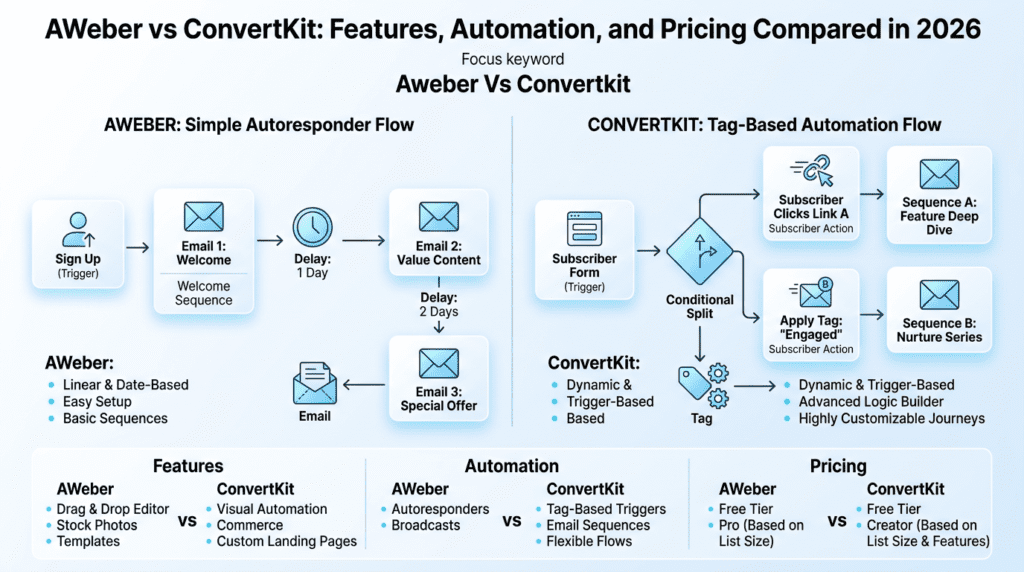
Simple autoresponders in AWeber
AWeber’s automation is built for users who want to send timed follow-ups without a complicated setup. You can welcome a new subscriber, wait a few days, and send the next email. For a small business that mainly uses email for updates or basic nurture, that’s enough.
The limitation appears when the workflow needs branching. Once you want to send one path to buyers and another to non-buyers, or react to click behavior, the system can feel constrained. It’s not broken. It’s just not trying to be a deep automation engine.
ConvertKit workflow flexibility for creators
ConvertKit’s automation feels much closer to how modern creator businesses operate. You can build workflows around tags, purchases, form submissions, and sequence behavior. That flexibility matters when you have multiple offers, lead magnets, or content buckets.
This is also where beginner confusion often starts. ConvertKit is simpler than it looks, but it still expects you to think in terms of triggers and actions instead of old-fashioned list buckets. Once that clicks, the workflow becomes easier to maintain than most people expect.
Tag-based automation and segmentation differences
AWeber can segment subscribers, but ConvertKit’s tag-based structure is usually better for behavior-driven email marketing. Tags let you follow what a subscriber did, not just which list they joined. That becomes useful for segmentation because the same person can subscribe to more than one interest path without duplicate admin work.
That difference matters for a creator who sells both a newsletter and a course. One subscriber might enter through a lead magnet, get tagged based on interest, and then receive a different email sequence after clicking a product link. That’s cleaner than forcing everything into separate lists.
Which platform handles advanced workflows better
ConvertKit wins here for most users. It’s simply better at handling advanced automation without making the workflow feel fragile. AWeber can do the basics reliably, but the more complicated the setup gets, the more likely you are to feel the platform wasn’t built for it.
If your business depends on rules like “if opened email A, tag as engaged; if clicked link B, move to sequence C,” ConvertKit is the better fit. If your needs stop at welcome emails and a few timed follow-ups, AWeber is still workable.
Real-world automation limits as your list grows
A lot of automation tools feel great at 500 subscribers and slightly annoying at 5,000. The issue is usually not raw sending power. It’s maintenance. The more you grow, the more important it becomes to keep your email automations easy to audit, edit, and troubleshoot.
In that context, ConvertKit scales more naturally because tags and workflows reduce duplication. AWeber can still function well, but list management gets heavier as the number of subscriber paths grows. That’s especially true if you run multiple email campaigns, product launches, or segmentation rules at the same time.
AWeber vs ConvertKit Pricing in 2026
Starting price and plan structure
AWeber and ConvertKit both use subscriber-based pricing, which means the exact monthly cost changes as your email list grows. In 2026, AWeber typically starts around $15 per month for small lists, while ConvertKit typically starts around $25 per month. Both also offer a free plan, though the feature depth is limited compared with paid tiers.
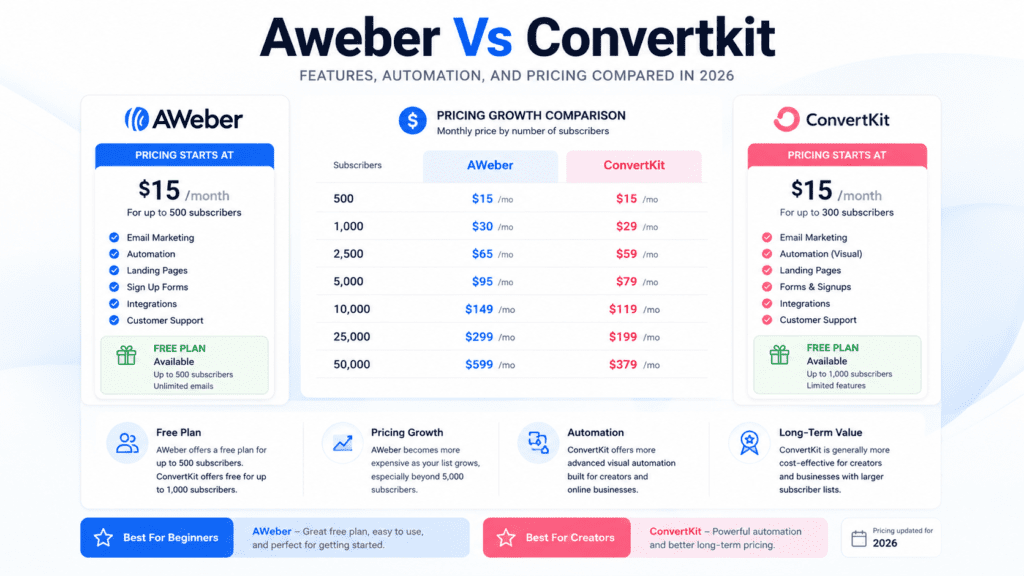
That difference sounds small until you’re comparing real budgets. A solo creator with 500 subscribers may tolerate a $10 difference. A small team watching every subscription line item will notice it quickly.
Pricing differences as subscriber count increases
As the number of subscribers increases, both platforms get more expensive in predictable steps. The important part is not just the headline starting price. It’s how much you’re paying for the features you actually use.
For example, a creator on the lower tier may only need broadcasts and a few basic automations. In that case, AWeber’s pricing can feel more forgiving. But if that same creator needs stronger segmentation and more flexible automation, ConvertKit’s higher price may make more sense because it reduces operational friction. A platform that saves you 2 hours a week can be cheaper in the real world, even if the monthly bill is higher.
Value for money for creators, bloggers, and small businesses
ConvertKit usually offers better value for creators who rely on tagging, email sequences, and funnels built around content or digital products. If your business model depends on warming leads over time, its pricing is easier to justify.
AWeber tends to feel better for users who want simple email marketing without paying for extra depth they won’t use. Bloggers, small local businesses, and newsletter publishers can still get decent value there. The catch is that once your workflow grows more complex, the cheaper plan may stop feeling cheap.
Hidden costs to watch for
The main hidden cost is not a fee buried in the checkout. It’s time. If your platform makes segmentation messy, your team spends more time cleaning lists, editing automations, and fixing subscriber logic. That’s a real cost.
There’s also the switching cost to think about. Moving from AWeber to ConvertKit later is possible, but list cleanup, tags, and email migration can take time. If you already know you’ll want more advanced automation, starting with the wrong platform can create a second project six months later.
Which platform feels more affordable long term
AWeber often looks more affordable at the start. ConvertKit often feels more affordable over time. That sounds backwards, but it comes down to what you’re buying. If your email marketing stays simple, AWeber can stay cheaper. If your business grows into segmentation and workflow-heavy automation, ConvertKit’s structure usually saves more time and frustration.
For most creators, the long-term choice comes down to whether they want lower monthly pricing or a smoother operating model. The second one usually wins once the email list starts doing real work.
AWeber vs ConvertKit Ease of Use
Setup experience for beginners
AWeber is usually the easier first stop if you want simple email marketing without a lot of setup drama. The account flow is straightforward, the defaults are predictable, and you can get to your first broadcast fast. That matters when you just want to send a welcome email, build a small list, and move on with your day.
ConvertKit is still approachable, but it asks a little more of you up front. Its structure leans toward creators who think in tags, automations, and subscriber behavior. That’s helpful later. At signup, though, some beginners pause because the system doesn’t feel as instantly familiar as a classic list-based email tool. If you’ve never used a tag-driven platform before, the first 20–30 minutes can feel like you’re translating a new workflow in your head.
AWeber’s dashboard is built around routine tasks: create email, manage list, check stats, move on. That makes it comfortable for small teams or solo operators who don’t want to dig through layers of settings just to send a newsletter. The trade-off is that it can feel a little older and less streamlined once you start doing more advanced work.
ConvertKit’s interface is cleaner and more modern. It usually feels faster once you understand the layout, especially for creators managing multiple forms, tags, and sequences. The downside is that the workflow can feel unfamiliar if you’re used to thinking in folders or separate subscriber lists. A blogger with one main audience will probably adapt quickly. A local business owner trying to keep multiple audience types organized may need a day or two to settle in.
Creating campaigns without a steep learning curve
This is where the two platforms separate a bit. AWeber makes it easy to build a basic campaign, choose an email template, and send. You don’t need much technical confidence to get a decent result. That’s useful if your priority is consistency rather than customization.
ConvertKit is also simple once you understand its logic, but the platform rewards people who want to build smarter email sequences over time. If you’re creating a lead magnet funnel, a webinar follow-up, or a product launch path, it starts to make more sense. For pure newsletter sending, some users still feel like ConvertKit offers more structure than they immediately need.
Where each email marketing platform feels faster
AWeber tends to feel faster for one-off tasks and basic broadcasts. If you’re sending a weekly newsletter to 500 subscribers, it’s easy to move from draft to send without much friction. The system doesn’t ask much of you, and that can be a real advantage when you’re short on time.
ConvertKit feels faster for repeatable creator workflows. Once your tags and automations are set, the platform can save time every week. A course creator, for example, might set up one signup form, one tag, and a 5-email sequence. After that, the process runs with less manual work. The catch is that getting to that point takes more planning than AWeber’s simpler model.
Beginner confusion that can slow implementation
Most beginner friction doesn’t come from a lack of features. It comes from mismatch. People sign up expecting one workflow and get another.
Common slowdowns include:
- Subscriber organization: New users often misunderstand the difference between lists, tags, and segments.
- Automation planning: Some users try to build advanced flows before they’ve mapped the actual customer journey.
- Template choice: Too many options can stall a first campaign instead of helping it.
- Form setup: A simple signup form can still take longer than expected if branding and placement aren’t clear.
In practice, AWeber is easier if you want a clean, traditional start. ConvertKit is easier if you’re willing to think a little more like a system builder. The “easiest” platform depends on whether you want speed today or flexibility later.
AWeber vs ConvertKit Deliverability and Inbox Performance
Deliverability reputation and sender trust
Deliverability is one of those areas where buyers want certainty, but the real answer is more nuanced. Both AWeber and ConvertKit have strong reputations in email marketing, and both are designed to help your email land in the inbox instead of disappearing into spam. That said, no platform can guarantee inbox placement on its own.
AWeber has been around for a long time, and that historical presence still helps with sender trust. ConvertKit also performs well for creators who keep their lists clean and send relevant content. The bigger point is that platform reputation only gets you so far. If your list is messy or your content is inconsistent, both tools can struggle.
Inbox placement considerations
Inbox placement depends on more than the software. Your subject line, sending frequency, list quality, and subscriber behavior all matter. A clean list of engaged readers usually performs better than a large list full of inactive contacts, even if the platform itself is strong.
For most small businesses, the practical question is not “Which one has perfect deliverability?” It’s “Which one helps me avoid mistakes that hurt inbox performance?” In that sense, both platforms are workable. The difference shows up in how easily you can maintain good sending habits without overcomplicating your process.
What affects deliverability in real campaigns
A few things matter more than most buyers realize:
- List hygiene: Old, inactive, or imported contacts can drag down results.
- Engagement: Opens, clicks, and replies influence how mailbox providers read your email.
- Consistency: Random bursts of email followed by silence can create poor signals.
- Content quality: Pushy or misleading copy can trigger spam complaints.
A SaaS brand sending product updates to 3,000 subscribers will need a different cadence than a coach sending one weekly newsletter. Either way, the platform won’t rescue weak list practices. It just gives you the tools to manage them better.
Which platform is easier to keep clean and compliant
AWeber feels a little more straightforward if your main concern is keeping the process simple. Its traditional list structure can be easier to understand when you’re managing basic opt-ins and routine broadcasts. That reduces the chances of setting up messy workflows that are hard to track later.
ConvertKit offers stronger tagging and segmentation, which can help with compliance and targeting if you know what you’re doing. But that flexibility can also create confusion if you don’t keep your tagging system tidy. A creator with multiple lead magnets can end up with a cluttered account fast if tags aren’t planned from the start.
Reality check on deliverability claims
A lot of marketing pages make deliverability sound like a platform feature you can buy once and forget. That’s not how it works. If your subscriber list is low quality, your inbox placement can still fall apart.
The more honest view is this: both AWeber and ConvertKit can support solid deliverability, but the platform itself is only one piece of the puzzle. The better choice is usually the one that helps you build disciplined habits. For some users, that means AWeber’s simpler workflow. For others, it means ConvertKit’s more controlled segmentation and automation logic.
AWeber vs ConvertKit Templates, Landing Pages, and Email Design
AWeber email templates for fast publishing
AWeber’s email templates are built for speed. If you want to send a newsletter, promote a sale, or announce a new post without spending 45 minutes on design, it gets the job done. The templates are practical, and they support a fast publishing workflow that suits smaller teams.
The trade-off is that the design system can feel less modern than what some creators expect in 2026. You can still create clean email campaigns, but you may not get the polished, minimalist look that many brands want right away. For a business that values function over flair, that’s fine. For a creator brand that sells visual identity, it may feel limiting.
ConvertKit template flexibility for creators
ConvertKit takes a lighter approach to email design. That sounds like less on paper, but for many creators, it’s actually the point. The platform encourages plain, personal-looking email instead of overdesigned layouts that can feel heavy or commercial.
That style works well for newsletters, audience building, and digital product launches. It’s also easier to stay consistent when you send a lot of email. You don’t need to keep tweaking a template every time you write. The downside is obvious: if you want highly styled marketing email with lots of visual elements, ConvertKit can feel restrained.
Landing page builder comparison
Both platforms include landing page and signup form tools, but they’re not built for the same kind of user. AWeber’s landing page tools are useful for simple lead capture pages and basic list growth. They’re good enough for getting a single offer live without adding another tool.
ConvertKit’s landing pages are better aligned with creator funnels. If you’re offering a PDF guide, webinar registration, or newsletter signup, the flow is smooth. You can spin up a page, connect a tag, and start moving people into a sequence. That’s a strong setup for solo creators who don’t want to pay for extra page software.
Brand customization and design trade-offs
This is where buyers usually have to make an honest choice. AWeber gives you more conventional design options, which can help if your brand wants structured email layouts. ConvertKit gives you a cleaner system with fewer design distractions, which often helps the message feel more personal.
If your brand relies on visual polish, AWeber may give you more immediate control. If your brand relies on trust, clarity, and direct communication, ConvertKit often feels more natural. Neither approach is automatically better. They just support different styles of email marketing.
When simple design is actually an advantage
Simple design can improve performance. A plain email often loads faster, looks better on mobile, and feels less salesy. That can matter more than a fancy template if your audience mainly wants information.
A newsletter creator sending weekly tips may do better with a clean text-first format than a visually heavy template. The same is true for coaches, consultants, and many B2B brands. In those cases, the question isn’t “Which platform has prettier templates?” It’s “Which one helps me send clearer email with less friction?” ConvertKit often wins there. AWeber wins when you want more built-in design options right away.
AWeber vs ConvertKit Integrations and Ecommerce Support
Integration coverage with common tools
Both platforms connect with the tools most small businesses already use, but the depth of those connections matters. AWeber covers a broad range of common integration needs, which is useful if you rely on standard website builders, forms, webinar tools, or CRM connections. It’s the kind of coverage that helps a business keep moving without reinventing its stack.
ConvertKit is especially strong in the creator ecosystem. It integrates well with tools that support digital products, landing pages, course delivery, and audience growth. If your workflow includes a content site, a checkout tool, and tag-based email follow-up, ConvertKit usually feels more native. If your stack is more traditional and you just need reliable connections, AWeber remains practical.
Ecommerce features and store connections
Ecommerce support is where the differences start to matter more. AWeber can work fine for straightforward store promotion and order follow-up, but it’s not the first platform most people choose for deeper ecommerce logic. It handles the basics, yet the workflow can feel limited once you want behavior-based automation tied to purchases.
ConvertKit is often the better fit for creators selling digital products, memberships, and courses. Its tools fit better with audience-driven selling, where a subscriber might move from lead magnet to offer to sale. For a Shopify store, that can mean simpler tagging and follow-up. For a content creator selling a PDF or mini course, it can feel like the whole system fits together better.
Checkout, tagging, and purchase-based workflows
This is one of the most important differences in the convertkit vs aweber comparison. ConvertKit is stronger when you want to tag and segment your subscribers based on buying behavior. That means a customer who purchases one product can be moved into a different sequence than someone who only joined your newsletter.
AWeber can support list management and segmentation, but it doesn’t usually feel as fluid for purchase-triggered workflows. If you’re building a funnel where buyers should stop receiving the same pitch sequence, ConvertKit tends to be easier to manage. That matters when you’re selling multiple digital products and don’t want people receiving duplicate offers.
Best fit for digital products vs physical products
ConvertKit is usually the better pick for digital products. It’s a strong tool for course creators, authors, coaches, and newsletter businesses that need tagging, sequence control, and simple monetization support. Its workflow is designed around audience relationships.
AWeber can still work well for physical products, local businesses, and simpler promotional campaigns. If your store mainly needs newsletters, promotions, and occasional automated follow-ups, it’s enough. But once you need richer purchase-based segmentation or a more creator-friendly flow, ConvertKit is the more natural fit.
Where integration limits create friction
The friction usually shows up when your business starts outgrowing basic email marketing. At that point, you realize the problem isn’t whether a tool connects to Shopify or your landing page software. It’s whether the integration supports the exact workflow you need.
A few common pain points:
- Manual tagging: Some setups still require extra steps after a purchase or signup.
- Weak sync logic: Not every integration passes useful behavior data.
- Disconnected reporting: You can connect tools but still miss the full customer picture.
- Too many workarounds: If you need Zapier for everything, the stack gets harder to maintain.
For simple use cases, both platforms are fine. For more complex ecommerce or creator funnels, ConvertKit tends to reduce friction sooner.
AWeber vs ConvertKit Analytics and Subscriber Insights
Campaign reporting that matters most
The most useful analytics are the ones you’ll actually check. Open rates, click rates, unsubscribes, and conversion activity tell you whether your email is working. Both AWeber and ConvertKit cover these basics, but they present them with different priorities.
AWeber keeps reporting straightforward. That’s helpful if you want quick visibility without spending time studying charts. ConvertKit adds more context around subscriber behavior, which is useful when you care about how people move through your email list over time. If your goal is to understand a simple newsletter campaign, both platforms are enough. If your goal is to refine a multi-step funnel, ConvertKit’s reporting feels more useful.
Open rates, clicks, and subscriber activity
Open rates still matter, but they’re not the full story. Clicks show intent. Subscriber activity shows whether your list is paying attention. A 25% open rate on a list of 1,000 people can be fine in one business and weak in another, depending on the audience and offer.
ConvertKit usually gives creators more visibility into how subscribers interact with forms, sequences, and tags. That makes it easier to see where people are dropping off. AWeber gives you the essentials, which is enough for many smaller lists. A local business sending occasional promotions may not need anything deeper. A content business with multiple lead magnets probably will.
List management and segmentation visibility
This is where ConvertKit has a clearer edge. Because its system is built around tags and audience behavior, it’s easier to see how subscriber groups are organized. That helps when you need to separate buyers from leads, webinar attendees from cold subscribers, or readers by interest.
AWeber can still manage subscriber lists effectively, but the structure feels more traditional. If your strategy depends on multiple lists and a lot of manual organization, it can become harder to keep track of who belongs where. For some users, that’s fine. For others, especially once the list grows past a few thousand contacts, the lack of intuitive segmentation becomes a real operational issue.
What each platform shows well
AWeber shows the basics well. You can quickly understand how an email performed and move on. That makes it useful for teams that don’t want a heavy analytics workflow.
ConvertKit shows subscriber behavior well. You get more insight into tags, sequence movement, and audience paths. That helps when you’re trying to improve automation, not just measure a single send. The difference is subtle at first, but it becomes more valuable as your email strategy gets more complex.
What most blogs miss about analytics depth
A lot of reviews talk about analytics like they’re just charts on a dashboard. In practice, analytics matter because they shape your next decision. If you can’t tell which lead magnet brought in the best subscribers, or which tag group clicks most often, you end up guessing.
That’s why the real question isn’t which platform has prettier reporting. It’s which one helps you take the next step with less confusion. AWeber is fine for tracking campaigns. ConvertKit is better when your email strategy depends on understanding subscriber behavior, segmentation, and long-term list quality.
AWeber vs ConvertKit: Real-World Workflow and Testing Notes
For a weekly newsletter, AWeber feels like a traditional email marketing tool that wants you to move fast and keep things tidy. You build the email, choose a template, and send. That’s usually enough for a creator or small business that publishes one or two broadcasts a week and doesn’t want to wrestle with extra setup. The structure is familiar, which is comforting when you’re under deadline.
ConvertKit feels lighter in the middle of the workflow, but a little less polished in the design stage. It’s built around the creator workflow: write, tag, segment, automate, send. If your newsletter is tied to a lead magnet, a paid product, or a simple nurture sequence, that structure can be a better fit than a more template-heavy tool. The trade-off is that the writing flow is smoother than the visual design flow.
Hands-on observations from day-to-day email marketing
The daily experience is where the gap between AWeber and ConvertKit starts to matter. AWeber is often easier when you’re sending straightforward email campaigns and don’t want to think too hard about organization. ConvertKit becomes more useful once your email list starts behaving like a real business asset instead of a single contact dump.
A few practical differences show up quickly:
- AWeber: Better if you want ready-made email templates and a familiar campaign setup.
- ConvertKit: Better if you rely on tags, automation, and simple list management.
- AWeber: Feels a bit more rigid, but easier to understand at a glance.
- ConvertKit: Feels more flexible, but you’ll notice its limits if you want highly designed emails.
That’s the part buyers miss. A platform can feel “easy” on day one and still become annoying at 5,000 subscribers when your workflow gets messy.
Speed, reliability, and workflow efficiency
Speed is not just about how fast the dashboard loads. It’s also about how quickly you can go from idea to email sent without backtracking. AWeber usually wins when the goal is a simple broadcast or a basic autoresponder. There are fewer decisions, so the workflow can feel shorter. ConvertKit can be just as fast for repeatable email sequences once the system is built, but setup takes more thought.
Reliability matters too. In practice, both platforms are built for serious email marketing, so the bigger issue is not whether they work. It’s whether they fit the way you work when you’re publishing every week. If you’re juggling content, product launches, and list cleanup, a clunky workflow becomes expensive in time, not just frustration.
Performance evaluation criteria that actually matter
Most buyers obsess over features they may never use. That’s a mistake. When comparing AWeber and ConvertKit in real use, the useful evaluation criteria are much narrower:
- How long it takes to create and send a campaign
- Whether automation is easy enough to maintain after setup
- How clean subscriber organization stays over time
- Whether reporting helps you make decisions, not just collect numbers
- How painful it is to edit a live workflow later
If a tool saves you 15 minutes per send and 30 minutes per automation change, that adds up fast. For a solo creator sending 4 email campaigns a month, that can mean hours back every month. For a small team, it can mean fewer workflow mistakes and fewer broken sequences.
Scaling concerns for growing audiences
Scaling is where many email platforms quietly change character. A setup that works fine for 500 subscribers can feel crowded at 5,000 or 25,000. With AWeber, the challenge is often workflow complexity. You may want more advanced segmentation or smarter automation than the platform naturally encourages. With ConvertKit, the challenge can be structure. Tags are powerful, but if you don’t manage them carefully, your subscriber list can become hard to interpret.
That matters because growth creates operational friction. You need to know who bought, who clicked, who ignored the last 3 broadcasts, and who should enter a new sequence. If that takes manual cleanup every week, the platform starts getting in your way. A creator growing from a simple newsletter to a product-based business will feel that faster than a casual sender.
AWeber vs ConvertKit: Key Trade-Offs by Use Case
Best for creators and solo publishers
ConvertKit is usually the better fit for creators who build around content, audience segmentation, and lightweight automation. It’s especially strong if you sell digital products, run webinars, or use a newsletter to feed a simple funnel. The tag-based structure makes it easier to separate a free subscriber from a buyer without building a mess of extra lists.
AWeber still works well for solo publishers, especially if the priority is sending consistent email broadcasts with less setup drama. But once a creator wants behavior-based automation, ConvertKit tends to feel more natural. That’s why many people compare Aweber Vs Convertkit and end up choosing the one that matches their business model, not just their comfort level.
Best for beginners who want simplicity
AWeber usually wins for absolute beginners who want a straightforward path to sending email. The template library and campaign setup make it easier to launch a first newsletter without studying the whole system. You can get something usable out the door quickly, which matters when you’re already overloaded.
ConvertKit is still beginner-friendly, but it assumes you’re willing to think in tags and workflows earlier. That’s not hard, exactly. It’s just a different mental model. If you’re a first-time newsletter operator and you mainly want to collect leads and send a weekly update, AWeber’s simpler approach can feel less intimidating.
Best for ecommerce and product promotions
For ecommerce, neither tool is a full-on store platform, but both can support promotional email marketing. AWeber is fine for basic product announcements, sales emails, and post-purchase follow-up. ConvertKit becomes more useful when your promotions depend on behavior. For example, you can tag someone after a purchase, then move them into a different sequence later.
If you’re selling digital products, ConvertKit often has the edge because its workflow is built for creators who sell through content. If you’re closer to physical ecommerce and your main need is regular promotional blasts to a customer list, AWeber can be enough. The real question is how much logic you need behind the campaign.
Best for growing lists that need stronger automation
ConvertKit is usually stronger once your list stops being simple. If subscribers can join from multiple opt-ins, buy different products, or move through different content paths, the tag-and-sequence model is easier to maintain. That matters when your email list starts acting like a sales system instead of a contact database.
AWeber can handle growth, but the automations are more limited in practice. That’s fine for a newsletter, a welcome series, or a basic nurture flow. It’s less ideal when you want branching logic, detailed segmentation, and workflow changes that don’t require rebuilding pieces later.
When another email marketing platform may be a better fit
There are cases where neither platform is the cleanest answer. If you need heavy ecommerce automation, deeper CRM features, or complex lifecycle marketing, a tool like ActiveCampaign may be better. If your main goal is all-in-one marketing with broader sales tooling, Mailchimp or another hybrid platform might fit better depending on your budget and team size.
The useful rule is simple: choose AWeber or ConvertKit if email is the core channel and you want a focused tool. Look elsewhere if you’re trying to force a newsletter platform to behave like a full customer operations system.
AWeber vs ConvertKit: Common Buying Mistakes
Choosing based on templates alone
A lot of buyers compare email templates and stop there. That’s risky. Templates matter if you send visually branded emails, but they won’t save you if your automation is clumsy or your list management gets messy after month three. A pretty email that’s hard to automate is still a bottleneck.
This is where AWeber often looks stronger at first. It has more traditional design appeal. ConvertKit can look plain by comparison. But if your real business goal is to turn subscribers into customers, design is only one piece of the workflow. A good-looking email doesn’t make up for poor segmentation or weak follow-up.
Overlooking automation needs until later
This is probably the most expensive mistake. People start with a basic newsletter, then add a lead magnet, then add a product, and suddenly they need email automations that can handle more than one path. By that point, switching tools is already a project.
If you think you’ll ever need tags, sequences, or behavior-based triggers, compare the platforms on that basis now. ConvertKit usually offers more room to grow here. AWeber can still work, but its automations are more limited, so you may hit a ceiling sooner than expected.
Ignoring subscriber organization and workflow structure
Subscriber management sounds boring until your list starts splitting into different groups. Then it becomes one of the most important parts of the platform. If you don’t think about whether a subscriber should live in one list, multiple lists, or under tags, you can create duplicates and confusion fast.
ConvertKit is generally better for tag-first organization. AWeber’s list structure can still work, but the way you manage people matters more. If your workflow involves multiple lists, product interests, or content paths, this is where people often realize they chose based on the wrong factor.
Paying for features you will not use
Some businesses buy the platform with the longest feature list and then use only 20% of it. That sounds harmless until the monthly cost climbs with subscriber count. If you only send a weekly newsletter and a few welcome emails, you probably don’t need a more advanced automation stack.
The smarter move is to match pricing to actual usage. A solo blogger with 500 subscribers doesn’t need the same tool as a creator running launches every month. If you won’t use segmentation, workflows, or sales funnels, don’t pay for them just because they exist.
Assuming migration will be effortless
Switching platforms is never as clean as it sounds. Even when a provider offers free migration, you still have to audit tags, sequences, forms, and segments. Some emails won’t map perfectly. Some forms need to be rebuilt. Some old automations need manual cleanup.
That’s why “I can always move later” is a shaky plan. If you’re already sending regular broadcasts and nurturing a list, migration takes time and attention. A creator moving from AWeber to ConvertKit, or the other way around, should expect at least a few hours of setup work and likely more if the list is active.
AWeber vs ConvertKit: Final Recommendation

Which platform is better for most users
ConvertKit is better for most creators who want to grow beyond basic newsletters. It handles tags, automation, and subscriber organization in a way that supports long-term audience building. If your email marketing is tied to products, funnels, or content monetization, that matters.
AWeber is better for users who want a simpler, more traditional email platform. It’s a solid choice if your main goal is to publish broadcasts, send basic campaigns, and avoid a complicated setup. For many small businesses, that’s enough.
Which platform wins for automation
ConvertKit wins for automation. It gives you more flexibility with email sequences, tags, and workflow logic. You can build more useful subscriber paths without making the system feel like a maze.
AWeber’s automation is fine for simple use cases, but it becomes limiting once your campaigns depend on branching behavior, product interest, or multiple entry points. If automation is a central part of your workflow, ConvertKit is the stronger choice.
Which platform wins for ease of use
AWeber wins for easy first-time publishing. Its structure is more familiar, especially if you’re used to classic email marketing tools. The learning curve is gentler for simple sends and basic list management.
ConvertKit is still usable, but it asks you to think a bit more about system design. That’s good if you want control. It’s less good if you just want to send an email and move on with your day.
Which platform offers stronger long-term value
ConvertKit usually offers stronger long-term value for audience builders because the platform grows better with your business model. Its features are built for creators who need better segmentation, workflow control, and more meaningful automation over time.
AWeber can still be the better value if you’ll never need much beyond newsletters and basic follow-up. In that case, paying for more advanced tools would be wasted money. The right value choice depends on whether your email list is a simple broadcast channel or a real sales engine.
Final verdict on Aweber Vs Convertkit
If you want the more capable creator platform, choose ConvertKit. If you want the easier traditional email tool, choose AWeber. That’s the cleanest way to think about the comparison.
The strongest choice for most growth-minded users is ConvertKit, especially if you care about automation, tagging, and future flexibility. AWeber still makes sense for simpler email marketing, but it’s more of a comfort tool than a scaling tool.
Frequently Asked Questions About Aweber Vs Convertkit
Is Aweber or ConvertKit better for beginners?
AWeber is usually better for beginners who want the simplest start. It has a more familiar setup for basic email sends and newsletter publishing.
ConvertKit is still beginner-friendly, but it becomes easier when you’re ready to think in tags and sequences. If you only need simple email marketing, AWeber is less overwhelming.
Which platform has better email deliverability?
Both platforms are generally strong on deliverability, but your sending habits matter more than the platform name. Clean lists, good subject lines, and regular engagement usually have a bigger impact than the software itself.
If you’re sending to a warm subscriber list and keeping your list clean, either platform can perform well. The real issue is list quality, not just the tool.
Is ConvertKit worth the higher price?
ConvertKit is worth the higher price if you use automation, segmentation, or creator-style funnels. The extra cost makes sense when those features save time or support revenue.
If you only send basic broadcasts, the higher cost may not pay off. In that case, AWeber can be the more practical buy.
Can AWeber and ConvertKit handle ecommerce email marketing?
Yes, both can handle basic ecommerce email marketing. They can support promotions, product updates, and simple follow-up flows.
ConvertKit is usually better for digital products and creator-led funnels. AWeber can work well for straightforward customer email campaigns and regular announcements.
Which email marketing platform is better for creators?
ConvertKit is better for most creators. It was built around the creator workflow, so tagging, sequences, and audience organization feel more natural.
AWeber can still work for creators, especially if they mostly send newsletters. But ConvertKit usually gives creators more room to grow.
How hard is it to switch from Aweber to ConvertKit?
Switching from AWeber to ConvertKit is manageable, but it’s not automatic. You’ll need to move subscriber data, rebuild forms, and check automations carefully.
If you have a small list, the switch may take only a few hours. Larger or more active lists usually need a more careful migration plan.