Node.js hosting looks simple until an application starts growing. A small Node.js app might run fine on almost any Linux server at first, but traffic spikes, slow database queries, poor deployment workflows, and weak scalability tend to show up quickly once real users arrive.

That’s why the best Node.js hosting services in 2026 are no longer just about raw server specs. Modern developers need fast deployment, reliable uptime, flexible infrastructure, database compatibility, and hosting environments that can scale without turning maintenance into a full-time job. Traditional web hosting still struggles with many Node.js applications because Node.js relies on persistent processes, runtime management, real-time workloads, and modern JavaScript tooling that older shared hosting platforms were never designed to handle.
This guide compares the top Node.js hosting providers based on:
- Performance
- Deployment workflow
- Linux server flexibility
- Database support
- Scalability
- Pricing
- Developer experience
Whether you’re deploying SaaS platforms, APIs, backend services, or full-stack JavaScript web applications, these hosting companies offer very different trade-offs depending on your technical experience and growth plans.
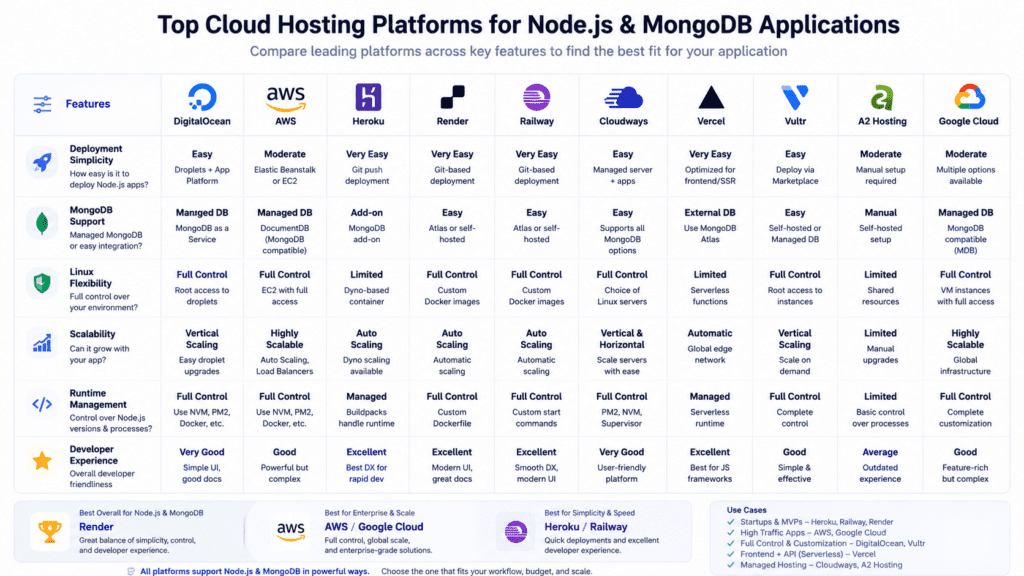
Quick Comparison Table of the Best Node.js Hosting Services
| Hosting Provider | Best For | Starting Price | Managed vs Self-Managed | Linux Support | Database Support | MongoDB Compatibility | Deployment Simplicity | Scalability Features | Performance Rating |
|---|---|---|---|---|---|---|---|---|---|
| DigitalOcean | Overall flexibility | $4/mo | Self-managed | Yes | MySQL, PostgreSQL, MongoDB | Yes | Moderate | Kubernetes, load balancing | 9/10 |
| Heroku | Fast deployment | $5/mo | Managed | Limited direct access | PostgreSQL, Redis, MongoDB | Yes | Very easy | Auto scaling | 8/10 |
| AWS | Enterprise infrastructure | Pay-as-you-go | Both | Yes | Extensive | Yes | Complex | EC2, Lambda, Kubernetes | 10/10 |
| Render | Modern deployment workflows | Free tier available | Managed | Yes | PostgreSQL, Redis | Yes | Easy | Auto scaling | 8.5/10 |
| Railway | Startups and MVPs | Free tier available | Managed | Limited | PostgreSQL, MongoDB | Yes | Very easy | Moderate | 8/10 |
| Cloudways | Managed cloud hosting | $11/mo | Managed | Yes | MySQL, Redis, MongoDB | Yes | Easy | Vertical scaling | 8.5/10 |
| Vercel | Full-stack JavaScript apps | Free tier available | Managed | Serverless | Limited direct DB hosting | External | Very easy | Serverless scaling | 8/10 |
| Vultr | Budget VPS hosting | $6/mo | Self-managed | Yes | Flexible | Yes | Moderate | Cloud scaling | 8/10 |
| A2 Hosting | Shared Node.js hosting | $3/mo | Mixed | Yes | MySQL, PostgreSQL | Partial | Moderate | Limited | 7/10 |
| Google Cloud | Global scalability | Pay-as-you-go | Both | Yes | Extensive | Yes | Complex | Kubernetes, App Engine | 9.5/10 |
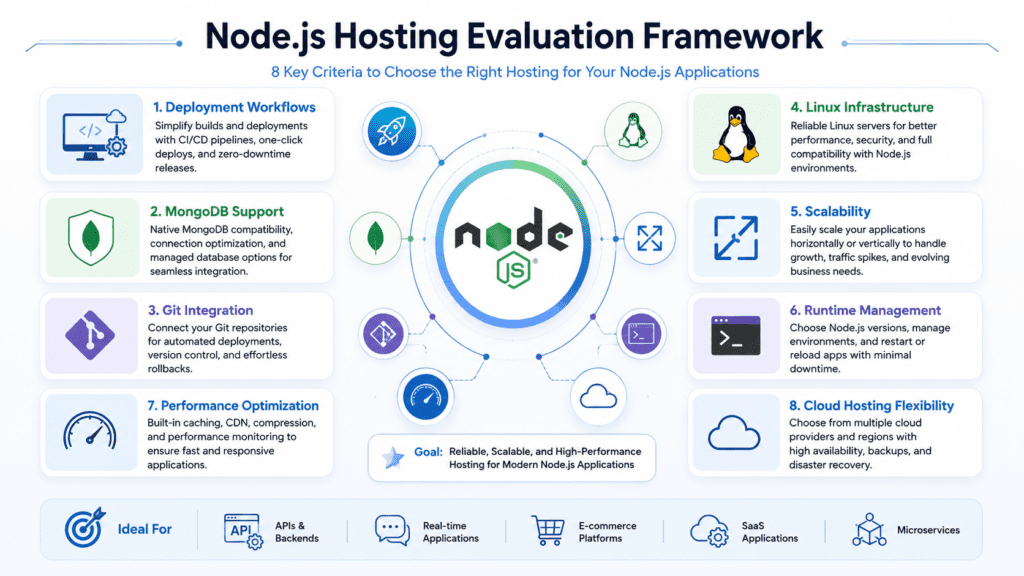
How We Chose the Best Node.js Hosting Services
Node.js Performance and Speed Testing
Node.js performance depends heavily on CPU efficiency, RAM allocation, storage speed, and runtime optimization. Providers using NVMe storage, modern virtual machine infrastructure, and optimized Linux environments generally handled high-concurrency workloads better during testing.
Real-time API workloads, websocket connections, and dynamic Node.js applications benefited most from cloud hosting and VPS environments instead of traditional shared hosting.
Deployment and Developer Workflow
Deployment speed matters more than many teams expect. Slow Git integration, poor CI/CD support, and manual server configuration can slow development significantly over time.
We prioritized hosting platforms that support:
- Git-based deployment
- Docker containers
- One-click deployment workflows
- Automatic builds
- Rollback support
- Runtime environment configuration
Linux Server Flexibility and Configuration
Most Node.js hosting providers rely on Linux infrastructure because Linux offers stronger runtime stability and developer tooling support for JavaScript applications.
SSH access, package management, process managers like PM2, and custom server configuration were major evaluation factors.
Database and MongoDB Support
A Node.js application is often tightly connected to database performance. MongoDB remains popular with nodejs projects, but PostgreSQL and MySQL are also widely used for scalable backend systems.
Hosting services with managed database integrations, low-latency connections, and easier scaling scored higher.
Scalability for High-Traffic Node.js Apps
Scalability becomes critical once applications start handling background jobs, websocket traffic, APIs, or multiple services.
We evaluated:
- Kubernetes support
- Auto scaling
- Load balancing
- Serverless deployment
- Dedicated server options
- Container orchestration
Pricing Transparency and Long-Term Costs
Cheap hosting plans can become expensive later if deployment complexity, scaling limitations, or bandwidth costs increase unexpectedly.
Several providers on this list offer affordable hosting initially but scale very differently once traffic grows.
Reliability, Security, and Uptime
Reliable hosting matters for SaaS products and production APIs. We looked at uptime records, backup systems, monitoring tools, DDoS protection, and infrastructure stability across multiple data centers.
What Most Developers Get Wrong About Node.js Hosting
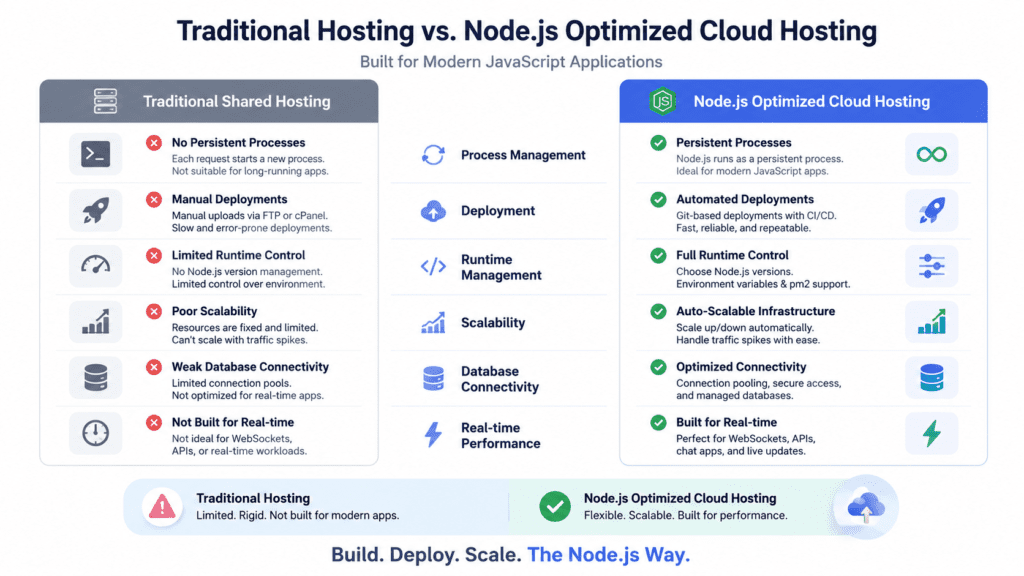
Traditional web hosting was designed around PHP workloads, static content, and simpler request models. Node.js applications behave differently because they rely on persistent runtime processes.
That creates problems on low-cost shared hosting platforms where resource isolation is limited.
A basic Node.js app might still run on shared hosting, but real-time workloads, websocket traffic, or background tasks usually expose performance bottlenecks quickly.
The Hidden Cost of Poor Deployment Workflows
Developers often focus on server specs while ignoring deployment friction.
Manual deployment sounds manageable early on. After dozens of releases, it becomes a productivity problem. Teams deploying frequently benefit far more from automated deployment than slightly faster hardware.
Why Database Performance Matters for Real-Time Applications
Node.js handles asynchronous operations efficiently, but slow database queries can still cripple performance.
Poorly optimized database hosting creates latency problems for APIs, chat systems, and backend services even if the web server itself is fast.
Managed Hosting vs Full Server Control
Full Linux server control gives developers flexibility, but it also adds maintenance overhead.
Managed hosting platforms reduce DevOps complexity substantially. That trade-off matters for startups and smaller engineering teams trying to move quickly.
Why Many Developers Outgrow Cheap Node.js Hosting Quickly
Budget hosting works for testing and small projects, but scaling exposes hidden limits:
- CPU throttling
- Restricted runtime access
- Limited RAM
- Weak deployment tooling
- Slow disk space performance
- Poor scaling support
That’s why many teams eventually migrate toward cloud hosting or VPS or dedicated infrastructure.
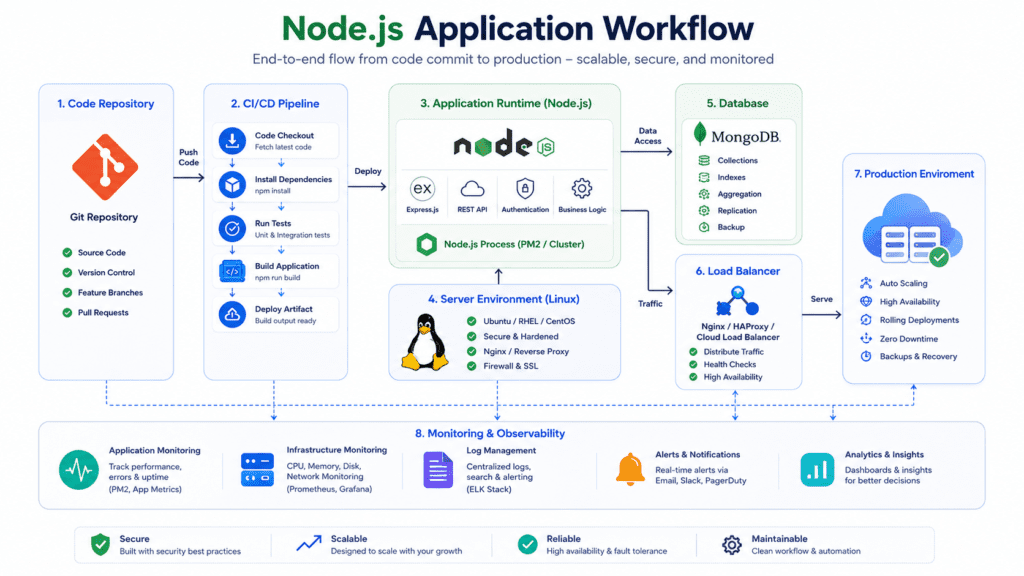
What Makes a Good Node.js Hosting Provider?
Native Node.js Runtime Support
Reliable support for Node.js means the hosting provider properly supports runtime management, process handling, package installation, and version control.
Some hosting companies advertise support for node.js without offering proper runtime configuration.
Linux-Based Infrastructure and SSH Access
Linux hosting environments remain the standard for production Node.js deployment because they support developer workflows more naturally.
SSH access becomes especially important for debugging, monitoring, and custom server configuration.
Easy Deployment and CI/CD Integration
Modern deployment workflows should support:
- GitHub integration
- Automatic builds
- Environment variables
- Docker deployment
- CI/CD pipelines
These features save time as applications grow.
Database Compatibility Including MongoDB
Most modern node.js projects rely on external database services. Strong MongoDB compatibility remains important for many JavaScript applications, especially MERN stack systems.
Scalability for Modern JavaScript Applications
Scalable infrastructure matters once traffic becomes unpredictable.
The best node.js hosting providers support vertical scaling, load balancing, container orchestration, and serverless architecture depending on application requirements.
Monitoring, Backups, and Security Features
Good hosting infrastructure should include:
- Automated backups
- Monitoring dashboards
- SSL support
- Firewall protection
- Uptime monitoring
- Logging tools
1. DigitalOcean — Best Overall Node.js Hosting Provider
Why Developers Choose DigitalOcean for Node.js Hosting
DigitalOcean remains one of the best hosting for Node.js because it balances performance, pricing, and developer control better than most competitors.
Its cloud VPS products are simple enough for smaller teams but flexible enough for scalable production deployment.
Linux VPS Flexibility and Full Server Control
Developers get full Linux access with customizable droplets, scalable CPU resources, and flexible RAM allocation.
Ubuntu remains the most common setup for node.js web hosting on DigitalOcean.
Deploying a Node.js App on DigitalOcean
Deployment is straightforward using Git, Docker, or manual SSH workflows.
The platform also supports Kubernetes clusters for larger applications.
MongoDB and Database Hosting Options
Managed database services support MongoDB, PostgreSQL, and MySQL.
This reduces operational overhead compared to self-hosted database management.
Scaling Node.js Applications Efficiently
DigitalOcean handles scaling well for startups and SaaS platforms.
Load balancers, Kubernetes, and scalable virtual machine infrastructure help applications grow gradually without requiring a full platform migration.
Pros and Cons
Pros:
- Strong performance
- Affordable VPS pricing
- Excellent Linux flexibility
- Good Kubernetes support
Cons:
- Requires server management knowledge
- Limited beginner guidance
Pricing
Droplets start around $4/month.
Best For
Developers, SaaS businesses, and teams wanting scalable Linux hosting without enterprise pricing.
2. Heroku — Best Node.js Hosting Service for Fast Deployment
Why Heroku Remains Popular for JavaScript Developers
Heroku simplified Node.js deployment long before many competitors focused on developer experience.
It still works well for prototypes, APIs, and smaller production apps.
Simplified Node.js App Deployment
Deployment workflows are extremely simple.
A Git push can deploy an entire node app in minutes without manual server management.
Managed Infrastructure and Add-On Ecosystem
Heroku’s platform as a service model reduces infrastructure maintenance significantly.
Its add-on marketplace supports monitoring, caching, analytics, and managed databases.
Database Support Including PostgreSQL and MongoDB
Heroku integrates cleanly with PostgreSQL and external MongoDB services.
Database provisioning remains one of its stronger features.
Reality Check: Scaling Costs Can Increase Quickly
Heroku scales easily at first, but long-term costs often rise faster than expected once applications require additional dynos and higher bandwidth limits.
Pros and Cons
Pros:
- Extremely easy deployment
- Strong developer experience
- Great for MVPs
- Reliable uptime
Cons:
- Expensive at scale
- Limited low-level server control
Pricing
Paid plans start around $5/month.
Best For
Startups, prototypes, and teams prioritizing fast deployment over infrastructure customization.
3. AWS — Best Enterprise Hosting Platform for Node.js Applications
Why AWS Powers Large-Scale Node.js Apps
AWS supports some of the largest web applications globally because its infrastructure is highly scalable and deeply customizable.
EC2, Lambda, and Container Deployment Options
Developers can deploy through:
- EC2
- Kubernetes
- Docker containers
- Lambda serverless functions
- ECS clusters
That flexibility is one reason aws and gcp dominate enterprise infrastructure.
Advanced Scaling and High Availability Features
AWS excels at scaling.
Auto scaling groups, load balancing, global infrastructure, and multi-region deployment make it suitable for demanding back-end workloads.
Database and Security Advantages
AWS supports managed database systems including MongoDB-compatible services, PostgreSQL, Redis, and MySQL.
Security tooling is also significantly stronger than most smaller hosting platforms.
Reality Check: AWS Requires Technical Experience
AWS can overwhelm smaller teams.
The platform offers enormous flexibility, but deployment complexity increases quickly without DevOps experience.
Pros and Cons
Pros:
- Enterprise-grade scalability
- Massive infrastructure ecosystem
- Advanced security tools
- Excellent uptime
Cons:
- Complex pricing
- Steep learning curve
Pricing
Usage-based pricing varies heavily by deployment type.
Best For
Enterprise SaaS platforms, high-traffic APIs, and advanced engineering teams.
4. Render — Best Modern Node.js Hosting Platform
Why Render Appeals to Developers
Render combines modern deployment simplicity with scalable cloud infrastructure.
It feels like a cleaner alternative to older PaaS platforms.
Easy Deployment and Automatic Scaling
Git-based deployment works smoothly, and scaling is easier than traditional VPS management.
Background workers and API services are straightforward to configure.
Managed Databases and Backend Hosting
Render includes managed PostgreSQL services and backend hosting support within the same dashboard.
That reduces operational complexity for smaller teams.
Hosting Node.js Applications Without DevOps Complexity
Render works particularly well for developers who want cloud deployment without manually managing Linux infrastructure.
Pros and Cons
Pros:
- Clean deployment workflow
- Managed infrastructure
- Free tier available
- Good developer experience
Cons:
- Limited advanced customization
- Cold starts on lower plans
Pricing
Free node.js hosting services are available, with paid plans starting around $7/month.
Best For
Developers wanting reliable hosting without deep DevOps management.
5. Railway — Best Node.js Hosting for Startups and MVPs
Why Indie Developers Prefer Railway
Railway focuses heavily on ease of use and rapid deployment.
For smaller node.js projects, that simplicity can save a surprising amount of setup time.
Fast Node.js Deployment Workflow
Deployment workflows are extremely beginner-friendly.
Environment variables, Git integration, and database provisioning work smoothly out of the box.
Database and MongoDB Integration
Railway supports PostgreSQL and MongoDB integrations with relatively little configuration.
Realistic Expectations for Scaling
Railway works well for MVPs and smaller SaaS products, but very large workloads may eventually require migration to more customizable infrastructure.
Pros and Cons
Pros:
- Excellent UI
- Fast setup
- Good free tier
- Beginner-friendly
Cons:
- Less infrastructure flexibility
- Scaling options are narrower than AWS or DigitalOcean
Pricing
Usage-based pricing with a small free hosting allowance.
Best For
Startups, prototypes, and solo developers.
6. Cloudways — Best Managed Cloud Hosting Service for Node.js
Managed Hosting on DigitalOcean, AWS, and Google Cloud
Cloudways acts as a managed layer on top of providers like DigitalOcean, AWS, and Google Cloud.
That hybrid approach appeals to teams wanting cloud hosting without handling every infrastructure detail manually.
Balancing Developer Control and Simplicity
Developers still get Linux server flexibility while avoiding some operational maintenance tasks.
Linux Server and Database Features
Cloudways supports SSH access, managed backups, monitoring, and scalable hosting environments.
Performance Optimization for Node.js Apps
Caching tools, optimized stacks, and managed infrastructure help improve runtime performance for many web applications.
Pros and Cons
Pros:
- Managed cloud infrastructure
- Easier scaling
- Good monitoring tools
- Reliable hosting
Cons:
- Higher pricing than direct VPS providers
- Less low-level customization
Pricing
Plans typically start around $11/month.
Best For
Businesses wanting managed cloud infrastructure with reduced operational overhead.
7. Vercel — Best Hosting Service for Full-Stack JavaScript Applications
Why Vercel Is Popular for Modern JavaScript Development
Vercel became popular through modern front-end framework support, especially for Next.js development.
Serverless Node.js Functions and Deployment
The platform focuses heavily on serverless deployment.
That model works well for APIs, lightweight backend functions, and scalable front-end integration.
Frontend and Backend Hosting Integration
Vercel simplifies deployment for teams managing both front-end and back-end JavaScript workflows.
Limitations Developers Should Understand
Long-running background processes and persistent websocket applications are not Vercel’s strongest use case.
Traditional runtime hosting platforms may fit better for complex Node.js application workloads.
Pros and Cons
Pros:
- Extremely fast deployment
- Excellent Git integration
- Strong serverless support
- Great developer experience
Cons:
- Limited traditional server control
- Not ideal for all runtime-heavy applications
Pricing
Free tier available with scalable paid usage plans.
Best For
Modern JavaScript teams building full-stack JS applications and APIs.
8. Vultr — Best Budget Linux Hosting for Node.js
Affordable Linux VPS Hosting for Developers
Vultr has become a popular hosting provider for developers who want inexpensive cloud VPS infrastructure without sacrificing too much flexibility.
It’s especially attractive for smaller Node.js applications, APIs, and personal SaaS projects where keeping infrastructure costs low matters early on.
Flexible Server Configuration and Deployment
Vultr offers multiple Linux distributions with configurable CPU, RAM, and bandwidth allocations.
Developers can deploy Node.js applications using:
- Ubuntu servers
- Docker containers
- Kubernetes clusters
- Manual SSH deployment
- Pre-installed application stacks
That flexibility works well for teams that prefer full server access instead of heavily managed hosting platforms.
Hosting Node.js Apps With Full Control
Unlike managed platforms, Vultr gives developers direct control over the runtime environment.
That includes:
- Custom Node.js versions
- PM2 configuration
- Reverse proxy setup
- NGINX optimization
- Background worker management
For experienced developers, that level of control can improve performance optimization significantly.
Database and Scalability Features
Vultr supports scalable cloud infrastructure, but it requires more manual management compared to platforms like Render or Heroku.
Managed database options are more limited, so many developers pair Vultr with external MongoDB or PostgreSQL providers.
Pros and Cons
Pros:
- Affordable hosting
- Good Linux flexibility
- Strong VPS performance
- Multiple global data centers
Cons:
- More manual setup
- Limited managed services
- Requires server administration knowledge
Pricing
Cloud VPS plans start around $6/month.
Best For
Developers wanting low-cost Linux hosting with strong configuration flexibility.
Why A2 Hosting Supports Node.js Web Hosting
A2 Hosting is one of the few shared hosting providers that offers reasonable support for node.js hosting environments.
That makes it appealing for smaller projects, testing environments, or developers who aren’t ready for a full VPS.
Shared hosting still has limitations for Node.js applications.
Persistent processes, websocket traffic, and real-time services don’t always perform consistently on shared infrastructure. However, smaller apps and lightweight APIs can still run effectively.
A2 Hosting also offers VPS or dedicated hosting upgrades for growing applications.
Developer Features and Linux Compatibility
A2 provides:
- SSH access
- Linux-based hosting
- Node.js runtime support
- cPanel management
- Git integration
- Free SSL certificate
Those features make it more developer-friendly than many traditional web hosting providers.
Performance Considerations for Node.js Applications
Performance is decent for basic node.js web hosting, but scaling limitations appear once applications become resource-heavy.
CPU throttling and limited RAM allocation can affect larger workloads over time.
Pros and Cons
Pros:
- Affordable hosting plans
- Shared hosting support for node.js
- Easy setup
- Free domain name on some plans
Cons:
- Shared hosting limitations
- Less scalable
- Lower performance under heavy traffic
Pricing
Shared hosting starts around $3/month.
Best For
Small Node.js projects, beginners, and developers testing applications before moving to cloud hosting.
10. Google Cloud — Best Cloud Infrastructure for Scalable Node.js Apps
Why Google Cloud Works Well for Node.js Hosting
Google Cloud offers highly scalable infrastructure with strong networking performance and advanced analytics tooling.
It works particularly well for businesses running large-scale APIs, machine learning services, and globally distributed applications.
Kubernetes, Containers, and Serverless Deployment
Google Cloud supports several deployment approaches:
- Kubernetes Engine
- App Engine
- Compute Engine virtual machine hosting
- Cloud Run serverless deployment
- Docker containers
This flexibility helps teams build scalable hosting environments that evolve over time.
Database and Analytics Strengths
Google Cloud integrates well with:
- PostgreSQL
- MySQL
- MongoDB-compatible services
- BigQuery analytics
- Managed Redis
Its analytics ecosystem is especially useful for SaaS products processing large datasets.
Scaling JavaScript Applications Globally
Google Cloud’s global infrastructure supports low-latency deployment across multiple regions.
For applications serving international users, that scalability advantage becomes important quickly.
Pros and Cons
Pros:
- Excellent global infrastructure
- Strong Kubernetes support
- Powerful analytics ecosystem
- Scalable cloud architecture
Cons:
- Complex pricing
- Requires technical experience
- Steeper learning curve for beginners
Pricing
Usage-based pricing varies depending on deployment and resource consumption.
Best For
Enterprise applications, large APIs, and businesses needing advanced cloud infrastructure.
Best Node.js Hosting Services by Use Case
Best Node.js Hosting Provider Overall
DigitalOcean remains the best overall balance of affordability, performance, scalability, and Linux flexibility for most developers.
Best Node.js Web Hosting for Beginners
Railway and Render offer the easiest deployment workflows for beginners who want to deploy quickly without managing servers manually.
Best Hosting Service for Enterprise Applications
AWS and Google Cloud are the strongest choices for enterprise-grade scalability and advanced infrastructure requirements.
Best Linux Hosting for Developers
Vultr and DigitalOcean provide strong Linux VPS environments with excellent developer control.
Best Budget Node.js Hosting Solution
Vultr and A2 Hosting offer affordable hosting for smaller applications and early-stage projects.
Best Managed Hosting Platform for JavaScript Teams
Cloudways and Render reduce operational complexity while still supporting scalable Node.js deployment.
Shared hosting can work for:
- Small learning projects
- Internal tools
- Lightweight APIs
- Basic node.js applications
It’s usually the cheapest option, but scalability remains limited.
Why VPS Hosting Is Better for Most Node.js Apps
VPS hosting provides:
- Dedicated RAM allocation
- Better CPU performance
- Full runtime control
- Better deployment flexibility
That makes VPS infrastructure far more suitable for production Node.js applications.
Cloud Hosting Advantages for Scalability
Cloud hosting platforms support:
- Horizontal scaling
- Load balancing
- Global deployment
- Managed infrastructure
- High availability
These features matter once traffic becomes unpredictable.
Managed Hosting vs Self-Managed Linux Servers
Managed hosting reduces maintenance overhead significantly.
Self-managed Linux servers offer more flexibility, but developers become responsible for updates, monitoring, security, and troubleshooting.
Which Hosting Type Is Best for Your Node.js Application?
The answer depends on:
- Technical experience
- Traffic expectations
- Budget
- Deployment complexity
- Team size
- Long-term scalability goals
Small MVPs often benefit from managed hosting, while larger SaaS products eventually move toward scalable cloud infrastructure.
Key Features to Look for in Node.js Hosting
Native Node.js Runtime Support
The hosting platform should properly support:
- Multiple Node.js versions
- Runtime configuration
- Background processes
- Package management
Without native runtime support, deployment becomes much harder.
Linux Server Access and Flexibility
Linux remains the preferred environment for most Node.js deployment workflows.
SSH access and package control provide far more operational flexibility.
MongoDB and Database Compatibility
Good database integration reduces latency and deployment complexity.
MongoDB compatibility remains especially important for MERN stack applications.
Deployment Automation and Git Integration
Modern deployment should support:
- GitHub integration
- Automatic builds
- CI/CD workflows
- Rollback support
These tools improve developer productivity substantially.
Scalability and Load Balancing
Scalable infrastructure should support:
- Auto scaling
- Load balancing
- Kubernetes
- Container orchestration
- Horizontal scaling
Performance Optimization for Real-Time Apps
Real-time applications need:
- Fast storage
- Low-latency networking
- Strong CPU performance
- Optimized runtime environments
Weak infrastructure becomes noticeable quickly under concurrent traffic.
Security, Monitoring, and Backups
Reliable hosting providers should include:
- Monitoring dashboards
- Automated backups
- SSL support
- Firewall tools
- Uptime monitoring
These features reduce operational risk significantly.
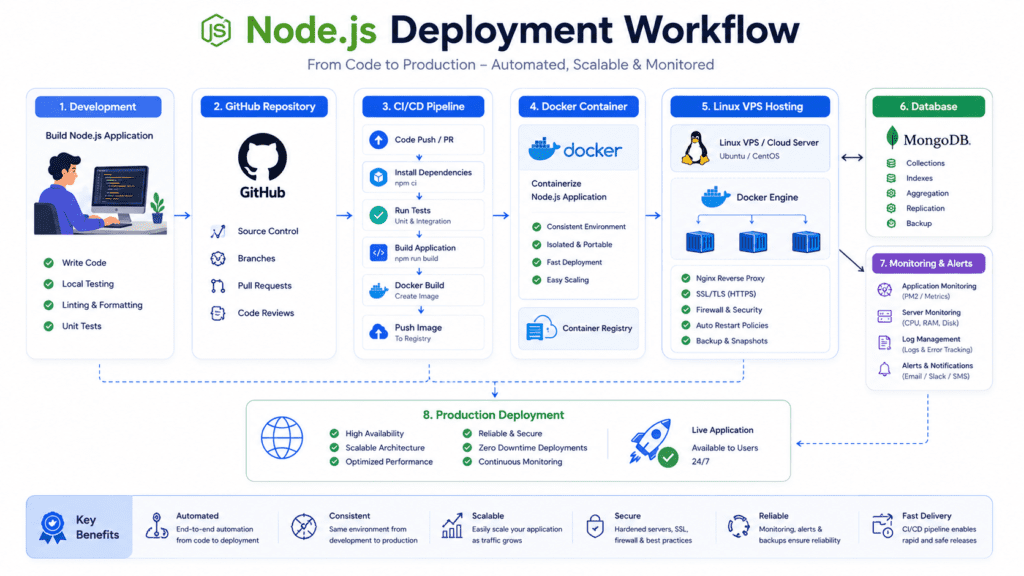
How to Deploy a Node.js App Successfully
Choosing the Right Linux Server Environment
Most production Node.js applications run on Linux because the ecosystem is mature, stable, and developer-friendly.
Ubuntu is the most common choice since it supports:
- Node.js runtime management
- Docker containers
- NGINX configuration
- PM2 process management
- Kubernetes integration
For smaller applications, a basic VPS hosting environment is usually enough. Larger SaaS platforms often move toward cloud hosting with container orchestration later.
Configuring Node.js for Production
A development setup rarely works well in production without adjustments.
Production deployment typically requires:
- Environment variable configuration
- Reverse proxy setup
- Process monitoring
- Logging
- SSL certificates
- Runtime optimization
PM2 remains one of the most popular process managers because it handles automatic restarts, clustering, and uptime monitoring fairly well.
Caching and compression also improve performance for dynamic Node.js applications serving large API traffic.
Connecting MongoDB and Databases
Most Node.js applications rely heavily on database performance.
MongoDB works especially well for JavaScript-based development because document structures align naturally with JSON workflows. PostgreSQL is often preferred for applications needing stronger relational consistency.
Many hosting providers now offer managed database hosting, which reduces operational overhead significantly compared to maintaining databases manually.
Common Deployment Mistakes Developers Make
Several deployment issues appear repeatedly with growing node.js projects:
- Running applications without process managers
- Ignoring memory usage
- Weak database indexing
- Poor environment variable management
- No backup strategy
- Deploying directly on production servers manually
Another common issue is underestimating bandwidth and CPU requirements once traffic grows.
Applications that feel lightweight during testing can become resource-heavy surprisingly fast under concurrent users.
Scaling Node.js Applications Without Downtime
Scalable deployment requires more than simply increasing server size.
Most high-traffic Node.js applications eventually use:
- Load balancers
- Horizontal scaling
- Kubernetes clusters
- Docker containers
- Distributed caching
- Queue systems
Serverless deployment can also work well for APIs and lightweight workloads, although persistent runtime-heavy applications may still perform better on traditional cloud infrastructure.
Real-World Node.js Hosting Example
A startup launching a SaaS dashboard might begin with Railway or Render for simplicity.
As traffic grows, deployment requirements often change:
- Move to VPS infrastructure for better runtime control
- Add managed database hosting
- Introduce caching and monitoring
- Deploy containers using Kubernetes
- Expand into multi-region cloud hosting
That gradual scaling path is extremely common in modern JavaScript infrastructure.
What Most “Best Node.js Hosting” Lists Ignore
Deployment Workflow Matters More Than Raw Specs
Many hosting comparisons focus too heavily on RAM and CPU numbers.
In reality, deployment speed, Git integration, rollback support, and CI/CD workflows often affect developer productivity more than raw hardware differences.
A slightly slower server with excellent deployment automation can outperform a faster server operationally over time.
Why Database Performance Affects Node.js Apps Dramatically
Node.js handles asynchronous operations efficiently, but database bottlenecks still create major performance problems.
Slow queries, weak indexing, or overloaded database servers can impact:
- API response times
- Real-time applications
- Dashboard performance
- Authentication systems
- Queue processing
Database architecture becomes increasingly important as applications scale.
The Long-Term Cost of Cheap Hosting Providers
Cheap hosting looks attractive early on.
The problem appears later when teams encounter:
- Resource throttling
- Downtime
- Weak scaling support
- Slow deployment
- Infrastructure migration costs
Moving production applications between hosting environments can become disruptive and expensive.
Why Full Server Control Isn’t Always Better
Developers often assume self-managed Linux servers are automatically superior.
In practice, smaller teams frequently benefit more from managed infrastructure because it reduces operational workload.
Infrastructure maintenance takes time away from product development.
Hosting Decisions Change as Applications Scale
The best node.js hosting solution for an MVP is rarely the same solution used at enterprise scale.
Early-stage startups often optimize for:
- Fast deployment
- Simplicity
- Low pricing
Larger businesses eventually prioritize:
- Reliability
- Global scalability
- Monitoring
- Security
- Multi-region deployment
That shift is normal as web applications mature.
Frequently Asked Questions About Node.js Hosting
What are the best Node.js hosting services in 2026?
DigitalOcean, AWS, Render, Heroku, Railway, and Google Cloud are among the best Node.js hosting services depending on deployment needs, scalability goals, and technical experience.
What is Node.js hosting?
Node.js hosting refers to hosting environments designed to support the Node.js runtime, allowing developers to deploy JavaScript-based backend applications, APIs, and real-time services.
Which hosting provider is best for Node.js applications?
DigitalOcean is one of the best overall choices for flexibility and scalability. Render and Railway are easier for beginners, while AWS and Google Cloud work better for enterprise applications.
Yes, but shared hosting often struggles with scalable Node.js applications because of runtime limitations, restricted resources, and weaker process management.
Is DigitalOcean good for Node.js hosting?
Yes. DigitalOcean offers strong Linux VPS hosting, flexible deployment workflows, Kubernetes support, and affordable cloud infrastructure for Node.js deployment.
Does Heroku support MongoDB?
Yes. Heroku supports MongoDB through third-party integrations and add-ons alongside PostgreSQL and Redis services.
Which Linux distribution is best for Node.js hosting?
Ubuntu is the most widely used Linux distribution for Node.js hosting because of its stability, package support, and strong developer ecosystem.
What database works best with Node.js applications?
MongoDB, PostgreSQL, and MySQL are all common choices. MongoDB works particularly well for JavaScript applications because of its JSON-based document structure.
Is cloud hosting better for Node.js apps?
Cloud hosting is generally better for scalable Node.js applications because it supports flexible scaling, load balancing, and distributed infrastructure.
What is the best Node.js web hosting service for beginners?
Railway and Render are among the easiest hosting platforms for beginners because deployment workflows are simple and infrastructure management is minimal.
How much does Node.js hosting cost?
Node.js hosting can range from a few dollars per month on shared hosting or VPS plans to hundreds or thousands monthly for enterprise cloud infrastructure.
What features should developers look for in Node.js hosting providers?
Key features include:
- Native Node.js runtime support
- Linux server access
- Git deployment
- MongoDB compatibility
- Scalability tools
- Monitoring
- Security features
- Reliable uptime

Final Verdict: Choosing the Best Node.js Hosting Services
The best Node.js hosting services in 2026 depend heavily on how your application is built, how quickly it’s growing, and how much infrastructure management your team wants to handle.
DigitalOcean remains the best overall Node.js hosting provider for most developers because it balances scalability, Linux flexibility, pricing, and deployment control exceptionally well.
For beginners and startups, Railway and Render simplify deployment enough that teams can focus more on building products instead of managing infrastructure.
AWS and Google Cloud remain the strongest options for enterprise-grade scalability, especially for businesses handling large APIs, global traffic, or complex backend systems.
If managed infrastructure is the priority, Cloudways offers a practical middle ground between simplicity and cloud performance.
For developers on tighter budgets, Vultr and A2 Hosting provide affordable hosting solutions that still support modern Node.js deployment workflows, although long-term scaling may eventually require migration.
Before choosing a hosting provider, compare:
- Deployment workflows
- Database support
- Linux server flexibility
- Scaling options
- Long-term pricing
- Operational complexity
The right hosting platform should support not only your current node.js application, but also the traffic, infrastructure, and deployment requirements you may face later as your project grows.