
A hosting platform can either speed up development workflows or quietly slow everything down behind the scenes. That becomes obvious once projects move beyond simple websites into client work, SaaS platforms, APIs, staging environments, and scalable applications.
The best hosting for web developers in 2026 is no longer just about uptime and storage space. Developers now need flexible infrastructure, deployment automation, Git integration, cloud hosting support, scalable VPS hosting, and environments that won’t become limiting six months later. Many developers outgrow beginner hosting plans quickly because shared hosting often struggles with performance, workflow flexibility, and advanced tooling once projects become more complex.
This guide compares the top web hosting providers based on:
- Performance
- Developer tools
- VPS and dedicated hosting options
- Managed hosting features
- Cloud hosting flexibility
- Pricing and long-term value
Whether you’re a freelance web developer, agency owner, WordPress developer, or advanced engineering team, these hosting solutions offer very different strengths depending on your workflow and technical requirements.
Quick Comparison Table of the Best Hosting for Web Developers
| Hosting Provider | Best For | Hosting Type | Starting Price | Managed Hosting Available | VPS or Dedicated Hosting Options | Developer Tools | Cloud Hosting Support | Performance Rating | Best Value Score |
|---|---|---|---|---|---|---|---|---|---|
| Cloudways | Overall flexibility | Managed cloud hosting | $11/mo | Yes | VPS-based cloud infrastructure | SSH, Git, staging | Yes | 9/10 | 9/10 |
| Liquid Web | Premium managed hosting | VPS, dedicated, cloud | $15/mo | Yes | Yes | Advanced server tools | Yes | 9.5/10 | 8/10 |
| A2 Hosting | Speed and customization | Shared, VPS, dedicated | $3/mo | Partial | Yes | SSH, Node.js, Git | Limited | 8.5/10 | 9/10 |
| InMotion Hosting | Agencies and client hosting | Shared, VPS, dedicated | $4/mo | Yes | Yes | WHM, SSH, staging | Limited | 8.5/10 | 8.5/10 |
| DigitalOcean | Full server control | Cloud VPS | $4/mo | No | VPS infrastructure | API, Docker, Kubernetes | Yes | 9/10 | 9/10 |
| SiteGround | Managed WordPress workflows | Shared cloud hosting | $3/mo | Yes | Limited | Staging, Git | Partial | 8/10 | 8/10 |
| Bluehost | Beginner-friendly hosting | Shared, WordPress | $3/mo | Yes | Limited | cPanel, WordPress tools | Partial | 7.5/10 | 8/10 |
| Vultr | Budget cloud infrastructure | Cloud VPS | $6/mo | No | VPS infrastructure | SSH, API access | Yes | 8.5/10 | 9/10 |
| Hostinger | Affordable hosting | Shared, VPS | $2/mo | Partial | Yes | Git, hPanel | Limited | 8/10 | 9/10 |
| AWS | Enterprise scalability | Cloud infrastructure | Pay-as-you-go | Both | Yes | Full cloud ecosystem | Yes | 10/10 | 7/10 |
How We Chose the Best Web Hosting for Developers
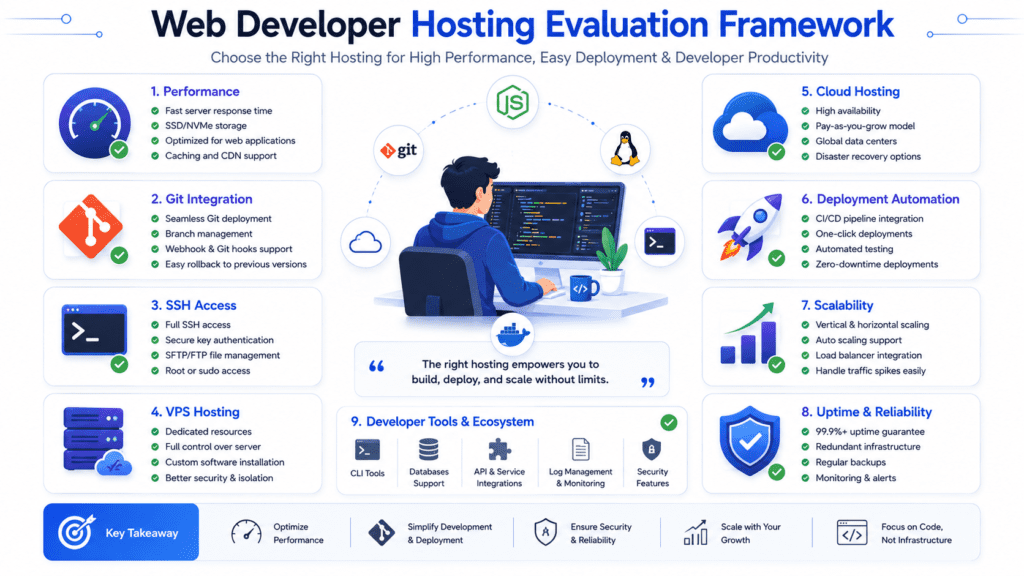
Server Performance and Uptime Testing
Server performance affects every part of web development, from local testing environments to production deployment.
We prioritized web host platforms with:
- Reliable uptime
- Fast SSD or NVMe storage
- Strong CPU allocation
- Consistent response times
- Scalable infrastructure
Performance matters even more once developers begin managing multiple client websites or resource-heavy web applications.
Developer-Friendly Features and Workflow Tools
The best web hosting for developers should improve workflows instead of creating friction.
We looked closely at:
- SSH access
- Git integration
- Docker support
- Staging environments
- API access
- Command-line tools
- Deployment automation
Some hosting providers market themselves toward developers while still restricting server access heavily.
Flexibility Across Different Types of Web Hosting
Different projects require different hosting type setups.
Some developers need shared hosting for basic WordPress sites. Others require cloud hosting plans, VPS hosting, or dedicated hosting for scalable applications.
We prioritized hosting solutions that support long-term growth without forcing major migrations too early.
Deployment and Version Control Support
Modern development workflows rely heavily on deployment automation.
Hosting platforms that support Git deployment, CI/CD workflows, staging environments, and rollback systems scored much higher during evaluation.
Scalability for Web Development Projects
Scalability matters once projects grow beyond simple websites.
We evaluated each hosting service based on:
- VPS and cloud hosting flexibility
- Dedicated server hosting options
- Load balancing
- Vertical scaling
- Container support
- Multi-site management
Pricing Transparency and Long-Term Value
Cheap hosting can become expensive later through upgrade pricing, add-ons, migration fees, or infrastructure limitations.
Several providers on this list offer better long-term value even if entry pricing appears slightly higher.
Customer Support for Technical Issues
Support quality matters more than most developers expect.
Infrastructure issues, DNS problems, deployment failures, and security incidents happen eventually. Strong technical support becomes extremely valuable during those situations.
What Most Developers Get Wrong About Web Hosting
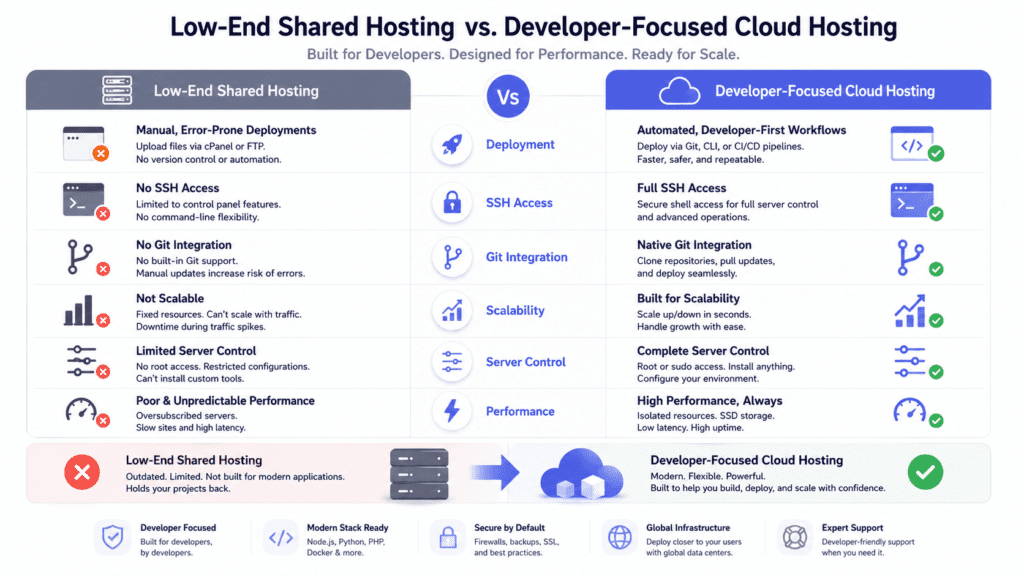
A basic shared hosting plan works for small projects, but it often becomes restrictive quickly.
Developers commonly run into problems with:
- Limited server access
- Weak staging environments
- Resource throttling
- Restricted runtime configuration
- Poor deployment workflows
That’s why many developers looking for reliable infrastructure eventually migrate away from low-end shared hosting providers.
The Hidden Costs of Poor Server Performance
Slow servers affect more than just page speed.
Poor server hosting performance can slow:
- Deployment workflows
- Local testing
- Database operations
- Client previews
- Admin dashboards
Over time, those small delays compound into real productivity loss.
Why Many Developers Switch Hosting Providers Later
Developers often choose hosting based only on beginner pricing.
As projects grow, requirements usually change:
- More traffic
- Better security
- Multiple environments
- VPS and cloud hosting
- Better backup systems
- More scalable infrastructure
That transition causes many developers to switch hosting providers later.
Managed Hosting vs Full Server Control
Managed hosting reduces maintenance overhead substantially.
Self-managed VPS and dedicated hosting provide more flexibility but also increase operational responsibility.
The right balance depends heavily on project complexity and technical experience.
Why Hosting Decisions Affect Long-Term Web Development Efficiency
Hosting infrastructure impacts:
- Deployment speed
- Workflow efficiency
- Scalability
- Client management
- Team collaboration
- Security maintenance
Choosing the best hosting early can prevent expensive migrations later.
Understanding the Different Types of Web Hosting
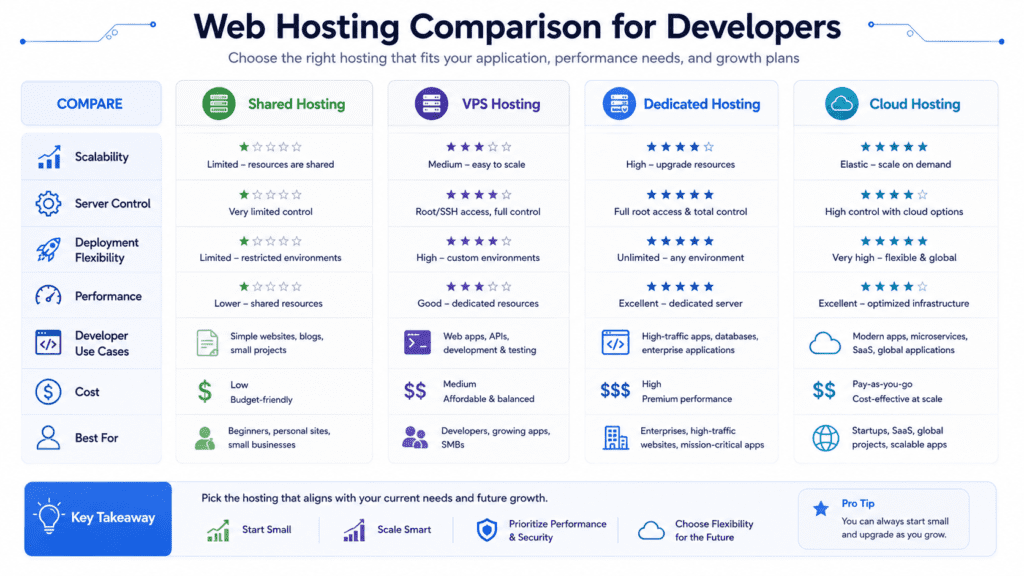
Shared web hosting places multiple websites on the same server environment.
It’s inexpensive and beginner-friendly, making it suitable for:
- Basic WordPress sites
- Portfolio websites
- Small client projects
- Lightweight applications
The downside is limited performance and reduced server flexibility.
VPS Hosting vs Dedicated Hosting
VPS hosting provides isolated virtual resources while still sharing physical infrastructure.
Dedicated hosting gives developers an entire server exclusively for their projects.
VPS plans are usually the best balance between affordability and flexibility for most developers.
Dedicated server hosting works better for:
- Large SaaS applications
- Enterprise websites
- High-traffic client projects
- Advanced custom infrastructure
Cloud Hosting Advantages for Developers
Cloud hosting offers scalable infrastructure with flexible resource allocation.
Developers benefit from:
- Easier scaling
- Better uptime
- Distributed infrastructure
- API access
- Faster deployment workflows
Cloud hosting platforms are now replacing traditional server hosting for many modern projects.
Managed Hosting and Managed WordPress Hosting
Managed hosting handles infrastructure maintenance automatically.
Managed WordPress hosting adds specialized optimization for WordPress workflows, including staging, caching, and security management.
This hosting option works well for agencies and developers managing multiple wordpress site deployments.
Which Hosting Type Is Best for Your Projects?
The best hosting solution depends on:
- Technical skill level
- Budget
- Traffic requirements
- Workflow preferences
- Development stack
- Long-term scalability
Freelancers often start with shared and wordpress hosting, while advanced teams typically move toward VPS and cloud hosting environments later.
1. Cloudways – Best Overall Hosting Service for Web Developers
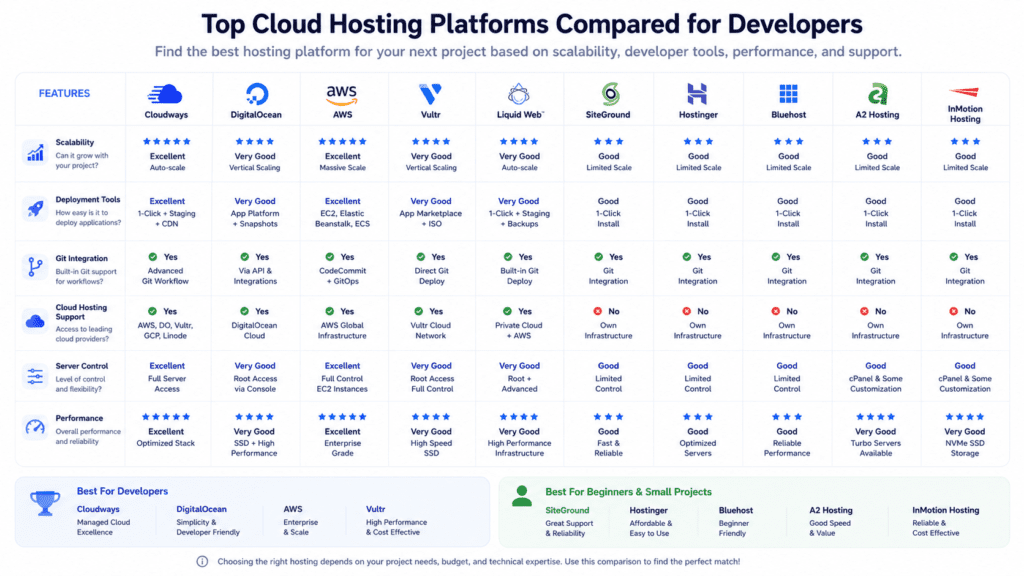
Why Developers Choose Cloudways
Cloudways balances flexibility, scalability, and managed hosting simplicity better than most competitors.
It’s one of the strongest hosting options for developers who want cloud performance without handling every server maintenance task manually.
Managed Cloud Hosting on DigitalOcean, AWS, and Google Cloud
Cloudways lets developers deploy applications on:
- DigitalOcean
- AWS
- Google Cloud
- Vultr
- Linode
That flexibility gives developers access to premium cloud hosting infrastructure while simplifying management.
Flexible Deployment and Scaling Features
The platform supports:
- Git deployment
- SSH access
- Staging environments
- Team collaboration
- Vertical scaling
- Automated backups
These features make Cloudways an excellent choice for developers managing client projects and scalable applications.
Managed Hosting Without Losing Developer Control
Unlike many managed hosting plans, Cloudways still allows strong server customization and workflow flexibility.
That balance is one reason it remains a top web hosting platform for developers.
Pros and Cons
Pros:
- Excellent cloud hosting flexibility
- Strong deployment workflows
- Managed infrastructure
- Good scaling support
Cons:
- More expensive than basic shared hosting
- Some advanced configurations still require technical knowledge
Pricing
Plans start around $11/month.
Best For
Freelance developers, agencies, SaaS businesses, and developers managing scalable applications.
2. Liquid Web – Best Premium Managed Hosting for Developers
Why Liquid Web Is Popular Among Professional Developers
Liquid Web focuses heavily on performance, reliability, and premium managed hosting services.
It’s especially popular with agencies, ecommerce businesses, and developers managing high-value client infrastructure where uptime and support quality matter more than finding the absolute cheapest hosting plan.
Dedicated Hosting and VPS Hosting Performance
Liquid Web offers:
- VPS hosting
- Dedicated hosting
- Cloud hosting
- Enterprise infrastructure
- High-performance managed WordPress hosting
Its infrastructure performs particularly well for larger applications and resource-intensive websites.
Developers handling multiple client environments often appreciate the stronger isolation and performance consistency compared to budget shared hosting providers.
Managed WordPress Hosting Features
Liquid Web’s managed hosting includes:
- Automatic updates
- Staging environments
- Daily backups on all plans
- Advanced caching
- Collaboration tools
- Server monitoring
For WordPress developers, these tools simplify long-term maintenance significantly.
Advanced Security and Reliability
Security is one of Liquid Web’s stronger advantages.
The platform includes:
- Web application firewall protection
- DDoS mitigation
- Automated backups
- Monitoring systems
- High-availability infrastructure
That level of operational reliability is valuable for client-facing projects where downtime directly affects revenue.
Pros and Cons
Pros:
- Excellent support quality
- Strong VPS and dedicated hosting performance
- Reliable uptime
- Premium managed hosting environment
Cons:
- Higher pricing than budget providers
- Less beginner-friendly
- Overkill for smaller projects
Pricing
Managed VPS plans typically start around $15/month and scale upward depending on resources.
Best For
Professional developers, agencies, ecommerce projects, and businesses needing reliable managed infrastructure.
3. A2 Hosting – Best Web Host for Speed and Flexibility
Turbo Servers and Performance Features
A2 Hosting has built a reputation around speed-focused hosting solutions.
Its Turbo Server infrastructure improves loading times through optimized caching, faster storage, and performance-focused server configurations.
For developers working on performance-sensitive websites, that can make a noticeable difference.
A2 Hosting supports multiple hosting types including:
- Shared hosting
- VPS hosting
- Dedicated hosting
- Managed hosting plans
That flexibility allows developers to start small and upgrade later without immediately switching providers.
Developer Tools and Server Customization
A2 Hosting supports a wide range of developer-friendly tools:
- SSH access
- Git integration
- Node.js support
- Multiple PHP versions
- Python support
- Custom server configurations
This makes it suitable for developers working across different programming language environments and web application stacks.
WordPress and Web Development Optimization
The platform also performs well for WordPress development.
Managed WordPress hosting plans include optimization features designed for faster website performance and easier maintenance workflows.
Pros and Cons
Pros:
- Strong speed optimization
- Good developer flexibility
- Multiple hosting options
- Affordable pricing
Cons:
- Interface feels less modern than some competitors
- Turbo features cost more on higher plans
Pricing
Shared hosting plans start around $3/month.
Best For
Developers wanting flexible hosting with strong performance optimization and scalable upgrade paths.
4. InMotion Hosting – Best Hosting Provider for Growing Development Agencies
Why InMotion Hosting Appeals to Web Developers
InMotion Hosting works particularly well for agencies managing multiple websites and client hosting accounts.
Its infrastructure balances affordability with stronger developer-focused features than many mainstream shared hosting providers.
VPS or Dedicated Hosting Flexibility
The platform supports:
- Shared hosting
- VPS hosting
- Dedicated hosting
- Reseller hosting
- Managed hosting solutions
That range gives agencies room to scale client projects gradually.
Performance and Uptime for Client Projects
Reliable uptime becomes extremely important once developers manage websites for paying clients.
InMotion Hosting performs consistently well for:
- WordPress sites
- Ecommerce stores
- Agency portfolios
- Medium-sized web applications
Its business-focused hosting environment also includes decent support response times for technical issues.
Managed Hosting Features for Agencies
InMotion includes several features useful for agencies and teams:
- Free SSL certificates
- Staging tools
- Backup systems
- WHM/cPanel support
- Team account management
Those tools simplify multi-client workflows substantially.
Pros and Cons
Pros:
- Strong agency-friendly features
- Good VPS scalability
- Reliable uptime
- Helpful support
Cons:
- Shared hosting still has limitations
- Dashboard experience feels slightly dated
Pricing
Shared hosting starts around $4/month, with VPS plans available at higher tiers.
Best For
Agencies, freelance developers, and businesses managing multiple client projects.
5. DigitalOcean – Best Cloud Hosting Platform for Full Server Control
Why Developers Prefer DigitalOcean for Web Development
DigitalOcean remains one of the most popular cloud hosting platforms among developers because it prioritizes simplicity without removing infrastructure control.
Compared to AWS, the learning curve is far more approachable while still offering scalable cloud hosting infrastructure.
Cloud Hosting and Scalable Infrastructure
DigitalOcean droplets provide flexible virtual server hosting with configurable:
- CPU resources
- RAM
- Storage
- Networking
- Load balancing
Developers can scale vertically or move toward Kubernetes deployment later as applications grow.
Deployment Flexibility and API Access
The platform supports:
- Docker
- Kubernetes
- Git-based workflows
- API automation
- SSH management
- Linux server customization
That flexibility makes it an excellent choice for developers working on scalable applications or custom infrastructure stacks.
Reality Check: Better for Technical Users
DigitalOcean is not fully managed hosting.
Developers are responsible for:
- Security updates
- Monitoring
- Server optimization
- Backups
- Infrastructure maintenance
That trade-off provides more control but also increases operational workload.
Pros and Cons
Pros:
- Excellent developer flexibility
- Affordable cloud infrastructure
- Strong API ecosystem
- Scalable hosting environment
Cons:
- Requires technical knowledge
- Self-managed infrastructure
- Less beginner-friendly
Pricing
Cloud VPS instances start around $4/month.
Best For
Advanced developers, SaaS teams, and developers wanting scalable cloud infrastructure with full control.
6. SiteGround – Best Managed WordPress Hosting for Developers
WordPress Development Features
SiteGround is one of the stronger managed WordPress hosting platforms for developers who prioritize workflow simplicity and reliable performance.
It’s especially useful for WordPress-focused web development because the hosting environment includes built-in tools for staging, caching, and collaboration.
Managed Hosting Simplicity
The platform handles many operational tasks automatically, including:
- Core updates
- Security patches
- Backups
- Caching optimization
- SSL configuration
That managed hosting approach reduces maintenance overhead for developers managing multiple wordpress site deployments.
Collaboration and Staging Tools
SiteGround includes developer-friendly workflow tools such as:
- Git integration
- Staging environments
- Team collaboration access
- Site cloning
- Managed caching
These features help streamline testing and deployment workflows for agencies and freelance developers.
Although SiteGround performs well compared to many shared hosting providers, it still has some limitations.
Developers needing:
- Deep server customization
- Advanced runtime configuration
- Heavy backend workloads
- Large-scale web application deployment
may eventually outgrow the platform.
Pros and Cons
Pros:
- Excellent WordPress optimization
- Strong support quality
- Easy staging workflows
- Reliable uptime
Cons:
- Higher renewal pricing
- Less server-level flexibility
- Shared hosting constraints on lower plans
Pricing
Plans usually start around $3/month for introductory pricing.
Best For
WordPress developers, agencies, and businesses wanting managed hosting simplicity.
7. Bluehost – Best Beginner-Friendly Web Hosting Service
Why New Developers Start With Bluehost
Bluehost remains popular largely because it simplifies website hosting for beginners.
For developers building smaller websites, portfolios, or early-stage wordpress projects, the platform offers an accessible starting point.
Bluehost supports:
- Shared hosting
- Managed WordPress hosting
- VPS hosting
- Dedicated hosting
Its shared and wordpress hosting plans are especially beginner-focused.
Easy Setup and Website Management
The onboarding process is straightforward, with features like:
- One-click WordPress installation
- Free domain name
- cPanel management
- Guided setup workflows
For developers new to server management, that simplicity reduces friction early on.
Realistic Expectations for Scaling Projects
Bluehost works best for smaller websites and lightweight projects.
As applications scale, developers often encounter limitations involving:
- Shared server performance
- Resource allocation
- Workflow flexibility
- Deployment automation
That’s one reason more advanced developers eventually move toward cloud hosting or VPS hosting environments.
Pros and Cons
Pros:
- Beginner-friendly setup
- Affordable pricing
- Easy WordPress deployment
- Large knowledge base
Cons:
- Limited developer flexibility
- Shared hosting performance bottlenecks
- Upselling during account setup
Pricing
Basic shared hosting plans typically start around $3/month.
Best For
Beginners, smaller websites, and developers learning web hosting fundamentals.
8. Vultr – Best Value Cloud Hosting for Developers
High-Performance Cloud Hosting Infrastructure
Vultr offers affordable cloud hosting infrastructure with surprisingly strong performance for the price.
Developers often compare it closely with DigitalOcean because both platforms focus heavily on scalable VPS hosting and Linux flexibility.
Flexible Server Deployment Options
The platform supports multiple deployment models including:
- Cloud VPS hosting
- Dedicated cloud instances
- Kubernetes clusters
- Bare metal servers
Developers can choose optimized server locations across multiple global data centers.
VPS Hosting for Developers on a Budget
Vultr appeals to developers looking for reliable cloud hosting without enterprise-level pricing.
The infrastructure works well for:
- Web applications
- APIs
- SaaS projects
- Development environments
- Lightweight production deployments
Pros and Cons
Pros:
- Affordable cloud hosting plans
- Strong server performance
- Flexible deployment options
- Good global infrastructure
Cons:
- Limited managed hosting features
- Requires technical experience
- Smaller ecosystem than AWS
Pricing
Cloud VPS plans start around $6/month.
Best For
Developers wanting budget-friendly cloud infrastructure with strong Linux server control.
9. Hostinger – Best Budget Web Hosting Provider
Affordable Hosting Plans for Developers
Hostinger has become one of the most affordable hosting providers while still offering enough flexibility for beginner and intermediate developers.
Its pricing structure makes it attractive for personal projects, smaller client sites, and early-stage development work.
Hostinger supports:
- Shared hosting
- VPS hosting
- Cloud hosting
- Managed WordPress hosting
That range gives developers room to upgrade gradually as projects grow.
Web Development Features for Beginners
Hostinger includes several developer-friendly features despite its low pricing:
- Git integration
- SSH access on higher plans
- Website staging
- Multiple PHP versions
- Custom control panel
Its simplified dashboard is easier for beginners compared to traditional cPanel-heavy environments.
What Most Reviews Miss About Budget Hosting
Budget hosting providers often look identical in marketing comparisons.
The real difference usually appears under heavier workloads. Hostinger performs well for smaller projects, but larger web application deployments may still require more scalable infrastructure later.
Pros and Cons
Pros:
- Very affordable hosting plans
- Beginner-friendly interface
- Decent performance for the price
- Multiple hosting solutions available
Cons:
- Limited advanced server customization
- Shared hosting limitations
- Support response times can vary
Pricing
Shared hosting plans often start around $2/month.
Best For
Beginners, freelancers, and developers needing low-cost hosting for smaller projects.
10. AWS – Best Enterprise Hosting Platform for Advanced Developers
Why Enterprise Developers Use AWS
AWS remains the most powerful cloud hosting platform for advanced developers and enterprise infrastructure teams.
Its ecosystem supports nearly every type of hosting environment imaginable.
Cloud Hosting and Dedicated Infrastructure Options
AWS offers:
- EC2 virtual servers
- Kubernetes hosting
- Serverless infrastructure
- Dedicated hosting
- Managed databases
- Global CDN infrastructure
That flexibility allows developers to build highly customized deployment architectures.
Advanced Deployment and Scaling Features
AWS excels at:
- Auto scaling
- Infrastructure automation
- Load balancing
- Distributed deployment
- High-availability architecture
- Enterprise-grade security
For advanced web application development, few hosting platforms match its scalability.
Reality Check: AWS Has a Steep Learning Curve
AWS is not beginner-friendly.
The platform introduces complexity involving:
- Pricing structures
- Networking
- Security configuration
- Deployment orchestration
- Infrastructure management
Smaller teams without DevOps experience may struggle initially.
Pros and Cons
Pros:
- Industry-leading scalability
- Massive infrastructure ecosystem
- Advanced automation tools
- Excellent global performance
Cons:
- Steep learning curve
- Complex pricing
- Requires technical expertise
Pricing
Pay-as-you-go pricing varies based on infrastructure usage.
Best For
Enterprise developers, SaaS platforms, advanced engineering teams, and scalable cloud infrastructure projects.
Best Hosting for Web Developers by Use Case
Best Web Hosting for Freelance Developers
Cloudways is one of the best hosting solutions for freelance developers because it balances flexibility, managed hosting features, and scalable cloud infrastructure without becoming overly complex.
Freelancers managing multiple client websites benefit from:
- Easy staging workflows
- Team collaboration tools
- Flexible cloud hosting plans
- Simplified server management
Best Hosting Provider for Agencies
InMotion Hosting and Liquid Web are strong choices for agencies handling multiple client projects.
Both platforms support:
- Reseller hosting
- VPS and dedicated hosting
- Multi-site management
- Reliable uptime
- Strong support teams
Agencies often prioritize operational reliability more than aggressive budget pricing.
Best Managed Hosting Service
Liquid Web’s managed hosting environment stands out for premium support, performance, and advanced security management.
For developers wanting less infrastructure maintenance, it’s one of the strongest managed hosting platforms available.
Best Cloud Hosting Platform
DigitalOcean remains one of the best cloud hosting platforms for developers who want scalable infrastructure with full server control.
AWS offers even more flexibility, but DigitalOcean is significantly easier to manage for most teams.
Best VPS or Dedicated Hosting Option
Liquid Web and Vultr both provide strong VPS and dedicated hosting solutions depending on budget and complexity requirements.
Liquid Web focuses more on managed infrastructure, while Vultr appeals to developers wanting lower-cost cloud flexibility.
Best Budget Hosting Plan for Developers
Hostinger offers one of the best value hosting plans for developers working with smaller budgets.
Its shared hosting plan and VPS hosting options provide decent flexibility without high monthly costs.
Shared hosting still works well for:
- Portfolio websites
- Basic WordPress sites
- Small client projects
- Lightweight development environments
It’s affordable and beginner-friendly, making it a reasonable option for early-stage projects.
Why VPS Hosting Offers More Flexibility
VPS hosting gives developers far more control over the hosting environment.
Benefits include:
- Dedicated resources
- Better performance consistency
- Custom server configuration
- Improved deployment flexibility
- Better scalability
Most developers eventually move toward VPS hosting once projects become more demanding.
Dedicated Hosting for Maximum Performance
Dedicated hosting provides full physical server access.
This hosting type works best for:
- Enterprise web applications
- High-traffic ecommerce sites
- Large SaaS platforms
- Resource-heavy client projects
The trade-off is significantly higher pricing and infrastructure management complexity.
Cloud Hosting vs Traditional Web Hosting
Cloud hosting offers several advantages compared to traditional website hosting:
- Better scalability
- Flexible resource allocation
- Higher uptime
- Distributed infrastructure
- Faster deployment workflows
Traditional shared web hosting still works for smaller websites, but cloud infrastructure handles growth more effectively.
Which Hosting Type Is Best for Your Workflow?
The right hosting option depends on:
- Budget
- Technical experience
- Deployment requirements
- Client workload
- Traffic expectations
- Long-term scalability plans
For many developers, VPS and cloud hosting become the best long-term balance between cost, flexibility, and performance.
Key Features Developers Should Look for in a Hosting Provider
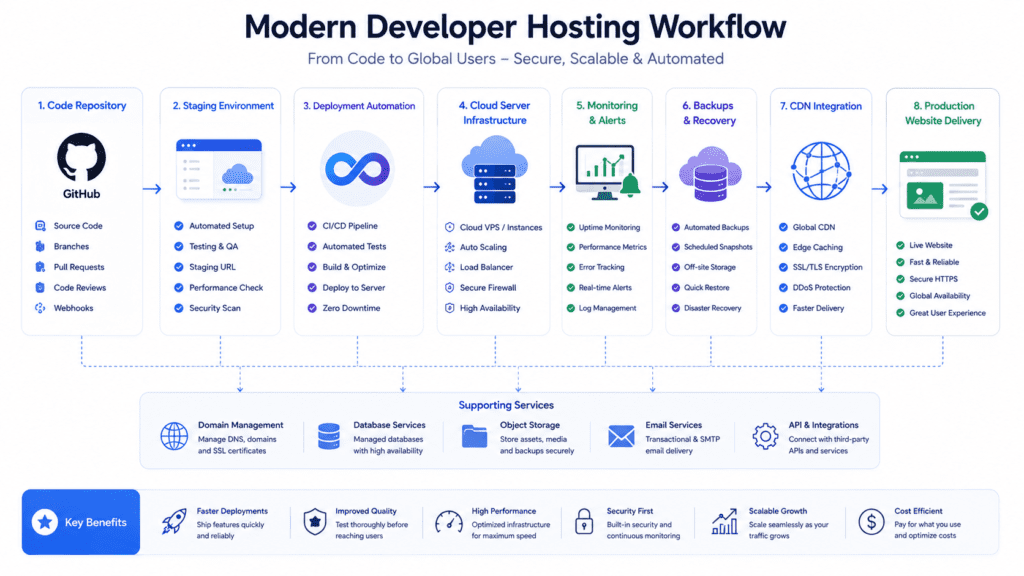
SSH Access and Git Integration
SSH access is essential for advanced workflows, deployment management, and troubleshooting.
Git integration also improves version control and deployment automation significantly.
Staging Environments and Deployment Tools
Staging environments allow developers to test updates safely before production deployment.
Modern hosting platforms should support:
- Staging workflows
- CI/CD integration
- Rollback functionality
- Deployment automation
Performance Optimization and Caching
Performance optimization tools help improve website speed and server efficiency.
Useful features include:
- Server-side caching
- CDN integration
- NVMe storage
- Resource monitoring
- Optimized hosting environments
Database and Programming Language Support
Developers often work across multiple stacks and frameworks.
Good web hosting providers should support:
- PHP
- Python
- Node.js
- MySQL
- PostgreSQL
- Redis
Flexible programming language support becomes important for advanced web development workflows.
Managed Hosting vs Self-Managed Servers
Managed hosting reduces operational maintenance, while self-managed servers provide deeper infrastructure control.
Smaller teams often benefit more from managed hosting plans because they reduce technical overhead.
Scalability and Infrastructure Flexibility
Scalable hosting infrastructure should support:
- Vertical scaling
- VPS upgrades
- Cloud hosting expansion
- Load balancing
- Kubernetes deployment
This flexibility becomes increasingly important as projects grow.
Security, SSL, and Backup Features
Reliable hosting providers should include:
- Free SSL certificates
- Automated backups
- Malware scanning
- Web application firewall protection
- Uptime monitoring
Security tools are especially important for ecommerce and client-facing applications.
Free Web Hosting vs Paid Hosting Services
Why Free Web Hosting Has Serious Limitations
Free web hosting often introduces major limitations involving:
- Slow server performance
- Weak security
- Limited bandwidth
- Restricted storage
- Forced advertising
These restrictions quickly become frustrating for serious development projects.
Security and Uptime Concerns
Free hosting services usually provide weaker security infrastructure and less reliable uptime guarantees.
For production websites, downtime and security problems can damage both revenue and reputation.
Performance Trade-Offs Developers Often Regret
Performance bottlenecks are extremely common with free hosting.
Developers often encounter:
- Slow database response times
- CPU throttling
- Traffic limitations
- Weak caching systems
Those issues become noticeable quickly once websites receive consistent traffic.
When Free Hosting Can Still Be Useful
Free hosting can still work for:
- Testing environments
- Learning projects
- Temporary demos
- Small experimental applications
It’s useful for experimentation, but rarely ideal for long-term production use.
Why Serious Web Development Projects Need Paid Hosting
Paid hosting services provide:
- Better uptime
- Faster performance
- Security tools
- Scalability
- Technical support
- More reliable infrastructure
For client work and scalable applications, paid hosting is usually the safer long-term investment.
What Most “Best Web Hosting” Lists Ignore
Developer Workflow Is More Important Than Marketing Features
Many hosting comparisons focus too heavily on storage limits and promotional pricing.
For developers, workflow efficiency matters far more.
Features like staging, Git deployment, SSH access, and infrastructure flexibility affect daily productivity much more than oversized storage allocations.
Why Scaling Changes Hosting Requirements
Hosting needs evolve as projects grow.
A hosting environment that works perfectly for a small wordpress site may struggle once traffic, databases, and deployment complexity increase.
That’s why infrastructure flexibility matters long-term.
Hidden Costs in Cheap Hosting Plans
Cheap hosting plans often introduce hidden operational costs later through:
- Expensive renewals
- Limited scalability
- Migration headaches
- Add-on fees
- Weak support
Developers sometimes spend more fixing infrastructure limitations than they save initially.
Support Quality Matters More Than Most Developers Expect
Technical support becomes extremely important during outages, deployment failures, or security incidents.
The difference between strong and weak support teams becomes obvious very quickly during emergencies.
Why Long-Term Infrastructure Flexibility Matters
Hosting decisions affect future scalability.
Developers choosing the best web hosting service should think beyond current traffic levels and consider how infrastructure requirements may change later.
Frequently Asked Questions About Hosting for Web Developers
What is the best hosting for web developers?
Cloudways is one of the best hosting for web developers overall because it balances managed hosting simplicity with scalable cloud infrastructure and strong deployment flexibility.
Developers needing full server control may prefer DigitalOcean or AWS instead.
Which hosting type is best for developers?
VPS hosting and cloud hosting are usually the best options for developers because they provide better scalability, server flexibility, and deployment control than shared hosting.
The right hosting type still depends on project complexity and technical experience.
Is VPS or dedicated hosting better for web development?
VPS hosting works well for most developers because it offers strong flexibility at a lower cost.
Dedicated hosting is better for enterprise projects, high-traffic applications, and workloads needing maximum server performance.
What is managed hosting?
Managed hosting means the hosting provider handles infrastructure maintenance tasks such as:
- Server updates
- Security patches
- Monitoring
- Backups
- Performance optimization
This reduces operational workload for developers.
Which web hosting provider offers the best value?
Hostinger, Vultr, and Cloudways offer some of the best value depending on whether developers prioritize affordability, cloud flexibility, or managed hosting features.
Cloud hosting is generally better for scalable web development projects because it provides:
- Flexible scaling
- Better uptime
- Faster performance
- Improved infrastructure reliability
Shared hosting still works for smaller websites and beginner projects.
What are the best web hosting services for WordPress developers?
SiteGround, Cloudways, and Liquid Web are among the strongest web hosting services for WordPress developers because they include staging tools, managed caching, and WordPress optimization features.
Can beginners use cloud hosting platforms?
Yes, although some platforms are easier than others.
Cloudways, SiteGround, and Hostinger are more beginner-friendly, while AWS and DigitalOcean require stronger technical experience.
What features should developers look for in a hosting plan?
Important features include:
- SSH access
- Git integration
- Staging environments
- Scalable infrastructure
- Automated backups
- SSL certificates
- VPS or cloud hosting flexibility
These tools improve deployment workflows and long-term scalability.
Is free web hosting worth using for development projects?
Free web hosting can work for testing and learning purposes, but it usually lacks the performance, security, and reliability needed for serious projects.
Paid hosting services are generally better for production websites and client work.
Which hosting provider is best for scaling applications?
AWS and DigitalOcean are among the strongest hosting providers for scalable applications because they offer flexible cloud hosting infrastructure, load balancing, and advanced deployment options.

Final Verdict: Choosing the Best Hosting for Web Developers
The best hosting for web developers in 2026 depends heavily on development workflow, infrastructure preferences, and long-term scalability goals.
Cloudways stands out as the best overall hosting provider because it combines managed cloud hosting, deployment flexibility, and scalable infrastructure without becoming overly complicated.
For premium managed hosting, Liquid Web remains one of the strongest choices for agencies and professional developers managing business-critical websites and applications.
Developers wanting maximum infrastructure control should seriously consider DigitalOcean or AWS. Both platforms offer highly scalable cloud hosting environments, although AWS introduces a much steeper learning curve.
For developers focused on affordability, Hostinger and Vultr provide excellent value hosting plans that still support modern web development workflows.
SiteGround remains one of the best managed WordPress hosting platforms for WordPress-focused developers, while Bluehost works reasonably well for beginners learning website hosting fundamentals.
Before choosing the best web host, compare:
- Hosting type flexibility
- Deployment workflows
- VPS and cloud hosting options
- Long-term scalability
- Support quality
- Infrastructure management requirements
The right hosting solution should support not only current projects, but also future growth as applications, client workloads, and deployment complexity continue expanding over time.