

One of the biggest mistakes people make when buying a hosting plan is focusing only on big numbers. They see 100GB, unlimited storage, or large disk space and assume more is always better.
Here’s the problem. Most beginners misunderstand what web hosting storage actually means. They confuse storage space with website size, or mix it up with bandwidth and traffic.
Storage in web hosting isn’t about how popular your site is. It’s about how much space your files and data take up on a web server. That includes your HTML files, images and videos, databases, email accounts, and even backup copies.
In this guide, we’ll break down what web hosting storage really is, how storage limits work, the main types of storage like hdd and ssd, and how much you actually need. Let’s keep it simple and practical.
What Is Web Hosting Storage?
Web hosting storage refers to the amount of disk space allocated to your website on a web server. It’s measured in gigabytes, often shown as GB inside your web hosting plan.
Think of it as the digital storage cabinet for your website’s files and data.
Here’s what it typically stores:
• Website files like HTML, CSS, and scripts
• Images and media uploads
• Databases used by your content management system
• Email inbox data
• Backup copies stored on the server
Your hosting provider allocates a certain storage capacity depending on the web hosting plan you choose. That storage capacity is part of your overall web hosting service.
It’s important to understand that storage in web hosting is different from your laptop storage. It exists inside a web server managed by your web host.
Every website, no matter how small, uses some disk space. Even a simple blog with a few web pages needs space to store content and databases.
Key Insight: Storage Is Not the Same as Bandwidth

This is where confusion happens.
Storage is about how much space your website’s files and data take up. Bandwidth is about how much data is transferred when web users visit your site.
Let’s use a simple analogy. Storage is the size of your closet. Bandwidth is how many times people open that closet and take things out.
If you have 10GB of disk space, that’s how much you can store. If you have 100GB of bandwidth, that’s how much data can move between your server and visitors.
Understanding bandwidth and storage separately helps you avoid overpaying for features you don’t need.
And honestly, most small websites never come close to using massive storage space. The real limits usually show up elsewhere.
Types of Web Hosting Storage And Why They Matter
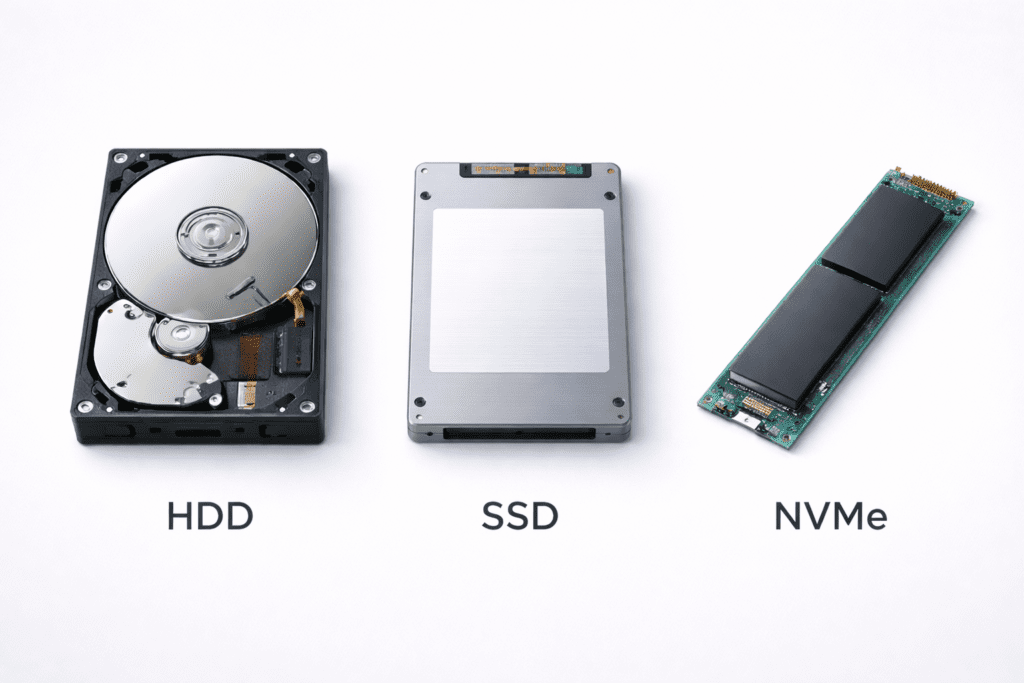
Not all web hosting storage is built the same. The type of disk space your web host uses can affect speed, reliability, and even long term growth.
There are three main types of storage used by hosting companies today.
1. HDD Storage
HDD stands for hard disk drive. It’s older technology that stores data on spinning disks inside the web server.
HDD storage is usually cheaper, and some hosting providers still use it in budget shared hosting plans. But it’s slower when it comes to read and write speeds.
For basic websites with small file sizes and low traffic, HDD can still work. That said, most modern hosting companies are moving away from it.
2. SSD Storage
SSD stands for solid state drive. Unlike a hard disk drive, it has no moving parts.
SSD storage offers much faster loading times compared to HDD. It improves database response time and overall user experience. That’s why most web hosting plans today use solid state drives.
If you’re choosing a web hosting plan in 2026, SSD should honestly be the minimum standard.
3. NVMe Storage
NVMe is a newer type of solid-state storage that’s even faster than traditional SSD.
It’s built for high performance websites that need faster read and write speeds. Many VPS hosting and premium plans now include NVMe because it improves website performance under load.
Performance focused web hosts often advertise NVMe storage as a competitive advantage.
So yes, the types of storage matter. They directly impact how quickly your files and data are accessed on the web server.
Why Storage Type Impacts Website Speed
The speed of your storage affects how quickly your website loads.
When someone visits your site, the web server pulls website files, database content, and media from disk space. If the storage system is slow, loading times increase.
That delay impacts user experience. And in some cases, it can affect SEO.
For example, if your content management system relies heavily on database queries, faster storage helps process those requests quickly. SSD and NVMe reduce the time needed to read and write data.
It’s not the only factor in performance. CPU, RAM, and bandwidth also matter. But storage type plays a real role in website speed.
In short, faster storage usually means smoother performance.
How Web Hosting Storage Limits Work
Every hosting plan comes with a specific amount of disk space. You might see 10GB, 50GB, or 100GB measured in gigabytes.
Some hosting companies advertise unlimited storage. In reality, unlimited storage doesn’t mean infinite space.
Most unlimited storage plans come with fair usage policies. If your website uses excessive server space or affects other web users on shared hosting, your hosting provider may ask you to upgrade.
Here’s how storage limits usually work:
• Disk space is measured in gigabytes
• Email data counts toward storage capacity
• Backup files stored on the server count
• Large images and videos increase usage
• Exceeding limits may restrict uploads
If you run out of space, your website may stop accepting new files or email. In some cases, you might temporarily lose the ability to upload content until you free up space or upgrade your hosting plan.
Understanding storage limits helps you avoid surprises later.
Where to Check Your Web Hosting Storage Usage Step by Step
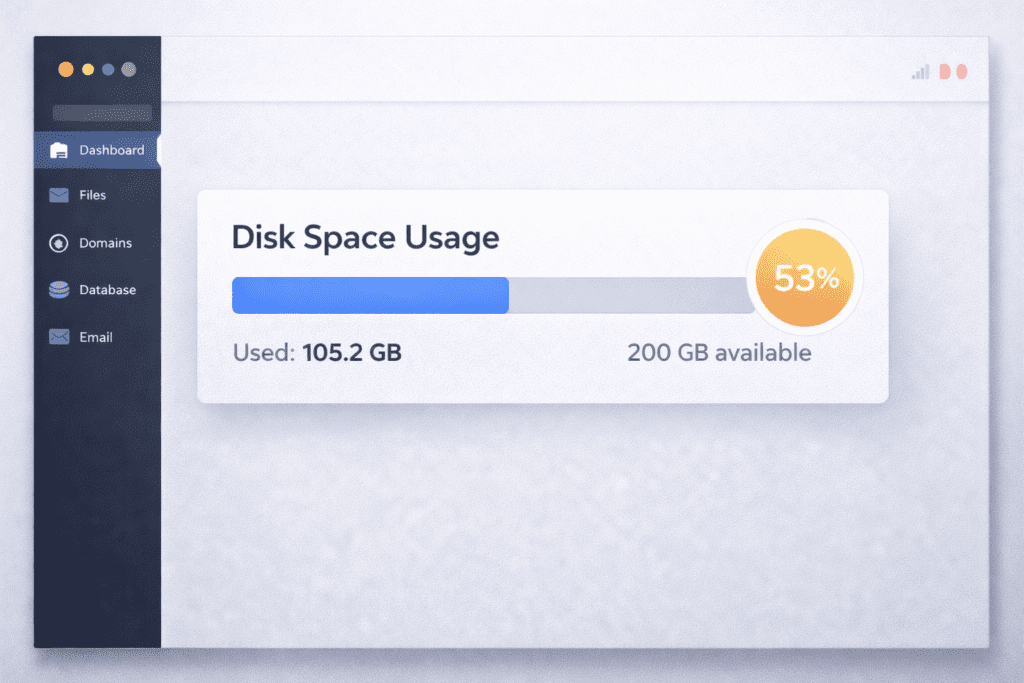
Most web hosts make it easy to check your web hosting storage usage. You just need to know where to look.
First, log into your hosting account through your hosting provider dashboard. From there, open your control panel.
Inside the panel, look for a section labeled disk space, storage, or usage. Many hosting companies show a visual bar that displays how much space allocated to your account is already used.
Next, open the file manager. This lets you see file sizes and identify folders taking up large disk space. Pay attention to images and videos.
You should also check email storage. Email inboxes often consume more storage capacity than expected, especially if attachments are stored on the server.
Finally, review your database size. If you’re using a content management system, your database can grow over time as website content expands.
Monitoring storage in web hosting regularly helps prevent sudden issues where you run out of space.
Reality Check What Unlimited Web Hosting Storage Really Means
You’ll often see unlimited storage advertised by many hosting providers. It sounds generous.
But no web host can offer truly unlimited disk space. Every web server has physical limits.
Unlimited storage usually means there are no strict storage limits for normal website usage. However, fair usage policies apply. If your website stores excessive files unrelated to web hosting, your hosting provider may intervene.
In practice, small websites rarely hit storage limits. A typical blog with optimized images may only use a few gigabytes of disk space.
The key is understanding that unlimited storage is about flexibility, not infinite server space.
How Much Web Hosting Storage Do You Really Need
This is where practical planning matters.
For small websites like blogs or portfolios, storage needs are usually modest. A basic site with images, HTML, and CSS may only use 1GB to 5GB of disk space. Starting with 10GB is often more than enough.
For a business website, storage capacity increases slightly. Product images, email accounts, and backups add up. Planning for 10GB to 20GB gives a comfortable buffer for growth.
E-commerce sites require more storage. High resolution images and a growing database storing customer data increase the amount of data quickly. In this case, 20GB to 50GB may be more realistic.
High traffic or media heavy sites need careful planning. Videos hosted directly on your web server can consume large storage space. In many cases, using external platforms helps reduce disk space usage.
Honestly, most website owners overestimate how much storage they need. Optimizing images and cleaning old backups often saves more space than upgrading your hosting plan.
Can You Upgrade Web Hosting Storage Later
Yes, in most cases you can upgrade your storage plan.
If you’re on shared hosting, you can usually move to a higher tier web hosting plan with more disk space. This upgrade is handled by your hosting provider and often requires little downtime.
If your website grows significantly, you might switch to VPS hosting. VPS plans allow more control over storage capacity and server resources.
Cloud hosting solutions also offer flexible storage options where you can allocate additional storage as needed.
Cost implications vary. Higher storage usually increases monthly pricing. However, upgrading only when your website uses more space keeps expenses reasonable.
Planning for growth without overpaying upfront is usually the smarter approach.
Beginner vs Advanced Users: Storage Planning Differences
When it comes to web hosting storage, beginners and advanced users think very differently.
Beginners often overestimate how much disk space they need. They assume more gigabytes automatically means better performance. In reality, most small sites use far less storage capacity than expected.
Advanced users calculate storage based on file sizes, database growth, and backup policies. They estimate the amount of data generated monthly and plan storage limits accordingly.
Developers also consider how often backups run and whether staging environments consume additional disk space. Those extra copies can quietly double the space allocated.
In short, beginners focus on big numbers. Advanced users focus on actual usage patterns.
Why Web Hosting Storage Matters in 2026
Storage decisions matter more today than they did a few years ago.
Websites now use higher resolution images and videos. AI generated media and larger design assets increase file sizes quickly. That growth affects web hosting storage.
Modern web users expect faster loading times and strong uptime. Faster storage types like SSD and NVMe help maintain smooth performance on the web server.
Search engines also consider performance signals. While storage isn’t the only factor, slower disk space can indirectly affect user experience.
In 2026, storage in web hosting isn’t just about space. It’s about balancing performance, cost, and growth.
What Impacts Web Hosting Storage Usage the Most
Several factors influence how quickly you consume disk space.
• Large images and videos stored directly on the server
• Backups stored inside the same hosting account
• Email inboxes with attachments
• WordPress plugins generating log files
• Caching systems storing temporary files
Image optimization alone can significantly reduce file sizes. Compressing media helps free up space and improve loading times.
Regular cleanup also matters. Deleting unused themes or plugins reduces unnecessary storage usage.
Some storage issues aren’t obvious at first.
Old backups often remain stored on the web server long after they’re needed. That can quietly eat up gigabytes.
Staging sites, especially for business website projects, duplicate website files and databases. That doubles disk space instantly.
Unused themes, plugins, and email attachments add up over time.
Here’s what I’ve noticed. Small websites rarely struggle with storage capacity unless they ignore maintenance. A quick monthly review can free up space before it becomes a problem.
Advantages and Limitations of Large Storage Plans
Larger storage plans sound appealing. But they come with trade-offs.
Advantages:
• More flexibility for growth
• Room for backups and media files
• Less worry about hitting storage limits
• Suitable for e-commerce or media heavy sites
Limitations:
• Higher monthly cost
• May encourage poor optimization habits
• Large storage doesn’t guarantee better performance
• Server resources still matter
In most cases, choosing a hosting plan based on real storage needs is smarter than chasing the biggest number.
Common Mistakes When Choosing Web Hosting Storage
Choosing the wrong web hosting storage often starts with assumptions.
One mistake is buying far more disk space than your website needs. Large storage capacity looks impressive, but unused gigabytes don’t improve performance.
Another mistake is ignoring storage type. HDD may be cheaper, but SSD or NVMe usually delivers better loading times and smoother user experience.
Some people forget to optimize images and videos. Large file sizes quickly fill disk space and increase the amount of data stored on the web server.
Confusing storage with RAM or CPU is also common. Storage holds files and data. RAM handles active processes. They’re different resources.
And finally, assuming unlimited storage means infinite space can lead to problems. Fair usage policies still apply.
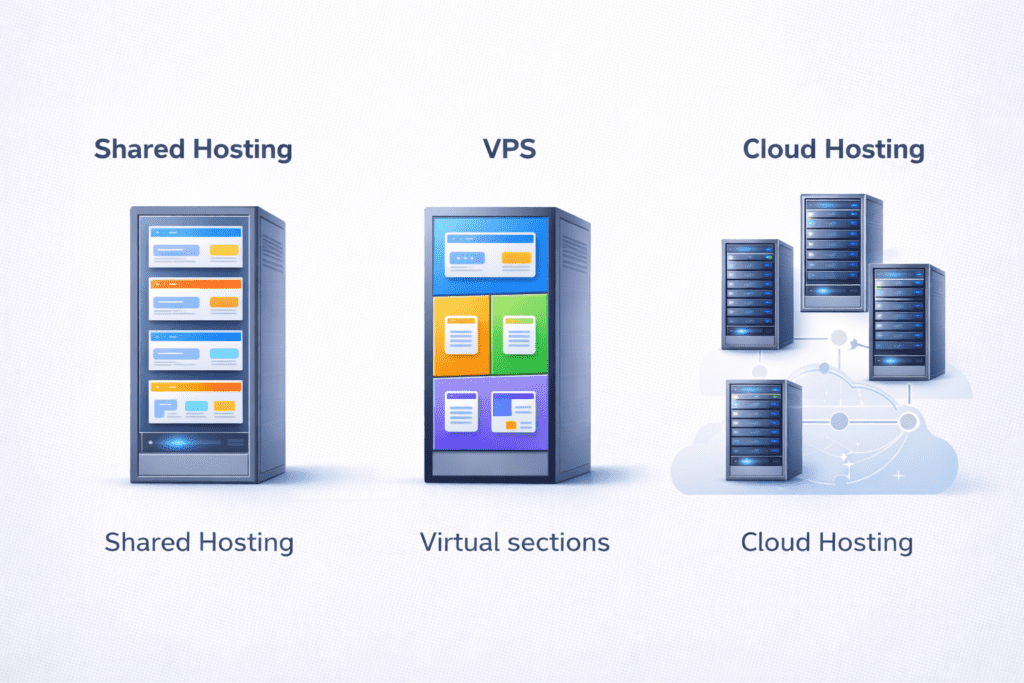
Storage works differently depending on the hosting solution you choose.
In shared hosting, disk space is part of a shared web server environment. You’re given a fixed storage limit inside shared hosting plans.
With VPS hosting, you receive dedicated storage capacity allocated specifically to your virtual server. VPS gives more control and flexibility over storage limits.
Cloud hosting allows more dynamic storage adjustments. Some cloud providers let you scale disk space up as your website grows.
For small websites, shared hosting is often enough. For growing projects or business needs, VPS or cloud may offer better flexibility.
Web Hosting Storage vs Other Hosting Resources
Storage is just one part of a web hosting plan.
Storage holds files and data. RAM handles active memory processes. CPU processes tasks and scripts. Bandwidth controls the amount of traffic data transferred.
Balancing bandwidth and storage matters more than maximizing one resource. A site with huge disk space but low RAM may still struggle.
It’s better to evaluate how your website uses server resources overall instead of focusing only on storage size.
Cloud Storage and Object Storage When Traditional Hosting Isn’t Enough

Some websites eventually outgrow traditional server space.
Media heavy platforms with large images and videos may use external object storage solutions. These systems store files outside the main web server.
CDN integration can also help distribute files across global networks. That reduces storage pressure and improves user experience.
Hybrid models combine web hosting storage for core website files and cloud storage for heavy media.
For most small sites, this isn’t necessary. But for high traffic or media rich projects, it becomes practical.
Real World Example: How a Website Grows Over Time
Imagine a small blog starting with 2GB of disk space used in year one. It publishes weekly posts with optimized images and occasional backups.
By year three, with hundreds of articles, updated themes, and larger media files, storage usage may reach 15GB or more.
The growth isn’t sudden. It builds gradually as website files, databases, and backups expand.
Planning with a growth mindset helps avoid running out of space unexpectedly.
Frequently Asked Questions About Web Hosting Storage
What is web hosting storage used for?
Web hosting storage stores website files, databases, email data, and backup copies on a web server.
How much web hosting storage do I need for a small website?
Most small websites use between 1GB and 10GB of disk space, depending on images and media usage.
Is unlimited web hosting storage really unlimited?
No. Unlimited storage comes with fair usage policies and practical server limits.
Does web hosting storage affect website speed?
Yes. Faster storage types like SSD improve loading times and overall user experience.
What happens if I run out of web hosting storage?
Your site may stop accepting new files or emails until you free up space or upgrade your hosting plan.
Can I upgrade my web hosting storage later?
Yes. Most hosting providers allow upgrades to higher storage plans or VPS hosting.
Is SSD better than HDD for web hosting storage?
Yes. SSD offers faster read and write speeds compared to HDD.
Does email count toward web hosting storage?
Yes. Email inbox data stored on the server counts toward your disk space.
What is storage in web hosting?
Storage in web hosting is the amount of space on a server where website files, databases, and backups are kept so you can store all the data for your site.
How does disk space in web hosting affect my site?
The disk space in web hosting limits how many files and how much media you can upload, and if you need larger space you may need to upgrade your plan.
What are the different storage types used by hosting companies?
Web hosting companies use different storage like HDDs and solid-state drives, which vary in speed and reliability for serving your site.
How much storage capacity do I need for a business website?
Your storage capacity depends on your content, but consider pages, images, videos, and backups to choose an amount of storage that fits business needs.
Can I get unlimited storage from web hosting providers?
Some plans claim unlimited storage, but providers often have fair use limits or limits on certain file types, so read terms before relying on unlimited storage.
What are the key aspects of storage to compare when choosing a hosting provider?
Compare allotted space, storage type, backup options, and performance to decide which hosting company best matches your needs.
Will more storage require more bandwidth?
Having larger space does not always require more bandwidth, but if you serve many big files or downloads you will likely require more bandwidth.
How is hosting space allotted and can I increase it later?
Hosting space is allotted based on your plan and most providers let you upgrade to increase the amount of space as your site grows.
Should website owners worry about backups and server space?
Yes, backups use server space and you should ensure your plan includes backup storage or allows you to store copies offsite for safety.
Final Thoughts: Choosing the Right Amount of Web Hosting Storage
Most websites need less storage than owners assume.
Optimizing images, cleaning old backups, and monitoring disk space regularly often prevents storage issues.
Instead of chasing large storage numbers, focus on performance, storage type, and realistic growth expectations.
Log into your hosting dashboard and review your current disk space usage. You may discover you have more room than you thought.
And once you understand storage, the next smart step is learning how bandwidth and server resources work together with it.