
Most people make the same mistake when starting an online store. They choose a platform based on what looks easiest, not what actually supports growth.
That’s exactly how the Shopify vs BigCommerce decision usually happens.
Someone watches a few tutorials, sees Shopify everywhere, and assumes it must be the best. BigCommerce feels less popular, so it gets ignored. But popularity doesn’t always mean better for your business.
The choice you make here affects profit margins, long-term costs, and how much freedom you’ll have later.
Some platforms make it easy to launch. Others make it easier to scale.
And those two things aren’t the same.
Shopify vs BigCommerce: The Real Choice for Online Stores in 2026
The real decision isn’t about design or branding.
It’s about how much control you want over your ecommerce business.
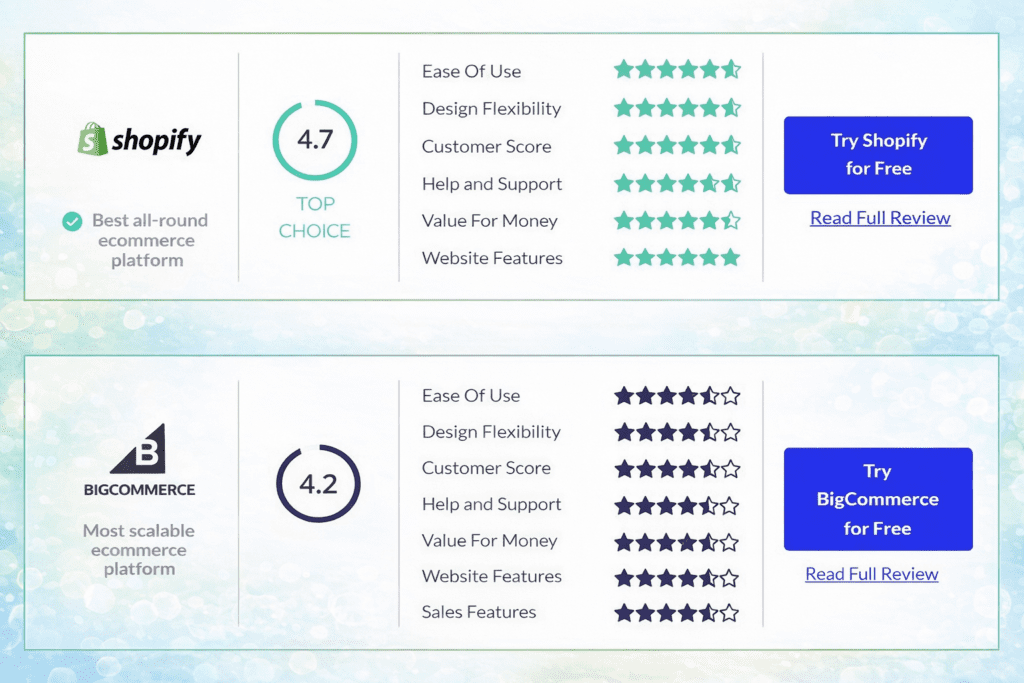
Shopify focuses on simplicity. You sign up, pick a theme, add products, and start selling. Everything feels guided and smooth.
BigCommerce focuses on built-in power. You get more features out of the box, more customization options, and fewer add-ons required.
So the framing looks like this:
Shopify = easy, mainstream, beginner-friendly
BigCommerce = powerful, feature-heavy, scalable
Both are strong ecommerce platforms. But they’re designed for different types of store owners.
This comparison helps you understand which platform fits your goals, not just which one feels easier today.
Beginner-Friendly Explanation of What Shopify and BigCommerce Actually Are
At a basic level, both platforms let you build an online store without coding.
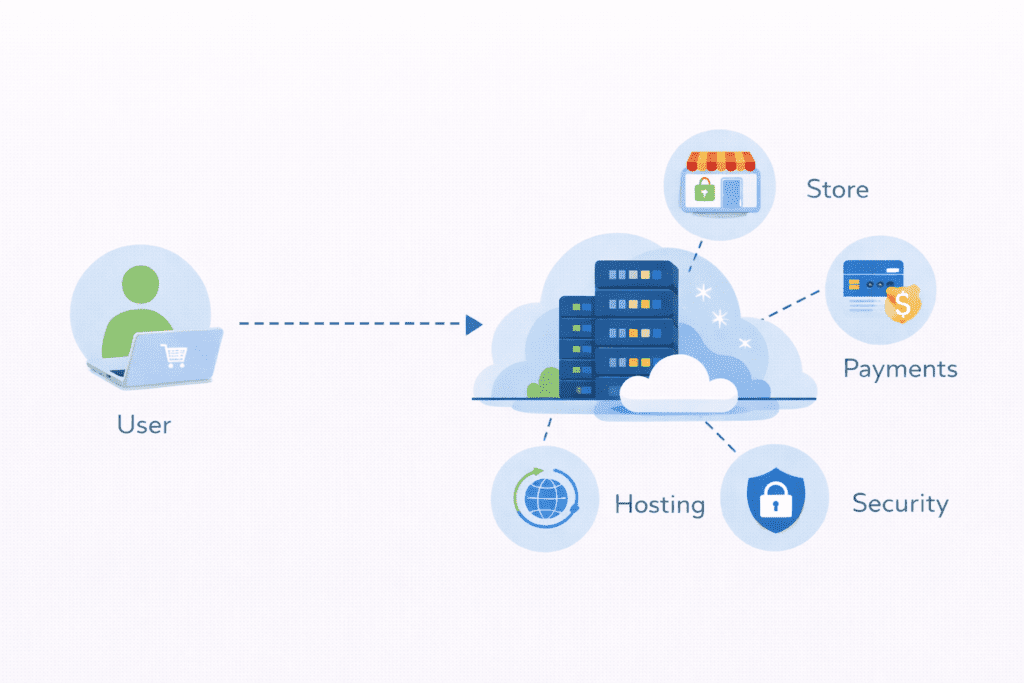
They handle hosting, security, and updates. You don’t manage servers or software. You just log in and manage products.
But how they structure their systems is different.
Shopify is an all-in-one hosted ecommerce platform. You pay a monthly fee, and Shopify runs everything. Store management, payments, themes, apps, and even physical point-of-sale.
BigCommerce is also hosted, but it works more like a flexible business system. It includes more advanced tools by default and expects users to customize workflows.
That’s why people often say shopify and bigcommerce serve different types of sellers.
Shopify is built for speed and simplicity. BigCommerce is built for structure and control.
Both remove technical barriers. But they don’t remove strategic decisions.
And that’s where most people get stuck later.
One platform feels easy on day one. The other feels powerful on year three.
Choosing between them isn’t about which one is “better.”
It’s about which one matches how serious you are about scaling your ecommerce business.
Quick Recommendation (TL;DR)
Shopify: Best for beginners and fast setup
BigCommerce: Best for long-term scalability and built-in features
Bottom line: Choose Shopify for simplicity. Choose BigCommerce for power.
How We Selected and Compared Shopify vs BigCommerce
This comparison isn’t based on marketing pages or feature lists.
It’s based on how these platforms actually behave when running a real store.
The main criteria were:
Ease of use.
How quickly someone can launch and manage without outside help.
Pricing structure.
Not just monthly fees, but how costs change as the store grows.
Features.
What’s included by default versus what requires apps.
Performance.
How well the platform handles speed, traffic, and stability.
SEO.
How much control you have over rankings and site structure.
Scalability.
How the platform handles growth over time.
App ecosystem.
How dependent the platform is on third-party tools.
These criteria matter because ecommerce isn’t static.
Your store changes.
Your traffic changes.
Your costs change.
A platform that works perfectly for ten products might feel painful at one hundred.
That’s why this comparison focuses on real usage, not theoretical capability.
Because most problems with ecommerce platforms don’t appear in the first week.
They show up in year two.
Shopify Review
Overview
Shopify is one of the most popular ecommerce platforms in the world, and there’s a reason it shows up everywhere.
It’s built to make selling online as simple as possible. You don’t deal with hosting, servers, or technical setup. You sign up, choose a plan, and start building your store inside Shopify’s system.
That’s why people say Shopify is beginner-friendly.
Everything is guided. The dashboard is clean. Most tasks feel obvious. Even if you’ve never built an online store before, you can usually figure things out without getting stuck.
From a business point of view, Shopify’s biggest strength is that it removes friction. You spend less time learning tools and more time adding products and marketing.
My Real Experience Using Shopify and BigCommerce

I didn’t start with BigCommerce.
Like most people, I started with Shopify because it felt safer. It was everywhere, tutorials were easy to find, and the setup felt almost automatic. I could add products, connect payments, and launch without thinking about systems.
For a small store, that worked perfectly.
The problems didn’t show up immediately. They appeared when the store started growing.
As orders increased and the catalog expanded, I started relying more and more on apps. One for email. One for reviews. One for upsells. One for analytics. Each tool solved a problem, but also added cost and complexity.
Over time, the store became dependent on a stack of third-party tools just to function normally.
That’s when I started testing BigCommerce.
The experience felt different from day one. Less guided, more structural. But I noticed that many things I was paying for on Shopify already existed natively inside BigCommerce. Product filtering, customer groups, shipping logic, and SEO control didn’t require extra tools.
The biggest difference wasn’t technical. It was financial.
On Shopify, growth increased monthly expenses.
On BigCommerce, growth increased configuration.
That shift alone changed how I think about ecommerce platforms.
One rewards speed.
The other rewards efficiency.
What Shopify Is in Simple Terms
Shopify is a hosted ecommerce platform.
That means Shopify runs the software, the servers, the security, and the updates. You don’t install anything. You just log in through a browser.
Your shopify store lives inside Shopify’s infrastructure. You control products, content, pricing, and design. Shopify controls the technical foundation.
This is why Shopify feels safe for beginners.
You’re not responsible for performance.
You’re not responsible for security.
You’re not responsible for maintenance.
Shopify handles all of it.
In return, you accept Shopify’s rules, limits, and pricing structure.
Hosted, All-in-One Ecommerce Model
Shopify works as an all-in-one system.
It includes:
Hosting.
Store management.
Checkout system.
Payment processing.
Order tracking.
Basic analytics.
You don’t need to connect multiple services just to start selling.
This model is why people often use Shopify when they want to move fast.
You don’t design a system. You step into one that already exists.
That’s convenient, but it also means you’re operating inside Shopify’s framework, not your own.
Key Features
Shopify’s strength isn’t deep customization. It’s ecosystem and accessibility.
The shopify app store is one of the largest in ecommerce. You can add almost any feature using apps.
Marketing tools.
Email systems.
Upsells.
Subscriptions.
Reviews.
Analytics.
There are also many shopify themes that make stores look professional without custom design work.
For payments, shopify payments allows you to accept credit cards without using third-party gateways in many countries.
Shopify also offers shopify pos for physical stores, which connects online and offline sales in one system.
All of this makes Shopify feel like a complete business toolkit.
Pros
The biggest advantage of Shopify is how easy it is to operate.
Pros:
- Extremely easy to use
- Huge app ecosystem
- Fast setup with no technical work
You can realistically launch a store in a single day.
That speed matters for beginners who don’t want to get stuck in setup loops.
Cons
The downsides appear as your store grows.
Cons:
- Transaction fees
- Heavy app dependency
- Costs increase as you scale
Shopify charges extra fees if you don’t use their payment system.
Many features require paid apps, which stack monthly costs.
And as your revenue grows, Shopify plans become more expensive.
So while Shopify feels affordable early, it gets more costly over time.
Best For
Shopify works best for:
- Beginners
- Dropshipping stores
- Small to medium businesses
If your main goal is to start selling quickly and avoid complexity, Shopify is a strong choice.
It’s not the most powerful platform on paper.
But for most new sellers, it’s the easiest way to get into ecommerce without feeling overwhelmed.
BigCommerce Review
Overview
BigCommerce is built for store owners who want more control and more power from the start.
It’s also a hosted ecommerce platform, which means you don’t manage servers or install software. You log in, build your store, and BigCommerce runs everything in the background.
The difference is in philosophy.
Shopify tries to keep things simple and guided.
BigCommerce tries to give you advanced tools built in by default.
That’s why BigCommerce often feels more serious. It’s less about quick wins and more about long-term structure.
What BigCommerce Is
BigCommerce is a feature-heavy ecommerce platform designed for businesses that plan to grow.
Your store lives inside BigCommerce’s system, just like Shopify. But BigCommerce gives you more native functionality without relying on apps.
This means fewer third-party tools and fewer extra monthly costs.
BigCommerce also positions itself closer to enterprise-level ecommerce, even on lower plans.
It’s not trying to be flashy. It’s trying to be capable.
Built-In Enterprise-Style Ecommerce Platform
BigCommerce includes many features that Shopify usually requires apps for.
Product filtering.
Advanced shipping rules.
Tax configurations.
Customer groups.
Custom pricing.
Bulk product management.
All of this is available inside the core system.
This is why people say bigcommerce offers more features out of the box.
You don’t spend as much time searching for tools. You spend more time configuring what already exists.
The tradeoff is that the interface feels heavier.
More options means more decisions.
Key Features
BigCommerce focuses on native power instead of external apps.
One of its strongest features is multi-channel selling. You can connect your store to marketplaces, social platforms, and external channels directly.
BigCommerce also has strong SEO structure. Clean URLs, customizable metadata, and better control over page structure.
Another important point is no transaction fees.
Unlike Shopify, BigCommerce doesn’t take a cut of your sales.
That alone can make a big difference for high-volume stores.
BigCommerce also provides robust APIs and developer tools for custom setups.
So while it looks simple on the surface, it’s built for complex workflows.
Pros
BigCommerce shines when you care about depth.
Pros:
- More built-in features
- Better for large catalogs
- No extra fees per sale
You don’t need ten apps just to run basic operations.
And if your margins are tight, avoiding transaction fees matters.
Cons
The power comes with complexity.
Cons:
- Steeper learning curve
- Fewer apps than Shopify
- Can feel overwhelming for beginners
BigCommerce isn’t hard, but it’s not as intuitive.
You’ll spend more time learning the system.
For some people, that’s a good thing. For others, it feels like friction.
Best For
BigCommerce works best for:
- Growing brands
- High-volume stores
- Businesses planning to scale seriously
If you already understand ecommerce and want a platform that won’t limit you later, BigCommerce is a strong option.
It’s not the easiest platform to start with.
But it’s one of the hardest to outgrow.
Shopify vs BigCommerce – Feature Comparison Table
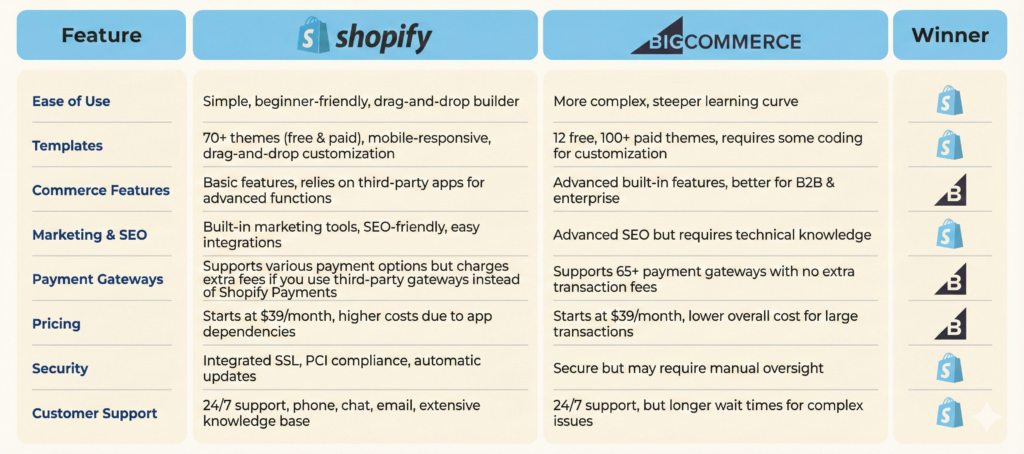
This is where the practical differences become obvious.
Not in theory. Not in marketing claims. But in how each platform actually behaves when you run a real store.
Both platforms can launch an online store. Both can process payments. Both can handle products.
But the way they approach core features is very different.
| Feature | Shopify | BigCommerce |
|---|---|---|
| Ease of use | Very beginner-friendly | Moderate learning curve |
| Pricing | Simple plans, costs rise with apps | Higher base, fewer add-ons |
| Transaction fees | Yes, unless using Shopify Payments | No transaction fees |
| App ecosystem | Massive app store | Smaller but more built-in |
| SEO tools | Good, app-dependent | Strong, native control |
| Customization | Theme and app based | Deeper native customization |
| Scalability | Scales with cost | Scales with structure |
| Payment options | Wide support | Wide support |
The table looks clean, but the experience isn’t equal.
Shopify focuses on ease of use.
BigCommerce focuses on built-in capability.
That’s the core difference.
If you like adding features through apps, Shopify feels flexible.
If you prefer having features already included, BigCommerce feels more stable.
This is why bigcommerce and shopify attract different types of store owners.
One rewards speed.
The other rewards planning.
Is Shopify or BigCommerce Really “All-in-One”? Understanding Platform Limits
Both platforms call themselves all-in-one.
But they mean different things by that.
With Shopify, all-in-one means everything is connected through apps. You start with a simple core and expand using the shopify app ecosystem.
With BigCommerce, all-in-one means many features are already built in. You don’t rely as much on external tools.
This difference matters over time.
On Shopify, the more advanced your store becomes, the more apps you need. Email tools. SEO tools. Upsells. Subscriptions. Reviews. Analytics.
Each app adds cost and complexity.
On BigCommerce, many of these features exist inside the platform already. You still might need apps, but fewer of them.
So the real question isn’t which one has more features.
It’s where those features live.
In Shopify, features live in apps.
In BigCommerce, features live in the core system.
And that affects:
Your monthly costs.
Your performance.
Your technical stability.
Your long-term flexibility.
Both platforms are all-in-one.
But Shopify’s version is modular.
BigCommerce’s version is structural.
That’s why Shopify feels lighter at the start, while BigCommerce feels heavier but more complete.
Pricing Comparison – Shopify vs BigCommerce
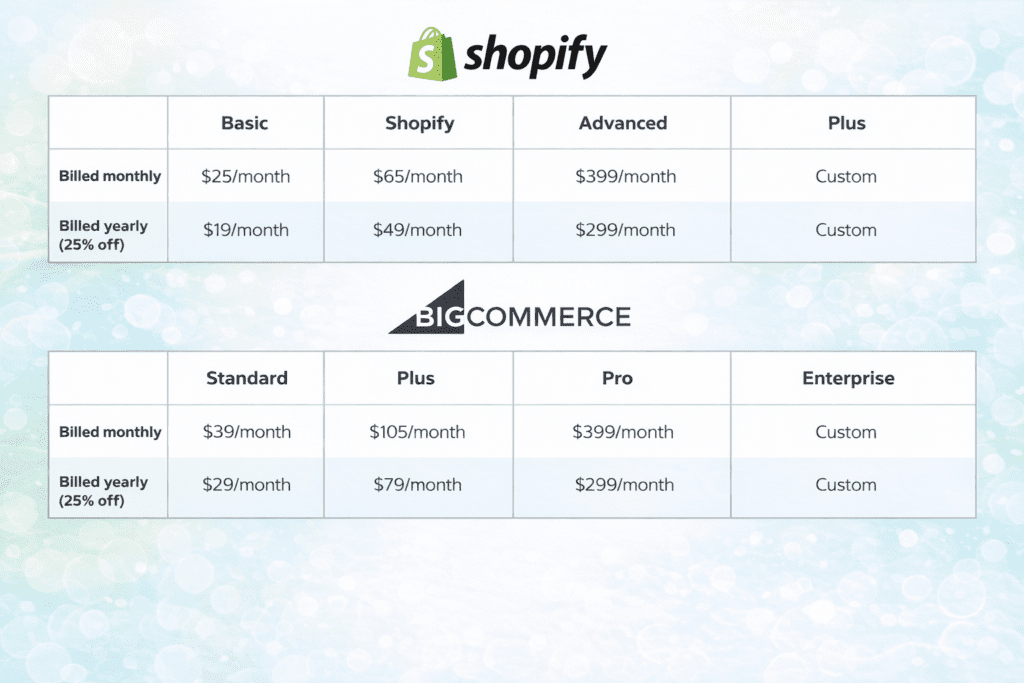
Prices, offers, and availability mentioned on this page are subject to change. Please visit the official website for the most up-to-date pricing and details.
This is where most store owners feel the difference, not just see it.
Both platforms advertise simple pricing. Both look reasonable on the surface. But how they charge over time is very different.
And that difference quietly shapes your profit.
Entry-Level Plans
Shopify’s entry plans feel friendly.
You pay one monthly fee and get everything you need to launch. Hosting, security, templates, checkout, and support are all included.
It feels predictable.
BigCommerce’s entry plans are usually slightly higher. But they include more built-in features from day one.
So while Shopify looks cheaper at the start, BigCommerce gives you more without extra tools.
This is where many people underestimate bigcommerce. The base price looks higher, but the feature value is stronger.
Mid-Tier Plans
This is where costs start to separate.
Shopify mid-tier plans still look affordable, but most stores at this level need multiple paid apps.
Email tools.
Advanced SEO.
Upsells.
Subscriptions.
Analytics.
Each one adds another monthly fee.
BigCommerce mid-tier plans already include many of these features.
So while Shopify’s plan price is lower, total cost is often higher.
Not because Shopify is expensive. But because it relies on external tools to stay competitive.
Enterprise Pricing
At the enterprise level, both platforms offer custom pricing.
Shopify’s enterprise plan is Shopify Plus, designed for large brands with high revenue.
BigCommerce also offers enterprise plans with deep customization and dedicated support.
The difference is structure.
Shopify Plus still depends heavily on apps.
BigCommerce enterprise relies more on built-in systems.
So Shopify Plus scales through ecosystem.
BigCommerce scales through architecture.
Hidden Costs
This is the part most people miss.
With Shopify, hidden costs usually come from apps.
You might start with three. Then five. Then ten.
Each one feels small. Together, they become significant.
With BigCommerce, hidden costs are lower, but complexity is higher.
You don’t pay as much in tools, but you spend more time configuring systems.
So the real hidden cost is either money or effort.
Shopify costs money.
BigCommerce costs learning time.
App-Related Costs
This is where the long-term picture becomes clear.
Shopify stores often rely on:
Marketing apps.
SEO apps.
Conversion tools.
Inventory tools.
Each app adds value. But also adds cost and performance overhead.
BigCommerce stores usually need fewer apps because more features are native.
That’s why over several years, bigcommerce often ends up cheaper for growing stores.
Not because the platform is cheaper.
But because you’re not paying for your own feature set piece by piece.
Performance Comparison – Speed, SEO, and Reliability
Performance isn’t just about load time.
It’s about how much control you have over how your store behaves under pressure.
Site Speed Control
Both platforms are hosted, so you don’t manage servers.
But Shopify performance depends heavily on theme quality and apps.
Too many apps slow things down.
BigCommerce performance is more consistent because fewer external tools are involved.
Less dependency means fewer conflicts and fewer slowdowns.
SEO Flexibility
Shopify has good SEO basics.
Clean URLs.
Meta tags.
Sitemaps.
But deeper SEO usually requires apps.
BigCommerce gives more SEO control natively.
Better URL structure.
More control over technical settings.
Stronger default schema.
So while both can rank, bigcommerce offers more SEO freedom without extra tools.
Core Web Vitals Impact
Core Web Vitals matter more every year.
Shopify stores often struggle when overloaded with apps.
Each script adds weight.
BigCommerce stores tend to perform more consistently because fewer scripts are involved by default.
This doesn’t mean Shopify is slow.
It means Shopify performance is fragile if not managed carefully.
Hosting Reliability
Both platforms handle uptime, security, and scaling.
You don’t worry about servers on either.
But Shopify relies on ecosystem stability.
BigCommerce relies on platform stability.
If an app breaks on Shopify, your store can break.
On BigCommerce, fewer external dependencies mean fewer points of failure.
So the difference isn’t reliability.
It’s where the risk lives.
Shopify risk lives in apps.
BigCommerce risk lives in complexity.
And which one feels safer depends on how much control you want over your system.
Use-Case Scenarios (Real-World Ecommerce Situations)
This is where the comparison stops being abstract and starts feeling practical.
Most store owners don’t care about feature lists. They care about what actually works for their situation.
That’s why Shopify vs BigCommerce looks very different depending on what kind of business you’re running.
Scenario 1 – Beginner Dropshipper
If you’re just starting out with dropshipping, Shopify usually makes more sense.
You can launch fast, connect suppliers, install a few apps, and start testing products without building complex systems.
The setup feels smooth. The learning curve is low. You focus on marketing instead of configuration.
For beginners, ease of use matters more than depth.
Shopify removes friction, which is exactly what new sellers need in the early stage.
Scenario 2 – Brand Selling 100+ Products
Once your catalog grows, the priorities change.
Now you care about product organization, filtering, inventory rules, and customer groups.
This is where bigcommerce offers a stronger foundation.
You get more built-in product management tools without relying on multiple apps.
The system feels heavier, but it’s also more stable for complex catalogs.
Shopify can handle this stage too, but it usually requires more paid tools.
BigCommerce handles it more natively.
Scenario 3 – Scaling Ecommerce Business
At scale, the platform becomes part of your strategy.
You care about performance, margins, automation, and data control.
This is where BigCommerce often fits better.
No transaction fees.
Stronger SEO structure.
More native features.
Fewer external dependencies.
Shopify still works, but costs rise faster as you add apps and features.
So for serious growth, bigcommerce is better aligned with long-term scaling.
There’s a situation that shows this clearly.
Someone launches a small online store selling custom products. At first, it’s just 20 items and a few orders per week. Shopify feels perfect.
Two years later, the same store has 400 products, international customers, multiple sales channels, and complex shipping rules.
Now they’re paying for ten different apps, dealing with performance issues, and watching margins shrink.
That’s usually the moment they start looking at BigCommerce seriously.
Not because Shopify failed.
But because the business outgrew the system it started on.
And that’s the part most people don’t plan for.
Long-Term Cost and Growth Analysis
Short-term decisions feel cheap.
Long-term decisions shape your business.
Cost After 1 Year
After one year, both platforms feel affordable.
Shopify costs are predictable.
BigCommerce costs are slightly higher but stable.
At this stage, the difference isn’t dramatic.
Most stores are still small. Most features are basic.
So pricing doesn’t feel like a big factor yet.
Cost After 3 Years
This is where reality shows up.
Shopify stores usually rely on more apps.
Each app adds a monthly fee.
Each fee reduces margin.
BigCommerce stores rely more on built-in features.
So while the base price looks higher, total spending is often lower.
This is where many store owners realize they’re paying more for Shopify than expected.
Not because Shopify is expensive.
But because the ecosystem isn’t free.
Cost After 5 Years
Over five years, the gap becomes clear.
Shopify stores often carry heavy app stacks.
BigCommerce stores usually carry fewer tools.
The difference isn’t just money.
It’s complexity.
More apps means:
More points of failure.
More updates.
More performance risk.
BigCommerce stays more centralized.
So while both platforms can support growth, BigCommerce usually ages better for large stores.
App vs Built-In Feature Cost
This is the hidden cost most people ignore.
On Shopify, features are modular.
You buy what you need, piece by piece.
On BigCommerce, features are structural.
They’re part of the platform.
So Shopify gives flexibility.
BigCommerce gives efficiency.
Neither is wrong.
But for long-term growth, efficiency usually wins.
Rebuild Risk
This is the risk nobody wants to think about.
If your Shopify store becomes too complex, you can’t just “upgrade” the platform.
You either keep stacking apps or rebuild elsewhere.
With BigCommerce, you’re less likely to hit a hard ceiling.
The system grows with you.
So the real risk isn’t switching platforms.
It’s choosing a platform that forces you to rebuild later.
And that’s where long-term thinking matters more than first impressions.
Buying Guide – How to Choose Between Shopify vs BigCommerce
This is the point where the decision becomes personal and strategic, not technical.
Not about which dashboard looks nicer. Not about which brand feels bigger. But about how you want your business to behave over time.
Both platforms can run an ecommerce store. The difference is what they make easy and what they make expensive later.
What Matters Most
Total cost is the first thing most people underestimate.
Shopify looks cheaper at first. BigCommerce looks more expensive on paper.
But over time, Shopify costs usually grow faster because of apps, transaction fees, and upgrades. BigCommerce has higher base pricing, but fewer add-ons.
So the real question isn’t which one is cheaper today.
It’s which one stays predictable as you scale.
Feature limits matter more than features themselves.
Shopify limits features in the core system and unlocks them through apps.
BigCommerce includes many advanced features by default.
So Shopify grows through purchases.
BigCommerce grows through configuration.
One charges you more.
The other asks you to learn more.
SEO control becomes critical once competition increases.
Shopify gives solid basics, but deeper SEO usually needs tools.
BigCommerce provides stronger native SEO structure without relying on apps.
If organic traffic is part of your growth plan, BigCommerce gives you more control without extra cost.
Scaling potential is where most mistakes happen.
Shopify scales well for speed and volume, but costs rise with complexity.
BigCommerce scales well for structure and systems, with fewer extra charges.
So Shopify is better for moving fast.
BigCommerce is better for staying efficient.
A Typical Tool Stack Most Serious Ecommerce Stores End Up Using
No matter which platform you choose, most real ecommerce businesses eventually use a similar core stack.
Not because it’s trendy, but because these functions become necessary as stores grow.
Most long-term stores use:
A marketing system to manage email and customer retention.
An SEO tool to monitor rankings and page performance.
A conversion tool for reviews, upsells, or abandoned carts.
An analytics system to understand user behavior.
A performance layer to optimize speed and stability.
The difference is how these tools integrate.
On Shopify, these usually come from apps. You add features piece by piece.
On BigCommerce, many of these functions already exist inside the platform, and external tools are used only for advanced needs.
This is why Shopify stores feel modular and flexible.
And BigCommerce stores feel centralized and structured.
Both paths work.
But over time, tool dependency becomes a business decision, not just a technical one.
What Doesn’t Matter as Much
Fancy themes feel important in the beginning.
But customers don’t buy because of animations. They buy because of product value, trust, and experience.
Design helps. But it rarely drives revenue by itself.
Free trials feel like a big deal.
In reality, they don’t tell you how the platform behaves after one year of real sales, real traffic, and real costs.
They show you comfort, not sustainability.
Marketing hype is noise.
Both platforms invest heavily in branding and promotion.
That doesn’t reflect how your business performs.
It reflects how well their marketing performs.
Common Mistakes Buyers Make
This is where most store owners lose money without realizing it.
Not because they choose a bad platform.
But because they choose a good platform for the wrong reason.
Choosing Ease Over Scalability
Many people choose Shopify because it feels easier.
They don’t think about what happens when:
Orders grow.
Product count increases.
Systems become complex.
Ease solves the first month.
Scalability shapes the next five years.
Ignoring Transaction Fees
Transaction fees feel small.
But over time, they become real money.
Especially if you’re not using Shopify Payments.
BigCommerce doesn’t charge per sale.
That difference becomes visible only after volume increases.
Underestimating App Costs
Shopify apps feel optional at first.
Then they become essential.
Email tools.
SEO tools.
Upsell tools.
Inventory tools.
Each one adds cost and performance load.
BigCommerce reduces this dependency.
So Shopify trades flexibility for expense.
BigCommerce trades simplicity for efficiency.
Not Planning for Growth
Most people plan for launch.
Very few plan for scale.
That’s why platform decisions often feel “wrong” after two years.
Not because the platform failed.
But because the business outgrew the original assumptions.
Who Should NOT Use Shopify or BigCommerce
Not every store fits every platform.
And forcing the wrong fit creates frustration.
Who Should Not Use Shopify
Shopify isn’t ideal if you have tight margins.
Transaction fees, app costs, and upgrades eat into profit.
It’s also not ideal for stores that need heavy customization or complex workflows without paying for multiple tools.
Shopify prefers standard use cases.
It’s strong, but not deeply flexible.
Who Should Not Use BigCommerce
BigCommerce isn’t ideal for total beginners.
The interface has more settings. The system expects more decisions.
It’s also not great for small hobby stores that just want to test an idea.
BigCommerce feels heavy if your business is light.
So the real decision isn’t about quality.
It’s about how serious your ecommerce plans really are.
One platform protects beginners from mistakes.
The other protects growing businesses from limits.
And choosing between them means deciding which risk you want to manage.
You’re right — Part 8 isn’t finished until all remaining sections are covered.
Here is the complete remaining Part 8, continuing exactly from where we left off.
Risks and Limitations You Must Know
This is the part most platform comparisons avoid.
Not because the risks are extreme, but because they’re uncomfortable to talk about.
Both platforms work. Both are stable. But both come with tradeoffs that only show up after you’re already committed.
Shopify Profit Leakage
Shopify’s biggest hidden risk is profit leakage.
Not from one big cost. From many small ones.
Apps.
Transaction fees.
Premium themes.
Upgrades.
Each one feels minor. Together, they slowly reduce margins.
Shopify doesn’t break your business.
It just makes it more expensive to run as you grow.
BigCommerce Complexity Risk
BigCommerce’s biggest risk is complexity.
The system is powerful, but it expects you to understand ecommerce logic.
Shipping rules.
Tax logic.
Catalog structure.
SEO configuration.
If you’re not comfortable making decisions, BigCommerce feels overwhelming.
It doesn’t guide you as much.
It expects you to know what you want.
Platform Dependency
Both platforms are hosted.
That means:
You don’t own the infrastructure.
You can’t move instantly.
You follow their pricing and rules.
The difference is how trapped you feel.
Shopify traps you through apps.
BigCommerce traps you through system structure.
One locks your tools.
The other locks your workflow.
Migration Difficulty
Switching platforms is never simple.
From Shopify, you can export products and content. But:
Apps don’t transfer.
Design doesn’t transfer.
SEO settings often reset.
From BigCommerce, migration is similar.
Content moves.
Structure doesn’t.
So migration isn’t impossible.
It’s just time-consuming and expensive.
That’s why the best platform choice is the one you won’t need to leave.
Migration Reality – How Hard Is It to Switch Between Shopify and BigCommerce?
The answer most people don’t want to hear is: harder than expected.
Moving from Shopify to BigCommerce means:
Rebuilding design.
Reinstalling features.
Reconfiguring SEO.
Testing checkout.
Moving from BigCommerce to Shopify means:
Rebuilding structure.
Replacing native features with apps.
Adjusting workflows.
In both cases, you don’t migrate.
You rebuild.
That’s why early platform choices matter more than most beginners realize.
It’s not about starting.
It’s about avoiding a restart later.
Upgrade Paths – What Happens When You Outgrow Each Platform?
This is where the real difference shows.
Scaling Shopify Costs
When Shopify stores grow, they usually:
Add more apps.
Upgrade plans.
Pay higher transaction fees.
Growth increases monthly expenses automatically.
So scaling Shopify means:
More revenue.
More cost.
More complexity.
It’s linear.
Scaling BigCommerce Structure
When BigCommerce stores grow, they usually:
Use more native tools.
Customize workflows.
Optimize systems.
Growth increases configuration, not cost.
So scaling BigCommerce means:
More structure.
More control.
More efficiency.
It’s architectural.
Enterprise Plans Comparison
Shopify Plus is powerful, but still app-dependent.
BigCommerce enterprise relies more on built-in systems.
So Shopify enterprise scales through ecosystem.
BigCommerce enterprise scales through platform design.
Both work.
But only one minimizes long-term tool dependency.
FAQs – Shopify vs BigCommerce
Is Shopify better than BigCommerce in 2026?
For beginners and fast launches, yes. For long-term scalable systems, BigCommerce is often stronger.
Which is cheaper long-term, Shopify or BigCommerce?
BigCommerce is usually cheaper long-term because it requires fewer paid apps.
Does Shopify charge transaction fees?
Yes, unless you use Shopify Payments.
Is BigCommerce good for beginners?
It works, but it feels complex. Shopify is easier for first-time store owners.
Which platform is better for SEO?
BigCommerce offers stronger native SEO structure. Shopify usually requires apps for similar control.
Can I migrate from Shopify to BigCommerce?
Yes, but expect to rebuild design and workflows.
Which is better for large stores?
BigCommerce is better for complex catalogs and high-volume operations.
Which platform do serious ecommerce brands use?
Both. But brands focused on efficiency and margins often prefer BigCommerce.
Which platform is easier to use: Shopify or BigCommerce?
Both platforms aim to be easy, but many find Shopify wins for beginners because its layout is simple and the dashboard is cleaner. BigCommerce allows more built-in tools, which can feel complex at first. If you want quick setup and simple steps, choose Shopify. If you need more built-in selling features, BigCommerce might be better after a short learning curve.
How do pricing plan options compare between Shopify and BigCommerce?
Shopify pricing and bigcommerce pricing both offer multiple tiers. Shopify provides simple plans and Shopify Plus for large stores. BigCommerce includes more features in standard plans and bigcommerce doesn’t charge transaction fees when using certain payment gateways. Compare pricing plan details to see which gives more value for your store size.
Does BigCommerce or Shopify have better apps and themes?
Shopify has a huge app market and many shopify apps for your store, so you can add custom features easily. BigCommerce apps are fewer but cover common needs. BigCommerce themes are good and include built-in features that reduce the need for apps. If you rely on many third-party apps on shopify, choose Shopify; if you prefer built-in tools, choose BigCommerce.
Which platform is better for large businesses: Shopify Plus vs BigCommerce?
Shopify Plus is built for enterprise stores and shopify provides powerful scaling tools and support. BigCommerce also supports large businesses and includes advanced features. When comparing shopify and bigcommerce, look at fees, integrations, and the specific enterprise features you need to decide between Shopify Plus vs BigCommerce.
Do either platform charge transaction fees, and what about payments?
Shopify platform offers Shopify Payments which eliminates some third-party fees when used. BigCommerce doesn’t charge transaction fees on any plan for using other payment gateways, but check gateway fees. shopify payments eliminates extra Shopify transaction fees when you use it, which can affect your final costs.
How do Shopify and BigCommerce compare on SEO and sales features?
Both platforms include SEO basics and tools to help ranking. BigCommerce includes more built-in sales features like product filtering and faceted search. Shopify also supports strong SEO and apps on shopify can add features. When comparing bigcommerce vs shopify for SEO, think about built-in features versus apps and how easy they are to use.
Which platform has a larger market share and community?
Shopify has a larger market share and a big ecosystem of developers, apps on shopify, and partners. This means more tutorials and third-party tools. BigCommerce is smaller but still strong and focused on merchants who want built-in features and bigcommerce allows advanced customization without as many apps.
Can I move my store from BigCommerce to Shopify or vice versa?
Yes, you can migrate between platforms. There are migration tools and services to move products, customers, and orders from bigcommerce to shopify or from Shopify to BigCommerce. Check for differences between shopify and bigcommerce data fields and plan time for testing after migration.
Which platform should I choose: BigCommerce or Shopify for my small store?
To choose shopify or bigcommerce, think about your needs. If you want simple setup, many shopify offers, and lots of shopify apps, go with Shopify. If you want more built-in sales tools, bigcommerce features, and no transaction fees for many gateways, BigCommerce is better. Compare features, pricing plan, and expected growth before deciding.
Does BigCommerce include more staff and user controls than Shopify?
BigCommerce includes unlimited staff accounts on some plans and strong user roles, which can be useful for teams. Shopify also supports staff accounts but may limit them by plan. If your team needs many admin users, bigcommerce or shopify and bigcommerce compare on team features should be part of your decision.
Final Verdict – Shopify vs BigCommerce: Which Is Better in 2026?

This isn’t really a battle between good and bad.
It’s a battle between ease and long-term power.
Shopify is better if:
You want speed.
You want simplicity.
You don’t want to think about systems.
BigCommerce is better if:
You want control.
You want built-in features.
You want predictable growth costs.
So the real question isn’t which platform is better.
It’s which risk you prefer.
Shopify risks higher costs later.
BigCommerce risks complexity earlier.
And the right choice depends on whether you’re optimizing for comfort today or control tomorrow.
If You’ve Chosen Shopify or BigCommerce, Here’s the First Real Step
Most comparison articles stop at the verdict and leave you there.
But the real question after choosing a platform is simple:
“What do I actually do next?”
If you choose Shopify, the first step is not building the perfect store. It’s launching something small and learning how the system feels. Add a few products, use a basic theme, and focus on getting your first real orders instead of over-optimizing design.
Shopify works best when you move fast and iterate.
If you choose BigCommerce, the first step is understanding structure. Spend time configuring categories, filters, shipping rules, and SEO settings before scaling. BigCommerce rewards planning more than speed.
BigCommerce works best when you design systems first and grow into them.
In both cases, the mistake beginners make is trying to perfect everything before selling anything.
The platform doesn’t matter until customers exist.
The first real step is always the same:
launch, learn, then optimize.