
if you’re building a website and hear people talk about wordpress hosting, it can feel confusing fast. You already picked WordPress, so why does hosting suddenly sound different? Isn’t all web hosting the same?
This confusion is common for beginners in the US. Many start with a simple idea-build a site, publish content, move on. But hosting plays a bigger role than most expect. The way wordpress hosting works affects how fast your site loads, how secure it stays, and how easy it is to manage over time.
This guide explains how wordpress hosting actually works, step by step, without technical overload. You’ll learn what makes it different from regular web hosting, how a wordpress site runs on a server, and why certain hosting options fit US-based websites better than others.
What Is WordPress Hosting?
WordPress hosting is a type of web hosting designed specifically for WordPress websites. Instead of treating WordPress like just another app, the hosting environment is built around how WordPress works.
A wordpress host sets up servers, software, and settings that make running WordPress smoother. That includes the right PHP versions, database tuning, caching tools, and security layers that fit a wordpress website’s needs.
Regular web hosting can run WordPress too. But wordpress hosting is optimized so you don’t have to configure everything yourself. That’s the key difference.
For beginners, this matters because fewer technical decisions fall on you. The hosting provider handles many background tasks while you focus on content and site structure.

How WordPress Hosting Works (High-Level Overview)

At a high level, wordpress hosting works by combining three things:
- A server
- WordPress software
- An optimized hosting setup
When you choose a wordpress hosting provider, they prepare a hosting platform that’s already tuned for WordPress. This usually includes one-click WordPress installation, built-in caching, and automatic updates.
The hosting environment handles server resources, performance tuning, and security monitoring. You still control your wordpress site, themes, and plugins-but the heavy lifting stays on the server side.
This is why many hosting providers offer WordPress-specific plans. The goal is to reduce setup friction and lower the chance of mistakes.
How a WordPress Website Runs on Hosting
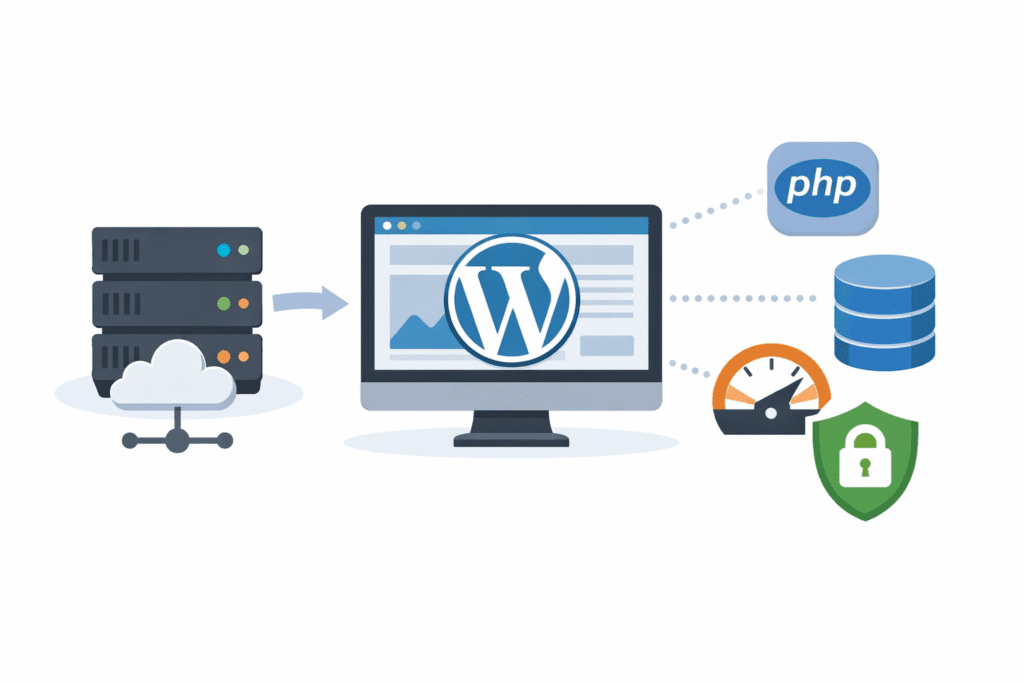
Here’s how a wordpress website runs behind the scenes.
When someone in the US visits your site, their browser sends a request to your wordpress host. The server receives that request and looks at your WordPress files.
WordPress then talks to the database to fetch content-posts, pages, images, settings. The server processes this information, builds the page, and sends it back to the visitor’s browser.
This entire process happens in seconds. The speed depends on your hosting service, server location, caching, and how optimized the hosting environment is.
Even a small delay matters. If your server responds just 0.5 seconds slower, many US visitors are more likely to leave before the page fully loads.
That’s why hosting choices matter early, even for small sites.
What Makes Hosting “Optimized” for WordPress

A wordpress host doesn’t just store files. It prepares the server to handle WordPress efficiently.
Optimized hosting often includes:
- Server configuration tuned for WordPress
- Database optimization
- Built-in caching systems
- Security rules designed for WordPress threats
Managed WordPress hosting goes a step further. With managed wordpress hosting, the hosting provider handles updates, backups, and performance tuning automatically.
This setup reduces technical risk, especially if you’re installing WordPress for the first time or running a content-focused wordpress site.
Types of WordPress Hosting
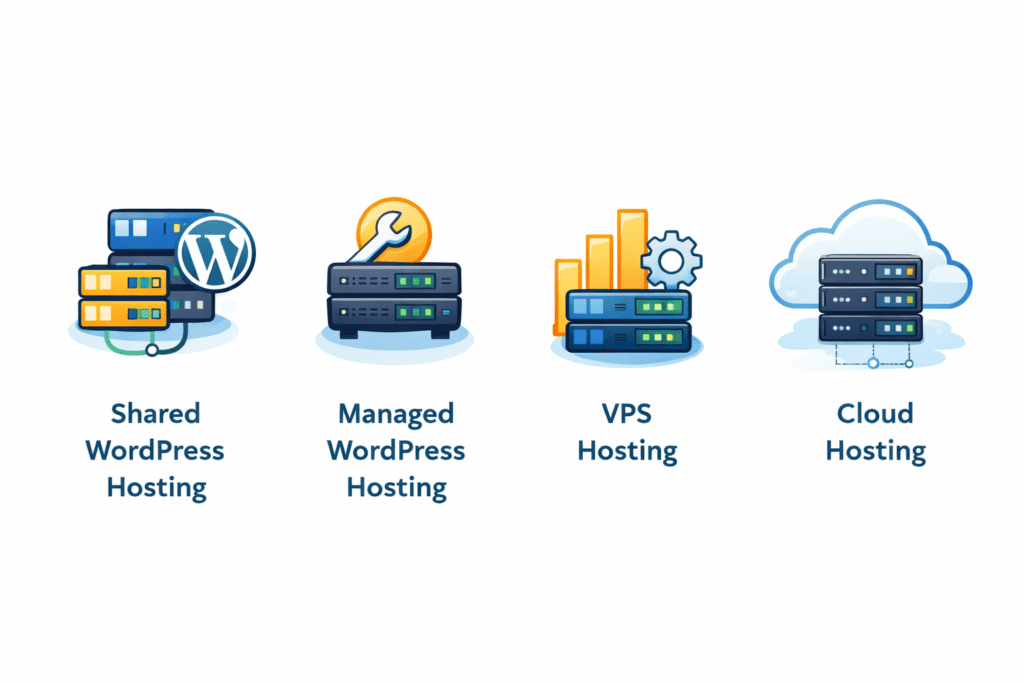
Not all wordpress hosting works the same way. The hosting type you choose changes how much control you have, how much work the hosting provider handles, and how your site performs over time.
For US beginners, the most common options fall into four main types.
Shared WordPress Hosting
Shared hosting is usually the starting point. With this hosting option, your wordpress site lives on a server where multiple websites share the same server resources. That’s why it’s affordable.
Shared hosting providers often include WordPress-ready features, such as one-click WordPress installation and basic performance tools. This type of web hosting works fine for small blogs or early-stage sites.
That said, shared hosting has limits. If another site on the same server uses too many resources, your site can slow down. This doesn’t always happen, but there are exceptions.
Managed WordPress Hosting
Managed wordpress hosting is designed for people who want fewer technical tasks. With this hosting type, the hosting provider handles updates, backups, security checks, and performance tuning.
Managed hosting costs more than shared hosting, but it removes many setup headaches. For US-based bloggers and small businesses, this hosting solution often feels easier to manage long term.
Managed wordpress hosting provides an environment optimized for running WordPress without constant manual work.
VPS WordPress Hosting
VPS hosting gives your wordpress website a private portion of a server. You still share the physical server, but resources are more controlled.
This hosting type sits between shared hosting and dedicated hosting. It’s useful when a wordpress site outgrows shared hosting but doesn’t need full server control yet.
VPS hosting requires more technical knowledge, so it’s usually not the first choice for beginners.
Cloud WordPress Hosting
Cloud hosting spreads your wordpress site across multiple servers. Instead of relying on one machine, your site pulls resources from a network.
This hosting environment helps with stability and traffic spikes. Cloud hosting can be flexible, but pricing can vary based on usage.
Some wordpress hosting providers combine cloud hosting with managed features, which can work well for growing US websites.
What Is Managed WordPress Hosting and How It Works
Managed wordpress hosting works by shifting responsibility away from you and onto the hosting provider.
Here’s what typically happens behind the scenes.
The host provides automatic WordPress updates, plugin monitoring, daily backups, and built-in security rules. Performance tools like caching and image optimization are often included.
This setup helps beginners avoid common mistakes while running a wordpress website. You still control content and design, but the hosting platform handles stability and speed.
Managed wordpress hosting providers focus on WordPress only, not general hosting. That’s why the hosting experience often feels smoother.
WordPress Hosting vs Regular Web Hosting
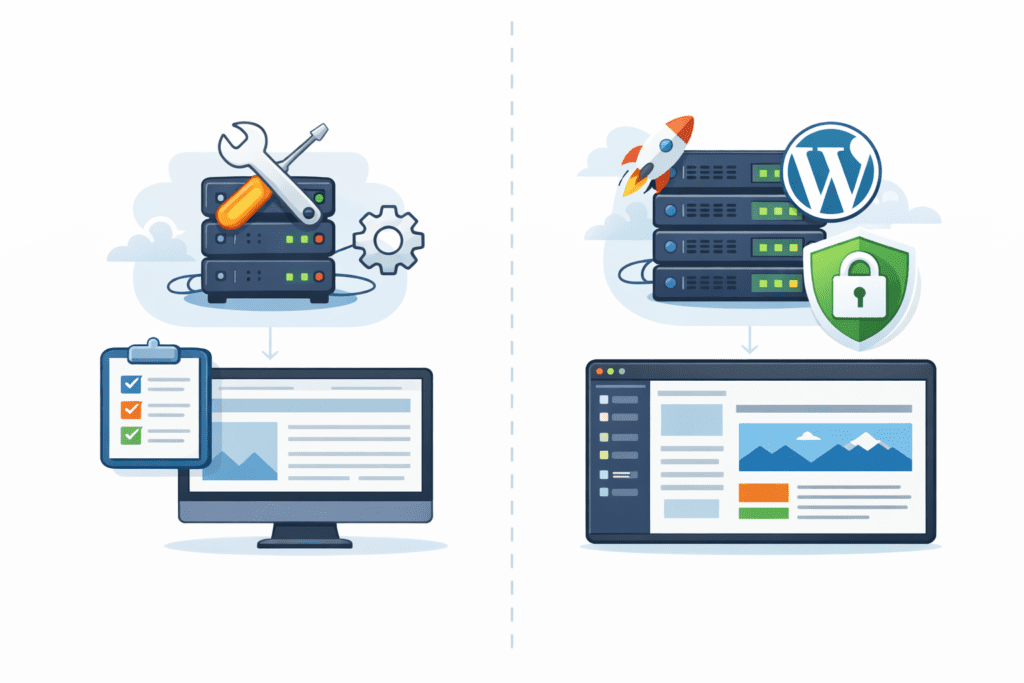
WordPress hosting and regular web hosting may look similar at first, but they work differently once you dig in.
Regular web hosting is designed to run many types of websites. WordPress can run on it, but it isn’t prioritized. You may need to handle installing WordPress, updates, caching, and security yourself.
WordPress hosting is optimized for WordPress from the start. The hosting setup includes WordPress-specific configurations, support, and tools.
If you want to run WordPress without constant adjustments, wordpress hosting is usually the right hosting choice.
How WordPress Hosting Affects Website Speed
Speed is one of the biggest reasons people switch to wordpress hosting.
When hosting is optimized for WordPress, server response time improves. Built-in caching stores pages so they load faster for repeat visitors. This matters a lot for US traffic, where users expect quick load times.
A wordpress host also chooses server locations and configurations that reduce delay. Faster loading improves user experience and helps with search visibility over time.
Speed gains won’t fix everything, but hosting often sets the foundation.
How WordPress Hosting Handles Security
Security is another area where wordpress hosting stands out.
Most wordpress hosting providers include malware scanning, firewalls, SSL integration, and backup systems. These tools protect your wordpress site from common threats.
Managed wordpress hosting handles security updates automatically. This reduces the risk of outdated plugins or vulnerable files.
While no hosting service guarantees perfect protection, WordPress-focused security lowers risk compared to general hosting setups.
Do You Need Technical Skills to Use WordPress Hosting?
This is one of the biggest concerns for beginners in the US, and it’s a fair one.
The short answer is no-you don’t need deep technical skills to use wordpress hosting. Most wordpress host platforms are built with beginners in mind. The hosting setup usually includes dashboards, guided tools, and clear options that reduce manual work.
A wordpress hosting provider often handles server updates, security patches, and performance settings. You’re mainly responsible for content, themes, and basic plugin choices. That division of responsibility makes wordpress hosting approachable, even if you’ve never worked with web hosting before.
That said, learning a few basics still helps. Understanding how plugins affect speed or how backups work can save time later. Hosting manages the system, but you still control the site.
Who Should Use WordPress Hosting in the US?
WordPress hosting isn’t for everyone, but it fits many common use cases.
For bloggers, wordpress hosting is ideal because it supports content-heavy wordpress sites without complex setup. Publishing posts, updating themes, and managing media feels straightforward.
Small US businesses also benefit. A wordpress website used for services, local SEO, or content marketing runs more smoothly when the hosting environment is designed for WordPress.
Content-focused websites-such as niche blogs, review sites, or informational platforms-usually perform better on a wordpress host because caching, updates, and security are already in place.
Who May Not Need WordPress-Specific Hosting
Some situations don’t require wordpress hosting right away.
Very small test sites or temporary projects can run on regular web hosting without issues. If the goal is experimentation, a general hosting plan may be enough.
Non-WordPress websites don’t benefit from WordPress-specific features. If you’re using a different website builder or a custom-coded setup, wordpress hosting won’t add value.
In these cases, choosing a different hosting type makes more sense.
Common Mistakes Beginners Make With WordPress Hosting
One common mistake is choosing unmanaged hosting too early. Beginners sometimes pick low-cost plans without realizing they’ll need to handle updates, security, and backups themselves.
Another issue is overpaying for features that aren’t needed yet. Not every site requires advanced tools on day one.
Ignoring performance limits is also common. Shared hosting works well initially, but growth can push resource limits faster than expected. Recognizing when it’s time to upgrade matters.
Choosing the right hosting early helps avoid these problems.
FAQs – How WordPress Hosting Works
Is WordPress hosting required?
No. WordPress can run on regular web hosting. WordPress hosting simply makes setup and management easier.
Can I switch from regular hosting later?
Yes. Many beginners start with general hosting and move to wordpress hosting when their site grows.
Does WordPress hosting improve SEO?
It doesn’t guarantee rankings, but faster speed and better stability support SEO efforts.
Can I host multiple WordPress sites?
Some wordpress hosting plans allow multiple sites, depending on the hosting provider and plan limits.
What is hosting for WordPress websites explained?
Hosting for WordPress websites explained means providing the server space, infrastructure and services needed to store your WordPress files and make your site accessible on the internet. A web hosting service or hosting provider runs servers, offers storage, bandwidth, security and often features like one-click WordPress installation so you can create a WordPress site quickly. While WordPress itself is free, you’ll need web hosting to host a WordPress site.
What types of hosting are available for WordPress?
Common types of hosting include shared hosting (where your site shares server resources), VPS, dedicated hosting, and managed hosting specifically configured for WordPress. Shared and dedicated hosting differ in resource allocation and control; managed WordPress hosting is a hosting solution optimized for WordPress websites and includes WordPress support, automatic updates, and performance tuning.
How do I choose a hosting plan for a WordPress site?
When choosing a hosting plan, evaluate traffic expectations, storage, backups, security, scalability and whether the web hosting plan includes WordPress-specific features such as one-click installation, staging environments and caching. Compare hosting offers and pricing across reputable hosting providers and pick the right wordpress host that matches your technical comfort and growth plans.
What is managed WordPress hosting and who should use it?
Managed hosting is a specialized hosting service where the provider handles server management, WordPress updates, security monitoring and performance optimization. It’s ideal for site owners who want hands-off maintenance, faster performance, and built-in backups — especially for business sites, eCommerce or high-traffic blogs that need reliability from wordpress hosting providers offer.
Can I install WordPress myself or do I need a hosting company to help?
You can install WordPress yourself using one-click installers many web hosting providers offer, or manually via FTP and a database. Hosting companies often provide features designed for WordPress websites that simplify installing WordPress and getting started with WordPress, but WordPress itself is open-source and can be installed on any compatible hosting account.
What hosting requirements does WordPress have?
WordPress has basic hosting requirements: a server running PHP and MySQL or MariaDB, HTTPS support, and sufficient memory and disk space. Most modern web hosting services meet these needs; however, if you plan resource-intensive plugins or high traffic, choose a hosting plan or dedicated WordPress solution that guarantees performance and scaling.
Is shared hosting good for new WordPress sites?
Shared hosting is an affordable option for getting started with WordPress and is suitable for low-traffic blogs or personal sites because hosting is a service that pools resources across users. Be aware that site shares server resources with others, which can affect speed and reliability. As your site grows, consider upgrading to a higher-tier web hosting plan or managed hosting.
How do I choose the best WordPress hosting provider?
To choose the best wordpress hosting, compare uptime guarantees, support quality, backup policies, security features, performance benchmarks and WordPress-specific optimizations. Look for reputable hosting providers that offer clear hosting offers, specialized hosting for WordPress, and a choice of hosting types so you can move from shared to dedicated hosting as needed.
What extra features should I look for in a WordPress hosting plan?
Important features include automatic updates, daily backups, SSL certificates, staging environments, built-in caching, malware scanning, and reliable customer support with WordPress expertise. These features make managing and maintaining an optimized for WordPress websites experience easier and are often included in wordpress hosting offers.
When should I upgrade my hosting or change hosting companies?
Upgrade or switch when your site outgrows current resources (slow performance, frequent downtime), you need better WordPress support, or your hosting lacks essential features like automated backups or security. Choosing a hosting company with scalable web hosting plans and good migration support makes moving to the right wordpress host smoother.
What Should You Do Next After Understanding WordPress Hosting?
After learning how wordpress hosting works, the next step is deciding between shared hosting and managed wordpress hosting. This depends on budget, time, and technical comfort.
Comparing wordpress hosting plans helps you see what features matter now versus later. Look at performance limits, backups, and support quality.
Once you choose a hosting plan, setting up your first WordPress site becomes much easier.
Final Thoughts
WordPress hosting doesn’t have to feel complicated once you understand what’s happening behind the scenes. At its core, wordpress hosting exists to make running a WordPress site easier, faster, and more stable-especially for beginners in the US.
A wordpress host prepares the hosting environment so WordPress can run without constant manual work. The server is configured for WordPress, updates are smoother, and performance tools are already in place. That foundation matters more than many beginners realize.
For small US-based websites, wordpress hosting is often a practical choice because it reduces setup errors and saves time. Shared hosting works for starting out, managed wordpress hosting helps when you want fewer technical tasks, and other hosting types exist as your site grows.
Bottom line? If you’re building a WordPress site and want fewer headaches, wordpress hosting gives you a cleaner starting point. It’s not magic, and it won’t replace good content or smart decisions-but it sets the stage so your site can grow without fighting the system.