

Can the type of hosting you choose really influence your core web vitals scores?
At first glance, website speed feels like something controlled mostly by themes, plugins, or images. But the hosting environment plays a bigger role than many people expect. In fact, hosting for core web vitals directly affects loading performance, server response time, and overall user experience.
When a server responds quickly and delivers content efficiently, pages load faster and interactions feel smoother. That’s exactly what Google measures through core web vitals metrics.
These performance metrics evaluate how fast a page loads, how responsive it feels during user interaction, and whether visual elements remain stable while loading.
From an SEO perspective, this matters more than ever. Google’s ranking systems now include page experience signals, which means poor core web vitals performance can influence search rankings.
Choosing optimized web hosting infrastructure helps improve load time, reduce layout shifts, and create faster responses for visitors. Over time, that leads to better core web vitals scores and stronger SEO performance.
Understanding how hosting for core web vitals works can help website owners improve performance without relying only on front-end optimization.
How Hosting for Core Web Vitals Improves Website Speed and SEO
Hosting for core web vitals focuses on delivering a fast and stable hosting environment that supports strong performance metrics.
Google evaluates page experience using core web vitals metrics, and the hosting setup influences several of those measurements.
A slow server response time can increase loading delays and negatively affect the lcp score. Likewise, limited server resources can cause inconsistent performance and higher inp delays.
Better hosting infrastructure helps prevent these issues.
• Server response time: Faster servers reduce delays before content begins loading.
• Stable resource allocation: Reliable infrastructure keeps performance consistent during traffic spikes.
• Built-in caching systems: Cache systems improve page delivery speed.
• Optimized content delivery: Faster data transfer improves load time for visitors.
Because these factors directly impact loading and responsiveness, hosting for core web vitals plays an important role in improving search rankings.
What Are Core Web Vitals?
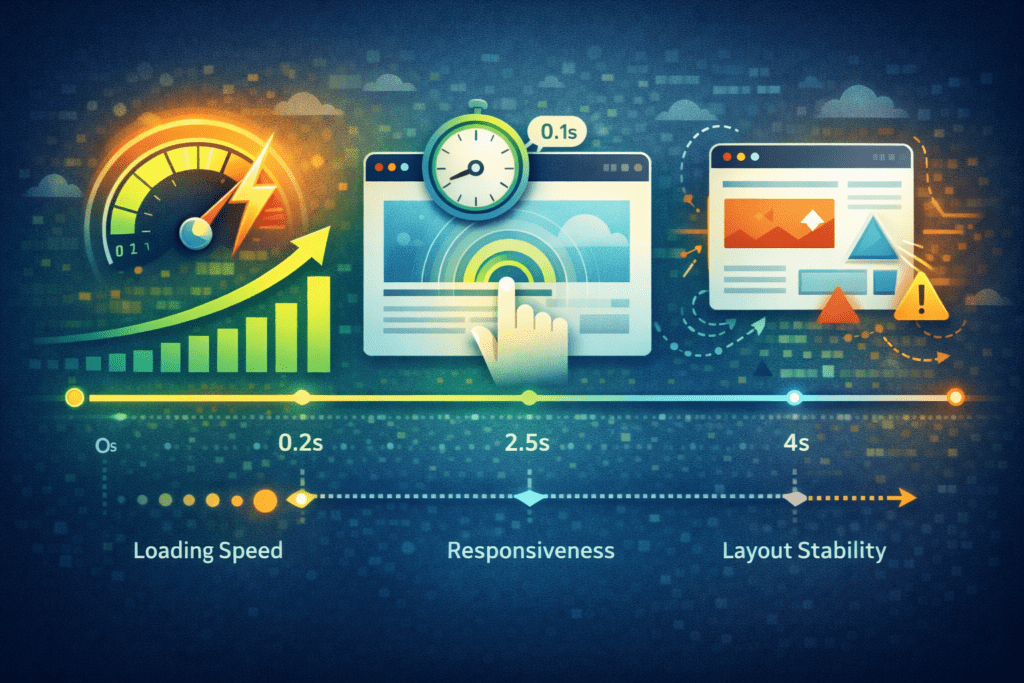
Core web vitals are performance metrics used by Google to evaluate user experience on a website.
These metrics measure how quickly a page loads, how responsive it feels when users interact with it, and how stable the page layout remains while loading.
Google introduced core web vitals to help website owners understand real-world web performance. The goal is simple: pages should load quickly, remain stable, and respond smoothly to user interaction.
When these metrics perform well, websites often deliver better user experience and may appear more competitive in search results.
Google Search Console provides a core web vitals report that shows how individual web pages perform according to these metrics.
Core Web Vitals Metrics Explained

Core web vitals metrics focus on three major aspects of performance.
These measurements help determine whether a page provides a smooth and reliable browsing experience.
Largest Contentful Paint (LCP)
Largest contentful paint measures how long it takes for the main content of a page to become visible.
This metric focuses on loading performance.
A good lcp score means the primary content of the page appears quickly, which improves user experience and reduces bounce rates.
Interaction to Next Paint (INP)
Interaction to next paint measures how responsive a page is when users interact with it.
For example, clicking a button or opening a menu triggers a visual response in the browser. The inp metric tracks how quickly that response appears.
Lower inp score values indicate better responsiveness and smoother interaction.
Cumulative Layout Shift (CL / CLS)
Cumulative layout shift measures unexpected layout shifts that occur while a page is loading.
Layout shifts happen when elements move suddenly on the page. For example, images or advertisements loading late may push other content downward.
Minimizing these layout shifts improves visual stability and makes browsing more comfortable.
Hosting Performance Benchmarks for Core Web Vitals
Several performance benchmarks help determine whether a hosting environment supports strong core web vitals performance.
These benchmarks provide reference points for evaluating page speed and responsiveness.
• Server response time: Ideally below 200 milliseconds to support fast loading.
• LCP loading threshold: Largest contentful paint should occur within 2.5 seconds.
• INP responsiveness: Interaction delays should remain minimal during user interaction.
• CLS stability: Layout shifts should stay below acceptable thresholds.
These benchmarks help website owners measure whether their hosting setup can deliver good core web vitals scores.
Why Hosting for Core Web Vitals Matters for SEO and User Experience
Website speed and stability are closely connected to both SEO performance and user experience.
When a web server responds slowly, pages take longer to begin loading. This delay increases load time and can reduce engagement.
Search engines consider these performance signals when evaluating websites.
Improved hosting infrastructure helps reduce response time, deliver content faster, and improve core web vitals performance.
Better performance often leads to stronger search rankings, improved engagement, and smoother browsing experiences.
How Web Hosting Impacts Core Web Vitals Performance

Web hosting plays a direct role in how well a website meets core web vitals metrics, thus affecting the site’s core web vitals scores. Even if a site is well designed, a slow server can still increase load time and reduce responsiveness.
Several hosting factors influence core web vitals performance, impacting how well a site performs.
Server Response Time and Page Loading
Server response time determines how quickly a web server begins delivering page content to the browser.
If the response time is slow, the browser must wait longer before loading the page, increasing time to first byte. This delay can affect largest contentful paint and increase the overall load time.
Faster hosting infrastructure reduces these delays and helps pages start loading sooner, ultimately improving your core web vitals.
Resource Availability and Performance Stability
Server resources such as cpu and ram influence how efficiently websites process requests.
When resources are limited, loading speed may fluctuate during high traffic periods. This instability can affect core web vitals scores and reduce site performance.
Better resource allocation allows websites to maintain consistent performance.
Caching Systems and Content Delivery
Caching systems improve page loading by storing pre-generated versions of web pages, contributing to a better core web vitals assessment.
When a visitor requests a page, the cache delivers stored content instead of generating the page again. This reduces server workload and improves loading speed.
Caching can improve core web vitals performance by reducing load time and improving response time.
Server Infrastructure That Improves Core Web Vitals Performance

Server infrastructure strongly influences website performance metrics.
Modern hosting environments rely on several technologies designed to improve loading speed and responsiveness.
• CPU and RAM resources: More processing power allows servers to handle requests efficiently.
• NVMe or SSD storage: Faster storage improves data transfer and page loading speed.
• Edge caching and CDN networks: These systems reduce latency and accelerate content delivery.
• Data center location: Servers closer to visitors often deliver faster response times.
When these infrastructure elements work together, websites can significantly improve core web vitals performance.
Core Web Vitals for WordPress Websites
WordPress websites rely heavily on server performance because they generate pages dynamically.
Each time a visitor loads a page, the wordpress core processes themes, plugins, and database queries before displaying content.
If the hosting environment is slow, these processes take longer and increase page loading delays.
Optimized wordpress hosting environments can improve wordpress core web vitals performance by providing faster servers, better caching systems, and more reliable infrastructure.
WordPress Core Web Vitals Challenges
Several factors can create performance challenges for a wordpress site.
Themes, plugins, and database queries all influence loading performance.
• Heavy themes: Complex themes may increase page size and loading time.
• Large plugin stacks: Too many plugins can increase server workload.
• Slow database queries: Inefficient queries can delay page rendering.
When these issues combine with low quality hosting, poor core web vitals scores become more likely.
Proper hosting optimization helps reduce these problems.
Different hosting environments offer different levels of performance optimization.
Shared hosting environments usually distribute server resources across many websites. This can reduce performance during traffic spikes.
Managed wordpress hosting environments are designed specifically for wordpress websites. They typically include built in performance optimization tools.
These features may include server level cache systems, automatic updates, and integrated content delivery network support.
Because of these improvements, managed hosting environments often provide better core web vitals performance compared to basic shared hosting plans.
How CDN and Edge Delivery Improve Core Web Vitals

Content delivery systems play an important role in improving core web vitals performance.
A content delivery network distributes website content across multiple servers located in different regions. When a visitor opens a page, the browser retrieves files from the nearest server location.
This reduces latency and improves loading performance.
Edge caching also helps improve page speed. Instead of requesting content from the main web server each time, cached files are delivered from edge locations.
• Faster loading: Cached files reduce the time required to deliver page content.
• Lower server workload: The main server handles fewer requests.
• Better global performance: Visitors receive faster responses regardless of location.
• Improved lcp metric: Faster content delivery can help improve largest contentful paint.
These technologies help websites improve core web vitals scores by reducing load time and improving response speed, which is essential for passing core web vitals.
How to Measure Core Web Vitals Performance
Monitoring core web vitals performance helps identify issues affecting page speed and responsiveness.
Several tools allow website owners to measure core web vitals and evaluate how individual web pages perform.
Measuring Your Core Web Vitals
Google provides several tools that help measure core web vitals metrics.
Google Search Console includes a dedicated core web vitals report that shows how pages perform according to real user data.
PageSpeed Insights also analyzes site performance and provides detailed recommendations for optimization.
These tools help website owners understand whether pages meet Google’s recommended thresholds.
Important Core Web Vitals Metrics to Track
Tracking the right performance metrics helps determine whether a website delivers a good browsing experience.
• LCP metric: Measures loading performance of the main page content.
• INP metric: Tracks how quickly the page responds to user interaction.
• CL / CLS metric: Evaluates layout shifts during page loading.
Monitoring these metrics helps identify areas where optimization is needed.
Understanding Core Web Vitals Scores
Google groups core web vitals scores into three performance categories.
• Good: Pages meet recommended thresholds for loading, responsiveness, and stability.
• Needs improvement: Performance falls slightly outside optimal ranges.
• Poor: Significant performance issues affect user experience.
Improving these scores often requires a combination of hosting optimization, caching improvements, and front end performance adjustments.
Monitoring Core Web Vitals Over Time
Website performance can change over time as traffic increases or new features are added.
Monitoring core web vitals metrics regularly helps detect performance issues early.
Google Search Console provides ongoing reports that track the site’s core web vitals performance across individual web pages.
Analytics tools and performance monitoring platforms also help track response time, load time, and site performance trends.
Continuous monitoring ensures that optimization efforts maintain consistent results.
Techniques to Improve Core Web Vitals with Better Hosting

Improving performance often requires both hosting improvements and site level optimization.
Several techniques can help improve core web vitals performance.
Choose Optimized Hosting for Core Web Vitals
Selecting a hosting provider with modern infrastructure can significantly improve page speed.
Fast web hosting environments use optimized servers, faster storage systems, and better network connectivity.
These improvements reduce response time and help improve core web vitals scores.
Use Server Level Cache
Server level cache systems store pre generated versions of pages.
When visitors request a page, the server delivers the cached version instead of generating it again.
Caching can improve load time and reduce server workload.
Optimize WordPress Hosting Environment
WordPress websites benefit from hosting environments designed specifically for wordpress performance.
Managed wordpress hosting platforms typically include performance optimization tools such as caching, CDN integration, and automatic updates.
Reducing unnecessary plugins and optimizing database queries also helps improve wordpress core web vitals performance.
Hosting Features That Improve Core Web Vitals
Certain hosting features can make a noticeable difference in core web vitals performance. When the hosting environment includes modern infrastructure and built-in optimization tools, websites usually load faster and remain more stable.
These features help reduce load time, improve responsiveness, and create better user experience.
• Fast server infrastructure: Modern servers with NVMe or SSD storage reduce delays during loading.
• Global data centers: Servers located closer to visitors improve response time.
• Integrated caching systems: Cache layers deliver pages faster to the browser.
• Content delivery network support: A content delivery network distributes files across global locations.
When these technologies are combined, they help websites maintain strong core web vitals scores.
How to Improve LCP and Other Core Web Vitals Metrics
Improving core web vitals metrics requires a combination of hosting optimization and front-end adjustments.
Improve LCP (Largest Contentful Paint)
Largest contentful paint focuses on loading speed of the main content.
To improve lcp, websites should rely on faster web hosting infrastructure and optimized media delivery.
• Use faster hosting infrastructure: Faster server response time helps improve lcp score.
• Optimize images and media: Compress images and enable lazy loading when possible.
• Use efficient caching: Cache systems reduce page generation time.
These changes help improve lcp and reduce overall load time.
Reduce Layout Shifts (CLS)
Layout shifts occur when page elements move unexpectedly while loading, potentially hurting the site’s core web vitals scores.
These visual changes can interrupt browsing and negatively affect cumulative layout shift scores.
• Predefine image sizes: Set dimensions for images to prevent layout movement.
• Avoid unstable dynamic content: Ads or scripts loading late can cause layout shifts.
• Optimize CSS delivery: Proper CSS loading prevents visual instability.
Reducing layout shifts improves visual stability and enhances user experience.
Improve Interaction Performance (INP)
Interaction to next paint measures how quickly a page responds to user interaction.
Improving inp performance often requires reducing script delays and improving page responsiveness.
• Optimize scripts: Remove unnecessary javascript that blocks rendering.
• Reduce heavy tasks: Limit background tasks that delay user interaction.
• Improve server response time: Faster servers help deliver quicker responses.
These adjustments help improve inp score and create smoother interaction.
When Upgrading Hosting Improves Core Web Vitals
Sometimes website optimization alone is not enough to improve your core web vitals; additional factors must be considered.
If the hosting environment is slow or overloaded, upgrading hosting infrastructure can significantly improve core web vitals performance.
Several situations often indicate that hosting upgrades may help.
• Slow server response times: High response time delays page loading.
• Shared hosting limitations: Shared hosting environments sometimes struggle with heavy workloads.
• High traffic websites: Increased traffic requires stronger server resources.
• Resource heavy wordpress sites: Complex websites may require more powerful hosting infrastructure.
Upgrading to a faster hosting plan can help improve loading speed and stabilize core web vitals metrics.
Common Hosting Mistakes That Hurt Core Web Vitals
Some hosting decisions can unintentionally reduce website performance.
Understanding these mistakes can help website owners avoid poor core web vitals scores.
• Choosing extremely cheap web hosting: Low quality servers may increase load time.
• Ignoring caching features: Lack of cache systems slows page delivery.
• Overloaded shared hosting environments: Too many websites on one server reduce performance.
• Poor database performance: Slow queries affect wordpress site speed.
Avoiding these mistakes helps maintain strong site performance.
Why Hosting for Core Web Vitals Is More Important in 2026
Website performance expectations continue to rise.
Search engines increasingly emphasize page experience signals, and core web vitals remain an important part of that evaluation.
Fast websites create better user experience, which often leads to longer engagement and improved search rankings.
Hosting infrastructure now plays a critical role in achieving these performance goals.
As websites grow more complex and interactive, reliable hosting environments become essential for maintaining strong core web vitals performance.
FAQs About Hosting for Core Web Vitals
What is hosting for core web vitals?
Hosting for core web vitals refers to web hosting environments optimized to support faster loading, stable layout behavior, and responsive user interaction.
Does web hosting affect core web vitals scores?
Yes. Server response time, caching systems, and hosting infrastructure can significantly influence core web vitals metrics.
How can I measure core web vitals for my website?
You can measure core web vitals using tools such as Google PageSpeed Insights or Google Search Console.
Can hosting improve core web vitals for WordPress?
Yes. Optimized wordpress hosting environments often improve wordpress core web vitals performance through faster servers and better caching systems.
What is the most important core web vitals metric?
Largest contentful paint is often considered the most important because it measures loading performance of the main page content.
How can I improve my core web vitals scores?
Improving hosting infrastructure, enabling cache systems, and optimizing website resources can help improve core web vitals scores.
Final Thoughts: Why Hosting for Core Web Vitals Is Critical for SEO
Choosing the right hosting for core web vitals can influence both website speed and search visibility.
Fast servers, optimized cache systems, and reliable hosting infrastructure help reduce load time and improve performance metrics.
When websites deliver faster loading, stable layout behavior, and responsive interactions, they create better user experience and stronger SEO results.
For websites that rely on search traffic, investing in quality hosting infrastructure can be one of the most effective ways to improve long term performance.