
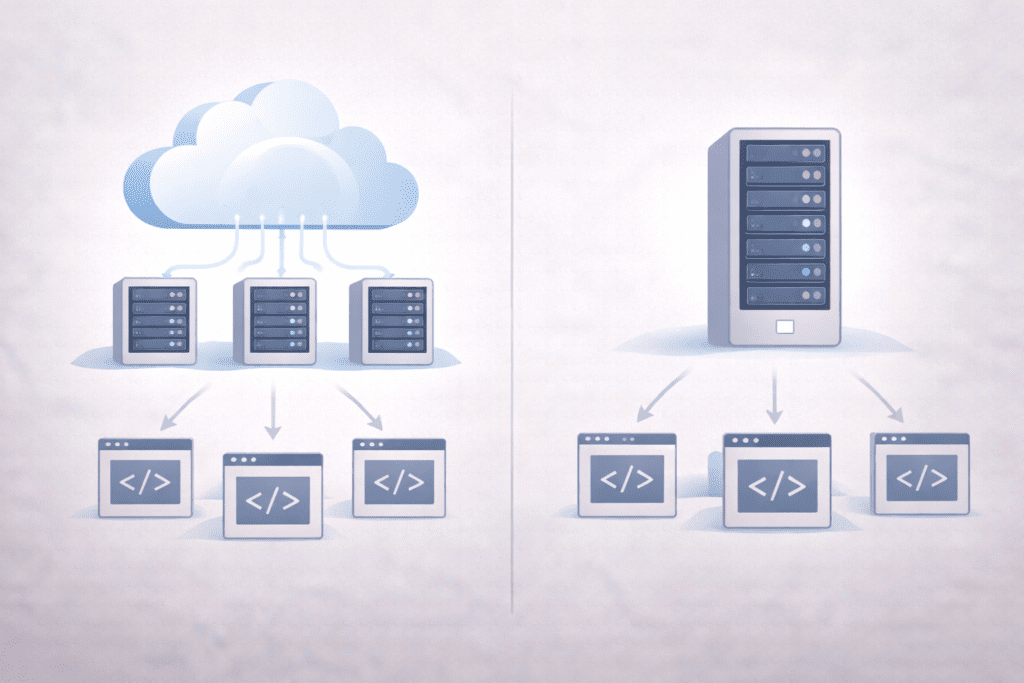
It’s early morning, you’re setting up a website, and the first real decision hits you. Hosting choice. This is where Cloud Hosting vs Traditional Hosting quietly becomes important, even if it doesn’t feel that way yet.
Here’s what I noticed while researching beginner forums and US hosting reviews. Most people don’t worry about hosting until something breaks. A slow page, sudden downtime, or a bill that looks higher than expected. By then, switching feels harder.
That’s why this comparison focuses on performance, cost, and real use cases. Not hype. Not tech talk. Just what usually matters in 2026 when expectations around speed and reliability are higher than before.
Along the way, I’ll also point out reliable hosting options beginners in the US often consider, without pushing you into anything. Let’s keep it simple and practical.
What Is Cloud Hosting vs Traditional Hosting? Beginner Friendly Explanation
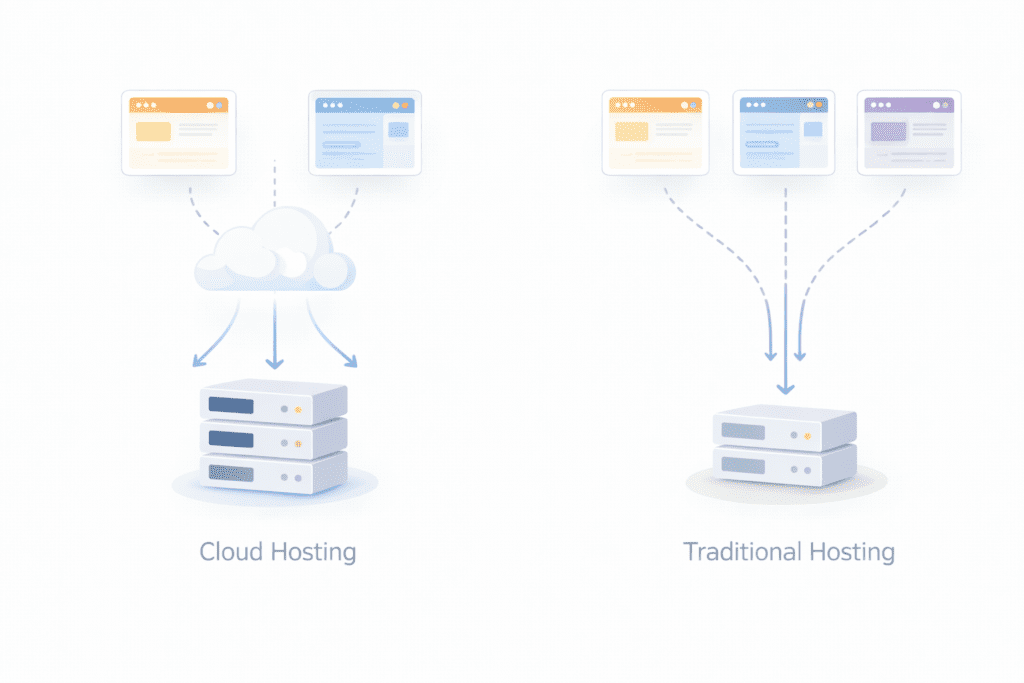
Cloud hosting works a little differently than what most beginners expect. Instead of your site living on one server, it runs inside a cloud environment made up of multiple machines working together. When traffic rises, extra compute resources can be pulled in automatically.
Traditional hosting is more straightforward. Your website sits on a single physical server, sharing space or owning resources depending on the plan. Everything stays tied to that one server, even when demand changes.
The core difference is how resources are handled. Traditional hosting relies on fixed limits. Cloud hosting uses a flexible hosting environment powered by modern cloud technology.
Cloud hosting is usually best for sites that expect traffic changes, seasonal spikes, or steady growth. Traditional hosting still works well for smaller sites with predictable usage and simple needs.
Beginners often struggle here because both options promise uptime and speed. The difference only shows up when the server experiences pressure or traffic increases. That’s when the choice starts to matter more than expected.
Who Should Use Cloud Hosting And Who Should Stick With Traditional Hosting

This is where the decision usually gets clearer.
From my research, cloud hosting tends to make sense for people who expect change. That could mean growing traffic, seasonal spikes, or plans to add features later. If your site can’t afford slowdowns when traffic jumps, this setup usually handles pressure better.
Cloud hosting is often a good fit for:
- Small US businesses planning to scale
- Content sites that see traffic spikes
- Projects where uptime feels non-negotiable
- Users who want flexibility without migrating later
That said, it’s not for everyone. Cloud hosting often involves usage-based costs, which can feel unpredictable at first.
Traditional hosting still works well when things are stable. If your website traffic is steady and you’re running something simple, a traditional setup can feel easier to manage.
Traditional hosting fits better if:
- You’re running a basic website or blog
- Traffic stays low and predictable
- You prefer fixed monthly costs
- You don’t want to think about scaling yet
Most beginners struggle because both sound similar on paper. The difference shows up only when the server load changes, and by then, switching can feel inconvenient.
Beginners who prefer predictable pricing often start with traditional plans on InMotion Hosting, while those expecting growth usually explore scalable cloud options through DigitalOcean.
Why Cloud Hosting vs Traditional Hosting Matters More in 2026

Here’s the thing. Expectations have changed.
In 2026, visitors don’t wait. If a page takes too long, they leave. That puts performance front and center when comparing Cloud Hosting vs Traditional Hosting.
Traffic patterns have also become less predictable. A single post can suddenly take off. Traditional hosting relies on a single server, and when that server gets overwhelmed, performance drops. Sometimes, the entire server slows down.
Cloud hosting spreads the load across a network of servers. If one server fails, others step in. That redundancy is a big reason uptime matters more now than before.
Cost structure is another factor. Cloud hosting often uses pay-as-you-go pricing, which feels efficient when traffic fluctuates. Traditional hosting sticks to fixed pricing, which feels safer but less flexible.
Security expectations have also increased. Cloud setups usually include automated updates, backups, and monitoring. Traditional hosting depends more on the hosting provider and the specific plan you choose.
So yes, choosing between cloud hosting vs traditional hosting matters more than ever, mostly because websites are under more pressure in 2026 than they were a few years ago.
Is Cloud Hosting Worth the Higher Cost in 2026?
Honestly, it depends.
In most cases, cloud hosting does cost more upfront. You’re paying for flexibility, redundancy, and the ability to scale without moving your site. For growing projects, that trade-off usually feels fair.
That said, cloud hosting costs don’t always stay higher. When traffic is low, usage stays low. When traffic rises, you’re paying because the site is actually being used. That feels reasonable, but it can surprise beginners who expect a flat bill.
Traditional hosting is still cheaper for simple sites. If your traffic stays stable, paying extra for unused cloud resources doesn’t make much sense.
Personally, I feel cloud hosting is worth the cost when downtime or slow pages would hurt you. If a few minutes offline means lost leads or sales, the extra spend usually pays for itself.
If not, traditional hosting can still be a practical choice in 2026. No shame there.
If uptime and scalability are priorities, reviewing managed cloud plans on SiteGround can help determine whether the added flexibility fits your budget.
Key Differences Between Cloud Hosting vs Traditional Hosting
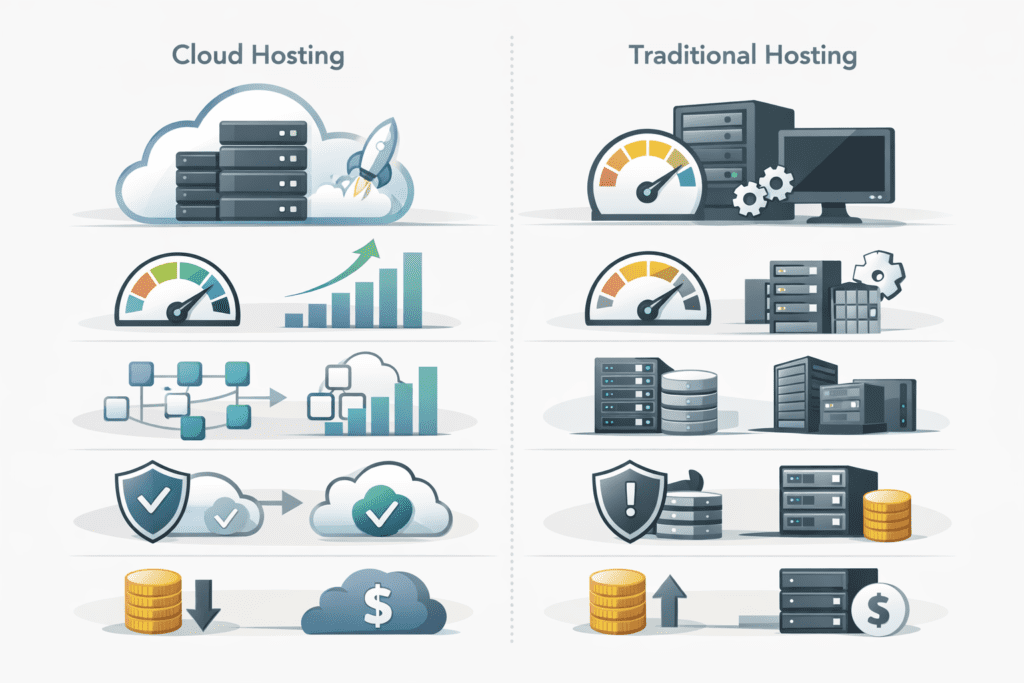
The easiest way to understand the difference is to look at how resources behave when your website changes.
With traditional hosting, everything revolves around a single server. Your website uses a fixed amount of CPU, memory, and storage. When traffic rises beyond that limit, performance usually drops. There’s no room to borrow extra power from elsewhere.
Cloud hosting, on the other hand, spreads your site across a cloud environment built on multiple systems. If demand increases, additional compute power can be pulled in. When traffic drops, usage scales back. That flexibility is the core advantage.
Performance is another key difference. Traditional hosting performs well until the server experiences heavy load. Cloud hosting distributes requests across more than one system, which helps maintain speed during traffic spikes.
Reliability also works differently. If a server fails in traditional hosting, your site can go offline until it’s fixed. In cloud hosting, traffic can shift to another virtual server, reducing downtime.
Management matters too. Traditional hosting often expects users to handle more things themselves. Cloud hosting often includes managed features, which reduce hands-on work for beginners.
Cost structure is where people hesitate. Traditional hosting offers predictable billing. Cloud hosting charges based on usage, which feels flexible but less certain.
Long term, cloud hosting gives more freedom. Traditional hosting feels simpler at first but can limit growth later.
Types of Cloud Hosting vs Traditional Hosting

Not all hosting types work the same way, and this is where beginners often get overwhelmed.
Shared traditional hosting places multiple websites on the same single physical server. It’s affordable and easy to start with, but performance depends on what other sites are doing. This setup works best for small sites with light traffic.
VPS traditional hosting uses a virtual server created from one larger machine. You get dedicated resources without paying for a full dedicated server. It’s more stable than shared hosting and offers better control.
Dedicated traditional hosting gives you an entire server to yourself. Performance is strong, but costs are higher. This option fits large sites with consistent traffic and technical experience.
On the cloud side, public cloud hosting runs your site on shared cloud platforms, but resources scale dynamically. It’s flexible and efficient, especially for growing projects.
Managed cloud hosting removes most technical work. The hosting provider handles updates, security, and performance tuning. For beginners, this often feels less stressful.
Choosing the right type depends on your hosting needs, traffic expectations, and comfort level. Most beginners aren’t confused by cloud technology itself. They’re confused by which hosting type actually fits their situation.
Cloud Hosting vs Traditional Hosting: Feature by Feature Comparison
Performance and Speed
Performance is usually the first thing people notice when something goes wrong.
With traditional hosting, performance depends heavily on how busy the server is. If traffic rises suddenly, the single server has to handle everything. When limits are reached, pages slow down. Sometimes they stall.
Cloud hosting works differently. It pulls resources from a cloud infrastructure made up of multiple systems. Requests are spread across more than one server, which helps keep load times stable even when traffic jumps.
For beginners, cloud hosting often feels faster because slowdowns are less noticeable. That doesn’t mean traditional hosting is slow by default. It just has less room to react when pressure hits.
Cost and Pricing Structure
Cost is where hesitation usually kicks in.
Traditional hosting uses fixed pricing. You pay the same amount every month for the same hosting plan, whether traffic rises or not. That predictability feels comfortable, especially early on.
Cloud hosting uses usage-based billing. You’re charged based on compute, bandwidth, and resources consumed inside the cloud environment. In low-traffic months, costs stay reasonable. During spikes, they rise.
Here’s what I noticed. Beginners sometimes overestimate how expensive cloud hosting will be. In reality, it usually costs more only when the site is actually doing more work.
Scalability and Growth
Traditional hosting has limits. When traffic grows past those limits, upgrading often means moving to a different plan or even a different hosting provider. That process isn’t hard, but it’s rarely instant.
Cloud hosting allows scaling on demand. Resources expand or shrink without downtime. That flexibility matters once growth becomes unpredictable.
For small sites, scalability isn’t urgent. For growing ones, it quickly becomes a risk factor.
Here’s a real situation people run into. A small US-based blog gets mentioned on social media and traffic jumps from a few hundred visits a day to several thousand overnight. On traditional hosting, the server experiences overload and the site slows or goes offline. On cloud hosting, traffic is distributed across multiple systems, and visitors barely notice. That difference usually changes how people feel about scalability.
Reliability and Uptime
Reliability depends on how failures are handled.
Traditional hosting relies on one server. If that server fails, the site goes down until it’s restored. Some plans include backups and monitoring, but recovery still takes time.
Cloud hosting spreads risk. If one server fails, traffic shifts to another. Redundancy is built into the cloud hosting uses a network model.
This doesn’t mean cloud hosting never goes down. There are exceptions. But outages usually affect fewer users for shorter periods.
Ease of Use and Management
Traditional hosting gives beginners a simple dashboard and basic tools. Management responsibility depends on the plan. Some tasks are automated. Others aren’t.
Cloud hosting often includes managed services. Updates, security patches, and monitoring are handled by the hosting provider. That reduces manual work, which beginners usually appreciate.
That said, cloud interfaces can feel unfamiliar at first. It’s not harder, just different. Once set up, management is usually smoother.
Cloud Hosting vs Traditional Hosting Comparison Table
| Feature | Traditional hosting | Cloud hosting |
|---|---|---|
| Performance level | Depends on one server and fixed limits | Uses multiple server resources for stable speed |
| Scalability | Limited and manual upgrades | On-demand scaling inside a cloud environment |
| Reliability | Risk if the single server goes down | Redundancy reduces downtime when a server fails |
| Cost flexibility | Fixed monthly pricing | Usage-based billing tied to compute |
| Beginner friendliness | Simple to start, fewer options | Easier long term with managed features |
| Best use case | Small, stable websites | Growing sites with traffic changes |
If you want to compare beginner-friendly cloud and traditional hosting plans, reviewing options on SiteGround, InMotion Hosting, or DigitalOcean helps clarify real pricing and scalability differences.
How to Choose Between Cloud Hosting vs Traditional Hosting Step by Step
Step 1: Define your website purpose
Start with why the site exists. A personal blog, portfolio, or local business page has very different needs than an online store or content site. This decision shapes everything else.
Step 2: Estimate traffic and growth potential
Be honest here. If traffic is likely to stay low, traditional hosting often works fine. If growth is uncertain, cloud hosting handles surprise traffic better.
Step 3: Set a realistic budget
Traditional hosting feels safer because costs are fixed. Cloud hosting costs change based on usage. Neither is wrong, but unexpected bills are something beginners should plan for.
Step 4: Decide how much flexibility you need
If switching plans later sounds stressful, cloud hosting offers more long-term flexibility. Traditional hosting is simpler but less adaptable.
Step 5: Consider ease of management
Some hosting setups expect more involvement. Managed cloud options reduce manual tasks. If you don’t want to deal with updates or monitoring, this matters.
Step 6: Compare beginner-friendly hosting providers
Look at uptime history, support quality, and clear pricing. From my research, support response time often matters more than flashy features.
Comparing support response times and uptime guarantees on InMotion Hosting or SiteGround can make differences more concrete.
Step 7: Choose a plan that fits your needs
There’s no perfect choice. Pick the option that feels balanced, not the one that promises everything.
Common Mistakes Beginners Make When Choosing Cloud Hosting vs Traditional Hosting
• Choosing based on price alone
• Overpaying for cloud features not needed yet
• Underestimating future growth
• Ignoring uptime and reliability history
• Choosing unmanaged hosting without experience
• Not understanding how billing models work
Most of these mistakes come from rushing the decision. Hosting looks simple, but the long-term impact adds up.
Cloud Hosting vs Traditional Hosting vs Other Hosting Options
When beginners compare cloud hosting vs traditional hosting, they often wonder if other setups might work better. That’s fair. There are a few alternatives worth understanding.
Cloud hosting vs traditional hosting vs VPS hosting usually comes down to control. VPS hosting sits in the middle. It uses a virtual server carved out of a larger server, offering more stability than shared hosting but less flexibility than cloud setups. For many beginners, it feels like a stepping stone.
Cloud hosting vs traditional hosting vs managed hosting is more about responsibility. Managed hosting removes technical tasks like updates and security. In most cases, managed cloud hosting services combine flexibility with ease, which is why beginners lean toward them.
Cloud hosting vs traditional hosting vs website builders is a different decision. Website builders simplify everything but limit customization. If you want control over your hosting environment, cloud or traditional hosting still makes more sense.
Alternatives work in specific cases, but for beginners, the choice between cloud and traditional hosting remains the core decision. Everything else builds on that.
FAQs About Cloud Hosting vs Traditional Hosting
What is cloud hosting vs traditional hosting?
It’s the difference between running a site on a single server versus using a cloud infrastructure that spreads resources across multiple systems.
Is cloud hosting vs traditional hosting better for beginners?
In most cases, beginners start comfortably with traditional hosting, but cloud hosting often becomes easier as sites grow.
Which is cheaper: cloud hosting vs traditional hosting?
Traditional hosting usually costs less upfront. Cloud hosting costs vary based on usage.
Is cloud hosting vs traditional hosting faster?
Cloud hosting typically handles traffic spikes better, which helps maintain speed.
Does cloud hosting vs traditional hosting affect uptime?
Yes. Cloud setups reduce downtime by shifting traffic if a server fails.
Can beginners start with traditional hosting and move to cloud hosting later?
Yes, many do. Migration is common and usually manageable.
Is cloud hosting vs traditional hosting secure?
Both can be secure. Security depends more on the hosting provider than the model itself.
Which cloud hosting vs traditional hosting option is best for small businesses?
Small businesses with growth plans usually benefit from cloud hosting.
Do I need technical skills for cloud hosting vs traditional hosting?
Not always. Managed options reduce the need for hands-on technical work.
Which is better in 2026: cloud hosting vs traditional hosting?
In 2026, cloud hosting fits more use cases, but traditional hosting still works for simple sites.
Can You Switch From Traditional Hosting to Cloud Hosting Later?
Yes, and this happens more often than people expect.
Many beginners start with traditional hosting because it’s familiar. When traffic grows or performance becomes an issue, moving to cloud hosting feels like a natural step. Most hosting providers offer migration support, which reduces downtime and stress.
That said, switching isn’t instant. Files, databases, and DNS settings need to move correctly. In most cases, the transition is smooth, but planning matters.
Final Verdict: Cloud Hosting vs Traditional Hosting — Which Is Better in 2026?
So what does this mean for you?
Traditional hosting is still a solid choice when traffic is low, budgets are tight, and simplicity matters most. It’s predictable and easy to start with.
Cloud hosting stands out when flexibility, uptime, and growth matter. It adapts better when conditions change, which is why more beginners eventually move in that direction.
If you’re just starting out in the US and building something small, traditional hosting can be enough. If growth is even a possibility, cloud hosting usually feels like the safer long-term option.
Bottom line? Cloud Hosting vs Traditional Hosting isn’t about which is “better” overall. It’s about choosing what fits your needs today while leaving room for tomorrow.
If you’re ready to explore real plans, reviewing traditional hosting options on InMotion Hosting or scalable cloud environments on DigitalOcean is a practical next step.