This SiteGround vs Bluehost guide compares two of the most popular web hosts used by US websites in 2026. Both are well-known, beginner-friendly, and often recommended for WordPress sites-but they don’t perform the same way.
Speed and performance matter more than ever. A slow website can hurt user experience, lower search rankings, and reduce trust. That’s why this comparison focuses heavily on real-world performance, not just marketing claims.
This guide is written for bloggers, small businesses, and e-commerce site owners in the United States who want a clear answer. If you’re choosing between SiteGround and Bluehost, this breakdown will help you understand which one fits your goals better in 2026.
| Feature | SiteGround | Bluehost |
|---|---|---|
| Starting Price 1 Year | $3.99/mo | $4.99/mo |
| Website Migration | Free | Paid |
| Data Centers | 11 | 5 |
| Email Accounts | Unlimited number of email accounts | Limited to 5 on the basic plan |
| Subdomains | Unlimited | Limited to 25 |
| CDN | In-house, one-click setup | Third-party, extra configuration |
| Speed Optimization | Multi-level caching out of the box | Manual caching setup |
| Backups | Free | $3.99/mo extra cost |
| Backup Frequency | Daily for all | Daily only for sites under 30 GB |
| Free Website Builder | Yes | Yes |
| Client Rating on Trustpilot | 4.9/5 | 4.6/5 |
| Hosting | Get a Siteground | Get a Bluehost |
How We Compare SiteGround & Bluehost
To keep this comparison fair and useful, both hosts are evaluated using the same criteria. Instead of listing features blindly, the focus is on how those features actually affect websites.
Performance Metrics (Speed & Uptime)
Performance includes uptime reliability, server response time, and page load speed for US visitors. These factors directly impact SEO and user experience.
Features & Tools
This covers WordPress tools, website builders, backups, security, email, and other extras that affect daily site management.
Pricing & Value in 2026
Pricing is compared at both the starting rate and renewal stage. Value matters more than just low entry cost, especially for long-term sites.
Support Quality
Customer support response times, availability, and knowledge level are reviewed, with a focus on WordPress-related issues.
Security and Backups
Security features like SSL, backups, and basic protection tools are included because reliability isn’t just about uptime.
SiteGround Overview

Company Background
SiteGround is a performance-focused web host known for speed, strong customer support, and modern infrastructure. It’s often listed among premium-leaning hosting companies rather than budget providers.
SiteGround has moved away from traditional setups and now relies on cloud-based infrastructure, which improves consistency and scalability for US websites.
Hosting Types Offered
SiteGround offers several hosting services:
- Shared hosting
- WordPress hosting
- WooCommerce hosting
- Cloud hosting
These options are designed for users who value speed, uptime, and support over the lowest possible price.
Target Users
SiteGround targets WordPress users, growing businesses, and site owners who want reliable performance. It’s often chosen by users who outgrow basic shared hosting and want better stability.
Bluehost Overview

Company Background
Bluehost is one of the most widely used web hosts in the US. It’s especially popular with beginners and first-time website owners.
Bluehost is officially recommended by WordPress, which makes it a common choice for new WordPress users launching their first site.
Hosting Types Offered
Bluehost provides:
- Shared hosting
- WordPress hosting
- VPS hosting
- Dedicated hosting
These options cover everything from simple blogs to larger business sites.
Target Users
Bluehost mainly targets beginners, bloggers, and small businesses that want easy setup and low entry pricing. It focuses on simplicity and bundled features rather than advanced performance tuning.
SiteGround vs Bluehost: Performance & Speed Comparison
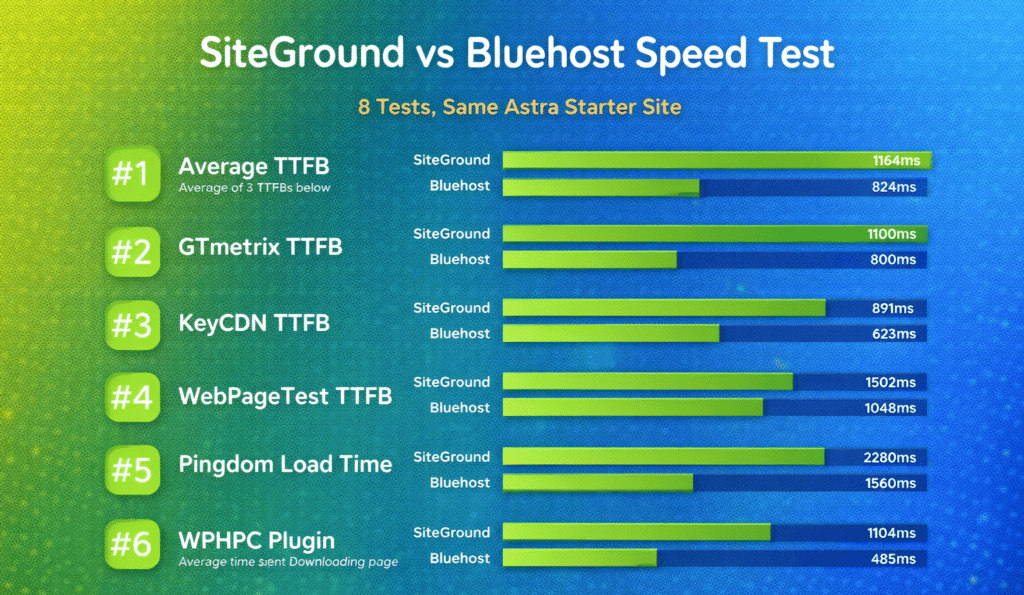
Speed and uptime are the biggest deciding factors in a SiteGround vs Bluehost decision. This section compares how both hosts perform for US traffic using the same criteria.
Uptime Comparison (2026)
Uptime shows how often a website stays online without interruptions. In 2026, both providers aim for industry-standard reliability, but their consistency differs.
SiteGround maintains uptime close to the 99.9% benchmark across shared and cloud hosting. Short maintenance windows happen, but extended outages are uncommon. This level of reliability suits blogs, business sites, and WordPress projects that need steady access.
Bluehost also delivers acceptable uptime for shared hosting and WordPress plans. However, brief dips can occur during peak load times on shared servers. For most beginner sites, this still meets expectations, but it’s less consistent than SiteGround under stress.
Summary: Both meet minimum uptime standards, but SiteGround shows slightly stronger consistency in 2026.
Speed & Load Times for US Sites
Speed affects how fast pages load for visitors. Even small delays can impact user experience and SEO.
SiteGround uses cloud-based infrastructure and advanced caching. For US visitors, page load times are usually fast and stable, especially on WordPress hosting. The platform is tuned to reduce delays before content appears.
Bluehost delivers solid speed for new and low-traffic sites. On shared hosting, performance is fine for basic blogs and business pages. As traffic grows, load times can slow unless users upgrade their hosting plan.
Summary: SiteGround generally loads pages faster and stays more stable during busy periods.
Real-World Test Results
Real-world testing shows how hosts behave outside of ideal conditions.
Sites hosted on SiteGround tend to keep steady page load time even when background tasks like updates or backups run. Shared hosting handles normal traffic smoothly, while cloud hosting manages spikes better.
Bluehost performs well for everyday use, but shared hosting has clearer limits. Sudden traffic spikes can cause temporary slowdowns, which may affect time-sensitive pages.
Summary: SiteGround performs better under load; Bluehost performs well at lighter usage levels.
CDN & Caching Tools
Both providers include tools to improve speed, but their approaches differ.
SiteGround includes a free CDN and built-in server-level caching. These tools reduce the need for extra plugins and improve performance across the US.
Bluehost offers CDN integration and basic caching, but some performance features rely more on plugins or higher-tier plans.
Summary: SiteGround’s built-in optimization gives it an edge in performance tuning.
SiteGround vs Bluehost: Features Comparison
Features decide how easy it is to build, manage, and protect a website long term. In this section, we compare the tools that SiteGround and Bluehost offer in 2026, with a focus on WordPress users in the US.
| Feature | SiteGround | Bluehost |
|---|---|---|
| Starting Price 1 Year | $3.99/mo | $4.99/mo |
| Website Migration | Free | Paid |
| Data Centers | 11 | 5 |
| Email Accounts | Unlimited number of email accounts | Limited to 5 on the basic plan |
| Subdomains | Unlimited | Limited to 25 |
| CDN | In-house, one-click setup | Third-party, extra configuration |
| Speed Optimization | Multi-level caching out of the box | Manual caching setup |
| Backups | Free | $3.99/mo extra cost |
| Backup Frequency | Daily for all | Daily only for sites under 30 GB |
| Free Website Builder | Yes | Yes |
| Client Rating on Trustpilot | 4.9/5 | 4.6/5 |
| Hosting | Get a Siteground | Get a Bluehost |
WordPress & Website Tools
Both providers support WordPress well, but the experience feels different.
SiteGround focuses heavily on performance-focused WordPress tools. It includes automatic WordPress updates, built-in caching, staging tools, and optimized server settings. These tools help WordPress sites run smoothly without needing many extra plugins.
Bluehost keeps WordPress simple and beginner-friendly. WordPress comes pre-installed, setup is quick, and basic tools are easy to access. Advanced features exist, but many are tied to higher-tier plans.
Takeaway: SiteGround offers deeper WordPress tools; Bluehost keeps things simpler.
Security Features (SSL, Backups)
Security matters more in 2026 than ever, especially for business and e-commerce sites.
SiteGround includes free SSL, daily backups, firewall protection, and proactive monitoring on most plans. These features are active by default, which reduces setup work.
Bluehost also includes free SSL and basic security tools. Backups may be limited or require add-ons depending on the hosting plan, which can surprise beginners.
Takeaway: SiteGround provides stronger built-in security across plans.
Dashboard & Ease of Use
The dashboard controls how fast users can manage their site.
SiteGround uses a custom control panel instead of cPanel. It’s clean, modern, and fast once learned, but first-time users may need a short adjustment period.
Bluehost uses a familiar dashboard that blends cPanel-style navigation with guided menus. Beginners often find it easier to navigate right away.
Takeaway: Bluehost feels easier at first; SiteGround feels more powerful over time.
Extra Tools (Email, Builder, Marketing)
Extra tools add value beyond hosting.
SiteGround includes professional email hosting, advanced email tools, and site management features suited for teams. Marketing tools are minimal, but the focus stays on performance.
Bluehost includes email, a basic website builder, and optional marketing tools like SEO and ads. These extras appeal to beginners who want everything in one place.
Takeaway: Bluehost offers more beginner extras; SiteGround focuses on core hosting quality.
Pricing & Value
Pricing is where many users feel the biggest difference between SiteGround and Bluehost. Both look affordable at first, but the long-term value depends on renewal costs and what’s actually included in each hosting plan.
Starting Prices (2026)
In 2026, both hosting providers continue to offer low introductory pricing to attract new users.
SiteGround’s starting prices are usually higher than Bluehost’s, even during promotions. However, SiteGround includes more performance and security features from day one, such as daily backup access, advanced caching, and stronger optimization.
Bluehost often advertises one of the lowest entry prices in the market. This makes Bluehost appealing to beginners who want to launch quickly with minimal upfront cost. The base plan usually includes a free domain, free SSL, and basic WordPress setup.
Key difference: Bluehost is cheaper to start; SiteGround bundles more features upfront.
Renewal Costs
Renewal pricing is where many users pause and rethink their choice.
SiteGround pricing increases significantly after the first term. This is one of the most common concerns users raise. However, the feature set stays consistent, and users don’t need to pay extra for essentials like daily backup access or caching.
Bluehost also raises prices at renewal, but the increase is often less dramatic compared to SiteGround. That said, some features-such as advanced backups or security tools-may require paid add-ons, which raises the real cost over time.
Key difference: SiteGround has higher renewals but fewer paid add-ons; Bluehost has lower renewals but more optional upgrades.
What You Get at Each Price Point
At similar price levels, SiteGround and Bluehost deliver different value.
With SiteGround, most plans focus on performance and reliability. You get strong backup coverage, built-in optimization, and a hosting environment designed for WordPress speed.
With Bluehost, plans focus on accessibility and ease of use. Beginners get guided setup, a familiar dashboard, and bundled extras like email and marketing tools.
This makes the choice less about price alone and more about priorities.
Value for Small Businesses
For small businesses in the US, value isn’t just about cost-it’s about stability.
SiteGround tends to appeal to businesses that want consistent performance, strong backup systems, and fewer technical worries. Even with higher pricing, many businesses see it as a safer long-term option.
Bluehost works well for small businesses that are just starting out, testing ideas, or running simple sites. It keeps costs lower early on and offers flexibility to upgrade later.
Bottom line:
- Choose SiteGround if uptime, backup reliability, and performance matter more than price
- Choose Bluehost if budget and simplicity matter more at the beginning
SiteGround vs Bluehost: Support & Customer Service
When hosting issues happen, support quality matters more than features or pricing. In 2026, both SiteGround and Bluehost offer multiple support channels, but the experience feels very different once you actually need help.
Support Channels (Live Chat, Phone, Tickets)
Both providers offer the core support options most US users expect.
SiteGround provides live chat, phone support, and ticket-based support. All channels are available 24/7. Tickets are mainly used for technical issues, while live chat and phone handle faster questions.
Bluehost also offers live chat and phone support. Ticket support exists but is less emphasized. Bluehost’s setup leans heavily on chat and phone for most problems.
At a surface level, both seem equal. The difference shows up in how issues are handled.
Response Times
Response speed is one of SiteGround’s strongest points.
Live chat usually connects quickly, and support agents tend to respond with direct, technical answers. Phone support is also fast, especially during US business hours.
Bluehost response times are generally acceptable, but wait times can vary. During busy periods, chat queues may take longer, and users sometimes need to explain the issue more than once.
Key difference: SiteGround is more consistent; Bluehost can be hit or miss.
Help Quality & Resources
Support quality is about more than speed.
SiteGround support agents are often praised for deep technical knowledge, especially for WordPress issues, performance tuning, and site migrations. Problems are usually solved in fewer steps.
Bluehost support is more beginner-focused. Agents are helpful with basic setup, domain issues, and WordPress installation, but advanced troubleshooting may take longer or require escalation.
Both companies offer knowledge bases and tutorials. SiteGround’s guides lean technical and detailed, while Bluehost’s content is more beginner-friendly and visual.
Overall support takeaway:
- SiteGround is better for complex issues and long-term sites
- Bluehost is better for beginners who need guided help
Pros & Cons
Every hosting provider has strengths and trade-offs. This section breaks them down plainly so you can see where each one fits best.
SiteGround Pros
Strong performance and optimization
SiteGround puts a lot of effort into speed. Built-in caching, CDN integration, and server-level optimization help pages load fast for US visitors.
Reliable backups and security
Daily backups are included and easy to restore. Security features are active by default, which reduces setup work and lowers risk.
High-quality customer support
Support agents usually understand WordPress and technical issues well. Problems tend to get solved faster, with fewer follow-ups.
Good for growing sites
SiteGround works well as a site scales. Moving from shared hosting to cloud hosting is smooth, without changing providers.
SiteGround Cons
Higher renewal pricing
Intro prices are reasonable, but renewals jump. This can feel expensive if you weren’t expecting it.
Limited storage on lower plans
Entry-level plans don’t offer unlimited storage, which may matter for image-heavy or media sites.
Custom dashboard learning curve
The control panel is powerful, but beginners may need a short adjustment period.
Bluehost Pros
Beginner-friendly setup
Bluehost makes it easy to get started. WordPress comes pre-installed, and the dashboard feels familiar.
Lower starting price
Intro pricing is among the lowest in the market, which helps new bloggers and small sites launch cheaply.
Free domain included
Most plans include a free domain for the first year, reducing upfront costs.
Wide feature access
Email hosting, basic site builder tools, and marketing add-ons are easy to find in one place.
Bluehost Cons
Inconsistent support experience
Some support sessions are helpful, others feel rushed. Complex issues may take longer to resolve.
Add-ons increase total cost
Backups, security tools, and advanced features often require extra payments.
Performance not as strong under load
For high-traffic or resource-heavy sites, Bluehost may struggle compared to SiteGround.
Best Use Cases – Which One Should You Choose?
Choosing between SiteGround and Bluehost isn’t about which host is “best” overall. It’s about which one fits your goals right now and where your site is headed.
Best for Beginners
If you’re brand new to hosting and WordPress, Bluehost usually feels easier on day one. The setup is guided, WordPress installs automatically, and the dashboard doesn’t feel overwhelming.
SiteGround can still work for beginners, but the custom control panel may take a little time to learn. Once understood, it becomes powerful-but the first steps aren’t as hand-holding.
Winner for beginners: Bluehost
Best for WordPress
Both hosts support WordPress well, but they focus on different priorities.
SiteGround is built around WordPress performance. Tools like staging, caching, and automatic updates are part of the core experience. This helps WordPress sites stay fast and stable with less manual work.
Bluehost focuses on simplicity. WordPress setup is easy, but advanced optimization features may require plugins or higher plans.
Winner for WordPress-focused users: SiteGround
Best for E-Commerce
E-commerce sites need speed, reliability, and strong backups.
SiteGround handles traffic spikes better and includes daily backups and security features by default. This matters when orders and payments are involved.
Bluehost can run e-commerce sites, but performance under heavy load isn’t as consistent, and some protections require add-ons.
Winner for e-commerce: SiteGround
Best for Speed & Performance
If speed is your top priority, SiteGround clearly pulls ahead. Server-level caching, CDN integration, and performance tuning are baked into the platform.
Bluehost performs fine for small to medium sites, but page load time can slow down as traffic grows.
Winner for speed: SiteGround
Best for Budget
For users watching every dollar, Bluehost is easier to justify early on. Lower intro pricing and a free domain help keep startup costs low.
SiteGround costs more, especially at renewal, but that higher price covers features Bluehost often charges extra for.
Winner for budget-conscious users: Bluehost
FAQs – SiteGround vs Bluehost 2026
Which one is faster?
In most tests and real-world use, SiteGround delivers faster page load time, especially for WordPress sites targeting US visitors. Bluehost performs well for small sites but can slow down as traffic grows.
Which has better uptime?
Both hosts maintain strong uptime in 2026, but SiteGround tends to be more consistent. Bluehost uptime is generally good, though short outages can happen during high-traffic periods.
Is one easier for beginners?
Yes. Bluehost is easier for beginners. The setup process is simpler, the dashboard feels familiar, and WordPress installation is more guided.
Which offers better value?
Value depends on expectations. Bluehost offers lower starting pricing and is cheaper early on. SiteGround costs more, especially at renewal, but includes performance and backup features that Bluehost often charges extra for.
Can I switch between hosts later?
Yes. Both SiteGround and Bluehost support site migration. Switching is common when sites grow or needs change.
Which is better for a new WordPress website: Bluehost or SiteGround?
For a new wordpress website, both bluehost and siteground make it easy to install wordpress with one-click wordpress installers and beginner-friendly dashboards. Bluehost is often cheaper and offers a straightforward shared hosting plan that’s easy to use for setting up your wordpress site from scratch, while SiteGround focuses on better performance, managed wordpress features, and superior support. Determining the best option depends on whether you prioritize affordability and simplicity (bluehost) or speed, daily backups, and advanced wordpress features (siteground wins for performance).
How do Bluehost and SiteGround compare on performance and uptime?
In a siteground vs bluehost performance comparison, siteground typically provides better performance thanks to its modern data center infrastructure, advanced caching, and optimized WordPress hosting stacks. Bluehost did well on basic uptime and is reliable for shared hosting services, but siteground is a better choice if you need faster response times, more consistent uptime, and improved scalability for growing wordpress sites.
Are managed WordPress plans worth it, and which provider has the best managed hosting?
Managed wordpress plans are worth it if you want automatic updates, security hardening, and specialized support for wordpress features. SiteGround’s managed hosting goes the extra mile with staging, daily backups, and WordPress-specific optimizations, while Bluehost still offers managed WordPress options that are affordable and easy to use. For premium wordpress needs, SiteGround may be more expensive than Bluehost but offers a more hands-off hosting solution.
Can I host unlimited websites with Bluehost or SiteGround?
Bluehost plans often let you host unlimited websites on higher-tier shared hosting plans, and many marketing pages say they host unlimited domains and email accounts; in practice resource limits apply. SiteGround offers scalable hosting but tends to limit the number of websites per plan more strictly-siteground doesn’t always advertise “host unlimited” on entry tiers. If you need to host unlimited sites affordably, Bluehost or other web hosting providers like DreamHost and HostGator may be better choices for that specific requirement.
What WordPress features are included with each host (staging, backups, caching)?
SiteGround comes with built-in WordPress staging, automatic daily backups, advanced caching, and developer tools that help with setting up your wordpress and performance tuning. Bluehost covers basics like one-click wordpress install, automatic updates on some plans, and simple site staging on managed plans, but SiteGround generally offers more out-of-the-box wordpress features and optimization aimed at best wordpress practices.
How do Bluehost and SiteGround compare to other web hosting providers like HostGator or DreamHost?
Compared with HostGator and DreamHost, Bluehost and SiteGround are two of the most cited wordpress hosting providers. HostGator often competes on price and straightforward shared hosting services similar to bluehost vps offerings, while DreamHost focuses on privacy and developer-friendly features. SiteGround is more focused on performance and managed hosting. Choosing among these many hosting options depends on your priorities: affordable hosting, better performance, or premium wordpress support.
Is Bluehost still recommended for WordPress beginners in 2025?
Bluehost is still a solid recommendation for WordPress beginners in 2025 because it makes installing wordpress and setting up your wordpress site from scratch very easy with one-click installers and simplified dashboards. For beginners who want the cheapest path to a working site, bluehost covers the basics well. If you later need advanced performance or managed hosting, you can migrate to providers like SiteGround that specialize in WordPress optimization.
Choose a shared hosting plan if you want the most affordable hosting solution for a small or low-traffic wordpress website and are comfortable managing updates and backups yourself. If you prefer peace of mind, automatic maintenance, and wordpress staging tools, managed hosting from SiteGround or premium wordpress plans from other hosting providers is worth the extra cost. Many hosting companies, including bluehost and siteground, offer both options so you can scale as your site grows.
Final Verdict – SiteGround or Bluehost in 2026?
This SiteGround vs Bluehost comparison shows that there is no single winner for everyone in 2026.
Bluehost is the better choice for beginners, tight budgets, and simple websites. It’s easier to start, cheaper upfront, and works well for blogs or small business sites that don’t expect heavy traffic right away.
SiteGround is the better choice for performance, reliability, and long-term growth. It’s faster, more stable under load, and includes stronger backup and security features by default. The higher renewal price makes sense if uptime and speed matter.
“Two sites with the same content can feel very different to users when one loads in under a second and the other doesn’t.”
Bottom line:
- Choose Bluehost if you want simplicity and lower upfront cost
- Choose SiteGround if you want speed, stability, and fewer technical worries as your site grows