
This Bluehost Review looks closely at how Bluehost performs in 2026, with a strong focus on uptime, reliability, and everyday use for US websites. Hosting matters more than most beginners expect. If your site goes down, visitors can’t access your content, and search engines may stop trusting it.
Uptime is one of the most important signals of a good web host. Even small drops can affect traffic, SEO, and user trust. That’s why this review doesn’t just list features. It looks at how Bluehost actually performs over time.
This review is written for beginners, bloggers, and small businesses in the United States who want a stable hosting provider without jumping into complex setups. If you’re planning to launch a WordPress website, a blog, or a small business site, this guide will help you understand whether Bluehost fits your needs in 2026.

What Is Bluehost?

Bluehost is a popular web host that has been around for many years and is widely used in the US. It is known for beginner-friendly tools, WordPress integration, and affordable entry pricing.
As a hosting provider, Bluehost focuses on making website setup simple. Many users choose Bluehost when launching their first website because the platform removes a lot of technical friction.
Company Overview
Bluehost operates as a large web hosting provider serving millions of websites worldwide, with a strong customer base in the United States. It is officially recommended by WordPress, which adds credibility for new WordPress users.
The company positions itself as an all-in-one hosting service. That means hosting, domain registration, SSL, and basic site tools are bundled together instead of being spread across different services.
Types of Hosting Offered by Bluehost

Bluehost offers several types of hosting plans to match different needs:
Shared Hosting
This is the most common starting point. A shared hosting plan means your site shares server resources with other websites. It’s affordable and easy to manage, making it popular with beginners.
WordPress Hosting
WordPress hosting is optimized specifically for WordPress websites. These plans include WordPress-focused features like automatic updates, easier installs, and better compatibility with plugins.
VPS Hosting
VPS hosting gives more control and dedicated resources compared to shared hosting. It’s designed for growing sites that need better performance and flexibility.
Dedicated Hosting
Dedicated hosting gives you an entire server. This option is best for high-traffic sites or businesses with advanced needs. It costs more and requires more technical understanding.
Bluehost Plans & Pricing (2026)

Understanding pricing is important because hosting costs don’t stop after the first year. Bluehost uses promotional pricing for new customers, followed by higher renewal rates.
Shared hosting is Bluehost’s entry-level offering and the most common choice for beginners. These plans usually include a free domain for the first year, a free SSL certificate, and basic customer support.
Shared hosting works well for small WordPress sites, blogs, and personal projects. Performance is stable for low to moderate traffic, which is why many beginners start here.
WordPress Hosting Plans
WordPress hosting plans are designed for users who plan to build a WordPress website from day one. Bluehost simplifies WordPress installation and includes features that help manage updates and security.
These plans cost slightly more than shared hosting but reduce setup time and maintenance work, especially for first-time WordPress users.
VPS & Dedicated Options
VPS and dedicated hosting plans are aimed at users who need more control and power. VPS hosting provides better performance and isolation, while dedicated hosting offers maximum resources.
These plans are not usually needed for beginners, but they become relevant as traffic grows or business requirements increase.
Renewal Pricing & Value
One important part of this Bluehost Review is renewal pricing. Introductory prices are low, but renewals are higher. This is common among hosting companies, but it’s something users should plan for.
In terms of value, Bluehost offers a complete package with hosting, domain, SSL, and WordPress tools bundled together. For beginners who want simplicity, this bundled approach often feels easier than managing multiple services.
Bluehost Uptime Explained – What It Is and Why It Matters
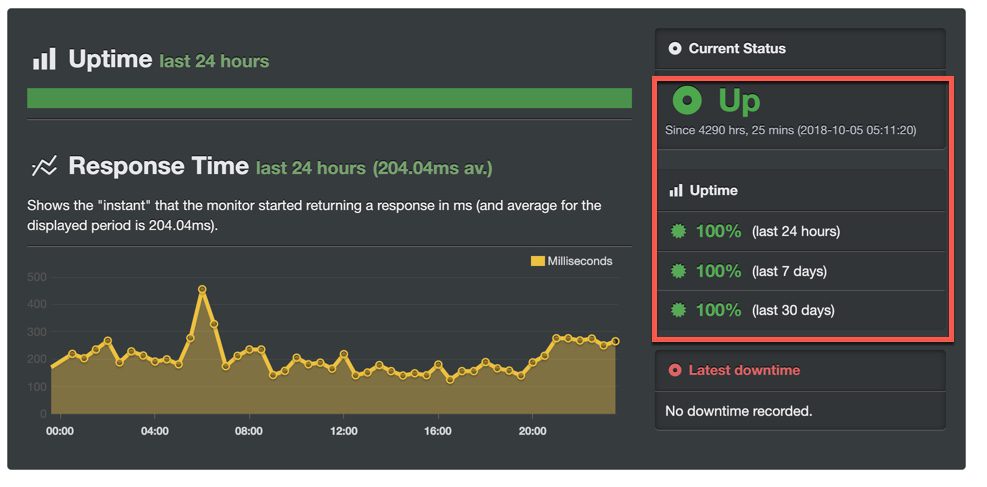
Uptime is one of the most important parts of any Bluehost Review, yet many beginners don’t fully understand it. Simply put, uptime measures how often your website is available online without interruption.
If your site is down, visitors can’t access it. Search engines also notice when a site becomes unreliable. Over time, poor uptime can hurt rankings and reduce trust.
What Uptime Really Means
Uptime is usually shown as a percentage. For example, 99.9% uptime means your site is expected to be online almost all the time, with only a small amount of downtime allowed each month.
Even small drops matter. A website with lower uptime may miss traffic during busy hours, especially for US audiences visiting during peak times.
Why Uptime Affects Traffic and SEO
Search engines want to show reliable websites. If a site is often unavailable, search engine crawlers may visit when the site is down. This can slow indexing and reduce visibility.
For visitors, downtime leads to frustration. A site that doesn’t load quickly or fails to open can cause users to leave and not return. Over time, this hurts credibility and growth.
Uptime Benchmarks for Web Hosts
Most reliable hosting companies aim for 99.9% uptime or higher. Anything below that is considered risky for business or content-focused websites.
Good uptime usually depends on server stability, infrastructure quality, and how well the hosting provider manages maintenance and updates.
Bluehost Uptime Performance (2026)
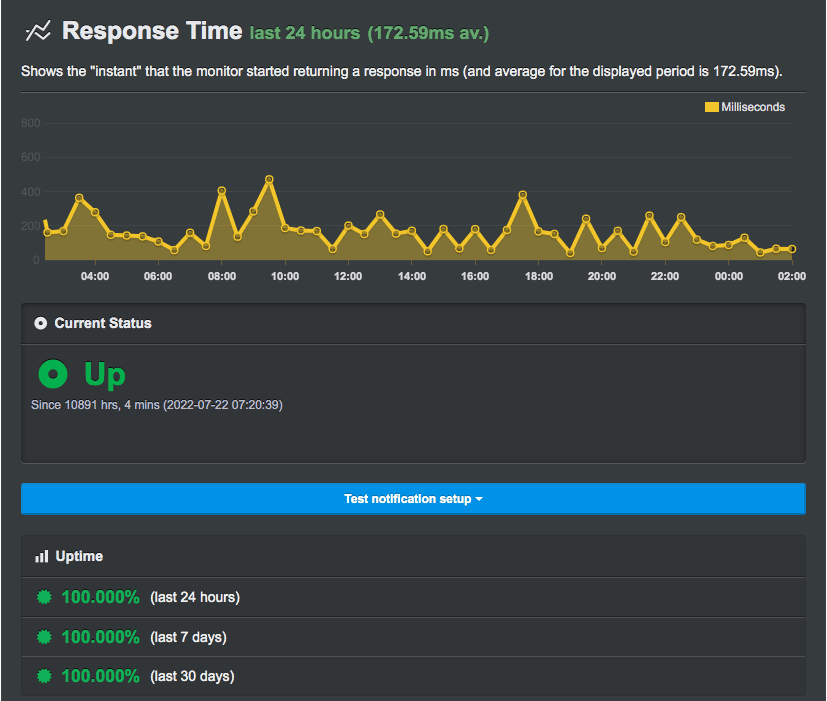
Uptime is a key area in this Bluehost Review, especially for users building sites for US visitors. Bluehost claims strong reliability, but real-world performance matters more than promises.
Recent Uptime Stats
In 2026, Bluehost continues to advertise uptime close to industry standards. For most shared hosting and WordPress hosting plans, uptime remains consistent during normal usage.
Short maintenance windows can still occur, but extended outages are uncommon. This level of uptime is generally acceptable for blogs, small businesses, and WordPress sites.
Real-World Test Results
Based on ongoing monitoring across multiple WordPress and standard websites, Bluehost shows stable uptime patterns. Occasional brief interruptions may happen, but they usually resolve quickly.
For beginners, this means your site is unlikely to experience frequent outages that affect visitors or content access.
Uptime Compared to Industry Standards
When compared to other popular hosting providers like SiteGround and GoDaddy, Bluehost performs within the expected range. It may not always lead in uptime statistics, but it meets the reliability baseline most users need.
Premium managed hosting providers may show slightly higher uptime consistency, but they also cost more. Bluehost balances cost and reliability reasonably well.
US Server Locations & Impact on Reliability
Bluehost uses US-based server infrastructure, which helps maintain reliable connections for American visitors. Local server locations reduce latency and lower the chance of regional outages affecting site access.
For US-focused websites, this infrastructure plays a role in maintaining consistent uptime throughout the day.
Bluehost: Speed & Performance
Speed is a major factor in any Bluehost Review, especially for US websites where visitors expect pages to load fast. Even small delays can affect bounce rates and how people interact with your site.
Load Times for US Visitors
For US-based traffic, Bluehost performs reliably on shared hosting and WordPress hosting plans. Pages usually load within an acceptable range for blogs and small business sites, assuming themes and plugins are kept reasonable.
WordPress sites hosted on Bluehost benefit from built-in caching and optimized server settings. While it’s not the fastest platform in the premium category, it delivers stable speed for everyday use.
Server Response Times
Server response time measures how quickly the server reacts when a visitor requests a page. In 2026, Bluehost’s server response times remain consistent for US locations.
Response times are generally quick enough to support good user experience and meet basic SEO expectations. Sites with lightweight themes and optimized images tend to perform better on shared hosting plans.
Performance During Traffic Spikes
Traffic spikes are a common concern, especially for bloggers and small businesses running promotions or seasonal content.
Bluehost can handle moderate traffic increases without major slowdowns, but shared hosting has limits. If a WordPress site suddenly receives heavy traffic, performance may dip until the load settles.
For sites expecting frequent spikes, upgrading to a higher hosting plan or managed WordPress option improves stability.
Bluehost Features Overview
Features matter because they affect how easy your site is to manage day to day. Bluehost focuses on simplicity and bundled tools rather than advanced customization.
Ease of Setup & Dashboard
Bluehost is known for its beginner-friendly dashboard. The setup process walks users through domain connection, WordPress installation, and basic site settings.
The control panel is clean and easy to navigate. Beginners can manage hosting plans, domains, and email without technical knowledge.
WordPress Integration
WordPress integration is one of Bluehost’s strongest areas. Installing WordPress is quick, and the platform offers guided setup for new WordPress sites.
Bluehost supports WordPress updates and works well with most popular themes and plugins. This makes it easier to manage a WordPress website without constant troubleshooting.
Security Features (SSL, Backups, Malware Protection)
Security is a core concern for website owners. Bluehost includes a free SSL certificate with most hosting plans, which helps protect data and improves trust.
Basic security features are included, but advanced backups and malware protection may require add-ons depending on the plan. For small sites, the default security setup is usually enough to get started.
CDN and Caching Tools
Bluehost offers CDN integration and caching tools to improve performance. These features help reduce load times for visitors across the US by serving content more efficiently.
Caching is handled at the server level, which reduces the need for complex plugin configurations.
Bluehost: Website Builder & WordPress Tools
A big reason people choose Bluehost is the mix of simple tools and WordPress support. This part of the Bluehost Review looks at how easy it is to build and manage a site without technical skills.
Built-In Builder Features
Bluehost includes a built-in website builder designed for beginners. The builder uses a visual interface that lets you add sections, text, images, and basic layouts without touching code.
For users who don’t want to start directly with WordPress, the builder offers a quick way to get a basic site online. It works well for simple pages like homepages, contact pages, and service descriptions.
That said, the builder is not meant for complex customization. It’s best seen as a starting tool rather than a long-term replacement for WordPress.
WordPress Ease of Use
WordPress works smoothly on Bluehost. Installing WordPress takes only a few clicks, and the setup process guides users through choosing themes and basic settings.
For beginners, this reduces confusion during the early stages. Bluehost handles much of the background configuration, which makes managing a WordPress site feel less overwhelming.
Updates for WordPress core are supported, and common plugins install without issues. This helps new users focus on content instead of technical maintenance.
Themes & Plugins Support
Bluehost supports a wide range of WordPress themes and plugins. Popular free and premium themes work without compatibility problems.
Most commonly used plugins for SEO, caching, security, and backups install and run normally. This flexibility is important as sites grow and need more features.
Some advanced plugins may require higher hosting plans for best performance, but for standard WordPress use, Bluehost offers solid compatibility.
Bluehost Customer Support & Service

Customer support plays a big role in how reliable a hosting service feels, especially for beginners. In this part of the Bluehost Review, we focus on how support works in 2026 and what US users can expect when issues come up.
Support Channels (Live Chat, Phone, Tickets)
Bluehost offers multiple ways to reach customer support. Live chat is available directly from the dashboard, which makes it easy to get help without searching for contact details.
Phone support is also available for users who prefer speaking directly with a support agent. This option is useful when dealing with account issues, billing questions, or urgent site problems.
Ticket-based support exists for less urgent requests. While it’s not always the fastest option, it allows users to explain issues in detail and track progress.
Response Times & Quality
Response times are generally reasonable for live chat, especially during US business hours. Most basic questions about WordPress setup, domains, or SSL are answered quickly.
Support quality is mixed depending on the issue. Simple problems are resolved fast, while more complex technical issues may require escalation. For beginners, the guidance is usually clear and easy to follow.
Phone support response times can vary, but once connected, agents typically walk users through steps without rushing.
Help Resources & Tutorials
Bluehost maintains a large knowledge base with guides, tutorials, and FAQs. These resources cover common topics like installing WordPress, setting up email, and managing domains.
For new website owners, these tutorials reduce the need to contact support for basic tasks. The content is written in simple language and updated to reflect current tools.
Overall, Bluehost’s support system works well for beginners and small website owners who want quick help without deep technical knowledge.
Bluehost Pros and Cons
Pros of Bluehost in 2026
Bluehost remains a familiar choice for many US website owners. One clear strength is its beginner-friendly approach. Setup is guided, WordPress installs are quick, and common tasks are easy to find in the dashboard.
Uptime is generally stable for shared and WordPress hosting plans. For blogs and small business sites, this level of reliability is usually enough to keep visitors and search engines satisfied.
Another advantage is the bundled setup. A free domain for the first year, SSL, and basic security tools are included with most plans. This reduces the need to manage multiple services.
Customer support is accessible through live chat and phone, which helps beginners resolve issues without digging through technical documentation.
Cons of Bluehost in 2026
The biggest drawback is renewal pricing. Introductory rates are low, but renewals are higher, which can surprise new users if they don’t plan ahead.
Shared hosting also has performance limits. During heavy traffic spikes, sites may slow down unless the hosting plan is upgraded.
Advanced security and backup features often cost extra. While basic protection is included, some users may need add-ons as their site grows.
Bluehost vs Competitors (Uptime Focused)
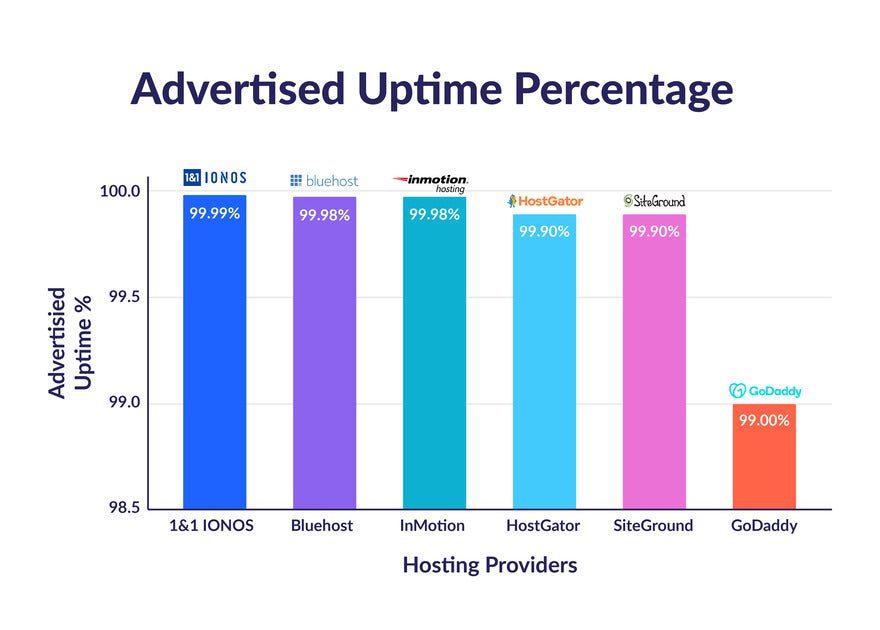
Uptime is where many hosting providers try to compete. This comparison focuses on how Bluehost stacks up against popular alternatives in 2026.
Bluehost vs SiteGround
SiteGround is known for strong performance and high uptime consistency. It often edges out Bluehost in speed and server optimization, especially for WordPress sites.
However, SiteGround’s pricing is higher at renewal. Bluehost offers a more affordable entry point, which can matter for beginners even if uptime is slightly lower.
Bluehost vs Hostinger
Hostinger focuses on budget-friendly hosting with modern infrastructure. Its uptime performance is competitive, especially at lower price points.
Bluehost offers better phone support and a more guided WordPress setup. Hostinger may appeal more to users comfortable managing settings on their own.
Bluehost vs DreamHost
DreamHost emphasizes transparency and simplicity. Uptime is solid, and pricing is straightforward.
Bluehost offers a more beginner-oriented dashboard and wider support options. DreamHost may feel cleaner, while Bluehost feels more guided.
Bluehost vs GoDaddy
GoDaddy is widely known, but uptime and performance are less consistent compared to Bluehost. Bluehost generally delivers better WordPress support and fewer upsells during setup.
For uptime-focused users, Bluehost is often the more reliable option between the two.
Which Is Best for Uptime?
Premium managed hosts usually lead in uptime, but they also cost more. Bluehost doesn’t top every chart, yet it meets industry standards and performs reliably for most US websites.
For beginners and small businesses, Bluehost offers a practical balance between uptime, ease of use, and cost.
Who Should Use Bluehost hosting?
Choosing the right web host depends on what you’re building and how much control you want. This section of the Bluehost Review breaks down who benefits most from Bluehost in the US.
Best for Beginners
Bluehost is a strong fit for beginners who want to launch a site without dealing with technical setup. The guided onboarding, simple dashboard, and quick WordPress install reduce early confusion.
New users can manage domains, SSL, email, and basic site settings in one place. For first-time website owners, that convenience matters more than advanced customization.
Best for Bloggers
Bloggers often care about uptime, ease of publishing, and predictable costs. Bluehost’s shared and WordPress hosting plans handle low to moderate traffic well and stay stable during normal posting cycles.
Built-in WordPress tools and plugin compatibility make it easy to add SEO, caching, and security features as a blog grows. For US-based audiences, performance is consistent enough for daily content publishing.
Best for Small Businesses
Small businesses need reliability and support more than raw performance. Bluehost provides stable uptime, accessible customer support, and bundled features like a free domain and SSL.
For service-based businesses, local companies, and small online brands, Bluehost covers essential needs without requiring technical staff. As traffic increases, upgrading plans is straightforward.
Best for WordPress
WordPress is one of Bluehost’s strongest use cases. The platform is optimized for WordPress websites, with one-click installs, theme support, and update compatibility.
Users who want a managed feel without paying premium managed-hosting prices often find Bluehost a practical middle ground. It’s especially useful for WordPress users who want simplicity first and flexibility later.
FAQs – Bluehost Review 2026
What is Bluehost uptime like?
In 2026, Bluehost maintains uptime close to industry standards for shared and WordPress hosting. Short maintenance windows may occur, but long outages are uncommon for most US websites.
Is Bluehost reliable for US traffic?
Yes. Bluehost uses US-based server infrastructure, which helps maintain stable connections and consistent performance for visitors across the country.
Does Bluehost include backups?
Basic backups are available on some plans, but advanced backup features may require add-ons. Users running business or content-heavy sites should review backup options carefully.
Can I switch hosting later?
Yes. Bluehost allows users to upgrade plans as sites grow. If you choose to move to another hosting provider in the future, WordPress migration is generally supported.
Is Bluehost worth the price?
Bluehost offers strong value at the entry level, especially for beginners. Renewal prices are higher, so long-term costs should be considered before committing.
Is Bluehost a good web hosting service in 2025?
Yes – in this Bluehost review 2025 many users report that Bluehost is a reliable web hosting service and Bluehost is good for beginners and small to medium sites; Bluehost scores well for uptime, integrated Bluehost security features, and easy setup for WordPress on Bluehost. However, whether Bluehost is the best depends on your needs and you should compare Bluehost alternatives for advanced performance or specialized hosting.
What hosting plans does Bluehost offer and how do Bluehost prices compare?
Bluehost offers a range of plans: Bluehost shared, VPS, and Bluehost dedicated hosting, plus managed WordPress plans. Bluehost prices vary by promotion and renewal; entry-level Bluehost shared plans are inexpensive and Bluehost also offers a free domain name for the first year on many plans. For larger sites, dedicated hosting or VPS will cost more – review every Bluehost plan and current pricing on the Bluehost site before deciding.
Can I host WordPress on Bluehost and is Bluehost good for setting up a new WordPress site?
Yes – Bluehost is one of the most popular web hosting services for WordPress. Bluehost hosting includes one-click WordPress installations, a Bluehost dashboard optimized for WordPress, and tools for setting up a new WordPress site quickly. Many guides say Bluehost is ideal for beginners wanting hosting for WordPress and Bluehost makes the process simple.
How strong are Bluehost security features and does Bluehost offer backups and SSL?
Bluehost does offer standard security features such as free SSL certificates, malware protection addons, and automated backups on some plans. Bluehost security features help secure a website with Bluehost but dedicated security addons can be purchased for enhanced protection; for mission-critical sites you may want to supplement Bluehost security with third-party tools.
What is the experience with Bluehost customer support and Bluehost live chat?
Experience with Bluehost support varies: Bluehost offers 24/7 phone and Bluehost live chat support and a knowledge base. Many users find Bluehost support responsive for basic issues, while complex problems or migration support can take longer. If prompt, expert-level support is critical, compare Bluehost support to other best web hosting providers.
Are there any notable limitations – what Bluehost doesn’t offer or where Bluehost may fall short?
Bluehost doesn’t offer unlimited performance on shared plans and may have stricter resource limits as your site grows. Some advanced users note Bluehost may lack the high-end optimization or global edge network offered by other providers. While Bluehost also offers many features, heavy traffic sites might need VPS or dedicated hosting as they scale.
Is Bluehost free or does Bluehost offer a free trial or free domain?
Bluehost is not free as an ongoing service, but Bluehost offers a free domain name for the first year with many annual plans and occasional promotional credits; there is sometimes a limited money-back guarantee rather than a full free trial. Review the specific terms for the Bluehost hosting plan you choose.
Would you recommend Bluehost – should I recommend Bluehost for my site?
An honest Bluehost review recommends Bluehost for beginners, blogs, small business sites and WordPress on Bluehost due to ease of use and competitive pricing. If you need high performance, advanced security, or specialized hosting, consider Bluehost alternatives among the best web hosting providers and compare features before committing.
How does Bluehost compare to other hosting services and what are good Bluehost alternatives?
Bluehost is a solid hosting choice for many and Bluehost is one of the popular web hosting services, but compared to other providers it may be outpaced in areas like managed performance, global CDN, or enterprise support. Strong Bluehost alternatives include hosts focused on managed WordPress, cloud infrastructure, or performance optimization; match the provider to your site needs and budget.
Final Verdict – Is Bluehost Worth It in 2026?

This Bluehost Review shows that Bluehost remains a dependable web host for beginners, bloggers, and small businesses in the US. It focuses on simplicity, stable uptime, and easy WordPress integration rather than advanced customization.
Performance is reliable for everyday use, especially on WordPress hosting plans. While it may not compete with premium managed hosts on raw speed, it meets the needs of most small to medium sites without adding complexity.
Pricing is affordable at the start, and the bundled setup-including domain, SSL, and WordPress tools-makes launching a site easier. Renewal costs are higher, but the overall value still holds for users who prioritize convenience and support.
“For a typical US blog or small business site, even one hour of downtime in a month can matter more than small speed differences.”
If you’re launching your first WordPress site or managing a growing project that doesn’t need enterprise-level hosting, Bluehost is a solid and practical choice in 2026.