
Are your emails vanishing into the spam folder? A thriving email list is a powerful asset for any content creator, but it’s worthless if your messages never reach their intended audience. Many creators pour hours into crafting compelling newsletters and promotions, only to see their efforts disappear into the digital void.
This email deliverability guide offers a complete, step-by-step framework to understand, diagnose, and significantly improve your inbox placement. We’ll cut through the noise and provide actionable strategies, covering everything from technical setup and content best practices to list hygiene and long-term monitoring. The goal isn’t just to send emails; it’s to ensure they land where they belong, connecting you directly with your subscribers.
What Is Email Deliverability and Why Does It Matter for Creators?
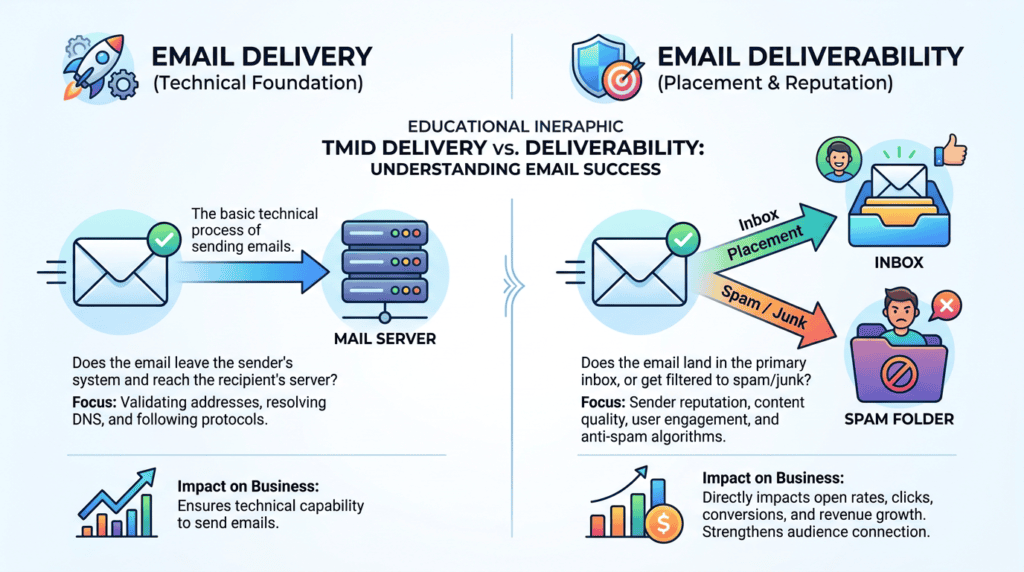
It’s easy to confuse email delivery with email deliverability, but the distinction is critical. Email delivery simply means your email server successfully handed off a message to the recipient’s server. It’s like mailing a letter and the post office confirming they received it. Email deliverability, however, means that letter actually made it into the recipient’s mailbox, not their junk pile. For content creators, this difference dictates whether your audience sees your work or if it gets filtered away before it even has a chance.
The real-world impact of poor email deliverability hits hard where it hurts most: your bottom line and audience connection. When your emails consistently land in the spam folder, your open rates plummet. This naturally leads to lower click-through rates on your links, fewer sales of your digital products, and reduced engagement with your content. Over time, this erodes trust and makes it harder to build a loyal community. I once worked with a client whose new product launch email campaign saw abysmal results, only to discover their emails were consistently hitting spam folders due to a misconfigured sender domain. Fixing that single issue boosted their next launch’s revenue by 30% almost overnight.
Several key factors influence whether your emails make it to the inbox or get flagged as spam. These generally fall into three pillars: your sender reputation, technical authentication, and audience engagement. Your sender reputation is like a credit score for your email address and domain, built on consistent good sending habits. Technical authentication involves specific records (like SPF, DKIM, and DMARC) that prove you are who you say you are. Finally, how your subscribers interact with your emails – opening, clicking, replying – tells mailbox providers that your content is valued.
> Ignoring your email deliverability is like shouting into a void; your message might be brilliant, but no one will hear it.
Many common misconceptions about the spam folder can lead creators astray. It’s not just about avoiding certain “spammy” words like “free” or “guarantee” anymore. While those can sometimes be triggers, modern spam filters are far more sophisticated. They analyze your sender’s history, your domain’s health, your IP address reputation, and how engaged your subscribers are. A perfectly legitimate email from a sender with a poor reputation is far more likely to end up in spam than a slightly salesy email from a trusted sender.
The Technical Foundation: Essential Authentication Protocols (SPF, DKIM, DMARC)
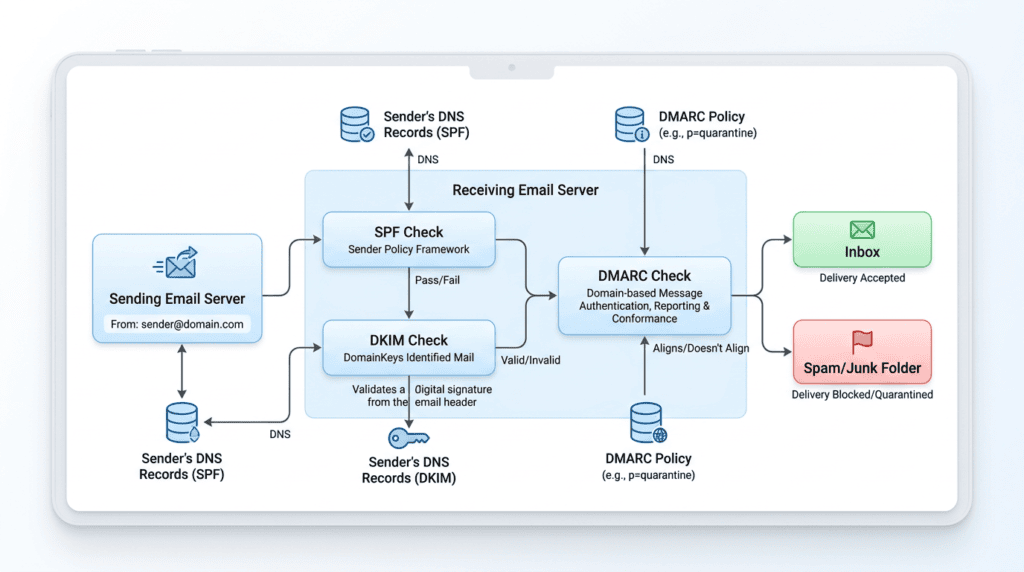
Getting your emails into the inbox isn’t just about what you say; it’s also about proving who you are. This is where technical authentication comes in. These protocols act like digital passports and signatures, telling inbox providers like Gmail, Outlook, and Yahoo that your email is legitimate and hasn’t been tampered with. Without them, even the most valuable email content can easily be flagged as suspicious, leading to poor email deliverability. It’s the absolute baseline for any serious sender.
Why Technical Authentication Is Non-Negotiable
Think of email authentication protocols as your sender’s ID. When an email server receives a message, it doesn’t just look at the “From” address; it performs a series of checks to verify the sender’s identity and the message’s integrity. These checks are crucial for combating spam and phishing. If your domain isn’t properly authenticated, mailbox providers have no reliable way to confirm that you’re authorized to send email from that domain. This immediately raises red flags, often resulting in your emails being sent straight to the spam folder or even rejected outright. For content creators, this means lost opportunities to connect with subscribers and monetize their efforts. Proper authentication is the first line of defense against being labeled a spammer.
SPF (Sender Policy Framework) Explained
SPF, or Sender Policy Framework, is a DNS record that specifies which mail servers are authorized to send email on behalf of your domain. Essentially, it’s a public list of approved senders. When a receiving server gets an email from your domain, it checks your domain’s SPF record. If the sending IP address isn’t on that list, the email might be flagged. Setting up your SPF record correctly tells the world, “These are the only servers allowed to send email from my domain.” This helps prevent spammers from forging your sender identity.
DKIM (DomainKeys Identified Mail) Explained
DKIM adds another layer of security by attaching a digital signature to your outgoing emails. This signature is generated using a private key on your sending server and can be verified by the receiving server using a public key published in your domain’s DNS records. The primary purpose of DKIM is to ensure the email hasn’t been altered in transit. If the signature doesn’t match, it indicates the email’s content or headers might have been tampered with after it left your server. This verification process is vital for maintaining the integrity of your email marketing campaigns.
DMARC (Domain-based Message Authentication, Reporting & Conformance) Explained
DMARC builds upon SPF and DKIM, providing a policy framework for email authentication. It tells receiving servers what to do with emails that fail SPF or DKIM checks. You can instruct them to:
- Monitor: Simply report on failures without taking action.
- Quarantine: Send failed emails to the recipient’s spam folder.
- Reject: Block failed emails entirely.
DMARC also provides valuable reporting, giving you insights into who is sending email from your domain and whether those emails are passing authentication checks. This feedback loop is incredibly useful for identifying unauthorized sending or misconfigurations. I remember when I first implemented DMARC for a client; the reports showed us several old, forgotten systems trying to send email from their domain, which we quickly shut down. It was an eye-opener for their overall email security.
How to Check if Your Domain Is Properly Authenticated
Verifying your authentication setup is straightforward and critical. Many free online tools can help you check your SPF, DKIM, and DMARC records.
> Critical Warning: Incorrectly configured DNS records for SPF, DKIM, or DMARC can severely damage your email deliverability, potentially causing all your emails to be rejected. Always double-check your entries.
Here’s how you can check:
- MXToolbox: Their SuperTool allows you to check SPF, DKIM, and DMARC records by simply entering your domain name. It provides clear results on whether records exist and if they’re valid.
- DMARC Analyzer: Tools specifically designed for DMARC will not only show your record but also help you interpret the reports generated by your DMARC policy. This is essential for understanding your domain’s email traffic and potential issues.
- Your Email Service Provider (ESP): Most reputable ESPs offer built-in tools or guides to help you configure these records and often provide a status check within their platform.
Regularly checking these settings, especially after any changes to your DNS or ESP, ensures your email authentication protocols remain robust and your email deliverability guide stays effective.
Building and Protecting Your Sender Reputation
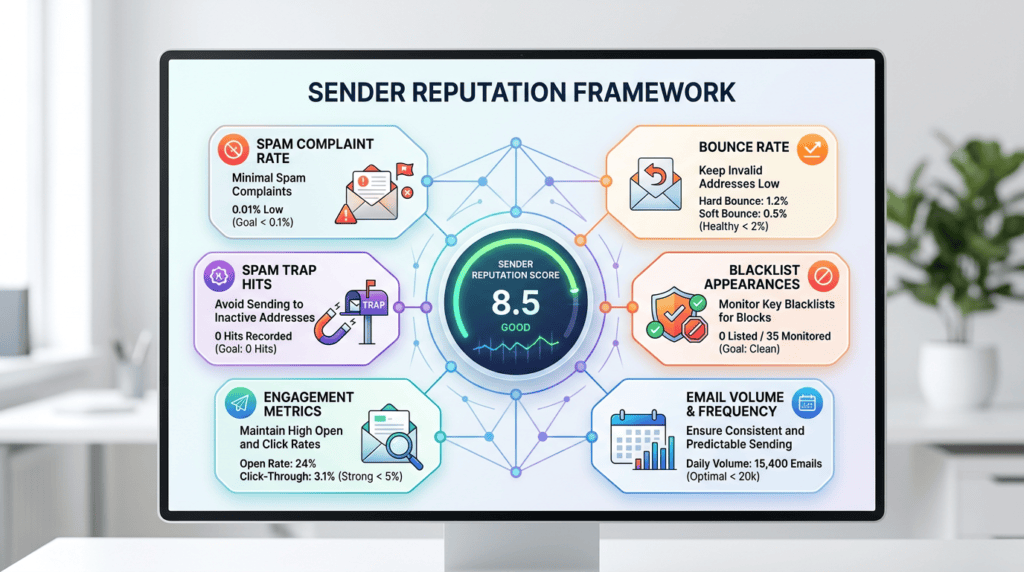
Your sender reputation is arguably the most critical factor determining whether your emails reach the inbox or the spam folder. It’s like a credit score for your email sending activities, constantly being evaluated by Internet Service Providers (ISPs) and mailbox providers. A strong reputation means your emails are trusted; a poor one means they’re viewed with suspicion.
What Is Sender Reputation and How Is It Scored?
Sender reputation is a complex score assigned to your sending IP address and, more importantly, your domain. ISPs track various metrics to build this score, including:
- Spam complaint rate: How many recipients mark your emails as spam.
- Bounce rate: The percentage of emails that couldn’t be delivered.
- Engagement metrics: Open rates, click-through rates, and how often recipients move your emails from spam to the inbox.
- Spam trap hits: Sending to addresses specifically designed to catch spammers.
- Blacklist appearances: If your IP or domain ends up on a public blacklist.
Each ISP has its own proprietary algorithms for calculating this score, but they all aim to identify legitimate senders from malicious ones. A consistently good score ensures your emails bypass filters and land in the primary inbox.
The Critical Role of Your Sending Domain
While IP reputation matters, your domain’s reputation is increasingly paramount. Using a custom domain, such as `you@yourbrand.com`, is non-negotiable for serious content creators. Sending from a free email address like `@gmail.com` or `@outlook.com` is a huge red flag for ISPs because these domains are not designed for bulk sending and lack the necessary authentication controls.
When you send from your own domain, you establish a unique identity that ISPs can track and trust over time. Your custom domain is your brand’s digital identity in the inbox. It allows you to implement SPF, DKIM, and DMARC, which are impossible with free email accounts. This commitment to a professional sending domain signals to ISPs that you’re a legitimate sender invested in your email deliverability.
IP Warming: A Crucial Step for New Senders
If you’re a new sender or have recently switched ESPs and are using a new dedicated IP address, you can’t just start sending thousands of emails overnight. This sudden surge in volume from an unknown IP will immediately trigger spam filters. IP warming is the process of gradually increasing your email sending volume over several days or weeks to build a positive reputation with ISPs.
Here’s a practical guide to warming up an IP:
- Start Small: Begin by sending to your most engaged subscribers.
- Gradual Increase: Slowly increase the volume each day, following a structured schedule provided by your ESP or a general guideline. For example, you might send 100 emails on day 1, 200 on day 2, 400 on day 3, and so on, carefully monitoring your bounce and complaint rates.
- Monitor Closely: Pay close attention to your metrics. If you see spikes in bounces or complaints, slow down your sending.
- Consistency: Send regularly, but not excessively. Consistent, moderate sending is better than sporadic, large blasts.
I’ve seen clients skip this step, only to find their first major campaign land entirely in spam folders. It’s a frustrating setback that’s easily avoidable with a bit of patience and strategic planning.
Avoiding Spam Traps: The Silent List Killers
Spam traps are email addresses specifically designed to identify spammers. They come in two main forms:
- Pristine Spam Traps: These are addresses that have never been valid and were created solely to catch senders who scrape emails or use purchased lists.
- Recycled Spam Traps (Honey Pots): These were once valid email addresses that have become inactive for a long time. ISPs convert them into spam traps to catch senders who don’t regularly clean their email list.
Hitting a spam trap, especially a pristine one, is a severe blow to your sender reputation. It tells ISPs that you’re either using shady list-building tactics or have extremely poor list hygiene. The best way to avoid them is to use double opt-in for all new subscribers and regularly clean your list of inactive addresses.
How to Monitor Your Sender Score
Monitoring your sender score and overall reputation is an ongoing task. Several tools can help you keep an eye on your standing:
- Sender Score by Validity: This free tool provides a score from 0 to 100 for your IP address, indicating its reputation. It aggregates data from various mailbox providers.
- Google Postmaster Tools: If you send a significant volume of email to Gmail users, this tool is invaluable. It provides detailed dashboards on your domain’s reputation, spam rate, IP reputation, and DMARC authentication status.
- Microsoft SNDS (Smart Network Data Services): Similar to Google Postmaster Tools, SNDS offers insights into your sending reputation with Outlook.com and other Microsoft properties.
Regularly checking these tools allows you to catch potential issues early and take corrective action before your email deliverability suffers significantly.
List Hygiene and Audience Management: The Engagement Factor
Beyond technical setup and sender reputation, the quality of your email list and how you manage your audience play a massive role in email deliverability. ISPs prioritize sending emails to recipients who actually want them, and engagement is their primary signal.
Why a Clean List Is More Valuable Than a Large One
Many content creators chase large subscriber numbers, but a massive list filled with unengaged or invalid email addresses is a liability, not an asset. ISPs monitor how recipients interact with your emails. If a significant portion of your list consistently ignores your messages, deletes them without opening, or marks them as spam, it signals to the ISP that your emails aren’t relevant or wanted. This negatively impacts your sender reputation and, consequently, your email deliverability for *all* your subscribers. A smaller, highly engaged list will always outperform a large, dormant one in terms of inbox placement and overall campaign success. Focus on quality over quantity.
The Importance of Confirmed Opt-In (Double Opt-In)
Confirmed opt-in, often called double opt-in, is a process where after a user signs up for your email list, they receive a confirmation email asking them to click a link to verify their subscription. This extra step might seem like a barrier, but it’s incredibly beneficial for your email deliverability:
- Validates Subscribers: It ensures the email address is real and active, reducing bounce rates.
- Protects Against Bots and Typos: It prevents fake sign-ups and accidental typos from polluting your list.
- Proves Intent: Subscribers who go through this extra step are genuinely interested in your content, leading to higher engagement.
- Legal Compliance: It provides clear proof of consent, which is crucial for privacy regulations like GDPR.
While single opt-in is quicker, double opt-in is a best practice that pays dividends in long-term list health and inbox placement.
How to Safely Clean Your Email List
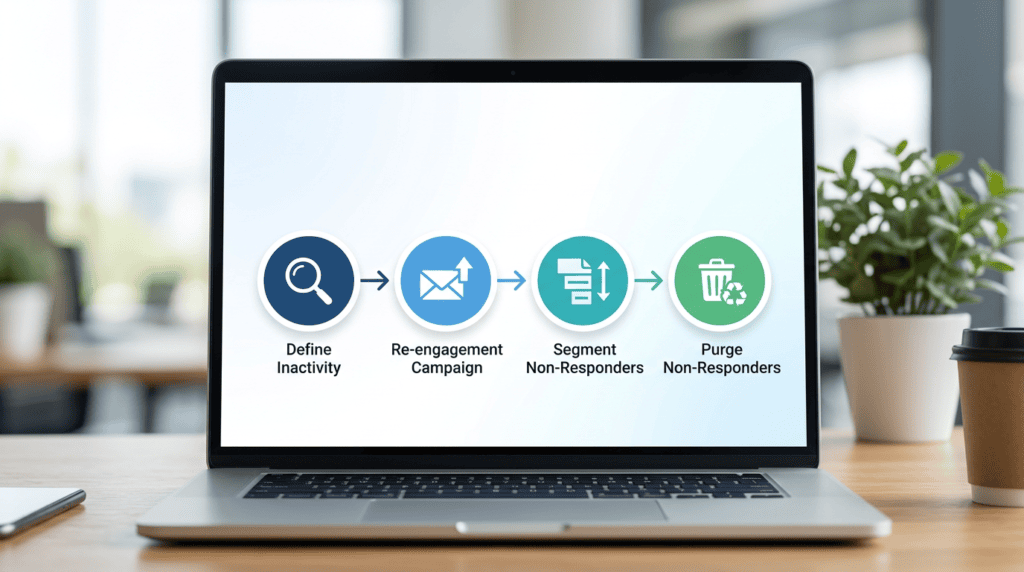
Regular email list hygiene is not a one-time task; it’s an ongoing process. Neglecting it can lead to higher bounce rates, more spam complaints, and a damaged sender reputation. Here’s a step-by-step process for identifying and removing inactive subscribers:
- Define Inactivity: Decide what “inactive” means for your audience. Is it someone who hasn’t opened or clicked an email in 90, 120, or 180 days?
- Create a Re-engagement Campaign: Before removing anyone, send a series of emails specifically designed to re-engage these dormant subscribers. Offer exclusive content, ask for feedback, or remind them of your value.
- Segment Non-Responders: After the re-engagement campaign, identify those who still haven’t opened or clicked.
- Purge Non-Responders: Remove these subscribers from your active list. You might keep them in a separate, inactive segment for historical data, but stop sending them regular campaigns.
- Use Email Validation Tools: Periodically run your list through an email validation service. These tools can identify invalid, disposable, or spam trap email addresses before you even send to them, significantly improving your email deliverability.
> Tactical Takeaway: Don’t be afraid to remove inactive subscribers. You’re not losing potential customers; you’re improving your chances of reaching the ones who truly care.
Segmentation Strategies That Boost Engagement
Sending generic emails to your entire list is a recipe for low engagement. Segmentation involves dividing your email list into smaller groups based on shared characteristics or behaviors. This allows you to send more targeted, relevant content, which naturally boosts engagement metrics like open and click rates.
Common segmentation strategies include:
- Demographics: Location, age, gender (if relevant).
- Interests: Based on what content they’ve consumed or products they’ve shown interest in.
- Purchase History: For e-commerce, segmenting by past purchases allows for personalized recommendations.
- Engagement Level: Active vs. moderately engaged vs. inactive.
- Lead Magnet Downloaded: Tailoring follow-up content based on their initial entry point.
When I started segmenting my own audience by the specific niche topics they showed interest in, I saw a noticeable jump in my average open rates. It’s about delivering the right message to the right person at the right time.
Managing Bounces: Hard vs. Soft Bounces
Bounces occur when an email cannot be delivered to the recipient’s inbox. Understanding the difference between hard and soft bounces is crucial for maintaining a clean email list:
- Hard Bounces: These are permanent delivery failures. They typically occur because the email address is invalid, non-existent, or blocked. Your ESP should automatically remove hard-bounced addresses from your list immediately. Continuing to send to hard-bounced addresses severely damages your sender reputation.
- Soft Bounces: These are temporary delivery failures. Reasons include a full inbox, a server being down, or the message being too large. Your ESP will usually attempt to re-send soft-bounced emails a few times. If an email consistently soft bounces over a period, it should eventually be treated like a hard bounce and removed from your active list.
Regularly monitoring your bounce rate and ensuring your ESP handles hard bounces correctly is a fundamental part of good email list hygiene.
Content and Sending Practices That Keep You Out of Spam
Even with perfect technical setup and a clean list, your email content and how you send it can still trigger spam filters. This section focuses on the practical aspects of crafting emails that land in the inbox, not the spam folder. It’s about understanding what mailbox providers look for and how to signal trustworthiness through your content.
Designing Emails for the Inbox, Not the Spam Filter
The core principle here is to provide value. Spam filters are designed to catch unsolicited, low-value, or deceptive emails. When you focus on delivering genuinely helpful content, you naturally avoid many common spam triggers. This means avoiding overly promotional language, excessive exclamation points, all caps, or phrases commonly associated with scams (e.g., “make money fast,” “free gift”). Your email marketing campaigns should feel like a conversation, not a sales pitch.
Subject Line Best Practices (Beyond Avoiding “Spammy” Words)
Your subject line is the first impression, and it heavily influences whether your email gets opened or marked as spam. Beyond avoiding obvious “spammy” words, focus on clarity, personalization, and setting accurate expectations.
- Be Clear and Concise: Tell subscribers exactly what’s inside.
- Personalize When Possible: Using a subscriber’s name can boost engagement.
- Avoid Deceptive Tactics: Don’t use “Re:” or “Fwd:” unless it’s genuinely a reply or forward. This tricks people into opening, but often leads to spam complaints.
- Test Emojis Sparingly: While they can increase open rates, overuse or irrelevant emojis can sometimes trigger filters.
The Dangers of Misleading “From” Names
Your “From” name should be consistent and instantly recognizable. It builds trust and helps subscribers quickly identify your email. Using a generic name, changing it frequently, or trying to impersonate another sender can confuse recipients and lead to emails being ignored or, worse, marked as spam. Stick to your brand name or your personal name if you’re a solo creator.
Image-to-Text Ratio: What’s the Real Story?
There’s a common myth that a specific image-to-text ratio is a hard rule for email deliverability. The truth is more nuanced. While emails that are *entirely* images with no visible text can be flagged (because filters can’t read the content), a healthy balance is fine. Many modern email marketing campaigns use images effectively. The real danger comes when you try to hide spammy text *within* an image, or when your email is so image-heavy that it loads slowly or looks broken on some devices. Prioritize readable text over excessive imagery to ensure your message is accessible and understood by both humans and spam filters.
Link Hygiene: Using Reputable URLs and Link Shorteners Wisely
Every link in your email is scrutinized. Using untrustworthy or suspicious links can significantly harm your sender reputation.
- Use Reputable Domains: Ensure all links point to your own verified domain or well-known, trusted sites.
- Avoid Excessive Links: Too many links can look suspicious.
- Be Cautious with Link Shorteners: While convenient, some free link shorteners are often abused by spammers, leading to their domains being blacklisted. If you must use one, opt for a custom branded shortener or a reputable service.
- Check for Broken Links: Broken links signal a lack of care and can negatively impact user experience.
Making Unsubscribing Easy and Obvious
This might seem counterintuitive, but making it easy for subscribers to leave your list is crucial for good email deliverability. A hidden or difficult-to-find unsubscribe link frustrates users, and frustrated users are far more likely to hit the “report spam” button. A spam complaint is significantly more damaging to your sender reputation than an unsubscribe. Always include a clear, one-click unsubscribe link in the footer of every email.
I’ve personally seen clients dramatically improve their inbox placement rate just by making their unsubscribe process transparent and easy, even if it meant a slight increase in unsubscribes initially. It’s better to have a smaller, engaged list than a large list full of people who want out but can’t find the exit.
> Tactical Takeaway: Always prioritize making your unsubscribe link clear and easy to find. A single spam complaint carries far more negative weight for your sender reputation than multiple unsubscribes.
How to Diagnose and Fix a Deliverability Problem
Even with the best practices in place, email deliverability issues can arise. When you notice a sudden drop in open rates, an increase in bounce rates, or hear from subscribers that your emails are landing in their spam folder, it’s time to put on your detective hat. Here’s a systematic approach to diagnosing and fixing common problems.
Step 1: Run a Technical Audit
Start with the foundation. Re-check your email authentication protocols: SPF, DKIM, and DMARC records. Misconfigurations or recent changes to your DNS records can easily break these. Use tools like MXToolbox or your ESP’s built-in checkers to ensure everything is correctly set up for your sending domain. Even a small typo can cause major email deliverability issues.
Step 2: Analyze Your Sending Reports
Your email service provider (ESP) provides valuable data. Dive into your recent campaign reports and look for anomalies:
- Sudden Drop in Open Rates: This is often the first sign of an inbox placement problem.
- Spikes in Bounce Rates: Differentiate between hard bounces (permanent failure) and soft bounces (temporary issues). A high hard bounce rate indicates a need for email list hygiene.
- Increase in Spam Complaints: Even a small uptick here is a red flag. Most ESPs will show you the complaint rate.
- Click-Through Rate (CTR) Changes: If opens are stable but clicks drop, it might indicate content issues, but if opens drop, CTR will follow.
Step 3: Use Google Postmaster Tools for Gmail Insights
If a significant portion of your audience uses Gmail, Google Postmaster Tools is an invaluable, free resource. It provides data on your IP and domain reputation, spam rate, and authentication status specifically for Gmail users. This can give you insights into how Google views your sending practices and help pinpoint specific email deliverability issues.
Step 4: Perform an Email “Seed Test”
A seed test sends your email to a collection of “seed” email addresses across various internet service providers (ISPs) and mailbox providers (like Gmail, Outlook, Yahoo). Tools like GlockApps or Mail-Tester.com then report exactly where your email landed: inbox, promotions tab, spam folder, or if it was blocked entirely. This gives you a real-world snapshot of your inbox placement rate and can help identify specific spam filter triggers in your content or sending patterns. From my experience, ignoring these early warning signs almost always leads to a full-blown deliverability crisis.
Step 5: Check if You’re on a Blocklist (and How to Get Removed)
Blocklists (also known as blacklists) are databases of IP addresses or domains known to send spam. If your sending IP or domain ends up on one, your emails will likely be rejected by many providers.
- Check Tools: Use services like the MXToolbox blocklist check to see if you’re listed.
- Identify the Cause: If listed, investigate why. Was it a sudden spike in spam complaints? A compromised account? Poor email list hygiene?
- Request Delisting: Most blocklists have a process for requesting removal. You’ll typically need to demonstrate that you’ve addressed the underlying issue and committed to better practices. This can take time and effort.
> Critical Warning: Never ignore a sudden drop in email performance metrics. Proactive diagnosis using these steps can prevent minor deliverability issues from escalating into a full-blown crisis that severely impacts your ability to reach your subscribers.
Long-Term Deliverability: A Maintenance Checklist for Creators
Maintaining excellent email deliverability isn’t a one-time fix; it’s an ongoing process. Consistent monitoring and adherence to best practices are essential to ensure your email marketing campaigns continue to reach your active email subscribers. Here’s a practical maintenance checklist for content creators.
Weekly Tasks
- Monitor Campaign Performance: Review the open rates, click-through rates, bounce rates, and spam complaint rates for your most recent email sends. Look for any unusual spikes or dips.
- Check for Unusual Spikes: Pay close attention to unsubscribes or complaints. A sudden increase could indicate a content issue, a segment mismatch, or a broader deliverability problem.
- Review Engagement Metrics: Note which types of content or subject lines are performing best. This feedback helps you refine your content strategy.
Monthly Tasks
- Review Engagement on Key Segments: Analyze the engagement levels of different subscriber segments. Are certain groups becoming inactive? This can inform re-engagement efforts.
- Run a Seed Test: Use a tool like GlockApps or Mail-Tester.com to spot-check your inbox placement across various providers. This helps you catch potential spam folder delivery issues before they become widespread.
- Check Sender Score/Reputation Tools: Briefly review your sender score using tools like Google Postmaster Tools (for Gmail) or Sender Score by Validity to keep an eye on your overall sender domain reputation.
Quarterly Tasks
- Run a List-Cleaning or Re-engagement Campaign: For subscribers who haven’t opened or clicked an email in 90 days, consider a targeted re-engagement campaign. Those who still don’t respond should be removed from your active list to improve your email list hygiene and overall deliverability.
- Review Email Authentication: Double-check your SPF, DKIM, and DMARC records. Ensure no accidental changes have occurred and that they are still correctly configured for your sending domain.
- Analyze Bounce Reports: Look for patterns in hard bounces. If you’re seeing a lot of bounces from specific domains, it might indicate an issue with your data collection or a particular email validation tool.
Annual Tasks
- Review Your Overall List Growth Strategy: Assess how you’re acquiring new subscribers. Are your opt-in methods still high-quality? Are you using a double opt-in process? This ensures you’re building a clean email list from the start.
- Audit Your Email Content Strategy: Review your most successful and least successful email content. Are there any recurring themes that might be triggering spam filters or leading to low engagement?
- Evaluate Your ESP: Consider if your current email service provider still meets your needs for email deliverability, features, and support. As your list grows, your requirements might change. I make it a point to review my own email marketing strategy and tools every year, especially looking at how my audience’s engagement patterns might have shifted. This proactive approach helps me stay ahead of potential deliverability issues.
> Key Insight: Consistent, scheduled maintenance is the most effective way to protect your email deliverability. Think of it like changing the oil in your car; small, regular efforts prevent major breakdowns.
Final Recommendation: The Golden Rule of Email Deliverability

We’ve covered a lot in this email deliverability guide, from the critical technical setup of SPF, DKIM, and DMARC to the ongoing work of building a strong sender reputation and fostering genuine audience engagement. These pillars are non-negotiable for anyone serious about email marketing campaigns. But beyond the technicalities and metrics, there’s a fundamental principle that underpins every successful email strategy.
The ultimate principle for consistent inbox placement is simple: send valuable content that people genuinely want to receive. This means focusing on your subscribers, understanding their needs, and consistently delivering emails that educate, entertain, or solve a problem. When your email list is filled with active email subscribers who look forward to your messages, your engagement metrics naturally improve, signaling to mailbox providers that your email is desired, not spam. Ignoring this golden rule means your email marketing efforts will constantly battle spam filters, leading to low opens, high spam complaint rates, and ultimately, a wasted opportunity to connect with your audience.
> Prioritize your audience’s value above all else, and your deliverability will follow.
For content creators, this isn’t just about avoiding the spam folder; it’s about building a sustainable, trusting relationship. If you’re a creator who relies on email to communicate, sell, or build community, neglecting this aspect means you’re leaving money on the table and actively eroding your connection with your most loyal followers. The cost of inaction here is direct: fewer eyes on your content, fewer sales, and a diminished brand presence. I’ve seen firsthand how a commitment to delivering consistent value transforms an email list from a mere contact database into a powerful, engaged community.
Frequently Asked Questions (FAQs)
How long does it take to fix a bad sender reputation?
It can take anywhere from a few weeks to several months to fix a bad sender reputation, depending on the severity of the issues and how consistently you implement best practices like email list hygiene and proper authentication. ISPs monitor your sending behavior over time, so consistent positive engagement is key to rebuilding trust and improving your email sender score.
Will switching my Email Service Provider (ESP) fix my deliverability issues?
Switching your Email Service Provider (ESP) alone won’t fix underlying deliverability issues if the problem stems from your sending practices, content, or list quality. While a reputable ESP provides a solid infrastructure and shared IP reputation, your individual sender domain reputation and how you manage your email marketing campaigns are still the primary factors.
Is it safe to buy an email list?
No, it is never safe to buy an email list, and it’s one of the quickest ways to destroy your email deliverability and sender reputation. Purchased lists often contain spam traps, invalid email addresses, and individuals who never opted in, leading to high bounce rates and spam complaints that will get you blacklisted by mailbox providers.
How often should I clean my email list?
You should aim to clean your email list at least quarterly, or more frequently if you notice a significant drop in engagement or an increase in bounce rates. Regular email list hygiene, including removing inactive subscribers and validating new sign-ups, is crucial for maintaining a healthy list and strong deliverability.
Can using too many emojis in my subject line hurt deliverability?
Using too many emojis in your subject line can sometimes hurt deliverability, as it can trigger spam filters if combined with other suspicious elements or if your sender reputation is already low. While a single, relevant emoji can boost open rates, overuse or irrelevant emojis can make your email appear less professional and more like spam.
What is a good open rate to aim for?
A good open rate to aim for typically falls between 15-25%, though this can vary significantly by industry, audience, and content type. The most important metric isn’t just the raw open rate, but rather how your open rates compare to your historical performance and industry benchmarks, indicating the health of your email deliverability and subscriber engagement.