
A lot of teams hit the same wall in 2026: they know they need an SEO platform, but they don’t want to overpay for features they’ll barely use. That’s where the Moz Vs Semrush decision gets tricky. Both tools can handle keyword research, rankings, site audits, and competitor analysis, but they’re built for slightly different kinds of users.
The real question isn’t which tool has more features. It’s which one fits your workflow, your budget, and your team’s skill level. In this comparison, we’ll break down features, pricing, accuracy, ease of use, customer support, integrations, value for money, pros and cons, and the best-fit user for each platform.
Quick Verdict: Moz vs Semrush In 2026
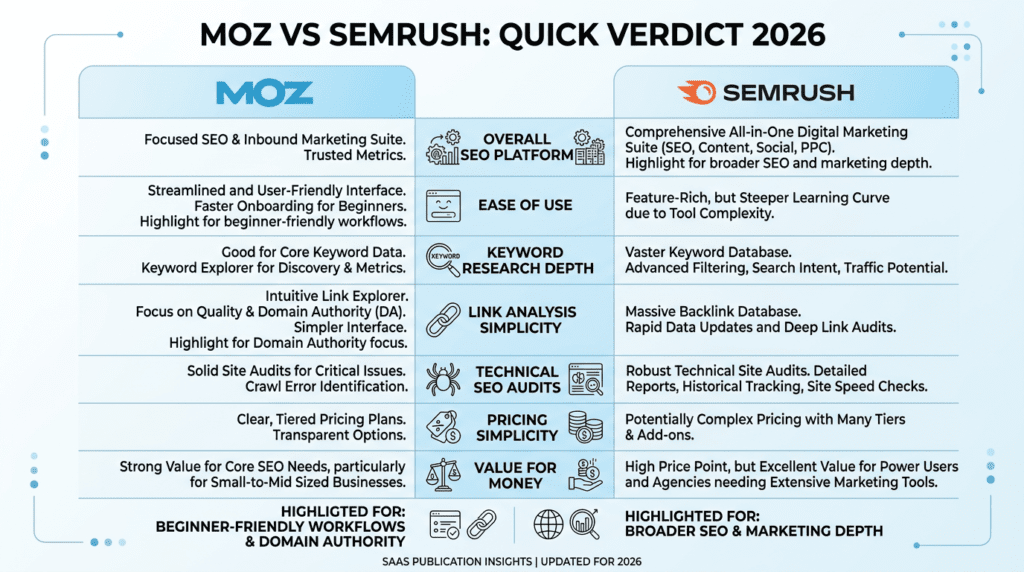
Complete Verdict Table
| Decision Factor | Better Choice | Why It Matters |
|---|---|---|
| Overall SEO platform | Semrush | Broader feature set for SEO, PPC, content, competitive research, and reporting |
| Ease of use | Moz | More user-friendly for beginners and smaller SEO teams |
| Keyword research depth | Semrush | Larger keyword database and stronger competitive keyword insights |
| Link analysis simplicity | Moz | Clear Domain Authority metrics and accessible backlink reports |
| Technical SEO audits | Semrush | More detailed site audit checks and issue prioritization |
| Pricing simplicity | Moz | Easier to understand entry-level plans |
| Value for money | Depends | Moz is better for simpler SEO needs; Semrush offers more tools for advanced users |
Best For
- Moz: Small businesses, beginners, bloggers, and teams that want a simpler SEO tool.
- Semrush: Agencies, advanced marketers, ecommerce brands, and companies needing deeper competitive data.
Not Ideal For
- Moz: Users who need advanced PPC, content marketing, and large-scale competitive intelligence.
- Semrush: Beginners who only need basic keyword tracking and may not use its full toolkit.
Bottom Line
Choose Moz if you want a more user-friendly SEO platform with core features and simpler workflows. Choose Semrush if you need a more powerful all-in-one platform with advanced features, deeper competitive analysis, and broader marketing data.
Moz Vs Semrush Feature Comparison: What Each SEO Platform Actually Does
Moz Core SEO Features Explained
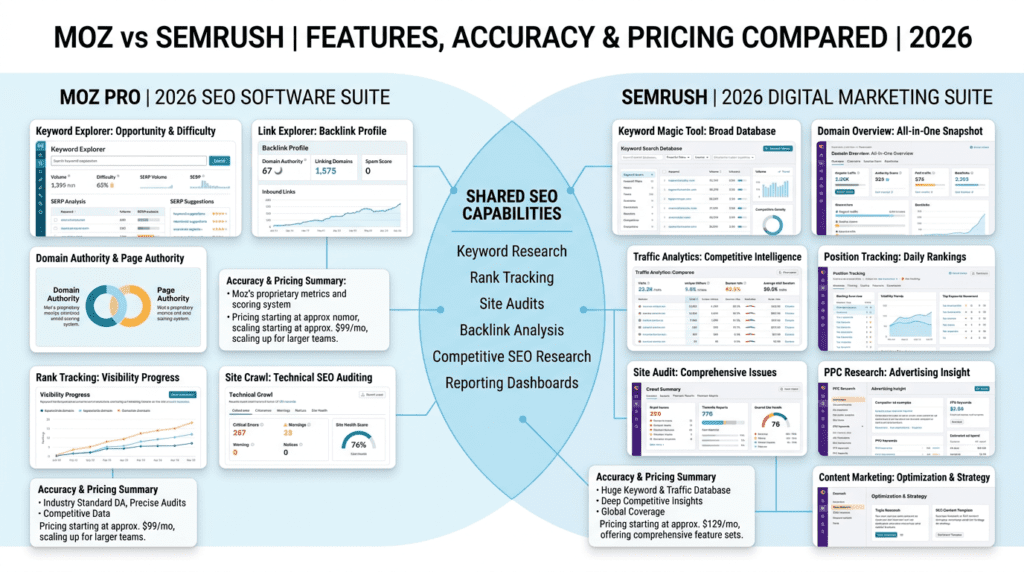
Moz focuses on the core SEO jobs most teams need first: keyword research, rank tracking, backlink analysis, and technical checks. Its Keyword Explorer is useful when you want a straightforward way to research a keyword without getting buried in too many data points. That matters for beginners and small teams that want clear answers fast.
Its Link Explorer is one of Moz’s better-known tools because it pairs backlink data with Domain Authority and Page Authority, which many marketers still use as quick comparison metrics. Moz also includes rank tracking and site crawl features, so you can monitor keyword movement and catch common technical SEO issues. For a small blog, local business, or lean in-house team, that’s often enough.
Where Moz usually feels lighter is in broader marketing coverage. It’s a solid SEO tool, but it doesn’t try to be everything at once. That can be a strength if your main job is search engine optimization and you don’t want a cluttered dashboard.
Semrush Core SEO Features Explained
Semrush takes a much wider approach. Its Keyword Magic Tool is built for large-scale keyword research, and it usually gives users more options when building content plans or mapping out a full SEO campaign. The platform also includes Domain Overview, Traffic Analytics, Position Tracking, and Site Audit, which makes it easier to study a competitor and your own site in the same place.
Semrush also goes beyond classic SEO. It includes tools for PPC, content marketing, local SEO, and even social media workflows. That broader scope is a big reason agencies and ecommerce teams often prefer it. If you need one digital marketing tool that helps with SEO plus adjacent channels, Semrush makes more sense.
The trade-off is complexity. Beginners often overestimate how much of Semrush they’ll actually use. The platform can feel crowded at first, especially if you only came in looking for a keyword research tool.
Where Moz And Semrush Overlap
Both platforms cover the basics that most SEO teams care about:
- Keyword research
- Rank tracking
- Site audits
- Backlink analysis
- Competitive SEO research
- Reporting dashboards
That overlap is why the difference between Semrush and Moz comes down to depth, workflow, and how much data you really need. If your team only checks a handful of target keywords and audits a few pages each month, either tool can work.
Where Semrush Goes Beyond Moz
Semrush offers more than Moz in a few areas that matter once your SEO work gets serious:
- PPC competitor research
- Content marketing tools
- Market research and traffic estimates
- Broader agency reporting options
- More advanced integrations and workflow tools
This is where Semrush often becomes the better choice for scaling teams. A freelancer can live inside a simpler SEO tool. But an agency or ecommerce brand usually wants one platform that supports research, reporting, and campaign planning across multiple clients or product lines.
Where Moz Still Holds Its Own
Moz still wins in a few practical spots. It’s easier to learn, and that matters more than most product pages admit. A beginner usually doesn’t need 50 tabs of data. They need clear next steps.
Moz also gives users a more familiar feel around authority metrics. For many marketers, Domain Authority is a quick shorthand for comparing sites, even if it isn’t a Google metric. Add in the cleaner interface and simpler workflows, and Moz remains a good fit for people who want solid SEO without the learning curve.
For small businesses, bloggers, and solo site owners, that can be more valuable than a huge feature list.
Moz Vs Semrush Pricing And Value For Money
Moz Pricing In 2026
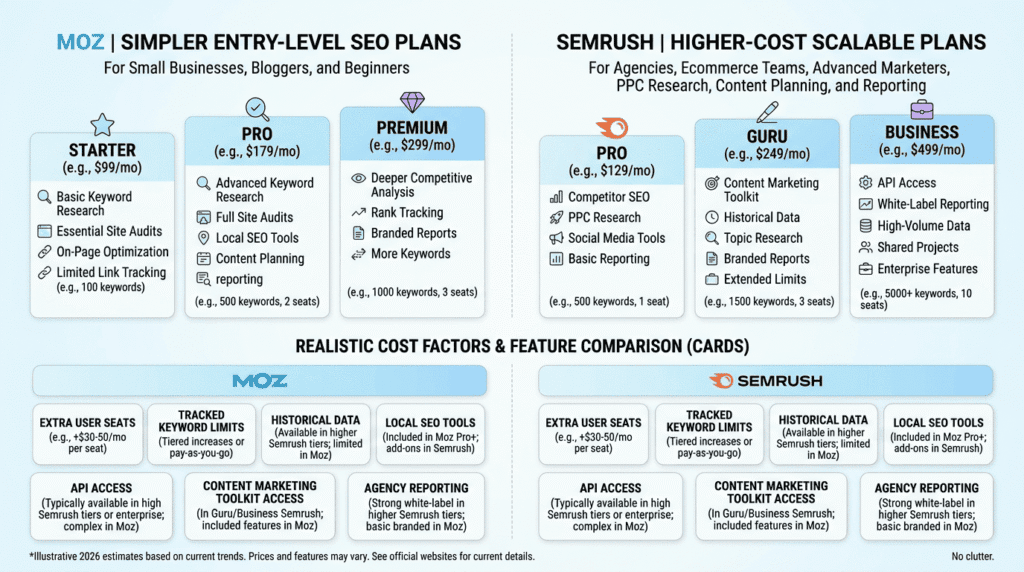
Moz Pro pricing usually starts with a lower entry point than Semrush, which makes it easier for smaller sites to get started without paying for tools they may not use yet. The exact plan names and prices can change, but Moz has generally kept a simple tier structure with a few core plans instead of a long menu of add-ons.
That simplicity matters. Many beginners don’t need five different dashboards on day one. They usually want to track a set of keywords, run a site crawl, and check backlinks without dealing with a steep learning curve. Moz fits that kind of workflow well.
The main limits show up as usage grows. Lower plans typically restrict things like:
- Campaigns you can monitor
- Keyword queries
- Tracked keywords
- Pages crawled in site audits
Those caps are fine for a small business site, a blog, or a local brand with one main domain. They get tight when you start managing multiple websites, many location pages, or a bigger content program. That’s where the value can drop if your team keeps hitting limits and has to upgrade before it really wants to.
Moz tends to make the most sense for users who want core SEO functions and don’t need a huge toolkit. If your monthly SEO work is mostly rank checks, audits, and backlink review, you may get more practical value here than from a larger platform you barely use.
Semrush Pricing In 2026
Semrush usually costs more because it covers more than SEO. You’re not just paying for keyword research and site audits. You’re also paying for competitor research, content tools, PPC features, and broader marketing workflows.
Like Moz, Semrush pricing can change, but it has traditionally used tiered plans that scale by usage. The big difference is that Semrush plans often feel designed for teams that expect growth. As you move up, the limits on projects, tracked keywords, reports, users, and add-ons become more important than the base subscription price.
That structure can be a win for larger teams, but it can also surprise first-time buyers. A small business might sign up for one plan and then realize it needs more tracked keywords, another user seat, or a separate feature bundle to match its actual workflow. That’s when the monthly cost starts creeping up.
Semrush offers the best value when a team uses multiple parts of the platform every week. For example:
- An agency running audits for several clients
- An ecommerce team watching competitors and product keywords
- A SaaS marketer doing keyword research, content planning, and backlink analysis in one place
If you only need basic SEO tasks, the extra depth can be wasted. If you use the broader toolkit, the higher price can make more sense because it replaces other software and saves time.
Hidden Costs To Watch For
This is where many buyers get caught off guard. The sticker price is only part of the story. Real cost often depends on how the tool is used in practice.
Common extra costs include:
- Extra user seats
- Higher tracked keyword limits
- Historical data access
- Local SEO tools
- Content marketing toolkit access
- API access
- Agency reporting needs
These aren’t always deal breakers, but they can change the math fast. A freelancer may be fine on one seat and a small set of tracked keywords. An agency, though, may need multiple logins, more reports, and wider access to older data for client work. That can push the real monthly cost much higher than expected.
The biggest hidden cost is usually scale. Once you track more keywords, crawl more pages, or add more sites, the original plan can stop fitting your workflow. At that point, you’re not just paying for a software upgrade. You’re paying to keep your process intact.
Renewal Pricing And Long-Term Cost Considerations
It’s easy to compare monthly plan prices and miss the long-term picture. That can lead to the wrong choice, especially for teams that expect steady growth.
Annual cost matters because SEO tools tend to expand in use over time. A site that starts with 50 tracked keywords may end up needing 300. One brand might begin with a single domain, then add a blog, a store, or a second market. Agencies often scale even faster because every new client adds projects, reporting, and keyword tracking.
That means the real question isn’t just, “What does it cost today?” It’s also:
- How fast will the plan hit limits?
- Will we need more users later?
- Do we need local SEO or historical data soon?
- Will this tool still fit when we manage 3 to 10 sites instead of 1?
Small businesses can often stay on starter plans longer and keep costs predictable. Agencies and in-house marketing teams usually outgrow starter tiers much faster. That’s why annual planning is useful. A lower monthly price can look better at first, but a plan that forces constant upgrades may cost more over 12 months.
Which Platform Offers Better Value For Money?
The better value depends on usage depth, not just price.
Moz usually delivers stronger value when you only need core SEO tools and want to keep the workflow simple. If your team checks rankings, audits pages, and reviews backlinks without relying on a wider marketing stack, Moz can be the cleaner spend.
Semrush usually delivers stronger value when the business uses more of the platform. If keyword research, content planning, competitor analysis, PPC insights, and reporting all matter, the higher price is easier to justify because it replaces several separate tools.
A quick way to think about it:
- Choose Moz value if you want fewer moving parts
- Choose Semrush value if you want one tool to do more jobs
That difference becomes clearer as businesses grow. Small sites often value simplicity. Larger teams often value range.
Moz Vs Semrush Ease Of Use And Learning Curve
Moz User Experience For Beginners
Moz is often easier for non-technical users because it doesn’t try to show everything at once. The interface feels lighter, the main metrics are easier to follow, and the path from “log in” to “find an issue” is usually shorter.
That helps beginners in a real way. A small business owner doesn’t usually want to learn a complex research system just to see which pages need attention. They want quick answers: which keywords are moving, what errors need fixing, and whether backlinks are growing.
Moz works well for that kind of monthly check-in workflow. The simpler layout reduces the chance that a new user gets lost in filters, tabs, and nested reports. Over time, that can save a lot of frustration.
Where beginners may still struggle is in judging what the numbers mean. Like any SEO tool, Moz can surface issues, but it can’t make the strategy decision for you. Users still have to connect the data to their content plan, especially when rankings move slowly or traffic doesn’t match a metric spike.
Semrush User Experience For Advanced SEO Workflows
Semrush feels heavier at first because there’s more going on. More reports. More filters. More paths to the same answer. That can overwhelm beginners, but it becomes useful once a team needs to do more than basic SEO monitoring.
The upside is flexibility. Advanced users can move through competitor research, content gaps, keyword analysis, backlink review, and paid search ideas without switching tools. For teams that run frequent campaigns, that can save real time.
A common pattern is this: people think they want more data, then discover they also need more discipline. Semrush gives a lot of options, but the tool works best when a team has a clear process. Without that, the extra depth can feel messy instead of powerful.
This is why it tends to fit agencies and in-house marketers better than casual users. If you already know which workflows matter, the platform starts to feel efficient. If you’re still learning SEO basics, it may feel like too much too soon.
Setup Time And First-Week Learning Curve
Setup is one of the first real differences users notice. Moz usually gets people moving faster because the project setup and core reports are straightforward. That matters when someone wants to connect a site, start tracking keywords, and run a crawl without spending half a day in onboarding.
Semrush can take longer to configure, mainly because there’s more to choose from. More project settings. More report options. More tools to decide whether you need now or later. That doesn’t mean it’s hard, but it does mean the first week may feel busier.
In practical terms:
- Moz is often faster for a first-time SEO user
- Semrush is often slower upfront but more expandable later
This trade-off becomes important for teams under pressure. If a freelancer needs to audit a site today, speed matters. If an agency is building a repeatable system for 10 clients, the extra setup time can pay off later.
Reporting And Dashboard Usability
Reporting is another area where the user experience differs in meaningful ways. Moz usually feels more approachable for internal review and quick status checks. The dashboards are easier to scan, so users can get a clean picture without digging too deep.
Semrush is stronger when reporting needs are more complex. It supports more customization, more exports, and more layers of analysis. That makes it more useful for client-facing reporting or team workflows where different people need different views.
The trade-off is clarity versus flexibility:
| Category | Moz | Semrush |
|---|---|---|
| Internal team clarity | Strong | Good |
| Client reporting depth | Moderate | Strong |
| Dashboard simplicity | Strong | Moderate |
| Customization | Moderate | Strong |
| First-time usability | Strong | Moderate |
If your team just wants a monthly snapshot, Moz is easier to live with. If you need detailed reports for clients, stakeholders, or multiple departments, Semrush has the advantage.
Moz Vs Semrush For Keyword Research And Competitive Analysis
Keyword Discovery And Topic Expansion
This is one of the biggest difference makers in Moz Vs Semrush. Both tools support keyword research, but they don’t feel equally deep when you start building out topic ideas at scale.
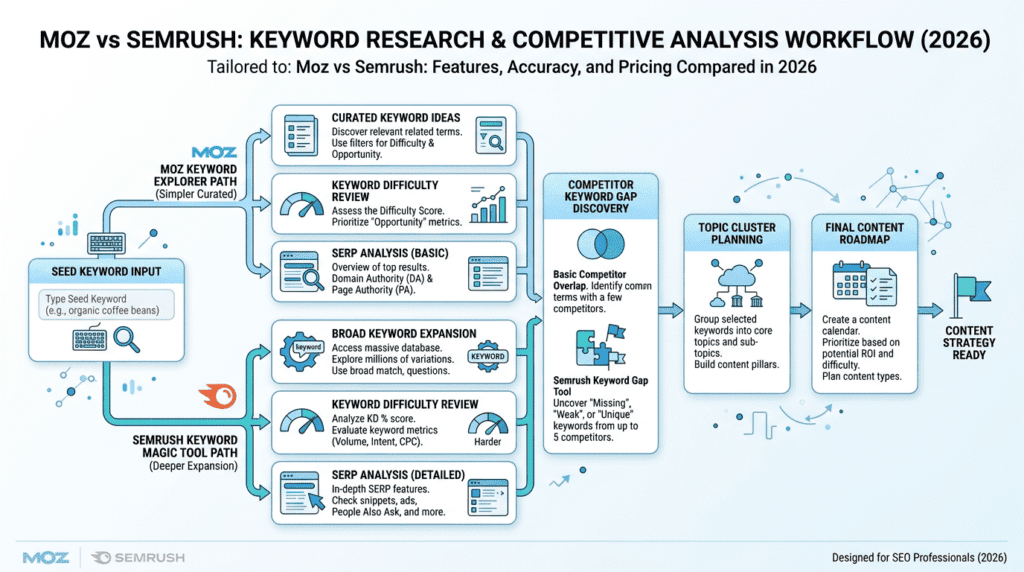
Moz Keyword Explorer works well for straightforward keyword analysis. It helps users find related terms, check difficulty, and review search data without making the process too complicated. That makes it a good fit for smaller content plans or teams that want a more curated research experience.
Semrush Keyword Magic Tool is more expansive. It’s better for long-tail keyword discovery, topic expansion, and building large keyword lists around a seed term. That matters when you’re mapping a content cluster, planning a category structure, or trying to uncover competitor opportunities.
For example, a blogger may only need a few dozen good topic ideas each month. An ecommerce brand or agency may need hundreds of keyword variations across product, category, and informational pages. Semrush is usually the stronger tool in that setting because it helps you move from a single keyword to a broader content map faster.
Keyword Difficulty And Ranking Opportunity
Keyword difficulty is useful, but it’s easy to overtrust it. That’s one of the most common mistakes newer users make with any SEO tool.
Both Moz and Semrush can help estimate ranking opportunity, but the score should never be the only factor. A keyword with a low difficulty score can still be hard if the SERP is packed with strong brands, shopping results, or high-authority pages. A harder keyword can sometimes be worth targeting if the intent is strong and the business has better content than the current results.
The most practical approach is to combine the tool score with:
- SERP review
- Domain strength
- Content quality
- Search intent
- Existing site relevance
Moz keeps the process simple. Semrush gives you more data points. Neither one removes the need for judgment.
Competitor Keyword Research
Competitive keyword research is where Semrush usually pulls ahead. It’s built to help users find what competitors rank for, where traffic may be coming from, and which pages matter most in a competitor’s strategy.
That’s useful because competitor research isn’t just about copying keywords. It helps answer better questions:
- Which pages drive visibility?
- What topics are missing from our site?
- Which keywords are we losing?
- Where are competitors getting traction that we’re not?
Moz can still support this kind of research, but Semrush is generally stronger for deeper gap analysis and traffic-style comparisons. Agencies and ecommerce teams usually feel that difference quickly because they need more than a simple keyword list. They need context.
Content Planning Use Cases
This is where the right tool depends on the type of business.
A blogger may use keyword data to build topic clusters and find low-competition ideas with solid search intent. In that case, clarity matters more than raw volume.
An ecommerce store usually needs a different workflow. It may care more about category keywords, product-page terms, and competitor gaps across the buying journey.
An agency often needs the broadest view of all. It may use keyword research for content planning, competitor audits, and client reporting in the same week.
In short:
- Bloggers usually need clarity and topic ideas
- Ecommerce brands usually need scale and category coverage
- Agencies usually need competitor intelligence and flexible workflows
That’s why the keyword research choice often comes down to how much research the business will actually do, not just how good the tool looks on paper.
Moz Vs Semrush For Technical SEO, Backlinks, And Performance Monitoring
Technical SEO Audits
When it comes to technical SEO, both Moz and Semrush can catch the basics, but they don’t feel the same in day-to-day use. Semrush usually gives you a deeper site audit with more crawl data, more issue categories, and stronger prioritization. That matters when a site has dozens or hundreds of pages and you need to know what to fix first.
Moz is easier to read for small sites. The recommendations are usually simpler, which helps beginners avoid getting buried in technical noise. If you run a local business site, a small blog, or a straightforward service site, that simplicity can save time.
The trade-off is scale. As a site grows, “simple” can turn into “too simple.” If you manage multiple templates, faceted pages, redirects, canonical problems, or large internal linking issues, Semrush tends to give you more to work with.
A practical way to think about it:
- Moz is better if you want clear, lightweight site audit guidance.
- Semrush is better if you need deeper technical SEO analysis and more detailed issue prioritization.
- Neither replaces a hands-on crawl tool when you need very granular debugging.
Backlink Analysis And Link Building
Backlink analysis is one of the areas where Moz and Semrush take different paths. Moz is still closely tied to Domain Authority, and that metric is easy to understand at a glance. For a lot of marketers, that makes Moz useful for quick checks during prospecting or competitor review.
Semrush offers broader backlink monitoring and a more complete link-building workflow. That becomes helpful when you’re tracking many domains, comparing link profiles, or watching for new and lost backlinks over time. It’s less about one score and more about the full picture.
Here’s the real-world difference:
| Category | Moz | Semrush |
|---|---|---|
| Best for | Simple authority checks and easy link review | Broader backlink monitoring and outreach workflows |
| Main metric users notice | Domain Authority | Authority Score |
| Ease of use | Easier for beginners | More detailed, but more complex |
| Link-building workflow | Lighter | Stronger for ongoing prospecting and tracking |
| Scaling | Good for smaller SEO needs | Better for larger campaigns and agencies |
Moz works well if you mainly want to evaluate a competitor or check whether a site looks trustworthy. Semrush is stronger if link building is part of a larger SEO campaign and you want to manage the process more actively.
One thing many buyers overestimate is backlink “scores.” They’re useful, but they’re still third-party metrics. A strong-looking number doesn’t guarantee rankings, and a weaker score doesn’t mean a site can’t earn traffic. Use them as signals, not truth.
SEO Performance Tracking
For ongoing SEO monitoring, both tools help you track keyword movement and visibility trends, but Semrush generally gives you more depth for competitive tracking. That matters if you care about how a site performs against direct competitors instead of just watching your own rankings.
Moz is often easier for basic progress checks. If you just want to see whether a small set of keywords is moving and whether site health is improving, it works fine. That’s enough for a lot of small businesses and solo marketers.
Semrush becomes more useful when you need a bigger picture. It can help teams track more keywords, compare against more competitors, and watch changes across a larger SEO campaign. That’s especially valuable when rankings bounce around and you need context, not just a daily number.
The key is not to obsess over one bad day. Ranking volatility happens all the time. A real SEO win shows up in trend lines, visibility gains, and traffic growth over weeks or months.
Reporting For Stakeholders Or Clients
Reporting is where the audience matters. Moz is often easier for business owners who want a simple update without too much jargon. The reports feel more approachable, and that’s a plus if your client just wants to know whether SEO is moving in the right direction.
Semrush is stronger for agencies and larger teams. It usually gives you more options for branded reports, scheduled reporting, and multi-client management. If you’re sending reports to several stakeholders, that flexibility saves time.
A few practical differences stand out:
- Moz fits better when one person or a small team reviews SEO results internally.
- Semrush fits better when multiple clients or departments need regular reporting.
- Scheduled reports matter more as you scale, because manual exports get old fast.
- Branded PDFs help agencies look polished, but they matter less for in-house teams.
If reporting is just a monthly checkbox, Moz may be enough. If reporting is part of your service delivery or leadership updates, Semrush usually offers more room to grow.
Moz Vs Semrush Integrations, Support, And Scalability
Integrations With Analytics And Search Data
Integrations can make or break your workflow, especially if you’re already using Google Analytics and Google Search Console. Both Moz and Semrush connect with core search data tools, which helps you move from “SEO metrics” to actual business context.
That matters because SEO tools are only part of the picture. Search Console shows what Google is doing. Analytics shows what visitors do after they arrive. An SEO platform helps connect those dots, but it shouldn’t replace them.
Semrush tends to fit more naturally into broader reporting setups, especially if you use other marketing tools around it. Moz can still work well, but it feels more focused on core SEO tasks rather than a full marketing stack.
For teams that live in Looker Studio or recurring dashboards, the quality of integration often matters as much as the features list. If it’s hard to move data where you need it, the tool starts losing value.
Workflow Integrations For Teams
This is where Semrush usually pulls ahead. It generally has stronger workflow depth for agencies, larger teams, and users who need to connect SEO work with reporting, content planning, or client management.
That doesn’t mean Moz lacks useful integrations. It just means Moz is more often chosen for the SEO work itself, while Semrush is more likely to sit at the center of a bigger workflow.
| Category | Moz | Semrush |
|---|---|---|
| Best for | Core SEO workflows | Broader team and agency workflows |
| API access | Available on some plans, depending on current offerings | More commonly used for advanced team workflows |
| Reporting workflow | Simpler | More scalable |
| Multi-site management | Good for moderate needs | Better for complex use cases |
| Cross-team adoption | Easier for smaller teams | Better for larger marketing groups |
If you’re a freelancer or small agency, Moz may be enough unless your client work is getting more complex. If you need to hand data between SEO, paid search, and content teams, Semrush usually makes that easier.
Customer Support Comparison
Support quality matters more than most buyers expect. The feature list looks great until you hit a setup problem, a crawl issue, or a report you can’t quite configure.
Moz is usually friendlier for self-guided users. The learning resources are generally easier to digest, which helps beginners who are still learning SEO basics. That can reduce frustration early on, especially for users who don’t want to sit through a lot of product training.
Semrush has a bigger toolset, so it naturally comes with more educational material. That’s useful, but it can also feel like you’re learning the platform and the strategy at the same time. For advanced users, that’s fine. For beginners, it can be a lot.
If your team expects to learn by doing, Moz may feel calmer. If your team is willing to invest time in training, Semrush’s deeper feature set becomes easier to unlock.
Scalability For Growing Companies
Scalability is one of the biggest differences in the Moz vs Semrush decision. Moz can absolutely support growing businesses, but it’s best when the SEO process stays relatively focused: keyword tracking, site health, and link checking.
Semrush handles complexity better. As you add more websites, more competitors, more tracked keywords, more users, and more content workflows, the platform feels more complete. That’s why agencies and multi-brand businesses often lean toward it.
The long-term question is simple: what happens when your SEO stops being a side task?
- If SEO stays small, Moz can remain a good fit.
- If SEO becomes part of a larger marketing engine, Semrush usually scales better.
- If your team expects more clients, more channels, and more reporting, Semrush has the stronger runway.
Moz Vs Semrush Use Cases: Which Tool Fits Different Users?
Best For Small Business SEO
For small businesses, Moz is often the easier starting point. The interface is less intimidating, and the core features cover what many owners actually need: basic keyword tracking, site checks, and backlink monitoring.
That said, not every small business is the same. A local plumber or dentist may do fine with Moz. A small ecommerce brand competing in a crowded niche may outgrow it faster and benefit more from Semrush.
A good rule of thumb:
- Choose Moz if you want clarity and don’t plan to run large SEO campaigns.
- Choose Semrush if SEO is tied to growth, content, or paid search.
- Wait before upgrading if you only check SEO occasionally and don’t act on the data.
Best For Bloggers And Content Creators
Bloggers usually care about keyword ideas, topic expansion, and ranking opportunities. Moz can help with basic keyword research, but Semrush is stronger when content planning gets more serious.
That’s because content creators often need more than a single keyword score. They need related terms, content gaps, competitor page ideas, and a sense of how hard a topic really is before they spend time writing.
If you publish a few posts a month, Moz may be enough. If you’re trying to build topical authority and publish at scale, Semrush is usually the better research tool.
Best For Ecommerce SEO
Ecommerce sites tend to hit complexity fast. Product pages, category pages, filters, duplicate content, and competitor research all matter. Semrush is usually the better fit here because it offers deeper keyword analysis, stronger competitive research, and more robust auditing.
Moz can still work for smaller stores, especially if the SEO plan is simple. But once you’re managing many SKUs or trying to compete on category terms, Semrush’s broader toolkit becomes more valuable.
This is one of those cases where the better tool is often the one that saves time later, not the one that feels simpler on day one.
Best For Agencies And Consultants
Agencies usually need a tool that can do several jobs well. Semrush fits that pattern better. It supports competitive research, audits, reporting, content workflows, and broader client management more comfortably than Moz.
Moz can still be useful for consultants who sell simpler retainers. If your service is mostly rank tracking, site health checks, and authority analysis, Moz may be enough. But once you start managing multiple clients with different goals, Semrush tends to hold up better.
Best For Advanced Marketers
Advanced marketers usually want the full stack: SEO, PPC, competitive intel, content planning, and reporting. Semrush is clearly stronger here. It’s built for users who want to dig into data and make decisions across channels.
Moz can still be part of an advanced workflow, but it’s usually not the center of it. If you already know you’ll use PPC data, competitor analysis, and content tools, Semrush is the better long-term fit.
Honest Take: Moz Vs Semrush Pros, Cons, And Trade-Offs
Moz Pros And Cons
What Moz does well:
- Easier for beginners to understand
- Cleaner interface with less clutter
- Strong Domain Authority recognition
- Solid for core SEO tasks
- Less overwhelming for small teams
Where Moz falls short:
- Less depth in competitive research
- Fewer marketing features overall
- Can feel limited as campaigns grow
- Not ideal for users who want one platform for everything
Moz is a good fit when simplicity matters more than breadth. The downside is that you may eventually outgrow it if your SEO work gets more ambitious.
Semrush Pros And Cons
What Semrush does well:
- Broad SEO and marketing coverage
- Strong keyword research and competitor analysis
- Better for agencies and advanced teams
- More reporting and workflow options
- Scales well as needs grow
Where Semrush falls short:
- Higher pricing
- Steeper learning curve
- More features than some users need
- Some capabilities may be tied to higher plans or add-ons
Semrush is often the stronger platform overall, but that doesn’t automatically make it the better purchase. If you only need a few core SEO functions, the extra power can just add cost and complexity.
What Most Buyers Miss Before Choosing
A lot of people focus on features first and workflow second. That’s backwards.
The real question is not “Which tool has more features?” It’s:
- Will my team use those features weekly?
- Do I need deeper competitive data or just basic tracking?
- Will this tool still make sense in 12 months?
- Am I paying for functions that will sit unused?
That’s why Moz vs Semrush is less about raw quality and more about fit. A smaller team can waste money on a giant tool. A growing team can lose time with a tool that feels too thin.
When Another SEO Tool May Be Better
Sometimes neither tool is the perfect answer.
If you mainly need crawling, Screaming Frog may be the better technical tool. If your focus is backlink research, Ahrefs can be a stronger competitor in some workflows. If you want lightweight rank tracking, SE Ranking may feel simpler. And if content optimization is the main goal, Surfer SEO can fit better.
Google Search Console also still matters a lot. It won’t replace an SEO platform, but it gives you first-party data that neither Moz nor Semrush can fully match.
In other words, Moz vs Semrush is a strong comparison, but it’s not the whole market. The best SEO tool is the one that matches your real workflow, not the one with the biggest feature list.
Moz Vs Semrush Decision Guide: How To Choose The Better SEO Platform
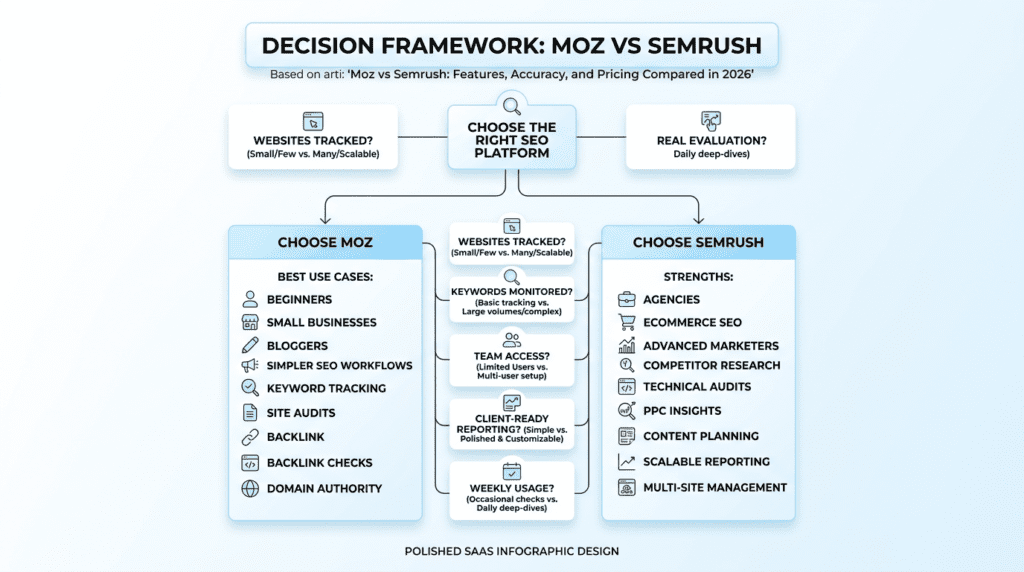
Choose Moz If
- You are a beginner or small business owner who wants a simpler path into SEO.
- You prefer a cleaner interface and less setup friction.
- You mainly need keyword research, backlink checks, site audits, and rank tracking.
- You want a platform that feels easier to learn and manage day to day.
- You do not need advanced PPC, content intelligence, or deep competitive research.
Choose Semrush If
- You need more detailed keyword and competitor research.
- You manage multiple websites, clients, or larger SEO programs.
- You want one platform that covers SEO, PPC, content, and reporting more broadly.
- You rely on stronger technical audits and ongoing performance monitoring.
- You can justify the higher cost with broader team usage.
Questions To Ask Before Buying
- How many websites do you need to track?
- How many keywords do you need to monitor?
- Do you need competitor PPC data?
- Will multiple team members need access?
- Do you need client-ready reporting?
- Will you use the tool weekly or only occasionally?
- Is your team comfortable with advanced SEO workflows?
Practical Trial Workflow
- Run the same keyword research task in both tools.
- Audit the same website in both tools.
- Compare backlink reports for your domain and key competitors.
- Track a small set of priority keywords for a short period.
- Export reports and see which platform your team understands faster.
Final Recommendation: Is Moz Or Semrush Better In 2026?
Overall Winner
- Semrush is the stronger overall choice for most advanced users, agencies, ecommerce brands, and growing companies because it delivers broader data, deeper competitive insight, and more scalable workflows.
Best Value Choice
- Moz is often the better value for beginners, small businesses, and teams that only need core SEO functionality without paying for extra marketing tools they will not use.
Final Buying Advice
- Choose Moz if simplicity, usability, and core SEO coverage matter most.
- Choose Semrush if depth, competitive analysis, advanced features, and long-term scalability matter most.
- If you are still unsure, test both with real site data before committing to an annual plan.
Moz Vs Semrush FAQs
Is Moz Or Semrush More Accurate?
- Both use third-party estimates, so neither is a perfect source of truth.
- Semrush often offers broader data coverage, while Moz is known for straightforward authority metrics.
- For real performance, always rely on Google Search Console and your own analytics.
Is Moz Cheaper Than Semrush?
- Yes, Moz is generally more affordable at the entry level.
- Semrush usually costs more because it includes a wider range of SEO and marketing tools.
- Value depends on whether you will actually use the extra features.
Which Is Better For Small Business SEO?
- Moz is often better for small businesses that want a simpler, easier-to-manage SEO tool.
- Semrush is the better fit for small businesses in competitive markets or those investing heavily in content and paid search.
Which Is Better For Agencies?
- Semrush is usually the better agency platform because of its reporting, competitive research, and multi-client workflow support.
- Moz can still work for smaller consultants with simpler SEO packages.
Does Semrush Have Better Keyword Research Than Moz?
- Yes, Semrush is generally stronger for keyword volume, expansion, competitor keyword analysis, and content planning.
- Moz still works well for simpler keyword workflows.
Is Moz Easier To Use Than Semrush?
- Yes, Moz is generally easier for beginners.
- Semrush has a steeper learning curve, but it becomes more powerful once your team knows how to use it.
Do I Need Both Moz And Semrush?
- Most users do not need both.
- Some advanced SEOs and agencies use both to compare data points, but most small businesses should choose one based on budget and workflow.
What Are The Best Alternatives To Moz And Semrush?
- Ahrefs for backlink-heavy SEO research.
- SE Ranking for budget-conscious tracking.
- Screaming Frog for technical crawling.
- Surfer SEO for content optimization.
- Google Search Console for free first-party search data.