Let’s keep it simple.
If you’re new to building a website in the US, you’ll quickly run into two popular choices: shared hosting vs cloud hosting. Most beginners compare these because both sound affordable, beginner-friendly, and widely recommended by every web host out there.
Here’s what I noticed when researching this:
People usually start with shared hosting because it’s cheap. Then they hear about cloud hosting and think, “Is that better? Or is it overkill?”
This guide will help you:
- Understand what shared hosting and cloud hosting really mean
- See the key differences between cloud and shared setups
- Decide the right hosting for your first website in the US
No jargon. No hype. Just real talk.

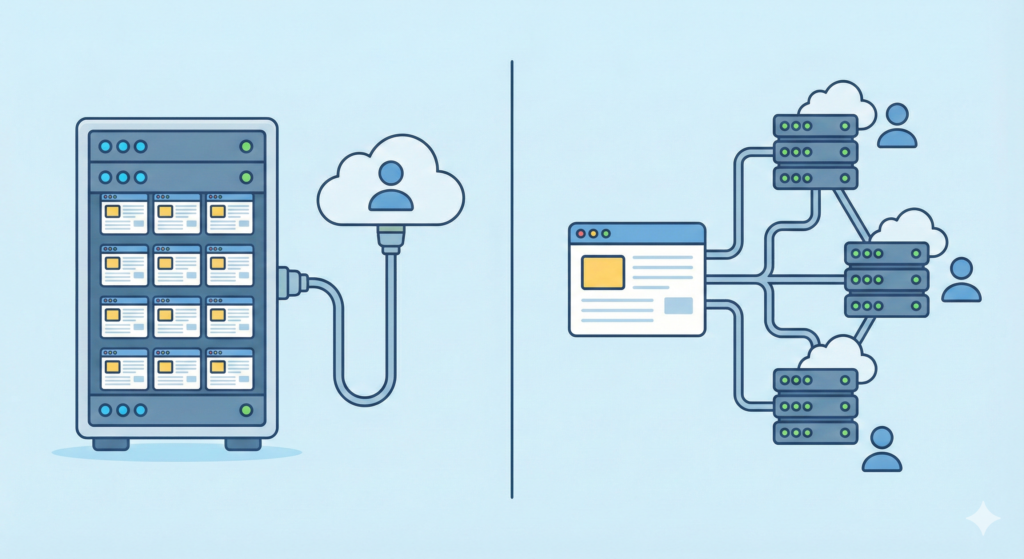
Shared hosting means your website lives on a shared server with many other sites.
In simple words, one server stores and runs multiple websites at the same time. All of them share the same server power like memory and CPU. That’s why people say resources are shared.
So when your site is hosted on the shared server, it:
- Uses a portion of that single server
- Depends on how much other sites are using
- Runs in a basic hosting environment
This setup is common because:
- It’s cheap
- It’s easy
- Many shared hosting plans are made for beginners
You’ll often hear that shared hosting means simple website hosting for small blogs or personal sites. And honestly, that’s usually true.
What Is Cloud Hosting? (Quick Overview)

Cloud hosting is different.
Instead of one machine, your site runs on a network of systems. Think of many computers working together as one big system. That’s where cloud computing comes in.
With cloud hosting:
- Your site uses more than one server
- It may pull power from a cloud server when needed
- If one system fails, another can step in
This is why people say cloud hosting uses a network of servers.
From my research, most cloud hosting providers design this as a flexible hosting solution for growing sites. You’re not tied to just one box.
So while shared hosting lives on a single physical server, cloud hosting spreads your site across a smarter system.

Let’s get to the heart of shared hosting vs cloud hosting.
Single Server vs Server Network
With shared hosting, your site sits on one server.
With cloud hosting, your site uses a network of servers.
That’s the biggest difference.
Fixed vs Scalable Resources
Shared hosting has fixed limits. If the server resources are busy, your site slows down.
Cloud hosting can scale up when traffic grows.
Simplicity vs Flexibility
Shared hosting is simple. Set it and forget it.
Cloud hosting is flexible, but a bit more complex.
This is why people often search for cloud hosting vs shared hosting – they want to know which trade-off fits them.
Here’s a quick table to show the main differences for US beginners:
| Feature | Shared Hosting | Cloud Hosting |
|---|---|---|
| Cost in the US | Very low | Low to medium |
| Performance | Depends on neighbors | More stable |
| Scalability | Limited | Easy to scale |
| Reliability & uptime | Can drop if one server fails | Better due to multiple servers |
| Resource limits | Tight | Flexible |
| Control & customization | Basic | More options |
| Security | Basic isolation | Stronger isolation |
| Technical skill | Very low | Low to medium |
| Best use cases | Small blogs, personal sites | Growing sites, business use |
This gives a clear comparison of cloud hosting with shared hosting for beginners.
Let’s look at the pros and cons of shared hosting first.
- Very cheap for US beginners
- Easy setup, no stress
- Simple dashboard
- Many plans include WordPress hosting
- Good if you just want to opt for shared hosting and get online fast
From what I’ve seen, this is why shared hosting is suitable for first-time users.
- Limited server resources
- Other sites can slow you down
- Less control
- Performance depends on neighbors
- Not great for heavy web traffic
So while shared hosting may work fine at first, it has limits once your site grows.
Pros and Cons of Cloud Hosting
Now let’s talk about cloud.
Benefits of Cloud Hosting
These are the advantages of cloud hosting most US users care about:
- Better speed and performance
- Easy scaling when traffic jumps
- Strong uptime because of backups
- More flexible hosting solution
- Good for sites that expect growth
In most cases, cloud hosting provides a smoother experience when your site gets busy.
Downsides of Cloud Hosting
- Can be more expensive than shared hosting
- Pricing can change with usage
- Slight learning curve
- Not always needed for tiny sites
These are the main cons of cloud hosting beginners should know.

Let’s be honest. Shared hosting is where most US beginners start.
You should lean toward shared hosting if you are:
- A beginner building your first site
- Running a personal blog or small website
- On a tight budget
- Not expecting much web traffic at first
In many cases, shared hosting means simple, low-cost website hosting that just works.
If your site is light and your goals are small, you can safely opt for shared hosting and grow later.
Who Should Use Cloud Hosting in the US?

Cloud hosting is better when your site starts to grow.
You should consider cloud hosting if you:
- Run a growing website or blog
- Manage an online business
- Expect traffic spikes
- Want more flexibility in your hosting solution
From what I’ve seen, people move during the transition from shared to cloud hosting when shared plans start to feel tight.
So if your site is picking up visitors, shared to cloud hosting can be a smart upgrade path.
Let’s talk price, because this matters most to beginners.
Most US shared hosting plans cost:
- $2 to $5 per month to start
- Renew at $6 to $10 per month
This is why people say shared hosting is the most cost-effective choice for beginners.Cloud Hosting Costs
Cloud hosting usually starts around:
- $5 to $10 per month for basic setups
- Can go higher as usage grows
In many cases, cloud hosting is more expensive than shared hosting at the start and may become costly than shared hosting as traffic rises.
That said, you’re paying for flexibility.
So the cost hosting depends on how much power your site really needs.
Performance Comparison for US Websites
Performance is where these two really differ.
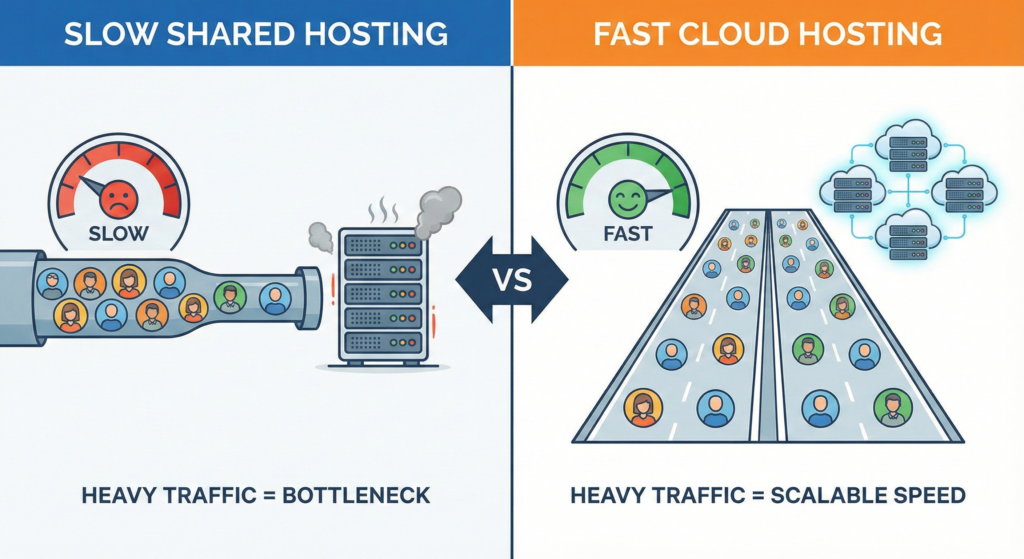
With shared hosting, your site runs on a single server. If neighbors use too many resources, your site may slow down.
That’s because resources are shared on the same machine.
Cloud Hosting Performance
With cloud hosting, your site can pull power from multiple systems. If one server gets busy, another helps out.
This setup:
- Handles traffic surges better
- Keeps speed more stable
- Makes cloud hosting feel smoother
That’s what many mean when they say cloud hosting is better for performance.
Reliability and Uptime Comparison
Let’s keep it simple.
If the single physical server goes down, your site goes down too. That’s a risk with shared setups.
Cloud Hosting Reliability
Cloud hosting spreads your site across many servers. If one fails, another steps in.
That’s why people say cloud hosting ensures better uptime and fewer outages.
For US sites that care about being online 24/7, cloud hosting often wins here.
Ease of Use for Beginners
This is important.
Shared hosting is:
- Very simple
- Easy dashboards
- Little setup
- Designed for beginners
That’s why many say shared hosting is suitable for first-time users.
Cloud Hosting Ease
Cloud hosting:
- Is still user-friendly
- But has more settings
- May feel a bit complex at first
So for pure simplicity, shared hosting is easier.
Security Comparison
Let’s talk safety.
With shared hosting, many sites are on the same shared server. Most hosts isolate accounts, but risks exist if another site is hacked.
So shared hosting may be safe for small sites, but it’s not perfect.
Cloud Hosting Security
Cloud hosting spreads data across systems and often adds stronger isolation.
This makes cloud hosting more resilient for growing sites.
That’s one more reason businesses prefer cloud.
Common Mistakes Beginners Make When Choosing
Here’s where people usually slip up:
Choosing Only by Price
Going with the cheapest plan without thinking long-term.
Overestimating Needs
Picking cloud hosting when shared hosting would be enough.
Ignoring Growth Plans
Not planning the move from shared to cloud hosting when traffic grows.
Not Comparing Providers
Not checking the right hosting provider or choosing the right hosting provider for support and reliability.
These mistakes can cost time and money.
Here’s the simple answer.
Choose shared hosting if:
- You’re brand new
- Your site is small
- Budget is tight
- You want simple setup
Choose cloud hosting if:
- Your site is growing
- You expect traffic spikes
- You want flexibility
- You plan to scale
In most cases, shared hosting is the better starting point for beginners in the US.
Cloud hosting becomes useful once you outgrow it.
Let’s answer the quick questions beginners in the US usually ask about shared hosting vs cloud hosting.
Which is cheaper?
In most cases, shared hosting is cheaper. Starter plans cost just a few dollars a month. Cloud hosting usually starts higher because you’re paying for flexibility and extra server power.
Which is faster?
For light sites, both can feel fast. But when traffic grows, cloud hosting handles surges better because it can pull from more than one server. That’s why many say cloud hosting is faster under load.
Can I upgrade later?
Yes. Many people start with shared hosting and then move during the transition from shared to cloud hosting when their site grows. This moving from shared to cloud step is common for US beginners.
Which is better for WordPress?
Both work with WordPress hosting, but shared plans are fine for small WordPress sites. For bigger blogs, cloud hosting offers more stability.
When evaluating a web host, compare cloud hosting service features against shared hosting: scalability, resource isolation, uptime guarantees and pricing. A shared hosting provider offers lower cost and simpler management for small sites, while a cloud hosting solution or managed cloud hosting service gives on-demand resources, virtual server instances, and better redundancy. Consider your traffic patterns, need for managed cloud hosting services, and whether the hosting depends on your website’s growth potential to decide the best hosting option.
What should a hosting provider tell me about dedicated hosting vs VPS or cloud server options?
A reputable hosting provider will explain the differences between dedicated hosting, VPS hosting and cloud server offerings. Dedicated server hosting provides an entire physical server for high performance and security, while a VPS is a virtual server partitioned on shared hardware that offers more control than shared hosting. Cloud server and managed cloud hosting solutions distribute workloads across multiple machines for resilience. Ask about managed services, backup, and whether a dedicated server or virtual server is the right hosting choice for your needs.
Choose a dedicated server or dedicated hosting when you require maximum performance, customization, compliance, or resource isolation that shared and cloud hosting may not offer. Dedicated server hosting is ideal for high-traffic eCommerce sites, large databases, or applications needing specific hardware. However, consider cons of each hosting model – cost and scalability limitations for dedicated servers versus the elasticity of a cloud hosting solution.
For small businesses, VPS hosting offers a middle ground: more control and resources than shared hosting but at lower cost than a dedicated server. Compared to cloud hosting, VPS can be less scalable and fault-tolerant. Cloud hosting vs shared hosting highlights that cloud is better for variable traffic and high availability, while shared hosting is cheaper and easier to manage. Evaluate hosting for your business based on anticipated growth, hosting multiple websites needs, and whether you want managed cloud hosting services.
The differences between cloud and shared hosting include architecture and resource allocation: shared hosting is one server where many sites share CPU, memory and disk, often limiting performance. Cloud and shared hosting differ because cloud hosting uses distributed resources across virtual servers for better uptime and scalability, which benefits WordPress hosting with traffic spikes. For managed WordPress hosting, look for caching, backups and managed cloud hosting capabilities compared to traditional hosting.
When moving from shared to cloud, choose the right hosting provider by evaluating SLAs, migration support, pricing models, and whether they offer managed cloud hosting. Consider hosting option comparisons: pay-as-you-go scalability, security features, and compatibility with your applications. Ask about migration tools, downtime expectations and whether the provider supports virtual server setups or dedicated hosting if you later need them.
Important ways to compare cloud hosting include measuring scalability, average and peak performance, redundancy, and cost structure. Cloud hosting often charges based on consumption, while shared hosting has fixed monthly fees. Compare cloud hosting vs shared hosting on traffic handling, backup and recovery, and whether the hosting is managed. Also consider hosting depends on your website’s expected load and whether hosting multiple websites will increase costs in one model versus another.
Are there specific types of web hosting that are better for hosting multiple websites or high-traffic apps?
Yes: cloud hosting solution, VPS hosting and dedicated server hosting are typically better for hosting multiple websites or high-traffic apps. A cloud server offers elasticity and redundancy for variable loads, VPS allows resource control for several sites, and dedicated server hosting gives maximum performance. Shared hosting is a much more limited hosting option for multiple high-traffic sites due to resource contention.
How do I decide the right hosting provider and hosting solution for WordPress or other CMS platforms?
Deciding the right hosting provider requires assessing platform-specific support, managed services, security, and scalability. For WordPress hosting, a managed cloud hosting service can offer automated updates, optimized caching and backups. Compare providers on uptime, customer support, and whether the hosting service includes staging environments and easy scaling. Choosing between cloud hosting and traditional hosting depends on traffic patterns, budget and whether you prefer managed or unmanaged hosting options.
What Should You Do Next After This Comparison?
Now that you’ve seen the differences between cloud hosting and shared hosting, here’s what I’d suggest:
Decide Your Goal
Ask yourself:
- Is this just a small blog?
- Or do I want to grow into a business site?
Your goal should guide your hosting solution that fits your needs.
Check Your Budget
Shared hosting is easier on the wallet. Cloud hosting may be expensive than shared hosting, but it offers room to grow.
Compare Hosting Plans
Look at:
- What each hosting provider includes
- Storage, traffic, and backups
- Support quality
This helps you choose the right hosting without stress.
Think About Growth
If you expect growth, pick a host that supports an easy upgrade from shared to cloud later.
That way, your hosting solution that aligns with your future plans won’t hold you back.
Final Thoughts

Let’s wrap this up in plain English.
Shared hosting is like renting a room in a house.
You save money, but you share space.
Cloud hosting is like having access to many rooms in many houses at once.
You get flexibility, but you pay more.
So for most US beginners:
- Start with shared hosting. It’s simple, cheap, and enough to begin.
- Move to cloud hosting when your site grows and shared limits show.
Bottom line?
If you’re just starting, shared hosting is the smart move.
If your site is growing or needs stability, cloud hosting is better.
Once you understand this shared hosting and cloud hosting choice, picking the right path becomes much easier.