
Have you ever opened a website and noticed a small pause before anything actually starts loading? That delay often relates to ttfb.
In simple terms, ttfb measures how long it takes for a browser to receive the first byte of data from a server after sending a request. It may seem like a tiny technical detail, but it can reveal a lot about how a website performs behind the scenes.
That first byte acts like a signal. Once it arrives, the browser knows the server has started responding and the page can begin loading. If the server responds quickly, visitors see the page start to load almost immediately. If it takes longer, everything waits.
From my research while analyzing performance tools, ttfb often exposes backend problems that aren’t visible on the surface. Hosting infrastructure, server processing, or network delays can all increase the time it takes before the first byte arrives.
This delay can affect loading behavior, user experience, and even how search engines evaluate website performance. Google doesn’t directly rank pages based on ttfb alone, but it connects indirectly with web vitals that influence overall site quality.
Let’s keep it simple. If the server responds quickly, the page begins loading sooner. If the response is slow, the entire page load process starts later.
That’s why many developers and website owners monitor this metric when evaluating website performance.
What Is TTFB (Time to First Byte)?
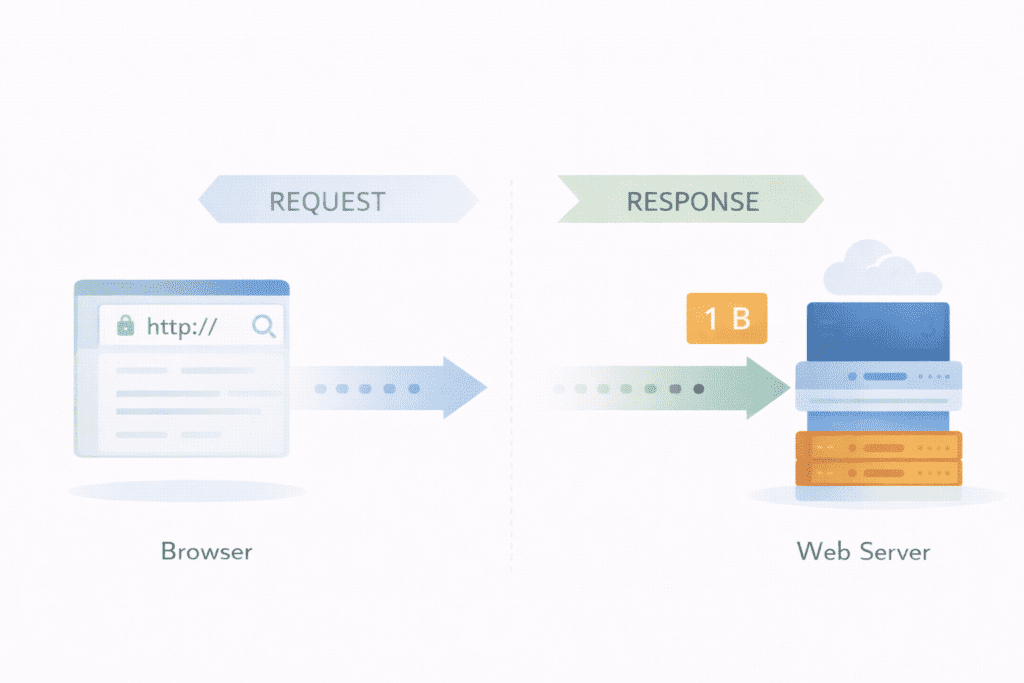
ttfb stands for time to first byte. It refers to the time between when a browser requests a page and when it begins receiving the first byte of data from the server.
In other words, ttfb is a metric that measures how quickly a web server begins responding to an http request.
When someone enters a website address in a browser, several steps happen in the background.
First, the browser performs a dns lookup to identify the correct server that hosts the website. After that connection is established, the browser sends an http request asking the server for the web page.
The server receives the request and starts processing it.
This may involve running application logic, retrieving information from a database, or executing server-side scripts. Once the server prepares the response, it begins sending data back to the browser.
The moment the browser starts receiving the first byte of response data is when ttfb is measured.
So ttfb does not measure the full loading process. Instead, it measures the time it takes for the server to start responding.
Developers often use this metric as an indicator of the responsiveness of a web server.
If the first byte arrives quickly, the backend system is likely working efficiently. If it takes longer, something in the request process may be slowing things down.
Why TTFB Is Important for Website Performance
Most website owners focus on visual loading elements such as images, styles, and scripts. Those things definitely matter.
But here’s the part people sometimes overlook. None of those resources can start loading until the server begins its response.
That’s where ttfb becomes important.
If the server takes longer to respond, the browser waits before it can start rendering the page. Even well-optimized front-end code can’t compensate for a slow backend response.
This delay affects several aspects of website performance.
• User experience: Visitors may notice a pause before the page begins loading.
• Website speed: Slow backend processing increases the overall load time.
• Perceived performance: Even a short delay can make a website feel slower.
Most internet users expect pages to start loading almost instantly. If nothing appears after a moment, some visitors leave before the content even shows.
For small US-based websites, especially blogs or business sites, the difference between fast and slow performance often comes down to the server infrastructure.
A fast server helps create fast web pages, while a slower system may lead to slow ttfb values.
How TTFB Connects to Core Web Vitals and SEO

Google introduced core web vitals to measure real user experience on websites. These metrics evaluate how quickly pages become visible, interactive, and stable.
While ttfb is not officially listed as one of the core web vitals, it still influences them indirectly.
For example, largest contentful paint measures when the main content of a web page becomes visible. If the server response time is slow, the browser cannot begin rendering content quickly.
That delay pushes the LCP metric further out.
Another related metric is first contentful paint, which tracks when the browser displays the first visible content on the screen. A slow ttfb can delay this step as well.
So while ttfb measures backend response speed, it can affect the performance signals Google uses when evaluating website performance.
From an SEO perspective, this connection matters because Google prioritizes fast, responsive websites in web search results.
Most developers aim for a ttfb value that stays under about 0.8 seconds. This range is commonly considered a good ttfb score for many websites.
If the number becomes significantly higher, it may indicate issues such as slow hosting infrastructure, heavy backend processing, or database delays.
And honestly, this is where many website owners get confused. They spend time optimizing images, reducing javascript, or adjusting design elements, but the real problem sometimes sits on the server side.
How TTFB Works When a Browser Requests a Page
To understand ttfb better, it helps to look at what actually happens when someone opens a website.
When a user types a URL into a browser, several technical steps happen before the page begins loading. These steps involve communication between the browser, network infrastructure, and the server that hosts the website.
The time taken during these early steps determines the ttfb value.
Most of the delay happens before the browser even starts rendering the page. That’s why developers often analyze this metric when evaluating server response behavior.
Let’s break down the process.
Step 1: Browser Sends Request
Everything begins when a user enters a website address or clicks a link, impacting the speed of the user’s experience.
The browser first performs a dns lookup to find the correct server that hosts the site. This step identifies the IP address associated with the domain.
Once the connection is established, the browser sends an http request asking the server for the web page.
During this stage, the network connection is created and the request travels across the internet. Sometimes network latency can increase the time it takes for the request to reach the server.
If the connection time is longer than expected, the ttfb measurement increases.
Step 2: Server Processes the Request
After the request reaches the server, processing begins.
The server receives the request and prepares the response. This stage may include application logic, authentication checks, or retrieving data from databases.
For dynamic websites, the server may also execute server-side scripts and generate page content.
Several factors influence processing time at this stage.
• Database queries: Retrieving information from a database can increase processing time.
• Application logic: Complex backend code may slow the request handling.
• Server resources: Limited CPU or memory can delay the response.
If backend processing becomes heavy, the time taken to prepare the response increases, which directly affects the ttfb value.
Step 3: Server Sends the First Byte
Once the server finishes processing the request, it begins sending the response back to the browser.
The first byte of response data travels through the network and reaches the browser. The moment the browser begins receiving that first byte of response data is when ttfb is measured.
After the browser receives the first byte, the rest of the page continues loading.
From there, additional resources such as javascript, images, and stylesheets start downloading.
This is the point where the page load process begins.
In most performance tools, the ttfb metric reflects the delay between the initial http request and the receipt of the first byte of the response.
For example, imagine a visitor opening a blog page and the server takes 700 millisecond before the first byte arrives. The page might still load quickly afterward, but that initial delay still contributes to the ttfb measurement.
This early server response stage plays a major role in overall web performance.
TTFB Components That Affect Performance
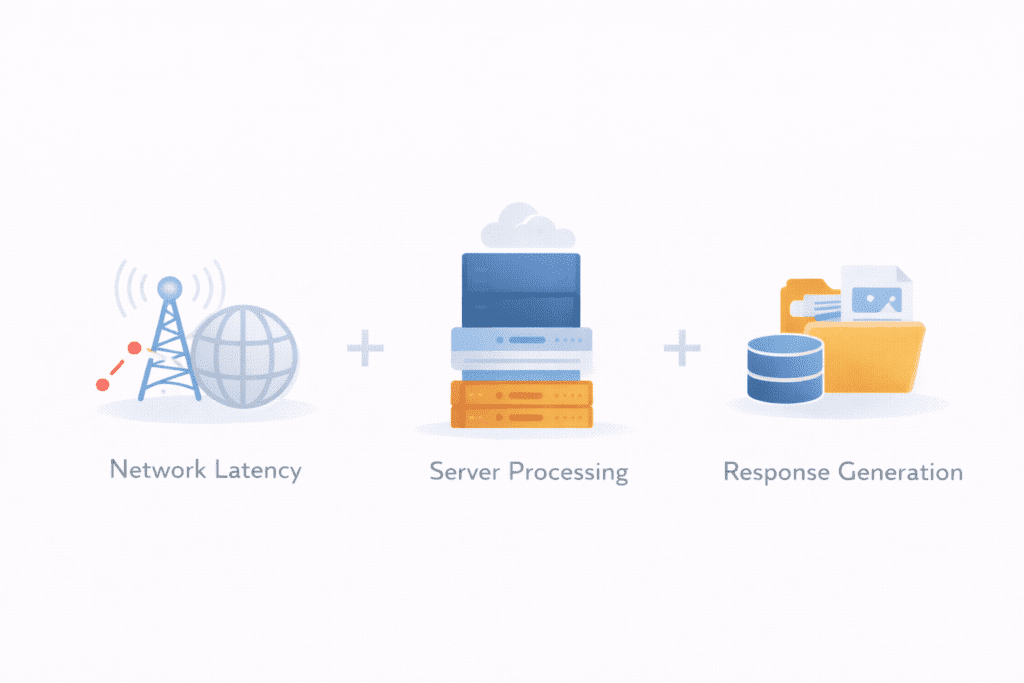
Several technical factors combine to determine the final ttfb score.
These factors are often referred to as the ttfb components because they represent the different stages involved in server communication.
Understanding these components helps identify where delays might occur.
• Network latency: The time required for data to travel between the browser and the server.
• Server processing: The time required for the server to prepare the response.
• Response generation: The time required to start sending the first byte of data.
Each of these stages contributes to the final ttfb measurement.
If network latency increases, the request takes longer to reach the server. If server processing becomes slow, the response takes longer to generate.
In most cases, the final ttfb score reflects a combination of these backend and network factors.
What Is Considered a Good TTFB Score?
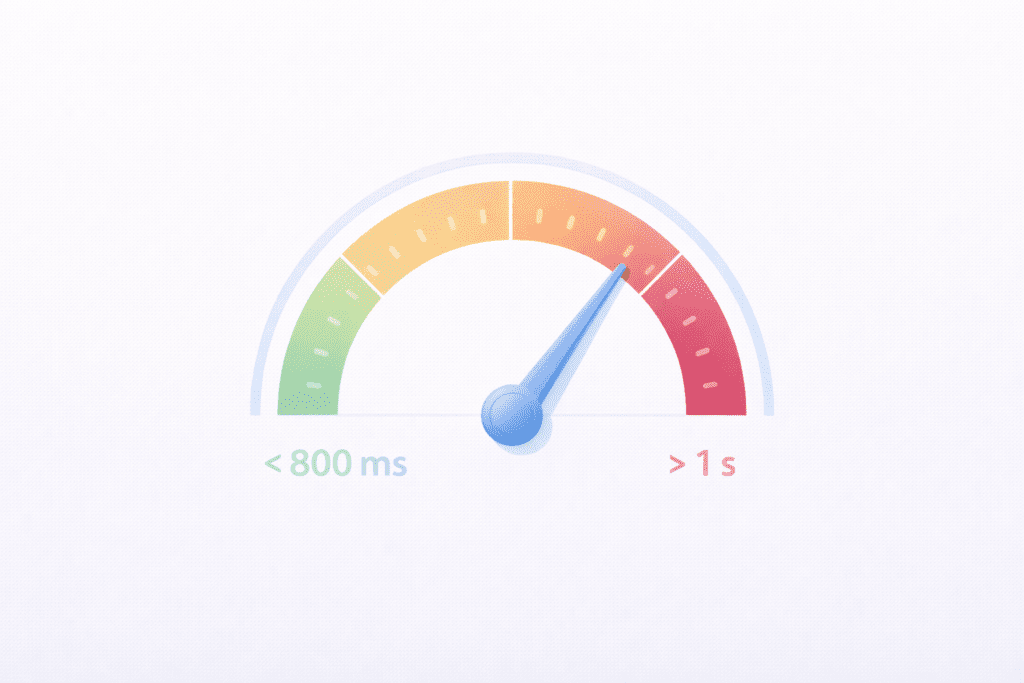
Developers often evaluate website performance using benchmark ranges.
These ranges help determine whether the server response is performing well or needs improvement.
Generally, performance tools classify response speed into several categories.
Good TTFB
A good ttfb score usually falls below 800 millisecond.
When a server responds within this range, the page begins loading quickly and the browser can start rendering content without noticeable delays.
Websites that maintain a low ttfb often feel faster because the initial response arrives quickly.
Slow TTFB
A slow ttfb typically occurs when the response exceeds one second.
At this point, users may begin noticing delays before the page starts loading. In some cases, the page might appear blank for a short moment.
Slow server response time can increase overall load time and negatively affect perceived website speed.
If the ttfb value becomes significantly higher, it may indicate issues such as limited server resources, inefficient database queries, or high network latency.
TTFB Benchmarks by Website Type
Not every website has the same performance expectations. The acceptable ttfb range can vary depending on how the website is built and what it delivers to users.
A simple blog usually responds faster than a complex application because it performs fewer server-side tasks.
Still, developers generally aim for a fast response across all types of websites.
Here’s how typical benchmarks often look across different website categories.
Blog or Content Sites
Content-driven websites such as blogs usually have simpler backend processing.
Most pages are static or lightly dynamic, which means the server can respond quickly.
For many blog sites, a ttfb below about 800 millisecond is considered healthy.
If the backend uses caching effectively, the response may arrive even faster.
eCommerce Websites
Online stores are usually more complex.
Product pages often require database queries, pricing logic, inventory checks, and user session handling. All of these operations increase server processing time.
Because of this complexity, ttfb may be slightly higher compared to simple content websites.
Still, most developers try to keep the response under one second to maintain smooth loading.
Web Applications
Web applications often perform real-time processing.
User authentication, account data retrieval, and application logic can increase backend workload.
These operations may add extra processing time before the server sends the first byte.
In many cases, developers focus on backend optimization to reduce delays and maintain acceptable ttfb values.
High Traffic Media Websites
Large media platforms handle huge amounts of traffic and content delivery.
To maintain fast responses, these websites often rely on advanced caching systems and distributed infrastructure.
With the help of a content delivery network, media sites can reduce network distance and speed up content delivery to global visitors.
Even with heavy traffic, the goal is still to maintain a relatively low ttfb.
How to Measure TTFB Using Performance Tools
If you want to evaluate server responsiveness, the first step is to measure ttfb.
Performance tools analyze the time between when a browser sends an http request and when it begins receiving the first byte of the response.
These tools break down the request timeline so developers can see exactly where delays occur.
There are several common methods used to measure the ttfb.
Browser Developer Tools
Most modern browsers include built-in developer tools that help analyze website performance.
For example, Chrome DevTools allows developers to inspect network activity for each web page request.
Inside the network panel, you can see detailed timing information for every resource. This includes connection setup, request time, and the moment the browser starts receiving the first byte.
Developers often use this method when debugging performance issues directly inside the browser.
Website Performance Tools
There are also external tools designed specifically to analyze website performance.
These platforms simulate page requests and calculate the ttfb metric from different locations.
The results help identify how long it takes for the server to begin responding after the request is sent.
Some tools also collect ttfb data using real user monitoring, which measures performance experienced by actual visitors.
This approach helps website owners understand how their servers perform in real-world conditions.
Why Monitoring TTFB Over Time Matters
Checking ttfb once is useful, but monitoring it over time provides deeper insights.
Server performance can change depending on traffic, infrastructure upgrades, or configuration changes.
If the response suddenly becomes slower, ongoing monitoring can help detect the issue quickly.
For example, a sudden spike in response delays may indicate server overload, inefficient database queries, or infrastructure problems.
Regular tracking helps website owners identify these issues before they start affecting visitors.
Over time, monitoring also helps evaluate whether performance improvements are working, particularly in reducing TTFB.
TTFB vs Page Load Time: Understanding the Difference
People often confuse ttfb with overall page loading speed.
They are related, but they measure different parts of the performance process.
ttfb measures the time it takes before the browser begins receiving the first byte of data from the server.
Page load time measures how long it takes for the entire page to fully render and finish loading all resources.
In other words, ttfb focuses on the server response stage, while page loading reflects the complete rendering process inside the browser.
Both metrics matter when evaluating website performance.
A fast server response helps the page begin loading quickly, while efficient front-end resources ensure the rest of the page finishes loading smoothly.
When both factors are optimized together, websites tend to feel significantly faster for users.
Common Causes of Slow TTFB
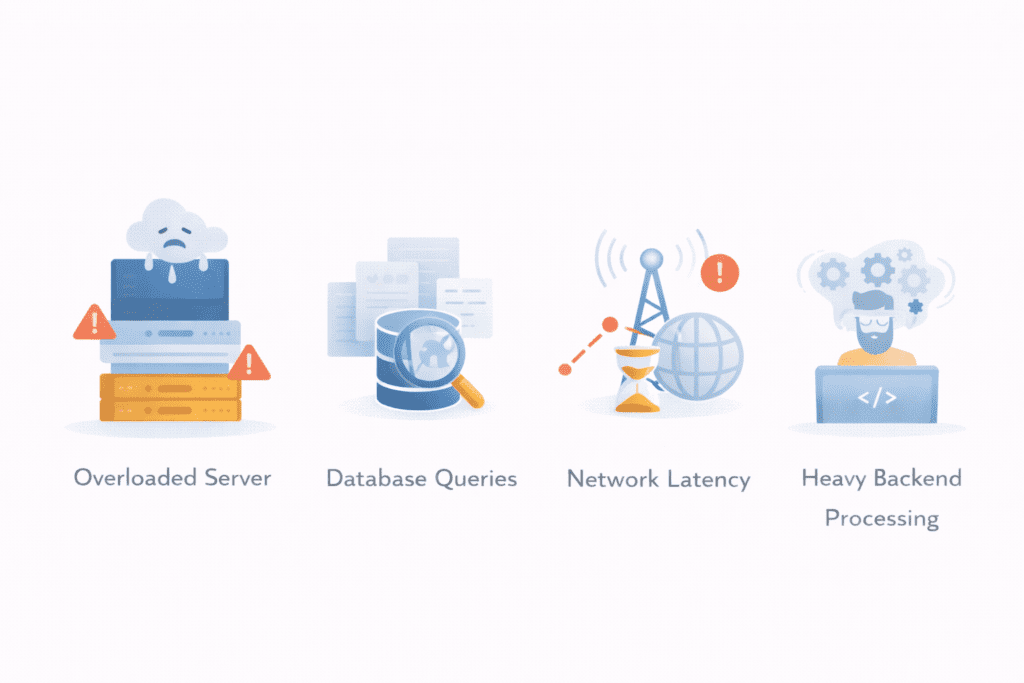
When the ttfb value becomes high, the problem usually starts on the backend.
The server might be overloaded, misconfigured, or taking too long to generate the response. Sometimes the delay comes from network conditions rather than the server itself.
Understanding the common causes makes it easier to diagnose performance issues.
• Slow server infrastructure: Can lead to a higher TTFB, negatively impacting user experience.
• Poor hosting configuration: Shared environments may struggle when multiple sites compete for resources.
• Database queries: Complex queries can increase processing time before the server sends data.
• Heavy backend processing: Applications that run many server-side operations may slow responses.
• Network latency: Longer distances between users and servers increase transmission delay.
Any of these factors can increase the time taken before the browser begins receiving data.
What Causes High TTFB in WordPress
WordPress websites can sometimes experience high TTFB when the server takes longer than expected to start responding to a page request. Since WordPress is a dynamic content management system, each page request may involve database queries, server-side processing, and plugin execution before the server sends the first byte of data.
If any part of this process becomes inefficient, the server response time increases and the TTFB value rises.
Understanding the common causes of high TTFB in WordPress helps website owners identify where delays occur and what needs optimization.
Slow or Low-Quality Hosting
One of the most common reasons for high TTFB in WordPress is slow hosting infrastructure.
Many WordPress sites run on shared hosting environments where multiple websites share the same server resources. If the server becomes overloaded or resources are limited, it may take longer to process requests and generate responses.
Slow storage systems, outdated hardware, or limited CPU and memory can all increase server response time.
Websites that experience consistently high TTFB often benefit from upgrading to faster hosting environments such as VPS hosting or managed WordPress hosting.
Lack of Page Caching
WordPress generates pages dynamically. Every time a visitor requests a page, the server may need to run PHP code and query the database to build the page content.
Without caching, this process happens repeatedly for every request.
Page caching stores a pre-generated version of the page so the server can deliver it instantly without rebuilding it each time. When caching is not enabled, backend processing time increases and TTFB becomes higher.
Implementing page caching can significantly reduce server workload and improve response speed.
Heavy or Poorly Optimized Plugins
Plugins extend WordPress functionality, but excessive or poorly optimized plugins can slow down server processing.
Some plugins perform complex database queries, load additional scripts, or execute background processes that increase the time required to generate the page.
When multiple heavy plugins run simultaneously, the server must handle more operations before sending the response.
Reducing unnecessary plugins and choosing well-optimized alternatives can help improve backend performance.
Large or Complex WordPress Themes
Themes control the layout and design of a WordPress site, but some themes include large frameworks, excessive scripts, and complex functionality.
Heavy themes may trigger additional database calls or server-side processing when generating pages.
This additional workload increases the time required for the server to start responding.
Using lightweight themes with clean code can help reduce processing delays and improve TTFB.
Slow Database Queries
WordPress relies heavily on database operations to retrieve posts, settings, user data, and other information needed to generate pages.
If the database becomes large or queries are inefficient, retrieving this information can take longer.
Poorly optimized database queries, unindexed tables, or large volumes of stored data may slow down backend processing.
Regular database optimization and cleanup can help improve query efficiency and reduce response delays.
No Content Delivery Network (CDN)
Network distance between users and the hosting server can also affect response time.
If a visitor is located far from the data center hosting the website, network latency increases the time required for requests and responses to travel across the internet.
A content delivery network distributes cached content across multiple geographic locations. Visitors are then served content from a nearby server, reducing latency and improving response speed.
While a CDN does not solve every backend performance issue, it often helps reduce delays for global visitors.
Server Configuration Issues
Improper server configuration can also increase TTFB in WordPress environments.
Web servers that are not configured for optimal performance may process requests inefficiently or allocate resources poorly.
For example, misconfigured PHP settings, outdated server software, or inefficient request handling can slow down response generation.
Modern server stacks and optimized configurations can significantly improve request handling efficiency.
High Website Traffic Without Optimization
When a WordPress website experiences sudden traffic spikes, the server must process a large number of simultaneous requests.
If caching systems or resource allocation are not configured properly, the server may struggle to keep up with the workload.
This overload increases processing time and leads to higher TTFB values.
Scaling server resources and implementing caching strategies can help manage higher traffic levels more efficiently.
External API Requests
Some WordPress plugins and themes rely on external services to retrieve information from other servers.
Examples include social media integrations, analytics tools, or remote content feeds.
If the WordPress server must wait for responses from external APIs before generating the page, this delay increases the overall response time.
Reducing unnecessary external requests can help improve server responsiveness.
Background WordPress Tasks
WordPress performs several background tasks such as scheduled cron jobs, plugin updates, and automated processes.
If these tasks run during page generation or compete for server resources, they can slow down response times.
Large backup processes, security scans, or heavy scheduled tasks may temporarily increase server workload and raise TTFB.
Managing background tasks carefully helps maintain stable server performance.
Summary
High TTFB in WordPress usually results from a combination of server limitations, inefficient backend processing, and network delays.
The most common causes include slow hosting infrastructure, lack of caching, heavy plugins, inefficient database queries, and poor server configuration.
By identifying these issues and optimizing the backend environment, website owners can reduce server response time and improve overall website performance.
How Hosting Infrastructure Influences TTFB
Hosting infrastructure plays a major role in determining server responsiveness.
Different hosting environments offer different levels of performance and resource availability.
Shared hosting is often the most affordable option. Multiple websites run on the same server, which means resources are shared between many users.
When traffic spikes or other sites consume resources, server performance may drop.
VPS hosting improves this situation by allocating dedicated resources within a virtual environment. The server still shares hardware, but each site receives more consistent performance.
Dedicated servers provide even greater control and performance, which can help achieve a lower TTFB. In this environment, the entire machine runs a single website or application.
Hardware capability also affects the responsiveness of a web server. Faster processors, solid-state storage, and modern infrastructure help the server respond more quickly.
Location matters as well.
If a data center is far from the user, network latency increases and the connection takes longer to establish.
Practical Ways to Improve TTFB
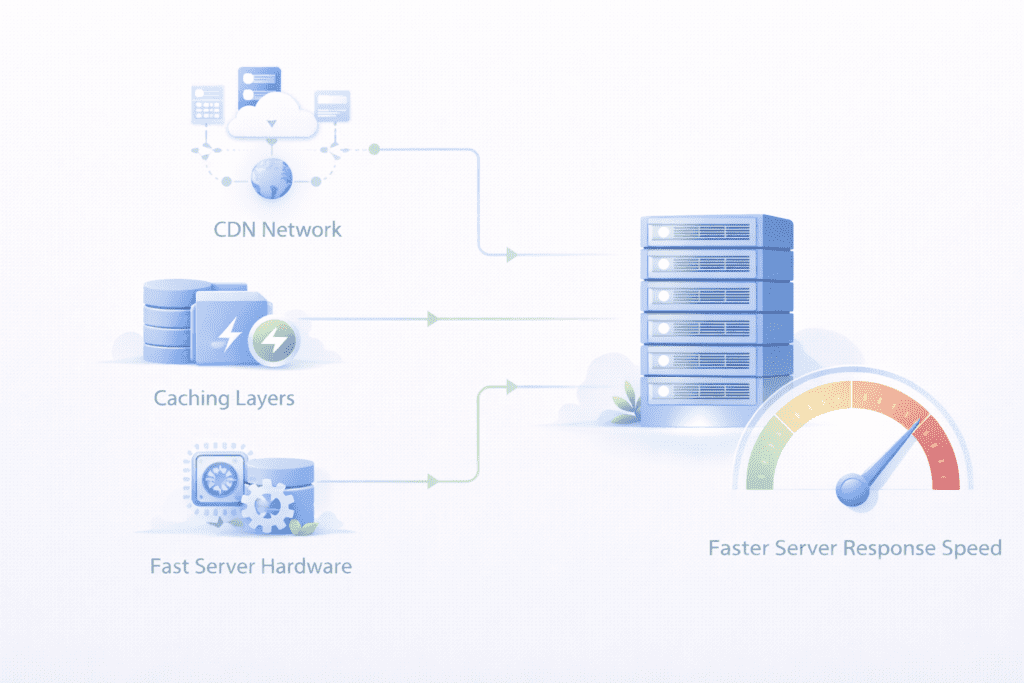
Improving ttfb often requires optimizing the backend infrastructure and reducing delays in server communication.
Several strategies can help reduce the time it takes for the server to respond, ultimately aiming to lower TTFB.
Upgrade Your Hosting Server
One of the most direct ways to improve response speed is upgrading hosting infrastructure.
Faster servers with better hardware resources can process requests more quickly.
If a website frequently experiences high ttfb values, moving to a more powerful hosting environment may improve performance.
Use a CDN
A cdn distributes website content across multiple geographic locations.
When visitors access a site, the request can be routed to a nearby edge server rather than the origin server.
This reduces network latency and improves content delivery for global users.
In many cases, using a content delivery network helps reduce delays for international traffic.
Optimize Backend Processing
Server-side processing efficiency directly influences response time.
Reducing unnecessary database queries, simplifying backend logic, and optimizing application code can decrease the time required to generate responses.
Improving backend performance often leads to a faster server response.
Enable Caching
Caching allows frequently requested data to be stored temporarily so the server does not need to regenerate it repeatedly.
When cached content is available, the server can deliver responses much faster.
Using cache systems effectively can significantly reduce backend workload.
These strategies help improve backend efficiency and reduce delays before the first byte is sent.
TTFB and CDN: When It Helps and When It Doesn’t
A cdn can improve response speed in many situations, but it doesn’t solve every performance problem.
When cached content is delivered from a nearby edge server, users often experience faster response times.
However, if a request requires dynamic processing on the origin server, the cdn may not eliminate the backend delay.
In those cases, the server must still generate the response before data can be delivered.
That’s why improving backend performance remains important even when a content delivery network is used.
Advanced Ways to Optimize TTFB
For websites with complex infrastructure, advanced optimization techniques may be required.
These improvements focus on refining server configuration and backend architecture.
• Server configuration improvements: Adjusting web server settings can improve request handling efficiency.
• Backend optimization: Streamlining server-side application logic reduces processing overhead.
• Efficient caching systems: Multi-layer caching can reduce repeated processing tasks.
• Infrastructure upgrades: Modern hosting environments often deliver faster response speeds.
These strategies are commonly used by developers working on high-performance websites.
TTFB Optimization Checklist
Maintaining a low ttfb often requires monitoring several technical areas of a website.
A quick checklist can help ensure important performance factors are not overlooked.
• Hosting infrastructure: Ensure the server has sufficient resources and reliable hardware.
• Caching configuration: Verify that cache systems are correctly implemented.
• Database optimization: Reduce inefficient queries that slow backend processing.
• CDN configuration: Confirm that global content delivery is working properly.
• Performance monitoring: Track response metrics regularly to detect issues early.
These steps help maintain stable server responsiveness and consistent performance.
What Most Websites Get Wrong About TTFB
Many website owners misunderstand what ttfb actually represents.
One common mistake is confusing it with full page loading speed.
The metric only measures the delay before the server begins responding. It does not represent the complete loading process.
Another mistake is focusing only on front-end improvements.
Optimizing images, scripts, and layout can improve visual speed, but it doesn’t fix backend delays.
Hosting decisions also play a role in determining the TTFB and overall speed of the user’s experience.
Some websites choose low-cost hosting environments that lack sufficient resources. Over time, this can increase response delays and affect overall website speed.
Understanding how backend performance influences response timing helps website owners make better optimization decisions.
Frequently Asked Questions About TTFB
What is TTFB in website performance?
TTFB refers to the time between when a browser sends a request and when it begins receiving the first byte of data from the server.
It indicates how quickly the server starts responding to a page request.
What is considered a good TTFB score?
A good ttfb score is typically below about 800 millisecond.
Lower values usually indicate faster server responsiveness.
How do you measure TTFB?
You can measure ttfb using browser developer tools or website performance testing platforms that analyze request timing.
Why is slow TTFB bad for SEO?
Slow response delays can affect page performance metrics that influence search visibility and user experience.
How does TTFB affect Core Web Vitals?
While not a core web vital itself, slow server responses can delay metrics such as largest contentful paint.
Can a CDN improve TTFB?
In many cases, a cdn can reduce latency by delivering cached content from locations closer to users.
How can I improve time to first byte?
Improving hosting infrastructure, enabling caching, and optimizing backend processing are common ways to improve response speed.
Final Thoughts: Why Optimizing TTFB Matters
ttfb reflects how quickly a server begins responding after receiving a request.
Even though it measures only the initial stage of page delivery, it can influence how quickly a website starts loading.
A fast response helps create smoother loading behavior and improves overall user experience.
Monitoring this metric regularly allows website owners to identify backend issues before they affect visitors.
For most websites, the goal is simple: strive to have a TTFB of 0.8 seconds or lower. Maintain a stable server environment, monitor performance metrics, and gradually optimize backend systems.
Over time, these improvements help create faster and more reliable websites.