
You open a hosting website, start reading about plans, and suddenly you see words like server, bandwidth, and domain. It feels technical fast.
That’s exactly why this Web Hosting Glossary exists. It breaks down confusing hosting terminology into clear explanations you can actually use.
Understanding basic web hosting terms helps you avoid costly mistakes. When you know what a server does or how a domain works, you choose the right hosting plan with confidence.
This Web Hosting Glossary is structured in sections. Each group of terms focuses on one area, so you can learn step by step instead of feeling overwhelmed.
What Is a Web Hosting Glossary?
A Web Hosting Glossary is a collection of important hosting terms explained in simple language.
In the world of web hosting, technical words are everywhere. A glossary organizes those common terms so beginners can understand them without digging through complicated documentation.
Learning hosting terminology matters because web hosting is a type of service built on infrastructure. If you don’t understand the basics, it’s easy to confuse a domain with a server or mix up storage and bandwidth.
This Web Hosting Glossary simplifies those ideas and makes the complete web environment easier to understand.
Core Infrastructure Terms in Web Hosting

Web Host
A web host is a company that provides space on a server for your website.
A web host is a company that stores your files and keeps them connected to the internet. Without a web host, your website without hosting would not be accessible online.
Every web host provides hosting space and tools that allow web pages to load in a browser.
Hosting Provider
A hosting provider manages the technical infrastructure behind your hosting account.
The hosting provider maintains the server hardware, network, and security systems. They are the company that provides the environment where your site runs.
Some web hosting companies offer multiple hosting packages depending on performance needs.
Hosting Service
A hosting service includes server storage, bandwidth, and technical support.
When you buy a hosting plan, you are purchasing a hosting service that allows your website to be connected to the internet.
Different hosting types exist, such as shared hosting and dedicated hosting. Each type of hosting offers different levels of performance and control.
Server
A server is a powerful computer that stores website data.
Your website files, images, and database live on a server inside a secure data center. The server stays online so visitors can access your domain anytime.
When someone types your domain into a browser, the server responds by delivering the requested web page.
Web Server
A web server is software running on a server that handles web requests.
It processes requests coming from a browser and sends back the correct web page. Popular web servers are designed to handle traffic efficiently.
The web server works closely with the operating system installed on the server.
IP Address
An IP address is a unique number assigned to a server.
This number is called an internet protocol address. It identifies where your website lives online.
People use domain names because remembering an IP address is difficult. The domain name system connects domain names to the correct server automatically.
Server Resource Terms Explained
Understanding server resources helps you see why one hosting plan performs better than another.
These resources control how your website behaves under traffic and how stable your server remains during busy periods.
CPU
CPU stands for central processing unit.
The CPU on a server handles calculations and processes requests. When your website receives traffic, the CPU works behind the scenes to generate the correct web page.
If a hosting plan limits CPU usage, your site may slow down during peak times.
RAM
RAM is short term memory inside a server.
It temporarily stores active data while the server processes requests. More RAM allows a server to handle multiple visitors at once without crashing.
Low RAM can slow dynamic pages that rely on a database.
Uptime
Uptime measures how often your server stays online.
A web host usually promises a percentage of uptime. High uptime means your domain remains accessible to visitors most of the time.
Reliable uptime builds trust with users and search engines.
Downtime
Downtime happens when a server goes offline.
During downtime, your domain cannot load in a browser. Even short outages can affect revenue and credibility.
That’s why choosing a stable web host matters.
Latency
Latency measures delay between request and response.
When someone visits your domain, the time it takes the server to respond affects the experience. Lower latency means faster delivery.
Latency is influenced by server location and network quality.
Scalability
Scalability refers to the ability of a server to grow with your website.
If traffic increases, scalable hosting allows upgrades without rebuilding everything. This flexibility becomes important as your site expands.
A scalable hosting plan protects long term growth.
Storage and Data Terms in Web Hosting
Storage refers to the amount of disk space available on a server.
It holds website files, images, scripts, and your database. The size of your hosting plan determines how much storage you can use.
Storage
Storage is the space on a server where your data lives.
It includes website files, themes, plugins, and backups. If storage runs out, you cannot upload new content.
SSD
SSD stands for solid state drive.
SSD storage is faster than traditional drives because it reads and writes data more quickly. That speed improves overall performance.
Many modern web host companies use SSD by default.
NVMe
NVMe is a newer storage technology.
It improves communication between storage and the server processor. NVMe reduces delays and increases efficiency under load.
This is helpful for high traffic websites.
Backup
A backup is a saved copy of your website.
If a server issue occurs or files are deleted accidentally, a backup restores your content quickly.
A good web host includes automated backups in the hosting plan.
Data Center
A data center is a physical facility where servers are stored.
Each server in a data center is connected to the internet, protected by security systems, and powered by backup electricity sources.
The location of the data center can affect latency and speed.
Domain and DNS Terminology Explained
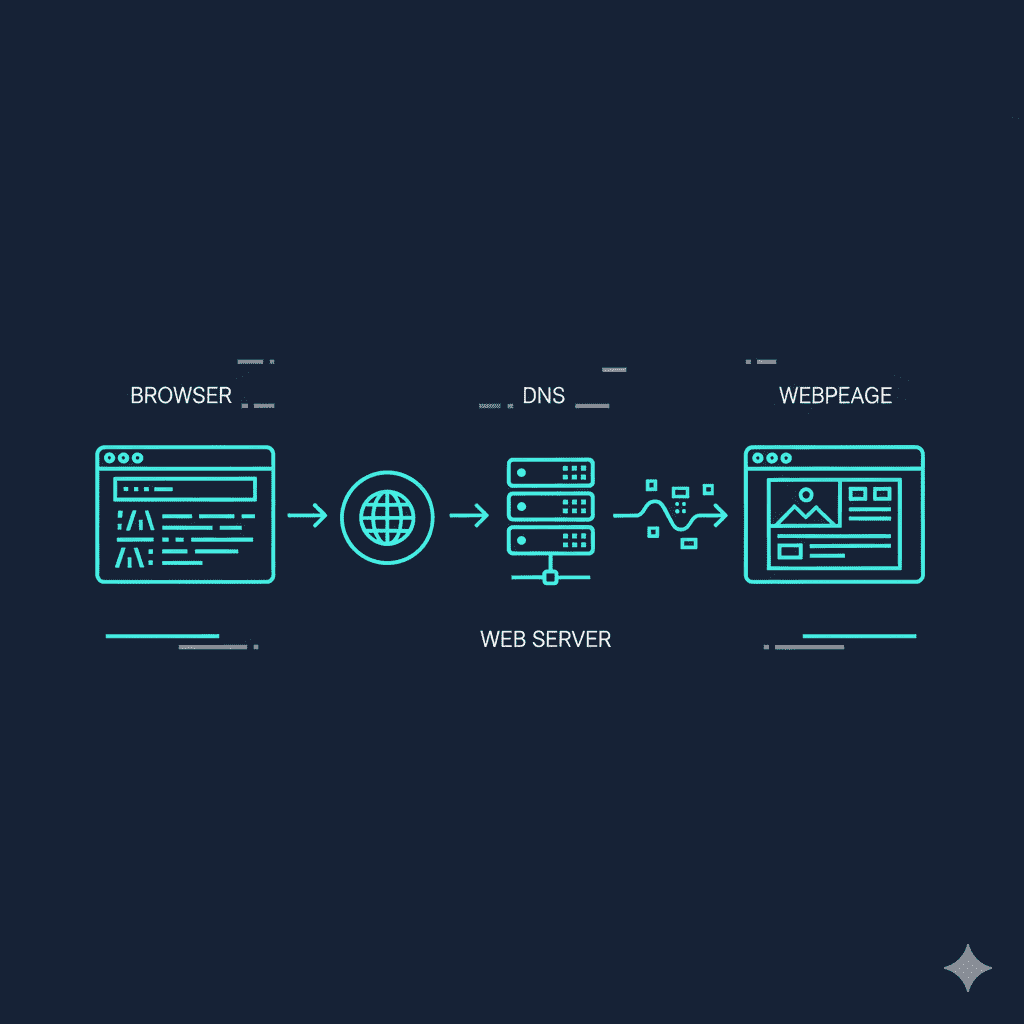
To understand web hosting, you must understand the domain layer.
Your server stores files, but your domain is how people find those files.
Domain
A domain is the name people type into a browser to visit your site.
Instead of remembering a complex IP number, users enter a domain. The domain acts as your website’s public identity on the internet.
Without a domain, visitors would have to type a long internet protocol address.
Domain Names
Domain names are human friendly web addresses.
They are easier to remember than an IP address. Strong domain names help with branding and recognition.
Every domain is unique and must be registered before use.
Domain Name System
The domain name system connects domain names to the correct server.
It translates the domain into the right IP address so the browser knows where to send the request.
Without the domain name system, websites would not load properly.
DNS
DNS stands for domain name system.
When someone enters a domain into the address bar, DNS directs the browser to the correct server automatically.
This process happens in seconds and usually goes unnoticed.
Nameservers
Nameservers connect your domain to a hosting account.
They store DNS records that tell browsers which server to contact.
If you move your website to another server, updating nameservers points the domain to the new location.
Hosting Types Explained
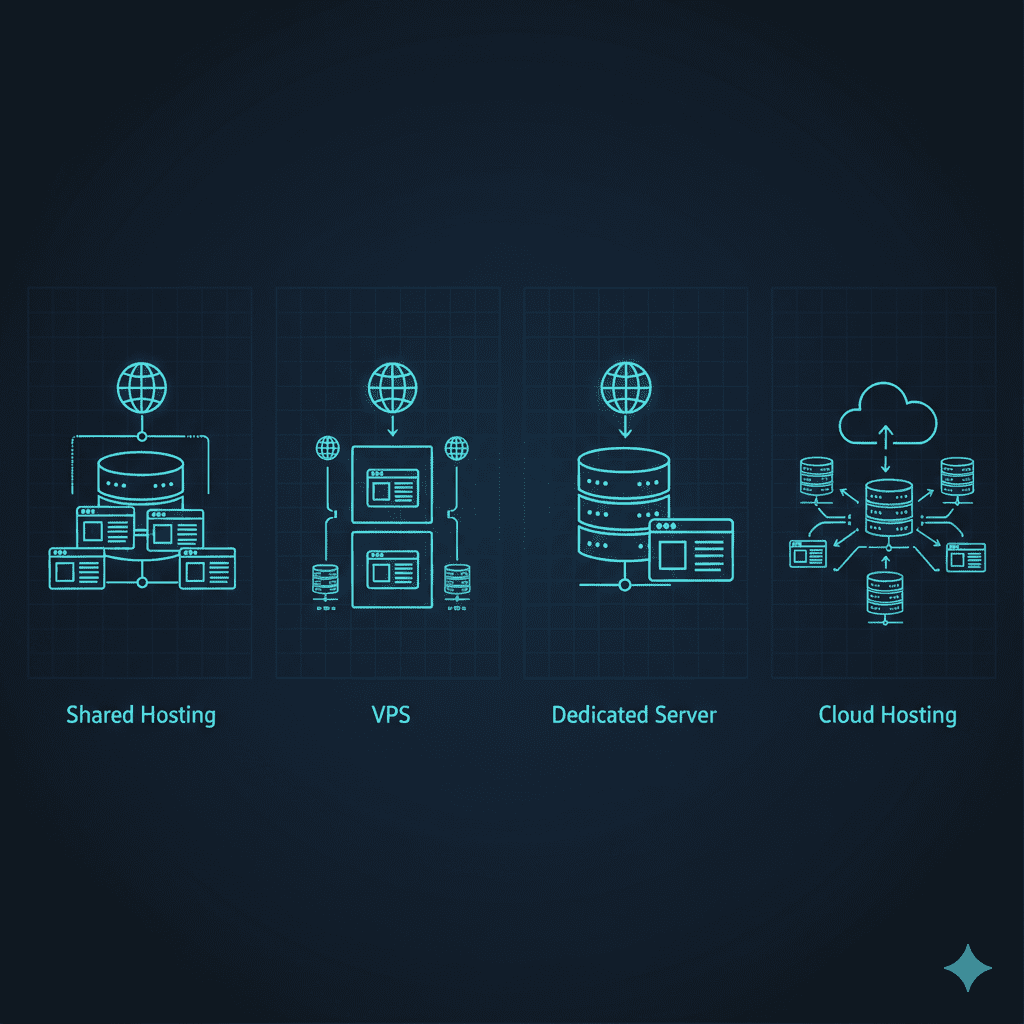
Different hosting types offer different levels of performance and control.
Choosing the right type of hosting depends on traffic, budget, and technical needs.
Shared hosting places multiple websites on one server.
Because resources are shared, it is more affordable. This hosting type works well for small blogs or simple business websites.
Shared hosting is often the starting point for beginners.
Dedicated Hosting
Dedicated hosting gives you an entire dedicated server.
You do not share CPU, RAM, or storage with other users. This provides higher performance and greater control.
Dedicated hosting is suitable for large or high traffic websites.
Virtual Private Server
A virtual private server divides one physical server into separate environments.
Each virtual private server operates independently with its own allocated resources.
This provides better stability than shared hosting.
Virtual Private Server Hosting
Virtual private server hosting includes isolated resources and more configuration options.
It offers improved performance and flexibility compared to basic shared hosting.
Many growing websites upgrade to this option when traffic increases.
Cloud Hosting
Cloud hosting uses multiple servers working together.
If one server experiences an issue, another server takes over. This improves reliability and uptime.
Cloud hosting is known for scalability and flexibility.
Reseller Hosting
Reseller hosting allows individuals to sell hosting under their own brand.
You purchase server resources from a web host and create hosting accounts for clients.
It is often used by agencies and freelancers.
WordPress Hosting
WordPress hosting is optimized specifically for wordpress websites.
It includes performance adjustments and features designed to support the wordpress content management system.
Some hosting providers also offer managed versions.
Web Hosting Services
Web hosting services typically include server access, email setup, security features, and backups.
Different hosting packages offer varying amounts of storage, bandwidth, and performance resources.
Understanding these hosting types helps you choose wisely based on real needs.
Website Building and Development Terms
Building a website involves more than just buying a hosting plan.
You also need tools and technologies that run on the server and deliver content to a browser.
WordPress
WordPress is a popular content management system.
It allows users to create and manage websites without deep coding knowledge. Many web host companies optimize their server settings for WordPress performance.
WordPress powers blogs, business sites, and even eCommerce platforms.
Content Management System
A content management system helps you manage website content easily.
Instead of editing raw code, you use a dashboard to update text, images, and pages. This makes running a website much simpler.
WordPress is one example, but other systems exist as well.
PHP
PHP is a programming language that runs on the server.
It powers dynamic web pages by connecting the website to a database. When someone loads a page, PHP processes information and generates the final output.
Most popular web applications rely on PHP.
Database
A database stores structured website information.
It keeps user data, blog posts, product details, and more. The server retrieves data from the database when generating a web page.
A database management system organizes and processes this information efficiently.
Language of Web
The language of web includes HTML, CSS, and JavaScript.
HTML structures content, CSS controls design, and JavaScript adds interactivity. Together, these technologies create interactive web pages.
They work alongside the server to deliver complete web experiences.
Subdomain
A subdomain is a separate section under a main domain.
For example, blog.yoursite.com is a subdomain of your primary domain. It helps organize different parts of a website.
Subdomains still rely on the same server or hosting account.
Addon Domain
An addon domain allows you to run multiple websites from one hosting account.
Each domain has its own folder on the server. This makes it possible to manage more than one website without purchasing another hosting plan.
Website Performance Optimization Terms
Performance determines how fast your server delivers content.
Even a strong domain and good design won’t help if performance is weak.
CDN
A CDN distributes website files across multiple servers worldwide.
Instead of relying on one server, visitors access content from the closest location. This reduces latency and improves speed.
CDN support improves user experience across regions.
Caching
Caching stores copies of frequently accessed web pages.
Instead of generating the same content repeatedly, the server serves a saved version. This reduces load and improves response time.
Caching helps stabilize performance during traffic spikes.
Cache
Cache refers to the stored data itself.
While caching is the process, cache is the saved result. Clearing cache forces the server to regenerate content.
Understanding this difference prevents confusion when troubleshooting.
Load Time
Load time measures how long it takes for a web page to fully appear in a browser.
Faster load time improves engagement and reduces bounce rates.
Load time depends on server speed, optimization, and bandwidth.
Response Time
Response time measures how quickly a server reacts to a request.
A lower response time means the server begins delivering content almost instantly.
Improving response time strengthens overall website reliability.
Security and Performance Terms

Security protects your server and your domain from threats.
Performance ensures your web page loads quickly and reliably.
SSL
SSL encrypts data between a browser and a server.
It protects login details, payment information, and personal data. When SSL is active, your domain uses HTTPS instead of HTTP.
A secure site builds trust and improves credibility.
Secure Socket Layer
Secure socket layer is the full name for SSL.
It creates an encrypted connection so information cannot be intercepted easily.
Most web host companies include SSL certificates in their hosting plan.
Bandwidth
Bandwidth measures the amount of data transferred from a server to visitors.
If many users access your domain, higher bandwidth supports the traffic.
Limited bandwidth can slow a web page during busy periods.
HTTP
HTTP stands for hypertext transfer protocol.
It defines how a browser communicates with a server.
HTTP transfers data but does not encrypt it.
HTTPS
HTTPS is secure HTTP.
It uses SSL encryption to protect communication between the browser and server.
Search engines prefer HTTPS because it improves user safety.
Port
A port is a communication endpoint on a server.
Different services on the server use different ports to receive requests.
Ports help route traffic correctly within the operating system.
Migration and Management Terms
Managing a website often involves moving or adjusting server settings.
Understanding these terms prevents errors during changes.
Website Migration
Website migration means moving your domain from one server to another.
It can involve transferring website files, updating DNS, and reconfiguring settings.
A careful migration prevents downtime and data loss.
Staging Environment
A staging environment is a test version of your website.
It runs on a separate server or folder within the hosting account. Changes can be tested safely before going live.
This reduces the risk of breaking your main web page.
Redirect
A redirect sends users from one domain or web page to another.
It is useful when changing URLs or moving to a new server.
Redirects help preserve search engine rankings.
Cron Job
A cron job automates tasks on a server.
It can schedule backups, send emails, or clean database entries automatically.
Cron jobs reduce manual work and improve efficiency.
Control Panel
A control panel is a web based dashboard for managing a hosting account.
It allows you to manage domains, files, and server settings without using complex commands.
Most web host companies provide a control panel to simplify management.
Browser
A browser is software used to access the world wide web.
When someone types a domain into the address bar, the browser connects to the server and displays the web page.
The browser acts as the bridge between users and servers.
Email and Communication Hosting Terms
Communication features are often included in hosting services.
These tools help businesses operate professionally.
Email Hosting
Email hosting provides professional email accounts linked to your domain.
Instead of using free web mail, businesses use branded addresses.
Email hosting strengthens brand identity and trust.
Internet Message Access Protocol
Internet message access protocol allows emails to sync across devices.
It works with an email client so messages remain consistent everywhere.
This protocol runs through the server and keeps communication organized.
Payment Gateway
A payment gateway processes online transactions securely.
It connects your website to banks and financial systems.
The server communicates with the payment gateway during checkout.
PCI Compliance
PCI compliance ensures secure handling of payment data.
It protects customer information stored on or transmitted through the server.
Compliance is essential for online stores.
Shopping Cart
A shopping cart allows users to select products before checkout.
It works with a database and server to manage selected items.
The shopping cart updates in real time as customers browse.
Hosting Billing and Plan Terms
Understanding pricing terms helps you avoid surprises after buying a hosting plan.
These terms explain how hosting packages are structured and billed.
Monthly Billing
Monthly billing allows you to pay for your hosting service every month.
It offers flexibility, but it may cost more compared to long term plans.
Some hosting providers use monthly billing for short term projects.
Annual Plan
An annual plan requires payment upfront for a year.
It often lowers the overall cost of the hosting account compared to monthly billing.
Many web host companies offer discounts for annual commitments.
Renewal Rate
The renewal rate is the price you pay after the first term ends.
Introductory pricing is often lower than the renewal rate.
Understanding renewal pricing helps you plan long term hosting costs.
Money Back Guarantee
A money back guarantee allows refunds within a limited period.
It reduces risk when testing a new web host.
Policies vary depending on the hosting provider.
Free Trial
A free trial provides temporary access to hosting features.
It allows you to test server performance and tools before committing.
Not all hosting packages include a free trial.
File Management and Access Terms
Managing files on a server requires specific tools.
These terms explain how uploads and transfers work.
FTP
FTP stands for file transfer protocol.
It allows you to upload files directly to a server from your computer.
FTP provides more control than browser based uploads, especially for large files.
Common Web Hosting Jargon Beginners Should Know
The world of web hosting includes technical terms that may seem overwhelming at first.
Words like server, domain, dns, bandwidth, database, and ssl appear frequently.
Learning these common terms builds clarity and reduces confusion when working with a hosting account.
The more familiar you become with web hosting jargon, the easier it is to communicate with your web host.
What Most Beginners Misunderstand About Web Hosting Terminology
One common mistake is confusing a domain with a server.
A domain is the address people type. A server stores the actual website data.
Another misunderstanding is mixing bandwidth and storage. They measure different resources on the server.
Some believe WordPress is a web host. In reality, WordPress is software installed on a server.
Recognizing these differences prevents costly errors.
How to Use This Web Hosting Glossary Effectively
Bookmark this Web Hosting Glossary for quick reference.
Review important terms before choosing a hosting plan or contacting a hosting provider.
Use this glossary when reading documentation so technical phrases feel less intimidating.
Over time, familiarity with web hosting terminology builds confidence in managing your hosting account.
Frequently Asked Questions About Web Hosting Glossary
What is included in a Web Hosting Glossary?
A Web Hosting Glossary includes definitions of core hosting terms such as server, domain, ssl, database, and bandwidth.
Why is Web Hosting Glossary important for beginners?
It simplifies web hosting jargon and helps beginners understand technical terms before purchasing hosting packages.
What is the difference between a web host and hosting provider?
A web host is a company that stores your website on a server. A hosting provider manages and delivers the hosting service infrastructure.
Is WordPress a hosting service?
No. WordPress is a content management system that runs on a server provided by a web host.
Shared hosting places multiple websites on one server. Virtual private server hosting provides isolated server resources for better control and performance.
Why do I need SSL in web hosting?
SSL encrypts data between the browser and server, protecting sensitive information.
What does DNS mean in web hosting?
DNS stands for domain name system. It connects domain names to the correct IP address of a server.
What is web hosting terminology and why does it matter?
Web hosting terminology refers to technical terms used in hosting services. Understanding them helps you manage your website effectively.
Final Thoughts: Why Every Beginner Needs a Web Hosting Glossary
This Web Hosting Glossary simplifies the world of web hosting by explaining technical terms in clear language.
When you understand how a server, domain, ssl, and bandwidth work together, managing your website becomes easier.
Confidence grows as you recognize the difference between hosting service features and infrastructure components.
Keep this glossary saved and revisit it whenever new hosting terms appear. The stronger your understanding, the smoother your journey in web hosting becomes.